Social Feed

L
Last reply · posted in DISH Network Support Forum
I had 2 HWS and 2 Joeys installed a couple weeks ago. Generally like the system over the 722/612 I had before.

My problem, since day one, the hoppers can't see each others DVRs. When looking at the whole house network, the hoppers can see each other. I have tried the suggestions made on other threads here and on the dish website, no no avail. The most frustrating part is that DISH can't figure it out either.

I knew I was in for trouble when the installer that came back to bury the cable told me that wasn't a feature available on the HWS. Called tech support; no joy. He would send a tech out. Sent the same installer out. The field tech had checked with his supervisor by now and realized that it was a feature of the equipment. He didn't know why they sent him back out because those types of problems are "handled by engineering."

They decided to replace both hoppers. Got a call saying they had narrowed the problem to one hopper. Received the new hopper, activated it, no dvr sharing. Called tech support, nice guy told me that was not a feature of the hopper system. Passed on to Tier 2. Worked with a guy for a couple of hours, with no luck. All of a sudden HWS 1 can see HWS 2 dvr but not vice versa. No one in the company had ever seen this before. He told me to call back in 24 hours and he would put out a note to see if anyone else had seen this problem before. Somehow in the process, they had cut off my HD channels.

Called back the next night, went through everything again but added I had lost my HD channels. The guy ask me which HD channel I had lost. I told him CNN, after putting me on hold, he told me that channel wasn't available in HD. Went to a supervisor at that point. Got the HD channels turned back on. No replies on the main problem though.

Sorry to be so lengthy but wanted to see if anyone else had any suggestions. All other features, including OTA seem to work fine. May come down to replacing the other hopper. BTW, both are on the same software version, etc.
15 Replies · 5897 views
T
My 2 Hoppers don't see each other either.

?I also am having the same problems with a 2 Hopper 1 Joey system. The primary problem is that the 2 Hoppers do not show any detection of each other. I have made multiple dvr recordings on both Hoppers and cannot see the other Hoppers recordings. The Joey sees only the Hopper it is linked to and not the other Hopper. As you stated it has been that way since day 1. Day 1 being the day the system was installed.

A little system info: "Office" Hopper connected to internet through a 6ft network cable, "Den" Hopper connected to internet through it's wifi 802.11n, The "Bedroom" Joey is connected to internet using usb 802.11n network dongle. The Wifi has been bridged. I can watch satellite on all 3 units just like I could on my old system.


The Dish tech and I worked on this issue for 3 hours to no avail. He called tech support, his supervisor, and another Dish tech without success. He left for the day but scheduled a 12-5 revisit for the next day.
The next day we replaced the Duo Node 2 times with no change. Next he swapped out one of the Hoppers with no change. We went back and verified all the cabling making sure there were no splitters or open rf ports, no bad cables or connectors and all fittings were tight. We made sure the Hosts were where they should be and the client was where it should be and still no go.


As a last ditch effort we unplugged both Hoppers and the Joey for 1 minute. After this super reboot we fully brought up the Office Hopper then the Den Hopper and finally the Joey.
Much to our surprise the whole system came up and started operating like it should. Hopper could see Hopper and the Joey could be relinked back and forth between the Hoppers without problem.
So why am I writing on this forum about this experience? Because it didn't last for 24 hours before it is back not communicating again.


There are a lot of questions about how this system operates. When the Hopper 1st came out, 2 Hoppers could not communicate with each other. A software update supposedly fixed that problem. Should this systems video be able to cross communicate without an internet connection? I have read that the internet connections are only necessary for on demand features from Dish. What actually constitutes a MOCA signal? Can something be missing from it causing these communication problems? What is a duo node? How does it work.
The Dish tech I was working with could not get answers to any of these questions.


If I have missed something or have a misunderstanding of how this thing should work please help me out?
Now I will have to call Dish and get them back out here to start all over again.

----------------------------------------( Found the problem at least for my system )---------------------------------------------------

All the symptoms seemed to indicate we had a bad duo node but after trying a total of 3 we thought statistically not likely.
We thought what else could cause the same symptoms of one way signals and data links?
So we started tracing the entire RG6 cabling from the Hoppers to the satellite. We even pulled wall plates.

Guess what we found? The old system used a diplexer to combine ota with sat over the same line. We found a diplexer inline with
one of the Host lines buried in a cabinet where it came in from the outside. Took it off, coupled the open lines back together and rebooted
both Hoppers. After both Hoppers came up it took about 5 minutes before they could see each other but for now they work as they should.

I will monitor the situation to make sure it does not come back again. I had thought it was fixed before.
If it continues to operate normally I will confirm it at a later date.
Mike_H
?

----------------------------------------( Found the problem at least for my system )---------------------------------------------------

Guess what we found? The old system used a diplexer to combine ota with sat over the same line. We found a diplexer inline with
one of the Host lines buried in a cabinet where it came in from the outside. Took it off, coupled the open lines back together and rebooted
both Hoppers. After both Hoppers came up it took about 5 minutes before they could see each other but for now they work as they should.

I will monitor the situation to make sure it does not come back again. I had thought it was fixed before.
If it continues to operate normally I will confirm it at a later date.

Very interesting. One thought I have is that if that diplexer would have been capped off with a termination resistor I bet things would have started working the same as removing the diplexer.

It makes me wonder if Echostar has a quality problem with the RF radio portion of their receivers such that often enough the problem is the actual equipment so they have techs swap it out. But sometimes the problem can be the wiring in the home. Perhaps they need some tooling that allows a tech to check the viability of the coax with a known good calibration quality device.
Scherrman
?I also am having the same problems with a 2 Hopper 1 Joey system. The primary problem is that the 2 Hoppers do not show any detection of each other. I have made multiple dvr recordings on both Hoppers and cannot see the other Hoppers recordings. The Joey sees only the Hopper it is linked to and not the other Hopper. As you stated it has been that way since day 1. Day 1 being the day the system was installed.

A little system info: "Office" Hopper connected to internet through a 6ft network cable, "Den" Hopper connected to internet through it's wifi 802.11n, The "Bedroom" Joey is connected to internet using usb 802.11n network dongle. The Wifi has been bridged. I can watch satellite on all 3 units just like I could on my old system.


The Dish tech and I worked on this issue for 3 hours to no avail. He called tech support, his supervisor, and another Dish tech without success. He left for the day but scheduled a 12-5 revisit for the next day.
The next day we replaced the Duo Node 2 times with no change. Next he swapped out one of the Hoppers with no change. We went back and verified all the cabling making sure there were no splitters or open rf ports, no bad cables or connectors and all fittings were tight. We made sure the Hosts were where they should be and the client was where it should be and still no go.


As a last ditch effort we unplugged both Hoppers and the Joey for 1 minute. After this super reboot we fully brought up the Office Hopper then the Den Hopper and finally the Joey.
Much to our surprise the whole system came up and started operating like it should. Hopper could see Hopper and the Joey could be relinked back and forth between the Hoppers without problem.
So why am I writing on this forum about this experience? Because it didn't last for 24 hours before it is back not communicating again.


There are a lot of questions about how this system operates. When the Hopper 1st came out, 2 Hoppers could not communicate with each other. A software update supposedly fixed that problem. Should this systems video be able to cross communicate without an internet connection? I have read that the internet connections are only necessary for on demand features from Dish. What actually constitutes a MOCA signal? Can something be missing from it causing these communication problems? What is a duo node? How does it work.
The Dish tech I was working with could not get answers to any of these questions.


If I have missed something or have a misunderstanding of how this thing should work please help me out?
Now I will have to call Dish and get them back out here to start all over again.

----------------------------------------( Found the problem at least for my system )---------------------------------------------------

All the symptoms seemed to indicate we had a bad duo node but after trying a total of 3 we thought statistically not likely.
We thought what else could cause the same symptoms of one way signals and data links?
So we started tracing the entire RG6 cabling from the Hoppers to the satellite. We even pulled wall plates.

Guess what we found? The old system used a diplexer to combine ota with sat over the same line. We found a diplexer inline with
one of the Host lines buried in a cabinet where it came in from the outside. Took it off, coupled the open lines back together and rebooted
both Hoppers. After both Hoppers came up it took about 5 minutes before they could see each other but for now they work as they should.

I will monitor the situation to make sure it does not come back again. I had thought it was fixed before.
If it continues to operate normally I will confirm it at a later date.


Great, informative post there. This info can be very useful. Shows just how important is is to trace every cable from the Dish to the receivers to make sure it's done correctly.
D
It also shows the importance of watching/noting/participating in ANY A/V installs in our homes or at least asking whoever installer (geek squad, DirecTV, Dish) what equipment they installed so that WE as the home owner know the existence of splitters, diplexers etc. This is the same for all other crafts people who do repairs in our home. We need to know EXACTLY what the plumber did, or electrician or roofer, etc. did and what parts and HOW they did it because we need to inform the next repair/installer as to what was done and how. Crafts people are mighty thankful for the advanced info :).
L
It's Fixed

Sorry to be so late responding but have been out of town for two weeks. I appreciate all of the suggestions.

The problem is corrected, thanks to Tronicone. I followed his advice and traced all of the cables. I found some type of splitter/diplexer installed on the line. It had been installed during the original installation several years ago. I took it out, rebooted the hoppers and has worked ever since.

Thanks again foe the advice.
T
Solved Dual Hopper Moca system follow up information.

?I also am having the same problems with a 2 Hopper 1 Joey system. The primary problem is that the 2 Hoppers do not show any detection of each other. I have made multiple dvr recordings on both Hoppers and cannot see the other Hoppers recordings. The Joey sees only the Hopper it is linked to and not the other Hopper. As you stated it has been that way since day 1. Day 1 being the day the system was installed.

A little system info: "Office" Hopper connected to internet through a 6ft network cable, "Den" Hopper connected to internet through it's wifi 802.11n, The "Bedroom" Joey is connected to internet using usb 802.11n network dongle. The Wifi has been bridged. I can watch satellite on all 3 units just like I could on my old system.


The Dish tech and I worked on this issue for 3 hours to no avail. He called tech support, his supervisor, and another Dish tech without success. He left for the day but scheduled a 12-5 revisit for the next day.
The next day we replaced the Duo Node 2 times with no change. Next he swapped out one of the Hoppers with no change. We went back and verified all the cabling making sure there were no splitters or open rf ports, no bad cables or connectors and all fittings were tight. We made sure the Hosts were where they should be and the client was where it should be and still no go.


As a last ditch effort we unplugged both Hoppers and the Joey for 1 minute. After this super reboot we fully brought up the Office Hopper then the Den Hopper and finally the Joey.
Much to our surprise the whole system came up and started operating like it should. Hopper could see Hopper and the Joey could be relinked back and forth between the Hoppers without problem.
So why am I writing on this forum about this experience? Because it didn't last for 24 hours before it is back not communicating again.


There are a lot of questions about how this system operates. When the Hopper 1st came out, 2 Hoppers could not communicate with each other. A software update supposedly fixed that problem. Should this systems video be able to cross communicate without an internet connection? I have read that the internet connections are only necessary for on demand features from Dish. What actually constitutes a MOCA signal? Can something be missing from it causing these communication problems? What is a duo node? How does it work.
The Dish tech I was working with could not get answers to any of these questions.


If I have missed something or have a misunderstanding of how this thing should work please help me out?
Now I will have to call Dish and get them back out here to start all over again.

----------------------------------------( Found the problem at least for my system )---------------------------------------------------

All the symptoms seemed to indicate we had a bad duo node but after trying a total of 3 we thought statistically not likely.
We thought what else could cause the same symptoms of one way signals and data links?
So we started tracing the entire RG6 cabling from the Hoppers to the satellite. We even pulled wall plates.

Guess what we found? The old system used a diplexer to combine ota with sat over the same line. We found a diplexer inline with
one of the Host lines buried in a cabinet where it came in from the outside. Took it off, coupled the open lines back together and rebooted
both Hoppers. After both Hoppers came up it took about 5 minutes before they could see each other but for now they work as they should.

I will monitor the situation to make sure it does not come back again. I had thought it was fixed before.
If it continues to operate normally I will confirm it at a later date.

----------------------------------------( Follow up information for solved problem)-------------------------------------------------------

For the most part the entire Dish (Moca) system continues to operate as it should. The removal of the diplexer fixed 90% of the issues.
I found official Dish installation instructions and training material stating a diplexer should "Never" be used in a Moca system since it will kill it.

On occasion I still loose Moca communication to one of the units but a simple reset usually takes care of it. Oddly I either have all Green full moca signal or none, never yellow or marginal.
Immediately after a reset everything returns to normal with (GGMSS), great green moca signal strength. :)

My suspicion is that Dish's moca implementation is Engineered to just barely meet the "MOCA" standard. Any item that even temporarily falls outside the limits causes a moca comm problem.
Hopefully this is controlled by software and over a period of time the intermittent problems will go away.
M
Last reply · posted in Over the Air Television By RabbitEars.Info
Interesting article about the work being done to develope an ATSC 3 converter box. Yes it does mention affordable.
1 Replies · 8 views
Scott Greczkowski
Hopefully they are better then the current highly insecure junk boxes that are out now.
meStevo
Lifetime Supporter
Last reply · posted in The Sports Section
Schedule drops tomorrow. Mandatory mini camps in June. Hall of Fame game August 6th.
118 Replies · 1881 views
  • Like
Reactions: Jimbo and dfergie
Foxbat
I guess even the patience of us laid-back Hoosiers has its limits:
rvvaquero
I guess even the patience of us laid-back Hoosiers has its limits:
Be nice to see a Cowboy headline like that.
M
I guess even the patience of us laid-back Hoosiers has its limits:

Can we expect to see a new coach if we say "pretty please?"
  • Like
Reactions: Foxbat
Foxbat
Jeeez, Week 6, no lead is safe…
  • Like
Reactions: Mike0616
b4pjoe
Be nice to see a Cowboy headline like that.
Yes the Cowboys owner needs to fire the general manager (himself), co-owner, Chief Operating Officer (COO), Executive Vice President, Director of Player Personnel, and President of AT&T Stadium (his son) and then he should jump off of a cliff. Only then can they recover.
rvvaquero
Jerry Jones and Jimmy Johnson had an argument about who was responsible for the dynasty building of the early 90's Cowboys.

The rest of us figured it out in about 3 years, Jerry has had over 30 years but still can't admit it. It's all he lives for, to show everyone he can put together a winner. I don't think he can. His kids only know what he taught them.
  • Like
Reactions: b4pjoe
dfergie
Staff member HERE TO HELP YOU!
Last reply · posted in The Chit Chat Club
Stumbled across this ... http://www.gaspricewatch.com/USGas_ZipSearch.asp
I found no local prices, although it did show stations at my location...
Added these to this post...
USA National Gas Temperature Map
State By State Gasoline Taxes
Gas Buddy

Ethanol Free Stations

5554 Replies · 460832 views
Bobby
Regular$5.999​
Premium$6.399​
Diesel$7.999​
at Costco, Rohnert Park.​
  • Like
Reactions: harshness
dishstaller
Regular$5.999​
Premium$6.399​
Odd that out there, Prem is only 40 cents higher. Here it's a full dollar more.

Last night it was about $4.17 gas, $6,19 diesel.
harshness
Odd that out there, Prem is only 40 cents higher. Here it's a full dollar more.
On the West Coast, a 40-cent differential is common. It used to be 30 cents before the prices rose above $3.

A "full dollar more" sounds like it may be boat gas (non-alcoholic), which is a whole different discussion.
  • Like
Reactions: Foxbat
Foxbat
Here in Indiana, the difference between Regular and Premium is usually a dollar, but some charge even more:
1792374072446.webp
  • Like
Reactions: dishstaller
dishstaller
A "full dollar more" sounds like it may be boat gas (non-alcoholic),
Both non-ethanol and prem run about the same....buck more. When we were up in TN it was a buck more up there as well.
harshness
In Oregon, our premium boat gas is about a dollar more than our corn premium. Several stations only offer the non-corn premium grade.
Bobby
Regular$5.899​
Premium$6.299​
Diesel$7.999​
at Costco, Rohnert Park.​
Scott Greczkowski
Staff member HERE TO HELP YOU! Cutting Edge
Last reply · posted in The Chit Chat Club
Sometimes a thread gets so many posts in it that is can cause issues for the server so that why today we introduce The Song Name Game Part 3!

So let the game continue!

The last song was added by Bobby who posted...

One Meat Ball - Andrews Sisters

CONTINUE ON AND HAVE FUN! WELCOME HOME TO SATELLITEGUYS.US!

Here are the original rules for the game as posted by WebbyDude back in 2006. http://www.satelliteguys.us/threads/68645-Song-Name-Game

Just name a song title and the band who performed it. The next person does the same thing, but needs to list a song title or band name which includes a word from the previous entry. Pick songs from any genre.

Example:

Long Live Rock and Roll -- Rainbow

Rainbow in the Dark -- Dio

Another example:

Ride the Lightning -- Metallica

Lightning Strikes -- Ozzy Osbourne


Get it?


An additional note: we all know that song titles, sometimes, use profane words. Because this is a family friendly website it is advised that you clean up that title up a bit. This is accomplished by using something like sh!t instead of the real word. Thanks....
68542 Replies · 2673896 views
  • Like
Reactions: c-spand
H
LITTLE Willy-Sweet
  • Like
Reactions: ClarkGable
ClarkGable
Little Deuce Coupe - The Beach Boys
  • Like
Reactions: gms49ers
gms49ers
The Boys of Summer - Don Henley
FTA4PA
Summer In The City - The Lovin' Spoonful
  • Like
Reactions: gms49ers
Bobby
Gonna Send You Back To Georgia (A City Slick) - Timmy Shaw
T
Last reply · posted in C-BAND Satellite Discussion
Howdy folks long time no write.

Issue(s): Horizontal transponders (esp. Weigel mux) breakup/mosaic/sputtering audio, JTV less so (but received perfectly up until a month or so ago.
Vertical is fine (Daystar). Up until recently couldn't even get any signal on Weigel Mux but JTV was perfect.

What I did to improve things: A slight westward move improved reception but only slightly (approx 72 on the micro HD, sorry no dB to post). I removed the 3-way C-Band splitter and used a 2-way to get a 1-2 db signal gain ( the power port goes to the Startrak - the micro HD doesn't have enough juice ! (1st clue) even after swapping the switching power supply it came with with a heftier linear 12 V supply (less RFI too !).
I have had issues with the uHD before signal breaking up that a reboot would clear up (clue #2 = dying tuner?) - FYI, I reinforced the IF input and removed all flux from the pcb completely with a Flux Removal Pen (MG Chemicals Cat No. 4140-P) which definitely makes a huge difference.

I went outside and pushed and pulled reflector slightly and no improvement. Pole (actually tower in yard - the neighbours love me..NOT) is plumb, checked with carpenters level. Dish was last peaked in 2017 or so, after overhauling 24" Von Weise, new Acme, fresh grease, etc. Focal length, f/d ratio etc meticulously adjusted. One panel has a tear so planning to repair that this weekend when my cousin comes over ( to help me out (old guy here) forecast calls for sunshine.

What has changed: My utility company has installed new high tension line poles (one smack dab in the middle of 101°W target! But they put it in last year and reception (of JTV (HOR) at least) was fine, BUT when they came out to transfer the wires over this year from the old (sawed in half) pole that's about when the troubles started (coincidence?), but again Daystar (VER) was fine. I always had this pole in the light of sight of 101° before with no issues. (fyi my zenith sat 74° is unobstucted, but can't test)

In the meantime Weigel mux is trying to break in MOSTLY in LATE at night (less cell usage?) (audio not video except for a frame here or there) so don't know what has changed with this mux which suddenly "woke up". I have never had to fuss with dish moves on this satellite ( the slightest move +/- motor clicks loses lock, wheres normally on C-band I can go significantly wider east or west and still have a strong signal ( have these gone "spot beam" or narrower somehow and what is the slight difference in Az listed on Lyngsat to 100.9° affect things ( isn't that the declination i.e. requiring a tweak of declination?).

Long story short (too late, ha), if I had another DVB-S2 box to try and / or a newer more stable PLL lnb ( I have been meaning to upgrade many a time but never got arround to it) I could determine if it's my antiquated receiving equipment, or my dish/feed alignment ( doubtful as it tracks everything from 55 °W to 133 ° W nicely.) or the dreaded 5G! (BUT only on HOR and not VER?).
I read another post where the OP (with his smaller 7.5 footer) played around with the illumination to peak desired transponder and reduce qrm on interfering/ stronger xpndrs (even on 103° W). So will play with that too - and cut away the RG-6 a and pull up a fresh section with new PPC and coax Seal. Open the throat cap see if any cobwebs are there and check servo operation (also changed in last maintence 10 years ago).

Finally, this will probably be the last chance I get to play with the BUD from the looks of it (providers leaving, auctioning off rest of spectrum imminent above 4.0 Ghz, and to keep the peace with neighbours so it would be nice to have that mux back for the long, cold and dark winters to comfort this old man before I call it quits and buy a VHF/UHF/FM Yagi and get MeTV, H&I from my Vermont local stations (checked at a friends today and they come in nicely - except ABC) .
Only one guy in town (Montreal) I may be able to get a receiver or PLL lnb from to try (RPS Sat) so hopefully with elimnate that as a possible culprit. Be nice to pick up a cheap or used PLL lnb to try w/o 5G BPF (money is tight )

Like others I couldn't care less about "tv" (well maybe just a liitle or a lot) it's the challenge that excites me , I can get MeTV other ways OTA (no pirate crap).

So what do you guys (and gals) think ?. p.s. I don't have a spectrum analyzer and there are def/ cell towers nearby (half a Km or so away).
Oh and time permitting will hammer out dings too and wire damaged mesh on one section for an extra dB or two. Hesitate to touch Declination, Elevation and pole mount but will play around with those a little too... Why is this mux for finicky suddenly ?(8psk, 5/6 fec, beamwidthetc.. man wish they went back to VER I think everthing would be fine! For the engineers out here does 5G QRM affect one poliarization (HOR) more than another (VER)? I understand the strong interference swamps out the input mixer/local oscilator in the hapless old C-band lnb (I think it at time affect KU too esp. LPB on 101°W KU - incidentally thos were weak or "gone' but are back almost at the time MeTV improved..hmm Terrestrial interference?

Any thoughts or suggestions ( cheap or free solutions please) greatly appreciated. Cheers.

p.p.s. Micro HD can't display Decades and Toons but records them fine so I can watch on another box/media player (Ali chip set issue). Another reason to upgrade.

Anybody interested in a nice C/KU system free ? (for next Spring/Summer 2027)

[Sami 10' mesh, Corotor II+, Eagle Aspen (very old) C-band lnb, Norsat Ku lnb, Channel Master C/Ku (H/V) switch, Startrak 400 Analog receiver w/ motor control, Geosat uHD DVD-S2, CW600S for Mpeg-2]
10 Replies · 385 views
cyberham
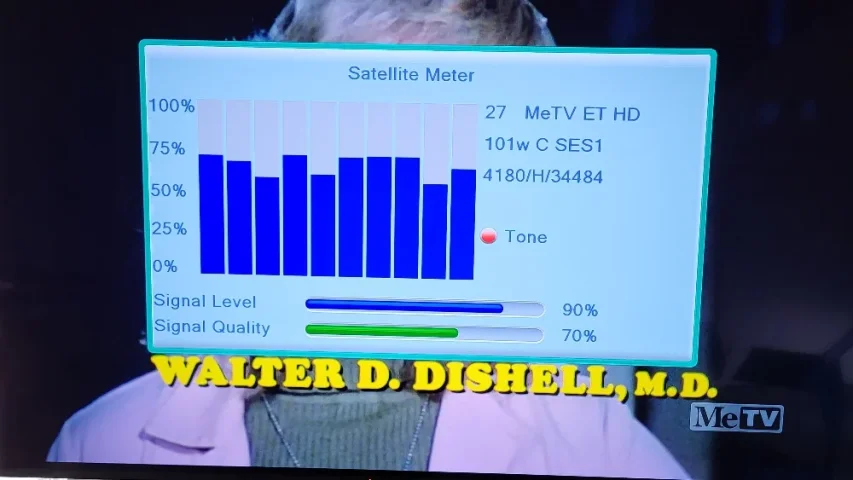
With the microHD connected this afternoon and tuned to the Weigel mux, I can receive the mux well.

My conclusion is that the sensitivity of the receivers in descending order of sensitivity is as follows:
  • V9 Prime (best)
  • microHD
  • Edision osmio4k+
Either the V9 or the microHD could be used to watch Weigel but the Edision really could not with my given dish situation, at least during the daytime. At night, the signal is stronger here and then maybe the Edision could be used.

Weigel mux.webp
Titanium
What is the SNR readings for these transponders? Is the signal breaking up due to low SNR or interference?

Did you inspect the feedhorn throat and wave guide for wasp nest or other blockage? Good SNR with frequent drops in decoding ( loss of SQ readings) could indicate interference from 5G.
T
Appreciate you checking. I should be picking these up with the tenner so still not done tuning up the bud - fell off ladder last week and hit my head!

Started over from scratch, N/S alignment, El/Decl extreme West sat, played with feed f/d checking everything and getting nice signals but still 101 west is PIA. New lnb was defective and returned it. My old one is fine but would have liked to A/B with a better lnb.

Thought it was the servo there because I was out and set everything up by the dish and flipping to HOR made a strange noise -BUT ONLY on 101 W ! All other sats skew is fine..hmm ( I have the skew almost perfect, use "Arrow" template on Zenith Sat (well nothing on 74 W to check with but Nimiq 5 at 72.6 W is closest and luckily picking up R- Pol channel from Canada to test with. Anyway picking up a new servo to try (the obvious polarity culprit).

Q. Back in the day PAS9 (74 W) was used but now I have to use closest zenith sat (Nimiq 5). I can't perfectly peak on that one which is 1 degree off (N/S alignment error). I used my trusty Brunton compass and even true noon shadow off pole to hit south.

I did have to peak extreme west by rotating mount ever so slighty so tracking extreme pretty good, but top and middle can use an elevation tweak (esp. Ku) to bring them back to where they were. No fun as the weather has been miserable and still dizzy from fall.

Oh and the Freesat V8 is crap (the tuner pixelates when the uHD is solid!) but love that SCART connector for S-Video out ! (I record to my Pio DVR and burn to DVD classic tv shows).

Stay tuned

With the microHD connected this afternoon and tuned to the Weigel mux, I can receive the mux well.
T
Did you inspect the feedhorn throat and wave guide for wasp nest or other blockage? Good SNR with frequent drops in decoding ( loss of SQ readings) could indicate interference from 5G.

Thanks for chiming in here. No wasps (or hornets nests) but good suggestion.

I am getting 70 and over Quality on uHD which is good but as you say the signal drops out (70 to 0 ) occasionally and much worse by day (even JTV which I used to get solid is a mess in the day. Again Daystar (VER) is fine but still not what it used to be.

I will will either have to get a BPF or go VHF/UHF for these channels but not giving up just yet!

p.s. Isn't there something between your feedhorn/lnbf BPF model and Norsat's 1500$ BPF and 5G filtering lnb's? Heck almost ready for a diy (reverse engineer) job here (microwave BPF hack) Ah where is Radio Electronics when you need it! If it wasn't for losing Ku I'd buy your lnbf in a heartbeat! Are these hard to add Ku to?
Titanium
Our LNBFs are integrated with the feedhorn and no KU option. Maybe install an inline waveguide BPF such as:

www.ebay.com/itm/158077455896
www.ebay.com/itm/960059145385
www.ebay.com/itm/158007483799
B
Howdy folks long time no write.

Issue(s): Horizontal transponders (esp. Weigel mux) breakup/mosaic/sputtering audio, JTV less so (but received perfectly up until a month or so ago.
Vertical is fine (Daystar). Up until recently couldn't even get any signal on Weigel Mux but JTV was perfect.

What I did to improve things: A slight westward move improved reception but only slightly (approx 72 on the micro HD, sorry no dB to post). I removed the 3-way C-Band splitter and used a 2-way to get a 1-2 db signal gain ( the power port goes to the Startrak - the micro HD doesn't have enough juice ! (1st clue) even after swapping the switching power supply it came with with a heftier linear 12 V supply (less RFI too !).
I have had issues with the uHD before signal breaking up that a reboot would clear up (clue #2 = dying tuner?) - FYI, I reinforced the IF input and removed all flux from the pcb completely with a Flux Removal Pen (MG Chemicals Cat No. 4140-P) which definitely makes a huge difference.

I went outside and pushed and pulled reflector slightly and no improvement. Pole (actually tower in yard - the neighbours love me..NOT) is plumb, checked with carpenters level. Dish was last peaked in 2017 or so, after overhauling 24" Von Weise, new Acme, fresh grease, etc. Focal length, f/d ratio etc meticulously adjusted. One panel has a tear so planning to repair that this weekend when my cousin comes over ( to help me out (old guy here) forecast calls for sunshine.

What has changed: My utility company has installed new high tension line poles (one smack dab in the middle of 101°W target! But they put it in last year and reception (of JTV (HOR) at least) was fine, BUT when they came out to transfer the wires over this year from the old (sawed in half) pole that's about when the troubles started (coincidence?), but again Daystar (VER) was fine. I always had this pole in the light of sight of 101° before with no issues. (fyi my zenith sat 74° is unobstucted, but can't test)

In the meantime Weigel mux is trying to break in MOSTLY in LATE at night (less cell usage?) (audio not video except for a frame here or there) so don't know what has changed with this mux which suddenly "woke up". I have never had to fuss with dish moves on this satellite ( the slightest move +/- motor clicks loses lock, wheres normally on C-band I can go significantly wider east or west and still have a strong signal ( have these gone "spot beam" or narrower somehow and what is the slight difference in Az listed on Lyngsat to 100.9° affect things ( isn't that the declination i.e. requiring a tweak of declination?).

Long story short (too late, ha), if I had another DVB-S2 box to try and / or a newer more stable PLL lnb ( I have been meaning to upgrade many a time but never got arround to it) I could determine if it's my antiquated receiving equipment, or my dish/feed alignment ( doubtful as it tracks everything from 55 °W to 133 ° W nicely.) or the dreaded 5G! (BUT only on HOR and not VER?).
I read another post where the OP (with his smaller 7.5 footer) played around with the illumination to peak desired transponder and reduce qrm on interfering/ stronger xpndrs (even on 103° W). So will play with that too - and cut away the RG-6 a and pull up a fresh section with new PPC and coax Seal. Open the throat cap see if any cobwebs are there and check servo operation (also changed in last maintence 10 years ago).

Finally, this will probably be the last chance I get to play with the BUD from the looks of it (providers leaving, auctioning off rest of spectrum imminent above 4.0 Ghz, and to keep the peace with neighbours so it would be nice to have that mux back for the long, cold and dark winters to comfort this old man before I call it quits and buy a VHF/UHF/FM Yagi and get MeTV, H&I from my Vermont local stations (checked at a friends today and they come in nicely - except ABC) .
Only one guy in town (Montreal) I may be able to get a receiver or PLL lnb from to try (RPS Sat) so hopefully with elimnate that as a possible culprit. Be nice to pick up a cheap or used PLL lnb to try w/o 5G BPF (money is tight )

Like others I couldn't care less about "tv" (well maybe just a liitle or a lot) it's the challenge that excites me , I can get MeTV other ways OTA (no pirate crap).

So what do you guys (and gals) think ?. p.s. I don't have a spectrum analyzer and there are def/ cell towers nearby (half a Km or so away).
Oh and time permitting will hammer out dings too and wire damaged mesh on one section for an extra dB or two. Hesitate to touch Declination, Elevation and pole mount but will play around with those a little too... Why is this mux for finicky suddenly ?(8psk, 5/6 fec, beamwidthetc.. man wish they went back to VER I think everthing would be fine! For the engineers out here does 5G QRM affect one poliarization (HOR) more than another (VER)? I understand the strong interference swamps out the input mixer/local oscilator in the hapless old C-band lnb (I think it at time affect KU too esp. LPB on 101°W KU - incidentally thos were weak or "gone' but are back almost at the time MeTV improved..hmm Terrestrial interference?

Any thoughts or suggestions ( cheap or free solutions please) greatly appreciated. Cheers.

p.p.s. Micro HD can't display Decades and Toons but records them fine so I can watch on another box/media player (Ali chip set issue). Another reason to upgrade.

Anybody interested in a nice C/KU system free ? (for next Spring/Summer 2027)

[Sami 10' mesh, Corotor II+, Eagle Aspen (very old) C-band lnb, Norsat Ku lnb, Channel Master C/Ku (H/V) switch, Startrak 400 Analog receiver w/ motor control, Geosat uHD DVD-S2, CW600S for Mpeg-2]
I had the EXACT same problem happen to me with 101w, MeTV mux (Weigel). Working great when about 3 weeks ago I started to get the pixelating, especially at night. Sometimes Jewelry TV would also do it, sometimes not. Tweaked my dish. I have a Titanium 240 feed with the 5G filter 4.0-4.2 band pass. Every other satellite is working fine. Something on their end for sure. Power reduction? My signal seems fine like always. Running a Winegard 8.5 ft dish using a GT Media UHD V8. I'm sure my receiver isn't maybe sensitive enough for lower signal levels. Frustrating here too. I'm in the Canton, Ohio area. Thanks!
arlo
To me it looks like all of the intelligent things to diagnose the problem 'on the cheap' are being done.
I have my own thoughts of lnbf's using an external filter between the feed and coax. It would be cool to see what Brian could add.
Do his units have the filter before the actual LNA chip in the circuit? In other words, signal is focused at the lnbf throat. The probes for h & v polarity send the signal to.......filtering......then to the lna IC......
Or probes, lna, then filtering. Makes sense to trap the bad stuff before amplification to me.

On the cheap sometimes leaves questions. Enosat and El Bandido both use dvb-s pci cards and TBS USB receivers.
With those, and software. Signal analysis becomes sort of easy. Or tapping into your coax with a dc pass splitter, decoupling capacitor, and using a spectrum analyzer. Tuning across the LO band. Finding signal spikes. Digging deep.

Still making my decision on a (most probably) TBS PCIe tuner card. But I have tapped into my coax with my ancient but quite impressive HP spectrum analyzer and tinysa.
I don't have 5G interference so far that I know of. But have my suspects because I'm only able to snag signal from 131W in the winter when the leaves drop. But out of curiosity do scan it in the fall. And seem to be getting a signal that 'shouldn't' be there and a scan shows no channels. Far as I got.

An idea pops up to rig up an LNBF on a stick. Along with the tinysa and power supply and do some rogue signal searches. War Driving, of sorts. But. I wouldn't think that a chinabox, firmware based receiver would be of much help.
From what I see scanning across the frequency band. 5G cell transmission is always on and is very wide spectrum.
Whether anyone is actually using talking, texting, watching stupid human tricks on YouTube Makes no difference. The RF is there. So why would a C Band setup come and go? And what if you dumped the corotor and went modern voltage controlled polarity?

Another thought. Since you've learned the optimal position to place the scalar to illuminate out to the dish rim. And peaked the feed. There's most of a roll of aluminum flashing out in my garage that would most definitely wrap around my dish perimeter. That and a bag of large binder clips from the office supply. wally world. Ideas?
T
Last reply · posted in DISH Network Support Forum
I thought I would come here and find lots of complaints about the update to the dish anywhere mobile app, but am not seeing any. It used to look just like the desktop webpage. Now you can no longer filter by sports channels or movie channels. Plus that they made it look like a big button telephone and you see fewer channels in the screen which requires more scrolling. Yes I realize you can look at sports then select which sport you want to look at, I just liked being able to see all sporting events in the guide with all other channels being filtered out. Am I alone in the wilderness on this?
8 Replies · 292 views
  • Like
Reactions: dishstaller
dishdude
I like the new look, it's a lot cleaner. I'm using it on one of those Onn streaming devices when I travel.
  • Like
Reactions: charlesrshell
T
I like the new look, it's a lot cleaner. I'm using it on one of those Onn streaming devices when I travel.
Yes a lot cleaner, glossier, and less functional. Someone trying to justify why they are making a big salary. "See look shiny"
  • Like
Reactions: charlesrshell
navychop
"Big salary." Charlie. "?Big?"
Tampa8
Seems in some ways better. Nicer layout, as others said maybe cleaner. Moving ahead in the guide is better.
S
I thought I would come here and find lots of complaints about the update to the dish anywhere mobile app, but am not seeing any. It used to look just like the desktop webpage. Now you can no longer filter by sports channels or movie channels. Plus that they made it look like a big button telephone and you see fewer channels in the screen which requires more scrolling. Yes I realize you can look at sports then select which sport you want to look at, I just liked being able to see all sporting events in the guide with all other channels being filtered out. Am I alone in the wilderness on this?
I think most are using it on a firestick or other device as an extra receiver, rather than their phone. Just a guess based on how I use it. 99% thru my firestick, 1% phone.
  • Like
Reactions: llokey
dfergie
Staff member HERE TO HELP YOU!
Last reply · posted in TV Shows
Stargate SG-1 cancelled, Atlantis renewed
clear.gif

Monday - August 21, 2006 | by Darren Sumner
clear.gif

The future of Stargate is in question today, as SCI FI Channel has cancelled the long-running Stargate SG-1, Multichannel News reported today and a GateWorld source has confirmed. The news regrettably follows the airing of the show's milestone two-hundredth episode on Friday.

Stargate Atlantis, meanwhile, has been renewed for a fourth season, with the network hoping to see that the spin-off series can stand alone, according to a source.
Source Gateworld
2034 Replies · 184192 views
R
I have gotten back into watching SG-1 and I have recorded most of the episodes to binge watch. What episodes are about the Antarctic or was this a movie? Also where could I watch the SG-1 movies?
osu1991
long_time_Dish
I have gotten back into watching SG-1 and I have recorded most of the episodes to binge watch. What episodes are about the Antarctic or was this a movie? Also where could I watch the SG-1 movies?
Well, there are a couple involving the Antarctic. "Solitudes", S1 E17 (one of my favorites), Then, "Lost City', S7 E21 and E22. Then, in the SGA pilot, "Rising", S1 E1 and E2, it starts out in the Antarctic for about the first 20 minutes or so.
R
Well, there are a couple involving the Antarctic. "Solitudes", S1 E17 (one of my favorites), Then, "Lost City', S7 E21 and E22. Then, in the SGA pilot, "Rising", S1 E1 and E2, it starts out in the Antarctic for about the first 20 minutes or so.
Which one has O'Neil being Ancients? I am at the end of Season 8 now.
long_time_Dish
Which one has O'Neil being Ancients? I am at the end of Season 8 now.
If I understand your question, O'Neill had the Ancient's knowledge in the "Lost City" two-part episode. That was when Anubis attacked Earth and there was a big battle over Antarctica.
  • Like
Reactions: dfergie and Foxbat
R
If I understand your question, O'Neill had the Ancient's knowledge in the "Lost City" two-part episode. That was when Anubis attacked Earth and there was a big battle over Antarctica.
Those are the episodes I am looking for. They are referred to a lot in the episodes I just recently watched.
  • Like
Reactions: dfergie