

Social Feed

[Other Topic] Measure Diversity Delay and Correct for It
what is your opinion on this subject?
This article appeared in the recent Radio World eBook "HD Radio Evolves," and is printed here due to interest in the topic. You can read the full eBook at radioworld.com/ebooks.
The hybrid digital and analog broadcasting solution deployed in the United States, FM and AM IBOC, more commonly known as HD Radio, allows simultaneous transmission of broadcast radio signals in both the analog and digital domain. A key component is that receivers can immediately acquire the analog signal and then transition (or blend) into the digital signal after it has acquired and buffered. The transition process is called blending.
In order to have this blend be seamless and transparent to our listeners, we broadcasters have had to employ delays on our analog AM and FM signals to match the digital. This delay is typically called "diversity delay" because the HD Radio transmission system uses a variety of techniques and buffering to add redundancy or diversity to the system for signal robustness.
This robustness and signal processing create significant delays compared to the near-instantaneous analog transmissions, typically anywhere from 6–10 seconds, depending on hardware, software and data links in use. At a properly configured AM or FM station broadcasting in HD, there is a device in the analog air chain providing this delay.
In the first and second generation of HD hardware, this delay often was in the same device producing the HD signal. Over time, engineers demanded flexibility in configuration, reduction of hardware costs and reducing points of failure (the first two generations of hardware weren't particularly reliable).
The most common deployment of HD systems came in third-generation and recently introduced fourth-generation hardware, and these systems broke out the functionality of that single device into two, the Exporter and the Exciter. These components communicate over common Ethernet using a system designed by iBiquity called the Exgine platform. The connection between the two is considered the Exporter to Exciter (E2X) link.
As a station-level engineer, ever since I got my hands on an Exgine system (now in its tenth year in production hardware), I was challenged to keep the analog diversity delay perfectly aligned with the digital; and I wasn't alone. But these were the early days; the system was still being worked out, and many many of the major drifting issues were resolved over several software updates.
But precision tools available in the last few years have told us that there is still a long list of items that can cause diversity delay drift on a radio station: Incompatible software/firmware loads, improper configuration of the hardware, poor isolation of network traffic and design of the E2X link, location of the Exporter and the Exciter and the latency or jitter on the data link it traverses, separate processors, component aging and failures … and did you know that if you reboot your Exporter or Exciter it often will come up with a slightly different delay than it had before the reboot?
A laundry list of items can cause a station's digital transmission timing to change. These, in turn, can cause diversity delay/ blend time alignment problems.
It's impossible to keep your station's diversity delay perfectly aligned through manual means. If you don't have a delay measurement device, it's also nearly impossible to know the precise amount of delay needed on your station. You should seek a way to measure the delay accurately and correct it automatically.
SPEC
We as an industry really have not been looking at diversity delay measurement with the precision it has demanded. Part of the problem was that we did not have the tools when we launched our HD stations. The initial alignment procedure was to put on a set of headphones and put a receiver in split mode with the analog on the left and the digital on the right, and get them to match. As you might imagine, it takes a "golden ear" to get it perfect. I've determined with precision devices that I'm just awful at it. Or, if I get close, I've wasted half my day trying to get it right.
And let's say you do have that "golden ear" … your UPS on the Exporter just failed, your Exporter rebooted, the delay just changed. Are you able to listen to each of your stations continuously to make that adjustment? The answer is that nobody can do this job manually and stay up on it and provide the precision required to stay in spec.
The official specification is that the analog and digital signals should be at 0 samples, plus or minus 3 samples. So the range is –3 to +3, with the center of 0 being preferred. One sample refers to 1 out of 44,100 samples per second in the 44.1 kHz bit stream.
An extreme amount of precision is required to get this perfect. One sample is 22.7 µsec. Three samples means within 68 µsec. Many broadcast monitoring products show the measurement in seconds and samples. If you've been measuring your diversity delay in seconds from any of these products and been saying things like "… the station is off –0.0001 seconds … close enough," you have been doing it wrong.
I must admit, I was doing it that way for a long time as well. At four digits beyond the decimal point, that is a resolution of 100 µsec. Any reading that is not zero essentially is out of spec. If the station is off by 3 samples, that equates to 68 µsec, rounded to the nearest 100 µsec, you would get 100 µsec or 0.0001 seconds. Four samples is 91 µsec and would round to 0.001. So, you could be in spec or out of spec with that number; there isn't enough resolution. At 2 samples, that will round to 0.000 sec.
Looking at it another way, 0.0001 sec is very close to 4 samples off, but anything between 3 and 6 samples off will round to .0001 seconds.
The best way to avoid these issues is to just focus on the number of samples and stop looking at the time. We need to be focused on samples, not seconds. And when you look at it that way, that level of precision is only available consistently if we automate the process.
WHY DOES IT MATTER?
HD Radio is here to stay and growing rapidly in the only area where volumes of radio receivers are still manufactured: factory installed radios in new automobiles. Ten years ago the industry wondered when these digital radios would show up. They are here now; your listeners already have them. In 2014, iBiquity reported that 43 percent of new automobiles came with HD Radio, standard. In 2013, that number was 33 percent. This equates to millions of HD radios being sold and used.
Each day, more and more of your listeners have HD Radio receivers. Should trends continue for the rest of the decade, it's going to be hard to buy a vehicle without HD Radio in a few years. The digital experience of your radio station is something we should be paying attention to today. Within a few years, an HD Radio will become the primary radio your listeners will use.
If your station is not precisely aligned, all of the time, it makes that transition from analog to digital, or back from digital to analog when the HD fails, sound bad. How bad depends on how far off you are and what type of programming you have.
Stations that are lightly processed or air talk programming seem to be more susceptible to audible problems even with a small offset in samples. Loud, densely processed music stations the effects of being out of spec slightly can get buried in the program density to a point. But keep in mind, even these stations have periods of less density that are important, such as talk-intensive morning shows and commercials.

Fig. 1: Audible effects on blending at various sample offsets.
Credit: Courtesy iBiquity Digital
(Click to Enlarge)
Imagine your station's most important client in a vehicle with HD Radio, hearing their commercial stutter. So every station ultimately is affected by not being "in spec."
IBiquity has done research, demonstrating how you can get various audible blending effects depending on how many samples you are off. Fig. 1 shows the effect of different sample offsets and the impact on the audio. During a blend, any misalignment >5 ms (approx. 200–300 audio samples) will be perceptible to a listener as an echo or skipping effect. The two audio sources will sound distinct. Even small misalignments (<200 samples) will produce a filtering effect during a blend. It will sound like one audio source but will have a "hollow" sound due to a comb filtering effect. The effect is not noticeable if the misalignment is less than 3 samples.
Some people may think, "Well, the radio blends once 8 seconds after it tunes to the station, so it skips once; why does it matter that much?" Perhaps they think of the blend as an initial acquisition; then you keep digital forever. But that isn't always the case. Receivers of all types lose digital lock at some point. We could go into an exhaustive investigation of those situations, but that's a topic in itself.
The easiest way to think about this is in the car. Perhaps you think of the blend as if someone is driving out of your market. They have coverage, and at some point on the highway, they lose digital lock, it blends to analog, and eventually as you go out further and further, the signal is gone. But that's not the typical experience of your listeners. Most of your listeners do not leave the market and stations' signal coverage each day.
Think about your station's 60 dBu contour, which is where most –20 dBc stations tend to start to lose digital lock. If you live and work in that area, you can experience constant drifting in and out of digital. You can run into situations where the radio is blending quite a bit.
CAR COMPANIES CARE
Diversity delay blending issues are the top complaint from auto manufacturers. IBiquity has told the industry that for years, their number one complaint about HD Radio is time alignment. I can independently vouch for this. I work closely with many automotive companies, and I've had emails, phone calls and idle conversations at lunch about this problem with their engineers. I have been in vehicles with these engineers where they hear stations skip and ask me to help fix it. The problem is, those stations typically belong to other companies, so it takes time to research who owns that station and to contact their engineering staff to have them make a manual adjustment.
GM temporarily removed HD in some vehicle models to help fine-tune their implementation to address consumer feedback about HD Radio blending. It turns out that their customers (and our listeners) have been complaining to them about this for a long time. But instead of calling up the radio station to complain about it, the customer takes the car back to the dealer and thinks there is a problem with the radio. Listeners are not (and should not be) educated enough on this issue to think to contact the radio station about this annoyance. This customer feedback is not unique to GM vehicles.
Automotive designers are sensitive to this problem, and it is my experience that 99 percent of the problems come back to issues on the broadcast side. We need to fix this with automated monitoring and correction.
WHAT CAN YOU DO ABOUT IT?
For years, broadcast engineers have been working with iBiquity and transmitter hardware manufacturers to resolve this problem. We have made progress and addressed some of the most common problems that cause drift. But as I transitioned from a traditional broadcast engineer to an HD Radio implementation specialist, I have discovered there are just too many variables beyond the control of all parties involved; there really needed to be a push for automated diversity delay measurement and corrective systems. I and other colleagues have been asking for products and solutions in this area, and we've seen the industry respond in the last few years. This year at April's NAB Show in Las Vegas, we saw a large collection of solutions being introduced to the marketplace.
Below, we've created a roundup of products that can help you monitor and manage diversity delay. Note that I have not personally tested each solution, and the list should not be construed as a product review or endorsement. Also, this is an evolving space. Some vendors are working on integration efforts with other products; and there may be other offerings available. Check with each vendor about pricing and delivery schedules for products or software you are considering.
TWO STRATEGIES TO CONSIDER
Create a two-piece system. Consider pairing a monitoring receiver that can measure the diversity delay offset and send a correction offset to a device that is active in the analog air chain (an audio processor, delay unit or exporter). If you have some of these products already, this could make a lot of sense for your station. By upgrading firmware on your devices, you can possibly put together two pieces of hardware to come up with an automated hardware solution.
Single-box solution. Some stations may choose to implement devices that measure and correct the diversity delay in a single device. This is especially handy for stations that do not have the products listed on the following pages already in their air chain, or for companies looking for standardization of delay solutions from station to station. These devices can be inserted into either your analog or digital air chain to make delay adjustments and have an integrated receiver to make the measurements of delay offset. You can use a simple antenna on these units, or wire off an RF sample (in FM+HD installations) with the appropriate amount of attenuation and the device. Many engineers I have spoken with are most comfortable about having these right before the HD Exporter, so that any adjustments the Exporter is making to delay are contained to just the HD broadcasts and the analog plant remains exactly the same as it does today. In that use case, you increase the existing diversity delay in your analog chain to a larger number than you need today; then these devices will make up the difference on the digital chain. The advantage of going in this direction is that the devices can then correct digital audio level and give you level alignment between analog FM and HD. The disadvantage to it being in the digital chain is that it would not work for any station that has to eliminate all delay for live programming and enter what is commonly referred to as "ballgame mode." Luckily, the products are easily configured to work in either chain.
SOLUTIONS
Some solutions may be a better fit for your station than others. There are many factors to evaluate, including repurposing equipment you already have, overall system costs and your level of comfort with the devices. As mentioned, this is a rapidly developing space. If you adopt now — and I suggest that you do — you might need to provide feedback and observations to the manufacturers to refine the code and products. The industry is going to learn a lot about this issue in the next few years now that we have tools to measure and correct for this delay automatically.
Belar
The FMHD-1 broadcast monitor receiver makes a variety of HD Radio-related measurements, and it can measure diversity delay continuously. Not only is this helpful when trying to manually align a station, the correction offset can be sent to a variety of devices in this list, such as products from GatesAir, Nautel, Omnia, Orban, 25-Seven and Wheatstone below. Currently, the FMHD-1 works on a single-station basis; however a future software update is being considered to have the device scan multiple station presents and send correction codes to multiple stations devices.
Broadcast Electronics
The XPi10 esp Exporter is an HD Radio Exporter with a built-in diversity delay alignment feature. If you provide the Exporter with audio of the analog and digital from a receiver running in split mode through the unbalanced audio inputs, when configured, it will measure and maintain diversity delay. Note that the station must be configured to have the analog diversity delay fully provided by the exporter for this feature to be useful.
DaySequerra
The M4DDC is a single-box solution that can do the measurement and delay adjustment in a single box. It inserts in your AES stream of either the analog or digital air chain and can make the corrections necessary for time alignment, level alignment and phase reversal correction. It has a Web GUI and can alarm via GPIO and SMTP (email alarms) and also has an SNMP interface. The GUI also does data collection and can show you how the device is working overtime. This is an FM-only device; an AM version with slight hardware variations is expected later this year.
DaySequerra's M4.2 TimeLock is a broadcast monitor receiver that makes a variety of HD Radio-related measurements, one of which is that this product can measure diversity delay continuously, helpful for aligning stations manually. In addition, this product supports automatic diversity delay correction with the GatesAir HDE-200 Exporter and the Orban processors mentioned below. Future support for Nautel, Omnia and Wheatstone products below is planned but not yet available.
GatesAir
HDE-200 Exporter can receive correction outputs from both the Belar FMHD-1 and the DaySequerra M4.2 TimeLock. Note that the station must be configured to have the analog diversity delay fully provided by the exporter for this feature to be useful.
Inovonics
JUSTIN 808 is a single-box solution that can do the measurement and delay adjustment in a single box. It inserts in your AES stream of either the analog or digital air chain and can make the corrections necessary for time alignment, level alignment and phase reversal correction. It has a Web GUI and can alarm via GPIO and SMTP (email alarms) and also has an SNMP interface. The GUI also does data collection and can show you how the device is working overtime. This is an FM-only device.
Nautel
Exporter Plus can receive correction outputs from both the Belar FMHD-1 and the DaySequerra M4.2 TimeLock. Note that the station must be configured to have the analog diversity delay fully provided by the exporter for this feature to be useful.
Omnia
Omnia.7, Omnia.9 audio processors can work in conjunction with the Belar FMHD-1 to automatically adjust the analog diversity delay, with future support for the DaySequerra M4.2 TimeLock planned.
Orban
The Orban 8600, 8600S, 8500, 8500S, 5700 and 5500 audio processors can work in conjunction with both the Belar FMHD-1 and the DaySequerra M4.2. Orban notes that even the non-HD versions of these processors make diversity delay available for stations running separate analog FM and HD processors.
25-Seven
Precision Delay can be inserted in the analog air chain to achieve diversity delay and supports automatic correction adjustments from both the Belar FMHD-1 and the Worldcast/Audemat Golden Eagle HD.
Wheatsone
AirAuraX3, FM531HD, FM-55 and AM-55 audio processors can work in conjunction with the Belar FMHD-1 with future support for the DaySequerra M4.2 TimeLock expected but not available yet at time of publication.
Worldcast/Audemat
Golden Eagle HD is a broadcast monitor receiver makes a variety of FM and HD Radio related measurements, one of which is that this product can measure diversity delay. It can work with the 25-Seven Precision Delay for automatic diversity delay correction. Also, it can be configured to monitor diversity delay alignment and send alerts if alignment (or other parameters) are out of specification. All alignment measurements are available via SNMP for use by third party equipment.
http://www.radioworld.com/article/measure-diversity-delay-and-correct-for-it/276940
Thanks
Allen bluegras
This article appeared in the recent Radio World eBook "HD Radio Evolves," and is printed here due to interest in the topic. You can read the full eBook at radioworld.com/ebooks.
The hybrid digital and analog broadcasting solution deployed in the United States, FM and AM IBOC, more commonly known as HD Radio, allows simultaneous transmission of broadcast radio signals in both the analog and digital domain. A key component is that receivers can immediately acquire the analog signal and then transition (or blend) into the digital signal after it has acquired and buffered. The transition process is called blending.
In order to have this blend be seamless and transparent to our listeners, we broadcasters have had to employ delays on our analog AM and FM signals to match the digital. This delay is typically called "diversity delay" because the HD Radio transmission system uses a variety of techniques and buffering to add redundancy or diversity to the system for signal robustness.
This robustness and signal processing create significant delays compared to the near-instantaneous analog transmissions, typically anywhere from 6–10 seconds, depending on hardware, software and data links in use. At a properly configured AM or FM station broadcasting in HD, there is a device in the analog air chain providing this delay.
In the first and second generation of HD hardware, this delay often was in the same device producing the HD signal. Over time, engineers demanded flexibility in configuration, reduction of hardware costs and reducing points of failure (the first two generations of hardware weren't particularly reliable).
The most common deployment of HD systems came in third-generation and recently introduced fourth-generation hardware, and these systems broke out the functionality of that single device into two, the Exporter and the Exciter. These components communicate over common Ethernet using a system designed by iBiquity called the Exgine platform. The connection between the two is considered the Exporter to Exciter (E2X) link.
As a station-level engineer, ever since I got my hands on an Exgine system (now in its tenth year in production hardware), I was challenged to keep the analog diversity delay perfectly aligned with the digital; and I wasn't alone. But these were the early days; the system was still being worked out, and many many of the major drifting issues were resolved over several software updates.
But precision tools available in the last few years have told us that there is still a long list of items that can cause diversity delay drift on a radio station: Incompatible software/firmware loads, improper configuration of the hardware, poor isolation of network traffic and design of the E2X link, location of the Exporter and the Exciter and the latency or jitter on the data link it traverses, separate processors, component aging and failures … and did you know that if you reboot your Exporter or Exciter it often will come up with a slightly different delay than it had before the reboot?
A laundry list of items can cause a station's digital transmission timing to change. These, in turn, can cause diversity delay/ blend time alignment problems.
It's impossible to keep your station's diversity delay perfectly aligned through manual means. If you don't have a delay measurement device, it's also nearly impossible to know the precise amount of delay needed on your station. You should seek a way to measure the delay accurately and correct it automatically.
SPEC
We as an industry really have not been looking at diversity delay measurement with the precision it has demanded. Part of the problem was that we did not have the tools when we launched our HD stations. The initial alignment procedure was to put on a set of headphones and put a receiver in split mode with the analog on the left and the digital on the right, and get them to match. As you might imagine, it takes a "golden ear" to get it perfect. I've determined with precision devices that I'm just awful at it. Or, if I get close, I've wasted half my day trying to get it right.
And let's say you do have that "golden ear" … your UPS on the Exporter just failed, your Exporter rebooted, the delay just changed. Are you able to listen to each of your stations continuously to make that adjustment? The answer is that nobody can do this job manually and stay up on it and provide the precision required to stay in spec.
The official specification is that the analog and digital signals should be at 0 samples, plus or minus 3 samples. So the range is –3 to +3, with the center of 0 being preferred. One sample refers to 1 out of 44,100 samples per second in the 44.1 kHz bit stream.
An extreme amount of precision is required to get this perfect. One sample is 22.7 µsec. Three samples means within 68 µsec. Many broadcast monitoring products show the measurement in seconds and samples. If you've been measuring your diversity delay in seconds from any of these products and been saying things like "… the station is off –0.0001 seconds … close enough," you have been doing it wrong.
I must admit, I was doing it that way for a long time as well. At four digits beyond the decimal point, that is a resolution of 100 µsec. Any reading that is not zero essentially is out of spec. If the station is off by 3 samples, that equates to 68 µsec, rounded to the nearest 100 µsec, you would get 100 µsec or 0.0001 seconds. Four samples is 91 µsec and would round to 0.001. So, you could be in spec or out of spec with that number; there isn't enough resolution. At 2 samples, that will round to 0.000 sec.
Looking at it another way, 0.0001 sec is very close to 4 samples off, but anything between 3 and 6 samples off will round to .0001 seconds.
The best way to avoid these issues is to just focus on the number of samples and stop looking at the time. We need to be focused on samples, not seconds. And when you look at it that way, that level of precision is only available consistently if we automate the process.
WHY DOES IT MATTER?
HD Radio is here to stay and growing rapidly in the only area where volumes of radio receivers are still manufactured: factory installed radios in new automobiles. Ten years ago the industry wondered when these digital radios would show up. They are here now; your listeners already have them. In 2014, iBiquity reported that 43 percent of new automobiles came with HD Radio, standard. In 2013, that number was 33 percent. This equates to millions of HD radios being sold and used.
Each day, more and more of your listeners have HD Radio receivers. Should trends continue for the rest of the decade, it's going to be hard to buy a vehicle without HD Radio in a few years. The digital experience of your radio station is something we should be paying attention to today. Within a few years, an HD Radio will become the primary radio your listeners will use.
If your station is not precisely aligned, all of the time, it makes that transition from analog to digital, or back from digital to analog when the HD fails, sound bad. How bad depends on how far off you are and what type of programming you have.
Stations that are lightly processed or air talk programming seem to be more susceptible to audible problems even with a small offset in samples. Loud, densely processed music stations the effects of being out of spec slightly can get buried in the program density to a point. But keep in mind, even these stations have periods of less density that are important, such as talk-intensive morning shows and commercials.
Fig. 1: Audible effects on blending at various sample offsets.
Credit: Courtesy iBiquity Digital
(Click to Enlarge)
Imagine your station's most important client in a vehicle with HD Radio, hearing their commercial stutter. So every station ultimately is affected by not being "in spec."
IBiquity has done research, demonstrating how you can get various audible blending effects depending on how many samples you are off. Fig. 1 shows the effect of different sample offsets and the impact on the audio. During a blend, any misalignment >5 ms (approx. 200–300 audio samples) will be perceptible to a listener as an echo or skipping effect. The two audio sources will sound distinct. Even small misalignments (<200 samples) will produce a filtering effect during a blend. It will sound like one audio source but will have a "hollow" sound due to a comb filtering effect. The effect is not noticeable if the misalignment is less than 3 samples.
Some people may think, "Well, the radio blends once 8 seconds after it tunes to the station, so it skips once; why does it matter that much?" Perhaps they think of the blend as an initial acquisition; then you keep digital forever. But that isn't always the case. Receivers of all types lose digital lock at some point. We could go into an exhaustive investigation of those situations, but that's a topic in itself.
The easiest way to think about this is in the car. Perhaps you think of the blend as if someone is driving out of your market. They have coverage, and at some point on the highway, they lose digital lock, it blends to analog, and eventually as you go out further and further, the signal is gone. But that's not the typical experience of your listeners. Most of your listeners do not leave the market and stations' signal coverage each day.
Think about your station's 60 dBu contour, which is where most –20 dBc stations tend to start to lose digital lock. If you live and work in that area, you can experience constant drifting in and out of digital. You can run into situations where the radio is blending quite a bit.
CAR COMPANIES CARE
Diversity delay blending issues are the top complaint from auto manufacturers. IBiquity has told the industry that for years, their number one complaint about HD Radio is time alignment. I can independently vouch for this. I work closely with many automotive companies, and I've had emails, phone calls and idle conversations at lunch about this problem with their engineers. I have been in vehicles with these engineers where they hear stations skip and ask me to help fix it. The problem is, those stations typically belong to other companies, so it takes time to research who owns that station and to contact their engineering staff to have them make a manual adjustment.
GM temporarily removed HD in some vehicle models to help fine-tune their implementation to address consumer feedback about HD Radio blending. It turns out that their customers (and our listeners) have been complaining to them about this for a long time. But instead of calling up the radio station to complain about it, the customer takes the car back to the dealer and thinks there is a problem with the radio. Listeners are not (and should not be) educated enough on this issue to think to contact the radio station about this annoyance. This customer feedback is not unique to GM vehicles.
Automotive designers are sensitive to this problem, and it is my experience that 99 percent of the problems come back to issues on the broadcast side. We need to fix this with automated monitoring and correction.
WHAT CAN YOU DO ABOUT IT?
For years, broadcast engineers have been working with iBiquity and transmitter hardware manufacturers to resolve this problem. We have made progress and addressed some of the most common problems that cause drift. But as I transitioned from a traditional broadcast engineer to an HD Radio implementation specialist, I have discovered there are just too many variables beyond the control of all parties involved; there really needed to be a push for automated diversity delay measurement and corrective systems. I and other colleagues have been asking for products and solutions in this area, and we've seen the industry respond in the last few years. This year at April's NAB Show in Las Vegas, we saw a large collection of solutions being introduced to the marketplace.
Below, we've created a roundup of products that can help you monitor and manage diversity delay. Note that I have not personally tested each solution, and the list should not be construed as a product review or endorsement. Also, this is an evolving space. Some vendors are working on integration efforts with other products; and there may be other offerings available. Check with each vendor about pricing and delivery schedules for products or software you are considering.
TWO STRATEGIES TO CONSIDER
Create a two-piece system. Consider pairing a monitoring receiver that can measure the diversity delay offset and send a correction offset to a device that is active in the analog air chain (an audio processor, delay unit or exporter). If you have some of these products already, this could make a lot of sense for your station. By upgrading firmware on your devices, you can possibly put together two pieces of hardware to come up with an automated hardware solution.
Single-box solution. Some stations may choose to implement devices that measure and correct the diversity delay in a single device. This is especially handy for stations that do not have the products listed on the following pages already in their air chain, or for companies looking for standardization of delay solutions from station to station. These devices can be inserted into either your analog or digital air chain to make delay adjustments and have an integrated receiver to make the measurements of delay offset. You can use a simple antenna on these units, or wire off an RF sample (in FM+HD installations) with the appropriate amount of attenuation and the device. Many engineers I have spoken with are most comfortable about having these right before the HD Exporter, so that any adjustments the Exporter is making to delay are contained to just the HD broadcasts and the analog plant remains exactly the same as it does today. In that use case, you increase the existing diversity delay in your analog chain to a larger number than you need today; then these devices will make up the difference on the digital chain. The advantage of going in this direction is that the devices can then correct digital audio level and give you level alignment between analog FM and HD. The disadvantage to it being in the digital chain is that it would not work for any station that has to eliminate all delay for live programming and enter what is commonly referred to as "ballgame mode." Luckily, the products are easily configured to work in either chain.
SOLUTIONS
Some solutions may be a better fit for your station than others. There are many factors to evaluate, including repurposing equipment you already have, overall system costs and your level of comfort with the devices. As mentioned, this is a rapidly developing space. If you adopt now — and I suggest that you do — you might need to provide feedback and observations to the manufacturers to refine the code and products. The industry is going to learn a lot about this issue in the next few years now that we have tools to measure and correct for this delay automatically.
Belar
The FMHD-1 broadcast monitor receiver makes a variety of HD Radio-related measurements, and it can measure diversity delay continuously. Not only is this helpful when trying to manually align a station, the correction offset can be sent to a variety of devices in this list, such as products from GatesAir, Nautel, Omnia, Orban, 25-Seven and Wheatstone below. Currently, the FMHD-1 works on a single-station basis; however a future software update is being considered to have the device scan multiple station presents and send correction codes to multiple stations devices.
Broadcast Electronics
The XPi10 esp Exporter is an HD Radio Exporter with a built-in diversity delay alignment feature. If you provide the Exporter with audio of the analog and digital from a receiver running in split mode through the unbalanced audio inputs, when configured, it will measure and maintain diversity delay. Note that the station must be configured to have the analog diversity delay fully provided by the exporter for this feature to be useful.
DaySequerra
The M4DDC is a single-box solution that can do the measurement and delay adjustment in a single box. It inserts in your AES stream of either the analog or digital air chain and can make the corrections necessary for time alignment, level alignment and phase reversal correction. It has a Web GUI and can alarm via GPIO and SMTP (email alarms) and also has an SNMP interface. The GUI also does data collection and can show you how the device is working overtime. This is an FM-only device; an AM version with slight hardware variations is expected later this year.
DaySequerra's M4.2 TimeLock is a broadcast monitor receiver that makes a variety of HD Radio-related measurements, one of which is that this product can measure diversity delay continuously, helpful for aligning stations manually. In addition, this product supports automatic diversity delay correction with the GatesAir HDE-200 Exporter and the Orban processors mentioned below. Future support for Nautel, Omnia and Wheatstone products below is planned but not yet available.
GatesAir
HDE-200 Exporter can receive correction outputs from both the Belar FMHD-1 and the DaySequerra M4.2 TimeLock. Note that the station must be configured to have the analog diversity delay fully provided by the exporter for this feature to be useful.
Inovonics
JUSTIN 808 is a single-box solution that can do the measurement and delay adjustment in a single box. It inserts in your AES stream of either the analog or digital air chain and can make the corrections necessary for time alignment, level alignment and phase reversal correction. It has a Web GUI and can alarm via GPIO and SMTP (email alarms) and also has an SNMP interface. The GUI also does data collection and can show you how the device is working overtime. This is an FM-only device.
Nautel
Exporter Plus can receive correction outputs from both the Belar FMHD-1 and the DaySequerra M4.2 TimeLock. Note that the station must be configured to have the analog diversity delay fully provided by the exporter for this feature to be useful.
Omnia
Omnia.7, Omnia.9 audio processors can work in conjunction with the Belar FMHD-1 to automatically adjust the analog diversity delay, with future support for the DaySequerra M4.2 TimeLock planned.
Orban
The Orban 8600, 8600S, 8500, 8500S, 5700 and 5500 audio processors can work in conjunction with both the Belar FMHD-1 and the DaySequerra M4.2. Orban notes that even the non-HD versions of these processors make diversity delay available for stations running separate analog FM and HD processors.
25-Seven
Precision Delay can be inserted in the analog air chain to achieve diversity delay and supports automatic correction adjustments from both the Belar FMHD-1 and the Worldcast/Audemat Golden Eagle HD.
Wheatsone
AirAuraX3, FM531HD, FM-55 and AM-55 audio processors can work in conjunction with the Belar FMHD-1 with future support for the DaySequerra M4.2 TimeLock expected but not available yet at time of publication.
Worldcast/Audemat
Golden Eagle HD is a broadcast monitor receiver makes a variety of FM and HD Radio related measurements, one of which is that this product can measure diversity delay. It can work with the 25-Seven Precision Delay for automatic diversity delay correction. Also, it can be configured to monitor diversity delay alignment and send alerts if alignment (or other parameters) are out of specification. All alignment measurements are available via SNMP for use by third party equipment.
http://www.radioworld.com/article/measure-diversity-delay-and-correct-for-it/276940
Thanks
Allen bluegras
3 Replies
·
1662 views


Staff member
HERE TO HELP YOU!
Cutting Edge
As you may have noticed we are doing a Fund Raiser for SatelliteGuys!
As many of you know I have been paying for a majority of the operation of the site out of my own pocket for awhile now. Now looking at things we have a number of renewals coming up that I could use some help with. These renewals include the license renewal for our Forum Software, Renewal of a number of our add on's the site uses, renewal of domain names etc.
I have set a goal of $400.00 - any extra that comes in will just go to fund the operations of the site. None of the money will go to me (I tried BuyMeACoffee a few months ago, and they denied me saying they do not do business with Satellite Piracy sites... which we are not... hell we host the beta programs for both DISH and DIRECTV here...)
Anyways... if you would like to help out please click the link below.

 www.satelliteguys.us
Thank you in advance.
As many of you know I have been paying for a majority of the operation of the site out of my own pocket for awhile now. Now looking at things we have a number of renewals coming up that I could use some help with. These renewals include the license renewal for our Forum Software, Renewal of a number of our add on's the site uses, renewal of domain names etc.
I have set a goal of $400.00 - any extra that comes in will just go to fund the operations of the site. None of the money will go to me (I tried BuyMeACoffee a few months ago, and they denied me saying they do not do business with Satellite Piracy sites... which we are not... hell we host the beta programs for both DISH and DIRECTV here...)
Anyways... if you would like to help out please click the link below.
SatelliteGuys Maintenance Fund Raiser
www.satelliteguys.us
Thank you in advance.
17 Replies
·
458 views


Staff member
HERE TO HELP YOU!
Cutting Edge
Due to security concerns and the fact that the Tapatalk Plugin for Xenforo is no longer being updated we have removed Tapatalk support from SatelliteGuys.
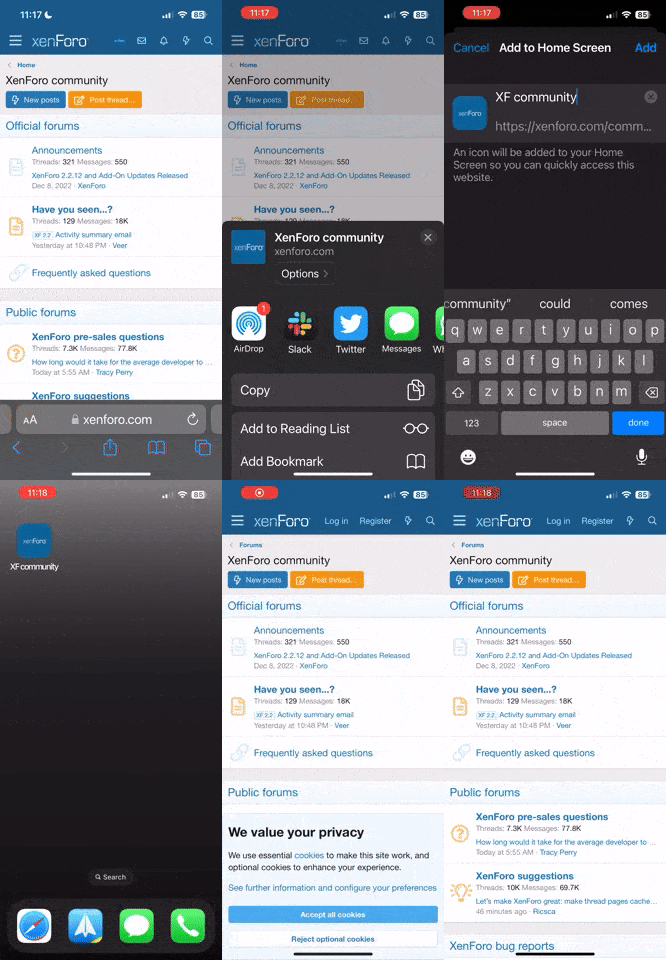
For those who were using it we recommend using our PWA App instead which is faster and does not have all the spam Tapatalk had. Below is a graphic showing how to add SatelliteGuys to your devices home screen. (While iOS is shown the process is mostly the same for Android.)
Thanks for your understanding.
For those who were using it we recommend using our PWA App instead which is faster and does not have all the spam Tapatalk had. Below is a graphic showing how to add SatelliteGuys to your devices home screen. (While iOS is shown the process is mostly the same for Android.)
Thanks for your understanding.
1 Replies
·
37 views

iJustine
Time for another AWESOME video from iJustine!
View: https://www.youtube.com/shorts/CnpUUseH5N0
Direct YouTube Link - Siri's NEW features...
The official iJustine Website's Website
Buy her book!
View: https://www.youtube.com/shorts/CnpUUseH5N0
Direct YouTube Link - Siri's NEW features...
The official iJustine Website's Website
Buy her book!
0 Replies
·
6 views

Staff member
HERE TO HELP YOU!
110 Replies
·
2671 views


Staff member
Pub Member / Supporter
Cutting Edge
The TPN Map Excel Presents all DIRECTV Channels:
Understanding the TPN Map
Making Sense of the TPN Map Display Conventions
National (50-States or wide/NAT+PR beams)
Local (Local-Into-Local or narrow/Spot beams)
Local (Local-Into-Local or narrow/Spot beams)
Additional tabs provide:
OTA the (Over-The-Air) Database
VOD (Video On_Demand) Records
Offline Records
Engr Records
Net Decoder a graphic presentation of all satellites and transponders
VOD (Video On_Demand) Records
Offline Records
Engr Records
Net Decoder a graphic presentation of all satellites and transponders
Domestic Satellites
@99W...... D11, D14
@101W.... D9S, D16
@103W.... D10, D12, D15
@110W.... D5
@119W.... D8
@99W...... D11, D14
@101W.... D9S, D16
@103W.... D10, D12, D15
@110W.... D5
@119W.... D8
See also
Understanding the TPN Map
Making Sense of the TPN Map Display Conventions
1968 Replies
·
908998 views

So I have recently setup Indoor OTA due to drop to Local from Dish, and found out reason why I have such bad signal is my Monitor now none of cable for my monitor near OTA or it cable going to TV, but the TV right above my Monitor maybe not even a foot.
If i have 3 to 2 bars with monitor off said channel for most part of perfectly watchable, but as soon my monitor is ON (show image of desktop or what ever) OTA going to TV halved that 3 to 2 bars become 1 and 2 if I lucky and channels start scrambling alot, and depending on what is being shown on monitor it might out right give no signal, and I can easily restore singal to being bad if change what show on monitor or bring back 3 to 2 bars if I turn monitor off or let it to to standby mode.
I have already disconnect every cable on TV except the OTA cable leaving just that so it not those cable. the Power cable for monitor and DP to DVI cable the monitor is using no where near that OTA cable either.
Any idea on how to fix this? moving my monitor isnt exactly an option neither is moving the tv and moving the OTA to other side room even with long cable dont fix this issue.
I have one those Leaf MoHu antennas 11x3 ones, I had same issue with one gateway mohu antennas the older one too
If i have 3 to 2 bars with monitor off said channel for most part of perfectly watchable, but as soon my monitor is ON (show image of desktop or what ever) OTA going to TV halved that 3 to 2 bars become 1 and 2 if I lucky and channels start scrambling alot, and depending on what is being shown on monitor it might out right give no signal, and I can easily restore singal to being bad if change what show on monitor or bring back 3 to 2 bars if I turn monitor off or let it to to standby mode.
I have already disconnect every cable on TV except the OTA cable leaving just that so it not those cable. the Power cable for monitor and DP to DVI cable the monitor is using no where near that OTA cable either.
Any idea on how to fix this? moving my monitor isnt exactly an option neither is moving the tv and moving the OTA to other side room even with long cable dont fix this issue.
I have one those Leaf MoHu antennas 11x3 ones, I had same issue with one gateway mohu antennas the older one too
14 Replies
·
309 views


Lifetime Supporter
EchoStar has filed with FCC for license and launch of the EchoStar 25 satellite at the nominal 110W slot.
------"At the nominal 110° W.L. orbital location, EchoStar is licensed to operate over 29 of the available 32 DBS channels (specifically channels 1-27, 29,and 31).3 Currently, EchoStar provides service over these channels from the 110° W.L. cluster utilizing the EchoStar 10, EchoStar 11 (in inclined orbit), and EchoStar 23 satellites; and from the 119° W.L. cluster utilizing the EchoStar 14 and EchoStar 15 satellites. EchoStar anticipates that EchoStar 25 will be ready for launch as early as the first quarter of 2026. EchoStar anticipates that EchoStar 25, a spot-beam satellite, will take over delivery of certain programming services from EchoStar 10 and 14. After launch and in-orbit testing ("IOT"),4EchoStar 25 will proceed directly to 110.0° ± 0.05° W.L. Once EchoStar 25 is placed into operation, EchoStar 10 will initially remain at 110.2° W.L. serving as an in-orbit spare and may ultimately be relocated subject to all appropriate Commission authorizations. EchoStar 14 will remain at the nominal 119° W.L. orbital location and serve as an in-orbit spare once EchoStar 25 begins service." -----
------"At the nominal 110° W.L. orbital location, EchoStar is licensed to operate over 29 of the available 32 DBS channels (specifically channels 1-27, 29,and 31).3 Currently, EchoStar provides service over these channels from the 110° W.L. cluster utilizing the EchoStar 10, EchoStar 11 (in inclined orbit), and EchoStar 23 satellites; and from the 119° W.L. cluster utilizing the EchoStar 14 and EchoStar 15 satellites. EchoStar anticipates that EchoStar 25 will be ready for launch as early as the first quarter of 2026. EchoStar anticipates that EchoStar 25, a spot-beam satellite, will take over delivery of certain programming services from EchoStar 10 and 14. After launch and in-orbit testing ("IOT"),4EchoStar 25 will proceed directly to 110.0° ± 0.05° W.L. Once EchoStar 25 is placed into operation, EchoStar 10 will initially remain at 110.2° W.L. serving as an in-orbit spare and may ultimately be relocated subject to all appropriate Commission authorizations. EchoStar 14 will remain at the nominal 119° W.L. orbital location and serve as an in-orbit spare once EchoStar 25 begins service." -----
79 Replies
·
7686 views

Staff member
HERE TO HELP YOU!
Cutting Edge
Sometimes a thread gets so many posts in it that is can cause issues for the server so that why today we introduce The Song Name Game Part 3!
So let the game continue!
The last song was added by Bobby who posted...
One Meat Ball - Andrews Sisters
CONTINUE ON AND HAVE FUN! WELCOME HOME TO SATELLITEGUYS.US!
Here are the original rules for the game as posted by WebbyDude back in 2006. http://www.satelliteguys.us/threads/68645-Song-Name-Game
Just name a song title and the band who performed it. The next person does the same thing, but needs to list a song title or band name which includes a word from the previous entry. Pick songs from any genre.
Example:
Long Live Rock and Roll -- Rainbow
Rainbow in the Dark -- Dio
Another example:
Ride the Lightning -- Metallica
Lightning Strikes -- Ozzy Osbourne
Get it?
An additional note: we all know that song titles, sometimes, use profane words. Because this is a family friendly website it is advised that you clean up that title up a bit. This is accomplished by using something like sh!t instead of the real word. Thanks....
So let the game continue!
The last song was added by Bobby who posted...
One Meat Ball - Andrews Sisters
CONTINUE ON AND HAVE FUN! WELCOME HOME TO SATELLITEGUYS.US!
Here are the original rules for the game as posted by WebbyDude back in 2006. http://www.satelliteguys.us/threads/68645-Song-Name-Game
Just name a song title and the band who performed it. The next person does the same thing, but needs to list a song title or band name which includes a word from the previous entry. Pick songs from any genre.
Example:
Long Live Rock and Roll -- Rainbow
Rainbow in the Dark -- Dio
Another example:
Ride the Lightning -- Metallica
Lightning Strikes -- Ozzy Osbourne
Get it?
An additional note: we all know that song titles, sometimes, use profane words. Because this is a family friendly website it is advised that you clean up that title up a bit. This is accomplished by using something like sh!t instead of the real word. Thanks....
67090 Replies
·
2661927 views


iJustine
Time for another AWESOME video from iJustine!
View: https://www.youtube.com/shorts/ZEPwG0kIRw0
Direct YouTube Link - A CONFUSING COLLAB
The official iJustine Website's Website
Buy her book!
View: https://www.youtube.com/shorts/ZEPwG0kIRw0
Direct YouTube Link - A CONFUSING COLLAB
The official iJustine Website's Website
Buy her book!
0 Replies
·
12 views
TWiT Tech Podcast Network
Time for another AWESOME video from the TWIT Network!
View: https://www.youtube.com/watch?v=ELuwScOC8hc
Direct YouTube Link - Apple's New Parental Controls
TWIT's Website
TWIT Live Feed
View: https://www.youtube.com/watch?v=ELuwScOC8hc
Direct YouTube Link - Apple's New Parental Controls
TWIT's Website
TWIT Live Feed
0 Replies
·
13 views