

Social Feed

Hey Guys, Been a while since I posted. I did not find a similar post for the FS1 and DTV dishes.
This Spring I found a great sale on a 50 inch flat screen smart (Roku) TV that was under $400 before taxes.
So wife agreed it was time to make the big leap and move up from SD tv to HD TV !
Now I am trying to use my F S meter to align the SL3 SWM dish. Searching the 'net, I found a link on the F S site to the custom parameters that I need to load into my meter for sats at 99,101,& 103. Some say I only need to look at sat 101 and do the peaking by the 'dither method'. I understand that the two Ka sats at 99 and 103 have a very
narrow window. Aprox 1 degree as compared to the Ku sat with nearly 3-5 degrees.
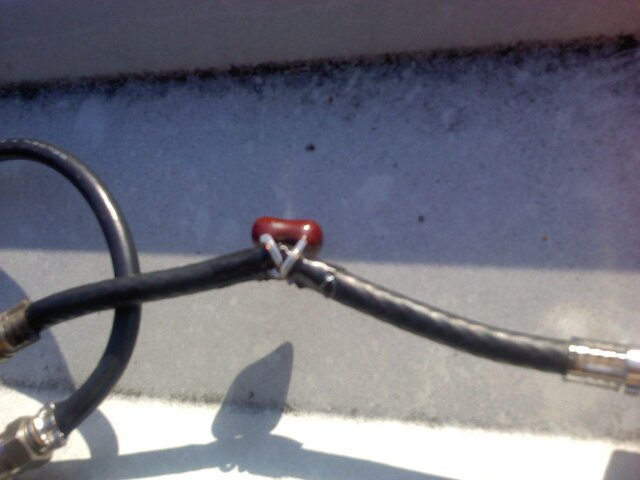
On the F S website, they claim I need to use DTVs alignment tool "ASL-1" which I see is no longer in stock on Amazon. eBay has two sellers as of this date. When I try to use the SWM DC pass thru splitter with the DTV power insertion module, the other port is a direct short to the power coming from the meter.
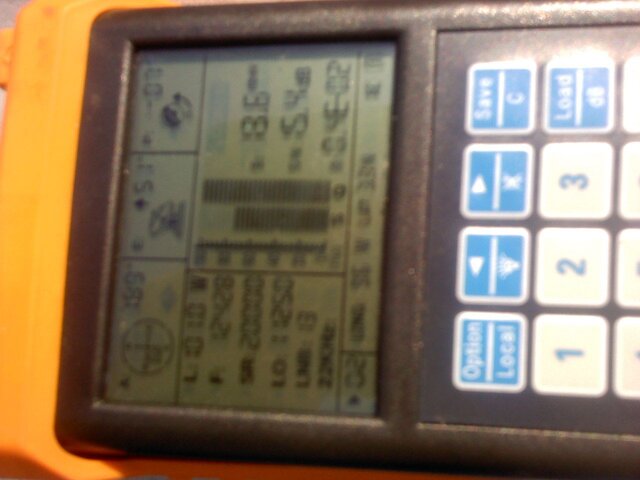
Bottom line: I have not been able to get any reliable reading from sat 101, regardless If I use the PI and splitter method, or if I try to power the SWM LNB directly from the F S meter.
F S link to aligning DTV: and using a DC pass thu splitter
http://firststrikemeters.com/fs-support/fs1-frequently-asked-questions/#asl-1
Known DSS transponders:
http://firststrikemeters.com/fs-support/confirmed-dss/
DirecTV 4S/8 at 101.0W
I did contact the seller on eBay about the ASL-1 splitter and if I could use it on the sats 99 or 103 and he
replied that It only would work with sat 119.
Ok, that is about it. My main goal is to be able to get a quality signal on sat 101 so I can perform DTVs
"dither method' of peaking my slimeline SL3 dish.
Regards, Doug
This Spring I found a great sale on a 50 inch flat screen smart (Roku) TV that was under $400 before taxes.
So wife agreed it was time to make the big leap and move up from SD tv to HD TV !
Now I am trying to use my F S meter to align the SL3 SWM dish. Searching the 'net, I found a link on the F S site to the custom parameters that I need to load into my meter for sats at 99,101,& 103. Some say I only need to look at sat 101 and do the peaking by the 'dither method'. I understand that the two Ka sats at 99 and 103 have a very
narrow window. Aprox 1 degree as compared to the Ku sat with nearly 3-5 degrees.
On the F S website, they claim I need to use DTVs alignment tool "ASL-1" which I see is no longer in stock on Amazon. eBay has two sellers as of this date. When I try to use the SWM DC pass thru splitter with the DTV power insertion module, the other port is a direct short to the power coming from the meter.
Bottom line: I have not been able to get any reliable reading from sat 101, regardless If I use the PI and splitter method, or if I try to power the SWM LNB directly from the F S meter.
F S link to aligning DTV: and using a DC pass thu splitter
http://firststrikemeters.com/fs-support/fs1-frequently-asked-questions/#asl-1
Known DSS transponders:
http://firststrikemeters.com/fs-support/confirmed-dss/
DirecTV 4S/8 at 101.0W
- 12355/20000/18 FS1 shows S/Q, does not show LOCKED
- 12428/20000/13 FS1 shows S/Q, does not show LOCKED
- 12501/20000/18 FS1 shows S/Q, does not show LOCKED
- 12545/20000/13 FS1 shows S/Q, does not show LOCKED
I did contact the seller on eBay about the ASL-1 splitter and if I could use it on the sats 99 or 103 and he
replied that It only would work with sat 119.
Ok, that is about it. My main goal is to be able to get a quality signal on sat 101 so I can perform DTVs
"dither method' of peaking my slimeline SL3 dish.
Regards, Doug
11 Replies
·
4857 views





TWiT Tech Podcast Network
Time for another AWESOME video from the TWIT Network!
View: https://www.youtube.com/shorts/oRVxjGm0qtE
Direct YouTube Link - Tim Cook, Elton John & King Charles: A Royal Tech Event
TWIT's Website
TWIT Live Feed
View: https://www.youtube.com/shorts/oRVxjGm0qtE
Direct YouTube Link - Tim Cook, Elton John & King Charles: A Royal Tech Event
TWIT's Website
TWIT Live Feed
0 Replies
·
0 views
TFLEV
Time for another AWESOME video from TFL Electric Vehicles!
View: https://www.youtube.com/watch?v=MyF_RH1m0mc
Direct YouTube Link - Watch the New Tesla Roadster Jump, Fly and Barrel-Roll in Mid-Air!
View: https://www.youtube.com/watch?v=MyF_RH1m0mc
Direct YouTube Link - Watch the New Tesla Roadster Jump, Fly and Barrel-Roll in Mid-Air!
0 Replies
·
6 views
TWiT Tech Podcast Network
Time for another AWESOME video from the TWIT Network!
View: https://www.youtube.com/shorts/0k5iT-OlpdE
Direct YouTube Link - The Apple HomeView
TWIT's Website
TWIT Live Feed
View: https://www.youtube.com/shorts/0k5iT-OlpdE
Direct YouTube Link - The Apple HomeView
TWIT's Website
TWIT Live Feed
0 Replies
·
1 views

Pub Member / Supporter
2 Replies
·
54 views


I thought I would come here and find lots of complaints about the update to the dish anywhere mobile app, but am not seeing any. It used to look just like the desktop webpage. Now you can no longer filter by sports channels or movie channels. Plus that they made it look like a big button telephone and you see fewer channels in the screen which requires more scrolling. Yes I realize you can look at sports then select which sport you want to look at, I just liked being able to see all sporting events in the guide with all other channels being filtered out. Am I alone in the wilderness on this?
3 Replies
·
51 views


Anyone else watch this show? Any guesses as to what was in the box Gibbs gave to Abby that was on her desk? It look liked it was glowing.
I also heard that someone was leaving the show at the end of this season. Any guesses as to who thats going to be?
I also heard that someone was leaving the show at the end of this season. Any guesses as to who thats going to be?
2132 Replies
·
214683 views


 Tony is not serious enough for me. Parker is too close to the team and Tim is too young to take over IMO.
Pub Member / Supporter
Lifetime Supporter
Might be worth a watch when it comes out. Looks like typical big corp against the little guy movie BUT....there is a reason this plot type is so oft repeated, it draws audiences.
View: https://www.youtube.com/watch?v=_-f9OGsKHd4
View: https://www.youtube.com/watch?v=_-f9OGsKHd4
1 Replies
·
10 views

Lifetime Supporter
If you're going try to read / listen to the book (can't recommend the audio book enough) before this comes out, I'd avoid trailers.
Trailer below, spoiling it to make sure you read the above bold message first. The book / audio book are fantastic. Go into this blind if you can IMO!
Kind of disappointed at how much they show. A lot still to see, but man, some good reveals in the book that are just served up here.
Trailer below, spoiling it to make sure you read the above bold message first. The book / audio book are fantastic. Go into this blind if you can IMO!
Kind of disappointed at how much they show. A lot still to see, but man, some good reveals in the book that are just served up here.
21 Replies
·
714 views


Lifetime Supporter
Schedule drops tomorrow. Mandatory mini camps in June. Hall of Fame game August 6th.
110 Replies
·
1618 views



Pub Member / Supporter
Lifetime Supporter
I had quit watching this show years ago because I ended up more annoyed than entertained. Well......I'm STILL more annoyed than entertained. I DO find it interesting to see how things work behind the scenes at many businesses. What annoys me is how utterly out of touch CEOs are with the companies they run. At the end of almost every episode the head of the company is amazed at how hard the employees have to work and many times have to work around impossible guidelines set forth from headquarters.
I found this one interesting because the new CEO had big plans for this company, Muscle Maker Grill, and it looked like the stores were all pretty busy. Recent history hasn't been good to this company however. I bet the covid lockdowns were the real killer.
View: https://www.youtube.com/watch?v=yIhZm0qkz0o
I found this one interesting because the new CEO had big plans for this company, Muscle Maker Grill, and it looked like the stores were all pretty busy. Recent history hasn't been good to this company however. I bet the covid lockdowns were the real killer.
View: https://www.youtube.com/watch?v=yIhZm0qkz0o
0 Replies
·
9 views