

Social Feed

Bob Haller
Supporting Founder
Last reply · posted in DISH Network Support Forum
Really wierd, and a first for my 522. It froze while playing back a show today.

On another note I bought another one, for 157 bucks including delivery off e bay, brand new never activated.

despite this glitch we really like the 522

reboot fixed it...
4 Replies · 1383 views
J
My 522 has done this twice recently. once watching live TV and once watching a recording.
The latest S/W has been the worst yet for my 522
GaryPen
Bob Haller said:
despite this glitch we really like the 522

reboot fixed it...
As a long time 721 user, how would you compare the 522?
P
Mine did that many times on recorded shows. The hard drive would start clicking, too. I finally got tired of it and returned it to Dish, got a replacement. So far, so good.

Both had version 253, but the one I replaced I had for almost a year and this problem started occuring a few software versions before it. I don't think it was the software, I think the hard drive was hurting.
McDish
The 522 had issues of this sort and were replaced with the 625. Try upgrading your software but I believe it is a harddrive issue more than anything.
primestar31
Pub Member / Supporter Lifetime Supporter
· posted in SatelliteGuys Classifieds
Cheap, just the battery. Working or not.

Anybody got anything they'd just as soon get rid of? They look like this:

874261052_2219548755262613_2425957638909156569_n.webp
0 Replies · 4 views
osu1991
Pub Member / Supporter
Last reply · posted in The Chit Chat Club
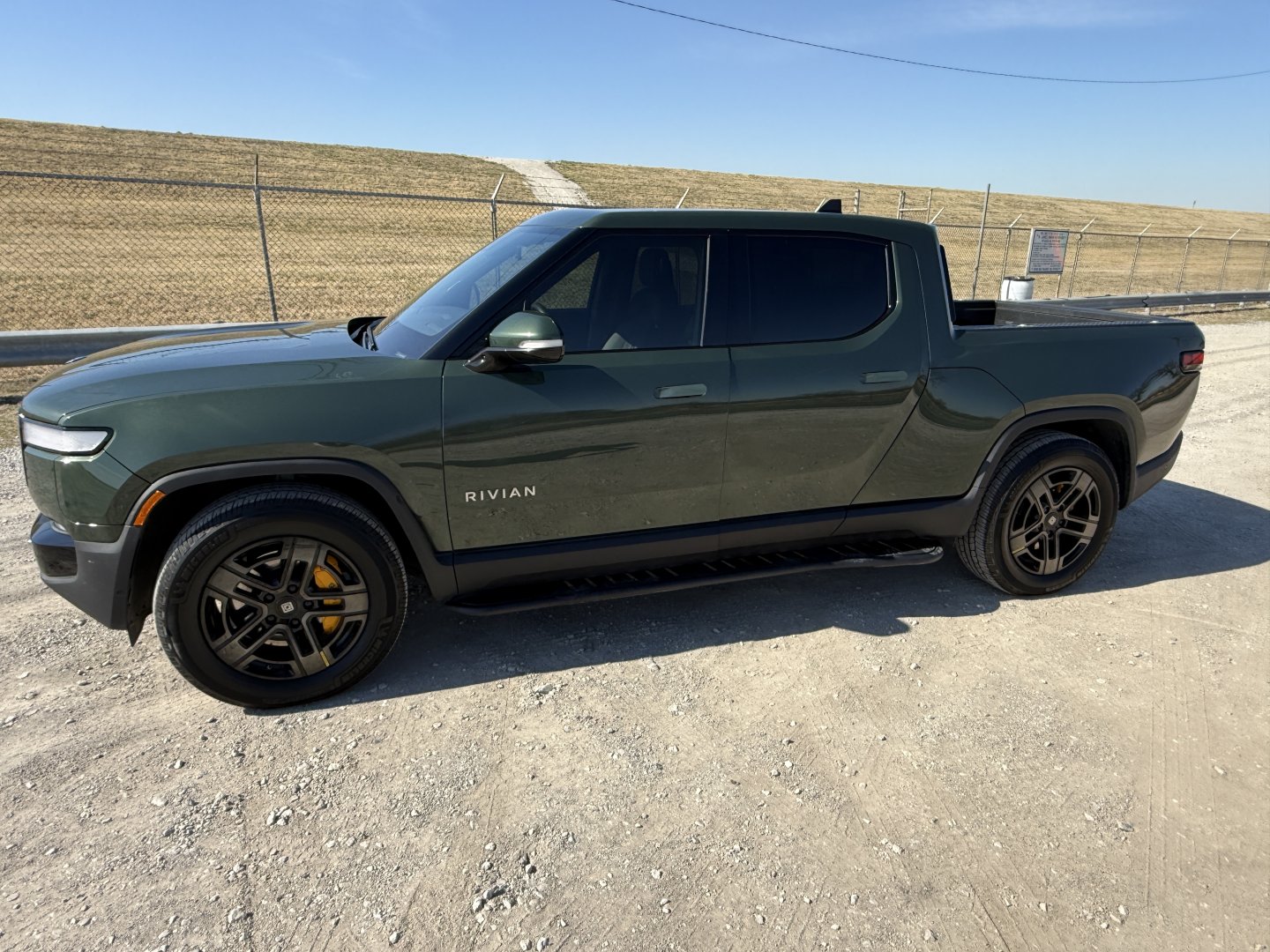
Razor Crest arrived today.
Quad motor, Large pack, Forest Green exterior, Black Mountain Dark Ash interior.
IMG_0689.jpeg
45 Replies · 768 views
T
But it's there for every mile driven, only adding to what is perhaps an EV's largest weakness- its weight. There has to be a much lighter-weight alternative to provide for a better road jack.
Bobby
But it's there for every mile driven, only adding to what is perhaps an EV's largest weakness- its weight. There has to be a much lighter-weight alternative to provide for a better road jack.
Keep in mind that the jack has to lift and hold up that heavy car. The jack has to made of materials that are capable of having enough strength to lift that vehicle without folding in on itself...
T
Certainly that's a given, as EVs aren't light. The jacks provided by mfr's are typically somewhat marginal as to stability, etc., being designed and intended only for emergency use. Again (admittedly without researching) I would have to believe that there are aftermarket "upgrades" to the factory jack that provide better stability and ease of use without adding a lot of weight, such as construction with lightweight metals.
osu1991
It was the one recommended by many owners as were the pucks. It's a 7700lb vehicle. The extra weight is negligible compared to how much that spare wheel and tire weighs
  • Like
Reactions: Foxbat
osu1991
Mobile service came by and replaced the rfid receiver in the door and re-paired everything. Took about an hour. Everything working well now. Hopefully I'm good now for a couple of years. Probably get a new one right before I plan to retire.
  • Like
Reactions: meStevo
M
Last reply · posted in DISH Network Support Forum
I have Dish with Hopper3. I choose to get local channels OTA and had a "guide list" established at my previous home. Having moved a few miles away, I wanted to update the list by appending a couple new stations via a rescan. As many would know, some stations come in with the UHF/VHF antenna aimed in one direction, while others come in better with a different direction.

Unfortunately, when a scan is done (bringing in 25-30 stations for that particular antenna aim), the dialog screen does not present the established guide list; it presents an empty field to the right that the scanned stations may be selected one by one and added to the empty guide. But because of antenna aim, some stations originally saved are missing, and would have to be retrieved with a different antenna aim. But as I explain, if a 2nd​ scan is done with a different antenna aim, the stations saved from the first scan are lost.

It troubles me that Dish didn't develop software that would allow a user to simply append only 1 or 2 channels to the established list. :mad:

Any thought on this? Has anyone experienced this or heard of this from others?
7 Replies · 259 views
M
To Dishstaller, I appreciate your compliment. That was an epic SNL skit !!

To RVvaquero, I appreciate your coments but everything you mention has been considered:

Firstly, I use OTA very rarely - mainly for sporting events.
Secondly, I'm well aware that, since certain channels may scan from one directon while others from another directions, and remembering the difference, for certain stations I will point the antenna in a suitable direction. Some stations come in for almost any direction. In my original list (which has now been discarded), I had about 18 OTA stations and all of them were scanned from the same antenna direction. Even so, the Dish receiver was very particular about ABC (local KOAT 007-01). In the new geographic setting, it gets KOAT easier. Several months ago, due to a contract dispute, CBS (formerly local KRQE on 013-01) was dropped; it hooked up with KOAT as KOATCB (007-04) which is the one station I really needed. But I had to rescan to get it ...

All of ths points to the flaw in Dish's OTA software that prevents scanned stations from simply being appended to a master saved list. The user should be left to manage antenna pointing per OTA station since in many areas (like mine), they don't all come in from the same direction.
Bobby
To Dishstaller, I appreciate your compliment. That was an epic SNL skit !!

To RVvaquero, I appreciate your coments but everything you mention has been considered:

Firstly, I use OTA very rarely - mainly for sporting events.
Secondly, I'm well aware that, since certain channels may scan from one directon while others from another directions, and remembering the difference, for certain stations I will point the antenna in a suitable direction. Some stations come in for almost any direction. In my original list (which has now been discarded), I had about 18 OTA stations and all of them were scanned from the same antenna direction. Even so, the Dish receiver was very particular about ABC (local KOAT 007-01). In the new geographic setting, it gets KOAT easier. Several months ago, due to a contract dispute, CBS (formerly local KRQE on 013-01) was dropped; it hooked up with KOAT as KOATCB (007-04) which is the one station I really needed. But I had to rescan to get it ...

All of ths points to the flaw in Dish's OTA software that prevents scanned stations from simply being appended to a master saved list. The user should be left to manage antenna pointing per OTA station since in many areas (like mine), they don't all come in from the same direction.
As rvvaquero mentioned, you are in a very small population who actually need to move their antenna to receive various TV channels. There are a few reasons why it is not advantageous for Dish to do what you are asking for. First and primary, there are anomalies in the software that can cause issues when you have scanned channels in the mix that have little or no signal. You get error pop ups and cannot watch any channel, OTA or satellite. I have seen these even with my antenna pointed to one direction. Second, you are asking Dish to adapt their software to your needs while the very vast majority don't need that. This is an expense that everyone is going to have to pay for while few gain any advantage.

Have you thought about adding a second antenna so that you are pointing at both directions to fulfill your needs. There are ways to do this and it would fulfill your individual need.

Foxbat
Televes makes an antenna signal combiner that will support two three different antennas pointing towards two different locations, and has filters to drop the signals from the channels that interfere with the 2nd antenna channels. This produces a signal that would contain all your receivable channels in one feed. It would probably cost less than a single antenna on a rotor controlled by a smart box that would relocate the antenna mast towards the TV station you wanted to tune in, plus it's instantaneous, without waiting for the antenna to slew towards its target.

Why Choose the Televes SmartKom?

SmartKom combines filtering, combining, and amplification in one outdoor preamplifier. Its three inputs and 32 programmable digital filters allow installers to select, combine, and level channels from different antenna sources, while the included ASuite app supports both automatic and advanced Bluetooth programming.

Key Benefits

  • Three VHF/UHF antenna inputs
  • 32 programmable digital channel filters
  • Automatic channel scan, filtering, and level balancing
  • Advanced per-channel programming through the ASuite app
  • Bluetooth programming through the included power supply interface
  • Automatic gain control on each filter
  • LTE/5G out-of-band filtering
  • Compatible with HDTV, UHD 4K, and supported ATSC 3.0 signals
  • Configuration retained after power loss
  • 12V, 750mA power supply included
M
I appreciate your sentiments, Bobby but as a professional programmer for many years, a hallmark of good programing is robustness – anticipating user needs and, where practicable, adding the necessary coding structure. Knowing that Dish must have understood the nuances of antenna directionality on signal strength, it seems that an accommodation could have been made to append direction-dependent stations. Though I haven't seen the code, it would not have taken a lot of effort to make that accommodation. And as to you point about "First and primary, there are anomalies in the software that can cause issues when you have scanned channels in the mix that have little or no signal. You get error pop ups …", if a rogue station causes the issues you described, it can easily be removed.

Another hallmark of good programming is documentation. Dish decided not to release any documentation on the OTA process for users. A key part of such documentation would have been an explanation that when a rescan is performed and new stations are saved, the original OTA list is overwritten. This could have even been done with an onscreen dropdown warning. That would prevent users from finding this out the hard way.

Finally. piggybacking on RVvaquero's comment about the "remote control issue", I should add that I am having a similar issue. Ever since I used the Pairing Wizard to tailor control for my Samsung TV, I find that it sometimes takes not 1, not 2, but 3 presses of the On/Off button (several minutes apart) to finally kill the TV. This is kinda maddening and, as with OTA function, not discussed in any Dish documentation I've seen
Almighty1
Good points MorCowbell - All they had to do was add a few more options including the existing, I don't remember the exact names:
1) Scan/Re-scan and it will ask if one wants to overwrite database aka delete first or add to existing database
2) View existing database and add or delete manually
3) Save Database
4) Restore Database
  • Like
Reactions: charlesrshell
Bobby
Supporting Founder Lifetime Supporter
Last reply · posted in DISH Network Support Forum
This is a thread that will keep you apprised of 4K events that will be showing on Dish channel 540. Keep looking here for information.

As of today, 9-27-17, there are no scheduled events posted for the next 2 weeks. That is subject to change on a daily basis.
771 Replies · 168683 views
Bobby
MLB, Brewers at Rays, Tuesday 10-27, 5PM PDT, Channel 148-01.
  • Like
Reactions: charlesrshell
Bobby
CFB, Florida vs Georgia, Saturday 10-31, 12:30PM PDT, Channel 148-03.
  • Like
Reactions: charlesrshell
Bobby
CFB, Wisconsin at Iowa, Saturday 10-31, 9AM PDT, Channel 148-01.
CFB, Arizona St at BYU, Saturday 10-31, 12:30PM PDT, Channel 148-01.
  • Like
Reactions: charlesrshell
Bobby
CFB, Alabama at LSU, Saturday 11-7, 12:30PM PST, Channel 148-03.
Bobby
CFB, UCLA at Minnesota, Saturday 11-7, 9AM PST, Channel 148-01.
CFB, Iowa at Northwestern, Saturday 11-7, 4:30PM PST, Channel 148-01.
  • Like
Reactions: charlesrshell
zippyfrog
Pub Member / Supporter Lifetime Supporter
Last reply · posted in DISH Network Support Forum
Over the past year I have been tracking the changes on Western Arc. The past 3 months have had a lot of changes that I posted in the other MPEG2 Western Arc shutdown thread. Now that 129 is (basically) out of commission, here is where Western Arc stands. This is just a national channel list, (no local channels) based off what I can see and what others have contributed. Thanks to everyone who has helped me come up with the locations of some of the channels – I would try and list all of you out, but I know I would forget someone! As has been suggested in other parts of the forum, it would be great to collect the spotbeam data for those who could contribute!

A couple of pieces of info:
  • Out of the 64 transponders between 110/119, there are currently 50 transponders that Dish is licensed to use. 22 are Spotbeams, 28 are ConUS transponders (14 transponders are licensed to DirecTV and Dish doesn't have access to them)
  • Those 28 ConUS transponders are divided as follows:
    • 10 are dedicated to National HD channels (ESPN, CNN, Disney Channel, etc). Dish is maxing out at 16 HD channels per transponder (note – in an earlier post I said there was one transponder with 17 HD channels, that was an error on my part. When I double checked my listings, one channel changed transponders). Before the transition, there was a maximum of 14 HD channels per transponder.
    • 1 transponder is dedicated to adult content
    • 2 are a mixture HD PPV Movies/4k channels
    • 3 are set aside for HD Sports channels that are only on for live games (NBA League Pass, the PAC 12 alternate channels, some PPV events, etc); 3 SD PPV Sports Channels are there as well.
    • 7 are for SD and/or music channels. Dish is maxing out at 26 SD channels per transponder thus far on the SD transponders.
    • 5 transponders on 110 I have no channels listed but Dish operates. (they are labeled as ConUS on my chart below) There are other things that could be on those transponders, like RV Distant Networks, internal testing channels, etc, that I can't see. They might be able to be used for additional content, but I am not sure exactly what is on those transponders.
There are two transponders that have lower than normal SD channels – 110, TP 21 and 119, TP 19. Previously those transponders contained the programming guides that get downloaded from the satellite when the receivers download EPG. I assume that is where the programming guides are still downloaded from, thus less channels there.

When I talk about number of channels on a transponder, all my numbers are unique channels – for example, channel 101 and 199 are the same channel mapped to two different numbers, but in terms of space, only takes up 1 channel worth of bandwidth on the transponder.

Finally, I have to give Dish a ton of credit. When it was 110/119/129, Dish had 82 transponders they were using – it took a lot to get it down to 50 transponders and figure out where all the pieces were going to go. What are the things they did to get there? Here are the things I saw:
  • During this migration from 129, Dish converted 7 ConUS transponders on 119 into Spotbeams – that is how they ended up fitting on all the HD locals that used to be on 129. (for those interested, TP 6, 7, 8, 9, 10, 11, 13 are the ones that used to be ConUS on 119 that are now Spotbeam)
  • Removed almost all SD duplicate channels that are offered in HD
  • Converted remaining SD channels from MPEG2 to MPEG4
  • There are also 2 subtle things that changed from the HD channel perspective
    • At the beginning of the transition, Dish decreased the number of PPV Movie channels – prior to this transition the PPV channels HD PPV movies were 502-522; now they are 502-517.
    • At the beginning of April when MLB, NBA, and NHL regular seasons were all going on at the same time and this transition began, there were a ton of games "joined in progress" for the HD feeds. That wasn't common since the days before the full time HD RSN's. The reason for that was prior to the transition, Dish had 4 transponders set aside for HD Sports – 2 transponders was the bandwidth set aside from the HD RSN's before Dish dropped the RSN's, then 2 transponders were for alternate channels. Now we are down to 3 transponders for HD sports.
248 Replies · 65851 views
zippyfrog
Today Dish brought back it's traditional Halloween Dish Scape on 303. It is on 119, TP 20. Clearly this is just a temporary channel and will be removed in November, so I am not including it on the channel list right now.
zippyfrog
With the extra hour I had this morning, I updated the listings. Another month has passed, and nothing has moved off 110 to 119 for the national channels. I really thought those handful of transponders on 119 would have been populated with the national channels from 110, but no change.

Can someone who has a Hopper tell me if the 4k channels are still on 110 and if so, what transponder?
  • Like
Reactions: charlesrshell
Bobby
With the extra hour I had this morning, I updated the listings. Another month has passed, and nothing has moved off 110 to 119 for the national channels. I really thought those handful of transponders on 119 would have been populated with the national channels from 110, but no change.

Can someone who has a Hopper tell me if the 4k channels are still on 110 and if so, what transponder?
They appear to be on 110, transponder 8.
zippyfrog
They appear to be on 110, transponder 8.
Thanks! I do have my listing correct then.
zippyfrog
Dish has officially removed all the locals from 119 and they are all on 110 now. TP 02, 04, 06, 08, 10 were all functioning as Spotbeams as of last week, but now they are ConUS.

This means all 21 transponders that Dish has access to at 119 are now ConUS.
  • Like
Reactions: charlesrshell
BlackHitachi
Supporting Founder
Last reply · posted in Movie Talk
Since the Reds have there thread we should too!

Last watched Nine inch Nails
Next 3:10 to Yuma
5395 Replies · 511537 views
dfergie

Last of the Dogmen is my favorite of hers.
  • Like
Reactions: osu1991
osu1991
Star Wars Despecialized Edition

IMG_0803.webp
  • Like
Reactions: dfergie
J
Last reply · posted in DISH Network Support Forum
I've had a H3 receiver for years but just recently began watching and recording 4k content. I'm consistently having the display revert to the upper left quarter of the screen after fast forwarding or pausing the playback of 4k recordings.

Some research I've done blames it on the Hopper as not having the processing power to quickly shift between the FF or pause playback formats and it leaves the playback device in a mode thinking that it's no longer receiving a 4k stream. So it displays the 1/4 image.

I've found that I can quickly recover back to a full screen 4k display by using the remote sequence Pause / Info / Resume.

I've tested this on two different monitors, but they're both LGs, so maybe it's the TVs, and not the Hopper? Is this a known problem? Anyone else experience this?
3 Replies · 160 views
navychop
I had similar problems when I had an H3. Not sure what triggered it. I don't think it was for 4K though, as I don't follow sports and what else has Dish put on in "4K?"

Sony UHD TV and Sony UHD player (no 1/4 there).

I think I was cycling power to work around it.
S
might be a bad hopper. no issues here with my hopper with the 4k. you might want to swap it and see if that helps.
  • Like
Reactions: charlesrshell
Almighty1
It might have nothing to do with the Hopper at all.

might be a bad hopper. no issues here with my hopper with the 4k. you might want to swap it and see if that helps.

That should always be a last resort.

Per Google Search AI:

No, his Hopper 3 is likely not defective hardware, and replacing the box itself may not completely fix the issue. [1]
The "real" solution to this problem lies in addressing a classic HDMI Handshake / EDID timing mismatch between the Hopper 3 and his LG TVs. When the Hopper drops out of trick-play (fast-forward or pause), the sudden timing shift in the 4K video stream confuses the TV. Because 4K is exactly four times the resolution of 1080p, the LG TV misinterprets the sudden frame changes and maps the image to a raw 1:1 pixel grid, which physically shrinks the 1080p/4K transition frame into exactly one-quarter of the 4K panel. [1]
The permanent solution requires stabilizing that HDMI connection so the TV doesn't lose the handshake:

1. The Real Fixes (Hardware Setup)
  • Upgrade the HDMI Cable: The Hopper 3 requires high bandwidth for 4K. If he is using an older HDMI cable, it can cause lagging handshakes. He should replace it with a certified Ultra High Speed HDMI (HDMI 2.1) cable, even though the Hopper doesn't output 2.1, because the higher shielding prevents signal dropouts during resolution changes.
  • Toggle LG Ultra Deep Color / HDMI Enhanced: On LG TVs, go to Settings > General > Devices > HDMI Settings and ensure HDMI Ultra HD Deep Color (or "Enhanced Format") is explicitly turned ON for the specific port the Hopper is plugged into. This forces the TV port to strictly expect high-bandwidth 4K signals.
  • Bypass or Add an Audio Receiver/Soundbar: If the Hopper is plugged into a soundbar or AVR first, plug the Hopper directly into the TV to eliminate a middle-man handshake failure. If it is already direct, sometimes putting a cheap, powered HDMI 2.0 splitter or handshake manager (like a Dr. HDMI device) between the Hopper and the TV forces a permanent EDID lock, completely solving the issue.

2. Software Fixes
  • Hard Reset: A standard software glitch can cause this. Unplugging the Hopper 3 from the wall for at least 60 seconds clears the HDMI cache. [1]
  • Dish Firmware Updates: Because other users note they can watch 4K on a Hopper 3 without this glitch, his specific TV firmware or Hopper software version might have a minor bug. Ensuring both devices are fully updated is critical. [1]


If he implements a brand-new high-quality cable and correctly configures the LG HDMI settings, the TV will adapt instantly to the fast-forward stream shifts without dropping the image into a 1/4 window. [1]
  • Like
Reactions: charlesrshell
TWiT Tech Podcast Network
· posted in TWiT Tech Podcast Network
0 Replies · 3 views
Scott Greczkowski
Staff member HERE TO HELP YOU! Cutting Edge
Last reply · posted in The Chit Chat Club
Sometimes a thread gets so many posts in it that is can cause issues for the server so that why today we introduce The Song Name Game Part 3!

So let the game continue!

The last song was added by Bobby who posted...

One Meat Ball - Andrews Sisters

CONTINUE ON AND HAVE FUN! WELCOME HOME TO SATELLITEGUYS.US!

Here are the original rules for the game as posted by WebbyDude back in 2006. http://www.satelliteguys.us/threads/68645-Song-Name-Game

Just name a song title and the band who performed it. The next person does the same thing, but needs to list a song title or band name which includes a word from the previous entry. Pick songs from any genre.

Example:

Long Live Rock and Roll -- Rainbow

Rainbow in the Dark -- Dio

Another example:

Ride the Lightning -- Metallica

Lightning Strikes -- Ozzy Osbourne


Get it?


An additional note: we all know that song titles, sometimes, use profane words. Because this is a family friendly website it is advised that you clean up that title up a bit. This is accomplished by using something like sh!t instead of the real word. Thanks....
68722 Replies · 2683806 views
  • Like
Reactions: c-spand
harshness
Because the Night - Patti Smith Group
gms49ers
Fly By Night - Rush
  • Like
Reactions: long_time_Dish
Bobby
Last Dollar (Fly Away) - Tim McGraw
long_time_Dish
Miles Away - Jackson Browne
sdfntx
Away From You - Gerry and the Pacemakers
meStevo
Lifetime Supporter
Last reply · posted in The Sports Section
Schedule drops tomorrow. Mandatory mini camps in June. Hall of Fame game August 6th.
130 Replies · 2634 views
  • Like
Reactions: Jimbo and dfergie
meStevo
Got to unfurl and hold the flag at Allegiant for the anthem today - amazing experience.
HipKat
Balls
Bears. Gave the Pats a good beatdown.
Bucs. Got Baker back and absolutely demolished the previously surprising Panthers.
Falcons. Took care of the 49ers and did so convincingly.
Vikings. I hate them. I do. I've never seen such a bad/good team. Know what I mean? I know their D is epic. But their O is insulting. How they remain undefeated is a mystery.
Rams. Finally looked the part. Mind you against the hapless Cards.
Cowboys. Fireworks performance from their O.
Dolphins. Finally logged in a W. There won't be many. Enjoy it, Miami fans.
Browns. Still atop the AFC North.
Giants. Epic OT win with Buffalo's very own Motor Singletary finishing it off.
Seattle. Dominated KC from start to finish.

Goats
Jets. Couldn't beat the winless Dolphins. Aaron Glenn is a dead man walking.
Eagles. Injured beyond repair
Ravens and Lamar. Has he ever played a full season? Honestly, dude is fragile. Of course he's back for the Bills game.
49ers. No longer undefeated.
Colts. A sh*t show. When are they gonna realize that Daniel Jones is ass?
Steelers vs Saints game. Ass, just ass all around. Those poor people in Paris have had enough lately, and on top of that, endure that game.
Chiefs. They looked terrible. Like really bad.
Pack vs. Detroit game refs. Some of the worst refereeing I've seen in a long time. And the sample is pretty large.
HipKat
Balls
Bears. Took care of the elite Seahawks defense in a great performance.
NFC North. The entire division is 2 games above .500
Lions. Finally handed an L to that weird Minnesota team. Good vibes for Jack Campbell.
Pitt. Took the lead of the division convincingly.
Bengals vs Titans game. Fireworks game. Not sure it was a well-played game, but it sure was fun. JoeyB with 6 scores... and 4 turnovers.
Denver. They keep winning, man. Payton is a baller of a coach.
Packers. Thorough beatdown of the hard-to-read Panthers.
Jags. Demolished the hapless Colts.
Rams. The Super team finally wins back-to-back games.


Goats
Vikings. Took their first L. I know their D is insane, but their offense is setting back football to the 1950's.
Cowboys. Lost a 2-score lead vs. the Gardner Minshew-led Cards... at home. Embarrassing.
Browns. Playing for the division lead by scoring 6 points.
Bucs vs Falcons game. Setting modern football back to the ice age. Honorable mention to Tua Penix err ... Michael Tagov .... well, you know what I mean.
Bengals fans acting like Burrow just won the MVP after his performance. I get it. 6 scores is awesome. But. He also turned the ball over 4 times and required overtime to beat the 1-win Titans. So spare me the parade.
Chiefs. Not because they lost. It was a close game decided on the last play vs. a divisional rival on the road. That's always rough. But because of their whining over the CLEAR flag they got on the would-be winning play. They are used to getting the calls, and when they don't, they complain. Honorable mention to Mahomes for this quote: "I mean, at the end of the day, you have to go with whatever is called, but a lot of times in those big moments, the little stuff doesn't get called like that"... so you admit it was a penalty?? Just shut up, man.
Colts. They began the fire sale earlier in the week, and it showed. This team is cooked; Daniel Jones should go to the bench, and Steichen will be fired pretty soon.
Chargers. Wow. That's all I got.
Miami. For having the Pats sort of on the ropes and letting them go.
Eagles. Another team that should consider selling some assets. They are going nowhere.