

Social Feed
I'm trying to use the DLNS server on the TNAP 3 image (miniDLNA?) but am running into 2 problems:
- it caches the content of the hard drive (meta data) and does not seem to update it, so it quickly ends up displaying an obsolete list of recordings. I have not found a way to update it.
- I can't seem to be able to fast-forward, which of course is a must when the recording contains commercials
Is there any other DLNA server that can be used on this box?
In the end, my goal is to be able to play my recordings via a Roku in other rooms. If anyone has any suggestions on others ways of doing this, i'm very open to suggestions. I have not found a way of browsing network shares from the roku
Thanks!
- it caches the content of the hard drive (meta data) and does not seem to update it, so it quickly ends up displaying an obsolete list of recordings. I have not found a way to update it.
- I can't seem to be able to fast-forward, which of course is a must when the recording contains commercials
Is there any other DLNA server that can be used on this box?
In the end, my goal is to be able to play my recordings via a Roku in other rooms. If anyone has any suggestions on others ways of doing this, i'm very open to suggestions. I have not found a way of browsing network shares from the roku
Thanks!
2 Replies
·
1849 views


Staff member
HERE TO HELP YOU!
Cutting Edge
Sometimes a thread gets so many posts in it that is can cause issues for the server so that why today we introduce The Song Name Game Part 3!
So let the game continue!
The last song was added by Bobby who posted...
One Meat Ball - Andrews Sisters
CONTINUE ON AND HAVE FUN! WELCOME HOME TO SATELLITEGUYS.US!
Here are the original rules for the game as posted by WebbyDude back in 2006. http://www.satelliteguys.us/threads/68645-Song-Name-Game
Just name a song title and the band who performed it. The next person does the same thing, but needs to list a song title or band name which includes a word from the previous entry. Pick songs from any genre.
Example:
Long Live Rock and Roll -- Rainbow
Rainbow in the Dark -- Dio
Another example:
Ride the Lightning -- Metallica
Lightning Strikes -- Ozzy Osbourne
Get it?
An additional note: we all know that song titles, sometimes, use profane words. Because this is a family friendly website it is advised that you clean up that title up a bit. This is accomplished by using something like sh!t instead of the real word. Thanks....
So let the game continue!
The last song was added by Bobby who posted...
One Meat Ball - Andrews Sisters
CONTINUE ON AND HAVE FUN! WELCOME HOME TO SATELLITEGUYS.US!
Here are the original rules for the game as posted by WebbyDude back in 2006. http://www.satelliteguys.us/threads/68645-Song-Name-Game
Just name a song title and the band who performed it. The next person does the same thing, but needs to list a song title or band name which includes a word from the previous entry. Pick songs from any genre.
Example:
Long Live Rock and Roll -- Rainbow
Rainbow in the Dark -- Dio
Another example:
Ride the Lightning -- Metallica
Lightning Strikes -- Ozzy Osbourne
Get it?
An additional note: we all know that song titles, sometimes, use profane words. Because this is a family friendly website it is advised that you clean up that title up a bit. This is accomplished by using something like sh!t instead of the real word. Thanks....
68731 Replies
·
2683967 views


Pub Member / Supporter
Not sure saving $24/year is worth it unless you're a hardcore Philo user. I'll stick with monthly.

0 Replies
·
7 views

Pub Member / Supporter
Lifetime Supporter
Cheap, just the battery. Working or not.
Anybody got anything they'd just as soon get rid of? They look like this:

Anybody got anything they'd just as soon get rid of? They look like this:
1 Replies
·
39 views

iJustine
Time for another AWESOME video from iJustine!
View: https://www.youtube.com/shorts/CQKExcti5Og
Direct YouTube Link - Buying a Car Online: Truth or Lie?
The official iJustine Website's Website
Buy her book!
View: https://www.youtube.com/shorts/CQKExcti5Og
Direct YouTube Link - Buying a Car Online: Truth or Lie?
The official iJustine Website's Website
Buy her book!
0 Replies
·
7 views
I have Dish with Hopper3. I choose to get local channels OTA and had a "guide list" established at my previous home. Having moved a few miles away, I wanted to update the list by appending a couple new stations via a rescan. As many would know, some stations come in with the UHF/VHF antenna aimed in one direction, while others come in better with a different direction.
Unfortunately, when a scan is done (bringing in 25-30 stations for that particular antenna aim), the dialog screen does not present the established guide list; it presents an empty field to the right that the scanned stations may be selected one by one and added to the empty guide. But because of antenna aim, some stations originally saved are missing, and would have to be retrieved with a different antenna aim. But as I explain, if a 2nd scan is done with a different antenna aim, the stations saved from the first scan are lost.
It troubles me that Dish didn't develop software that would allow a user to simply append only 1 or 2 channels to the established list.
Any thought on this? Has anyone experienced this or heard of this from others?
Unfortunately, when a scan is done (bringing in 25-30 stations for that particular antenna aim), the dialog screen does not present the established guide list; it presents an empty field to the right that the scanned stations may be selected one by one and added to the empty guide. But because of antenna aim, some stations originally saved are missing, and would have to be retrieved with a different antenna aim. But as I explain, if a 2nd scan is done with a different antenna aim, the stations saved from the first scan are lost.
It troubles me that Dish didn't develop software that would allow a user to simply append only 1 or 2 channels to the established list.
Any thought on this? Has anyone experienced this or heard of this from others?
8 Replies
·
295 views


Pub Member / Supporter
Lifetime Supporter
Over the past year I have been tracking the changes on Western Arc. The past 3 months have had a lot of changes that I posted in the other MPEG2 Western Arc shutdown thread. Now that 129 is (basically) out of commission, here is where Western Arc stands. This is just a national channel list, (no local channels) based off what I can see and what others have contributed. Thanks to everyone who has helped me come up with the locations of some of the channels – I would try and list all of you out, but I know I would forget someone! As has been suggested in other parts of the forum, it would be great to collect the spotbeam data for those who could contribute!
A couple of pieces of info:
When I talk about number of channels on a transponder, all my numbers are unique channels – for example, channel 101 and 199 are the same channel mapped to two different numbers, but in terms of space, only takes up 1 channel worth of bandwidth on the transponder.
Finally, I have to give Dish a ton of credit. When it was 110/119/129, Dish had 82 transponders they were using – it took a lot to get it down to 50 transponders and figure out where all the pieces were going to go. What are the things they did to get there? Here are the things I saw:
A couple of pieces of info:
- Out of the 64 transponders between 110/119, there are currently 50 transponders that Dish is licensed to use. 22 are Spotbeams, 28 are ConUS transponders (14 transponders are licensed to DirecTV and Dish doesn't have access to them)
- Those 28 ConUS transponders are divided as follows:
- 10 are dedicated to National HD channels (ESPN, CNN, Disney Channel, etc). Dish is maxing out at 16 HD channels per transponder (note – in an earlier post I said there was one transponder with 17 HD channels, that was an error on my part. When I double checked my listings, one channel changed transponders). Before the transition, there was a maximum of 14 HD channels per transponder.
- 1 transponder is dedicated to adult content
- 2 are a mixture HD PPV Movies/4k channels
- 3 are set aside for HD Sports channels that are only on for live games (NBA League Pass, the PAC 12 alternate channels, some PPV events, etc); 3 SD PPV Sports Channels are there as well.
- 7 are for SD and/or music channels. Dish is maxing out at 26 SD channels per transponder thus far on the SD transponders.
- 5 transponders on 110 I have no channels listed but Dish operates. (they are labeled as ConUS on my chart below) There are other things that could be on those transponders, like RV Distant Networks, internal testing channels, etc, that I can't see. They might be able to be used for additional content, but I am not sure exactly what is on those transponders.
When I talk about number of channels on a transponder, all my numbers are unique channels – for example, channel 101 and 199 are the same channel mapped to two different numbers, but in terms of space, only takes up 1 channel worth of bandwidth on the transponder.
Finally, I have to give Dish a ton of credit. When it was 110/119/129, Dish had 82 transponders they were using – it took a lot to get it down to 50 transponders and figure out where all the pieces were going to go. What are the things they did to get there? Here are the things I saw:
- During this migration from 129, Dish converted 7 ConUS transponders on 119 into Spotbeams – that is how they ended up fitting on all the HD locals that used to be on 129. (for those interested, TP 6, 7, 8, 9, 10, 11, 13 are the ones that used to be ConUS on 119 that are now Spotbeam)
- Removed almost all SD duplicate channels that are offered in HD
- Converted remaining SD channels from MPEG2 to MPEG4
- There are also 2 subtle things that changed from the HD channel perspective
- At the beginning of the transition, Dish decreased the number of PPV Movie channels – prior to this transition the PPV channels HD PPV movies were 502-522; now they are 502-517.
- At the beginning of April when MLB, NBA, and NHL regular seasons were all going on at the same time and this transition began, there were a ton of games "joined in progress" for the HD feeds. That wasn't common since the days before the full time HD RSN's. The reason for that was prior to the transition, Dish had 4 transponders set aside for HD Sports – 2 transponders was the bandwidth set aside from the HD RSN's before Dish dropped the RSN's, then 2 transponders were for alternate channels. Now we are down to 3 transponders for HD sports.
249 Replies
·
65927 views

Supporting Founder
Pub Member / Supporter
Lifetime Supporter
According to this article on The Verge, Videostrong Technologies based in Shenzen, China, placed a backdoor into 1.3 million of their devices and used this to deploy a botnet:

 www.theverge.com
One of Google’s Android partners turned 1.3 million set-top boxes into a botnet
A manufacturer intentionally hijacked its Android TV devices.
www.theverge.com
8 Replies
·
135 views


Lifetime Supporter
Schedule drops tomorrow. Mandatory mini camps in June. Hall of Fame game August 6th.
131 Replies
·
2665 views


Pub Member / Supporter
Razor Crest arrived today.
Quad motor, Large pack, Forest Green exterior, Black Mountain Dark Ash interior.
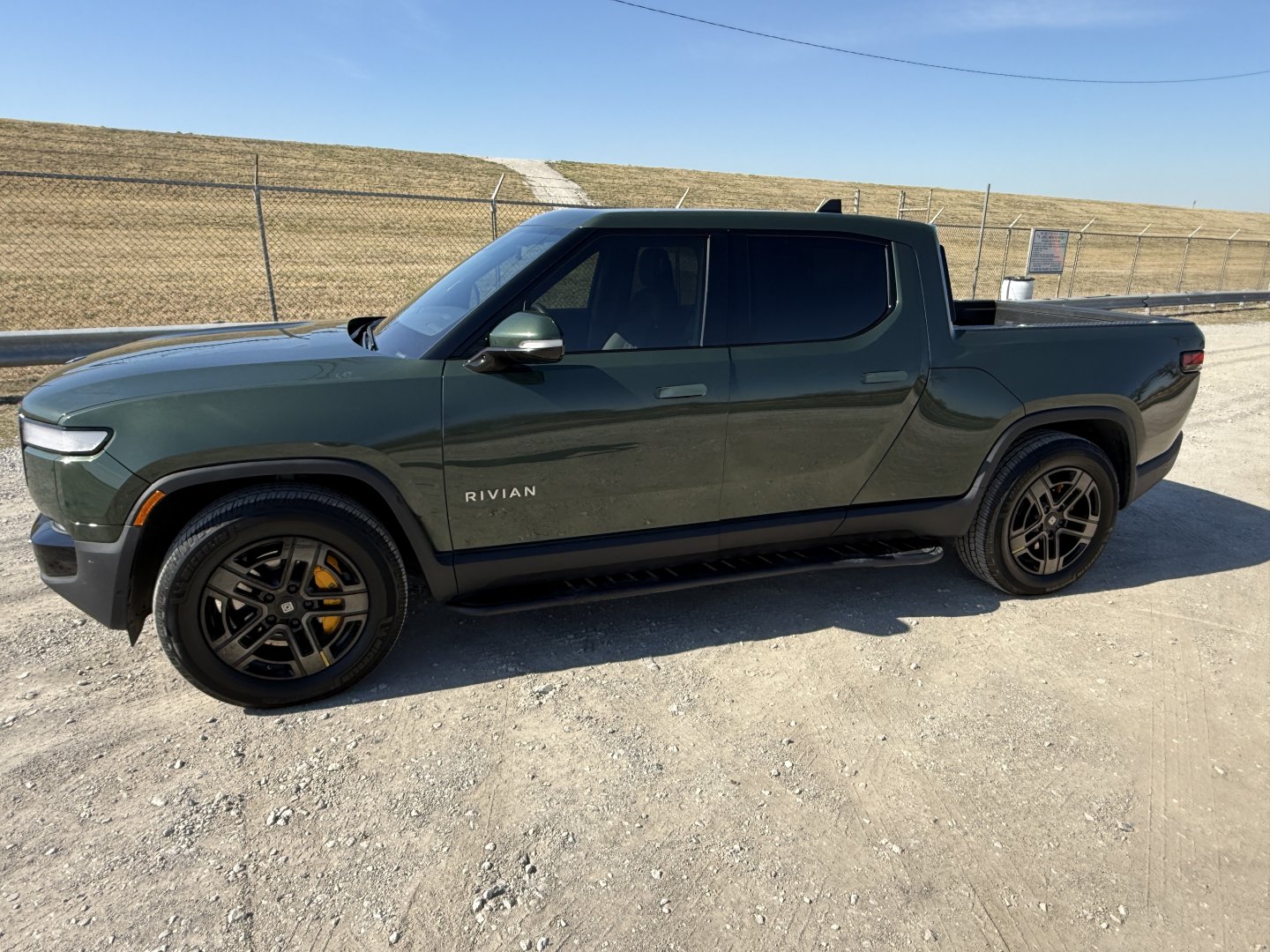
Quad motor, Large pack, Forest Green exterior, Black Mountain Dark Ash interior.
45 Replies
·
791 views

Supporting Founder
Lifetime Supporter
This is a thread that will keep you apprised of 4K events that will be showing on Dish channel 540. Keep looking here for information.
As of today, 9-27-17, there are no scheduled events posted for the next 2 weeks. That is subject to change on a daily basis.
As of today, 9-27-17, there are no scheduled events posted for the next 2 weeks. That is subject to change on a daily basis.
771 Replies
·
168735 views