

Social Feed

Staff member
HERE TO HELP YOU!
Pub Member / Supporter
Cutting Edge
Reprinted with permission from the weBoost blog.
5G technology is a game-changer not only for individual users but also for the American economy. Current data estimates from the American Consumer Institute expect 5G to generate up to $1.5 trillion in additional gross domestic product (GDP) by 2025, creating 4.6 million new jobs during that timeframe.
The U.S. Chamber of Commerce expects small busiensses to be among the biggest beneficiaries of 5G's improved connectivity and data capabilities, enabling them to tap into cloud computing, more robust online presence, and better operational efficiency.
A survey conducted by Verizon found that 96% of small and medium-sized business owners believe 5G will have a positive impact on their operations. 67% said they expect it to help them grow.
As fifth-generation wireless continues to roll out, businesses of all sizes will see tremendous benefits from being early adopters. To stay competitive, small- to medium-sized businesses should familiarize themselves with the incredible opportunities 5G presents.
If you have yet to take the steps to incorporate next-generation tech into your operations, then we're here to show you that the time is now. Here's a look at the top five reasons SMBs should be excited to integrate 5G technology into their business.

As people and devices become increasingly connected, networks demand advanced security protocols. Fortunately, 5G comes with advanced security features, such as network slicing and enhanced encryption. These features provide better protection for small businesses and their customers. Using 5G security, SMBs can better prevent and detect cyberattacks, helping them keep sensitive data safe.
Combined with its high-density, high-speed, and low-latency performance, 5G's enhanced security and privacy controls mean better network performance and protection for all.
During the COVID-19 pandemic, SMBs changed the way they do business. Research shows that consumers expect more from businesses today than they did prior to the pandemic. They expect seamless digital experiences with faster downloads and uploads, lower latency, and more reliable connections. And they expect it whether they're interacting with large or small companies.
For that reason, it's important to recognize that 5G is not just for enterprises. Small businesses can and should look to new technology to help them connect with their customers and make them happy.
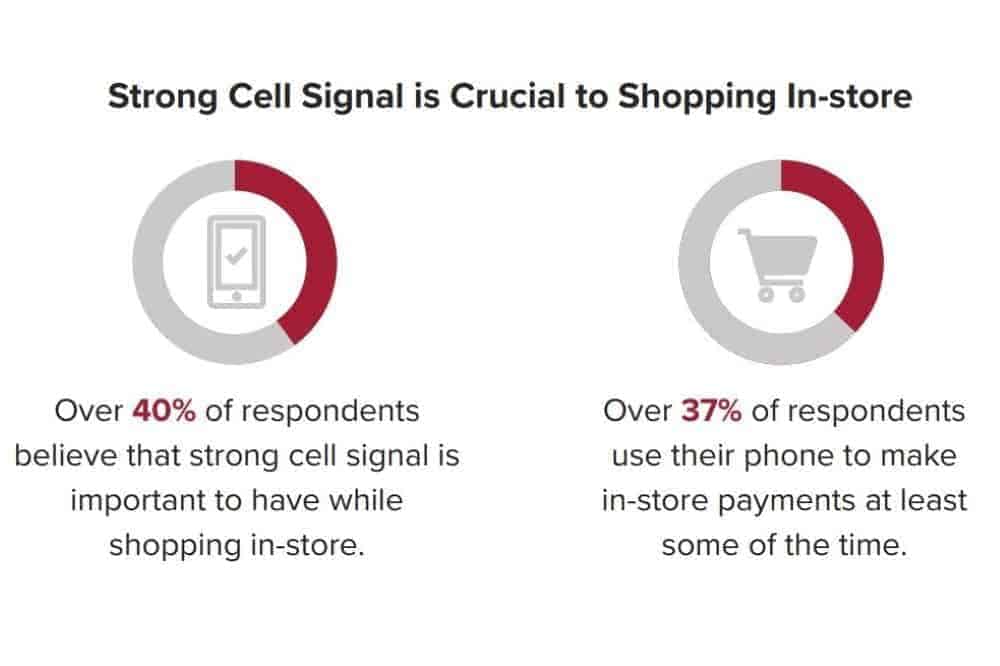
Strong network connections improve the customer experience. In our shopping small survey, we found that connectivity is incredibly important to consumers. Over 40% of respondents believe that strong cell signal is important to have while shopping.
In every industry, 5G allows for greater personalization and communication capabilities for small businesses to engage with customers. For example, small businesses can use more reliable, capable 5G to offer virtual consultations and interactive experiences that require high quality video and audio. They can even provide immersive and realistic virtual reality experiences that help them showcase their products and services in a more compelling way.

Small and medium businesses that rely on supply chains will benefit from the real-time connectivity of 5G to improve logistics between suppliers, distributors, retailers, and customers.
5G-enabled devices like cameras and sensors can provide critical real-time insights about shipping status, delivery times, and inventory. This allows SMBs to make better decisions and optimize operations, saving both time and money.
In-vehicle telematics require a consistent internet connection to collect accurate data. When these devices work as intended, businesses have everything they need to make data-driven decisions, cut costs, and boost profits. 5G comes with enhanced bandwidth, data rates, and capacity to improve supply chain logistics and communication.
As 5G becomes more widely adopted, small businesses will be able to provide a faster, safer and more convenient purchasing experience for their customers.
By leveraging the speed and capacity of 5G networks, employees can provide faster turnarounds and better collaboration on the job at hand. The ability to see web pages loading in real time, access files, conduct video conferences, make sales calls, and collaborate with ease all add up to productivity that can help SMBs compete.
From our Return to Work survey, we know that working from home is going to remain a widespread option for many. Whether employees work fully remote or work from home a few days out of the week, workplace flexibility is going to continue. Faster, more stable 5G connections means that your office and remote employees can work flexibly and stay productive.
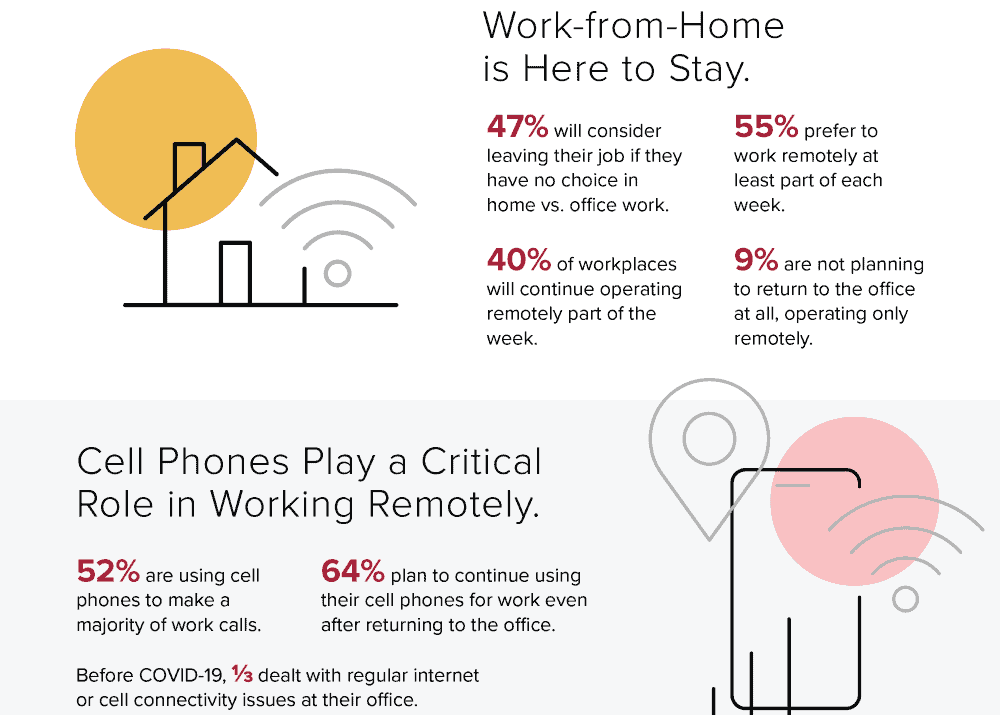
Whether we see this play out in home offices or in your business location, 5G will keep your team connected no matter where they work.
Small businesses that adopt 5G technology now can prepare for future technological advancements and market disruptions. 5G provides a foundation for the Internet of Things (IoT) and other emerging technologies that can transform the way businesses operate.
The ability to collect more data, more quickly, and put it to work for your business and your customers is one of many benefits of 5G for businesses. From managing production remotely, monitoring warehouse inventories, accepting mobile payments and speeding deliveries to customers, 5G-powered technology helps small businesses operate more profitably.
Ultimately, digital transformation is essential to growth and weathering future market disruptions. 5G enables that transformation. By embracing 5G, small businesses can stay ahead of the curve and remain relevant in a constantly evolving landscape.

As the next generation of wireless network technology, 5G will fuel innovation, boost productivity, make industries smarter, and transform the way we live, work, and play.
As the world becomes even more reliant on wireless connectivity, weBoost for Business will continue to serve SMBs with products designed specifically for you. Our SMB-focused products enhance signal for every cellular-connected device on any carrier. The increased range and reliability will help you take advantage of all the business benefits of 5G.
Small business owners have a lot to be excited about. If you're looking to enhance 5G connectivity in your small business, call the experts at Signal Connect at 888-233-7563 or fill out the form below.
The post 5 Reasons Small Business Owners Should Be Excited About 5G appeared first on The Solid Signal Blog.
Continue reading...
5G technology is a game-changer not only for individual users but also for the American economy. Current data estimates from the American Consumer Institute expect 5G to generate up to $1.5 trillion in additional gross domestic product (GDP) by 2025, creating 4.6 million new jobs during that timeframe.
The U.S. Chamber of Commerce expects small busiensses to be among the biggest beneficiaries of 5G's improved connectivity and data capabilities, enabling them to tap into cloud computing, more robust online presence, and better operational efficiency.
A survey conducted by Verizon found that 96% of small and medium-sized business owners believe 5G will have a positive impact on their operations. 67% said they expect it to help them grow.
As fifth-generation wireless continues to roll out, businesses of all sizes will see tremendous benefits from being early adopters. To stay competitive, small- to medium-sized businesses should familiarize themselves with the incredible opportunities 5G presents.
If you have yet to take the steps to incorporate next-generation tech into your operations, then we're here to show you that the time is now. Here's a look at the top five reasons SMBs should be excited to integrate 5G technology into their business.
1. Enhanced security
As people and devices become increasingly connected, networks demand advanced security protocols. Fortunately, 5G comes with advanced security features, such as network slicing and enhanced encryption. These features provide better protection for small businesses and their customers. Using 5G security, SMBs can better prevent and detect cyberattacks, helping them keep sensitive data safe.
Combined with its high-density, high-speed, and low-latency performance, 5G's enhanced security and privacy controls mean better network performance and protection for all.
2. Better customer experience
During the COVID-19 pandemic, SMBs changed the way they do business. Research shows that consumers expect more from businesses today than they did prior to the pandemic. They expect seamless digital experiences with faster downloads and uploads, lower latency, and more reliable connections. And they expect it whether they're interacting with large or small companies.
For that reason, it's important to recognize that 5G is not just for enterprises. Small businesses can and should look to new technology to help them connect with their customers and make them happy.
Strong network connections improve the customer experience. In our shopping small survey, we found that connectivity is incredibly important to consumers. Over 40% of respondents believe that strong cell signal is important to have while shopping.
In every industry, 5G allows for greater personalization and communication capabilities for small businesses to engage with customers. For example, small businesses can use more reliable, capable 5G to offer virtual consultations and interactive experiences that require high quality video and audio. They can even provide immersive and realistic virtual reality experiences that help them showcase their products and services in a more compelling way.
3. More intuitive supply chain
Small and medium businesses that rely on supply chains will benefit from the real-time connectivity of 5G to improve logistics between suppliers, distributors, retailers, and customers.
5G-enabled devices like cameras and sensors can provide critical real-time insights about shipping status, delivery times, and inventory. This allows SMBs to make better decisions and optimize operations, saving both time and money.
In-vehicle telematics require a consistent internet connection to collect accurate data. When these devices work as intended, businesses have everything they need to make data-driven decisions, cut costs, and boost profits. 5G comes with enhanced bandwidth, data rates, and capacity to improve supply chain logistics and communication.
As 5G becomes more widely adopted, small businesses will be able to provide a faster, safer and more convenient purchasing experience for their customers.
4. More productivity
By leveraging the speed and capacity of 5G networks, employees can provide faster turnarounds and better collaboration on the job at hand. The ability to see web pages loading in real time, access files, conduct video conferences, make sales calls, and collaborate with ease all add up to productivity that can help SMBs compete.
From our Return to Work survey, we know that working from home is going to remain a widespread option for many. Whether employees work fully remote or work from home a few days out of the week, workplace flexibility is going to continue. Faster, more stable 5G connections means that your office and remote employees can work flexibly and stay productive.
Whether we see this play out in home offices or in your business location, 5G will keep your team connected no matter where they work.
5. It future-proofs your business
Small businesses that adopt 5G technology now can prepare for future technological advancements and market disruptions. 5G provides a foundation for the Internet of Things (IoT) and other emerging technologies that can transform the way businesses operate.
The ability to collect more data, more quickly, and put it to work for your business and your customers is one of many benefits of 5G for businesses. From managing production remotely, monitoring warehouse inventories, accepting mobile payments and speeding deliveries to customers, 5G-powered technology helps small businesses operate more profitably.
Ultimately, digital transformation is essential to growth and weathering future market disruptions. 5G enables that transformation. By embracing 5G, small businesses can stay ahead of the curve and remain relevant in a constantly evolving landscape.
5G cell phone signal boosters for small businesses
As the next generation of wireless network technology, 5G will fuel innovation, boost productivity, make industries smarter, and transform the way we live, work, and play.
As the world becomes even more reliant on wireless connectivity, weBoost for Business will continue to serve SMBs with products designed specifically for you. Our SMB-focused products enhance signal for every cellular-connected device on any carrier. The increased range and reliability will help you take advantage of all the business benefits of 5G.
Small business owners have a lot to be excited about. If you're looking to enhance 5G connectivity in your small business, call the experts at Signal Connect at 888-233-7563 or fill out the form below.
The post 5 Reasons Small Business Owners Should Be Excited About 5G appeared first on The Solid Signal Blog.
Continue reading...
0 Replies
·
349 views

Staff member
HERE TO HELP YOU!
We have a Breakfast and Dinner thread so... 
Continuing from the Breakfast thread, found Cornbread mix so ...
Yellow Cornbread Mix
2 Hatch Green Chiles -diced
1 Egg
2/3 cup of milk
add to greased pan
Bake for 400f 20-25 minutes(From instructions)
now to put together and try... this to go with pinto beans...
Continuing from the Breakfast thread, found Cornbread mix so ...
Yellow Cornbread Mix
2 Hatch Green Chiles -diced
1 Egg
2/3 cup of milk
add to greased pan
Bake for 400f 20-25 minutes(From instructions)
now to put together and try... this to go with pinto beans...
5448 Replies
·
336076 views


iJustine
Time for another AWESOME video from iJustine!
View: https://www.youtube.com/shorts/yj3f7ab5pBI
Direct YouTube Link - iPhone Duo's First Concert! Revis!
The official iJustine Website's Website
Buy her book!
View: https://www.youtube.com/shorts/yj3f7ab5pBI
Direct YouTube Link - iPhone Duo's First Concert! Revis!
The official iJustine Website's Website
Buy her book!
0 Replies
·
2 views
TWiT Tech Podcast Network
Time for another AWESOME video from the TWIT Network!
View: https://www.youtube.com/shorts/7NJXMnbT1Mk
Direct YouTube Link - New iPad mini Announced... at $699?
TWIT's Website
TWIT Live Feed
View: https://www.youtube.com/shorts/7NJXMnbT1Mk
Direct YouTube Link - New iPad mini Announced... at $699?
TWIT's Website
TWIT Live Feed
0 Replies
·
1 views

Staff member
HERE TO HELP YOU!
Cutting Edge
Sometimes a thread gets so many posts in it that is can cause issues for the server so that why today we introduce The Song Name Game Part 3!
So let the game continue!
The last song was added by Bobby who posted...
One Meat Ball - Andrews Sisters
CONTINUE ON AND HAVE FUN! WELCOME HOME TO SATELLITEGUYS.US!
Here are the original rules for the game as posted by WebbyDude back in 2006. http://www.satelliteguys.us/threads/68645-Song-Name-Game
Just name a song title and the band who performed it. The next person does the same thing, but needs to list a song title or band name which includes a word from the previous entry. Pick songs from any genre.
Example:
Long Live Rock and Roll -- Rainbow
Rainbow in the Dark -- Dio
Another example:
Ride the Lightning -- Metallica
Lightning Strikes -- Ozzy Osbourne
Get it?
An additional note: we all know that song titles, sometimes, use profane words. Because this is a family friendly website it is advised that you clean up that title up a bit. This is accomplished by using something like sh!t instead of the real word. Thanks....
So let the game continue!
The last song was added by Bobby who posted...
One Meat Ball - Andrews Sisters
CONTINUE ON AND HAVE FUN! WELCOME HOME TO SATELLITEGUYS.US!
Here are the original rules for the game as posted by WebbyDude back in 2006. http://www.satelliteguys.us/threads/68645-Song-Name-Game
Just name a song title and the band who performed it. The next person does the same thing, but needs to list a song title or band name which includes a word from the previous entry. Pick songs from any genre.
Example:
Long Live Rock and Roll -- Rainbow
Rainbow in the Dark -- Dio
Another example:
Ride the Lightning -- Metallica
Lightning Strikes -- Ozzy Osbourne
Get it?
An additional note: we all know that song titles, sometimes, use profane words. Because this is a family friendly website it is advised that you clean up that title up a bit. This is accomplished by using something like sh!t instead of the real word. Thanks....
68658 Replies
·
2680216 views


Lately my eight year old Dell laptop has been shutting off even when I have a full battery. I have had to keep it plugged up all the time to keep this from happening. Any idea what is causing this? I replaced the battery about three years ago.
2 Replies
·
46 views


Pub Member / Supporter
I set up a music server for my brother a few years ago. It's basically a small headless computer but it needs to have a DHCP IP address reserved for it in the router settings. This was easy to do in his DSL router. He's switching to Starlink now and I was wondering if these setting are easily accessible in the Starlink router. I'm pretty sure he will be getting the latest V5 router.
5 Replies
·
284 views


Pub Member / Supporter
Lifetime Supporter
Good...simple humor. Enjoy
View: https://www.youtube.com/watch?v=E92AtfTLge4
View: https://www.youtube.com/watch?v=HJy0WnejlF4
View: https://www.youtube.com/watch?v=E92AtfTLge4
View: https://www.youtube.com/watch?v=HJy0WnejlF4
2 Replies
·
51 views

Pub Member / Supporter
Lifetime Supporter
Terrible tragedy. You would think that they would have safe guards in place that would prevent something like this from happening. I guess if you are going to ride in a passenger train it might be best to get a car near the rear.
 www.zerohedge.com
At Least 64 Dead After Two High-Speed Trains Collide In Spain<!-- --> | ZeroHedge
ZeroHedge - On a long enough timeline, the survival rate for everyone drops to zero
www.zerohedge.com
2 Replies
·
55 views


Booredatwork.com
Time for another AWESOME video from BoredAtWork!
View: https://www.youtube.com/watch?v=MSXmcYapC3I
Direct YouTube Link - MacBook Pro With PROLED XDR Display - Watch Before you BUY!
Booredatwork.com Website
Booredatwork on Facebook
View: https://www.youtube.com/watch?v=MSXmcYapC3I
Direct YouTube Link - MacBook Pro With PROLED XDR Display - Watch Before you BUY!
Booredatwork.com Website
Booredatwork on Facebook
0 Replies
·
14 views
Marques Brownlee
Time for another AWESOME video from Marques Brownlee!
View: https://www.youtube.com/watch?v=2reQut8WNGc
Direct YouTube Link - Macbook PROLED XDR Impressions: They Said They Wouldn't!
The official MKBHD Website!
The MKBHD Store
View: https://www.youtube.com/watch?v=2reQut8WNGc
Direct YouTube Link - Macbook PROLED XDR Impressions: They Said They Wouldn't!
The official MKBHD Website!
The MKBHD Store
0 Replies
·
26 views