

Social Feed

Staff member
HERE TO HELP YOU!
Pub Member / Supporter
Cutting Edge
This White Paper is available in PDF format for viewing or printing! Get it now!
There is no better way to get customers into your bar than with DIRECTV sports. It's proven over and over again… DIRECTV isn't a cost, it's a profit generator. It keeps customers in their seats and when they're in their seats they order food and drinks, easily paying for the cost of DIRECTV service. It's easier than ever to get your bar or restaurant wired, because there are so many good options out there. You don't have to know how to do it… Signal Connect's certified technicians will take care of it for you. We're going to throw a few diagrams your way, though, so you get an idea how it's done.
Are you looking to outfit a sports bar with 50 TVs or are you just looking for something to sit over the bartender's head? The key to getting the best value from DIRECTV is knowing what you want in the first place. That information comes from the person who knows your business better than anyone else: YOU. Here are the questions you want to ask yourself before calling to talk to a Signal Connect professional:
Sure, it's easy to say "it all depends on how much it costs." Remember though, that this isn't an expense, this is a profit center. If you do it right, this isn't going to cost you money, it's going to make you money. Only you know how many TVs you need, though, because only you know the kind of bar or restaurant you want to run. If this is a place where the locals come to watch games on Sunday, then you know the more TVs, the better. If you're just looking to tune into the occasional game or newscast, one TV may be enough.
Don't forget a TV for the bar manager's office or employee lunchroom, by the way… you see over and over that happy employees make for happy customers, and you want to give your people a breakroom experience that makes them feel refreshed. Besides, customers don't seem to like it when the waitstaff stare at the game when they should be working. Give them TV in the breakroom and that won't be a problem.
There are a lot of projects that are perfect for a DIYer, but installing DIRECTV in a bar or restaurant isn't one of them. Unlike home installs, a bar/restaurant install can be very complex. You'll want the experts. Signal Connect's team has decades of experience working with commercial accounts. There's a reason DIRECTV called us their dealer of the year… we know how to take care of our customers. Give the experts a call and we'll make sure everything is done right, on budget, and perfect the first time.
For one reason or another, bars and restaurants tend to do really well in older buildings. Maybe customers are looking for an established location, maybe there's just a feeling you get when you're in an old warehouse or hardware store that's been repurposed. A lot of bar patrons are men, and men like that industrial look. Unfortunately, there can be some issues with older locations and it's good to know them ahead of time.
If the walls are solid brick that makes wiring a little tough. You can run conduits on the outside of the walls if you want, but that may not look as good as you want your place to look. There are solutions that minimize the number of wires you see.
If you're already blowing circuit breakers you may need to get an electrician in to add power. There's a solution that's lowest on power use, but if you're already maxed out you may not be able to tolerate even one more wire.
If you have existing wires… it's possible they could be reused but honestly it is probably easier to replace those wires now rather than wait to see if they are "DIRECTV-quality." It's best to know what's in the walls so your installer can be ready.
If you have the money, you can do almost anything with a restaurant entertainment system. You can schedule channel changes, you can control lighting, you can even give customers individual TVs at their tables. How would you feel if you were at a bar and the server walked around with an iPad and asked you what game you wanted to watch? It's all possible, depending on your budget. Here again you're the master of your business and you're the best authority on how far you want to take things. A bar that appeals to sports fans or younger folks could be extremely high-tech while a older patrons in your quiet restaurant might be a little jarred by all that technology.
You also need to think about where you're going to put things. Some solutions require that a rack be set up and that means that either it needs to be in the public space, or you're going to have to give up some of that private space to house equipment. There are several ways to make the best of the space you have, but when it's all said and done, sometimes you do have to compromise. Some solutions use fewer cables, some take up less space, some are less costly.
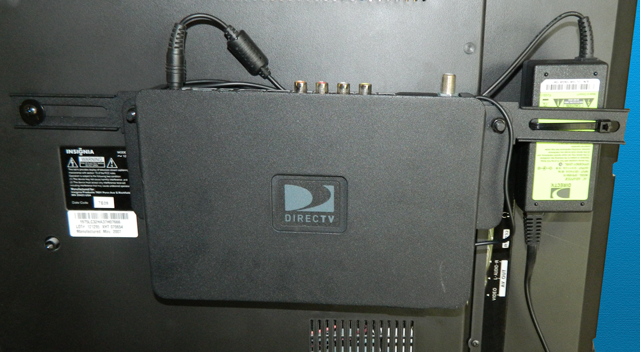
One of the easiest solutions to implement is to simply put a receiver behind every TV. This is usually the most cost-effective solution as it doesn't require special switching equipment. DIRECTV H44 receivers are small and light enough that they can stick to the back of a TV with industrial Velcro, or use one of Solid Signal's high-quality mounting solutions for a more professional installation.
The following diagram shows how a typical bar or restaurant would be wired with this solution.
Bar-SWM
Click here to view this diagram full-screen or download it.
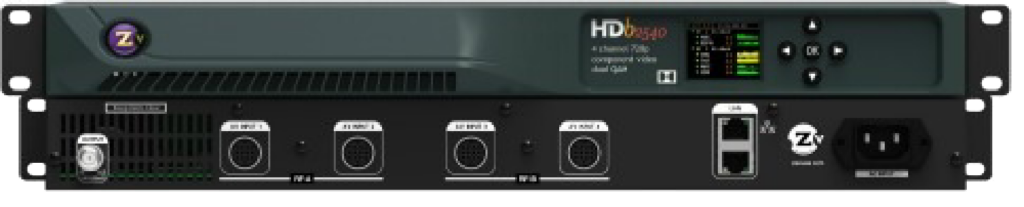
With a headend system, all the hardware is in one place and you essentially operate your own little cable system just for you. Every receiver tunes to its own channel 24/7 and then a special piece of equipment called a modulator puts them on different TV channels that can be tuned by any HDTV. This solution works very well if you think you really only need a few channels (like five or six) but you want to feed multiple TVs on every channel. Some headend systems are very small — think about the size of the average stereo receiver — but for that small size you incur a higher cost and special adapters may be needed to use your TVs.
Here's a diagram of how a headend system works.
Bar-Headend
Click here to view this diagram full-screen or download it.
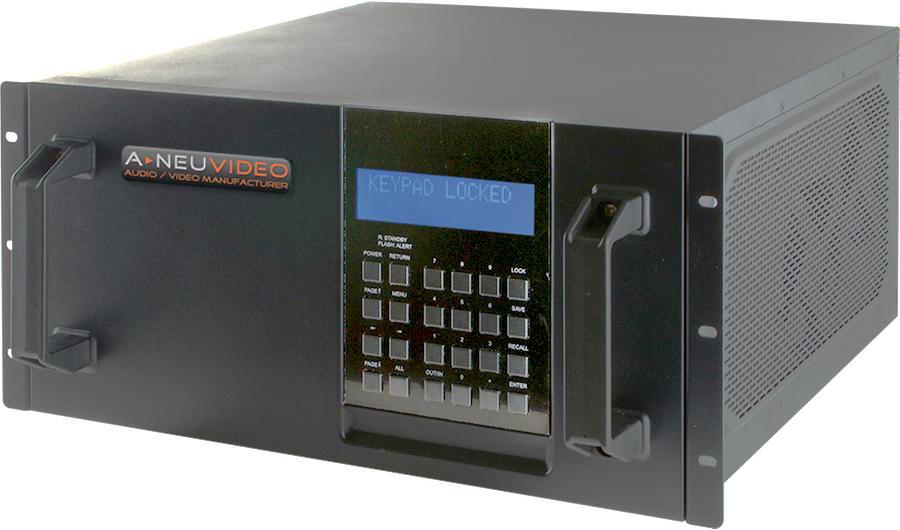
The best solution if you're controlling a lot of TVs and have a lot of customers is a matrix switched system. With a matrix switched system, all the equipment is kept in a rack and the outputs from every receiver are fed into a special device called a matrix switch. This matrix switch lets you send the output from any receiver to any TV, or send it to a bunch of TVs all at the same time. This is the ultimate form of control… usually a tablet app or the front panel of the device is all you need.
The big takeaway here is that you can tune any receiver to any channel and control it all with one device, easily sending the output from any receiver to one TV or as many as you want.
The matrix switch even handles changing channels for you. You can incorporate other devices like media players as well.
Of course the downside is the cost… the matrix switch itself is expensive and it requires special wiring to get an HD signal to every TV. HDMI cables must be run to every TV, or for longer runs the signal can be converted to run over dedicated category 5 wiring. This has the advantage of being easier to wire and allowing for runs over fifty feet.
Matrix switches can be controlled from their front panels, but it's very common for manufacturers to provide an app that does the same thing. That way, the matrix switch can be controlled from the manager's office or from behind the bar.
Here's a diagram of how a matrix-switched system works.
Bar-Matrix
Click here to view this diagram full-screen or download it.
It may not seem like it, but adding networking is one of the most important parts of your new system. It doesn't matter whether you go for a "good," "better," or "best" scenario, getting connected to the internet is critical.
If you have a receiver behind every TV networking them gives you the ability to use the free DIRECTV App for iPad to switch channels from anywhere on the premises and get guide information so your customers don't have to watch you scroll.
With a headend system your installation tech will have the ability to diagnose problems on the fly and help you get past embarrassing "blue screen" problems.
With a matrix switched system you have ultimate control from anywhere in the room, sometimes anywhere in the world to be able to control any part of your system. It also makes it easy for a technician to help you program.
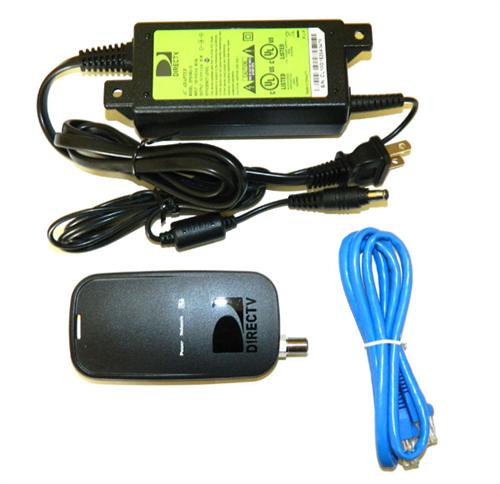
Usually, adding networking means adding a small adapter in a single location and for the most part doesn't mean adding an ethernet connection to every TV. The only exception is if you have a system with more than 15 DIRECTV receivers. You will need one network adapter for every 15 receivers. These network adapters go into a shared network switch. The receivers are configured with static IP addresses so that they can be controlled either by the DIRECTV for Business remote iPad app or by a matrix switch. Third party "IP Control" systems can also work with DIRECTV receivers.
A special installer called an "integrator" will generally come into the bar or restaurant and make sure that everything is hooked up properly. They then may offer to train you or your staff on the best way to use the system.
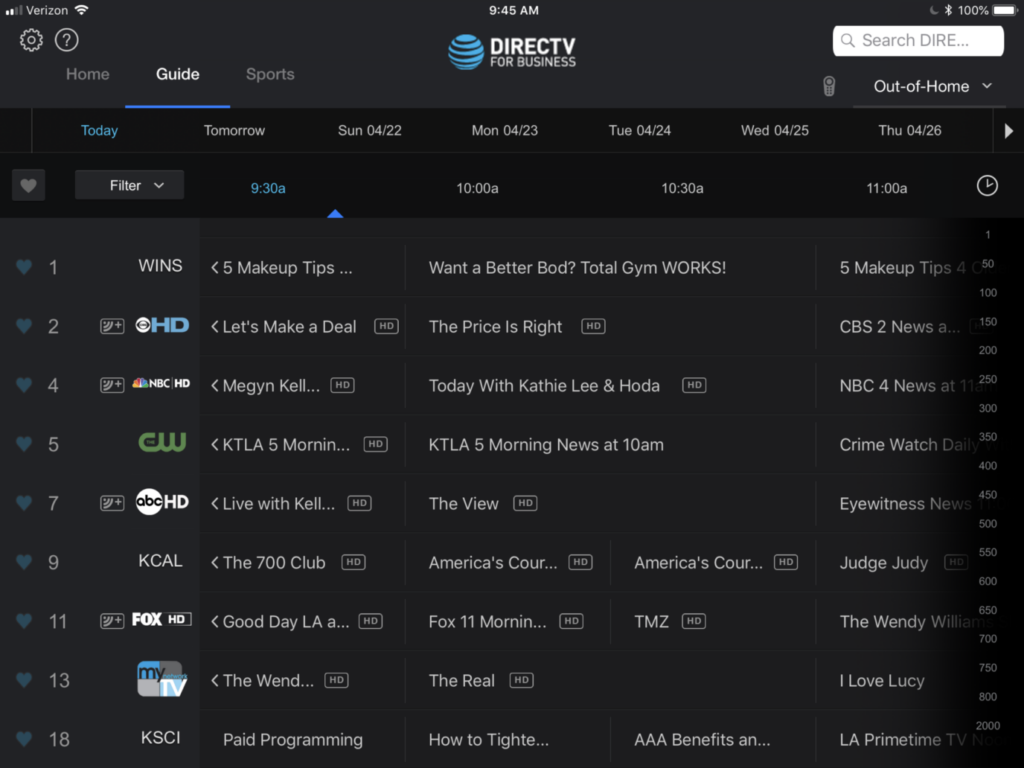
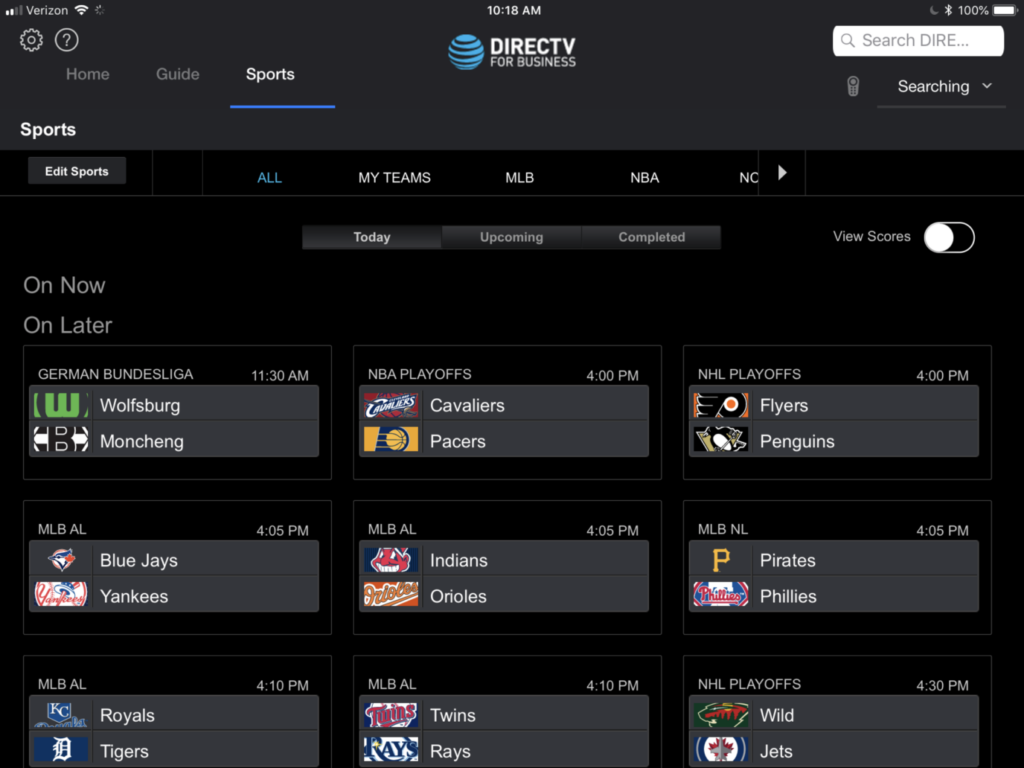
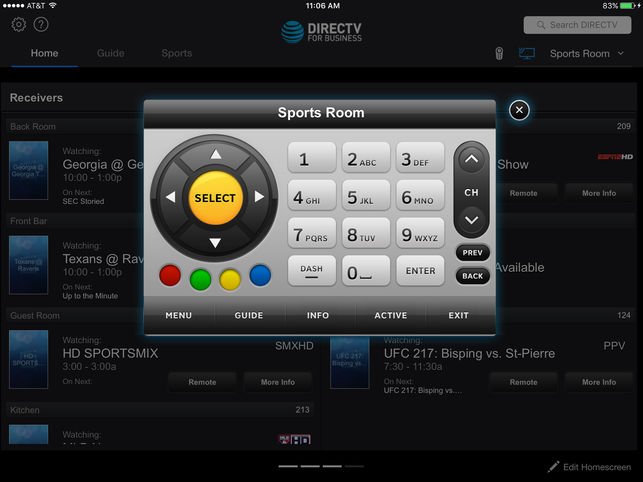
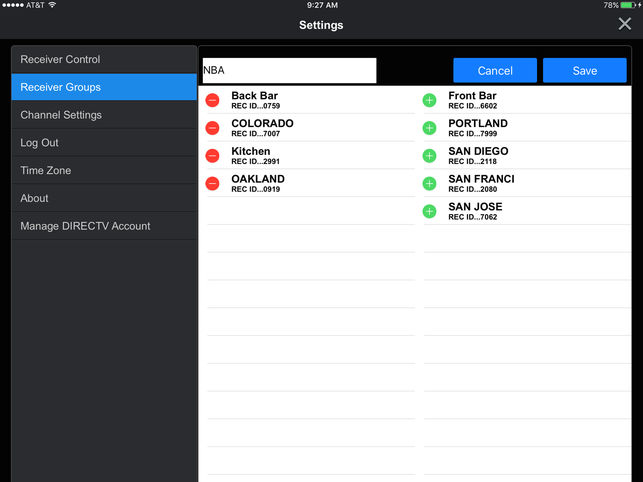
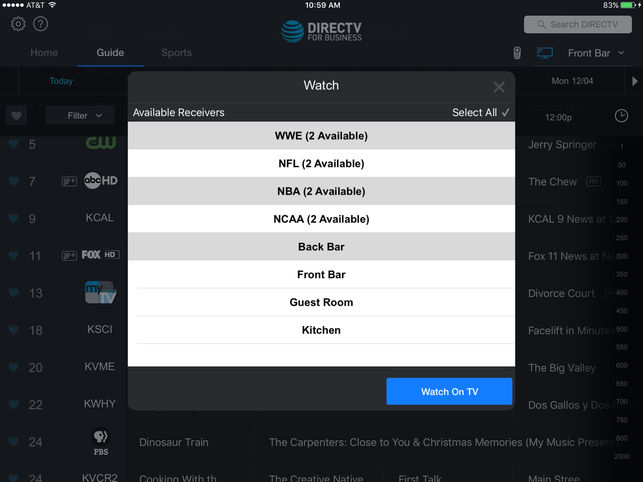
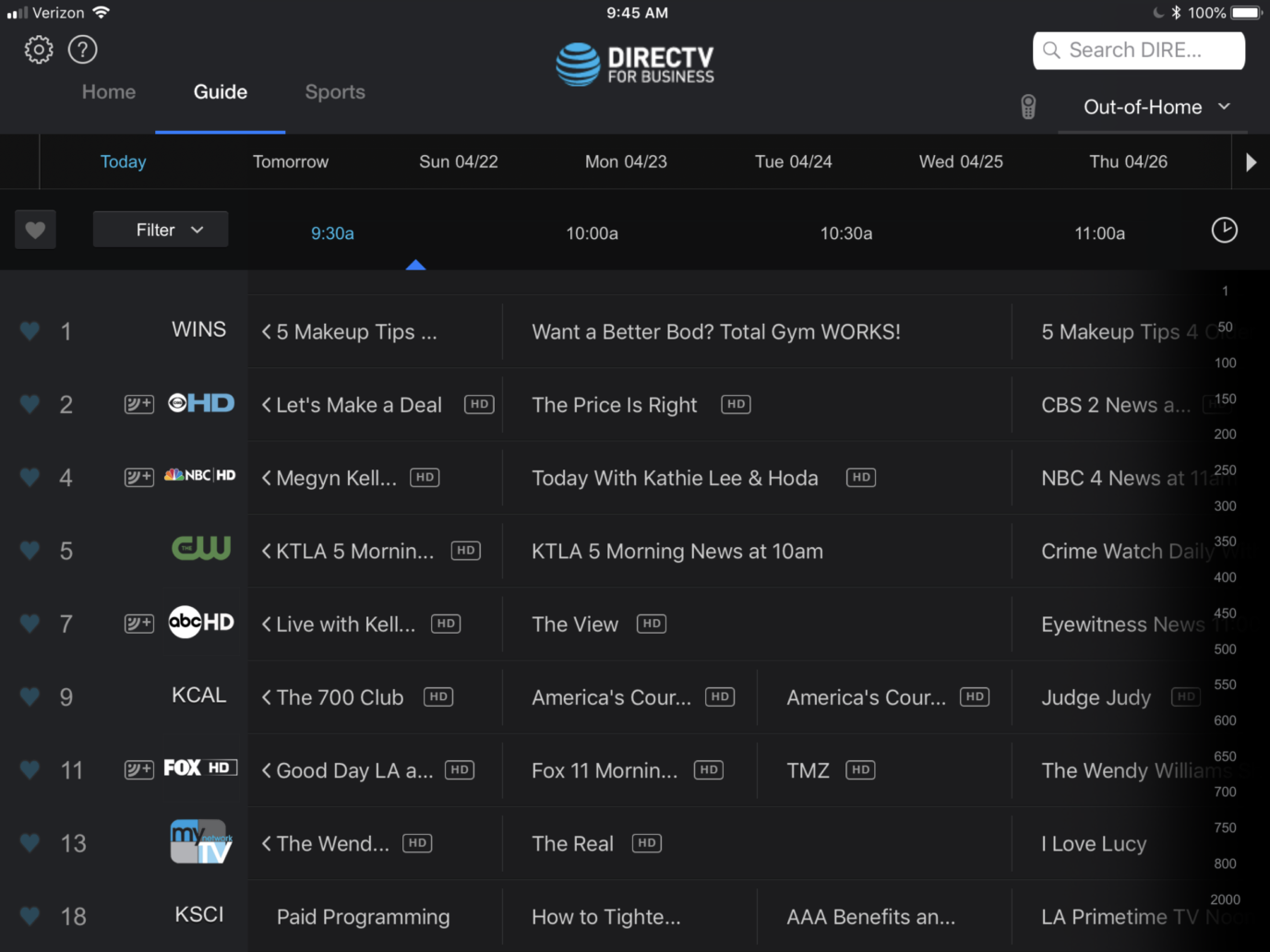
One of the nicest things about a "pure" DIRECTV setup, where the receivers are behind the TV, is DIRECTV's own app. It's available on the Apple App store. There's also a similar Android version. Make sure you're downloading the DIRECTV for Business Remote app. The other app is just the regular residential app. It works, but it doesn't give you the special features you need.
With the iPad app, you can directly control any networked receiver. Start by assigning a static IP address to each receiver. The address itself will depend on the way that your specific network is set up. However, the process is the same for every receiver. On newer DIRECTV receivers, press MENU then navigate to Settings, Internet Setup, Advanced Setup, then choose Advanced IP Config.
Once that step is done, you'll be able to see every networked receiver on an iPad, as long as your wireless network is set up to see devices on your wired network. Again, if you're not familiar with this process, consult your network professional.
With the app, you can assign receivers into groups and control them all at the same time as well. This essentially turns the app into a free matrix switch and gives you a lot of power. It's worth taking a look at.
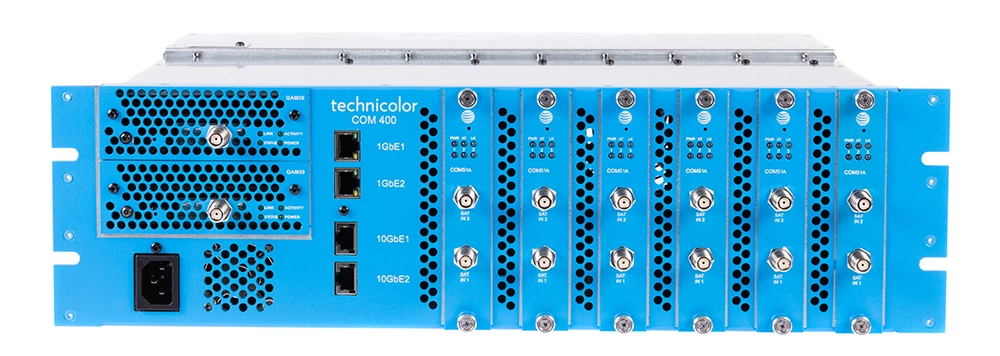
Imagine a system that combines the best attributes of a headend system with the best attributes of a matrix switched system. Now imagine that everything you need fits in a package about the size of pizza boxes stacked on top of each other. That's DIRECTV's COM3000 system, the most powerful compact headend for bars and restaurants.
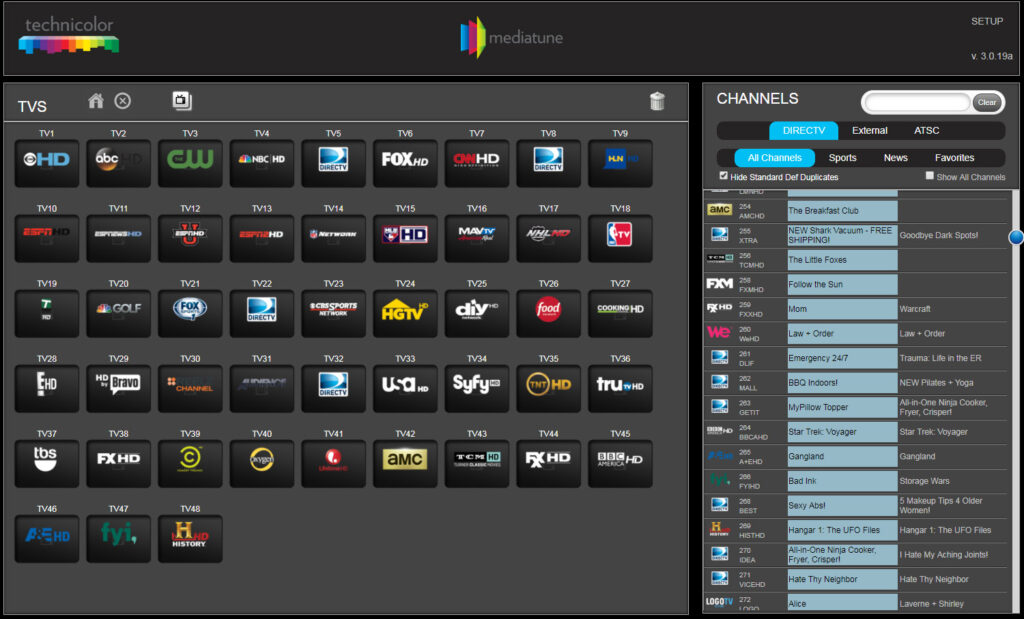
The key to using COM3000 is MediaTune. MediaTune is an app that works specifically with COM3000 to let you select which channels go out on your headend system. This way, you can keep long-term costs down by paying only for the channels and devices you need.
There are tons of upsides to this system — it's easy to use, uses less power than any other system, and can fit under a desk in the manager's office. It's also scalable up to hundreds of channels if you wanted a truly powerful system and can be completely administered over the internet.
There's no doubt that adding the right DIRECTV system to your bar or restaurant is a great choice and it's easy to see how keeping patrons in their seats by whatever means possible is a great idea. It's all about net profit, and choosing the right system will let you get the most net profit. It's harder than ever to bring patrons in, and once you have them you want to do everything you can to keep them eating and drinking. DIRECTV systems are a proven way to make this happen.
So, what are you waiting for? Give Signal Connect a call now at 888-233-7563 and get started on the road to taking your bar or restaurant to the next level! Our reps are here to help you drive your profits through the roof. Call now!
The post UPDATED WHITE PAPER: DIRECTV for Bars and Restaurants appeared first on The Solid Signal Blog.
Continue reading...
There is no better way to get customers into your bar than with DIRECTV sports. It's proven over and over again… DIRECTV isn't a cost, it's a profit generator. It keeps customers in their seats and when they're in their seats they order food and drinks, easily paying for the cost of DIRECTV service. It's easier than ever to get your bar or restaurant wired, because there are so many good options out there. You don't have to know how to do it… Signal Connect's certified technicians will take care of it for you. We're going to throw a few diagrams your way, though, so you get an idea how it's done.
Figuring out what you need
Are you looking to outfit a sports bar with 50 TVs or are you just looking for something to sit over the bartender's head? The key to getting the best value from DIRECTV is knowing what you want in the first place. That information comes from the person who knows your business better than anyone else: YOU. Here are the questions you want to ask yourself before calling to talk to a Signal Connect professional:
- How many TV's do I really want?
- How many different programs will I really want to show at the same time?
- How big is my public space, and what is the fire code occupancy?
- Do I want "just" TV or do I also want menu boards, advertising, music and other services?
Sure, it's easy to say "it all depends on how much it costs." Remember though, that this isn't an expense, this is a profit center. If you do it right, this isn't going to cost you money, it's going to make you money. Only you know how many TVs you need, though, because only you know the kind of bar or restaurant you want to run. If this is a place where the locals come to watch games on Sunday, then you know the more TVs, the better. If you're just looking to tune into the occasional game or newscast, one TV may be enough.
Don't forget a TV for the bar manager's office or employee lunchroom, by the way… you see over and over that happy employees make for happy customers, and you want to give your people a breakroom experience that makes them feel refreshed. Besides, customers don't seem to like it when the waitstaff stare at the game when they should be working. Give them TV in the breakroom and that won't be a problem.
Don't do it yourself! Call 888-233-7563 instead
There are a lot of projects that are perfect for a DIYer, but installing DIRECTV in a bar or restaurant isn't one of them. Unlike home installs, a bar/restaurant install can be very complex. You'll want the experts. Signal Connect's team has decades of experience working with commercial accounts. There's a reason DIRECTV called us their dealer of the year… we know how to take care of our customers. Give the experts a call and we'll make sure everything is done right, on budget, and perfect the first time.
Know your location
For one reason or another, bars and restaurants tend to do really well in older buildings. Maybe customers are looking for an established location, maybe there's just a feeling you get when you're in an old warehouse or hardware store that's been repurposed. A lot of bar patrons are men, and men like that industrial look. Unfortunately, there can be some issues with older locations and it's good to know them ahead of time.
If the walls are solid brick that makes wiring a little tough. You can run conduits on the outside of the walls if you want, but that may not look as good as you want your place to look. There are solutions that minimize the number of wires you see.
If you're already blowing circuit breakers you may need to get an electrician in to add power. There's a solution that's lowest on power use, but if you're already maxed out you may not be able to tolerate even one more wire.
If you have existing wires… it's possible they could be reused but honestly it is probably easier to replace those wires now rather than wait to see if they are "DIRECTV-quality." It's best to know what's in the walls so your installer can be ready.
Think about those other little expenses
If you have the money, you can do almost anything with a restaurant entertainment system. You can schedule channel changes, you can control lighting, you can even give customers individual TVs at their tables. How would you feel if you were at a bar and the server walked around with an iPad and asked you what game you wanted to watch? It's all possible, depending on your budget. Here again you're the master of your business and you're the best authority on how far you want to take things. A bar that appeals to sports fans or younger folks could be extremely high-tech while a older patrons in your quiet restaurant might be a little jarred by all that technology.
You also need to think about where you're going to put things. Some solutions require that a rack be set up and that means that either it needs to be in the public space, or you're going to have to give up some of that private space to house equipment. There are several ways to make the best of the space you have, but when it's all said and done, sometimes you do have to compromise. Some solutions use fewer cables, some take up less space, some are less costly.
"Good" solution: Put a receiver behind every TV
One of the easiest solutions to implement is to simply put a receiver behind every TV. This is usually the most cost-effective solution as it doesn't require special switching equipment. DIRECTV H44 receivers are small and light enough that they can stick to the back of a TV with industrial Velcro, or use one of Solid Signal's high-quality mounting solutions for a more professional installation.
Advantages
- You have ultimate flexibility with this solution. Every TV can be on its own channel or you can have every TV on the same channel.
- The cost tends to be lower than with other solutions.
- DIRECTV's free iPad app can be used for channel changes so you don't need a separate remote for every TV
Disadvantages
- This solution requires that coaxial cables be run to every receiver. This could be a problem in older buildings.
- Over time, this solution could be more expensive depending on how many receivers you really need.
The following diagram shows how a typical bar or restaurant would be wired with this solution.
Bar-SWM
Click here to view this diagram full-screen or download it.
"Better" solution: Headend system
With a headend system, all the hardware is in one place and you essentially operate your own little cable system just for you. Every receiver tunes to its own channel 24/7 and then a special piece of equipment called a modulator puts them on different TV channels that can be tuned by any HDTV. This solution works very well if you think you really only need a few channels (like five or six) but you want to feed multiple TVs on every channel. Some headend systems are very small — think about the size of the average stereo receiver — but for that small size you incur a higher cost and special adapters may be needed to use your TVs.
Advantages
- This solution requires the least wiring: one wire can be used to feed several TVs
- In most cases any TV will work using its built-in tuner
- Standard definition is fully supported if you want to connect to older TVs
- Operating fewer receivers could save you money over time
Disadvantages
- More expensive at the time of installation
- Requires you to make space for an equipment rack
- Need a separate remote for every TV/need to point the remote carefully
- Can't easily change channels, usually a tech is required to make that change
Here's a diagram of how a headend system works.
Bar-Headend
Click here to view this diagram full-screen or download it.
"Best" solution: Matrix Switch
The best solution if you're controlling a lot of TVs and have a lot of customers is a matrix switched system. With a matrix switched system, all the equipment is kept in a rack and the outputs from every receiver are fed into a special device called a matrix switch. This matrix switch lets you send the output from any receiver to any TV, or send it to a bunch of TVs all at the same time. This is the ultimate form of control… usually a tablet app or the front panel of the device is all you need.
The big takeaway here is that you can tune any receiver to any channel and control it all with one device, easily sending the output from any receiver to one TV or as many as you want.
The matrix switch even handles changing channels for you. You can incorporate other devices like media players as well.
Of course the downside is the cost… the matrix switch itself is expensive and it requires special wiring to get an HD signal to every TV. HDMI cables must be run to every TV, or for longer runs the signal can be converted to run over dedicated category 5 wiring. This has the advantage of being easier to wire and allowing for runs over fifty feet.
Matrix switches can be controlled from their front panels, but it's very common for manufacturers to provide an app that does the same thing. That way, the matrix switch can be controlled from the manager's office or from behind the bar.
Advantages
- The ultimate solution for feeding a lot of TVs
- Very flexible… feed one TV or as many as you want with the same content
- Usually works with a computer or tablet app to make it easy to control things from the bar or office
Disadvantages
- High cost of equipment
- Expensive wiring
- May require a lot of electricity.
Here's a diagram of how a matrix-switched system works.
Bar-Matrix
Click here to view this diagram full-screen or download it.
Networking: a critical upgrade
It may not seem like it, but adding networking is one of the most important parts of your new system. It doesn't matter whether you go for a "good," "better," or "best" scenario, getting connected to the internet is critical.
If you have a receiver behind every TV networking them gives you the ability to use the free DIRECTV App for iPad to switch channels from anywhere on the premises and get guide information so your customers don't have to watch you scroll.
With a headend system your installation tech will have the ability to diagnose problems on the fly and help you get past embarrassing "blue screen" problems.
Ultimate Control
With a matrix switched system you have ultimate control from anywhere in the room, sometimes anywhere in the world to be able to control any part of your system. It also makes it easy for a technician to help you program.
Usually, adding networking means adding a small adapter in a single location and for the most part doesn't mean adding an ethernet connection to every TV. The only exception is if you have a system with more than 15 DIRECTV receivers. You will need one network adapter for every 15 receivers. These network adapters go into a shared network switch. The receivers are configured with static IP addresses so that they can be controlled either by the DIRECTV for Business remote iPad app or by a matrix switch. Third party "IP Control" systems can also work with DIRECTV receivers.
A special installer called an "integrator" will generally come into the bar or restaurant and make sure that everything is hooked up properly. They then may offer to train you or your staff on the best way to use the system.
A closer look at the DIRECTV for Business iPad App
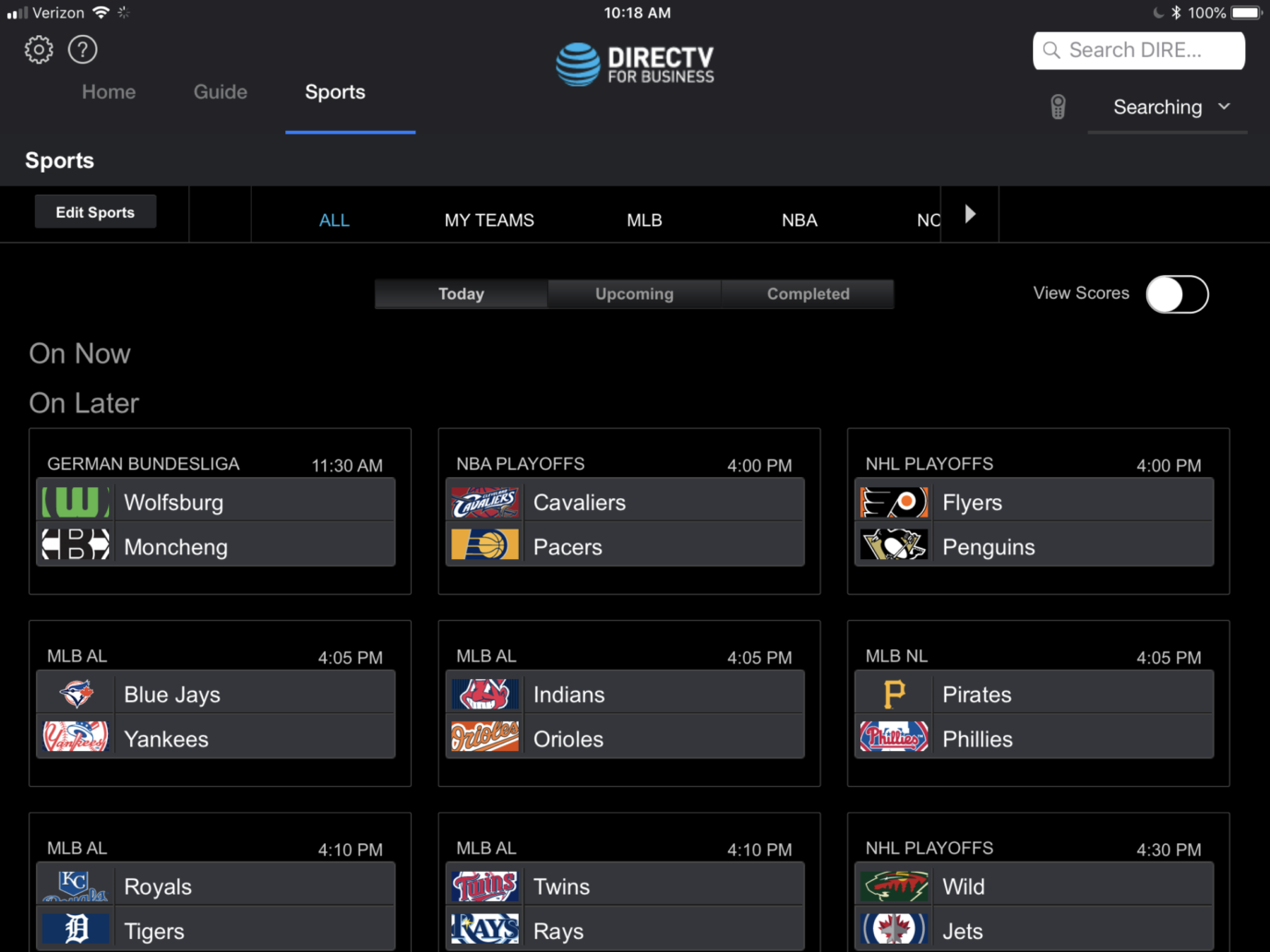
One of the nicest things about a "pure" DIRECTV setup, where the receivers are behind the TV, is DIRECTV's own app. It's available on the Apple App store. There's also a similar Android version. Make sure you're downloading the DIRECTV for Business Remote app. The other app is just the regular residential app. It works, but it doesn't give you the special features you need.
With the iPad app, you can directly control any networked receiver. Start by assigning a static IP address to each receiver. The address itself will depend on the way that your specific network is set up. However, the process is the same for every receiver. On newer DIRECTV receivers, press MENU then navigate to Settings, Internet Setup, Advanced Setup, then choose Advanced IP Config.
Once that step is done, you'll be able to see every networked receiver on an iPad, as long as your wireless network is set up to see devices on your wired network. Again, if you're not familiar with this process, consult your network professional.
With the app, you can assign receivers into groups and control them all at the same time as well. This essentially turns the app into a free matrix switch and gives you a lot of power. It's worth taking a look at.
Another option: COM3000 with MediaTune
Imagine a system that combines the best attributes of a headend system with the best attributes of a matrix switched system. Now imagine that everything you need fits in a package about the size of pizza boxes stacked on top of each other. That's DIRECTV's COM3000 system, the most powerful compact headend for bars and restaurants.
The key to using COM3000 is MediaTune. MediaTune is an app that works specifically with COM3000 to let you select which channels go out on your headend system. This way, you can keep long-term costs down by paying only for the channels and devices you need.
There are tons of upsides to this system — it's easy to use, uses less power than any other system, and can fit under a desk in the manager's office. It's also scalable up to hundreds of channels if you wanted a truly powerful system and can be completely administered over the internet.
Conclusion
There's no doubt that adding the right DIRECTV system to your bar or restaurant is a great choice and it's easy to see how keeping patrons in their seats by whatever means possible is a great idea. It's all about net profit, and choosing the right system will let you get the most net profit. It's harder than ever to bring patrons in, and once you have them you want to do everything you can to keep them eating and drinking. DIRECTV systems are a proven way to make this happen.
So, what are you waiting for? Give Signal Connect a call now at 888-233-7563 and get started on the road to taking your bar or restaurant to the next level! Our reps are here to help you drive your profits through the roof. Call now!
The post UPDATED WHITE PAPER: DIRECTV for Bars and Restaurants appeared first on The Solid Signal Blog.
Continue reading...
0 Replies
·
400 views
Over the past few weeks, I have had problems connecting to streaming services (Netflix, HBO et al). When I go to the TV's native Channels, I have no problem. The Dish internet troubleshooter shows I have a good internet connection. I'm wondering whether it's an issue with my internet provider or a problem with the Dish software on the Hopper Plus. Anyone else seeing this?
1 Replies
·
76 views


Pub Member / Supporter
Lifetime Supporter
It states the average amount they are under water is OVER $7,000. 
Personally, I tend to be the type that drives a vehicle for a lot of years....do my own oil changes and other fluid changes. Just replaced the spark plugs and a couple coils. Youtube is great for things like this.
 www.zerohedge.com
Personally, I tend to be the type that drives a vehicle for a lot of years....do my own oil changes and other fluid changes. Just replaced the spark plugs and a couple coils. Youtube is great for things like this.
Nearly 3 In 10 New-Car Trade-Ins Are Underwater, Edmunds Finds<!-- --> | ZeroHedge
ZeroHedge - On a long enough timeline, the survival rate for everyone drops to zero
www.zerohedge.com
0 Replies
·
4 views

Staff member
HERE TO HELP YOU!
Cutting Edge
Sometimes a thread gets so many posts in it that is can cause issues for the server so that why today we introduce The Song Name Game Part 3!
So let the game continue!
The last song was added by Bobby who posted...
One Meat Ball - Andrews Sisters
CONTINUE ON AND HAVE FUN! WELCOME HOME TO SATELLITEGUYS.US!
Here are the original rules for the game as posted by WebbyDude back in 2006. http://www.satelliteguys.us/threads/68645-Song-Name-Game
Just name a song title and the band who performed it. The next person does the same thing, but needs to list a song title or band name which includes a word from the previous entry. Pick songs from any genre.
Example:
Long Live Rock and Roll -- Rainbow
Rainbow in the Dark -- Dio
Another example:
Ride the Lightning -- Metallica
Lightning Strikes -- Ozzy Osbourne
Get it?
An additional note: we all know that song titles, sometimes, use profane words. Because this is a family friendly website it is advised that you clean up that title up a bit. This is accomplished by using something like sh!t instead of the real word. Thanks....
So let the game continue!
The last song was added by Bobby who posted...
One Meat Ball - Andrews Sisters
CONTINUE ON AND HAVE FUN! WELCOME HOME TO SATELLITEGUYS.US!
Here are the original rules for the game as posted by WebbyDude back in 2006. http://www.satelliteguys.us/threads/68645-Song-Name-Game
Just name a song title and the band who performed it. The next person does the same thing, but needs to list a song title or band name which includes a word from the previous entry. Pick songs from any genre.
Example:
Long Live Rock and Roll -- Rainbow
Rainbow in the Dark -- Dio
Another example:
Ride the Lightning -- Metallica
Lightning Strikes -- Ozzy Osbourne
Get it?
An additional note: we all know that song titles, sometimes, use profane words. Because this is a family friendly website it is advised that you clean up that title up a bit. This is accomplished by using something like sh!t instead of the real word. Thanks....
68659 Replies
·
2680247 views


TWiT Tech Podcast Network
Time for another AWESOME video from the TWIT Network!
View: https://www.youtube.com/watch?v=7E4fkSffYKA
Direct YouTube Link - Tech News Weekly 461
TWIT's Website
TWIT Live Feed
View: https://www.youtube.com/watch?v=7E4fkSffYKA
Direct YouTube Link - Tech News Weekly 461
TWIT's Website
TWIT Live Feed
0 Replies
·
3 views

Staff member
HERE TO HELP YOU!
We have a Breakfast and Dinner thread so... 
Continuing from the Breakfast thread, found Cornbread mix so ...
Yellow Cornbread Mix
2 Hatch Green Chiles -diced
1 Egg
2/3 cup of milk
add to greased pan
Bake for 400f 20-25 minutes(From instructions)
now to put together and try... this to go with pinto beans...
Continuing from the Breakfast thread, found Cornbread mix so ...
Yellow Cornbread Mix
2 Hatch Green Chiles -diced
1 Egg
2/3 cup of milk
add to greased pan
Bake for 400f 20-25 minutes(From instructions)
now to put together and try... this to go with pinto beans...
5449 Replies
·
336092 views

iJustine
Time for another AWESOME video from iJustine!
View: https://www.youtube.com/shorts/yj3f7ab5pBI
Direct YouTube Link - iPhone Duo's First Concert! Revis!
The official iJustine Website's Website
Buy her book!
View: https://www.youtube.com/shorts/yj3f7ab5pBI
Direct YouTube Link - iPhone Duo's First Concert! Revis!
The official iJustine Website's Website
Buy her book!
0 Replies
·
6 views
TWiT Tech Podcast Network
Time for another AWESOME video from the TWIT Network!
View: https://www.youtube.com/shorts/7NJXMnbT1Mk
Direct YouTube Link - New iPad mini Announced... at $699?
TWIT's Website
TWIT Live Feed
View: https://www.youtube.com/shorts/7NJXMnbT1Mk
Direct YouTube Link - New iPad mini Announced... at $699?
TWIT's Website
TWIT Live Feed
0 Replies
·
7 views
Lately my eight year old Dell laptop has been shutting off even when I have a full battery. I have had to keep it plugged up all the time to keep this from happening. Any idea what is causing this? I replaced the battery about three years ago.
2 Replies
·
50 views

Pub Member / Supporter
I set up a music server for my brother a few years ago. It's basically a small headless computer but it needs to have a DHCP IP address reserved for it in the router settings. This was easy to do in his DSL router. He's switching to Starlink now and I was wondering if these setting are easily accessible in the Starlink router. I'm pretty sure he will be getting the latest V5 router.
5 Replies
·
288 views


