

Social Feed

Staff member
HERE TO HELP YOU!
Pub Member / Supporter
Cutting Edge
I know it's an incredibly geeky thing. But I actually get kind of nostalgic when I see older user interfaces. There's something incredibly cool, I think, about the Windows 3.0/3.1 interface. This is the one I'm talking about:

Keep in mind that the designers of this UI had only 640×480 to work with. That's less resolution than there is in a single icon on your phone. Yet, they not only managed to convey all the information you needed, they even gave a 3D effect to the buttons. For someone who didn't know what was clickable and what wasn't, this was incredibly important.
By the mid-2000s we start to see icons becoming really important designs. The first icons for Macintosh are still works of art, because they're so clear with so little data. But they don't really reach the design level that you see in corporate logos. I'd argue that the first icon to do that was this one:

This was one of the original icons for Microsoft Internet Explorer. It comes from 1996 and it's so well executed that it still reads well today. It's an E for explorer, with something orbiting the world. Even if you didn't know it was internet software you might be able to guess. That's the mark of a good logo. In later years, it would suffer from an excess of 2010s special effects, looking like this by the time Windows Vista came a decade later:

Still it retained enough visual identity that all that extra shine didn't hurt it. The logo remained until the end of Internet Explorer's life, when it was replaced by the first generation of the Edge logo, which deliberately calls back to the original Internet Explorer logo:

Arguably it's not as good of a design, but the first generation of Edge wasn't that good either.
I ran across this essay on howtogeek, which traces the history of web browsers using their familiar icons. You can see how visual design went from extremely simple, driven by the limits of technology, to unnecessarily shiny and 3D, back to mostly simple. And now, where we are with icon design is that there's a lot of very subtle depth to the icons you use every day, but it doesn't register. Instead you just get an impression of overall quality. That's the sign of a well-crafted logo or icon. You shouldn't need to break it down in order to understand what it's all about.
I find it interesting that there are two logos from the early days that were not represented. The first is the original NCSA Mosaic logo.

What you see here is one of the very first web browser icons. It sorts of hits you in the head with what it does. It takes you all over the world from point to point. It's not a great logo. At the time it was created, colors were very limited and resolution was low. but that's not really the issue. The issue is that it's a little too on-the-nose and it looks like an "S" which doesn't really have anything to do with the internet.

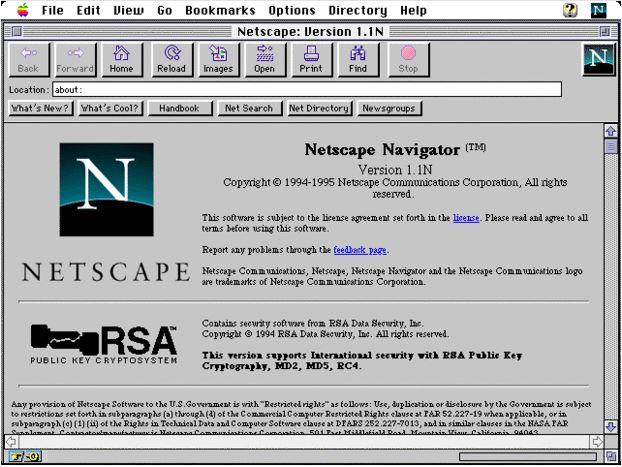
I'd argue that this logo should have been included, though. It's from Netscape, the first browser most people used in the 1990s. Netscape was a retail version of Mosaic and it was the first entry people got into the internet if they tried it before Microsoft's utter takeover of the browser market. It's also a very decent logo. There's a subtle curve indicating the world, and the lower part of the "N" is hidden giving some dimension. It's a good thing this was a good logo too, because at dialup speeds, you ended up looking at it a lot. As you can see from this screenshot, it sat at the upper right of the window and animated as you waited for your data to arrive.
Are there any? Will we look fondly back at the oddly balanced "F" of Facebook or the recently introduced "cheese slicer X" of the former Twitter? Time alone will tell, but I rather doubt it.
The post FUN FRIDAY: A history of browser icons appeared first on The Solid Signal Blog.
Continue reading...
Keep in mind that the designers of this UI had only 640×480 to work with. That's less resolution than there is in a single icon on your phone. Yet, they not only managed to convey all the information you needed, they even gave a 3D effect to the buttons. For someone who didn't know what was clickable and what wasn't, this was incredibly important.
By the mid-2000s we start to see icons becoming really important designs. The first icons for Macintosh are still works of art, because they're so clear with so little data. But they don't really reach the design level that you see in corporate logos. I'd argue that the first icon to do that was this one:
This was one of the original icons for Microsoft Internet Explorer. It comes from 1996 and it's so well executed that it still reads well today. It's an E for explorer, with something orbiting the world. Even if you didn't know it was internet software you might be able to guess. That's the mark of a good logo. In later years, it would suffer from an excess of 2010s special effects, looking like this by the time Windows Vista came a decade later:
Still it retained enough visual identity that all that extra shine didn't hurt it. The logo remained until the end of Internet Explorer's life, when it was replaced by the first generation of the Edge logo, which deliberately calls back to the original Internet Explorer logo:
Arguably it's not as good of a design, but the first generation of Edge wasn't that good either.
I'm not the only person who thinks this way
I ran across this essay on howtogeek, which traces the history of web browsers using their familiar icons. You can see how visual design went from extremely simple, driven by the limits of technology, to unnecessarily shiny and 3D, back to mostly simple. And now, where we are with icon design is that there's a lot of very subtle depth to the icons you use every day, but it doesn't register. Instead you just get an impression of overall quality. That's the sign of a well-crafted logo or icon. You shouldn't need to break it down in order to understand what it's all about.
A few that were left behind
I find it interesting that there are two logos from the early days that were not represented. The first is the original NCSA Mosaic logo.
What you see here is one of the very first web browser icons. It sorts of hits you in the head with what it does. It takes you all over the world from point to point. It's not a great logo. At the time it was created, colors were very limited and resolution was low. but that's not really the issue. The issue is that it's a little too on-the-nose and it looks like an "S" which doesn't really have anything to do with the internet.
I'd argue that this logo should have been included, though. It's from Netscape, the first browser most people used in the 1990s. Netscape was a retail version of Mosaic and it was the first entry people got into the internet if they tried it before Microsoft's utter takeover of the browser market. It's also a very decent logo. There's a subtle curve indicating the world, and the lower part of the "N" is hidden giving some dimension. It's a good thing this was a good logo too, because at dialup speeds, you ended up looking at it a lot. As you can see from this screenshot, it sat at the upper right of the window and animated as you waited for your data to arrive.
The timeless logos of 2023
Are there any? Will we look fondly back at the oddly balanced "F" of Facebook or the recently introduced "cheese slicer X" of the former Twitter? Time alone will tell, but I rather doubt it.
The post FUN FRIDAY: A history of browser icons appeared first on The Solid Signal Blog.
Continue reading...
0 Replies
·
260 views

Staff member
HERE TO HELP YOU!
We have a Breakfast and Dinner thread so... 
Continuing from the Breakfast thread, found Cornbread mix so ...
Yellow Cornbread Mix
2 Hatch Green Chiles -diced
1 Egg
2/3 cup of milk
add to greased pan
Bake for 400f 20-25 minutes(From instructions)
now to put together and try... this to go with pinto beans...
Continuing from the Breakfast thread, found Cornbread mix so ...
Yellow Cornbread Mix
2 Hatch Green Chiles -diced
1 Egg
2/3 cup of milk
add to greased pan
Bake for 400f 20-25 minutes(From instructions)
now to put together and try... this to go with pinto beans...
5449 Replies
·
336086 views


iJustine
Time for another AWESOME video from iJustine!
View: https://www.youtube.com/shorts/yj3f7ab5pBI
Direct YouTube Link - iPhone Duo's First Concert! Revis!
The official iJustine Website's Website
Buy her book!
View: https://www.youtube.com/shorts/yj3f7ab5pBI
Direct YouTube Link - iPhone Duo's First Concert! Revis!
The official iJustine Website's Website
Buy her book!
0 Replies
·
4 views
TWiT Tech Podcast Network
Time for another AWESOME video from the TWIT Network!
View: https://www.youtube.com/shorts/7NJXMnbT1Mk
Direct YouTube Link - New iPad mini Announced... at $699?
TWIT's Website
TWIT Live Feed
View: https://www.youtube.com/shorts/7NJXMnbT1Mk
Direct YouTube Link - New iPad mini Announced... at $699?
TWIT's Website
TWIT Live Feed
0 Replies
·
4 views

Staff member
HERE TO HELP YOU!
Cutting Edge
Sometimes a thread gets so many posts in it that is can cause issues for the server so that why today we introduce The Song Name Game Part 3!
So let the game continue!
The last song was added by Bobby who posted...
One Meat Ball - Andrews Sisters
CONTINUE ON AND HAVE FUN! WELCOME HOME TO SATELLITEGUYS.US!
Here are the original rules for the game as posted by WebbyDude back in 2006. http://www.satelliteguys.us/threads/68645-Song-Name-Game
Just name a song title and the band who performed it. The next person does the same thing, but needs to list a song title or band name which includes a word from the previous entry. Pick songs from any genre.
Example:
Long Live Rock and Roll -- Rainbow
Rainbow in the Dark -- Dio
Another example:
Ride the Lightning -- Metallica
Lightning Strikes -- Ozzy Osbourne
Get it?
An additional note: we all know that song titles, sometimes, use profane words. Because this is a family friendly website it is advised that you clean up that title up a bit. This is accomplished by using something like sh!t instead of the real word. Thanks....
So let the game continue!
The last song was added by Bobby who posted...
One Meat Ball - Andrews Sisters
CONTINUE ON AND HAVE FUN! WELCOME HOME TO SATELLITEGUYS.US!
Here are the original rules for the game as posted by WebbyDude back in 2006. http://www.satelliteguys.us/threads/68645-Song-Name-Game
Just name a song title and the band who performed it. The next person does the same thing, but needs to list a song title or band name which includes a word from the previous entry. Pick songs from any genre.
Example:
Long Live Rock and Roll -- Rainbow
Rainbow in the Dark -- Dio
Another example:
Ride the Lightning -- Metallica
Lightning Strikes -- Ozzy Osbourne
Get it?
An additional note: we all know that song titles, sometimes, use profane words. Because this is a family friendly website it is advised that you clean up that title up a bit. This is accomplished by using something like sh!t instead of the real word. Thanks....
68658 Replies
·
2680224 views


Lately my eight year old Dell laptop has been shutting off even when I have a full battery. I have had to keep it plugged up all the time to keep this from happening. Any idea what is causing this? I replaced the battery about three years ago.
2 Replies
·
46 views

Pub Member / Supporter
I set up a music server for my brother a few years ago. It's basically a small headless computer but it needs to have a DHCP IP address reserved for it in the router settings. This was easy to do in his DSL router. He's switching to Starlink now and I was wondering if these setting are easily accessible in the Starlink router. I'm pretty sure he will be getting the latest V5 router.
5 Replies
·
285 views


Pub Member / Supporter
Lifetime Supporter
Good...simple humor. Enjoy
View: https://www.youtube.com/watch?v=E92AtfTLge4
View: https://www.youtube.com/watch?v=HJy0WnejlF4
View: https://www.youtube.com/watch?v=E92AtfTLge4
View: https://www.youtube.com/watch?v=HJy0WnejlF4
2 Replies
·
51 views

Pub Member / Supporter
Lifetime Supporter
Terrible tragedy. You would think that they would have safe guards in place that would prevent something like this from happening. I guess if you are going to ride in a passenger train it might be best to get a car near the rear.
 www.zerohedge.com
At Least 64 Dead After Two High-Speed Trains Collide In Spain<!-- --> | ZeroHedge
ZeroHedge - On a long enough timeline, the survival rate for everyone drops to zero
www.zerohedge.com
2 Replies
·
55 views


Booredatwork.com
Time for another AWESOME video from BoredAtWork!
View: https://www.youtube.com/watch?v=MSXmcYapC3I
Direct YouTube Link - MacBook Pro With PROLED XDR Display - Watch Before you BUY!
Booredatwork.com Website
Booredatwork on Facebook
View: https://www.youtube.com/watch?v=MSXmcYapC3I
Direct YouTube Link - MacBook Pro With PROLED XDR Display - Watch Before you BUY!
Booredatwork.com Website
Booredatwork on Facebook
0 Replies
·
14 views
Marques Brownlee
Time for another AWESOME video from Marques Brownlee!
View: https://www.youtube.com/watch?v=2reQut8WNGc
Direct YouTube Link - Macbook PROLED XDR Impressions: They Said They Wouldn't!
The official MKBHD Website!
The MKBHD Store
View: https://www.youtube.com/watch?v=2reQut8WNGc
Direct YouTube Link - Macbook PROLED XDR Impressions: They Said They Wouldn't!
The official MKBHD Website!
The MKBHD Store
0 Replies
·
26 views