

Social Feed

Staff member
HERE TO HELP YOU!
Pub Member / Supporter
Cutting Edge
I've been working with a Blackmagic Pocket Cinema 6K camera for several months now. It's hands down the best camera I've ever used, video or still. Its 19-megapixel sensor can capture stills or 6K video (hence the name) that's up to broadcast standards. It has a large touchscreen which makes adjustments easy and quick. And boy is it customizable. It has a wide variety of automatic and manual settings that I'm still learning to use. It also has a full-sized HDMI port and a USB port for an external hard drive.
There's only one thing it doesn't have when you buy it: a lens.
That may seem kind of weird if you're an amateur photographer. Blackmagic Design is selling something that doesn't come with everything it needs right out of the box. But, if you're a photography or video buff, this likely doesn't surprise you. Camera bodies have been sold without lenses for at least as long as I've been alive. This lets the user choose the right lens from a bewildering array of choices. Since getting this camera, I've purchase three lenses which I've used for different purposes.
The first question is, of course, what do you want to do with the camera? For most users, a zoom lens is the right choice, but if you want the absolute best quality you might want to choose a "prime" lens. (That's the proper term for a "non-zoom" lens.) Prime lenses are less versatile but often provide a level of sharpness and sensitivity that you can't get with a zoom lens.
The next choice you'll want to make is the focal length of the lens. This doesn't always refer to the physical length since a lens can have several elements within it that allow it to be more compact. The "longer" the lens is, the more you can zoom in. A 35mm lens basically gives you a field of view similar to what your eyes see. Anything "shorter" like 18mm will capture a wider area but the edges may be distorted. With a very long lens, you can capture distant things as if you were right next to them. There are other benefits of different-sized lenses, but this isn't an in-depth photography course. If you're curious about that, there are plenty of other sites to read.
You should also consider the way the lens attaches to the camera. Blackmagic cameras use Canon's EF-mount. Lenses for other Canon mounts or for Nikon cameras won't work without an adapter, and those adapters can create problems that you want to avoid.
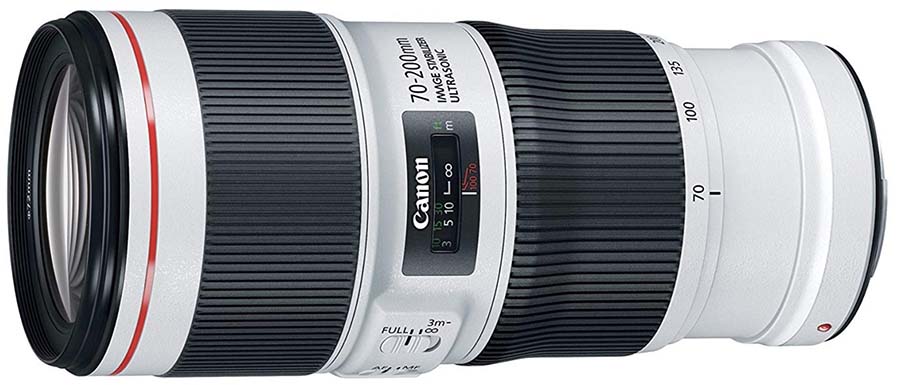
There really is a difference between a cheap lens and an expensive one. You'll want to look for these features:
A lens that's got a big chunk of glass on the edge will perform better than one with a smaller front lens. Ideally you want the part of the lens your camera actually uses to be as flat as possible, so you want a lens that's large enough that the part that slopes inward is far from the center.
As I said above, some lenses have many different elements in them. Having multiple pieces of glass essentially allows the lens to fold in on itself, reducing its physical size. However, the more glass you put in a lens, the more distortion you get and the less light reaches the sensor. An 80mm lens that's 10 inches long will always give you better performance than one that's 5 inches long.
When you compare the price of any two lenses, the more expensive one will generally have better construction and better optics. You can buy used and refurbished lenses instead of new ones, which will allow you to get a better lens at a lower price. But in the end, the lens is an incredibly important part of your camera. The same camera will give radically different results when used with a $50 lens compared to a $500 lens.
I get it, the camera itself wasn't cheap. But if you want something that will really show that camera off, choose a lens that's up to the task.

The Blackmagic line of cameras use Canon's EF-mount lenses. This opens up a whole world of possibilities for you to choose from. However, in the summer of 2023 the company rolled out Firmware Version 8 for its cameras. This update takes away the ability for non-Canon lenses to set auto exposure and auto focus. The company acknowledges the problem but has not committed to a timeline for fixing the issue.
The problem seems to have something to do with the way non-Canon lenses actually interact with Canon cameras. From what I understand, Canon does not publish the technical specs of their lens "communication protocol." This means that camera and lens makers like Blackmagic are left to try to figure out how motorized lenses actually talk to the camera. It's not super clear why, but Blackmagic's latest update doesn't talk to non-Canon-brand lenses very well.
There are some excellent third-party lenses for Canon EF mount, but for now I would stay away from them.
Blackmagic has really revolutionized the worlds of photography and video production. Their products are generally the same quality as those costing four times as much, and they carry the same advanced features. This puts advanced video production equipment in reach of small businesses, nonprofits, and others who would not be able to otherwise afford it.
Shop now for the great selection of Blackmagic Design products at Solid Signal!
The post Choosing the right lens for your Blackmagic Pocket Cinema camera appeared first on The Solid Signal Blog.
Continue reading...
There's only one thing it doesn't have when you buy it: a lens.
That's right, it doesn't come with a lens.
That may seem kind of weird if you're an amateur photographer. Blackmagic Design is selling something that doesn't come with everything it needs right out of the box. But, if you're a photography or video buff, this likely doesn't surprise you. Camera bodies have been sold without lenses for at least as long as I've been alive. This lets the user choose the right lens from a bewildering array of choices. Since getting this camera, I've purchase three lenses which I've used for different purposes.
Which lens should you pick?
The first question is, of course, what do you want to do with the camera? For most users, a zoom lens is the right choice, but if you want the absolute best quality you might want to choose a "prime" lens. (That's the proper term for a "non-zoom" lens.) Prime lenses are less versatile but often provide a level of sharpness and sensitivity that you can't get with a zoom lens.
The next choice you'll want to make is the focal length of the lens. This doesn't always refer to the physical length since a lens can have several elements within it that allow it to be more compact. The "longer" the lens is, the more you can zoom in. A 35mm lens basically gives you a field of view similar to what your eyes see. Anything "shorter" like 18mm will capture a wider area but the edges may be distorted. With a very long lens, you can capture distant things as if you were right next to them. There are other benefits of different-sized lenses, but this isn't an in-depth photography course. If you're curious about that, there are plenty of other sites to read.
You should also consider the way the lens attaches to the camera. Blackmagic cameras use Canon's EF-mount. Lenses for other Canon mounts or for Nikon cameras won't work without an adapter, and those adapters can create problems that you want to avoid.
Simple answer: choose the biggest and most expensive lens you can.
There really is a difference between a cheap lens and an expensive one. You'll want to look for these features:
Big front lens
A lens that's got a big chunk of glass on the edge will perform better than one with a smaller front lens. Ideally you want the part of the lens your camera actually uses to be as flat as possible, so you want a lens that's large enough that the part that slopes inward is far from the center.
Actual physical size
As I said above, some lenses have many different elements in them. Having multiple pieces of glass essentially allows the lens to fold in on itself, reducing its physical size. However, the more glass you put in a lens, the more distortion you get and the less light reaches the sensor. An 80mm lens that's 10 inches long will always give you better performance than one that's 5 inches long.
Cost generally equals quality
When you compare the price of any two lenses, the more expensive one will generally have better construction and better optics. You can buy used and refurbished lenses instead of new ones, which will allow you to get a better lens at a lower price. But in the end, the lens is an incredibly important part of your camera. The same camera will give radically different results when used with a $50 lens compared to a $500 lens.
I get it, the camera itself wasn't cheap. But if you want something that will really show that camera off, choose a lens that's up to the task.
SUPER IMPORTANT: Choose a Canon-brand lens
The Blackmagic line of cameras use Canon's EF-mount lenses. This opens up a whole world of possibilities for you to choose from. However, in the summer of 2023 the company rolled out Firmware Version 8 for its cameras. This update takes away the ability for non-Canon lenses to set auto exposure and auto focus. The company acknowledges the problem but has not committed to a timeline for fixing the issue.
The problem seems to have something to do with the way non-Canon lenses actually interact with Canon cameras. From what I understand, Canon does not publish the technical specs of their lens "communication protocol." This means that camera and lens makers like Blackmagic are left to try to figure out how motorized lenses actually talk to the camera. It's not super clear why, but Blackmagic's latest update doesn't talk to non-Canon-brand lenses very well.
There are some excellent third-party lenses for Canon EF mount, but for now I would stay away from them.
Get Blackmagic products from Solid Signal
Blackmagic has really revolutionized the worlds of photography and video production. Their products are generally the same quality as those costing four times as much, and they carry the same advanced features. This puts advanced video production equipment in reach of small businesses, nonprofits, and others who would not be able to otherwise afford it.
Shop now for the great selection of Blackmagic Design products at Solid Signal!
The post Choosing the right lens for your Blackmagic Pocket Cinema camera appeared first on The Solid Signal Blog.
Continue reading...
0 Replies
·
306 views

Staff member
HERE TO HELP YOU!
We have a Breakfast and Dinner thread so... 
Continuing from the Breakfast thread, found Cornbread mix so ...
Yellow Cornbread Mix
2 Hatch Green Chiles -diced
1 Egg
2/3 cup of milk
add to greased pan
Bake for 400f 20-25 minutes(From instructions)
now to put together and try... this to go with pinto beans...
Continuing from the Breakfast thread, found Cornbread mix so ...
Yellow Cornbread Mix
2 Hatch Green Chiles -diced
1 Egg
2/3 cup of milk
add to greased pan
Bake for 400f 20-25 minutes(From instructions)
now to put together and try... this to go with pinto beans...
5449 Replies
·
336086 views


iJustine
Time for another AWESOME video from iJustine!
View: https://www.youtube.com/shorts/yj3f7ab5pBI
Direct YouTube Link - iPhone Duo's First Concert! Revis!
The official iJustine Website's Website
Buy her book!
View: https://www.youtube.com/shorts/yj3f7ab5pBI
Direct YouTube Link - iPhone Duo's First Concert! Revis!
The official iJustine Website's Website
Buy her book!
0 Replies
·
4 views
TWiT Tech Podcast Network
Time for another AWESOME video from the TWIT Network!
View: https://www.youtube.com/shorts/7NJXMnbT1Mk
Direct YouTube Link - New iPad mini Announced... at $699?
TWIT's Website
TWIT Live Feed
View: https://www.youtube.com/shorts/7NJXMnbT1Mk
Direct YouTube Link - New iPad mini Announced... at $699?
TWIT's Website
TWIT Live Feed
0 Replies
·
4 views

Staff member
HERE TO HELP YOU!
Cutting Edge
Sometimes a thread gets so many posts in it that is can cause issues for the server so that why today we introduce The Song Name Game Part 3!
So let the game continue!
The last song was added by Bobby who posted...
One Meat Ball - Andrews Sisters
CONTINUE ON AND HAVE FUN! WELCOME HOME TO SATELLITEGUYS.US!
Here are the original rules for the game as posted by WebbyDude back in 2006. http://www.satelliteguys.us/threads/68645-Song-Name-Game
Just name a song title and the band who performed it. The next person does the same thing, but needs to list a song title or band name which includes a word from the previous entry. Pick songs from any genre.
Example:
Long Live Rock and Roll -- Rainbow
Rainbow in the Dark -- Dio
Another example:
Ride the Lightning -- Metallica
Lightning Strikes -- Ozzy Osbourne
Get it?
An additional note: we all know that song titles, sometimes, use profane words. Because this is a family friendly website it is advised that you clean up that title up a bit. This is accomplished by using something like sh!t instead of the real word. Thanks....
So let the game continue!
The last song was added by Bobby who posted...
One Meat Ball - Andrews Sisters
CONTINUE ON AND HAVE FUN! WELCOME HOME TO SATELLITEGUYS.US!
Here are the original rules for the game as posted by WebbyDude back in 2006. http://www.satelliteguys.us/threads/68645-Song-Name-Game
Just name a song title and the band who performed it. The next person does the same thing, but needs to list a song title or band name which includes a word from the previous entry. Pick songs from any genre.
Example:
Long Live Rock and Roll -- Rainbow
Rainbow in the Dark -- Dio
Another example:
Ride the Lightning -- Metallica
Lightning Strikes -- Ozzy Osbourne
Get it?
An additional note: we all know that song titles, sometimes, use profane words. Because this is a family friendly website it is advised that you clean up that title up a bit. This is accomplished by using something like sh!t instead of the real word. Thanks....
68658 Replies
·
2680224 views


Lately my eight year old Dell laptop has been shutting off even when I have a full battery. I have had to keep it plugged up all the time to keep this from happening. Any idea what is causing this? I replaced the battery about three years ago.
2 Replies
·
46 views

Pub Member / Supporter
I set up a music server for my brother a few years ago. It's basically a small headless computer but it needs to have a DHCP IP address reserved for it in the router settings. This was easy to do in his DSL router. He's switching to Starlink now and I was wondering if these setting are easily accessible in the Starlink router. I'm pretty sure he will be getting the latest V5 router.
5 Replies
·
285 views


Pub Member / Supporter
Lifetime Supporter
Good...simple humor. Enjoy
View: https://www.youtube.com/watch?v=E92AtfTLge4
View: https://www.youtube.com/watch?v=HJy0WnejlF4
View: https://www.youtube.com/watch?v=E92AtfTLge4
View: https://www.youtube.com/watch?v=HJy0WnejlF4
2 Replies
·
51 views

Pub Member / Supporter
Lifetime Supporter
Terrible tragedy. You would think that they would have safe guards in place that would prevent something like this from happening. I guess if you are going to ride in a passenger train it might be best to get a car near the rear.
 www.zerohedge.com
At Least 64 Dead After Two High-Speed Trains Collide In Spain<!-- --> | ZeroHedge
ZeroHedge - On a long enough timeline, the survival rate for everyone drops to zero
www.zerohedge.com
2 Replies
·
55 views


Booredatwork.com
Time for another AWESOME video from BoredAtWork!
View: https://www.youtube.com/watch?v=MSXmcYapC3I
Direct YouTube Link - MacBook Pro With PROLED XDR Display - Watch Before you BUY!
Booredatwork.com Website
Booredatwork on Facebook
View: https://www.youtube.com/watch?v=MSXmcYapC3I
Direct YouTube Link - MacBook Pro With PROLED XDR Display - Watch Before you BUY!
Booredatwork.com Website
Booredatwork on Facebook
0 Replies
·
14 views
Marques Brownlee
Time for another AWESOME video from Marques Brownlee!
View: https://www.youtube.com/watch?v=2reQut8WNGc
Direct YouTube Link - Macbook PROLED XDR Impressions: They Said They Wouldn't!
The official MKBHD Website!
The MKBHD Store
View: https://www.youtube.com/watch?v=2reQut8WNGc
Direct YouTube Link - Macbook PROLED XDR Impressions: They Said They Wouldn't!
The official MKBHD Website!
The MKBHD Store
0 Replies
·
26 views