

Social Feed

Staff member
HERE TO HELP YOU!
Pub Member / Supporter
Cutting Edge
Heinrich Hertz is not a name most people know. Even though most folks know terms like "kilohertz" and "megahertz" because of computers and radios, most don't give any thought to why those words are what they are. Most scientific measures used today are named for people instrumental in the history of electricity and physics, yet we rarely think about those communications pioneers. Articles like this one aim to change that.
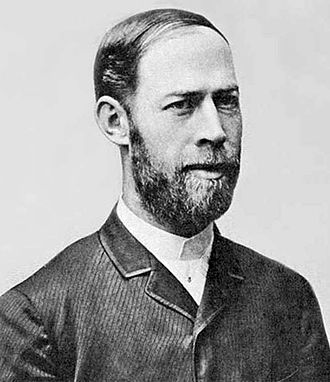
This appears to be the only photo that still exists of Heinrich Hertz. From the little we know, he was born in the area now known as Germany in 1857. He came from a wealthy family, which was more or less a prerequisite for being a scientist in those days. Hertz gained advanced degrees in engineering and went on to become an acclaimed professor at the time. That probably would have been enough to satisfy his family and land him the girl of his dreams, but he went on to do far more than that.
The late 19th century was a time of incredible innovations in technology, perhaps even more so than the present day. For the first time in history, scientists in different cities and countries could share information quickly. Thanks to the telegraph, which was making its way through the western world at the time, people could share information with people far away. Telegraph cable connected Europe and North America, and messages could be sent in minutes rather than weeks.
This led to people like Dr. Hertz working to prove theories of other scientists rather than trying to work independently. At the time, there were several folks across the country with a wild theory. They believed it was possible to send electricity from one point to another without a wire. But, in order to do it, they had to invent literally everything they needed. That's where Hertz came in. Not only did he literally confirm the existence of radio waves, he found a way to collect them.
Hertz' experiments in electricity led to everything from AC power to computer speeds to radio stations. However, Heinrich Hertz is also remembered as the inventor of the parabolic antenna, in other words, the satellite dish.
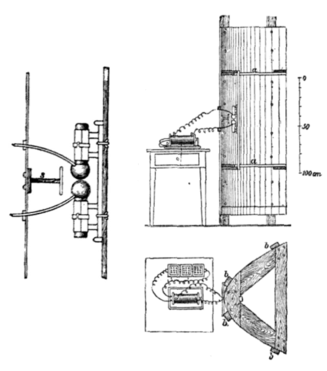
Surprisingly, the dish has been around since 1888, about 75 years longer than the communications satellite. (That should permanently settle any chicken-or-the-egg questions.) The antenna was invented to try to understand and confirm the existence of radio waves, which it did. The antenna concentrated as much energy as possible on a single spot, just as a dish does today.
The dish-shaped antenna was used throughout the history of recording technology to help improve the gain of weak signals. Radar antennas used the dish-shaped antenna during the 1940s and 1950s, and still do to this day. Radar antennas are traditionally hidden behind a dome to keep the moving parts cleaner as they do rotate.
In 1962, signals from the first communications satellite, Telstar I, were picked up by a large dish, just as satellite signals are today.
For giving us the dish that so many of us use for TV signals, we honor Heinrich Hertz. Sadly, Dr. Hertz died at the age of 36. The 19th century was a great time for science, but it would still be half a century before even the most simple antibiotics were found. Today the infection that killed him would probably be treatable with over-the-counter medication, but then… well obviously it was a much bigger deal.
The post COMMUNICATIONS PIONEERS: Heinrich Hertz appeared first on The Solid Signal Blog.
Continue reading...
Who was Heinrich Hertz?
This appears to be the only photo that still exists of Heinrich Hertz. From the little we know, he was born in the area now known as Germany in 1857. He came from a wealthy family, which was more or less a prerequisite for being a scientist in those days. Hertz gained advanced degrees in engineering and went on to become an acclaimed professor at the time. That probably would have been enough to satisfy his family and land him the girl of his dreams, but he went on to do far more than that.
The work Hertz did
The late 19th century was a time of incredible innovations in technology, perhaps even more so than the present day. For the first time in history, scientists in different cities and countries could share information quickly. Thanks to the telegraph, which was making its way through the western world at the time, people could share information with people far away. Telegraph cable connected Europe and North America, and messages could be sent in minutes rather than weeks.
This led to people like Dr. Hertz working to prove theories of other scientists rather than trying to work independently. At the time, there were several folks across the country with a wild theory. They believed it was possible to send electricity from one point to another without a wire. But, in order to do it, they had to invent literally everything they needed. That's where Hertz came in. Not only did he literally confirm the existence of radio waves, he found a way to collect them.
The invention of the dish
Hertz' experiments in electricity led to everything from AC power to computer speeds to radio stations. However, Heinrich Hertz is also remembered as the inventor of the parabolic antenna, in other words, the satellite dish.
Surprisingly, the dish has been around since 1888, about 75 years longer than the communications satellite. (That should permanently settle any chicken-or-the-egg questions.) The antenna was invented to try to understand and confirm the existence of radio waves, which it did. The antenna concentrated as much energy as possible on a single spot, just as a dish does today.
The dish-shaped antenna was used throughout the history of recording technology to help improve the gain of weak signals. Radar antennas used the dish-shaped antenna during the 1940s and 1950s, and still do to this day. Radar antennas are traditionally hidden behind a dome to keep the moving parts cleaner as they do rotate.
In 1962, signals from the first communications satellite, Telstar I, were picked up by a large dish, just as satellite signals are today.
For giving us the dish that so many of us use for TV signals, we honor Heinrich Hertz. Sadly, Dr. Hertz died at the age of 36. The 19th century was a great time for science, but it would still be half a century before even the most simple antibiotics were found. Today the infection that killed him would probably be treatable with over-the-counter medication, but then… well obviously it was a much bigger deal.
The post COMMUNICATIONS PIONEERS: Heinrich Hertz appeared first on The Solid Signal Blog.
Continue reading...
0 Replies
·
275 views

Staff member
HERE TO HELP YOU!
We have a Breakfast and Dinner thread so... 
Continuing from the Breakfast thread, found Cornbread mix so ...
Yellow Cornbread Mix
2 Hatch Green Chiles -diced
1 Egg
2/3 cup of milk
add to greased pan
Bake for 400f 20-25 minutes(From instructions)
now to put together and try... this to go with pinto beans...
Continuing from the Breakfast thread, found Cornbread mix so ...
Yellow Cornbread Mix
2 Hatch Green Chiles -diced
1 Egg
2/3 cup of milk
add to greased pan
Bake for 400f 20-25 minutes(From instructions)
now to put together and try... this to go with pinto beans...
5448 Replies
·
336076 views


iJustine
Time for another AWESOME video from iJustine!
View: https://www.youtube.com/shorts/yj3f7ab5pBI
Direct YouTube Link - iPhone Duo's First Concert! Revis!
The official iJustine Website's Website
Buy her book!
View: https://www.youtube.com/shorts/yj3f7ab5pBI
Direct YouTube Link - iPhone Duo's First Concert! Revis!
The official iJustine Website's Website
Buy her book!
0 Replies
·
2 views
TWiT Tech Podcast Network
Time for another AWESOME video from the TWIT Network!
View: https://www.youtube.com/shorts/7NJXMnbT1Mk
Direct YouTube Link - New iPad mini Announced... at $699?
TWIT's Website
TWIT Live Feed
View: https://www.youtube.com/shorts/7NJXMnbT1Mk
Direct YouTube Link - New iPad mini Announced... at $699?
TWIT's Website
TWIT Live Feed
0 Replies
·
1 views

Staff member
HERE TO HELP YOU!
Cutting Edge
Sometimes a thread gets so many posts in it that is can cause issues for the server so that why today we introduce The Song Name Game Part 3!
So let the game continue!
The last song was added by Bobby who posted...
One Meat Ball - Andrews Sisters
CONTINUE ON AND HAVE FUN! WELCOME HOME TO SATELLITEGUYS.US!
Here are the original rules for the game as posted by WebbyDude back in 2006. http://www.satelliteguys.us/threads/68645-Song-Name-Game
Just name a song title and the band who performed it. The next person does the same thing, but needs to list a song title or band name which includes a word from the previous entry. Pick songs from any genre.
Example:
Long Live Rock and Roll -- Rainbow
Rainbow in the Dark -- Dio
Another example:
Ride the Lightning -- Metallica
Lightning Strikes -- Ozzy Osbourne
Get it?
An additional note: we all know that song titles, sometimes, use profane words. Because this is a family friendly website it is advised that you clean up that title up a bit. This is accomplished by using something like sh!t instead of the real word. Thanks....
So let the game continue!
The last song was added by Bobby who posted...
One Meat Ball - Andrews Sisters
CONTINUE ON AND HAVE FUN! WELCOME HOME TO SATELLITEGUYS.US!
Here are the original rules for the game as posted by WebbyDude back in 2006. http://www.satelliteguys.us/threads/68645-Song-Name-Game
Just name a song title and the band who performed it. The next person does the same thing, but needs to list a song title or band name which includes a word from the previous entry. Pick songs from any genre.
Example:
Long Live Rock and Roll -- Rainbow
Rainbow in the Dark -- Dio
Another example:
Ride the Lightning -- Metallica
Lightning Strikes -- Ozzy Osbourne
Get it?
An additional note: we all know that song titles, sometimes, use profane words. Because this is a family friendly website it is advised that you clean up that title up a bit. This is accomplished by using something like sh!t instead of the real word. Thanks....
68658 Replies
·
2680216 views


Lately my eight year old Dell laptop has been shutting off even when I have a full battery. I have had to keep it plugged up all the time to keep this from happening. Any idea what is causing this? I replaced the battery about three years ago.
2 Replies
·
46 views


Pub Member / Supporter
I set up a music server for my brother a few years ago. It's basically a small headless computer but it needs to have a DHCP IP address reserved for it in the router settings. This was easy to do in his DSL router. He's switching to Starlink now and I was wondering if these setting are easily accessible in the Starlink router. I'm pretty sure he will be getting the latest V5 router.
5 Replies
·
284 views


Pub Member / Supporter
Lifetime Supporter
Good...simple humor. Enjoy
View: https://www.youtube.com/watch?v=E92AtfTLge4
View: https://www.youtube.com/watch?v=HJy0WnejlF4
View: https://www.youtube.com/watch?v=E92AtfTLge4
View: https://www.youtube.com/watch?v=HJy0WnejlF4
2 Replies
·
51 views

Pub Member / Supporter
Lifetime Supporter
Terrible tragedy. You would think that they would have safe guards in place that would prevent something like this from happening. I guess if you are going to ride in a passenger train it might be best to get a car near the rear.
 www.zerohedge.com
At Least 64 Dead After Two High-Speed Trains Collide In Spain<!-- --> | ZeroHedge
ZeroHedge - On a long enough timeline, the survival rate for everyone drops to zero
www.zerohedge.com
2 Replies
·
55 views


Booredatwork.com
Time for another AWESOME video from BoredAtWork!
View: https://www.youtube.com/watch?v=MSXmcYapC3I
Direct YouTube Link - MacBook Pro With PROLED XDR Display - Watch Before you BUY!
Booredatwork.com Website
Booredatwork on Facebook
View: https://www.youtube.com/watch?v=MSXmcYapC3I
Direct YouTube Link - MacBook Pro With PROLED XDR Display - Watch Before you BUY!
Booredatwork.com Website
Booredatwork on Facebook
0 Replies
·
14 views
Marques Brownlee
Time for another AWESOME video from Marques Brownlee!
View: https://www.youtube.com/watch?v=2reQut8WNGc
Direct YouTube Link - Macbook PROLED XDR Impressions: They Said They Wouldn't!
The official MKBHD Website!
The MKBHD Store
View: https://www.youtube.com/watch?v=2reQut8WNGc
Direct YouTube Link - Macbook PROLED XDR Impressions: They Said They Wouldn't!
The official MKBHD Website!
The MKBHD Store
0 Replies
·
26 views