

Social Feed

Staff member
HERE TO HELP YOU!
Pub Member / Supporter
Cutting Edge
Metal roofs aren't as common today as they once were, but they're still out there. Metal is a durable, lightweight building material that lasts decades if properly installed. In areas without extreme heat, it's an excellent choice. Metal roofs have gone out of fashion somewhat. I'm not quite sure why but I would guess it's due to them being… well… loud. But just because they're uncommon doesn't mean they're gone forever.
All building materials block cell signals to some degree or other. There are two factors that tend to make a difference in how much something will block cell signals. The first is energy-efficient design. Something that is specifically designed to keep the weather from getting in will also block cell phone signals very well. Newer homes are so energy efficient that it's a wonder any signals of any kind get in.
The other reliable indicator of cell signal problems is the amount of metal in between you and the cell tower. You might not see this metal. It could be in conduits in the walls. It could be in the form of iron oxide in bricks or tiles. Or, in the case of this article, it could be something extremely obvious like a metal roof. A metal roof is going to block cell signals from above almost completely. And, if you think about it, most cell signals do come from above, at least a little. Cell towers are above ground level. Signals can still come through walls and windows, but depending on where you are in relation to the towers, a lot can come through the roof. Or, in the case of metal roofs, not come through the roof.
You don't have to live without good cell signal at home. There's something you can do. It doesn't cost a lot, it doesn't require professional installation, and it eliminates the signal loss you get from metal roofs.
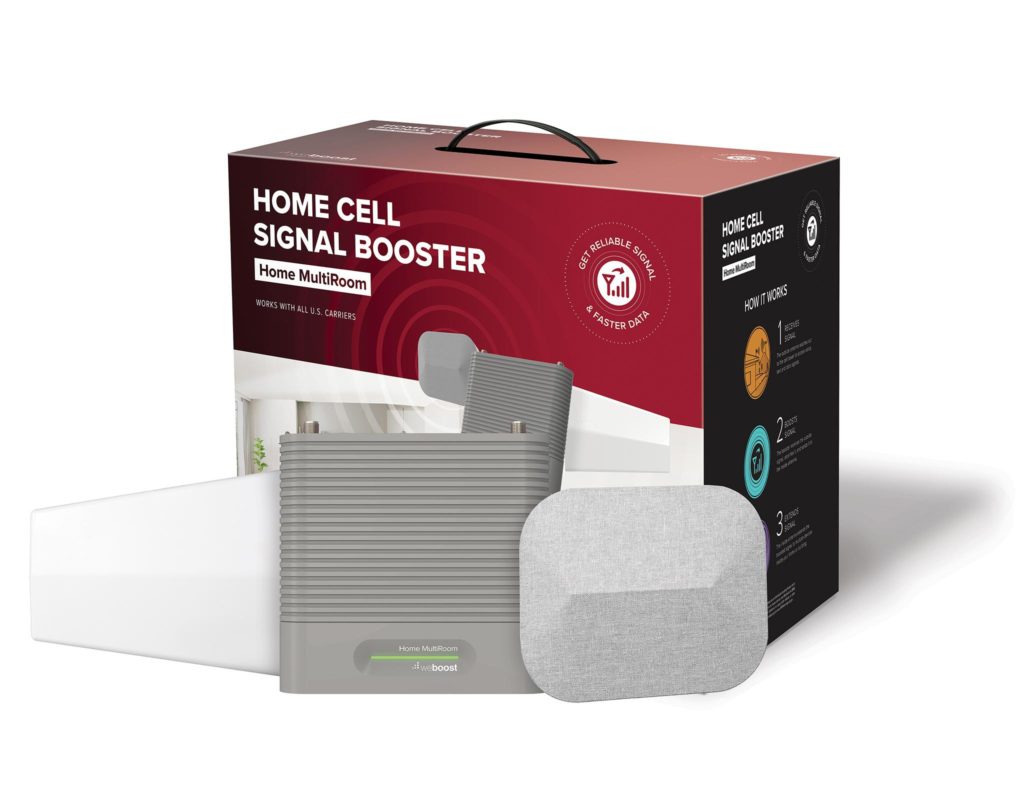
This is weBoost's Home Multiroom cell booster. It's designed to take cell signals from outside and blast them inside with up to 10,000,000 times amplification. It can be installed easily by anyone with basic homeowner skills and it costs half as much as that new iPhone you're lusting over. In most cases it will last 7+ years and it requires no maintenance during that time. Sounds great, right?
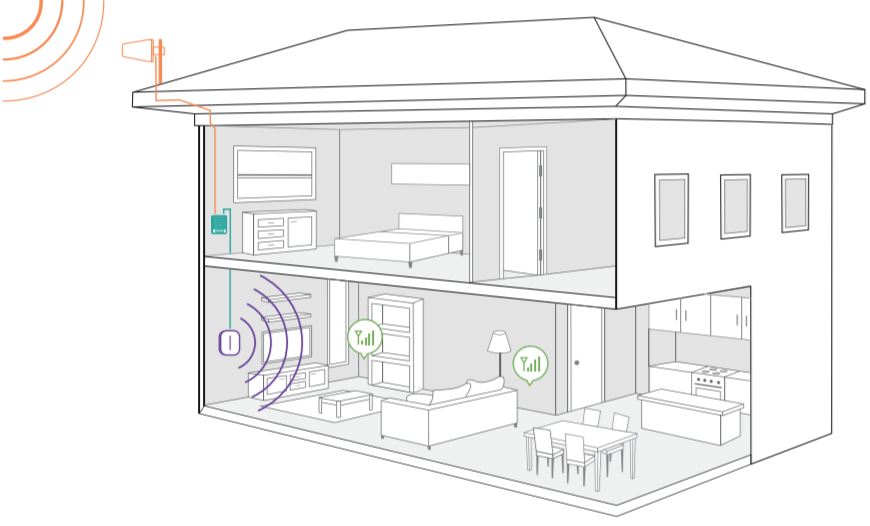
It's not magic. An outdoor antenna runs via wire to a complex two-way amplifier. That amplifier sends great signal into the house without the loss you get from a metal roof. It also takes inside cell signals and blasts them out to the closest cell tower. It does all this so well and so quickly that you don't even know it's there.
I honestly don't know why every home doesn't have one of these. They should just be installed as part of new energy-efficient homes, and they should be part of the upgrades people make as they're preparing to sell. The only thing I can figure is that people don't know that this tech exists.
Solid Signal has the best selection of cell phone signal boosters from all the leading brands. We have unbeatable prices, too. You can choose from the most powerful boosters allowed by law for home, business, vehicle, or even for your boat. It's all here in one place.
Not sure what you want? There's someone I want you to talk to.

This is Bryan Brillhart in our Signal Connect team. He knows cell phone boosters and he knows roofs. He's got more experience than practically anyone. He can help you choose the right cell phone signal booster no matter what your situation. Metal roof? Bryan knows all there is to know about them. He'll give you the best possible advice to help you get the booster you need. Bryan's available during East Coast business hours. All it takes is one call to 248-896-8599. If it's after hours, no problem! Fill out the form below and tell us you want to speak to Bryan. He'll call you back as quickly as possible. Not only that, he'll be ready to give you the free advice you need to make a great decision.
The post Metal roof? No cell service? There's something you can do appeared first on The Solid Signal Blog.
Continue reading...
The problem with metal roofs
All building materials block cell signals to some degree or other. There are two factors that tend to make a difference in how much something will block cell signals. The first is energy-efficient design. Something that is specifically designed to keep the weather from getting in will also block cell phone signals very well. Newer homes are so energy efficient that it's a wonder any signals of any kind get in.
The other reliable indicator of cell signal problems is the amount of metal in between you and the cell tower. You might not see this metal. It could be in conduits in the walls. It could be in the form of iron oxide in bricks or tiles. Or, in the case of this article, it could be something extremely obvious like a metal roof. A metal roof is going to block cell signals from above almost completely. And, if you think about it, most cell signals do come from above, at least a little. Cell towers are above ground level. Signals can still come through walls and windows, but depending on where you are in relation to the towers, a lot can come through the roof. Or, in the case of metal roofs, not come through the roof.
What can you do?
You don't have to live without good cell signal at home. There's something you can do. It doesn't cost a lot, it doesn't require professional installation, and it eliminates the signal loss you get from metal roofs.
This is weBoost's Home Multiroom cell booster. It's designed to take cell signals from outside and blast them inside with up to 10,000,000 times amplification. It can be installed easily by anyone with basic homeowner skills and it costs half as much as that new iPhone you're lusting over. In most cases it will last 7+ years and it requires no maintenance during that time. Sounds great, right?
Here's how it works
It's not magic. An outdoor antenna runs via wire to a complex two-way amplifier. That amplifier sends great signal into the house without the loss you get from a metal roof. It also takes inside cell signals and blasts them out to the closest cell tower. It does all this so well and so quickly that you don't even know it's there.
I honestly don't know why every home doesn't have one of these. They should just be installed as part of new energy-efficient homes, and they should be part of the upgrades people make as they're preparing to sell. The only thing I can figure is that people don't know that this tech exists.
Get the cell booster you want from Solid Signal
Solid Signal has the best selection of cell phone signal boosters from all the leading brands. We have unbeatable prices, too. You can choose from the most powerful boosters allowed by law for home, business, vehicle, or even for your boat. It's all here in one place.
Not sure what you want? There's someone I want you to talk to.
This is Bryan Brillhart in our Signal Connect team. He knows cell phone boosters and he knows roofs. He's got more experience than practically anyone. He can help you choose the right cell phone signal booster no matter what your situation. Metal roof? Bryan knows all there is to know about them. He'll give you the best possible advice to help you get the booster you need. Bryan's available during East Coast business hours. All it takes is one call to 248-896-8599. If it's after hours, no problem! Fill out the form below and tell us you want to speak to Bryan. He'll call you back as quickly as possible. Not only that, he'll be ready to give you the free advice you need to make a great decision.
The post Metal roof? No cell service? There's something you can do appeared first on The Solid Signal Blog.
Continue reading...
0 Replies
·
310 views


TWiT Tech Podcast Network
Time for another AWESOME video from the TWIT Network!
View: https://www.youtube.com/watch?v=7E4fkSffYKA
Direct YouTube Link - Tech News Weekly 461
TWIT's Website
TWIT Live Feed
View: https://www.youtube.com/watch?v=7E4fkSffYKA
Direct YouTube Link - Tech News Weekly 461
TWIT's Website
TWIT Live Feed
0 Replies
·
2 views

Staff member
HERE TO HELP YOU!
We have a Breakfast and Dinner thread so... 
Continuing from the Breakfast thread, found Cornbread mix so ...
Yellow Cornbread Mix
2 Hatch Green Chiles -diced
1 Egg
2/3 cup of milk
add to greased pan
Bake for 400f 20-25 minutes(From instructions)
now to put together and try... this to go with pinto beans...
Continuing from the Breakfast thread, found Cornbread mix so ...
Yellow Cornbread Mix
2 Hatch Green Chiles -diced
1 Egg
2/3 cup of milk
add to greased pan
Bake for 400f 20-25 minutes(From instructions)
now to put together and try... this to go with pinto beans...
5449 Replies
·
336091 views

iJustine
Time for another AWESOME video from iJustine!
View: https://www.youtube.com/shorts/yj3f7ab5pBI
Direct YouTube Link - iPhone Duo's First Concert! Revis!
The official iJustine Website's Website
Buy her book!
View: https://www.youtube.com/shorts/yj3f7ab5pBI
Direct YouTube Link - iPhone Duo's First Concert! Revis!
The official iJustine Website's Website
Buy her book!
0 Replies
·
5 views
TWiT Tech Podcast Network
Time for another AWESOME video from the TWIT Network!
View: https://www.youtube.com/shorts/7NJXMnbT1Mk
Direct YouTube Link - New iPad mini Announced... at $699?
TWIT's Website
TWIT Live Feed
View: https://www.youtube.com/shorts/7NJXMnbT1Mk
Direct YouTube Link - New iPad mini Announced... at $699?
TWIT's Website
TWIT Live Feed
0 Replies
·
6 views

Staff member
HERE TO HELP YOU!
Cutting Edge
Sometimes a thread gets so many posts in it that is can cause issues for the server so that why today we introduce The Song Name Game Part 3!
So let the game continue!
The last song was added by Bobby who posted...
One Meat Ball - Andrews Sisters
CONTINUE ON AND HAVE FUN! WELCOME HOME TO SATELLITEGUYS.US!
Here are the original rules for the game as posted by WebbyDude back in 2006. http://www.satelliteguys.us/threads/68645-Song-Name-Game
Just name a song title and the band who performed it. The next person does the same thing, but needs to list a song title or band name which includes a word from the previous entry. Pick songs from any genre.
Example:
Long Live Rock and Roll -- Rainbow
Rainbow in the Dark -- Dio
Another example:
Ride the Lightning -- Metallica
Lightning Strikes -- Ozzy Osbourne
Get it?
An additional note: we all know that song titles, sometimes, use profane words. Because this is a family friendly website it is advised that you clean up that title up a bit. This is accomplished by using something like sh!t instead of the real word. Thanks....
So let the game continue!
The last song was added by Bobby who posted...
One Meat Ball - Andrews Sisters
CONTINUE ON AND HAVE FUN! WELCOME HOME TO SATELLITEGUYS.US!
Here are the original rules for the game as posted by WebbyDude back in 2006. http://www.satelliteguys.us/threads/68645-Song-Name-Game
Just name a song title and the band who performed it. The next person does the same thing, but needs to list a song title or band name which includes a word from the previous entry. Pick songs from any genre.
Example:
Long Live Rock and Roll -- Rainbow
Rainbow in the Dark -- Dio
Another example:
Ride the Lightning -- Metallica
Lightning Strikes -- Ozzy Osbourne
Get it?
An additional note: we all know that song titles, sometimes, use profane words. Because this is a family friendly website it is advised that you clean up that title up a bit. This is accomplished by using something like sh!t instead of the real word. Thanks....
68658 Replies
·
2680237 views


Lately my eight year old Dell laptop has been shutting off even when I have a full battery. I have had to keep it plugged up all the time to keep this from happening. Any idea what is causing this? I replaced the battery about three years ago.
2 Replies
·
49 views

Pub Member / Supporter
I set up a music server for my brother a few years ago. It's basically a small headless computer but it needs to have a DHCP IP address reserved for it in the router settings. This was easy to do in his DSL router. He's switching to Starlink now and I was wondering if these setting are easily accessible in the Starlink router. I'm pretty sure he will be getting the latest V5 router.
5 Replies
·
288 views


Pub Member / Supporter
Lifetime Supporter
Good...simple humor. Enjoy
View: https://www.youtube.com/watch?v=E92AtfTLge4
View: https://www.youtube.com/watch?v=HJy0WnejlF4
View: https://www.youtube.com/watch?v=E92AtfTLge4
View: https://www.youtube.com/watch?v=HJy0WnejlF4
2 Replies
·
52 views

Pub Member / Supporter
Lifetime Supporter
Terrible tragedy. You would think that they would have safe guards in place that would prevent something like this from happening. I guess if you are going to ride in a passenger train it might be best to get a car near the rear.
 www.zerohedge.com
At Least 64 Dead After Two High-Speed Trains Collide In Spain<!-- --> | ZeroHedge
ZeroHedge - On a long enough timeline, the survival rate for everyone drops to zero
www.zerohedge.com
2 Replies
·
56 views

