

Social Feed

Staff member
HERE TO HELP YOU!
Pub Member / Supporter
Cutting Edge
DIRECTV's latest multiswitch is the SWM-30. It is, in fact, DIRECTV's only multiswitch. But, until they were discontinued years ago, DIRECTV had a SWM-8 and a SWM-16. The number indicates how many tuners each multiswitch could accommodate. (Note that I said tuners, not receivers. Read this article to understand the difference.) When used with DIRECTV's latest commercial receiver, the H26K, the SWM-30 can accommodate 30 tuners. With older devices, due to their construction, it can accommodate 26.
Because the last SWM-8 and SWM-16 multiswitches were made in the early 2010s, many of them have seen better days. Swapping one out for a SWM-30 is a smart and easy change. Really you just unscrew the cables from one and connect them to the corresponding ports in the other. However, there's something slightly different about a SWM-30.
The SWM-8, SWM-16, and SWM-30 all have two outputs, labeled SWM1 and SWM2. However, the way those outputs work are very different between the three. Here's what you need to know.
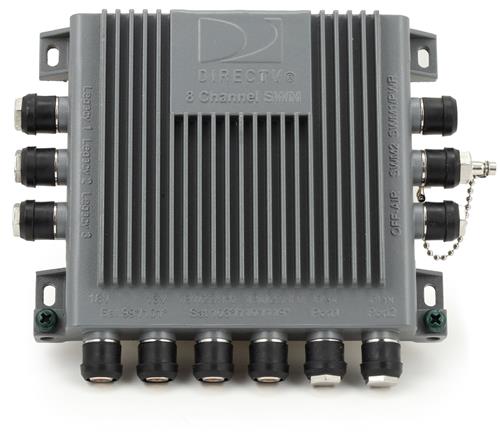
The SWM-8 can accommodate 8 tuners. They can be placed anywhere on SWM1 or SWM2. It doesn't matter if you have all 8 on SWM1 or split them up 4 and 4, 3 and 5, or whatever. It's pretty flexible, but then you can only have 8 tuners total. All the devices connected to either port can see all the other devices and share programs from them.
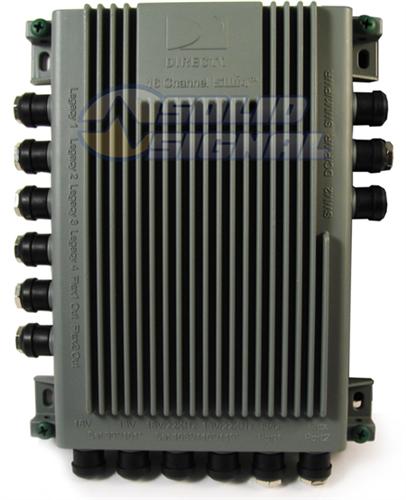
The SWM-16 can accommodate 16 tuners. You can place up to 8 on SWM1, and up to 8 on SWM2. You can't, for example, put 10 on SWM1 and 6 on SWM2. It doesn't work like that. However, all the devices connected to either port can see all the other devices and share programs from them, no matter which port they're connected to.
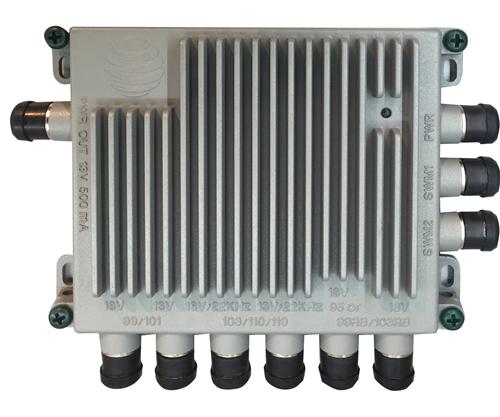
The SWM-30 can accommodate 30 tuners when used with H26K, or 26 tuners when used with older devices. With H26K, you can put 15 tuners on SWM1 and 15 on SWM2. With older equipment you can put 13 on SWM1 and 13 on SWM2. However, the devices on SWM1 can't see those on SWM2, and vice versa. That's very different from the other SWMs where it didn't matter where you put things.
Let's say you're using a SWM-30 to replace a SWM-16 with 16 tuners attached. You would have to split those 26 tuners between two outputs of the SWM-30. That means some devices would lose the ability to share programs.
However, there's a workaround. The only thing is you have to know when to use it.
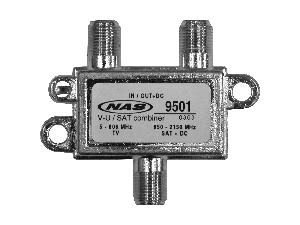
What yo see above is the STD-9501 diplexer from NAS. Unlike a regular splitter or combiner, it's got a special purpose. It will let you put DIRECTV's coax networking on the same line as the satellite TV signal. It's used in commercial installations. However with a bit of wiring expertise, you can also use it to bridge the two outputs of a SWM-30. Here's a diagram showing how it would all work:
Diplexing-9501
Click here to view full-screen or download.
As you can see, the diplexers are used to inject network information into the satellite line. The use of a green-labeled 2-port splitter lets everything see everything else.
There are some limitations you need to be aware of, and they're the reason the SWM-30 doesn't normally allow the two outputs to see each other.
For these reasons, I don't recommend using this technique unless you're really sure you need it. It's pretty rare that people have more than 13 tuners in their homes, but the people who do are probably used to doing some very interesting tricks to keep things going. And, if you have more than 16 tuners, you're already aware that some of them are probably unable to see some of the others. So it's really just those people who have between 13 and 16 tuners and that's not going to be very many.
DIRECTV could adopt MoCA 2.0 in all of its devices, which would allow for 128 devices in the same "cloud." They could also create a new multiswitch that had an internal crossover for those MoCA 2.0 devices. Neither of these things are likely to happen. Why? The engineering costs would be far beyond the financial benefit from serving a relatively small group. And, as much as we would like to say it isn't… money is always a factor. The few people who have this issue are already served by the STD-9501 and that's good enough for all but a very small number.
In the meantime, if you're ready to build the DIRECTV system of your dreams, let us help! If it can be done, we'll help you do it! We have all the same parts and accessories found on DIRECTV trucks, at prices you won't get anywhere else. Plus, we have a team of technicians ready to help. Call us at 888-233-7563. If it's after hours, fill out the form below and we'll get right back to you!
The post Should you bridge the outputs of a SWM-30 so that you can share programs? appeared first on The Solid Signal Blog.
Continue reading...
Because the last SWM-8 and SWM-16 multiswitches were made in the early 2010s, many of them have seen better days. Swapping one out for a SWM-30 is a smart and easy change. Really you just unscrew the cables from one and connect them to the corresponding ports in the other. However, there's something slightly different about a SWM-30.
No internal crossover
The SWM-8, SWM-16, and SWM-30 all have two outputs, labeled SWM1 and SWM2. However, the way those outputs work are very different between the three. Here's what you need to know.
SWM-8
The SWM-8 can accommodate 8 tuners. They can be placed anywhere on SWM1 or SWM2. It doesn't matter if you have all 8 on SWM1 or split them up 4 and 4, 3 and 5, or whatever. It's pretty flexible, but then you can only have 8 tuners total. All the devices connected to either port can see all the other devices and share programs from them.
SWM-16
The SWM-16 can accommodate 16 tuners. You can place up to 8 on SWM1, and up to 8 on SWM2. You can't, for example, put 10 on SWM1 and 6 on SWM2. It doesn't work like that. However, all the devices connected to either port can see all the other devices and share programs from them, no matter which port they're connected to.
SWM-30
The SWM-30 can accommodate 30 tuners when used with H26K, or 26 tuners when used with older devices. With H26K, you can put 15 tuners on SWM1 and 15 on SWM2. With older equipment you can put 13 on SWM1 and 13 on SWM2. However, the devices on SWM1 can't see those on SWM2, and vice versa. That's very different from the other SWMs where it didn't matter where you put things.
Here's where you run into a problem.
Let's say you're using a SWM-30 to replace a SWM-16 with 16 tuners attached. You would have to split those 26 tuners between two outputs of the SWM-30. That means some devices would lose the ability to share programs.
However, there's a workaround. The only thing is you have to know when to use it.
The NAS STD-9501 Diplexer
What yo see above is the STD-9501 diplexer from NAS. Unlike a regular splitter or combiner, it's got a special purpose. It will let you put DIRECTV's coax networking on the same line as the satellite TV signal. It's used in commercial installations. However with a bit of wiring expertise, you can also use it to bridge the two outputs of a SWM-30. Here's a diagram showing how it would all work:
Diplexing-9501
Click here to view full-screen or download.
As you can see, the diplexers are used to inject network information into the satellite line. The use of a green-labeled 2-port splitter lets everything see everything else.
The only thing is, you have to know when to use it
There are some limitations you need to be aware of, and they're the reason the SWM-30 doesn't normally allow the two outputs to see each other.
- You can only have 16 devices total within one network "cloud." If you try to have 17 devices all connected together, one of them won't see the other 16. The one that won't see the others is random, and it could change. It's also important to know that the DECA (the adapter that connects to your router) counts as one of those 16. So it's really 15.
- DIRECTV DVRs can really only see 8-10 devices. This is a long-term limitation of the system, and while it could probably be fixed, it's not likely to be since very few people are affected. If you try to have more than 7 devices together sharing content, chances are one will randomly drop off, or be invisible to the rest.
- A solution like this introduces some loss in the satellite output. You'll lose about 2dB of TV signal by doing it this way. That's usually not a problem, but if you have extremely long lines, you may need every decibel.
For these reasons, I don't recommend using this technique unless you're really sure you need it. It's pretty rare that people have more than 13 tuners in their homes, but the people who do are probably used to doing some very interesting tricks to keep things going. And, if you have more than 16 tuners, you're already aware that some of them are probably unable to see some of the others. So it's really just those people who have between 13 and 16 tuners and that's not going to be very many.
Is there any hope of an "official" fix for this?
DIRECTV could adopt MoCA 2.0 in all of its devices, which would allow for 128 devices in the same "cloud." They could also create a new multiswitch that had an internal crossover for those MoCA 2.0 devices. Neither of these things are likely to happen. Why? The engineering costs would be far beyond the financial benefit from serving a relatively small group. And, as much as we would like to say it isn't… money is always a factor. The few people who have this issue are already served by the STD-9501 and that's good enough for all but a very small number.
In the meantime, if you're ready to build the DIRECTV system of your dreams, let us help! If it can be done, we'll help you do it! We have all the same parts and accessories found on DIRECTV trucks, at prices you won't get anywhere else. Plus, we have a team of technicians ready to help. Call us at 888-233-7563. If it's after hours, fill out the form below and we'll get right back to you!
The post Should you bridge the outputs of a SWM-30 so that you can share programs? appeared first on The Solid Signal Blog.
Continue reading...
0 Replies
·
376 views
TWiT Tech Podcast Network
Time for another AWESOME video from the TWIT Network!
View: https://www.youtube.com/watch?v=7E4fkSffYKA
Direct YouTube Link - Tech News Weekly 461
TWIT's Website
TWIT Live Feed
View: https://www.youtube.com/watch?v=7E4fkSffYKA
Direct YouTube Link - Tech News Weekly 461
TWIT's Website
TWIT Live Feed
0 Replies
·
2 views

Staff member
HERE TO HELP YOU!
We have a Breakfast and Dinner thread so... 
Continuing from the Breakfast thread, found Cornbread mix so ...
Yellow Cornbread Mix
2 Hatch Green Chiles -diced
1 Egg
2/3 cup of milk
add to greased pan
Bake for 400f 20-25 minutes(From instructions)
now to put together and try... this to go with pinto beans...
Continuing from the Breakfast thread, found Cornbread mix so ...
Yellow Cornbread Mix
2 Hatch Green Chiles -diced
1 Egg
2/3 cup of milk
add to greased pan
Bake for 400f 20-25 minutes(From instructions)
now to put together and try... this to go with pinto beans...
5449 Replies
·
336091 views


iJustine
Time for another AWESOME video from iJustine!
View: https://www.youtube.com/shorts/yj3f7ab5pBI
Direct YouTube Link - iPhone Duo's First Concert! Revis!
The official iJustine Website's Website
Buy her book!
View: https://www.youtube.com/shorts/yj3f7ab5pBI
Direct YouTube Link - iPhone Duo's First Concert! Revis!
The official iJustine Website's Website
Buy her book!
0 Replies
·
5 views
TWiT Tech Podcast Network
Time for another AWESOME video from the TWIT Network!
View: https://www.youtube.com/shorts/7NJXMnbT1Mk
Direct YouTube Link - New iPad mini Announced... at $699?
TWIT's Website
TWIT Live Feed
View: https://www.youtube.com/shorts/7NJXMnbT1Mk
Direct YouTube Link - New iPad mini Announced... at $699?
TWIT's Website
TWIT Live Feed
0 Replies
·
6 views

Staff member
HERE TO HELP YOU!
Cutting Edge
Sometimes a thread gets so many posts in it that is can cause issues for the server so that why today we introduce The Song Name Game Part 3!
So let the game continue!
The last song was added by Bobby who posted...
One Meat Ball - Andrews Sisters
CONTINUE ON AND HAVE FUN! WELCOME HOME TO SATELLITEGUYS.US!
Here are the original rules for the game as posted by WebbyDude back in 2006. http://www.satelliteguys.us/threads/68645-Song-Name-Game
Just name a song title and the band who performed it. The next person does the same thing, but needs to list a song title or band name which includes a word from the previous entry. Pick songs from any genre.
Example:
Long Live Rock and Roll -- Rainbow
Rainbow in the Dark -- Dio
Another example:
Ride the Lightning -- Metallica
Lightning Strikes -- Ozzy Osbourne
Get it?
An additional note: we all know that song titles, sometimes, use profane words. Because this is a family friendly website it is advised that you clean up that title up a bit. This is accomplished by using something like sh!t instead of the real word. Thanks....
So let the game continue!
The last song was added by Bobby who posted...
One Meat Ball - Andrews Sisters
CONTINUE ON AND HAVE FUN! WELCOME HOME TO SATELLITEGUYS.US!
Here are the original rules for the game as posted by WebbyDude back in 2006. http://www.satelliteguys.us/threads/68645-Song-Name-Game
Just name a song title and the band who performed it. The next person does the same thing, but needs to list a song title or band name which includes a word from the previous entry. Pick songs from any genre.
Example:
Long Live Rock and Roll -- Rainbow
Rainbow in the Dark -- Dio
Another example:
Ride the Lightning -- Metallica
Lightning Strikes -- Ozzy Osbourne
Get it?
An additional note: we all know that song titles, sometimes, use profane words. Because this is a family friendly website it is advised that you clean up that title up a bit. This is accomplished by using something like sh!t instead of the real word. Thanks....
68658 Replies
·
2680237 views


Lately my eight year old Dell laptop has been shutting off even when I have a full battery. I have had to keep it plugged up all the time to keep this from happening. Any idea what is causing this? I replaced the battery about three years ago.
2 Replies
·
49 views

Pub Member / Supporter
I set up a music server for my brother a few years ago. It's basically a small headless computer but it needs to have a DHCP IP address reserved for it in the router settings. This was easy to do in his DSL router. He's switching to Starlink now and I was wondering if these setting are easily accessible in the Starlink router. I'm pretty sure he will be getting the latest V5 router.
5 Replies
·
288 views


Pub Member / Supporter
Lifetime Supporter
Good...simple humor. Enjoy
View: https://www.youtube.com/watch?v=E92AtfTLge4
View: https://www.youtube.com/watch?v=HJy0WnejlF4
View: https://www.youtube.com/watch?v=E92AtfTLge4
View: https://www.youtube.com/watch?v=HJy0WnejlF4
2 Replies
·
52 views

Pub Member / Supporter
Lifetime Supporter
Terrible tragedy. You would think that they would have safe guards in place that would prevent something like this from happening. I guess if you are going to ride in a passenger train it might be best to get a car near the rear.
 www.zerohedge.com
At Least 64 Dead After Two High-Speed Trains Collide In Spain<!-- --> | ZeroHedge
ZeroHedge - On a long enough timeline, the survival rate for everyone drops to zero
www.zerohedge.com
2 Replies
·
56 views


Booredatwork.com
Time for another AWESOME video from BoredAtWork!
View: https://www.youtube.com/watch?v=MSXmcYapC3I
Direct YouTube Link - MacBook Pro With PROLED XDR Display - Watch Before you BUY!
Booredatwork.com Website
Booredatwork on Facebook
View: https://www.youtube.com/watch?v=MSXmcYapC3I
Direct YouTube Link - MacBook Pro With PROLED XDR Display - Watch Before you BUY!
Booredatwork.com Website
Booredatwork on Facebook
0 Replies
·
14 views