

Social Feed

Staff member
HERE TO HELP YOU!
Pub Member / Supporter
Cutting Edge
Hey, remember these? There was a time, a generation ago, that the best way to get HD programming was through the use of five RCA cables. That time has long passed, and in general, most people are going to be better served by HDMI. But, the story of how we got here is an interesting one and definitely worthy of telling.
A component connection consists of two parts. First, and easiest to explain, is the audio part.
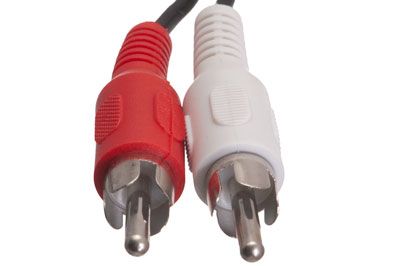
There are a pair of RCA connectors that are used for analog audio. Generally you will find them to be red and white, although red and black is also often used. In either case, red generally signifies the right channel, while the other connection signifies the left.
These connections can carry stereo audio, or surround that's encoded using Dolby Pro Logic. Dolby Pro Logic is an analog format designed originally in the 1970s to carry four channels of audio. Most Pro Logic receivers will mathematically derive a fifth channel for the center as well as a single bass channel. The overall effect is similar to an average-quality surround system today, although the center channel is often lower in volume.
Because this is an analog format and it's then decoded, the overall quality isn't as good as today's surround systems but, let's say "well it's something."
In addition to the audio plugs, there are three additional cables which are used for video.
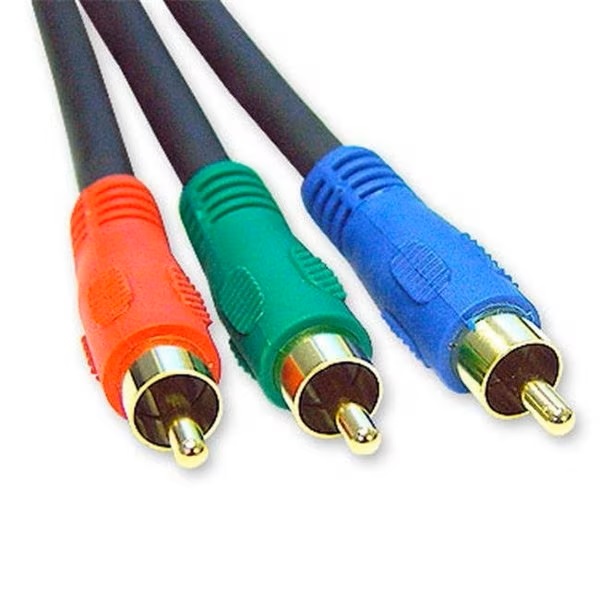
Video is carried on three cables, generally shown as red, green, and blue. This means there are two red RCA cables in a typical set. The video cables, which carry more signal than the audio cables, are generally thicker so it's easy to tell which cable is which.
Because of the colors of the cables, most people assume that each cable carries one color as part of an RGB signal. That's not true. The signals that come down are in the YPbPr color space. Without getting into a lot of color science, that's a way of sending signals that provides more clarity and better picture over analog connections. The red cable carries a high-resolution black-and-white version of the image, while the other two cables carry lower-resolution versions of that image. On the green cable there is also a second image that represents how blue or yellow the image is, while the blue cable there is another low-res black and white image as well as a second image that represents how red or green the image is.
Yes, I get it. It makes no sense to normal humans. But it's a good system and it lets a set of analog connections give you a decent HD picture. I didn't invent it, I'm not defending it, and really no one else is either.
HDMI is one of those things that has a little bit to like for everyone. Consumers like it because it's one plug that's easy to connect. Content providers like it because it can carry copy protection (which component cables can't.) It's the basis for a purely digital signal that can carry 8K video and up to 127 channels of digital audio via Dolby Atmos. But, it's that very copy protection that has made it a problem for some people. It's not that people have a genuine desire to pirate content, but sometimes you'd like to be able to save a copy of something. Say, for example, your kid was on the nightly news. You'd like to have that forever. Using an HDMI connection, your only choice is to resort to a sketchy semi-legal box to strip that content protection away.
If your pay-TV or streaming box doesn't have component outputs, what can you do? Most don't. The makers of streaming, pay-TV and physical disc hardware have worked very hard to close what they call the "analog hole." That's meant it's now practically impossible to find streaming or physical disc players with component outputs.
DIRECTV and DISH hardware generally does have component, with the exception of the very newest residential players. But let's be honest, component is on the way out.
There are some cases when an analog connection makes sense. If you're using a headend system to feed television to your bar, hotel, or institution, you'll want analog connections because they're more reliable. Content protection was specifically designed to stop you from creating distribution systems. That's why DIRECTV commercial hardware has this little jack:
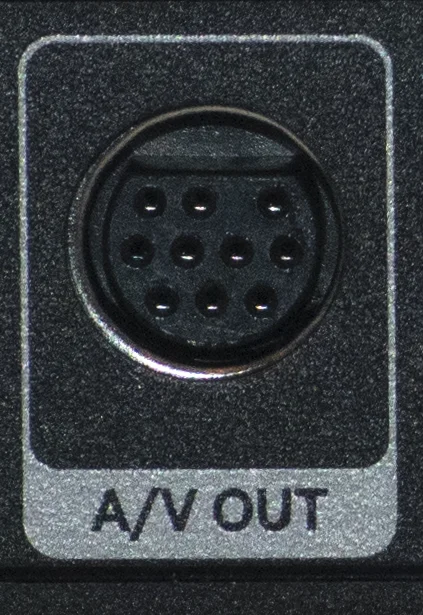
This ten-pin connector gives you component video, stereo audio, composite video, and digital coaxial audio. You'll need this cable to get all of them.
In the long term, it's likely that only commercial equipment will have unencrypted connections. Consumer hardware won't. Most people won't care, because HDMI is easier. But if you're still using anything that relies on component connections, it's time to replace that hardware. Shop at Solid Signal for all the home theater gear you need. If you need help choosing, please call us at 888-233-7563. If it's after hours, fill out the form below. We'll get right back to you!
The post Last call for component connections appeared first on The Solid Signal Blog.
Continue reading...
What a component connection?
A component connection consists of two parts. First, and easiest to explain, is the audio part.
There are a pair of RCA connectors that are used for analog audio. Generally you will find them to be red and white, although red and black is also often used. In either case, red generally signifies the right channel, while the other connection signifies the left.
These connections can carry stereo audio, or surround that's encoded using Dolby Pro Logic. Dolby Pro Logic is an analog format designed originally in the 1970s to carry four channels of audio. Most Pro Logic receivers will mathematically derive a fifth channel for the center as well as a single bass channel. The overall effect is similar to an average-quality surround system today, although the center channel is often lower in volume.
Because this is an analog format and it's then decoded, the overall quality isn't as good as today's surround systems but, let's say "well it's something."
Video… is a little more confusing
In addition to the audio plugs, there are three additional cables which are used for video.
Video is carried on three cables, generally shown as red, green, and blue. This means there are two red RCA cables in a typical set. The video cables, which carry more signal than the audio cables, are generally thicker so it's easy to tell which cable is which.
Because of the colors of the cables, most people assume that each cable carries one color as part of an RGB signal. That's not true. The signals that come down are in the YPbPr color space. Without getting into a lot of color science, that's a way of sending signals that provides more clarity and better picture over analog connections. The red cable carries a high-resolution black-and-white version of the image, while the other two cables carry lower-resolution versions of that image. On the green cable there is also a second image that represents how blue or yellow the image is, while the blue cable there is another low-res black and white image as well as a second image that represents how red or green the image is.
Yes, I get it. It makes no sense to normal humans. But it's a good system and it lets a set of analog connections give you a decent HD picture. I didn't invent it, I'm not defending it, and really no one else is either.
Enter HDMI
HDMI is one of those things that has a little bit to like for everyone. Consumers like it because it's one plug that's easy to connect. Content providers like it because it can carry copy protection (which component cables can't.) It's the basis for a purely digital signal that can carry 8K video and up to 127 channels of digital audio via Dolby Atmos. But, it's that very copy protection that has made it a problem for some people. It's not that people have a genuine desire to pirate content, but sometimes you'd like to be able to save a copy of something. Say, for example, your kid was on the nightly news. You'd like to have that forever. Using an HDMI connection, your only choice is to resort to a sketchy semi-legal box to strip that content protection away.
If your pay-TV or streaming box doesn't have component outputs, what can you do? Most don't. The makers of streaming, pay-TV and physical disc hardware have worked very hard to close what they call the "analog hole." That's meant it's now practically impossible to find streaming or physical disc players with component outputs.
DIRECTV and DISH hardware generally does have component, with the exception of the very newest residential players. But let's be honest, component is on the way out.
Who needs it anyway?
There are some cases when an analog connection makes sense. If you're using a headend system to feed television to your bar, hotel, or institution, you'll want analog connections because they're more reliable. Content protection was specifically designed to stop you from creating distribution systems. That's why DIRECTV commercial hardware has this little jack:
This ten-pin connector gives you component video, stereo audio, composite video, and digital coaxial audio. You'll need this cable to get all of them.
In the long term, it's likely that only commercial equipment will have unencrypted connections. Consumer hardware won't. Most people won't care, because HDMI is easier. But if you're still using anything that relies on component connections, it's time to replace that hardware. Shop at Solid Signal for all the home theater gear you need. If you need help choosing, please call us at 888-233-7563. If it's after hours, fill out the form below. We'll get right back to you!
The post Last call for component connections appeared first on The Solid Signal Blog.
Continue reading...
0 Replies
·
272 views

Staff member
HERE TO HELP YOU!
We have a Breakfast and Dinner thread so... 
Continuing from the Breakfast thread, found Cornbread mix so ...
Yellow Cornbread Mix
2 Hatch Green Chiles -diced
1 Egg
2/3 cup of milk
add to greased pan
Bake for 400f 20-25 minutes(From instructions)
now to put together and try... this to go with pinto beans...
Continuing from the Breakfast thread, found Cornbread mix so ...
Yellow Cornbread Mix
2 Hatch Green Chiles -diced
1 Egg
2/3 cup of milk
add to greased pan
Bake for 400f 20-25 minutes(From instructions)
now to put together and try... this to go with pinto beans...
5448 Replies
·
336080 views


iJustine
Time for another AWESOME video from iJustine!
View: https://www.youtube.com/shorts/yj3f7ab5pBI
Direct YouTube Link - iPhone Duo's First Concert! Revis!
The official iJustine Website's Website
Buy her book!
View: https://www.youtube.com/shorts/yj3f7ab5pBI
Direct YouTube Link - iPhone Duo's First Concert! Revis!
The official iJustine Website's Website
Buy her book!
0 Replies
·
3 views
TWiT Tech Podcast Network
Time for another AWESOME video from the TWIT Network!
View: https://www.youtube.com/shorts/7NJXMnbT1Mk
Direct YouTube Link - New iPad mini Announced... at $699?
TWIT's Website
TWIT Live Feed
View: https://www.youtube.com/shorts/7NJXMnbT1Mk
Direct YouTube Link - New iPad mini Announced... at $699?
TWIT's Website
TWIT Live Feed
0 Replies
·
3 views

Staff member
HERE TO HELP YOU!
Cutting Edge
Sometimes a thread gets so many posts in it that is can cause issues for the server so that why today we introduce The Song Name Game Part 3!
So let the game continue!
The last song was added by Bobby who posted...
One Meat Ball - Andrews Sisters
CONTINUE ON AND HAVE FUN! WELCOME HOME TO SATELLITEGUYS.US!
Here are the original rules for the game as posted by WebbyDude back in 2006. http://www.satelliteguys.us/threads/68645-Song-Name-Game
Just name a song title and the band who performed it. The next person does the same thing, but needs to list a song title or band name which includes a word from the previous entry. Pick songs from any genre.
Example:
Long Live Rock and Roll -- Rainbow
Rainbow in the Dark -- Dio
Another example:
Ride the Lightning -- Metallica
Lightning Strikes -- Ozzy Osbourne
Get it?
An additional note: we all know that song titles, sometimes, use profane words. Because this is a family friendly website it is advised that you clean up that title up a bit. This is accomplished by using something like sh!t instead of the real word. Thanks....
So let the game continue!
The last song was added by Bobby who posted...
One Meat Ball - Andrews Sisters
CONTINUE ON AND HAVE FUN! WELCOME HOME TO SATELLITEGUYS.US!
Here are the original rules for the game as posted by WebbyDude back in 2006. http://www.satelliteguys.us/threads/68645-Song-Name-Game
Just name a song title and the band who performed it. The next person does the same thing, but needs to list a song title or band name which includes a word from the previous entry. Pick songs from any genre.
Example:
Long Live Rock and Roll -- Rainbow
Rainbow in the Dark -- Dio
Another example:
Ride the Lightning -- Metallica
Lightning Strikes -- Ozzy Osbourne
Get it?
An additional note: we all know that song titles, sometimes, use profane words. Because this is a family friendly website it is advised that you clean up that title up a bit. This is accomplished by using something like sh!t instead of the real word. Thanks....
68658 Replies
·
2680220 views


Lately my eight year old Dell laptop has been shutting off even when I have a full battery. I have had to keep it plugged up all the time to keep this from happening. Any idea what is causing this? I replaced the battery about three years ago.
2 Replies
·
46 views


Pub Member / Supporter
I set up a music server for my brother a few years ago. It's basically a small headless computer but it needs to have a DHCP IP address reserved for it in the router settings. This was easy to do in his DSL router. He's switching to Starlink now and I was wondering if these setting are easily accessible in the Starlink router. I'm pretty sure he will be getting the latest V5 router.
5 Replies
·
285 views


Pub Member / Supporter
Lifetime Supporter
Good...simple humor. Enjoy
View: https://www.youtube.com/watch?v=E92AtfTLge4
View: https://www.youtube.com/watch?v=HJy0WnejlF4
View: https://www.youtube.com/watch?v=E92AtfTLge4
View: https://www.youtube.com/watch?v=HJy0WnejlF4
2 Replies
·
51 views

Pub Member / Supporter
Lifetime Supporter
Terrible tragedy. You would think that they would have safe guards in place that would prevent something like this from happening. I guess if you are going to ride in a passenger train it might be best to get a car near the rear.
 www.zerohedge.com
At Least 64 Dead After Two High-Speed Trains Collide In Spain<!-- --> | ZeroHedge
ZeroHedge - On a long enough timeline, the survival rate for everyone drops to zero
www.zerohedge.com
2 Replies
·
55 views


Booredatwork.com
Time for another AWESOME video from BoredAtWork!
View: https://www.youtube.com/watch?v=MSXmcYapC3I
Direct YouTube Link - MacBook Pro With PROLED XDR Display - Watch Before you BUY!
Booredatwork.com Website
Booredatwork on Facebook
View: https://www.youtube.com/watch?v=MSXmcYapC3I
Direct YouTube Link - MacBook Pro With PROLED XDR Display - Watch Before you BUY!
Booredatwork.com Website
Booredatwork on Facebook
0 Replies
·
14 views
Marques Brownlee
Time for another AWESOME video from Marques Brownlee!
View: https://www.youtube.com/watch?v=2reQut8WNGc
Direct YouTube Link - Macbook PROLED XDR Impressions: They Said They Wouldn't!
The official MKBHD Website!
The MKBHD Store
View: https://www.youtube.com/watch?v=2reQut8WNGc
Direct YouTube Link - Macbook PROLED XDR Impressions: They Said They Wouldn't!
The official MKBHD Website!
The MKBHD Store
0 Replies
·
26 views