

Social Feed

Staff member
HERE TO HELP YOU!
Pub Member / Supporter
Cutting Edge
Come on, don't pretend you weren't expecting it. After all, I publish this article roughly once with every new version of iOS. (Don't believe me? Here are the receipts.) Forget about any article that advises you to go into the iOS field test mode. It's never worked consistently and believe me, I've been trying for over ten years. It now seems with iOS 17, you can't get a signal level of your 5G signal, at least I can't. If someone else is able to, I'd love to hear how you did it.
Really, you don't. Really, the most important thing with a cell phone is whether or not you can do what you want. Can you make clear calls whenever you want to? Stream as fast as you want to? If you can, that's all that matters. However, a lot of people (myself included) get curious about how much better things can get. And unfortunately, cell phones are incredibly stubborn about providing this information.
First of all, I think we all know by now that the bar measurements are near useless. In my area, it's rare that I get more than one bar, yet my service outside is as strong as it can be. How is this? Because you never know what the bars are actually measuring. Your phone could have as many as five active radios going at one time, never mind the 15 or so that aren't used because they're for carriers you're not on. That bar measurement is reflecting the signal strength of ONE of those radios. Which one? Who knows. That's the point.
Cell signal is really measured using something called RSRP. RSRP, or Reference Signal Received Power, is the truest form of measurement. It takes into account not only the raw signal strength of what you're receiving, but the quality and usability of that signal. It's the only measurement that accurately tells you what kind of reception you're getting.
When it comes to your phone, it's using both LTE and 5G, probably at the same time. You don't notice the difference, but your phone is always switching between the two technologies to give you the best results. Often times, voice calls will stay on LTE while data comes over 5G. Occasionally, it's the opposite. The two technologies are designed to work together seamlessly. So, if you really want to get a true picture of what kind of signal your phone is getting, you need to know the RSRP for both. Except there's only one problem.
You can get into the phone's field test mode by dialing a simple string of numbers:
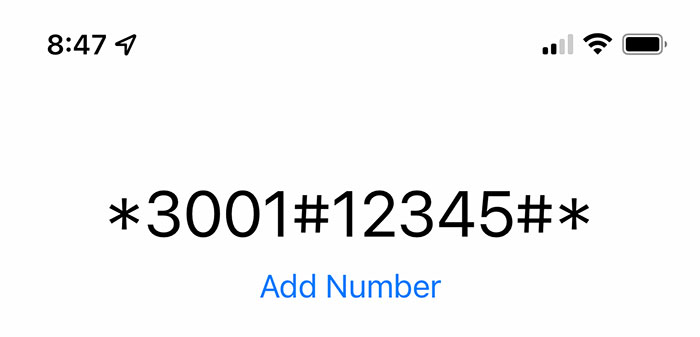
This takes you to a rather plain and nondescript menu. If you poke around enough you will find a measurement called "LTE Rach Attempt." Tap on it and one of the numbers is RSRP. It's a negative number and if you're lucky, it's higher than -100 (in other words -80, -85, etc.) and that indicates that you're coming through loud and clear. There used to be a similar menu for 5G, and now it's gone.
I don't even know how to show you that it's not there, it just isn't. And without it, you don't know how strong your 5G signal is.
Well, there are two ways. One's relatively cheap, and one's relatively not.
Ideally, what you want to do is have friends with different cell phone providers, all with 5G-capable Android phones. Get them to load an app that shows signal strength, because not every Android phone lets you see this number without an app. There are a lot of them. My personal favorite is called "Signal Strength" and it's free. Then, get them to run the app while standing in the same place. They won't need to do it at the same time, since for the most part this stuff doesn't change. They'll see a readout of both LTE and 5G signal:
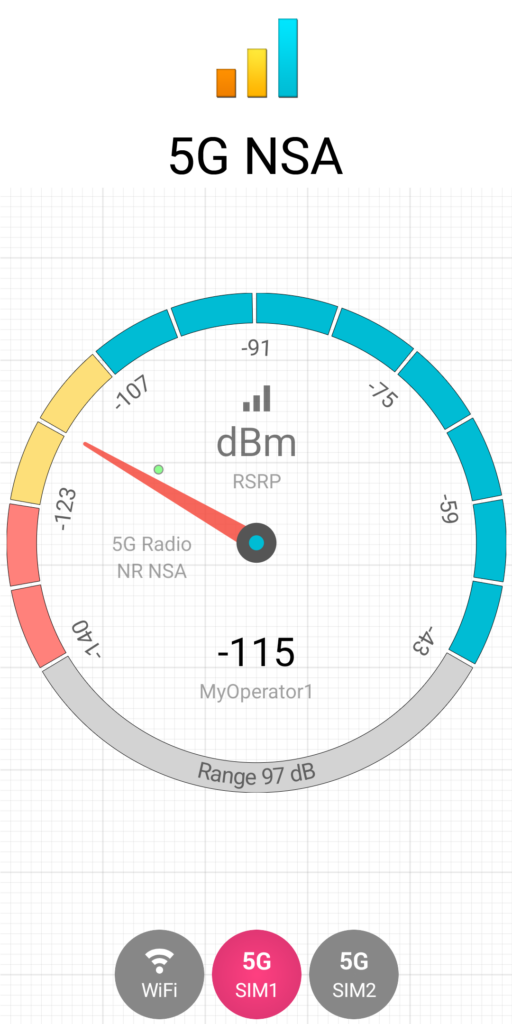
…and that's all you need. If you don't have friends with three different service providers, you can buy an unlocked prepaid phone and three different SIM cards. You may not find them for AT&T, Verizon, and T-Mobile, but each of these carriers wholesales their services to other carriers. Just look at your selection and google "What carrier is Cricket on" or whatever service you're looking at.
Yes, this is a pain in the neck. There is a better way.
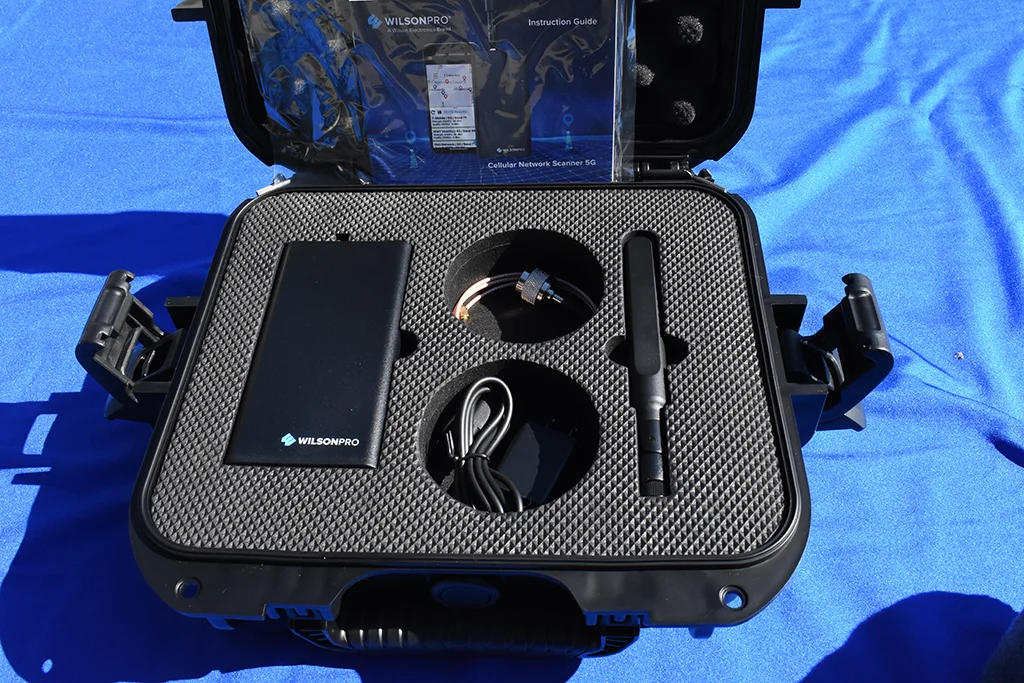
This impressive little kit is the WilsonPRO 5G Network Scanner. It's a sweet little piece of gear that connects via Bluetooth to your phone (iOS or Android.) It reads ALL the 5G and LTE signals in your area and displays the RSRP for all of them. In about 4 minutes, you'll have a complete record of all your signal strengths and you can even download them into Excel, complete with GPS coordinates.
But let's be honest with each other. It's not cheap. If you're only going to use it once, it's a big expense. Of course you could buy it with a credit card and sell it on eBay before you get the bill, but that's up to you. It is returnable to Solid Signal but if it's not defective, there is a rather sizable restocking charge. That charge is essentially there to stop people from using it once and returning it.
Even if you end up buying a prepaid phone and 3 SIM cards, you're probably out about $125. The Wilson Pro meter is about ten times that price. Isn't there something in the middle?
Unfortunately, not really. There are other cellular meters out there but they generally do not read RSRP. They'll read most of the low-band frequencies that you get, but all you get is raw signal strength, a measurement known as RSSI. This is fine if it's all you have, but it won't tell you how good your actual signal is or isn't.
That's why it's so disappointing that Apple is hiding this essential number from us. If all you want to do is figure out how your particular network is doing, you should be able to do it. Really, that isn't classified information. Yet, Apple makes it hard to get, and in some cases like the current iOS 17.1, it's impossible.
Whether or not you can actively measure it, a cell phone signal booster can help you get clearer calls and faster data. You'll want to take a look at the great selection we have at SolidSignal.com. Or even better, get a custom quote for the exact product you need. Call the experts today at 888-233-7563. If it's after hours, no problem! Just fill out the form below.
The post iOS 17 breaks field test mode, AGAIN appeared first on The Solid Signal Blog.
Continue reading...
Why do you need to know this information?
Really, you don't. Really, the most important thing with a cell phone is whether or not you can do what you want. Can you make clear calls whenever you want to? Stream as fast as you want to? If you can, that's all that matters. However, a lot of people (myself included) get curious about how much better things can get. And unfortunately, cell phones are incredibly stubborn about providing this information.
First of all, I think we all know by now that the bar measurements are near useless. In my area, it's rare that I get more than one bar, yet my service outside is as strong as it can be. How is this? Because you never know what the bars are actually measuring. Your phone could have as many as five active radios going at one time, never mind the 15 or so that aren't used because they're for carriers you're not on. That bar measurement is reflecting the signal strength of ONE of those radios. Which one? Who knows. That's the point.
How signal is really measured
Cell signal is really measured using something called RSRP. RSRP, or Reference Signal Received Power, is the truest form of measurement. It takes into account not only the raw signal strength of what you're receiving, but the quality and usability of that signal. It's the only measurement that accurately tells you what kind of reception you're getting.
When it comes to your phone, it's using both LTE and 5G, probably at the same time. You don't notice the difference, but your phone is always switching between the two technologies to give you the best results. Often times, voice calls will stay on LTE while data comes over 5G. Occasionally, it's the opposite. The two technologies are designed to work together seamlessly. So, if you really want to get a true picture of what kind of signal your phone is getting, you need to know the RSRP for both. Except there's only one problem.
In iOS 17, you can't get the RSRP of the 5G signal.
You can get into the phone's field test mode by dialing a simple string of numbers:
This takes you to a rather plain and nondescript menu. If you poke around enough you will find a measurement called "LTE Rach Attempt." Tap on it and one of the numbers is RSRP. It's a negative number and if you're lucky, it's higher than -100 (in other words -80, -85, etc.) and that indicates that you're coming through loud and clear. There used to be a similar menu for 5G, and now it's gone.
I don't even know how to show you that it's not there, it just isn't. And without it, you don't know how strong your 5G signal is.
How can you measure your signals?
Well, there are two ways. One's relatively cheap, and one's relatively not.
Ideally, what you want to do is have friends with different cell phone providers, all with 5G-capable Android phones. Get them to load an app that shows signal strength, because not every Android phone lets you see this number without an app. There are a lot of them. My personal favorite is called "Signal Strength" and it's free. Then, get them to run the app while standing in the same place. They won't need to do it at the same time, since for the most part this stuff doesn't change. They'll see a readout of both LTE and 5G signal:
…and that's all you need. If you don't have friends with three different service providers, you can buy an unlocked prepaid phone and three different SIM cards. You may not find them for AT&T, Verizon, and T-Mobile, but each of these carriers wholesales their services to other carriers. Just look at your selection and google "What carrier is Cricket on" or whatever service you're looking at.
Yes, this is a pain in the neck. There is a better way.
The Wilson Pro 5G Network Scanner
This impressive little kit is the WilsonPRO 5G Network Scanner. It's a sweet little piece of gear that connects via Bluetooth to your phone (iOS or Android.) It reads ALL the 5G and LTE signals in your area and displays the RSRP for all of them. In about 4 minutes, you'll have a complete record of all your signal strengths and you can even download them into Excel, complete with GPS coordinates.
But let's be honest with each other. It's not cheap. If you're only going to use it once, it's a big expense. Of course you could buy it with a credit card and sell it on eBay before you get the bill, but that's up to you. It is returnable to Solid Signal but if it's not defective, there is a rather sizable restocking charge. That charge is essentially there to stop people from using it once and returning it.
Is there some middle ground?
Even if you end up buying a prepaid phone and 3 SIM cards, you're probably out about $125. The Wilson Pro meter is about ten times that price. Isn't there something in the middle?
Unfortunately, not really. There are other cellular meters out there but they generally do not read RSRP. They'll read most of the low-band frequencies that you get, but all you get is raw signal strength, a measurement known as RSSI. This is fine if it's all you have, but it won't tell you how good your actual signal is or isn't.
That's why it's so disappointing that Apple is hiding this essential number from us. If all you want to do is figure out how your particular network is doing, you should be able to do it. Really, that isn't classified information. Yet, Apple makes it hard to get, and in some cases like the current iOS 17.1, it's impossible.
Have more questions?
Whether or not you can actively measure it, a cell phone signal booster can help you get clearer calls and faster data. You'll want to take a look at the great selection we have at SolidSignal.com. Or even better, get a custom quote for the exact product you need. Call the experts today at 888-233-7563. If it's after hours, no problem! Just fill out the form below.
The post iOS 17 breaks field test mode, AGAIN appeared first on The Solid Signal Blog.
Continue reading...
0 Replies
·
217 views

Staff member
HERE TO HELP YOU!
We have a Breakfast and Dinner thread so... 
Continuing from the Breakfast thread, found Cornbread mix so ...
Yellow Cornbread Mix
2 Hatch Green Chiles -diced
1 Egg
2/3 cup of milk
add to greased pan
Bake for 400f 20-25 minutes(From instructions)
now to put together and try... this to go with pinto beans...
Continuing from the Breakfast thread, found Cornbread mix so ...
Yellow Cornbread Mix
2 Hatch Green Chiles -diced
1 Egg
2/3 cup of milk
add to greased pan
Bake for 400f 20-25 minutes(From instructions)
now to put together and try... this to go with pinto beans...
5448 Replies
·
336080 views


iJustine
Time for another AWESOME video from iJustine!
View: https://www.youtube.com/shorts/yj3f7ab5pBI
Direct YouTube Link - iPhone Duo's First Concert! Revis!
The official iJustine Website's Website
Buy her book!
View: https://www.youtube.com/shorts/yj3f7ab5pBI
Direct YouTube Link - iPhone Duo's First Concert! Revis!
The official iJustine Website's Website
Buy her book!
0 Replies
·
3 views
TWiT Tech Podcast Network
Time for another AWESOME video from the TWIT Network!
View: https://www.youtube.com/shorts/7NJXMnbT1Mk
Direct YouTube Link - New iPad mini Announced... at $699?
TWIT's Website
TWIT Live Feed
View: https://www.youtube.com/shorts/7NJXMnbT1Mk
Direct YouTube Link - New iPad mini Announced... at $699?
TWIT's Website
TWIT Live Feed
0 Replies
·
3 views

Staff member
HERE TO HELP YOU!
Cutting Edge
Sometimes a thread gets so many posts in it that is can cause issues for the server so that why today we introduce The Song Name Game Part 3!
So let the game continue!
The last song was added by Bobby who posted...
One Meat Ball - Andrews Sisters
CONTINUE ON AND HAVE FUN! WELCOME HOME TO SATELLITEGUYS.US!
Here are the original rules for the game as posted by WebbyDude back in 2006. http://www.satelliteguys.us/threads/68645-Song-Name-Game
Just name a song title and the band who performed it. The next person does the same thing, but needs to list a song title or band name which includes a word from the previous entry. Pick songs from any genre.
Example:
Long Live Rock and Roll -- Rainbow
Rainbow in the Dark -- Dio
Another example:
Ride the Lightning -- Metallica
Lightning Strikes -- Ozzy Osbourne
Get it?
An additional note: we all know that song titles, sometimes, use profane words. Because this is a family friendly website it is advised that you clean up that title up a bit. This is accomplished by using something like sh!t instead of the real word. Thanks....
So let the game continue!
The last song was added by Bobby who posted...
One Meat Ball - Andrews Sisters
CONTINUE ON AND HAVE FUN! WELCOME HOME TO SATELLITEGUYS.US!
Here are the original rules for the game as posted by WebbyDude back in 2006. http://www.satelliteguys.us/threads/68645-Song-Name-Game
Just name a song title and the band who performed it. The next person does the same thing, but needs to list a song title or band name which includes a word from the previous entry. Pick songs from any genre.
Example:
Long Live Rock and Roll -- Rainbow
Rainbow in the Dark -- Dio
Another example:
Ride the Lightning -- Metallica
Lightning Strikes -- Ozzy Osbourne
Get it?
An additional note: we all know that song titles, sometimes, use profane words. Because this is a family friendly website it is advised that you clean up that title up a bit. This is accomplished by using something like sh!t instead of the real word. Thanks....
68658 Replies
·
2680220 views


Lately my eight year old Dell laptop has been shutting off even when I have a full battery. I have had to keep it plugged up all the time to keep this from happening. Any idea what is causing this? I replaced the battery about three years ago.
2 Replies
·
46 views


Pub Member / Supporter
I set up a music server for my brother a few years ago. It's basically a small headless computer but it needs to have a DHCP IP address reserved for it in the router settings. This was easy to do in his DSL router. He's switching to Starlink now and I was wondering if these setting are easily accessible in the Starlink router. I'm pretty sure he will be getting the latest V5 router.
5 Replies
·
285 views


Pub Member / Supporter
Lifetime Supporter
Good...simple humor. Enjoy
View: https://www.youtube.com/watch?v=E92AtfTLge4
View: https://www.youtube.com/watch?v=HJy0WnejlF4
View: https://www.youtube.com/watch?v=E92AtfTLge4
View: https://www.youtube.com/watch?v=HJy0WnejlF4
2 Replies
·
51 views

Pub Member / Supporter
Lifetime Supporter
Terrible tragedy. You would think that they would have safe guards in place that would prevent something like this from happening. I guess if you are going to ride in a passenger train it might be best to get a car near the rear.
 www.zerohedge.com
At Least 64 Dead After Two High-Speed Trains Collide In Spain<!-- --> | ZeroHedge
ZeroHedge - On a long enough timeline, the survival rate for everyone drops to zero
www.zerohedge.com
2 Replies
·
55 views


Booredatwork.com
Time for another AWESOME video from BoredAtWork!
View: https://www.youtube.com/watch?v=MSXmcYapC3I
Direct YouTube Link - MacBook Pro With PROLED XDR Display - Watch Before you BUY!
Booredatwork.com Website
Booredatwork on Facebook
View: https://www.youtube.com/watch?v=MSXmcYapC3I
Direct YouTube Link - MacBook Pro With PROLED XDR Display - Watch Before you BUY!
Booredatwork.com Website
Booredatwork on Facebook
0 Replies
·
14 views
Marques Brownlee
Time for another AWESOME video from Marques Brownlee!
View: https://www.youtube.com/watch?v=2reQut8WNGc
Direct YouTube Link - Macbook PROLED XDR Impressions: They Said They Wouldn't!
The official MKBHD Website!
The MKBHD Store
View: https://www.youtube.com/watch?v=2reQut8WNGc
Direct YouTube Link - Macbook PROLED XDR Impressions: They Said They Wouldn't!
The official MKBHD Website!
The MKBHD Store
0 Replies
·
26 views