

Social Feed

Staff member
HERE TO HELP YOU!
Pub Member / Supporter
Cutting Edge
It's that time again! During the last week of every year I look back at the big stories that defined the year in Solid-Signal-Land. 2023 was certainly exciting and it's amazing when I look back at all the wins and challenges we've seen.
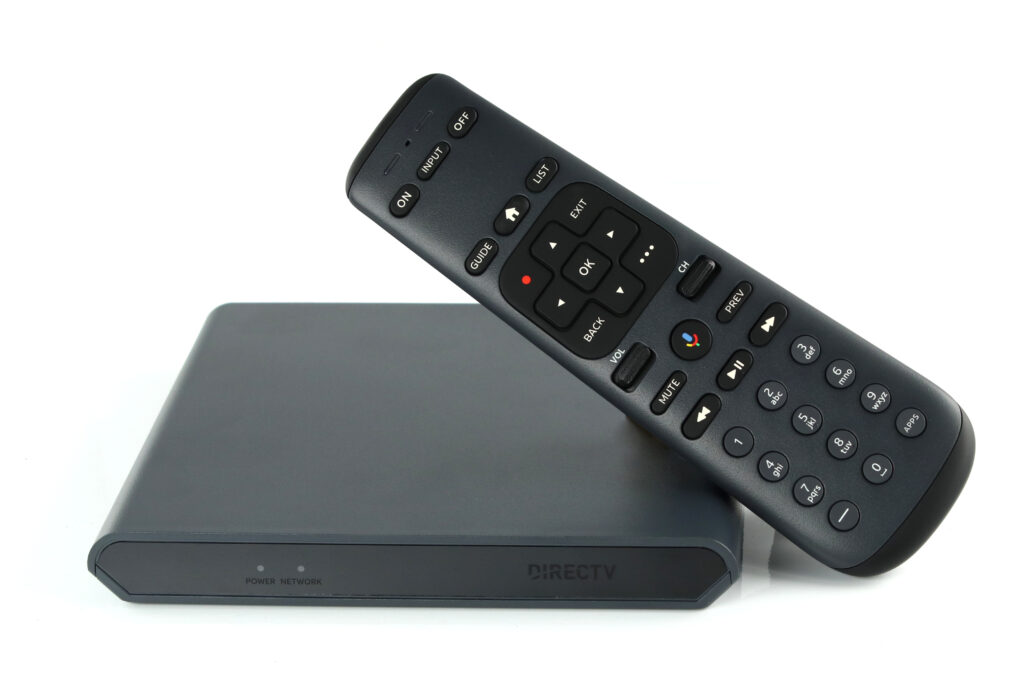
What a year! DIRECTV had two massive wins this year in the hardware category. The Gemini for Satellite is the first new residential hardware for the company since 2017. It brings apps, a new form factor, speed, and an all-new Bluetooth remote with voice. To say it's been popular is an understatement!
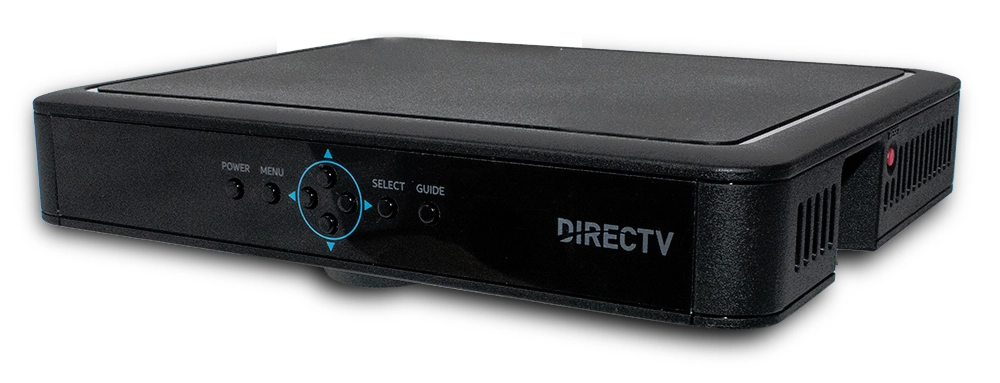
The other exciting piece of hardware for the company is the H26K Commercial Receiver. This is DIRECTV's first standalone receiver since 2011, and the first ever commercial-only receiver. It brings 4K and a modern user interface to commercial customers, and not a moment too soon. DIRECTV kept the NFL Sunday Ticket package for commercial customers, and this drove a mad rush for people to upgrade their receivers to 4K. Although the NFL didn't really come through with a lot of 4K content, customers still love the responsiveness and reliability of the H26K.
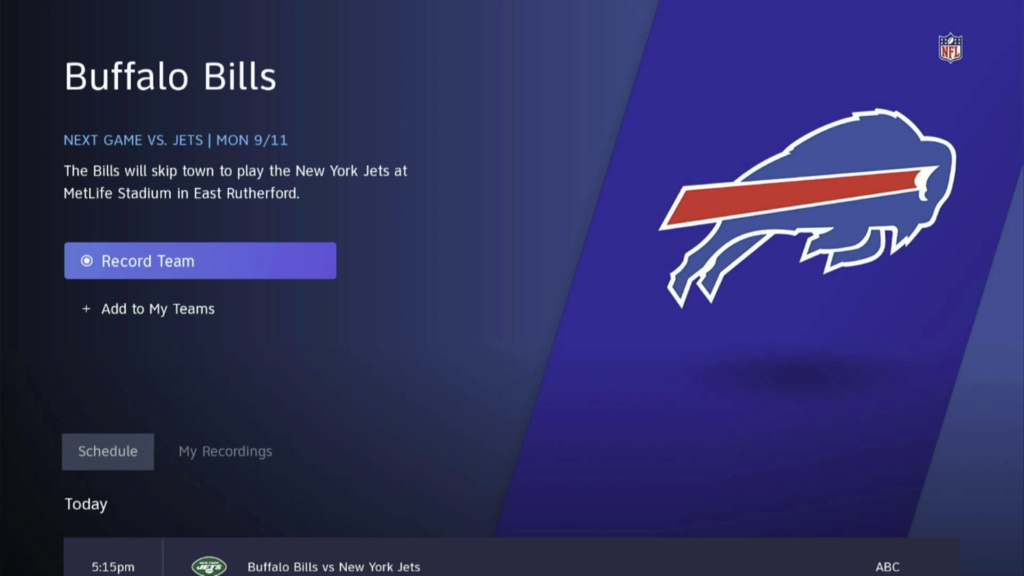
DIRECTV also rolled out their new Sports Central experience, the successor to ScoreGuide which can actually show you when games are airing even if they aren't on DIRECTV.
Although the world of DISH wasn't quite as exciting, there was still a lot to talk about. DISH is now in preparation to launch a whole new satellite which should keep the company broadcasting well into the 2030s. At the same time, they finished decommissioning their 129 satellite location, paving the way for more of the country to get reliable programming.
It wasn't all sunshine unfortunately. Both DIRECTV and DISH dealt with protracted channel blackouts. This isn't anything new, but because there are now so few players in the broadcast TV market each blackout now affects more and more cities.
The biggest news in over-the-air broadcasting is about ATSC 3.0, the next generation of over-the-air broadcasting (they hope.) The good news here is that the FCC did manage to reauthorize testing of ATSC 3.0 channels before it expired. This keeps hope for ATSC 3.0 alive, even if it does mean the transition has been moved to 2027 at the earliest.
On the other hand, it's worth pointing out that more and more people are giving over-the-air broadcasting a chance since local cable TV providers are getting out of the live TV business. That's a real win!
The downside to the world of OTA comes in the form of the twin actors' and writers' strikes. These events hit broadcast TV harder than streaming and pay television, because of the shorter lead times in broadcast TV. The fall TV season was quite literally decimated, and the hope is that at least the majority of shows can have limited seasons in 2024.
Most people would say that the biggest news in internet boils down to eight letters: STARLINK. The low-earth-orbit internet service continues to grow by leaps and bounds. They rolled out programs for RVs and boats, which is great news for our Signal Connect division. Getting Starlink for a boat or RV isn't as easy as it is for home, though. You might need accessories, and you'll definitely want to talk to an expert to get everything set up properly.
It's also worth pointing out that T-Mobile greatly expanded its home-internet-over-cellular product, and if you are looking for something with more reliability and lower cost than Starlink, talk to a Signal Connect representative.
Well, it's hard to find a lot of bright spots in the world of streaming in 2023. This was the year that prices exploded, with some services seeing increases of 40%. At the same time, folks like Warner Bros. Discovery's David Zaslav led the charge to gut their own streaming services. Some services saw close to half of their content disappear, and there were movies that never even got to see the light of day, canceled in favor of a tax writeoff.
At the same time, real hits in the streaming world were few and far between. Probably the buzziest show of the year was Suits, which originally aired a decade ago and became popular on Netflix this year. (In case you've been hiding under a rock, it stars a pre-Duchess of Sussex back when she was properly known as Meghan Markle.)
The year ended with the metaphorical sound of a whoopee cushion slowly deflating, as Netflix's Squid Game: The Challenge showed that (a) some people will do literally anything to be on TV and (b) the anti-capitalist message of the original scripted show wasn't super-obvious to some people.
I would say that the only good news in the streaming world is that more services didn't shut their doors. Showtime announced the end of their standalone app, merging that content into Paramount+ (which then, naturally, saw a price increase.) Disney and Hulu announced plans for a unified app, but really we didn't see the massive die-off of smaller streaming services that I expected.
It may not seem so to you, dear reader, but I am ever the optimist. I hope that we'll continue to see new hardware from our favorite providers, more entertainment options, and even more to watch in the coming year. Read this blog tomorrow (December 29) and this coming Saturday (December 30) for my annual predictions, as well as an accounting of how well last year's predictions panned out.
The post 2023: The Year In Signals appeared first on The Solid Signal Blog.
Continue reading...
The year in satellite TV
What a year! DIRECTV had two massive wins this year in the hardware category. The Gemini for Satellite is the first new residential hardware for the company since 2017. It brings apps, a new form factor, speed, and an all-new Bluetooth remote with voice. To say it's been popular is an understatement!
The other exciting piece of hardware for the company is the H26K Commercial Receiver. This is DIRECTV's first standalone receiver since 2011, and the first ever commercial-only receiver. It brings 4K and a modern user interface to commercial customers, and not a moment too soon. DIRECTV kept the NFL Sunday Ticket package for commercial customers, and this drove a mad rush for people to upgrade their receivers to 4K. Although the NFL didn't really come through with a lot of 4K content, customers still love the responsiveness and reliability of the H26K.
DIRECTV also rolled out their new Sports Central experience, the successor to ScoreGuide which can actually show you when games are airing even if they aren't on DIRECTV.
Although the world of DISH wasn't quite as exciting, there was still a lot to talk about. DISH is now in preparation to launch a whole new satellite which should keep the company broadcasting well into the 2030s. At the same time, they finished decommissioning their 129 satellite location, paving the way for more of the country to get reliable programming.
And the bad news…
It wasn't all sunshine unfortunately. Both DIRECTV and DISH dealt with protracted channel blackouts. This isn't anything new, but because there are now so few players in the broadcast TV market each blackout now affects more and more cities.
The year in over-the-air broadcasting
The biggest news in over-the-air broadcasting is about ATSC 3.0, the next generation of over-the-air broadcasting (they hope.) The good news here is that the FCC did manage to reauthorize testing of ATSC 3.0 channels before it expired. This keeps hope for ATSC 3.0 alive, even if it does mean the transition has been moved to 2027 at the earliest.
On the other hand, it's worth pointing out that more and more people are giving over-the-air broadcasting a chance since local cable TV providers are getting out of the live TV business. That's a real win!
The downside to the world of OTA comes in the form of the twin actors' and writers' strikes. These events hit broadcast TV harder than streaming and pay television, because of the shorter lead times in broadcast TV. The fall TV season was quite literally decimated, and the hope is that at least the majority of shows can have limited seasons in 2024.
The year in cellular and internet
Most people would say that the biggest news in internet boils down to eight letters: STARLINK. The low-earth-orbit internet service continues to grow by leaps and bounds. They rolled out programs for RVs and boats, which is great news for our Signal Connect division. Getting Starlink for a boat or RV isn't as easy as it is for home, though. You might need accessories, and you'll definitely want to talk to an expert to get everything set up properly.
It's also worth pointing out that T-Mobile greatly expanded its home-internet-over-cellular product, and if you are looking for something with more reliability and lower cost than Starlink, talk to a Signal Connect representative.
The year in streaming
Well, it's hard to find a lot of bright spots in the world of streaming in 2023. This was the year that prices exploded, with some services seeing increases of 40%. At the same time, folks like Warner Bros. Discovery's David Zaslav led the charge to gut their own streaming services. Some services saw close to half of their content disappear, and there were movies that never even got to see the light of day, canceled in favor of a tax writeoff.
At the same time, real hits in the streaming world were few and far between. Probably the buzziest show of the year was Suits, which originally aired a decade ago and became popular on Netflix this year. (In case you've been hiding under a rock, it stars a pre-Duchess of Sussex back when she was properly known as Meghan Markle.)
The year ended with the metaphorical sound of a whoopee cushion slowly deflating, as Netflix's Squid Game: The Challenge showed that (a) some people will do literally anything to be on TV and (b) the anti-capitalist message of the original scripted show wasn't super-obvious to some people.
Maybe the only good streaming news…
I would say that the only good news in the streaming world is that more services didn't shut their doors. Showtime announced the end of their standalone app, merging that content into Paramount+ (which then, naturally, saw a price increase.) Disney and Hulu announced plans for a unified app, but really we didn't see the massive die-off of smaller streaming services that I expected.
Will 2024 be any better?
It may not seem so to you, dear reader, but I am ever the optimist. I hope that we'll continue to see new hardware from our favorite providers, more entertainment options, and even more to watch in the coming year. Read this blog tomorrow (December 29) and this coming Saturday (December 30) for my annual predictions, as well as an accounting of how well last year's predictions panned out.
The post 2023: The Year In Signals appeared first on The Solid Signal Blog.
Continue reading...
0 Replies
·
280 views

Staff member
HERE TO HELP YOU!
We have a Breakfast and Dinner thread so... 
Continuing from the Breakfast thread, found Cornbread mix so ...
Yellow Cornbread Mix
2 Hatch Green Chiles -diced
1 Egg
2/3 cup of milk
add to greased pan
Bake for 400f 20-25 minutes(From instructions)
now to put together and try... this to go with pinto beans...
Continuing from the Breakfast thread, found Cornbread mix so ...
Yellow Cornbread Mix
2 Hatch Green Chiles -diced
1 Egg
2/3 cup of milk
add to greased pan
Bake for 400f 20-25 minutes(From instructions)
now to put together and try... this to go with pinto beans...
5449 Replies
·
336086 views


iJustine
Time for another AWESOME video from iJustine!
View: https://www.youtube.com/shorts/yj3f7ab5pBI
Direct YouTube Link - iPhone Duo's First Concert! Revis!
The official iJustine Website's Website
Buy her book!
View: https://www.youtube.com/shorts/yj3f7ab5pBI
Direct YouTube Link - iPhone Duo's First Concert! Revis!
The official iJustine Website's Website
Buy her book!
0 Replies
·
4 views
TWiT Tech Podcast Network
Time for another AWESOME video from the TWIT Network!
View: https://www.youtube.com/shorts/7NJXMnbT1Mk
Direct YouTube Link - New iPad mini Announced... at $699?
TWIT's Website
TWIT Live Feed
View: https://www.youtube.com/shorts/7NJXMnbT1Mk
Direct YouTube Link - New iPad mini Announced... at $699?
TWIT's Website
TWIT Live Feed
0 Replies
·
4 views

Staff member
HERE TO HELP YOU!
Cutting Edge
Sometimes a thread gets so many posts in it that is can cause issues for the server so that why today we introduce The Song Name Game Part 3!
So let the game continue!
The last song was added by Bobby who posted...
One Meat Ball - Andrews Sisters
CONTINUE ON AND HAVE FUN! WELCOME HOME TO SATELLITEGUYS.US!
Here are the original rules for the game as posted by WebbyDude back in 2006. http://www.satelliteguys.us/threads/68645-Song-Name-Game
Just name a song title and the band who performed it. The next person does the same thing, but needs to list a song title or band name which includes a word from the previous entry. Pick songs from any genre.
Example:
Long Live Rock and Roll -- Rainbow
Rainbow in the Dark -- Dio
Another example:
Ride the Lightning -- Metallica
Lightning Strikes -- Ozzy Osbourne
Get it?
An additional note: we all know that song titles, sometimes, use profane words. Because this is a family friendly website it is advised that you clean up that title up a bit. This is accomplished by using something like sh!t instead of the real word. Thanks....
So let the game continue!
The last song was added by Bobby who posted...
One Meat Ball - Andrews Sisters
CONTINUE ON AND HAVE FUN! WELCOME HOME TO SATELLITEGUYS.US!
Here are the original rules for the game as posted by WebbyDude back in 2006. http://www.satelliteguys.us/threads/68645-Song-Name-Game
Just name a song title and the band who performed it. The next person does the same thing, but needs to list a song title or band name which includes a word from the previous entry. Pick songs from any genre.
Example:
Long Live Rock and Roll -- Rainbow
Rainbow in the Dark -- Dio
Another example:
Ride the Lightning -- Metallica
Lightning Strikes -- Ozzy Osbourne
Get it?
An additional note: we all know that song titles, sometimes, use profane words. Because this is a family friendly website it is advised that you clean up that title up a bit. This is accomplished by using something like sh!t instead of the real word. Thanks....
68658 Replies
·
2680224 views


Lately my eight year old Dell laptop has been shutting off even when I have a full battery. I have had to keep it plugged up all the time to keep this from happening. Any idea what is causing this? I replaced the battery about three years ago.
2 Replies
·
46 views

Pub Member / Supporter
I set up a music server for my brother a few years ago. It's basically a small headless computer but it needs to have a DHCP IP address reserved for it in the router settings. This was easy to do in his DSL router. He's switching to Starlink now and I was wondering if these setting are easily accessible in the Starlink router. I'm pretty sure he will be getting the latest V5 router.
5 Replies
·
285 views


Pub Member / Supporter
Lifetime Supporter
Good...simple humor. Enjoy
View: https://www.youtube.com/watch?v=E92AtfTLge4
View: https://www.youtube.com/watch?v=HJy0WnejlF4
View: https://www.youtube.com/watch?v=E92AtfTLge4
View: https://www.youtube.com/watch?v=HJy0WnejlF4
2 Replies
·
51 views

Pub Member / Supporter
Lifetime Supporter
Terrible tragedy. You would think that they would have safe guards in place that would prevent something like this from happening. I guess if you are going to ride in a passenger train it might be best to get a car near the rear.
 www.zerohedge.com
At Least 64 Dead After Two High-Speed Trains Collide In Spain<!-- --> | ZeroHedge
ZeroHedge - On a long enough timeline, the survival rate for everyone drops to zero
www.zerohedge.com
2 Replies
·
55 views


Booredatwork.com
Time for another AWESOME video from BoredAtWork!
View: https://www.youtube.com/watch?v=MSXmcYapC3I
Direct YouTube Link - MacBook Pro With PROLED XDR Display - Watch Before you BUY!
Booredatwork.com Website
Booredatwork on Facebook
View: https://www.youtube.com/watch?v=MSXmcYapC3I
Direct YouTube Link - MacBook Pro With PROLED XDR Display - Watch Before you BUY!
Booredatwork.com Website
Booredatwork on Facebook
0 Replies
·
14 views
Marques Brownlee
Time for another AWESOME video from Marques Brownlee!
View: https://www.youtube.com/watch?v=2reQut8WNGc
Direct YouTube Link - Macbook PROLED XDR Impressions: They Said They Wouldn't!
The official MKBHD Website!
The MKBHD Store
View: https://www.youtube.com/watch?v=2reQut8WNGc
Direct YouTube Link - Macbook PROLED XDR Impressions: They Said They Wouldn't!
The official MKBHD Website!
The MKBHD Store
0 Replies
·
26 views