

Social Feed

Staff member
HERE TO HELP YOU!
Pub Member / Supporter
Cutting Edge
Here's something I've recently had to contend with. If young people think the tech you used when you were their age is "classic" or "retro," you my friend are officially old. In fact, you are old as …. well I don't use profanity on this blog but you get the idea.
This very idea came to me when I was exploring this video:
In which a fellow who, I would guess, is about 35, just gushes over a beat up, broken Power Macintosh 9600 and then proceeds to clean it up and adapt it to use modern forms of storage. This set off a cascade of feelings for me, and this being a blog after all, I decided to share them with you.
Apple's Power Macintosh 9600 was a very interesting beast. In the 1990s, Apple was stuck. Their computers really only appealed to a small group of creatives and designers, and they were incredibly expensive. Apple itself couldn't decide what they wanted their computers to be, and keep in mind the computer was virtually Apple's only product at the time. The iPod wouldn't come out until a few years later, but I'm getting ahead of myself.
Yes, Apple's computers were expensive and incompatible and all that. But in the early 1990s they were some of the best hardware you could buy. The company had really gotten into the groove of creating durable hardware that was way faster than it had a right to be at the time. Their operating system beat Windows in almost every way. And, not to be forgotten, their keyboards were some of the best ever made.
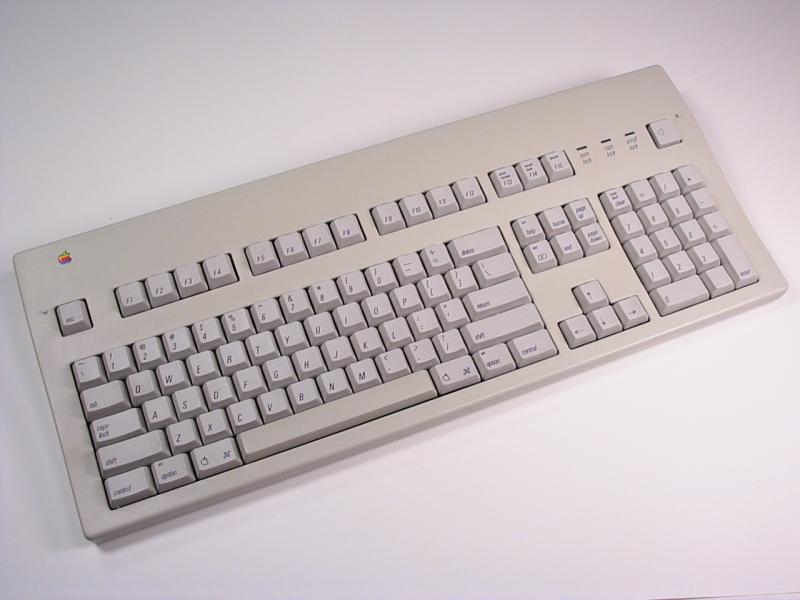
Laugh if you will, but this keyboard worked so well that people are still buying them and refurbishing them today.
Now, someone out there will know why (I never understood why) but in the mid-1990s Apple moved away from Motorola processors to IBM's PowerPC processor line. Motorola processors had been a key feature of everything from Apple ][ computers to Sega video games, and Apple just said, "nope." They decided to move instead to an untested processor that just didn't work very well. They celebrated this move by dubbing all of their pro computers as "Power Macintosh."
The first Power Macintoshes were hideously slow, slower than the computers they replaced. And they were more expensive, which just made things worse.
But, Apple persisted. They kept improving the hardware and tailoring the operating system to the new chips. Eventually, they hit a winning combination.
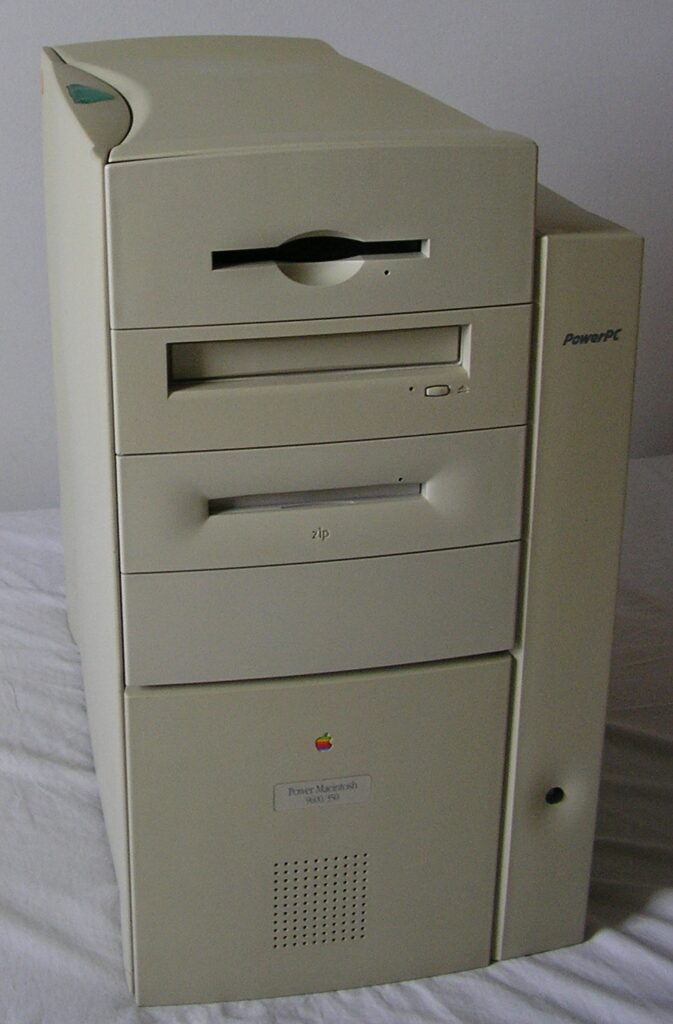
By today's standards, it doesn't look like much. It's got a few 1990s touches like the big jelly-style power button and the sea-foam-green button at the top. But otherwise it's beige, beige, beige. But behind its boring interior was some of the best hardware design posibly ever.
Up front you had a floppy disk drive – this would be the last Apple computer to have one despite the fact that everyone still used them for years to come. There was room for a CD reader and a Zip drive, both critical must-haves for creatives. But the real design was inside. You'll need to watch the above video to really get an idea of it, but it was massively expandable, and the whole case came apart in a sort of weird origami that gave you complete access to the motherboard.
More importantly, this computer was an absolute speed demon at the time, thanks to speedy processors and the ability to load it up with a staggering amount of memory. If you wanted a tank of a computer that just plain worked, this was your box.
Now don't get me wrong. I agree with the folks who say Steve Jobs' return saved Apple. Without him they'd still be relying on computer sales. But the moves he made from the beginning weren't real popular, at least not with me.
The Power Mac 9600 was really only available for about six months. It was replaced by a similar-looking box carrying the very first version of the PowerPC G3 chip. Like other first-version chips from IBM, it was initially a disaster and got better.
However, when Steve Jobs came back to Apple, he changed the course of the company's designs. Gone, he said, were the business-friendly good looks of the 1990s. They would be replaced with something flashy and fun. The stable and reliable OS 8 would be replaced with the weird and wonky OS 10 as soon as possible. (OS 9 was an interim step.)
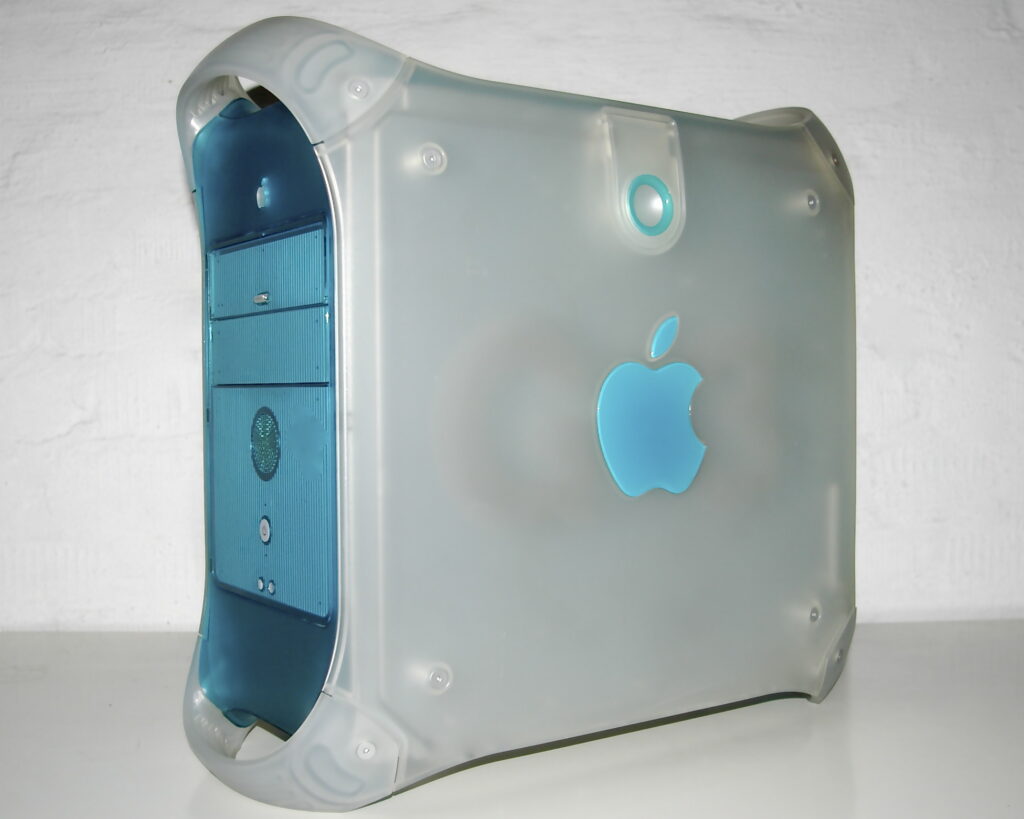
What this meant was that Apple computers stopped looking like the 9600 and started looking like … this.
They would also lose their internal floppy drives and a lot of their expandability. They gained something called "Firewire" which no one actually used for most of the time it was available. Like earlier Macs, the PowerPC G3-based systems would get better with time. They gave way to G4 and G5 versions that were even better than that. OS 10 (styled at the time as OS X) would get better too, but it would all take time. And then Apple threw it all away again by moving to Intel processors. But that's a story for another day.
At the time it came out, the "Bondi" blue Mac was hailed as a bold design choice. Today it looks dated. It's a bright blue reminder of a design aesthetic we all would rather forget. I'm sure that some enthusiasts out there are still pining for one, but there aren't too many of them.
On the other hand, you can say that the beige Macs were boring, but you have to marvel at their quality and design. I don't know if I'd want one of these behemoths on my desk today, but if I had to have one I'd bet it wouldn't be as well built as the Power Macintosh 9600.
The post FUN FRIDAY: Power Macintosh 9600 appeared first on The Solid Signal Blog.
Continue reading...
This very idea came to me when I was exploring this video:
In which a fellow who, I would guess, is about 35, just gushes over a beat up, broken Power Macintosh 9600 and then proceeds to clean it up and adapt it to use modern forms of storage. This set off a cascade of feelings for me, and this being a blog after all, I decided to share them with you.
Although I can't exactly blame the guy.
Apple's Power Macintosh 9600 was a very interesting beast. In the 1990s, Apple was stuck. Their computers really only appealed to a small group of creatives and designers, and they were incredibly expensive. Apple itself couldn't decide what they wanted their computers to be, and keep in mind the computer was virtually Apple's only product at the time. The iPod wouldn't come out until a few years later, but I'm getting ahead of myself.
Yes, Apple's computers were expensive and incompatible and all that. But in the early 1990s they were some of the best hardware you could buy. The company had really gotten into the groove of creating durable hardware that was way faster than it had a right to be at the time. Their operating system beat Windows in almost every way. And, not to be forgotten, their keyboards were some of the best ever made.
Laugh if you will, but this keyboard worked so well that people are still buying them and refurbishing them today.
Apple's big wrong turn
Now, someone out there will know why (I never understood why) but in the mid-1990s Apple moved away from Motorola processors to IBM's PowerPC processor line. Motorola processors had been a key feature of everything from Apple ][ computers to Sega video games, and Apple just said, "nope." They decided to move instead to an untested processor that just didn't work very well. They celebrated this move by dubbing all of their pro computers as "Power Macintosh."
The first Power Macintoshes were hideously slow, slower than the computers they replaced. And they were more expensive, which just made things worse.
But, Apple persisted. They kept improving the hardware and tailoring the operating system to the new chips. Eventually, they hit a winning combination.
Power Macintosh 9600: the best Mac ever made (up to that point, and possibly ever.)
By today's standards, it doesn't look like much. It's got a few 1990s touches like the big jelly-style power button and the sea-foam-green button at the top. But otherwise it's beige, beige, beige. But behind its boring interior was some of the best hardware design posibly ever.
Up front you had a floppy disk drive – this would be the last Apple computer to have one despite the fact that everyone still used them for years to come. There was room for a CD reader and a Zip drive, both critical must-haves for creatives. But the real design was inside. You'll need to watch the above video to really get an idea of it, but it was massively expandable, and the whole case came apart in a sort of weird origami that gave you complete access to the motherboard.
More importantly, this computer was an absolute speed demon at the time, thanks to speedy processors and the ability to load it up with a staggering amount of memory. If you wanted a tank of a computer that just plain worked, this was your box.
And then, Steve Jobs
Now don't get me wrong. I agree with the folks who say Steve Jobs' return saved Apple. Without him they'd still be relying on computer sales. But the moves he made from the beginning weren't real popular, at least not with me.
The Power Mac 9600 was really only available for about six months. It was replaced by a similar-looking box carrying the very first version of the PowerPC G3 chip. Like other first-version chips from IBM, it was initially a disaster and got better.
However, when Steve Jobs came back to Apple, he changed the course of the company's designs. Gone, he said, were the business-friendly good looks of the 1990s. They would be replaced with something flashy and fun. The stable and reliable OS 8 would be replaced with the weird and wonky OS 10 as soon as possible. (OS 9 was an interim step.)
What this meant was that Apple computers stopped looking like the 9600 and started looking like … this.
They would also lose their internal floppy drives and a lot of their expandability. They gained something called "Firewire" which no one actually used for most of the time it was available. Like earlier Macs, the PowerPC G3-based systems would get better with time. They gave way to G4 and G5 versions that were even better than that. OS 10 (styled at the time as OS X) would get better too, but it would all take time. And then Apple threw it all away again by moving to Intel processors. But that's a story for another day.
Good design remains, trendy design doesn't
At the time it came out, the "Bondi" blue Mac was hailed as a bold design choice. Today it looks dated. It's a bright blue reminder of a design aesthetic we all would rather forget. I'm sure that some enthusiasts out there are still pining for one, but there aren't too many of them.
On the other hand, you can say that the beige Macs were boring, but you have to marvel at their quality and design. I don't know if I'd want one of these behemoths on my desk today, but if I had to have one I'd bet it wouldn't be as well built as the Power Macintosh 9600.
The post FUN FRIDAY: Power Macintosh 9600 appeared first on The Solid Signal Blog.
Continue reading...
0 Replies
·
277 views
TWiT Tech Podcast Network
Time for another AWESOME video from the TWIT Network!
View: https://www.youtube.com/watch?v=7E4fkSffYKA
Direct YouTube Link - Tech News Weekly 461
TWIT's Website
TWIT Live Feed
View: https://www.youtube.com/watch?v=7E4fkSffYKA
Direct YouTube Link - Tech News Weekly 461
TWIT's Website
TWIT Live Feed
0 Replies
·
2 views

Staff member
HERE TO HELP YOU!
We have a Breakfast and Dinner thread so... 
Continuing from the Breakfast thread, found Cornbread mix so ...
Yellow Cornbread Mix
2 Hatch Green Chiles -diced
1 Egg
2/3 cup of milk
add to greased pan
Bake for 400f 20-25 minutes(From instructions)
now to put together and try... this to go with pinto beans...
Continuing from the Breakfast thread, found Cornbread mix so ...
Yellow Cornbread Mix
2 Hatch Green Chiles -diced
1 Egg
2/3 cup of milk
add to greased pan
Bake for 400f 20-25 minutes(From instructions)
now to put together and try... this to go with pinto beans...
5449 Replies
·
336091 views


iJustine
Time for another AWESOME video from iJustine!
View: https://www.youtube.com/shorts/yj3f7ab5pBI
Direct YouTube Link - iPhone Duo's First Concert! Revis!
The official iJustine Website's Website
Buy her book!
View: https://www.youtube.com/shorts/yj3f7ab5pBI
Direct YouTube Link - iPhone Duo's First Concert! Revis!
The official iJustine Website's Website
Buy her book!
0 Replies
·
5 views
TWiT Tech Podcast Network
Time for another AWESOME video from the TWIT Network!
View: https://www.youtube.com/shorts/7NJXMnbT1Mk
Direct YouTube Link - New iPad mini Announced... at $699?
TWIT's Website
TWIT Live Feed
View: https://www.youtube.com/shorts/7NJXMnbT1Mk
Direct YouTube Link - New iPad mini Announced... at $699?
TWIT's Website
TWIT Live Feed
0 Replies
·
6 views

Staff member
HERE TO HELP YOU!
Cutting Edge
Sometimes a thread gets so many posts in it that is can cause issues for the server so that why today we introduce The Song Name Game Part 3!
So let the game continue!
The last song was added by Bobby who posted...
One Meat Ball - Andrews Sisters
CONTINUE ON AND HAVE FUN! WELCOME HOME TO SATELLITEGUYS.US!
Here are the original rules for the game as posted by WebbyDude back in 2006. http://www.satelliteguys.us/threads/68645-Song-Name-Game
Just name a song title and the band who performed it. The next person does the same thing, but needs to list a song title or band name which includes a word from the previous entry. Pick songs from any genre.
Example:
Long Live Rock and Roll -- Rainbow
Rainbow in the Dark -- Dio
Another example:
Ride the Lightning -- Metallica
Lightning Strikes -- Ozzy Osbourne
Get it?
An additional note: we all know that song titles, sometimes, use profane words. Because this is a family friendly website it is advised that you clean up that title up a bit. This is accomplished by using something like sh!t instead of the real word. Thanks....
So let the game continue!
The last song was added by Bobby who posted...
One Meat Ball - Andrews Sisters
CONTINUE ON AND HAVE FUN! WELCOME HOME TO SATELLITEGUYS.US!
Here are the original rules for the game as posted by WebbyDude back in 2006. http://www.satelliteguys.us/threads/68645-Song-Name-Game
Just name a song title and the band who performed it. The next person does the same thing, but needs to list a song title or band name which includes a word from the previous entry. Pick songs from any genre.
Example:
Long Live Rock and Roll -- Rainbow
Rainbow in the Dark -- Dio
Another example:
Ride the Lightning -- Metallica
Lightning Strikes -- Ozzy Osbourne
Get it?
An additional note: we all know that song titles, sometimes, use profane words. Because this is a family friendly website it is advised that you clean up that title up a bit. This is accomplished by using something like sh!t instead of the real word. Thanks....
68658 Replies
·
2680237 views


Lately my eight year old Dell laptop has been shutting off even when I have a full battery. I have had to keep it plugged up all the time to keep this from happening. Any idea what is causing this? I replaced the battery about three years ago.
2 Replies
·
49 views

Pub Member / Supporter
I set up a music server for my brother a few years ago. It's basically a small headless computer but it needs to have a DHCP IP address reserved for it in the router settings. This was easy to do in his DSL router. He's switching to Starlink now and I was wondering if these setting are easily accessible in the Starlink router. I'm pretty sure he will be getting the latest V5 router.
5 Replies
·
288 views


Pub Member / Supporter
Lifetime Supporter
Good...simple humor. Enjoy
View: https://www.youtube.com/watch?v=E92AtfTLge4
View: https://www.youtube.com/watch?v=HJy0WnejlF4
View: https://www.youtube.com/watch?v=E92AtfTLge4
View: https://www.youtube.com/watch?v=HJy0WnejlF4
2 Replies
·
52 views

Pub Member / Supporter
Lifetime Supporter
Terrible tragedy. You would think that they would have safe guards in place that would prevent something like this from happening. I guess if you are going to ride in a passenger train it might be best to get a car near the rear.
 www.zerohedge.com
At Least 64 Dead After Two High-Speed Trains Collide In Spain<!-- --> | ZeroHedge
ZeroHedge - On a long enough timeline, the survival rate for everyone drops to zero
www.zerohedge.com
2 Replies
·
56 views


Booredatwork.com
Time for another AWESOME video from BoredAtWork!
View: https://www.youtube.com/watch?v=MSXmcYapC3I
Direct YouTube Link - MacBook Pro With PROLED XDR Display - Watch Before you BUY!
Booredatwork.com Website
Booredatwork on Facebook
View: https://www.youtube.com/watch?v=MSXmcYapC3I
Direct YouTube Link - MacBook Pro With PROLED XDR Display - Watch Before you BUY!
Booredatwork.com Website
Booredatwork on Facebook
0 Replies
·
14 views