

Social Feed

Staff member
HERE TO HELP YOU!
Pub Member / Supporter
Cutting Edge
In the age of generative artificial intelligence, clip art seems like a remnant of a long gone civilization. Today with just a short sentence you can get a very convincing image of virtually anything you want. Here's the proof. I gave the words "sparkly rainbow muffin" to Photoshop. I got this back in under 30 seconds.

But, it wasn't always like that. Until very recently, if you wanted to show something, you needed a photo of it. Before that, you probably used some sort of illustration, or as it was called in the 1990s, clip art. Clip art is a very interesting thing that's pretty much disappeared with the exception of the occasional company newsletter. I remember when it was a must-have for anyone who did any sort of design.
In the 19th century, printing presses became a lot more common. Electric motors made them more efficient and all of a sudden pretty much everyone was doing newspaper advertising. The only problem was, it was practically impossible to show a photo of anything in the newspaper at the time. Photography itself wasn't even common until the mid-1800s, and the technology to transfer a photo to a printed sheet didn't exist. So, the artists at the time used woodcuts.
Woodcuts are exactly what they sound like. Someone would scuplt a design into a piece of wood and that wood made an impression on paper. Here's an example of one I found from the 18th century.
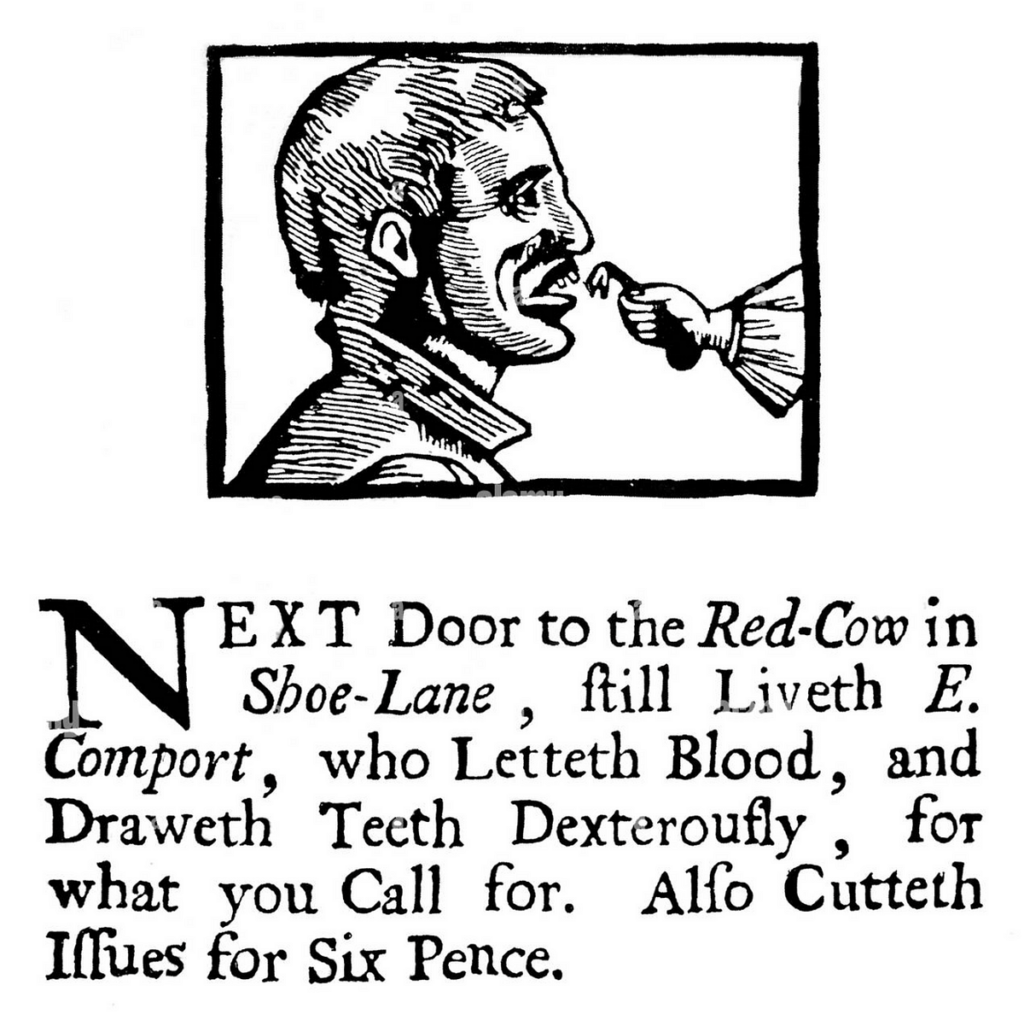
I think this was advertising a dentist. I can tell you the person in the woodcut doesn't look terribly happy.
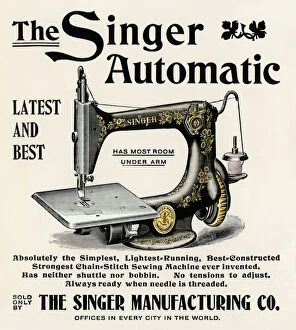
By the late 19th century and early 20th century, it was possible to use photos in printed materials but it was expensive and they didn't look very good. In the meantime, the art of creating woodcuts had improved a lot and so had the technology. They were still called woodcuts, but many of them used the original cut as a master to make a copy in lead so it would last longer. This also meant you could move type around them easier and use the same image for different ads. Here's a high-quality example courtesy of Image Warehouse:
The world of printing changed massively in the mid-to-late 20th century with the advent of what was called "quick printing." Smaller printing presses were able to use photographic processes to make printing plates. This meant you could reproduce anything you typed or drew. This process was a lot less expensive than older forms of printing and it sparked a revolution in small business. "Quick Print" shops sprung up in every city and town, ready to produce advertising, resumes, or booklets at a fraction of the price you used to pay. This was the first time that regular folks could really design something and make lots of duplicates of it.
Along with this revolution came a need for artwork that was inexpensive, easily reused, and designed for this new technology. By the 1970s there were several companies that offered monthly subscriptions where they sent you a big book in the mail full of illustrations. The idea was that if you saw something you liked, you "clipped" it out of the book and put it in your illustration, to be photographed and turned into printing plates. One of the most popular at the time was even called "Clipper." Here's a photo of an old clip art book, courtesy of eBay.
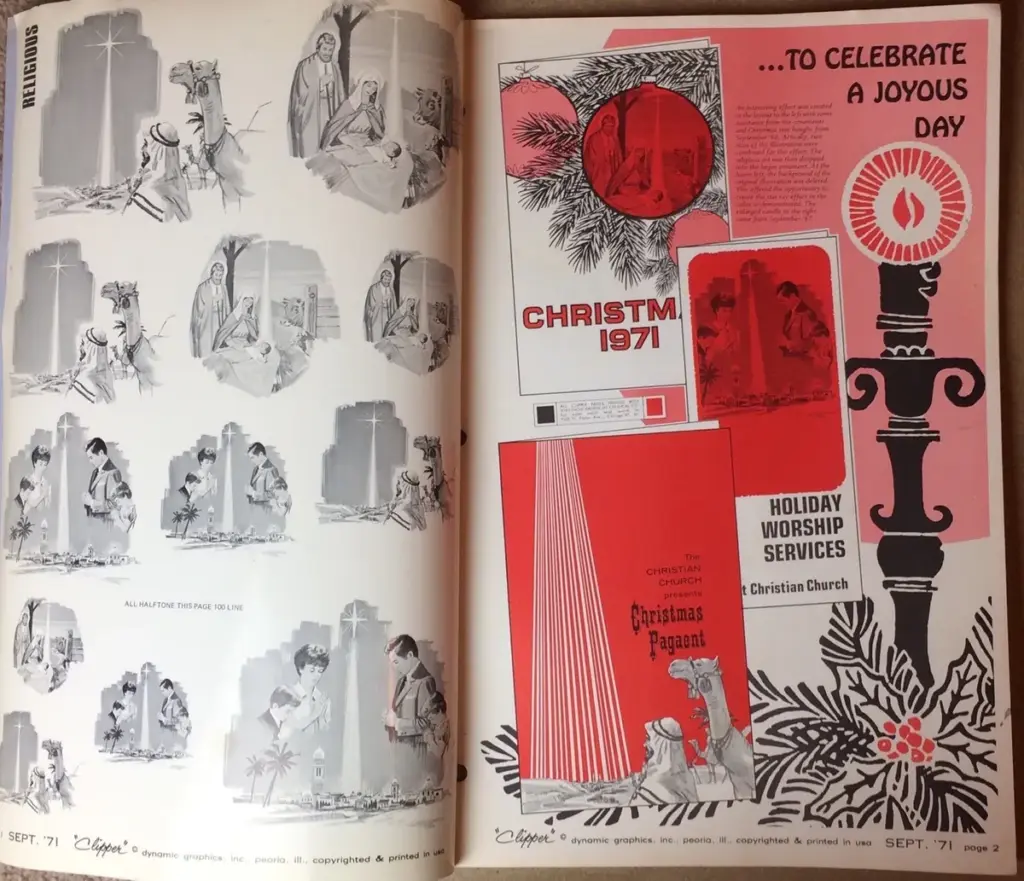
The left side was the artwork and the right side showed some typical ways you could use it.
Of course, the world was changing very quickly toward the end of the 20th century. In 1980, computers for personal use were still pretty rare and expensive. By 1995 not only did everyone have a computer, but pretty much everyone was doing their own artwork with them. Paper "clip art" books didn't last too far into the 1990s, and their replacement was the clipart CD.
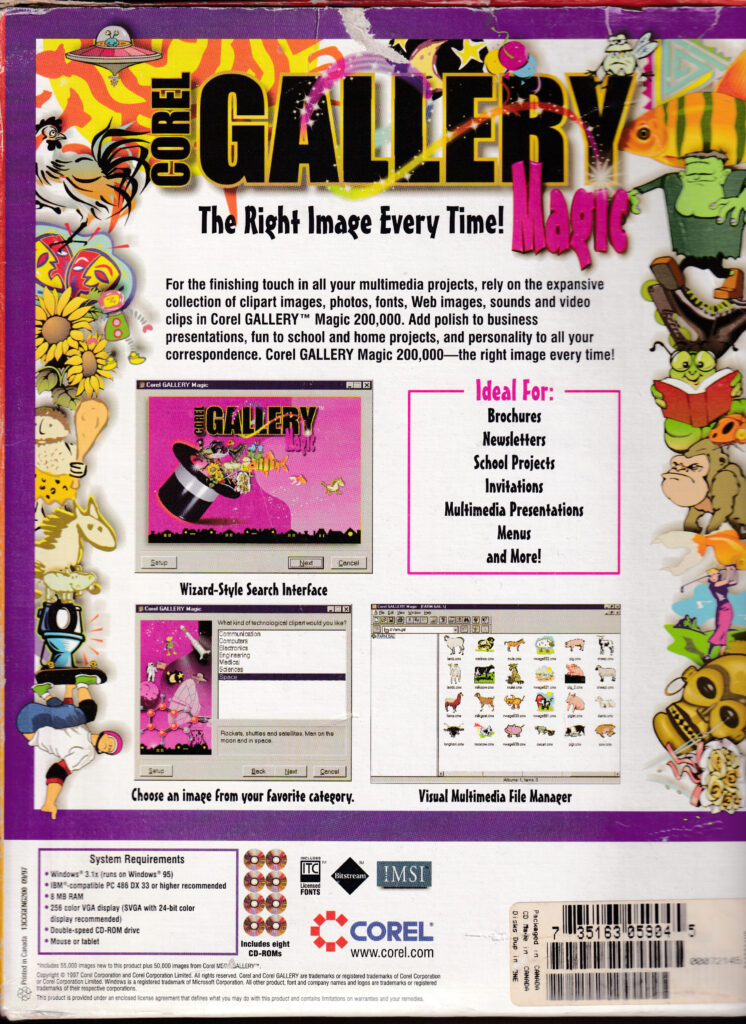
For about $30, the equivalent of maybe $75 today, you could get 200,000 images to use any way you wanted. Of course, they came on a CD-ROM, that was the high tech of the day. There are still a lot of archives of 1990s and 2000s clipart at the Internet Archive, if you're interested. It wasn't long before illustrations like the ones you see above gave way to true photos, also found on CDs of course. It wouldn't be until the 2000s that most people had internet fast enough to download high-quality pictures. Google introduced its image search in 2001, making it easier to find what you want.
Clip art was very, very overused in the 2000s and 2010s. It wasn't long before it became associated with very low-quality advertising and handmade flyers. By the late 2010s, inexpensive photo services and even free stock photo sites like Pexels made it easy to find high-quality photos that helped make your point. At that point practically everyone had a camera on their phone anyway, so you could just take a picture of what you really wanted to show anyway.
As a result, you don't see clip art much today. I think that's a shame really. I'm not saying we should go back to the days of poorly made, ugly clipart like this image:

…but I do think there's a place for well-made illustrations. When you look at a photo, you are automatically going to look at the details of that photo. When you look at a more abstract, but still high quality, illustration like this famous one of the "Gerber baby,"

your mind focuses less on the specific details and more on the emotion of the image. This is why artists paint instead of taking photos, and it's why traditional-looking animated films still have a place. Abstract images do more than photos in going straight to the heart and bypassing the ming.
That said, I'm certainly not saying we should go back to cutting art out of magazines or pulling images from CDs. I'm just saying that we might have gone too far away from illustration and it might be time to go back in that direction.
The post FUN FRIDAY: Clip Art appeared first on The Solid Signal Blog.
Continue reading...
But, it wasn't always like that. Until very recently, if you wanted to show something, you needed a photo of it. Before that, you probably used some sort of illustration, or as it was called in the 1990s, clip art. Clip art is a very interesting thing that's pretty much disappeared with the exception of the occasional company newsletter. I remember when it was a must-have for anyone who did any sort of design.
Woodcuts: the original clip art
In the 19th century, printing presses became a lot more common. Electric motors made them more efficient and all of a sudden pretty much everyone was doing newspaper advertising. The only problem was, it was practically impossible to show a photo of anything in the newspaper at the time. Photography itself wasn't even common until the mid-1800s, and the technology to transfer a photo to a printed sheet didn't exist. So, the artists at the time used woodcuts.
Woodcuts are exactly what they sound like. Someone would scuplt a design into a piece of wood and that wood made an impression on paper. Here's an example of one I found from the 18th century.
I think this was advertising a dentist. I can tell you the person in the woodcut doesn't look terribly happy.
By the late 19th century and early 20th century, it was possible to use photos in printed materials but it was expensive and they didn't look very good. In the meantime, the art of creating woodcuts had improved a lot and so had the technology. They were still called woodcuts, but many of them used the original cut as a master to make a copy in lead so it would last longer. This also meant you could move type around them easier and use the same image for different ads. Here's a high-quality example courtesy of Image Warehouse:
The 20th century: the birth of true clip art
The world of printing changed massively in the mid-to-late 20th century with the advent of what was called "quick printing." Smaller printing presses were able to use photographic processes to make printing plates. This meant you could reproduce anything you typed or drew. This process was a lot less expensive than older forms of printing and it sparked a revolution in small business. "Quick Print" shops sprung up in every city and town, ready to produce advertising, resumes, or booklets at a fraction of the price you used to pay. This was the first time that regular folks could really design something and make lots of duplicates of it.
Along with this revolution came a need for artwork that was inexpensive, easily reused, and designed for this new technology. By the 1970s there were several companies that offered monthly subscriptions where they sent you a big book in the mail full of illustrations. The idea was that if you saw something you liked, you "clipped" it out of the book and put it in your illustration, to be photographed and turned into printing plates. One of the most popular at the time was even called "Clipper." Here's a photo of an old clip art book, courtesy of eBay.
The left side was the artwork and the right side showed some typical ways you could use it.
The 1990s: Digital Clip Art and Stock Photos
Of course, the world was changing very quickly toward the end of the 20th century. In 1980, computers for personal use were still pretty rare and expensive. By 1995 not only did everyone have a computer, but pretty much everyone was doing their own artwork with them. Paper "clip art" books didn't last too far into the 1990s, and their replacement was the clipart CD.
For about $30, the equivalent of maybe $75 today, you could get 200,000 images to use any way you wanted. Of course, they came on a CD-ROM, that was the high tech of the day. There are still a lot of archives of 1990s and 2000s clipart at the Internet Archive, if you're interested. It wasn't long before illustrations like the ones you see above gave way to true photos, also found on CDs of course. It wouldn't be until the 2000s that most people had internet fast enough to download high-quality pictures. Google introduced its image search in 2001, making it easier to find what you want.
A place for clip art today?
Clip art was very, very overused in the 2000s and 2010s. It wasn't long before it became associated with very low-quality advertising and handmade flyers. By the late 2010s, inexpensive photo services and even free stock photo sites like Pexels made it easy to find high-quality photos that helped make your point. At that point practically everyone had a camera on their phone anyway, so you could just take a picture of what you really wanted to show anyway.
As a result, you don't see clip art much today. I think that's a shame really. I'm not saying we should go back to the days of poorly made, ugly clipart like this image:
…but I do think there's a place for well-made illustrations. When you look at a photo, you are automatically going to look at the details of that photo. When you look at a more abstract, but still high quality, illustration like this famous one of the "Gerber baby,"
your mind focuses less on the specific details and more on the emotion of the image. This is why artists paint instead of taking photos, and it's why traditional-looking animated films still have a place. Abstract images do more than photos in going straight to the heart and bypassing the ming.
That said, I'm certainly not saying we should go back to cutting art out of magazines or pulling images from CDs. I'm just saying that we might have gone too far away from illustration and it might be time to go back in that direction.
The post FUN FRIDAY: Clip Art appeared first on The Solid Signal Blog.
Continue reading...
0 Replies
·
261 views

Staff member
HERE TO HELP YOU!
We have a Breakfast and Dinner thread so... 
Continuing from the Breakfast thread, found Cornbread mix so ...
Yellow Cornbread Mix
2 Hatch Green Chiles -diced
1 Egg
2/3 cup of milk
add to greased pan
Bake for 400f 20-25 minutes(From instructions)
now to put together and try... this to go with pinto beans...
Continuing from the Breakfast thread, found Cornbread mix so ...
Yellow Cornbread Mix
2 Hatch Green Chiles -diced
1 Egg
2/3 cup of milk
add to greased pan
Bake for 400f 20-25 minutes(From instructions)
now to put together and try... this to go with pinto beans...
5448 Replies
·
336080 views


iJustine
Time for another AWESOME video from iJustine!
View: https://www.youtube.com/shorts/yj3f7ab5pBI
Direct YouTube Link - iPhone Duo's First Concert! Revis!
The official iJustine Website's Website
Buy her book!
View: https://www.youtube.com/shorts/yj3f7ab5pBI
Direct YouTube Link - iPhone Duo's First Concert! Revis!
The official iJustine Website's Website
Buy her book!
0 Replies
·
3 views
TWiT Tech Podcast Network
Time for another AWESOME video from the TWIT Network!
View: https://www.youtube.com/shorts/7NJXMnbT1Mk
Direct YouTube Link - New iPad mini Announced... at $699?
TWIT's Website
TWIT Live Feed
View: https://www.youtube.com/shorts/7NJXMnbT1Mk
Direct YouTube Link - New iPad mini Announced... at $699?
TWIT's Website
TWIT Live Feed
0 Replies
·
3 views

Staff member
HERE TO HELP YOU!
Cutting Edge
Sometimes a thread gets so many posts in it that is can cause issues for the server so that why today we introduce The Song Name Game Part 3!
So let the game continue!
The last song was added by Bobby who posted...
One Meat Ball - Andrews Sisters
CONTINUE ON AND HAVE FUN! WELCOME HOME TO SATELLITEGUYS.US!
Here are the original rules for the game as posted by WebbyDude back in 2006. http://www.satelliteguys.us/threads/68645-Song-Name-Game
Just name a song title and the band who performed it. The next person does the same thing, but needs to list a song title or band name which includes a word from the previous entry. Pick songs from any genre.
Example:
Long Live Rock and Roll -- Rainbow
Rainbow in the Dark -- Dio
Another example:
Ride the Lightning -- Metallica
Lightning Strikes -- Ozzy Osbourne
Get it?
An additional note: we all know that song titles, sometimes, use profane words. Because this is a family friendly website it is advised that you clean up that title up a bit. This is accomplished by using something like sh!t instead of the real word. Thanks....
So let the game continue!
The last song was added by Bobby who posted...
One Meat Ball - Andrews Sisters
CONTINUE ON AND HAVE FUN! WELCOME HOME TO SATELLITEGUYS.US!
Here are the original rules for the game as posted by WebbyDude back in 2006. http://www.satelliteguys.us/threads/68645-Song-Name-Game
Just name a song title and the band who performed it. The next person does the same thing, but needs to list a song title or band name which includes a word from the previous entry. Pick songs from any genre.
Example:
Long Live Rock and Roll -- Rainbow
Rainbow in the Dark -- Dio
Another example:
Ride the Lightning -- Metallica
Lightning Strikes -- Ozzy Osbourne
Get it?
An additional note: we all know that song titles, sometimes, use profane words. Because this is a family friendly website it is advised that you clean up that title up a bit. This is accomplished by using something like sh!t instead of the real word. Thanks....
68658 Replies
·
2680220 views


Lately my eight year old Dell laptop has been shutting off even when I have a full battery. I have had to keep it plugged up all the time to keep this from happening. Any idea what is causing this? I replaced the battery about three years ago.
2 Replies
·
46 views


Pub Member / Supporter
I set up a music server for my brother a few years ago. It's basically a small headless computer but it needs to have a DHCP IP address reserved for it in the router settings. This was easy to do in his DSL router. He's switching to Starlink now and I was wondering if these setting are easily accessible in the Starlink router. I'm pretty sure he will be getting the latest V5 router.
5 Replies
·
285 views


Pub Member / Supporter
Lifetime Supporter
Good...simple humor. Enjoy
View: https://www.youtube.com/watch?v=E92AtfTLge4
View: https://www.youtube.com/watch?v=HJy0WnejlF4
View: https://www.youtube.com/watch?v=E92AtfTLge4
View: https://www.youtube.com/watch?v=HJy0WnejlF4
2 Replies
·
51 views

Pub Member / Supporter
Lifetime Supporter
Terrible tragedy. You would think that they would have safe guards in place that would prevent something like this from happening. I guess if you are going to ride in a passenger train it might be best to get a car near the rear.
 www.zerohedge.com
At Least 64 Dead After Two High-Speed Trains Collide In Spain<!-- --> | ZeroHedge
ZeroHedge - On a long enough timeline, the survival rate for everyone drops to zero
www.zerohedge.com
2 Replies
·
55 views


Booredatwork.com
Time for another AWESOME video from BoredAtWork!
View: https://www.youtube.com/watch?v=MSXmcYapC3I
Direct YouTube Link - MacBook Pro With PROLED XDR Display - Watch Before you BUY!
Booredatwork.com Website
Booredatwork on Facebook
View: https://www.youtube.com/watch?v=MSXmcYapC3I
Direct YouTube Link - MacBook Pro With PROLED XDR Display - Watch Before you BUY!
Booredatwork.com Website
Booredatwork on Facebook
0 Replies
·
14 views
Marques Brownlee
Time for another AWESOME video from Marques Brownlee!
View: https://www.youtube.com/watch?v=2reQut8WNGc
Direct YouTube Link - Macbook PROLED XDR Impressions: They Said They Wouldn't!
The official MKBHD Website!
The MKBHD Store
View: https://www.youtube.com/watch?v=2reQut8WNGc
Direct YouTube Link - Macbook PROLED XDR Impressions: They Said They Wouldn't!
The official MKBHD Website!
The MKBHD Store
0 Replies
·
26 views