

Social Feed

Staff member
HERE TO HELP YOU!
Pub Member / Supporter
Cutting Edge
For a moment, let's be honest. Have you ever thought about how to create one of those square barcode things that everyone seems to be using in shopping, navigating and so on? You know, the ones where you can scan them with your phone to quickly get contact details, websites, and a tonne of other goodies?
Yes, the thing is a QR Code.
Well, get ready to have your mind blown, because it's much simpler than you may think to create your QR code.
So, let's get started and see how useful QR codes may be for your personal and professional needs!
A QR code (quick response code) is a form of barcode, but more advanced than the ones we see on product labels in stores. Instead of just a few numbers, a QR code can hold a variety of data, including website links, contact information, event details, and so on.
The good part is that you do not need to manually input all of that information. You only need a smartphone with a camera and a QR code scanning app (which is already built into most phones). Simply point your camera at the QR code, and your phone will instantly display the information hidden therein.
It's like having a secret door to the internet or a contact list hidden inside a small square picture. QR codes are very useful for fast sharing information without having to write down lengthy URLs or contact information.
QR codes normally seem like this:

QR codes and barcodes are similar in that they are both visual representations of data; but, how the information encoded inside them is read differentiates them. Barcodes are one-dimensional, and the information stored inside them is read horizontally. QR codes are two-dimensional, and the data encoded inside them may be read horizontally and vertically.
Barcodes typically seem like this:

Both barcodes and QR codes may be scanned using a laser or a smartphone, as long as the device being used is capable of reading vertical and horizontal data. Although most smartphones automatically scan QR codes, many won't scan barcodes unless you use a specific app.
A normal barcode contains around 20-25 characters of information. That's probably enough for a tweet from 2006. A QR code, on the other hand, may store more than 3,000 characters. That is a full-fledged manifesto by comparison.
The differences extend to what they can be used for. Barcodes are most commonly used for inventory management, such as keeping track of goods at a store. QR codes are mostly about engagement and interaction. They may direct you to websites, movies, and forms, and even make phone calls or emails. In summary, QR codes are the extroverted relatives of barcodes, eager to lead visitors down a marketing rabbit hole with a single scan.
Originally developed in Japan for use in the automobile sector, marketers adopted the QR code because of its vast storage capacity and ability to provide more information to customers beyond what a product's packaging or advertising could reveal.
For example, When you scan a QR code with your smartphone's camera, the QR code reader app reads the pattern of black and white squares that comprise the code. This pattern holds the data, including a website URL, contact information, event details, or almost any other digital information.
The QR code reader app on your phone then translates the coded information and displays it to you. For example, if the QR code has a website link, your phone will lead to that page. Alternatively, your phone will add that person to its contacts if it has contact information.
It just takes a few seconds, making QR codes very fast and handy. You don't have to manually enter long URLs or contact information; the QR code handles it all for you.
The real beauty of QR codes is their versatility. You may encode a wide range of helpful information into them and then share it with anybody who scans the code. It's a simple technique for linking the real and digital worlds.

Uniqode is the best QR Code generator in the market.
Here is why:

If you want a QR Code platform that allows you to easily build sleek and snappy circular QR Codes (the only shape they provide), Flowcode is a good option.
However, it is worth noting that the platform's analytics engine, customization options, and security measures are rather minimal.
Also, Flowcode does not enable your QR code to redirect straight to your website; instead, you must use a Flowcode redirect subdomain that maintains a portion of your URL.
QR Code Generator Pro offers important features for producing and maintaining dynamic QR Codes, such as customization, deployment, and backend modification after printing.
However, it falls short of providing advanced functions beyond the basics.
The platform's security and analytics tools are restricted, and use-case templates need more flexibility. This solution lacks many important and advanced features that Uniqode has.

The QR code generator is a simple solution that does the job. It supports both static and dynamic QR codes, although there are very few customization possibilities.
It also supports a variety of QR Code formats, including URL, vCard, call, and SMS.
You may also join up to make dynamic QR codes, albeit the possibilities are restricted. Ideally, its product is best suited for a one-time campaign.
But imagine you need to change material on the backend after printing, improve security, and have complete creative control over the customization of your QR Codes. In such a situation, we suggest investing in a premium service, such as Uniqode.

Another free QR platform alternative is Adobe Express's QR Code Generator. If you're searching for an image-based solution with minimal QR-based functionality, Adobe may be a good choice.
When comparing Adobe with Uniqode, Adobe's free QR Code generator does not provide dynamic, trackable QR codes with comprehensive customization possibilities.

Canva allows you to quickly and easily design basic and beautiful QR codes. However, like with other free QR code generators, you can only generate static QR codes.
So, if you want to change the destination URL, you must create a new QR Code.
Canva provides the possibility of creating a dynamic QR Code, but only through a third-party site called Hovercode. This requires transitioning between two platforms and using Hovercode's functionalities.
The lack of a dynamic QR Code inside Canva, as well as the redirect to third-party platforms, highlights how static QR Code generation services are best suited for one-time use cases with rare link modifications.
Here are some factors to consider while selecting a QR code generator:
Dynamic or editable QR codes enable you to make changes even after they have been generated and printed.
This capability is useful in situations where you need to update the linked content, change URLs, or edit the information without creating a new QR code.
Customization is required to create QR codes that are consistent with your brand identity and campaign visuals.
Look for a unique QR Code generator with a variety of customization choices, such as changing colors, adding logos, and choosing different shapes.
Advanced customization features, such as QR Code dots, adding a transparent or background picture, or including a QR Code CTA, can all improve the QR Code's visual appeal.
A trackable QR Code generator will help you determine the success of your QR Code initiatives.
Most QR Code generators include basic metrics like location, time, and scan date. Uniqode, on the other hand, provides a robust analytics dashboard with regular QR Code reports.
Ensure that the platform you use is GDPR and SOC® 2 type-2 compliant and that it uses secure connections (HTTPS) to protect user data during QR code interactions.
Look for extra security features like Single Sign-On (SSO) login to limit access and password-protected QR Codes for transferring sensitive information.
A bulk QR Code generator is required to generate many QR Codes at the same time for large-scale deployments.
Also, with Uniqode's QR Code API, you can integrate QR Codes into your existing systems and apps for automated QR Code generation and other enhancements.
Look for a generator that works seamlessly with popular third-party technologies like CRMs, Google Analytics, and marketing automation solutions.
Genuine user experiences can give important details on the platform's reliability, simplicity of use, and customer support. Look for favorable feedback and high ratings. They suggest a good user experience.
Regardless of the device you're using, creating a QR code is a simple procedure. Here is how to get started.
Step 1: Open a QR code generator in any browser

Go to a QR code generator using any browser and any OS system. For this tutorial, I'll be using qr-code-generator.com. Remember that it is not necessary to use this tool only, you may use any web-based QR code generator.
Step 2: Enter your URL in the generator

For the majority of QR codes, you should redirect users to a URL. In that case, insert the URL into the tool. Contact cards, PDFs, and MP3s are among the additional types that you can select. At the bottom, you can also create QR codes for Microsoft Word and PowerPoint documents. The specific content selections will differ for each tool.
After you've chosen a content type, a field or form will appear where you may add campaign-specific information. For example, if you want your QR code to save contact information, you'll see a series of fields where you can input your email address, subject line, and message.
Once you enter your URL or upload your file, it will generate a QR code that is ready to download.
Step 3: If needed, customize your QR code

The best aspect of creating QR codes is customizing the codes' style to match your company's identity.
The front-end generator on qr-code-generator.com provides a limited number of frame, shape, and color options for customizing your QR code. If you want more options, you must register on the website and change your QR code using the tool's creator portal.
Step 4: Download your QR Code

When you click on the download button, your download will start immediately
Step 5: Use your QR code to market and promote
A QR code will not work unless it is visible to others. So, be sure to include the code in any documents that can help you market your business. This may include displaying it in print advertising, on clothing, or in real areas where people can scan it using their phones.
Whether you want to enhance your marketing game, make sharing contact information easier, or simply have some fun with a unique QR code design, the options are limitless. The goal is to be creative and examine how QR codes can be used to make life simpler for others around you.
So, what exactly are you waiting for? Go on and generate your QR code! Customize it, print it, and begin spreading it everywhere.
This article is sponsored by SolidSignal.com. Shop at Solid Signal for everything you need to live your best digital life. Call us at 888-233-7563 to find out more or fill out the form below.
The post Create Your First QR Code: A Step-by-Step Guide for Beginners appeared first on The Solid Signal Blog.
Continue reading...
Yes, the thing is a QR Code.
Well, get ready to have your mind blown, because it's much simpler than you may think to create your QR code.
So, let's get started and see how useful QR codes may be for your personal and professional needs!
What is a QR Code?
A QR code (quick response code) is a form of barcode, but more advanced than the ones we see on product labels in stores. Instead of just a few numbers, a QR code can hold a variety of data, including website links, contact information, event details, and so on.
The good part is that you do not need to manually input all of that information. You only need a smartphone with a camera and a QR code scanning app (which is already built into most phones). Simply point your camera at the QR code, and your phone will instantly display the information hidden therein.
It's like having a secret door to the internet or a contact list hidden inside a small square picture. QR codes are very useful for fast sharing information without having to write down lengthy URLs or contact information.
QR codes normally seem like this:
QR Codes vs Barcodes
QR codes and barcodes are similar in that they are both visual representations of data; but, how the information encoded inside them is read differentiates them. Barcodes are one-dimensional, and the information stored inside them is read horizontally. QR codes are two-dimensional, and the data encoded inside them may be read horizontally and vertically.
Barcodes typically seem like this:
Both barcodes and QR codes may be scanned using a laser or a smartphone, as long as the device being used is capable of reading vertical and horizontal data. Although most smartphones automatically scan QR codes, many won't scan barcodes unless you use a specific app.
A normal barcode contains around 20-25 characters of information. That's probably enough for a tweet from 2006. A QR code, on the other hand, may store more than 3,000 characters. That is a full-fledged manifesto by comparison.
The differences extend to what they can be used for. Barcodes are most commonly used for inventory management, such as keeping track of goods at a store. QR codes are mostly about engagement and interaction. They may direct you to websites, movies, and forms, and even make phone calls or emails. In summary, QR codes are the extroverted relatives of barcodes, eager to lead visitors down a marketing rabbit hole with a single scan.
How Does a QR Code Work?
Originally developed in Japan for use in the automobile sector, marketers adopted the QR code because of its vast storage capacity and ability to provide more information to customers beyond what a product's packaging or advertising could reveal.
For example, When you scan a QR code with your smartphone's camera, the QR code reader app reads the pattern of black and white squares that comprise the code. This pattern holds the data, including a website URL, contact information, event details, or almost any other digital information.
The QR code reader app on your phone then translates the coded information and displays it to you. For example, if the QR code has a website link, your phone will lead to that page. Alternatively, your phone will add that person to its contacts if it has contact information.
It just takes a few seconds, making QR codes very fast and handy. You don't have to manually enter long URLs or contact information; the QR code handles it all for you.
The real beauty of QR codes is their versatility. You may encode a wide range of helpful information into them and then share it with anybody who scans the code. It's a simple technique for linking the real and digital worlds.
Top QR Code Generators In the Market Today
1. Uniqode
Uniqode is the best QR Code generator in the market.
Here is why:
- We are the world's first GDPR and SOC® 2 type 2-compliant QR Code system, with Fort Knox-level security.
- Zapier, Workato, Make (previously Integromat), and API access provide over 4000 integrations for uninterrupted operations.
- Designed for scale. In minutes, you may create hundreds of QR codes, name them, and store them as templates for future organizational use.
- Extensive QR Code design customizations and a user-friendly platform to work with.
- Comprehensive QR code scan tracking and analytics provide significant data.
- QR Codes and other scalable features may be generated quickly and easily in mass.
- Various data kinds are supported, including URLs, text, contact information (vCard), SMS, and more.
2. Flowcode
If you want a QR Code platform that allows you to easily build sleek and snappy circular QR Codes (the only shape they provide), Flowcode is a good option.
However, it is worth noting that the platform's analytics engine, customization options, and security measures are rather minimal.
Also, Flowcode does not enable your QR code to redirect straight to your website; instead, you must use a Flowcode redirect subdomain that maintains a portion of your URL.
3. QR Code Generator PRO
QR Code Generator Pro offers important features for producing and maintaining dynamic QR Codes, such as customization, deployment, and backend modification after printing.
However, it falls short of providing advanced functions beyond the basics.
The platform's security and analytics tools are restricted, and use-case templates need more flexibility. This solution lacks many important and advanced features that Uniqode has.
4. Qr-Code-Generator
The QR code generator is a simple solution that does the job. It supports both static and dynamic QR codes, although there are very few customization possibilities.
It also supports a variety of QR Code formats, including URL, vCard, call, and SMS.
You may also join up to make dynamic QR codes, albeit the possibilities are restricted. Ideally, its product is best suited for a one-time campaign.
But imagine you need to change material on the backend after printing, improve security, and have complete creative control over the customization of your QR Codes. In such a situation, we suggest investing in a premium service, such as Uniqode.
5. Adobe
Another free QR platform alternative is Adobe Express's QR Code Generator. If you're searching for an image-based solution with minimal QR-based functionality, Adobe may be a good choice.
When comparing Adobe with Uniqode, Adobe's free QR Code generator does not provide dynamic, trackable QR codes with comprehensive customization possibilities.
6. Canva
Canva allows you to quickly and easily design basic and beautiful QR codes. However, like with other free QR code generators, you can only generate static QR codes.
So, if you want to change the destination URL, you must create a new QR Code.
Canva provides the possibility of creating a dynamic QR Code, but only through a third-party site called Hovercode. This requires transitioning between two platforms and using Hovercode's functionalities.
The lack of a dynamic QR Code inside Canva, as well as the redirect to third-party platforms, highlights how static QR Code generation services are best suited for one-time use cases with rare link modifications.
How To Choose the Best QR Code Generator?
Here are some factors to consider while selecting a QR code generator:
1. Look for options for editing QR codes after printing
Dynamic or editable QR codes enable you to make changes even after they have been generated and printed.
This capability is useful in situations where you need to update the linked content, change URLs, or edit the information without creating a new QR code.
2. Make sure there are enough QR Code customization options
Customization is required to create QR codes that are consistent with your brand identity and campaign visuals.
Look for a unique QR Code generator with a variety of customization choices, such as changing colors, adding logos, and choosing different shapes.
Advanced customization features, such as QR Code dots, adding a transparent or background picture, or including a QR Code CTA, can all improve the QR Code's visual appeal.
3. Determine the QR code generator's tracking capabilities
A trackable QR Code generator will help you determine the success of your QR Code initiatives.
Most QR Code generators include basic metrics like location, time, and scan date. Uniqode, on the other hand, provides a robust analytics dashboard with regular QR Code reports.
4. Examine the safety and privacy commitment
Ensure that the platform you use is GDPR and SOC® 2 type-2 compliant and that it uses secure connections (HTTPS) to protect user data during QR code interactions.
Look for extra security features like Single Sign-On (SSO) login to limit access and password-protected QR Codes for transferring sensitive information.
5. Check for bulk generation and API access
A bulk QR Code generator is required to generate many QR Codes at the same time for large-scale deployments.
Also, with Uniqode's QR Code API, you can integrate QR Codes into your existing systems and apps for automated QR Code generation and other enhancements.
6. Ensure integration with third-party tools
Look for a generator that works seamlessly with popular third-party technologies like CRMs, Google Analytics, and marketing automation solutions.
7. Look at customer reviews and feedback
Genuine user experiences can give important details on the platform's reliability, simplicity of use, and customer support. Look for favorable feedback and high ratings. They suggest a good user experience.
How to Create a QR Code?
Regardless of the device you're using, creating a QR code is a simple procedure. Here is how to get started.
How to Create a QR Code on Any Device?
Step 1: Open a QR code generator in any browser
Go to a QR code generator using any browser and any OS system. For this tutorial, I'll be using qr-code-generator.com. Remember that it is not necessary to use this tool only, you may use any web-based QR code generator.
Step 2: Enter your URL in the generator
For the majority of QR codes, you should redirect users to a URL. In that case, insert the URL into the tool. Contact cards, PDFs, and MP3s are among the additional types that you can select. At the bottom, you can also create QR codes for Microsoft Word and PowerPoint documents. The specific content selections will differ for each tool.
After you've chosen a content type, a field or form will appear where you may add campaign-specific information. For example, if you want your QR code to save contact information, you'll see a series of fields where you can input your email address, subject line, and message.
Once you enter your URL or upload your file, it will generate a QR code that is ready to download.
Step 3: If needed, customize your QR code
The best aspect of creating QR codes is customizing the codes' style to match your company's identity.
The front-end generator on qr-code-generator.com provides a limited number of frame, shape, and color options for customizing your QR code. If you want more options, you must register on the website and change your QR code using the tool's creator portal.
Step 4: Download your QR Code
When you click on the download button, your download will start immediately
Step 5: Use your QR code to market and promote
A QR code will not work unless it is visible to others. So, be sure to include the code in any documents that can help you market your business. This may include displaying it in print advertising, on clothing, or in real areas where people can scan it using their phones.
Conclusion
Whether you want to enhance your marketing game, make sharing contact information easier, or simply have some fun with a unique QR code design, the options are limitless. The goal is to be creative and examine how QR codes can be used to make life simpler for others around you.
So, what exactly are you waiting for? Go on and generate your QR code! Customize it, print it, and begin spreading it everywhere.
This article is sponsored by SolidSignal.com. Shop at Solid Signal for everything you need to live your best digital life. Call us at 888-233-7563 to find out more or fill out the form below.
The post Create Your First QR Code: A Step-by-Step Guide for Beginners appeared first on The Solid Signal Blog.
Continue reading...
0 Replies
·
407 views


Staff member
HERE TO HELP YOU!
Cutting Edge
Sometimes a thread gets so many posts in it that is can cause issues for the server so that why today we introduce The Song Name Game Part 3!
So let the game continue!
The last song was added by Bobby who posted...
One Meat Ball - Andrews Sisters
CONTINUE ON AND HAVE FUN! WELCOME HOME TO SATELLITEGUYS.US!
Here are the original rules for the game as posted by WebbyDude back in 2006. http://www.satelliteguys.us/threads/68645-Song-Name-Game
Just name a song title and the band who performed it. The next person does the same thing, but needs to list a song title or band name which includes a word from the previous entry. Pick songs from any genre.
Example:
Long Live Rock and Roll -- Rainbow
Rainbow in the Dark -- Dio
Another example:
Ride the Lightning -- Metallica
Lightning Strikes -- Ozzy Osbourne
Get it?
An additional note: we all know that song titles, sometimes, use profane words. Because this is a family friendly website it is advised that you clean up that title up a bit. This is accomplished by using something like sh!t instead of the real word. Thanks....
So let the game continue!
The last song was added by Bobby who posted...
One Meat Ball - Andrews Sisters
CONTINUE ON AND HAVE FUN! WELCOME HOME TO SATELLITEGUYS.US!
Here are the original rules for the game as posted by WebbyDude back in 2006. http://www.satelliteguys.us/threads/68645-Song-Name-Game
Just name a song title and the band who performed it. The next person does the same thing, but needs to list a song title or band name which includes a word from the previous entry. Pick songs from any genre.
Example:
Long Live Rock and Roll -- Rainbow
Rainbow in the Dark -- Dio
Another example:
Ride the Lightning -- Metallica
Lightning Strikes -- Ozzy Osbourne
Get it?
An additional note: we all know that song titles, sometimes, use profane words. Because this is a family friendly website it is advised that you clean up that title up a bit. This is accomplished by using something like sh!t instead of the real word. Thanks....
68505 Replies
·
2671226 views


Marques Brownlee
Time for another AWESOME video from Marques Brownlee!
View: https://www.youtube.com/watch?v=scwlR0QHGOk
Direct YouTube Link - The NEW Tesla Roadster: My Honest Reaction
The official MKBHD Website!
The MKBHD Store
View: https://www.youtube.com/watch?v=scwlR0QHGOk
Direct YouTube Link - The NEW Tesla Roadster: My Honest Reaction
The official MKBHD Website!
The MKBHD Store
0 Replies
·
5 views
iJustine
Time for another AWESOME video from iJustine!
View: https://www.youtube.com/shorts/m44iKsdN1-Q
Direct YouTube Link - NVIDIA RTX Spark launch party!!!
The official iJustine Website's Website
Buy her book!
View: https://www.youtube.com/shorts/m44iKsdN1-Q
Direct YouTube Link - NVIDIA RTX Spark launch party!!!
The official iJustine Website's Website
Buy her book!
0 Replies
·
11 views

For quite a while now, people with a VIP211k have been losing their recordings on their activated external HDDs... even when there's nothing physically wrong with HDD. I believe this is an intentional and underhanded tactic that Dish is pulling in an attempt to force users away from the VIP211k.
They are obviously regretting that they ever let users have a "non-dvr" dvr in the first place. You would think they would be happy charging you a $40 one time fee... and then be happy letting the customer be the one responsible for HDD failures.
Dish clearly hates the 211k bitter-clingers. This recording deletion problem is intentional (IMO), and I think it is just one more tool that they are using. Hopper and a 2-year agreement... that's what they want you to have. Think about that... a 2-year agreement... with a company $30 Billion in debt (that's with a B). What happens when all that debt causes them to drop the channel that may have been your whole reason for having Dish in the first place? Guess who's stuck with a service that no longer suits their needs... for the remainder of the 2-year agreement.
On top of that, they don't want you to install it yourself. I purchased and installed all my equipment myself. That used to be common. Now, they lie to me and tell me that my dish must be updated to use a Hopper. Funny thing is... they don't even know what dish I have because they didn't install it, and I didn't tell them. If you ask what type of dish/LNBs the hopper needs... good luck getting an answer. All they know is that whatever you have needs to be upgraded by an installer.
It is quite apparent to me that they care much more about staying in their box, than they do working with the customer. That's too bad, because it hasn't always been that way. It's like they are totally unaware of the current business environment that they are trying to compete in.
I have been a customer since 2010. I will be cancelling my service before the next period. Yeah, I know, my $1,200 a year won't make a difference to them. It just seems like they have forgotten who needs who, especially when you consider the competition in today's streaming world. But hey, they will have succeed in forcing me off the 211k.
They are obviously regretting that they ever let users have a "non-dvr" dvr in the first place. You would think they would be happy charging you a $40 one time fee... and then be happy letting the customer be the one responsible for HDD failures.
Dish clearly hates the 211k bitter-clingers. This recording deletion problem is intentional (IMO), and I think it is just one more tool that they are using. Hopper and a 2-year agreement... that's what they want you to have. Think about that... a 2-year agreement... with a company $30 Billion in debt (that's with a B). What happens when all that debt causes them to drop the channel that may have been your whole reason for having Dish in the first place? Guess who's stuck with a service that no longer suits their needs... for the remainder of the 2-year agreement.
On top of that, they don't want you to install it yourself. I purchased and installed all my equipment myself. That used to be common. Now, they lie to me and tell me that my dish must be updated to use a Hopper. Funny thing is... they don't even know what dish I have because they didn't install it, and I didn't tell them. If you ask what type of dish/LNBs the hopper needs... good luck getting an answer. All they know is that whatever you have needs to be upgraded by an installer.
It is quite apparent to me that they care much more about staying in their box, than they do working with the customer. That's too bad, because it hasn't always been that way. It's like they are totally unaware of the current business environment that they are trying to compete in.
I have been a customer since 2010. I will be cancelling my service before the next period. Yeah, I know, my $1,200 a year won't make a difference to them. It just seems like they have forgotten who needs who, especially when you consider the competition in today's streaming world. But hey, they will have succeed in forcing me off the 211k.
168 Replies
·
7484 views


Pub Member / Supporter
Lifetime Supporter
Has anyone subscribed to NBA League Pass for 2026-27 and try to link their account to NBA.com to stream League Pass? I purchased it for 2026-27, and when I linked, I got a message saying success, but then I receive an error that my linked subscription does not include the preseason games for NBA League Pass. Is that how it has always been? I know satellite doesn't have the preseason games on the NBA League Pass channels, but I thought that I was able to stream the preseason once I linked my account on NBA.com?
2 Replies
·
79 views


Supporting Founder
Really excited for this season with Kentucky having a new coach and some really exciting recruits. Probably won't last long, but here's hoping this season is great.
143 Replies
·
1460 views


For some reason, the satelliteguys.us site is loading a lot slower than usual on both Chrome on my Asus laptop and Safari on my iPhone.
I'm also seeing longer appearances of the blue bar at the top and the "3 blue bars" loading symbol.
Is anyone else also having the same problem? Thanks in advance.
I'm also seeing longer appearances of the blue bar at the top and the "3 blue bars" loading symbol.
Is anyone else also having the same problem? Thanks in advance.
530 Replies
·
18116 views


I thought I would come here and find lots of complaints about the update to the dish anywhere mobile app, but am not seeing any. It used to look just like the desktop webpage. Now you can no longer filter by sports channels or movie channels. Plus that they made it look like a big button telephone and you see fewer channels in the screen which requires more scrolling. Yes I realize you can look at sports then select which sport you want to look at, I just liked being able to see all sporting events in the guide with all other channels being filtered out. Am I alone in the wilderness on this?
7 Replies
·
152 views


Supporting Founder
Pub Member / Supporter
Lifetime Supporter
Apple has finally released their Apple TV 4K with built-in Siri and a microphone so it can respond to your queries even if you don't have the remote. It also increases in price, to $299. I had been planning on updating my current Apple TV 4K streamers, but that's $600 for the two of them, and that's a pass at this point.
At $299, it had better come with 256 GB of Storage, Gigabit (or better) Ethernet, the latest HDMI tech and standards, and one year of free Apple One. But it probably won't…
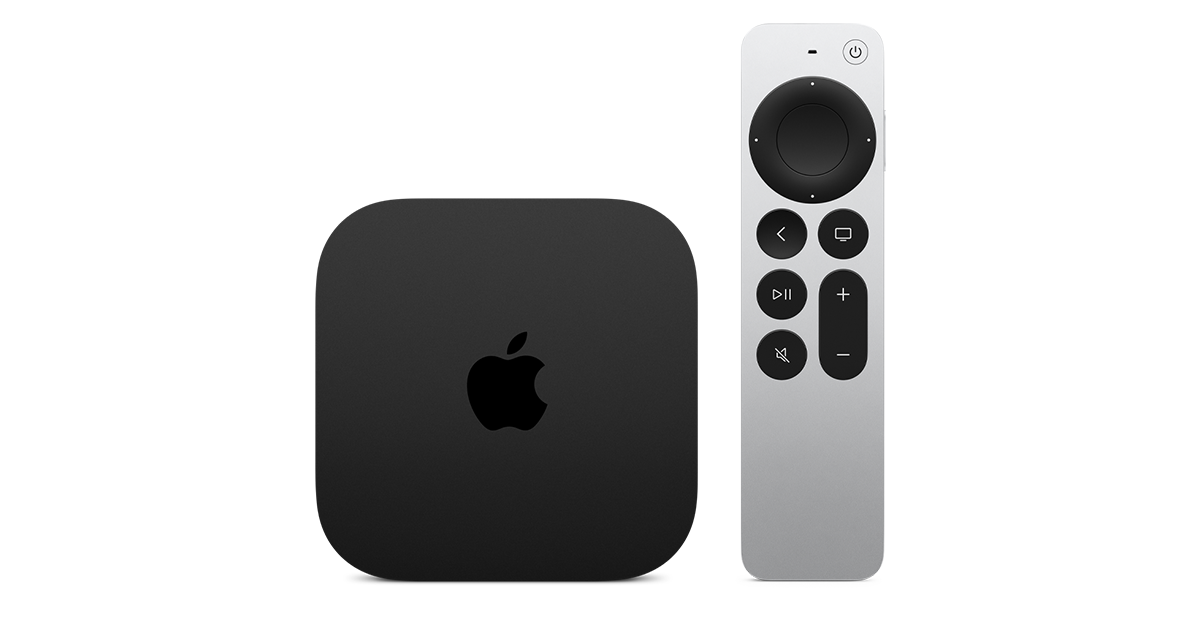
At $299, it had better come with 256 GB of Storage, Gigabit (or better) Ethernet, the latest HDMI tech and standards, and one year of free Apple One. But it probably won't…
Apple TV 4K
Apple TV 4K. New Siri AI and hands-free control. Stunning picture and immersive HomePod surround sound. Works with your Apple and smart home devices.
www.apple.com
20 Replies
·
321 views


 . apple's been making money off of software and not hardware for a while


