

Social Feed

Staff member
HERE TO HELP YOU!
Pub Member / Supporter
Cutting Edge
Frustrated with dropped calls and sluggish data? Signal strength might be the culprit! This guide dives into using the Wilson Pro 5G Network Scanner, a powerful tool that goes beyond basic bars. It measures signal strength in detail, including 5G, to help you identify and optimise your cellular reception. Learn how to unlock the secrets of your mobile network and finally experience reliable connections. This blog post will delve into using the Wilson Pro 5G Network Scanner to measure signal strength and uncover valuable insights about your cellular environment. Whether you're experiencing dropped calls or slow data speeds, this tool can be your secret weapon for optimising your mobile experience.
The way we connect is on the cusp of a revolution. Buckle up as we explore the exciting world of 5G technology!
5G Explained: It's the fifth generation of mobile network technology, the successor to the widely used 4G. Imagine it as a superhighway for data, offering significantly faster speeds, lower latency (response time), and vastly improved capacity.
Why is 5G Important? This isn't just about downloading movies quicker. 5G paves the way for groundbreaking advancements in various fields:
The Leap from 4G to 5G:
Compared to 4G, 5G offers a significant leap in:
Get ready to experience a whole new level of connectivity with 5G! This technology holds immense potential to transform our lives and redefine how we interact with the world around us.
Looking to optimise your cellular experience? Look no further than the Wilson Pro 5G Network Scanner! This innovative tool empowers you to analyse your local cell signal in detail. Let's delve into its key features:
Features at Your Fingertips:
Beyond the Basics: This scanner goes a step further than its predecessors by:
The Wilson Pro 5G Network Scanner is a powerful tool for anyone seeking to optimise their cellular signal, especially in the age of 5G.
Ever wished you could see your cell signal strength laid bare? The Wilson Pro 5G Network Scanner makes it possible! This guide will walk you through using this tool to measure your 5G signal strength and gain valuable insights.
Get Ready to Scan:
Understanding the Data:
The scanner will display various metrics – don't worry, we'll break them down!
Interpreting the Results:
The average characteristics of the 5G cellular signal give you an idea of its quality especially, 5G. Nowadays, clients get annoyed because signal weaknesses cause disconnected calls and slow data rates. This data is of the essence for finding out if a signal booster will work if affected by the case.
The Wilson Pro 5G Network Scanner empowers you to take control of your cellular experience. With this knowledge, you can make informed decisions to optimise your signal and enjoy reliable connectivity!
The Wilson Pro 5G Network Scanner equips you with valuable data, but what does it all mean? This section will guide you through interpreting the results and using them to troubleshoot signal issues.
Unlocking the Data:
The scanner displays various metrics, but the key ones are:
Understanding What You See:
By analysing these metrics, you can assess your cellular signal strength, especially 5G. Here's a general guideline:
Troubleshooting Tips:
Based on your signal strength, here are some troubleshooting pointers:
Need Help? We're Here for You!
If you have any confusion regarding the data interpretation or if you have needed questions, feel free to get in touch with the customer care services of Solid Signal. They know all about the cues that cells send and will help you in finding the best answer depending on your situation. Solid Signal has over 20 years of experience diagnosing cell service problems.
You may wish to consider outsourcing options. If you're a professional installer, you can leverage their resources and expertise to assist your clients with signal analysis and cell signal booster recommendations. This support outsourcing model not only streamlines the installation process but also ensures that clients receive the most effective and customised signal enhancement solutions, backed by Wilson Pro's comprehensive technical expertise.
The Wilson Pro 5G Network Scanner isn't just a fancy gadget – it's a powerful tool with real-world applications. Let's explore how businesses and individuals are utilising this scanner to optimise their cellular experience:
Empowering Businesses:
Boosting Individual Needs:
The Impact of Accurate 5G Measurement:
By providing precise 5G signal strength data, the Wilson Pro 5G Network Scanner plays a crucial role in various industries:
The Wilson Pro 5G Network Scanner is more than just a measurement tool; it's a gateway to a better-connected future. If you're interested in learning more, call the experts at 888-233-7563 or fill out the form below.
The post Understanding 5G: Measuring Signal Strength with the Wilson Pro 5G Network Scanner appeared first on The Solid Signal Blog.
Continue reading...
1: Introduction to 5G Technology
The way we connect is on the cusp of a revolution. Buckle up as we explore the exciting world of 5G technology!
5G Explained: It's the fifth generation of mobile network technology, the successor to the widely used 4G. Imagine it as a superhighway for data, offering significantly faster speeds, lower latency (response time), and vastly improved capacity.
Why is 5G Important? This isn't just about downloading movies quicker. 5G paves the way for groundbreaking advancements in various fields:
- Seamless Streaming: Plunge into the euphoria of smooth real-time gaming, video streaming at top ultra-high definition, and reality simulation without perceivable delay.
- The Internet of Things (IoT): Smart homes, autonomous cars, and intelligent cities aren't just 5G but also rise with it as it brings a boom in connected devices.
- Enhanced Mobile Broadband (eMBB): Take advantage of the fast connection speeds to download excellent-quality files and watch the mode of accessing and sharing the data get modified.
- Ultra-Reliable Low-Latency Communication (uRLLC): This is why 5G can cope with the applications developed in real-time such as car recovery systems and the operation of remote-controlled robots that need almost immediate response.
The Leap from 4G to 5G:
Compared to 4G, 5G offers a significant leap in:
- Speed: Download speeds up to 10 Gigabits per second (Gbps), for example, will be many times higher than the 4G normal 100 Mbps.
- Latency: The 5G boasts reduced latency dramatically, which means that increased interactions with no latency are possible.
- Capacity: This also ensures that the network sustains a more substantial amount of connected devices at one go.
Get ready to experience a whole new level of connectivity with 5G! This technology holds immense potential to transform our lives and redefine how we interact with the world around us.
2: Features of the Wilson Pro 5G Network Scanner
Looking to optimise your cellular experience? Look no further than the Wilson Pro 5G Network Scanner! This innovative tool empowers you to analyse your local cell signal in detail. Let's delve into its key features:
Features at Your Fingertips:
- 5G Savvy: Unlike older scanners, the Wilson Pro 5G Network Scanner is built for the future, providing a comprehensive analysis of both 5G (including C-Band and mmWave) and 4G (LTE) networks.
- Multi-Band Mastery: It scans a wide range of frequencies, ensuring compatibility with most cellular signals relevant to boosting. Identify bands like 4/5/12/13/14/25/66/71/77 to understand your signal landscape.
- Cell Tower Hunter: Say goodbye to signal guessing! This scanner helps pinpoint nearby cell towers from various carriers, providing valuable information for aiming your cell signal booster antenna.
- Signal Strength Sleuth: Measure the strength of cellular signals in your area. This data is crucial for assessing if a cell signal booster can improve your reception.
Beyond the Basics: This scanner goes a step further than its predecessors by:
- Seamless App Integration: It pairs with the user-friendly Cell LinQ app (available for iOS and Android) for real-time data display, geo-mapping of scan results, detailed reporting, and data export for further analysis.
- Future-Proof Technology: Investing in a scanner that supports the latest 5G technology ensures you're prepared for the evolving cellular landscape.
The Wilson Pro 5G Network Scanner is a powerful tool for anyone seeking to optimise their cellular signal, especially in the age of 5G.
3: How to Measure 5G Signal Strength
Ever wished you could see your cell signal strength laid bare? The Wilson Pro 5G Network Scanner makes it possible! This guide will walk you through using this tool to measure your 5G signal strength and gain valuable insights.
Get Ready to Scan:
- Power Up: Turn on your Wilson Pro 5G Network Scanner.
- App Connection (Optional): For a more comprehensive experience, download the Cell LinQ app and pair it with your scanner via Bluetooth. This unlocks features like real-time data display and data export.
- Location, Location, Location: Find an open area with minimal obstructions for an accurate scan. Hold the scanner upright with the antenna pointing towards the sky.
Understanding the Data:
The scanner will display various metrics – don't worry, we'll break them down!
- Signal Strength: This is usually represented by bars or a numerical value. Higher values indicate a stronger signal.
- Signal Type: Identify if you're connected to 5G (including C-Band or mmWave) or 4G (LTE).
- Cell Tower Information: The scanner might display details like cell tower ID, carrier information, and signal strength from nearby towers (available with the Cell LinQ app).
Interpreting the Results:
The average characteristics of the 5G cellular signal give you an idea of its quality especially, 5G. Nowadays, clients get annoyed because signal weaknesses cause disconnected calls and slow data rates. This data is of the essence for finding out if a signal booster will work if affected by the case.
The Wilson Pro 5G Network Scanner empowers you to take control of your cellular experience. With this knowledge, you can make informed decisions to optimise your signal and enjoy reliable connectivity!
4: Interpreting the Results
The Wilson Pro 5G Network Scanner equips you with valuable data, but what does it all mean? This section will guide you through interpreting the results and using them to troubleshoot signal issues.
Unlocking the Data:
The scanner displays various metrics, but the key ones are:
- Signal Strength: Often represented by bars or dBm values (higher dBm signifies stronger signal).
- Signal Type: Identifies if you're connected to 5G (including C-Band/mmWave) or 4G (LTE).
- Cell Tower Information: Details like cell tower ID, carrier info, and nearby tower signal strength (might require the Cell LinQ app).
Understanding What You See:
By analysing these metrics, you can assess your cellular signal strength, especially 5G. Here's a general guideline:
- Strong Signal: Repeating shaders or big bars would mean a strong signal that could be one good indication of better-than-average call quality and internet speeds.
- Weak Signal: Showing 5 bars, or more than -70dBm, puts the signal strength less than ideal, making your phone prone to dropped calls, slow data downloads, and intermittent data connections.
Troubleshooting Tips:
Based on your signal strength, here are some troubleshooting pointers:
- Strong Signal: You might not necessarily need a cell signal booster. However, the scanner can still be helpful for optimising your existing setup (e.g., antenna placement).
- Weak Signal: A cell signal booster might be a viable solution to amplify your signal and improve connectivity. The specific booster model depends on your signal type and needs.
Need Help? We're Here for You!
If you have any confusion regarding the data interpretation or if you have needed questions, feel free to get in touch with the customer care services of Solid Signal. They know all about the cues that cells send and will help you in finding the best answer depending on your situation. Solid Signal has over 20 years of experience diagnosing cell service problems.
You may wish to consider outsourcing options. If you're a professional installer, you can leverage their resources and expertise to assist your clients with signal analysis and cell signal booster recommendations. This support outsourcing model not only streamlines the installation process but also ensures that clients receive the most effective and customised signal enhancement solutions, backed by Wilson Pro's comprehensive technical expertise.
5: Case Studies and Real-world Applications
The Wilson Pro 5G Network Scanner isn't just a fancy gadget – it's a powerful tool with real-world applications. Let's explore how businesses and individuals are utilising this scanner to optimise their cellular experience:
Empowering Businesses:
- Rural Businesses: Farms, remote offices, and construction companies can pinpoint weak signal areas, enabling them to strategically place cell signal boosters for improved communication and employee productivity.
- Retail Stores: Ensure seamless customer experiences by identifying signal dead zones within stores, allowing for targeted booster placement to guarantee smooth credit card transactions and mobile payments.
- Event Organisers: Festivals and outdoor events often have spotty cell service. The scanner helps organisers locate weak signal pockets and strategically deploy temporary cell signal boosters for uninterrupted communication and social media sharing for attendees.
Boosting Individual Needs:
- Remote Workers: Working from home in areas with weak signals can be frustrating. The scanner empowers individuals to assess their signal strength and determine if a booster can enhance video conferencing quality and overall internet reliability.
- Travel Enthusiasts: For those who venture off the beaten path, the scanner helps identify areas with weak 5G signals, allowing them to adjust travel plans or download content beforehand to avoid connectivity issues.
- Gamers: Online gaming demands a strong and stable connection. The scanner allows gamers to pinpoint signal inconsistencies and optimise their setup for lag-free, competitive gameplay.
The Impact of Accurate 5G Measurement:
By providing precise 5G signal strength data, the Wilson Pro 5G Network Scanner plays a crucial role in various industries:
- Improved Decision-Making: Companies and people can determine which cell signal boosters suit their situation best, through proper research, and thus not exhausting so much on the wrong ones.
- Targeted Solutions: Precise spectrum monitoring enables the air of boosters to be in the right place avoiding booster redundancy and hence overall connectivity being better.
- Enhanced Productivity & Customer Satisfaction: The higher the cellular signals generate stronger networks resulting in the improved quality of services that businesses offer and the customers' satisfaction that is largely dictated by the mobile connectivity standards.
The Wilson Pro 5G Network Scanner is more than just a measurement tool; it's a gateway to a better-connected future. If you're interested in learning more, call the experts at 888-233-7563 or fill out the form below.
The post Understanding 5G: Measuring Signal Strength with the Wilson Pro 5G Network Scanner appeared first on The Solid Signal Blog.
Continue reading...
0 Replies
·
356 views
TWiT Tech Podcast Network
Time for another AWESOME video from the TWIT Network!
View: https://www.youtube.com/watch?v=n43A0sNukCg
Direct YouTube Link - SpaceX Seeks to Conduct 450 Starship Launches a Year in Texas!
TWIT's Website
TWIT Live Feed
View: https://www.youtube.com/watch?v=n43A0sNukCg
Direct YouTube Link - SpaceX Seeks to Conduct 450 Starship Launches a Year in Texas!
TWIT's Website
TWIT Live Feed
0 Replies
·
2 views

Staff member
HERE TO HELP YOU!
Cutting Edge
Sometimes a thread gets so many posts in it that is can cause issues for the server so that why today we introduce The Song Name Game Part 3!
So let the game continue!
The last song was added by Bobby who posted...
One Meat Ball - Andrews Sisters
CONTINUE ON AND HAVE FUN! WELCOME HOME TO SATELLITEGUYS.US!
Here are the original rules for the game as posted by WebbyDude back in 2006. http://www.satelliteguys.us/threads/68645-Song-Name-Game
Just name a song title and the band who performed it. The next person does the same thing, but needs to list a song title or band name which includes a word from the previous entry. Pick songs from any genre.
Example:
Long Live Rock and Roll -- Rainbow
Rainbow in the Dark -- Dio
Another example:
Ride the Lightning -- Metallica
Lightning Strikes -- Ozzy Osbourne
Get it?
An additional note: we all know that song titles, sometimes, use profane words. Because this is a family friendly website it is advised that you clean up that title up a bit. This is accomplished by using something like sh!t instead of the real word. Thanks....
So let the game continue!
The last song was added by Bobby who posted...
One Meat Ball - Andrews Sisters
CONTINUE ON AND HAVE FUN! WELCOME HOME TO SATELLITEGUYS.US!
Here are the original rules for the game as posted by WebbyDude back in 2006. http://www.satelliteguys.us/threads/68645-Song-Name-Game
Just name a song title and the band who performed it. The next person does the same thing, but needs to list a song title or band name which includes a word from the previous entry. Pick songs from any genre.
Example:
Long Live Rock and Roll -- Rainbow
Rainbow in the Dark -- Dio
Another example:
Ride the Lightning -- Metallica
Lightning Strikes -- Ozzy Osbourne
Get it?
An additional note: we all know that song titles, sometimes, use profane words. Because this is a family friendly website it is advised that you clean up that title up a bit. This is accomplished by using something like sh!t instead of the real word. Thanks....
68506 Replies
·
2671289 views


Marques Brownlee
Time for another AWESOME video from Marques Brownlee!
View: https://www.youtube.com/watch?v=scwlR0QHGOk
Direct YouTube Link - The NEW Tesla Roadster: My Honest Reaction
The official MKBHD Website!
The MKBHD Store
View: https://www.youtube.com/watch?v=scwlR0QHGOk
Direct YouTube Link - The NEW Tesla Roadster: My Honest Reaction
The official MKBHD Website!
The MKBHD Store
0 Replies
·
5 views
iJustine
Time for another AWESOME video from iJustine!
View: https://www.youtube.com/shorts/m44iKsdN1-Q
Direct YouTube Link - NVIDIA RTX Spark launch party!!!
The official iJustine Website's Website
Buy her book!
View: https://www.youtube.com/shorts/m44iKsdN1-Q
Direct YouTube Link - NVIDIA RTX Spark launch party!!!
The official iJustine Website's Website
Buy her book!
0 Replies
·
14 views

For quite a while now, people with a VIP211k have been losing their recordings on their activated external HDDs... even when there's nothing physically wrong with HDD. I believe this is an intentional and underhanded tactic that Dish is pulling in an attempt to force users away from the VIP211k.
They are obviously regretting that they ever let users have a "non-dvr" dvr in the first place. You would think they would be happy charging you a $40 one time fee... and then be happy letting the customer be the one responsible for HDD failures.
Dish clearly hates the 211k bitter-clingers. This recording deletion problem is intentional (IMO), and I think it is just one more tool that they are using. Hopper and a 2-year agreement... that's what they want you to have. Think about that... a 2-year agreement... with a company $30 Billion in debt (that's with a B). What happens when all that debt causes them to drop the channel that may have been your whole reason for having Dish in the first place? Guess who's stuck with a service that no longer suits their needs... for the remainder of the 2-year agreement.
On top of that, they don't want you to install it yourself. I purchased and installed all my equipment myself. That used to be common. Now, they lie to me and tell me that my dish must be updated to use a Hopper. Funny thing is... they don't even know what dish I have because they didn't install it, and I didn't tell them. If you ask what type of dish/LNBs the hopper needs... good luck getting an answer. All they know is that whatever you have needs to be upgraded by an installer.
It is quite apparent to me that they care much more about staying in their box, than they do working with the customer. That's too bad, because it hasn't always been that way. It's like they are totally unaware of the current business environment that they are trying to compete in.
I have been a customer since 2010. I will be cancelling my service before the next period. Yeah, I know, my $1,200 a year won't make a difference to them. It just seems like they have forgotten who needs who, especially when you consider the competition in today's streaming world. But hey, they will have succeed in forcing me off the 211k.
They are obviously regretting that they ever let users have a "non-dvr" dvr in the first place. You would think they would be happy charging you a $40 one time fee... and then be happy letting the customer be the one responsible for HDD failures.
Dish clearly hates the 211k bitter-clingers. This recording deletion problem is intentional (IMO), and I think it is just one more tool that they are using. Hopper and a 2-year agreement... that's what they want you to have. Think about that... a 2-year agreement... with a company $30 Billion in debt (that's with a B). What happens when all that debt causes them to drop the channel that may have been your whole reason for having Dish in the first place? Guess who's stuck with a service that no longer suits their needs... for the remainder of the 2-year agreement.
On top of that, they don't want you to install it yourself. I purchased and installed all my equipment myself. That used to be common. Now, they lie to me and tell me that my dish must be updated to use a Hopper. Funny thing is... they don't even know what dish I have because they didn't install it, and I didn't tell them. If you ask what type of dish/LNBs the hopper needs... good luck getting an answer. All they know is that whatever you have needs to be upgraded by an installer.
It is quite apparent to me that they care much more about staying in their box, than they do working with the customer. That's too bad, because it hasn't always been that way. It's like they are totally unaware of the current business environment that they are trying to compete in.
I have been a customer since 2010. I will be cancelling my service before the next period. Yeah, I know, my $1,200 a year won't make a difference to them. It just seems like they have forgotten who needs who, especially when you consider the competition in today's streaming world. But hey, they will have succeed in forcing me off the 211k.
168 Replies
·
7494 views


Pub Member / Supporter
Lifetime Supporter
Has anyone subscribed to NBA League Pass for 2026-27 and try to link their account to NBA.com to stream League Pass? I purchased it for 2026-27, and when I linked, I got a message saying success, but then I receive an error that my linked subscription does not include the preseason games for NBA League Pass. Is that how it has always been? I know satellite doesn't have the preseason games on the NBA League Pass channels, but I thought that I was able to stream the preseason once I linked my account on NBA.com?
2 Replies
·
85 views


Supporting Founder
Really excited for this season with Kentucky having a new coach and some really exciting recruits. Probably won't last long, but here's hoping this season is great.
143 Replies
·
1465 views


For some reason, the satelliteguys.us site is loading a lot slower than usual on both Chrome on my Asus laptop and Safari on my iPhone.
I'm also seeing longer appearances of the blue bar at the top and the "3 blue bars" loading symbol.
Is anyone else also having the same problem? Thanks in advance.
I'm also seeing longer appearances of the blue bar at the top and the "3 blue bars" loading symbol.
Is anyone else also having the same problem? Thanks in advance.
530 Replies
·
18123 views


I thought I would come here and find lots of complaints about the update to the dish anywhere mobile app, but am not seeing any. It used to look just like the desktop webpage. Now you can no longer filter by sports channels or movie channels. Plus that they made it look like a big button telephone and you see fewer channels in the screen which requires more scrolling. Yes I realize you can look at sports then select which sport you want to look at, I just liked being able to see all sporting events in the guide with all other channels being filtered out. Am I alone in the wilderness on this?
7 Replies
·
156 views


Supporting Founder
Pub Member / Supporter
Lifetime Supporter
Apple has finally released their Apple TV 4K with built-in Siri and a microphone so it can respond to your queries even if you don't have the remote. It also increases in price, to $299. I had been planning on updating my current Apple TV 4K streamers, but that's $600 for the two of them, and that's a pass at this point.
At $299, it had better come with 256 GB of Storage, Gigabit (or better) Ethernet, the latest HDMI tech and standards, and one year of free Apple One. But it probably won't…
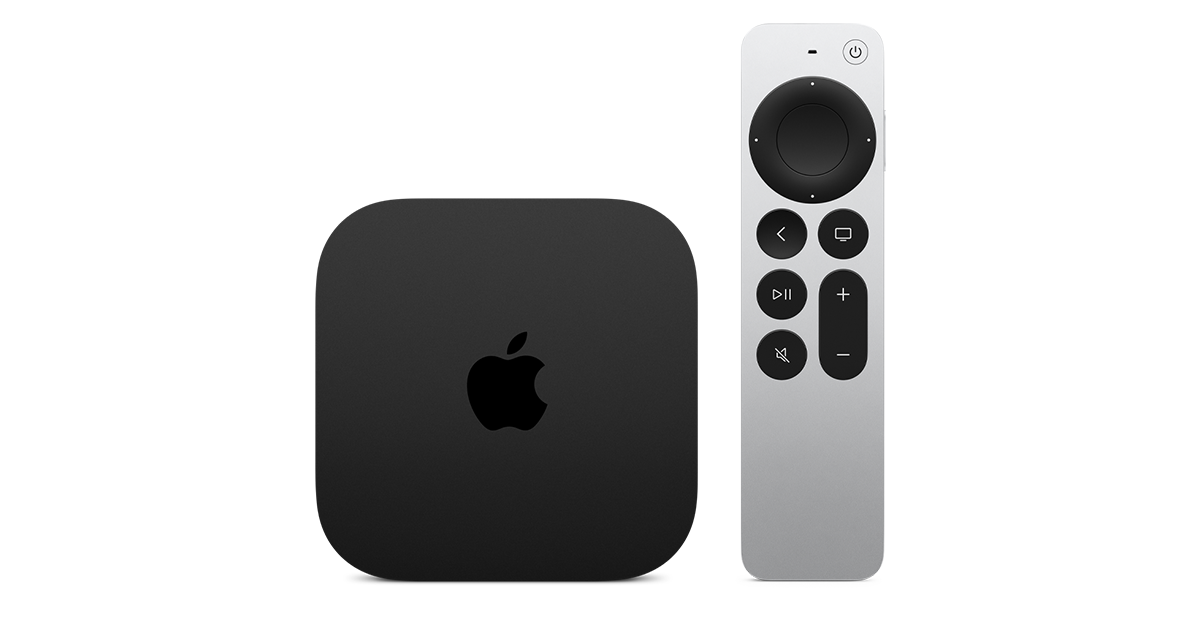
At $299, it had better come with 256 GB of Storage, Gigabit (or better) Ethernet, the latest HDMI tech and standards, and one year of free Apple One. But it probably won't…
Apple TV 4K
Apple TV 4K. New Siri AI and hands-free control. Stunning picture and immersive HomePod surround sound. Works with your Apple and smart home devices.
www.apple.com
20 Replies
·
330 views


 . apple's been making money off of software and not hardware for a while
