Social Feed

H
Supporting Founder
Last reply · posted in DISH Network Support Forum
I have 2 dishes installed at my home. Last week I realized that when E* installed my dishes back in November of 03 at my new home, they did not install a grounding rod. Instead they ran a blue coated wire into my home, then attached it to a screw that is on a clamp on the water pipe for my outside spicket. It appears though that the clamp is not tight around the pipe. I argued with them for an 1 hour that I wanted a grounding rod b/c I did not want the electricity from a lighting strike to enter my house, b/c though it may follow my water pipes, you never know.

Dish claimed it was against NEC regulations to install a grounding rod. When I told them that I did not want to risk electricity enterering my home and damaging over $15k of equipment and that I would rather have the lighting strike discipate outside before entering the home, they just said they couldn't do it.

When I told them that I would leave E* if they did not install a grounding rod, they started saying that I have a committment b/c I got an 811. However, I ordered my 811 on 11/26 and was installed 12/8/03 and I know there was NO committment at that time

Folks, I have pretty much had it with Dish, now I find that we may be losing channels again. What are my options? Yes I can go get a grounding rod myself and install it, but please understand that it is about the principle of it all. Today was the 4th visit by Dish to my home, all b/c they have never gotten the install right. I pay for services and paid for the install, should I not get what I have paid for.

Is my equipment safest with the way they grounded the dishes

sorry for the long rant
32 Replies · 7470 views
S
Just thought I would add this

mitchflorida said:
Grounding is probably the source of the greatest confusion in the understanding of electrical power distribution in general, and in DBS systems in particular. According to the National Electric Code® (NEC®) the purpose of grounding is:

"To limit voltages due to lightning, line surges or unintentional contact with higher voltage lines...to stabilize voltages…(and) to provide a path in order to facilitate the operation of over-current devices".

Note that nowhere is there any mention of protecting equipment. The intent of the grounding provisions of the NEC® is to insure that electrical systems are as safe as possible to the humans that use them.

For our purposes, the most relevant of the three goals listed above is "To limit voltages due to lightning, line surges or unintentional contact with higher voltage lines". These three sources of over-voltage are, in a properly grounded system, provided with an alternative path around the electrical system of your home or workplace by intentionally connecting the system to the earth. In practice this only minimizes damage from such occurrences. The NEC® provides only minimal standards for lightning protection. If lightning is a common occurrence in your area additional provisions must be made to protect your property. We will discuss the subject of lightning protection later. For now, let's look at the places a DBS system can be grounded and what each step buys us in the way of protection from over-voltages.


The Downlead (Coaxial Cable)

The next place that a typical DBS system will be grounded is at the "grounding block" that lives somewhere along the coaxial cable run from the dish to the receiver. This ground point serves several purposes. The point of coaxial cable is to trap any electromagnetic interference in the outer "shield", preventing it from reaching the inner conductor. Grounding the shield serves to nullify the effects of stray signals by "grounding out", or reducing to a zero potential, the voltages which are picked up by the outer shield. This prevents much of that signal potential from reaching the inner wire core.

The second purpose of the grounding block is to dissipate static electricity. Your satellite sits outside where wind will create a static charge on the dish itself and the wire attached to it. This action is similar to the grammar school science experiment of rubbing a glass rod with a piece of silk. Electrons are "rubbed off" the silk and collect on the glass rod, creating an electrical charge. In the case of your dish, the dish is the glass rod, and the air is the silk. This charge will build up on the dish and the cable until it reaches a high enough potential that it is able to jump across an air space to ground. Unfortunately this will usually follow a path the leads through the electronics inside your receiver, or, more commonly, in the LNB on the dish. More LNBs have been lost to static discharge than any other cause. Most mysterious failures of LNBs after months or even years of operation can be attributed to static discharge. Grounding the coax serves to safely dissipate this static charge.

Lightning

The third reason to ground the coaxial cable is to prevent lightning from striking the dish. This is NOT to carry the voltage from a lightning strike safely to ground. In order to do that, the ground wire would have to be the width of a tree trunk to carry the millions of volts and thousands of amps contained in a lightning strike without melting to slag. Grounding the dish and the coaxial cable effectively turns the dish into a lightning rod. This requires separately grounding the dish itself, in addition to the coaxial cable.

Contrary to popular opinion, lightning rods are not designed to attract lightning, but rather to repel it. To understand this more clearly, let's take a look at what causes lightning and how lightning arrestors work.

The earth is an enormous sponge for electrons. This is caused by ionization of materials deep within the mantle (as their electrons are stripped off and become either involved in other nuclear reactions or attached to other materials, iron and silicon in the core become positively charged). So the earth can be thought of as holding an extremely large positive charge. This is why grounding works – the negatively charged electrons flow into the earth in a futile attempt to balance the charge. A lightning strike consists of such a discharge of opposite charges of electrical energy. A negative charge or build-up occurs in the bottom part of the cloud closest to earth (caused by the same wind action that causes the static charge on your satellite dish) and a positive charge of energy accumulates directly underneath in the ground. Separating these two opposite charges is the non-conducting dry air belt separating cloud and earth. As the two opposite charges continue to build up and the dry air belt becomes moist, lightning starts down toward earth. At the same time the positive ground charge is attracted upward, leading to the "pop-science" statement that lightning strikes go up (not really true, the discharge or dissipation of a lightning strike travels up, but the lightning itself travels down).

One of the interesting things about lightning is that each "leg" of a bolt of lightning (i.e. the straight portions of the lightning) is always 150 feet long. As the negatively charged leader stroke from the cloud continues toward earth, the positive ground charge travels up (through the lightning rod system if there is one). When the negative leader stroke is about 150 feet above the top of a protected building, the positive ground charge starts upward to meet and neutralize the downward leader stroke. When they meet, 150 feet above the ground or the lightning rod system, the two opposite charges are neutralized, emptying the negative charges from the cloud and dissipating the ground charge. This all occurs in about one five thousandths of a second. Without a lightning rod system, the lightning will discharge through whatever happens to be in the way of the ground, whether that is your house, your satellite dish, or you!

So the effectiveness of a lightning rod system depends upon its ability to deliver a large positive charge over the entire area to be protected. This is not possible with only one lightning rod (or your satellite dish). Grounding your dish structure alone (without a properly designed and installed lightning rod system) is worse than not grounding it at all. It will result in the ENTIRE lightning strike being dissipated through the dish, which is guaranteed to fry your LNB. Ideally, you should have a lightning rod mounted every 20 feet along the highest edge of your roof. Chimneys wider than 4 feet require 2 rods, less than 4 feet can be protected with only one rod. The rods should be connected to each other starting at the highest point on the roof and working in a constantly downhill manner. Anything that protrudes from the roof must be connected to the lightning rod system. This includes antennas (including the dish), any cupolas, weathervanes, or roof ridge vents (if metal) and the plumbing vent pipes (if metal). This wire should be connected to at least two ground rods, as widely separated as possible, preferably at diagonally opposite corners, if the perimeter, or distance around the house, is 250 feet or less. If the building perimeter is between 250 feet and 350 feet, then three ground rods are required. If between 350 feet and 450 feet, then four ground rods, etc. Lightning protection systems should be applied to metal covered buildings (like sheds) in a like manner as on buildings without metal coverings. Cables must be kept free of sharp turns and "U" or "V" pockets and the cable should maintain a horizontal or downward course at all times. The lightning protection system must be bonded to the household entrance panel ground as well, to prevent grounding potential differences from developing.

Unified Ground

Whenever installing a new ground rod, it must be connected to all other ground rods connected to the residence or other building in question. Failure to do this can enable your lamp, air conditioner, satellite receiver and bathtub to all be at various potentials when referenced to each other. In other words, keeping everything at one potential prevents you from being able to touch two devices at the same time and getting shocked. Another issue that this practice avoids in ground loops. In these situations, two grounds are employed without interconnection, and they thus have a potential difference between them. If two pieces of equipment, each attached to one of these grounds, are interconnected, some portion of the line current will flow from the "higher" ground to the lower, through the interconnecting cable. Having worked in the sound reinforcement area for many years, I can tell you that ground loops can be fun to deal with. This can wreak havoc on an amplifier (or performer holding a microphone) if they are assumed to be at the same potential. At a minimum, they can introduce annoying hum (a 60Hz signal) into analog audio and video signals.

In the case of DBS systems, this issue of bonding the satellite downlead's ground to the household ground is an area of great discussion. Some people feel that any ground on the coax is better than none (for the shielding and static prevention reasons discussed above). However, using an independent ground for the satellite coaxial cable is, in fact, very dangerous. Consider the following scenario…

Your satellite is connected to a 120-volt circuit, probably protected by at least a 15 amp breaker but with no current limiting device on the neutral or ground leads. The power transformer in the receiver power supply will have its center tap attached to neutral and the receiver cabinet will be connected to ground, which as we have seen, are tied together at the service panel. If the ground used for the coaxial cable, which is also connected to the receiver cabinet, is a better ground (lower potential) than the one used for the electrical service, then the entire house's current will, at least partially, flow back through the receiver's electrical service ground lead. From there, current will flow to the receiver cabinet, through the coaxial cable's shield, to the grounding block and then to ground. How much current flows depends on the ground potential difference. In any event, besides the effect such a current flow will have on the transformer and voltage regulator in the power supply, the potential danger to anyone touching the receiver is extremely serious. For this reason, ALL local building codes as well as the NEC® require that all grounds be bonded together. Do not fool around here. It can save your life.

Surge Protection

So far, everything we have covered has been to protect life and limb (and home) from the dangers of short circuits, over-voltages and lightning. This is the only concern of building codes. They consider any and all electronic equipment to be expendable, so long as it is destroyed in a manner that does not present a danger of shock or fire. To protect your equipment requires steps to be taken that go far beyond the building code or the NEC®. We now move beyond grounding per se, and into power conditioning and surge protection.

The greatest threat to electronic equipment during a thunderstorm does not come from a direct lightning strike. After all, in most parts of the country, a direct hit on your satellite dish is a pretty rare occurrence. Most equipment is, in fact, damaged by voltage surges far below that caused by a lightning strike. These surges are induced in the various cables entering the home by a "near miss". When a bolt of lightning strikes the ground it carries enormous amounts of power. This blast of electricity causes an electromagnetic pulse that will induce a current in any wire that is within the magnetic field. This current can reach hundreds or thousands of volts, with substantial amperage. When it reaches electronic circuits designed for tiny voltage and miniscule amperages, these circuits are quite rapidly destroyed. These surges can be separated into two classes. The first is spikes caused by electric motors' starting capacitors or similar load related spikes, which are generally of moderate voltage but longer duration (several tenths of a second). The other is a very high voltage surge, caused by lightning or other discharges, which is of very short duration (a few thousandths of a second).

The most common method of dealing with both types of anomaly is through commercial surge protection equipment employing metal oxide varistors or MOVs. MOVs are solid state devices that have virtually infinite resistance at one voltage, but gradually decreasing resistance at higher voltages. In very inexpensive devices there will be a single MOV connected between the hot and neutral leads. This is effective against the first category of spike, since it is caused by a sudden increase in the load on the circuit and shows up as a higher voltage on the hot lead. However, in the case of a lightning strike, the surge will occur on both the hot and the neutral (because the neutral, in addition to being connected to ground in the service panel, is also connected to the center tap of the power utility transformer out on the utility pole). In this case, MOVs are required between ground and hot, as well as between neutral and ground. MOVs employed in this manner are very effective at clamping incoming voltages to a few hundred volts. Since almost all electronics is powered by low voltage (5 to 12 volts) DC, even a 300 volt surge, after passing through a transformer and rectifier, will be reduced to 15 to 30 volts, usually within the range of control of a solid state voltage regulator.

This induced voltage effect is also likely to occur on any cable entering the home from outside. The next most likely source of such a surge is the phone line, since it, like the power service line, is strung over a large area. Here, however, the "normal" voltage is much less than the electrical service (around 40 volts), and input transformers and voltage regulators are not as widely used, so a 300 volt surge is far more dangerous to the connected equipment. MOVs, by themselves, do not provide sufficient protection. More complex, and more costly, circuits that employ other kinds of varistors along with triacs and other solid state components are required.

The final, and most delicate, point of attack is the coaxial cable. Typically the maximum voltage sent to the LNB will around 18 volts. The signal returned to the receiver will be no more than one volt or typically less. Here, MOVs are least effective. Even when designed with a low clamping voltage, their response time may still allow a damaging voltage to pass through to the receiver. Even if effective, they are usually installed at the receiver end of the cable. The surge, however, is induced somewhere in the middle of the cable run, and so is dangerous to the LNB as well. While a coaxial surge protector may protect the receiver, it will not do anything for the LNB.

The single most important thing to understand about MOVs is that they can be used only once. In the process of shunting a large surge away from your equipment, they are destroyed. The gradually deteriorate in the presence of smaller surges. Unfortunately, most inexpensive surge protection equipment has no indication that the protection for which it was purchased is no longer being provided. When purchasing a surge protector make sure that it has an indicator light that verifies protection is being provided (although this will almost always ONLY monitor the AC circuit protection). The presence of an indicator light is also a good marker that the unit was built with some care and probably includes three MOVs on the AC circuit. Of course, the three MOV design requires that the unit be plugged into a properly grounded outlet. A good electrical ground is essential to almost all surge protection systems.
gpflepsen
dishup said:
...as far as the 921 it is out but you have to purchase the reciever for $999.99.

921 is $549 at your local Dish Dealer.
B
ChrisCoop said:
Does anyone have an opinion on the strip-like surge protectors that also protect the coax? Like this one:

http://www.panamax-sales.com/SP8DBS.htm

Are these worthwhile/recommended or are they just hype? Thanks.

One thing I found, with Dish Pro signals, the higher channels are suppressed in this surge protector. Using signal strength showed this. I previously had this on my Direct system, and when I received Dish, half the channels did not work when this was in the system.
Tyralak
HDTV Rookie said:
I have 2 dishes installed at my home. Last week I realized that when E* installed my dishes back in November of 03 at my new home, they did not install a grounding rod. Instead they ran a blue coated wire into my home, then attached it to a screw that is on a clamp on the water pipe for my outside spicket. It appears though that the clamp is not tight around the pipe. I argued with them for an 1 hour that I wanted a grounding rod b/c I did not want the electricity from a lighting strike to enter my house, b/c though it may follow my water pipes, you never know.

Dish claimed it was against NEC regulations to install a grounding rod. When I told them that I did not want to risk electricity enterering my home and damaging over $15k of equipment and that I would rather have the lighting strike discipate outside before entering the home, they just said they couldn't do it.

When I told them that I would leave E* if they did not install a grounding rod, they started saying that I have a committment b/c I got an 811. However, I ordered my 811 on 11/26 and was installed 12/8/03 and I know there was NO committment at that time

Folks, I have pretty much had it with Dish, now I find that we may be losing channels again. What are my options? Yes I can go get a grounding rod myself and install it, but please understand that it is about the principle of it all. Today was the 4th visit by Dish to my home, all b/c they have never gotten the install right. I pay for services and paid for the install, should I not get what I have paid for.

Is my equipment safest with the way they grounded the dishes

sorry for the long rant


I wouldn't worry about it for two reasons. 1. The NEC allows grounding to either a water pipe (steel or copper) or the ufer (your house's electrical ground) 2. If your house or dish gets hit with lightning, you're screwed no matter what you're grounded to. The average lightning strike contains enough power to light up a small city.
How they grounded it was more than sufficient. I'd just make sure the clamp is tightened down on that water pipe.
gpflepsen
Actually, they could install a ground rod for your dish. BUT, they would then need to connect the new rod to the existing rod with a big ass conductor. The water spigot ground is OK, as long as it isn't too far from the water service entrance. I can't recall the required distance, but it's not OK if it's across the house.
DialgaChampion
Last reply · posted in DISH Network Support Forum
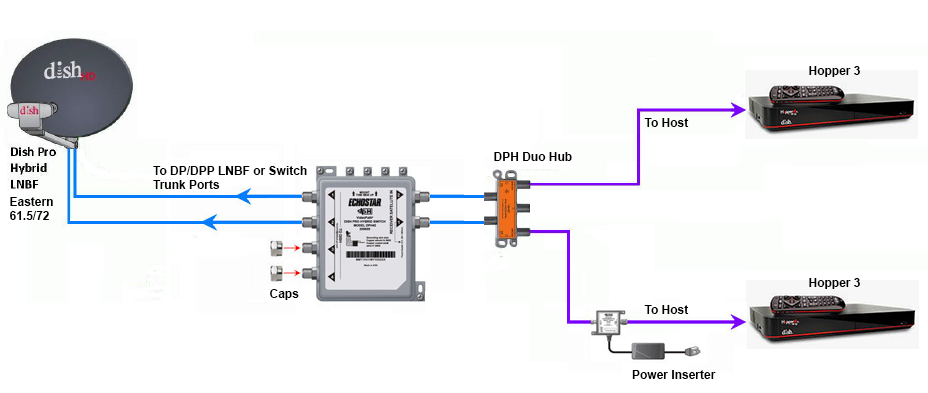
Does someone still have the diagram showing how to connect two Hopper 3s again?

I currently have one H3 and one 4K Joey, set up through a 1000.2 eastern arc hybrid lnb and solo hub.

The plan is to replace the Joey with the second H3. Already purchased a duo hub and I have three coax cables coming in from outside, from back when I used to have the older 1000.4 dish and the hopper 2. I don't fully remember, but I think the other two coax cables are just tied up next to the dish outside; will have to check again.
24 Replies · 5637 views
HipKat
dp6.png

You need a 42 switch.
Run the outputs to the inputs on the Duo Hub
DialgaChampion
You need a 42 switch.
Run the outputs to the inputs on the Duo Hub

Okay, so I made an updated diagram just to make sure I understand this right...

- 2 Coax connected from outside Dish LNB into 42 switch.
- 2 Coax from 42 switch into Duo Hub.
- 1 Coax from Duo Hub into 1st Hopper 3.
- 1 Coax from Duo Hub into Power Inserter.
- 1 Coax from Power Inserter into 2nd Hopper 3.
- Power Inserter plugged into wall electrical outlet.

Did I get that right? And also, I assume the power inserter is required?
HipKat
Okay, so I made an updated diagram just to make sure I understand this right...

- 2 Coax connected from outside Dish LNB into 42 switch.
- 2 Coax from 42 switch into Duo Hub.
- 1 Coax from Duo Hub into 1st Hopper 3.
- 1 Coax from Duo Hub into Power Inserter.
- 1 Coax from Power Inserter into 2nd Hopper 3.
- Power Inserter plugged into wall electrical outlet.

Did I get that right? And also, I assume the power inserter is required?
Twa Coaxes from the LNB if it's Eastern Arc (2 "Eyes") and three if it's Western Arc and yes, the power inserter, it's required
SandFarmer
Now that my Owned H3 fried itself. What gear can I remove for just one H3? Already took down the 129 Wing Dish.
  • Like
Reactions: charlesrshell
charlesrshell
Now that my Owned H3 fried itself. What gear can I remove for just one H3? Already took down the 129 Wing Dish.
Did you get a replacement for your fried H3? You can leave gear in place in case your other H3 bites the dust.
Bobby
Now that my Owned H3 fried itself. What gear can I remove for just one H3? Already took down the 129 Wing Dish.
You do know that DISH will replace your owned, fried, Hopper don't you. It's free....
SandFarmer
You do know that DISH will replace your owned, fried, Hopper don't you. It's free....
Yup. Been there done that many times over the past 29 years. Since not having it, I have found better and cheaper ways to get what little programming in need from it.

Just wondering how far down I can strip down all the gear on my chimney.

The 129 J-Arm grew an Outdoor Long Range AP. I already have several unused RJ lines that are going to be IPoE from the rack. Just wondering how much gear I'm going to be able to put up there.

Sent from my S61Pro using Tapatalk
  • Like
Reactions: charlesrshell
DialgaChampion
Twa Coaxes from the LNB if it's Eastern Arc (2 "Eyes") and three if it's Western Arc and yes, the power inserter, it's required
Yep just swap the lnb with a dpp lnb and connect the 42 switch.

Finally got around to trying to set everything up. Need some help because I've got an issue.

1st Hopper 3 works fine.

2nd Hopper 3 doesn't show any channels in my Top 200 package in the guide, even though it's set to All Subscribed. But it does see the 1st Hopper 3 and can access the recordings on it.

Here's my setup:
  • DPP EA 61.5/72 LNB on the dish. 2 Coaxes going from LNB into the DPH42 switch.
  • DPH42 "Receiver 1" port > Power Inserter "To Switch" port..... Power Inserter "To Receiver" port > Duo Hub "ODU 1" port.
  • DPH42 "Receiver 2" port > Duo Hub "ODU 2" port.
  • 2 Coaxes from both Host ports on the Duo Hub into both Hopper 3s.
I've spent the last few hours troubleshooting, no success. I did the Test Installation on the Diagnostics screen. Red button. Held Power Button for 15 seconds.

Also tried several different configurations with the coax cables according to Google's AI suggestions. Tried connecting both a Solo Hub and a Duo Hub (I don't have 2 solo hubs at the moment), having each Hopper connected to each hub independently. Tried connecting Receiver 2 from the DPH42 directly into the 2nd Hopper 3. Tried having the Power Inserter connected both before and after the hub.

I even checked my account online. Both Hopper 3s are authorized and "Powered" on the account. Even tried "Wake Up Receivers". That second H3 still won't show my channels in the guide at all.

According to Google's AI, it thinks this is the problem:
  • - When you plug two Hopper 3 units into a single Duo Hub, the hub cannot allocate the correct satellite transponder frequencies to both boxes simultaneously.
  • - As a result, the first Hopper 3 hogs the satellite line, while the second Hopper 3 gets locked out of the satellite signal entirely—causing an empty guide and blocking live TV. The unlinked status on the whole-home screen occurs because the software recognizes the conflict and stops integration.
But none of its solutions have worked. Any ideas?
  • Like
Reactions: charlesrshell
N
Googles AI is wrong as according to what you wrote you have two completely separate satellite line from the switch

My be a dumb question but did you run the check switch option on th 2nd H3

Did you try swapping the H3 to see if the problem switches between the two

That's all I can think of at the moment
  • Like
Reactions: charlesrshell
M
· posted in DISH Network Support Forum
Over the past few weeks, I have had problems connecting to streaming services (Netflix, HBO et al). When I go to the TV's native Channels, I have no problem. The Dish internet troubleshooter shows I have a good internet connection. I'm wondering whether it's an issue with my internet provider or a problem with the Dish software on the Hopper Plus. Anyone else seeing this?
0 Replies · 18 views
Scott Greczkowski
Staff member HERE TO HELP YOU! Cutting Edge
Last reply · posted in The Chit Chat Club
Sometimes a thread gets so many posts in it that is can cause issues for the server so that why today we introduce The Song Name Game Part 3!

So let the game continue!

The last song was added by Bobby who posted...

One Meat Ball - Andrews Sisters

CONTINUE ON AND HAVE FUN! WELCOME HOME TO SATELLITEGUYS.US!

Here are the original rules for the game as posted by WebbyDude back in 2006. http://www.satelliteguys.us/threads/68645-Song-Name-Game

Just name a song title and the band who performed it. The next person does the same thing, but needs to list a song title or band name which includes a word from the previous entry. Pick songs from any genre.

Example:

Long Live Rock and Roll -- Rainbow

Rainbow in the Dark -- Dio

Another example:

Ride the Lightning -- Metallica

Lightning Strikes -- Ozzy Osbourne


Get it?


An additional note: we all know that song titles, sometimes, use profane words. Because this is a family friendly website it is advised that you clean up that title up a bit. This is accomplished by using something like sh!t instead of the real word. Thanks....
68649 Replies · 2679789 views
  • Like
Reactions: c-spand
FTA4PA
Drift Away - Dobie Gray
long_time_Dish
Throwing It All Away - Genesis
dishstaller
All I Need is a Miracle - Mike + The Mechanics
gms49ers
Sweet Miracle - Rush
long_time_Dish
Sweet Baby James - James Taylor
  • Like
Reactions: dishstaller
JSheridan
Lifetime Supporter
Last reply · posted in DISH Network Support Forum
I know HipKat said that they were working on conversions but we got the official news yesterday right from Dish that starting next month all DMA's will be on the western arc, and all customers will be assigned to that. That's gonna mean a lot of customers around here aren't gonna get Dish unless there are exceptions. Too many mountains and trees.
176 Replies · 5251 views
MikeD-C05
I don't know why DISH doesn't just start a streaming version of DISH and then if you can't see the western arc you go with streaming versions and then they could keep customers if they had good internet speeds. I mean Sling TV could be changed to Streaming DISH TV if they wanted since both companies are under Echostar. Then you would still be able to use your ota antenna with Air TV devices like I do with Air TV Anywhere with 4 ota tuners.
Scott Greczkowski
I don't know why DISH doesn't just start a streaming version of DISH
I have the same wish.
B
I have the same wish.
Why?
A lot of people do not have fast internet.
That is why they use satellite
Scott Greczkowski
Why?
A lot of people do not have fast internet.
That is why they use satellite
They keep the satellite service too. But have. Full streaming version of dish. As sling tv sucks eggs.
T
Why didn't Charlie end up launching starlink
  • Like
Reactions: charlesrshell
Almighty1
Why didn't Charlie end up launching starlink
He does not have the resources aka $$$ compared to Elon Musk as in reality, Elon can eat Charlie for lunch or even mop the floor with Charlie if he wanted to.
S
ment to 20 yrs dam phone
  • Like
Reactions: charlesrshell
BradleyD
Dish should use both satellite and internet like they do now for all channels. Use either or or both.... like now but subscribers could choose something like internet only, or sat only, or both.
S
Dish should use both satellite and internet like they do now for all channels. Use either or or both.... like now but subscribers could choose something like internet only, or sat only, or both.
They have sling tv wich sucks ass it needs a major upgrade
S
They keep the satellite service too. But have. Full streaming version of dish. As sling tv sucks eggs.
can you DVR every channel now or is still only certain ones you can DVR
  • Like
Reactions: charlesrshell
dishstaller
Pub Member / Supporter Lifetime Supporter
Last reply · posted in The Chit Chat Club
RIP dude. Always liked his music. He was 83


View: https://www.youtube.com/watch?v=YH5Arbm47IQ
5 Replies · 114 views
FTA4PA
R.I.P.
M
R.I.P.
Foxbat
Rest in Peace…
dfergie
R.I.P. …
Ramy
Supporting Founder
Last reply · posted in The Sports Section
Really excited for this season with Kentucky having a new coach and some really exciting recruits. Probably won't last long, but here's hoping this season is great.
173 Replies · 2617 views
  • Haha
Reactions: Mike0616
Y
You mean other than Miami being in the final last year... and Indiana being the only bye team to win a game?
Jimbo
You mean other than Miami being in the final last year... and Indiana being the only bye team to win a game?
No, I was actually referring to outside of the Top 8, but should have been Top 12 ...

I guess I should have looked at the bracket from last year first ...

I'm more thinking about them trying to expect a 15 to beat a 5 seed or there abouts .
Ronnie-
I'm more thinking about them trying to expect a 15 to beat a 5 seed or there abouts .
I mean you get upsets all the time.

Just a couple of weeks ago. Unranked Florida knocked off number 7 texas. Unranked Auburn beat number 1 Georgia.

This week unranked Cincinnati beat number 8 texas Tech. Unranked UCF beat number 2 BYU.

No reason to think similar upsets wont happen in the playoffs where a low seed can upset a higher one.
AZ.
AZ.
I mean you get upsets all the time.

Just a couple of weeks ago. Unranked Florida knocked off number 7 texas. Unranked Auburn beat number 1 Georgia.

This week unranked Cincinnati beat number 8 texas Tech. Unranked UCF beat number 2 BYU.

No reason to think similar upsets wont happen in the playoffs where a low seed can upset a higher one.
Yep, wonder why we rank the top 25 in 2 poles still? Do the ranking change much if they are unranked or have many loses? They sure do, any given day never take your opponent as a cake walk.....
Jimbo
I mean you get upsets all the time.

Just a couple of weeks ago. Unranked Florida knocked off number 7 texas. Unranked Auburn beat number 1 Georgia.

This week unranked Cincinnati beat number 8 texas Tech. Unranked UCF beat number 2 BYU.

No reason to think similar upsets wont happen in the playoffs where a low seed can upset a higher one.
Correct, you Do get upsets from time to time ....however .
You Don't get teams UPSETTING teams for 5 weeks in a row.

They are trying to make this Basketball and its a far cry from the way that is played.

How long till they go to 32 teams ? Then they will say, well, the NFL is 32 teams, we can make more money that way .... except the NFL is 32 teams, that are a set number of teams and divisions, you don't have that in College ... oh but they will try.

They would have to choose what teams they would want in and thats it.
Hopefully that NEVER happens.

I can see the NCAA going away and the CFP taking that portion over and a Collective Bargaining agreement coming in the not to distant future.
  • Haha
Reactions: meStevo
rvvaquero
The problem with rankings and playoffs is that they are designed to hype the game and make money. Period.

The only reason that BYU and Texas Tech were upsets is that they were hyped up in the standings in the first place. I love watching BYU and Bear Bachmeier. They are a fun and talented team, but not nearly so strong, fast, big, and skilled as a true top ten team. Does anyone truly believe they could compete with the likes of Georgia, Ohio State, Indiana, Alabama, etc.? Yet, they were ranked above those teams.

Each year, there are 10 to 12 teams who truly could compete for the championship if it depended on winning more than one game in a playoff. Including teams like James Madison, Tulane, BYU, etc. in a playoff has nothing to do with determining a national champion. It's just about money.
  • Like
Reactions: Yespage and AZ.
Ronnie-
Correct, you Do get upsets from time to time
Yes. As shown in a few posts now.


You Don't get teams UPSETTING teams for 5 weeks in a row.

.
But that wasn't what your stated argument was though.


I mean if you drag it out, no team even a favorite is gonna win every game 20 weeks in a row.


With the parity in college football now, who knows who can beat anyone at any given time?

This season and last have shown it might not be the ones we think that might win it all that will win it all.
  • Like
Reactions: osu1991
M
Last reply · posted in Over the Air Television By RabbitEars.Info
Interesting article about the work being done to develope an ATSC 3 converter box. Yes it does mention affordable.
12 Replies · 669 views
primestar31
DEATH TO NEXGEN!
star trek GIF


It's dead, they just don't know it yet. They killed it by forcing DRM on it, and that TOTALLY botched implementing it.

There is absolutely NO compelling reason for anybody to switch to ATSC3.0. They only want it as a total and complete money grab.
Mister B
What bothers me is the total waste of broadcasting spectrum in this very crowded market. It has been almost three years now since KFOX converted their broadcast tower to ATSC 3.0 and moved all of their channels to other towers causing noticeable degradation of the picture quality.
I have a Sony TV with 3.0 capabilities but still use the 1.0 version of locals due to the fact that one or all of the 3.0 channels are often missing or unwatchable. In this city of 800K I doubt that more than a few hundred even know about ATSC 3.0.
The only thing that could motivate me to be interested in 3.0 would be if all of the minor networks (diginets) could be in at least 720P rather than blurry ultra-compressed 480i.
Three years is long enough to waste one of the few available RF frequencies in the area for this trial.
It is time to either move on with this experiment or call it quits.
navychop
In this city of 800K I doubt that more than a few hundred even know about ATSC 3.0.

They might notice the hand going into their pocket for their wallet.
  • Like
Reactions: FTA4PA
navychop
It is time to either move on with this experiment or call it quits.

QFT. Of course, my preference involves a curb and some kicking.
  • Like
Reactions: FTA4PA
S
star trek GIF


It's dead, they just don't know it yet. They killed it by forcing DRM on it, and that TOTALLY botched implementing it.

There is absolutely NO compelling reason for anybody to switch to ATSC3.0. They only want it as a total and complete money grab.
WHAT ABOUT THE INTERNET PART OF IT. NO ONE WANTS A BOX CONNECTED TO THE INTERNET EITHER.
navychop
Cough, cough. COVID vaccine implants.

:oldlaugh
  • Haha
Reactions: HIFI
Foxbat
Cough, cough. COVID vaccine implants.

:oldlaugh
That would be handy. Download the latest RNA snippets that can be updated over 5G and no more shots! You're a Genius!
dishstaller
Pub Member / Supporter Lifetime Supporter
Last reply · posted in The Chit Chat Club
1 Replies · 89 views
  • Like
Reactions: Scott Greczkowski
Foxbat
Meta Clickbait, clicking and watching the Video on Clickbait.
osu1991
Pub Member / Supporter
Last reply · posted in The Chit Chat Club
7 Replies · 105 views
FTA4PA
R.I.P.
dishstaller
My Mom was a huge McMillan & Wife fan.

RIP
dfergie
Mcmillan and wife was where I remember her from, R.I.P. ...
M
R.I.P.
Foxbat
Rest in Peace… I had forgotten she was Kate in "Kate and Allie", teamed with Jane Curtin.
TheForce
Supporting Founder Pub Member / Supporter
Last reply · posted in The Phone & Tablet Zone
Apple Fall Hardware Event takes place today, September 9, 2026, at 10:00 a.m. PT / 1:00 p.m. ET. It marks the debut of new CEO John Ternus and the expected reveal of Apple's first foldable phone.
136 Replies · 1748 views
Foxbat
IFixIt has published their Teardown and they had some positive things to say about the iPhone Duo. It still showed some dust ingress into the hinge assembly but seemed otherwise well-sealed.
​

But with a considerable number of reports of the main screen dying with similar failures, AppleCare+ should be a no-brainer for this phone.
S
IFixIt has published their Teardown and they had some positive things to say about the iPhone Duo. It still showed some dust ingress into the hinge assembly but seemed otherwise well-sealed.
​

But with a considerable number of reports of the main screen dying with similar failures, AppleCare+ should be a no-brainer for this phone.

hope you have apple care a screen job is 1000.00 :oops:. can we say over priced garbage!!!
harshness
Gone are the days when Apple "perfects" what debuted years earlier on an Android phone.
comfortably_numb
Gone are the days when Apple "perfects" what debuted years earlier on an Android phone.

Or better yet, innovate something "completely revolutionary!"