

Social Feed

Supporting Founder
Editor's Note:
Copy and Paste didn't do justice to the work. Download the attached file with pictures. It's a must read.
IDC OPINION
High definition TVs and high definition TV programming are taking the world by storm as consumers begin to realize how much better they are than traditional standard definition television. In the quest to support this demand for better image quality, many vendors are now offering TVs that offer what, in theory, should be the be-all and end-all of HDTV resolutions-1080p. The real-world benefits of 1080p TVs are limited for most people, however, due to lack of commercial content available in that resolution, technical challenges associated with 1080p displays, and the inability to actually see the resolution enhancements in most viewing environments.
EXECUTIVE SUMMARY
Many technology trends that promise a "revolutionary" change in the way we live our lives or the manner in which we enjoy our favorite activities rarely live up to the hype with which they are announced. In the case of high-definition television (HDTV), however, the impact could not be more real. Looking at a high quality program on a large new high definition display is one of the most stunning experiences that consumers have been able to enjoy for quite some time. It really is that much better.
It's no surprise, then, that HDTV set sales are exploding, particularly as more channels in high definition (HD) format are being made available and as set prices decline. Today's new HDTVs offer not just the promise, but also now the reality of tremendously improved image quality. The clarity, color and vibrancy of the image are stunning, regardless of whether you're enjoying a ball game, your favorite drama or a nature documentary. In fact, it's so good, it's hard to go back to viewing regular, or standard definition, TV programs as the image quality seems so much worse in comparison.
The core reason why HDTV looks so good is that the programs and the TVs designed to display them have more resolution than the TVs we've all grown up with. Resolution may sound like a hard concept, but it simply means showing more detail in an image. Just as digital cameras with higher megapixel ratings capture more detail by breaking up an image into finer and finer dots than cameras with lower resolutions, so too does HDTV improve the image quality vs. traditional TVs. HDTVs have the capability to show more smaller elements than regular TVs, much like higher resolution printers (say, 1,200 dpi) can print with more detail than those with lower resolution (such as 300 dpi).
But the HDTV experience is not just about the TVs. Everything from the cameras used to record the programs you watch, to the editing equipment used to refine them, to the broadcast equipment used to send them out (over-the-air, via a cable TV provider or via a satellite) to a TV receiver designed to show them—all of this equipment needs to be upgraded for people to enjoy the amazing quality of HDTV.
Another important point is that not all HDTV is the same. In fact, there are technically 18 different Advanced Television Standards Committee (ATSC) formats for digital broadcasting and six are considered high-definition. However, only two—known as 720p and 1080i—are really in common usage. (As a point of reference, regular standard definition TV has a resolution of 480i.) The number portion of each of those standards refers to how many vertical lines there are in a single image, while the "p" and "i" refer to how the image is created on the screen. The "p" stands for progressive and means that each individual image that appears on the screen (remember—TV is essentially a bunch of different still images that move across a screen very quickly) is created from top to bottom, much like a painter fills in a wall one stroke at a time. The "i", on the other hand, refers to interlaced, which means every other line is painted—typically odd lines first—and then the process starts over again to fill in all the even lines. Once again, think of someone painting a room, but this time imagine they're painting stripes and not switching colors until they completed all the first color stripes from ceiling to floor. On a TV this happens at a very rapid rate, however, so our eyes perceive it as a single image.
In addition to the 720p and 1080i standards, there has been talk about the 1080p resolution standard, which on paper, seems to offer the best of both worlds—the 360 additional lines of image resolution versus 720p as well as the progressively scanned screen. 1080p, some argue, is the penultimate HDTV standard, offering the highest possible screen resolution (for TV applications) as well as future-proofing a purchase for those customers who don't want to be impacted by evolving consumer electronics standards. If you have source material, or content, that's created with 1080p resolution and display it on a screen that supports 1080p, the quality is absolutely stunning, with a level of detail that is more than twelve times higher than that of traditional standard definition TV.
Despite these improvements, however, the real-world benefits of 1080p aren't quite as clear-cut as they may first appear. The main problem is that there is virtually no content that's widely available in 1080p format (other than the output from some PCs, which would require using these TVs as really big computer monitors). As a result, there is currently little that can take advantage of these advancements in screen resolution. In the case of broadcast TV, there is no standard for broadcasting signals in 1080p. High-definition DVDs have been discussed as a possible source for 1080p content, but given the format battle between the HD-DVD and Blu-ray camps (two competing standards—think VHS vs. Beta), there are now serious doubts about how soon regular DVDs (which have just 480p resolution) will be replaced. Plus, not all high definition DVD players—whenever they do appear--will even offer 1080p-capable outputs. Ironically, the only significant source of 1080p material that's expected by 2006 will be the forthcoming PS3 gaming console system from Sony.
Finally, given that much of the material most people watch on their televisions is still not even in high-definition, namely standard definition programming, DVDs, videotapes, gaming consoles, etc., it's also important to realize that a higher definition screen can actually magnify the imperfections of these common video sources. The basic issue is that any television will take whatever source material it receives and fill in the entire screen. With high definition program material on high definition screens, this often results in a direct mapping of source content detail to screen resolution capabilities.
However, with lower definition source materials, high resolution TVs need to "fill in" the missing gaps to create an image that covers the entire screen and not just a small section in the center. This process of filling in, commonly called "upconversion," involves making up image material that isn't there in the original signal. As you might surmise, this isn't an easy process and some TVs are much better at it than others. No HDTV, however, can create an image from standard definition TV material that looks as good as it can with true HD material. In fact, in many cases, a standard definition program that's viewed on an HDTV looks worse than it would on a very inexpensive standard definition TV. If everything that someone watched was in HD, this wouldn't be a problem, but the reality is, standard definition programs and sources will be a significant part of most individuals' viewing habits for many years to come.
As a result of all these concerns, consumers who are considering the purchase of a new HDTV set need to seriously consider the potential benefits of 1080p resolution and determine if the cost differences between 1080p and 720p/1080i HDTVs are justifiable. For AV enthusiasts who are willing to work through the high definition DVD format wars and are eager to enjoy the best possible image quality, 1080p TVs will certainly be worth it. Similarly, media center PC enthusiasts who want to play PC games or view high-resolution digital photos will find that 1080p displays will give them the most satisfying experience. For the general public, however, it will probably be several years before the price premium between 720p/1080i and 1080p TVs narrows enough to motivate consumers to adopt the higher resolution format.
SITUATION OVERVIEW
The 1080p movement is quickly gaining speed to entice consumers with a higher, high definition resolution format that promises more image detail than even "regular" HD. As of the holiday 2005 buying season, 1080p televisions using various display technologies are trickling out of factories and into showrooms, but at expected high price points. Those willing to pay a premium for entry into this cutting edge category will for the short term find native 1080p content in short supply, thus depending on varying degrees of image scaling to feed their new display. This white paper aims to detail the quality promise of 1080p, but will also analyze the long-term issues that are expected to challenge the growth and deployment of this new resolution format.
Resolving Resolution
Prior to any discussion of the pros and cons of 1080p resolution, the very concept of "resolution" requires further exposition, as to why it's such a key attribute in picture quality.
The term "resolution" can be defined in two ways: as 1) the amount of image information contained in one frame of a television show or movie -- referred to from this point on as "content" and 2) the physical display capability of a video or data monitor.
Content & Standards
To explain the first point, we'll analyze the two most common content examples -- DVD and High Definition Television or "HDTV". As mentioned above, DVD employs a resolution of "480p". In other words, a DVD player that supports progressive scan outputs an image that has 480 lines of image resolution and those lines are displayed progressively (p) or one at a time, in order, on screen. HDTV, on the other hand, has many more lines of resolution, either 720 or 1,080. In the case of 720-line material, the content is displayed progressively, while content with 1,080 lines can, in theory, be displayed in either interlaced or progressive mode. The current reality of most 1080-line content is that it is displayed in interlaced mode, in which every other line is painted on the display to create a "field" and then another field of the remaining data is displayed to complete the image.
Part of these differences stem from the fact that there are actually 18 different digital broadcast standards and six of those are considered high definition. The high definition resolution formats used in the United States (as well as Canada, Mexico, South Korea, among other countries) were specified by the Advanced Television Systems Committee, or ATSC. The 18 ATSC formats are shown below in Table 1.
TABLE 1
ATSC Digital Broadcast Formats
Version Resolution Aspect Ratio Picture Rate
1 1920 x 1080 16:9 60I
2 1920 x 1080 16:9 30P
3 1920 x 1080 16:9 24P
4 1280 x 720 16:9 60P
5 1280 x 720 16:9 30P
6 1280 x 720 16:9 24P
7 704 x 480 16:9 60P
8 704 x 480 16:9 60I
9 704 x 480 16:9 30P
10 704 x 480 16:9 24P
11 704 x 480 4:3 60P
12 704 x 480 4:3 60I
13 704 x 480 4:3 30P
14 704 x 480 4:3 24P
15 640 x 480 4:3 60P
16 640 x 480 4:3 60I
17 640 x 480 4:3 30P
18 640 x 480 4:3 24P
Source: ATSC, 2005
Versions 1 & 4 of the ATSC resolutions listed in Table 1 are the primary HD resolution formats in use today. The other versions are resolutions that are supported for digital broadcasting, but are either not high definition or not in widespread use. Versions 7-18 are similar to the resolutions used on widescreen or full-screen DVDs, and are not considered high definition.
The heart of this paper, 1080p, is covered by Versions 2 and 3 within the ATSC chart, neither of which is currently utilized via over the air (OTA), cable, or satellite transmission methods. 1080p content is currently a production format that is being either 1) natively recorded or 2) remastered from even higher resolution film or tape masters, but there are no current or future plans in the works to broadcast 1080p.
Display Hardware Resolution
TV resolution is measured by counting the number of image lines the TV can physically display. Like the content resolutions described above, many of today's HDTVs can show 720 lines on screen in one scan (progressive) or 1080 lines in two scans (interlaced), as compared to older TVs which were only capable of showing up to 480 interlaced lines. Some newer HDTV sets can also display 1080 lines in progressive form—in other words, 1080p.
Ultimately, higher resolutions can lead to better, more detailed pictures simply because more information is packed into a TV of the same size. Figure 1 below provides a graphical illustration of this concept.
FIGURE 1
Resolution Comparison – Regular TV vs. HDTV
Source: IDC, 2005
Figure 1 provides a comparison of a high definition image (on the right) as compared to a regular TV (left). Think of the individual grids in each picture as the physical display capabilities of a TV. These "grids" are also known as picture elements or "Pixels" in TV terms. The image on the right has many more pixels that can be filled in, as compared to the one on the left. By filling in the grid spaces on each picture, you're providing the content portion of the equation.
Regular, or Standard Definition TV (left) has far fewer pixels to use in the first place, thus creating the relatively blocky image shown above. In comparison, because HDTV has so many more pixels to work with, the content creator can fill in much more of the details.
Resolution Differences
Returning back to the heart of this paper's subject matter, 1080p is a resolution format that is considerably more detailed than even today's 720p HDTV. Figure 2 below provides a comparative illustration between 1080p, 720p, and 480p (DVD) resolutions.
FIGURE 2
Resolution Comparison of 1080p, 720p, & 480p
Source: IDC, 2005
If all pixels were the same size, the above image provides an accurate comparison between the differences among the three resolutions. From a total surface area standpoint, we can also calculate the number of individual pixels contained in each resolution:
480p = 338,000 pixels / frame, 720p = 922,000 pixels / frame, 1080i = 1,037,000 pixels / frame & 1080p = 2,074,000 pixels / frame.
In other words, 1080p represents about twice the amount of the resolution information as standard HD and contains six times the information in DVD resolution.
Now thinking about resolution in another way, Figure 3 below illustrates pixel counts and pixel size for DVD, 720p, and 1080p within a same sized display.
FIGURE 3
Pixel size and counts within same sized display
Source: IDC, 2005
Referring to the graphics above, let's assume that we're looking at a 42" display. Because DVD's resolution contains 6 times fewer pixels than 1080p's, the above image represents how large each of DVD's individual pixels would look in comparison with the much smaller pixel size of 1080p in a same size display. As seen in Figure 1, smaller pixels are better in that higher resolution images shown on higher resolution displays allow for greater image detail to be presented.
A second, yet related benefit has to do with image shading.
In the squares above, if we wanted to show a left / right transition from black to white, the 1080p "screen" would have many more opportunities to develop a smooth gray shade as compared to how it would look in the DVD screen. Now think of this as it applies to a person's face, with its many shades of peach, brown, red, and white. Compared to the 1080p screen, the DVD screen would appear blotchy and harsh, as opposed to the much smoother appearance that the 1080p would show, thanks to the many more shades that are possible.
The third benefit of higher resolutions has to do with the simple physical appearance of the pixels themselves. As we've shown above, each pixel square in the DVD screen is considerably larger and thus more perceptible than the squares in the 1080p screen. The closer you are to the screen, the better you'll be able to perceive the "pixel structure" and thus might be distracted from the viewing experience.
Our last resolution example below in Figure 4 illustrates what would happen if the same resolution were presented within two TVs of different sizes.
FIGURE 4
Pixel size comparison between 42" & 60" screens
Source: IDC, 2005
As shown above, both the 42" screen and 60" screen have the same number of pixels within their respective areas. In the case of the 60" screen, because its pixels occupy a larger area, naturally, the pixels themselves become larger, and as explained above, pixel perception can distract one away from the viewing content.
Thus we can finally address the two primary needs for 1080p beyond our current HD resolution formats of 720p and 1080i. TV manufacturers who currently specialize in very large screen sizes – 50", 60" on up – feel that a higher resolution above current HD is necessary to ensure a quality viewing experience as their screen sizes become larger and larger. Figure 4 illustrates what would happen if they kept to the same resolution while making bigger TVs – each individual pixel would get bigger as well, and more perceptible on screen.
Higher 1080p resolutions also address a second, yet equally valid need, which is to present a quality picture while the person sits fairly close to the TV screen. Think of this scenario: if you own a 42" TV with 720p resolution, and sit 7 feet away from the TV, you'll see a detailed yet smooth picture because the pixels are small enough where you can't perceive them, thus allowing you to focus on your movie instead of your TV.
In the case of Figure 4, however, now imagine looking at a 60" TV from 7 feet. Along with it being overwhelmingly large, you'll be able to pick out each and every pixel on screen. But, even at that same viewing distance, if you increased the resolution to 1080p, and thus made each pixel smaller, then the picture would look smoother and less blocky to your eyes.
According to Charles Poynton, a well-respected expert in imaging systems, "it's widely agreed in the vision science community that the acuity of the human visual system for luminance (at 100% contrast – pure black to pure white) is about 1/60 degree, equivalent to 1 minute of arc."
Table 2 below translates that calculation into real-world terms when it comes to measuring TV sizes with varying resolutions. It does so by:
1) calculating vertical pixel pitch
2) equating pixel pitch to 1/60 degree
3) deriving ideal viewing distance "D" (i.e. where all detail can be resolved without seeing individual pixels or "screen door" effect) as the radius of a circle where:
D = radius = 360 deg.* 60 * pixel pitch / 2 * Pi
TABLE 2
TV Viewing Distances
Size and Resolution 37" ED 42" ED 37" HD 42" HD 50" HD 65" HD 37" HD 42" HD 50" HD 65" HD 71" HD
Line Count 480p 480p 720p 720p 720p 720p 1080p 1080p 1080p 1080p 1080p
Diagonal (mm) 939.8 1066.8 939.8 1066.8 1270 1651 939.8 1066.8 1270 1651 1803.4
V Size (mm) 460.7 523 460.7 523 622.6 809.4 460.7 523 622.6 809.4 884.1
V Pixel Pitch (mm) 0.96 1.09 0.6 0.681 0.811 1.054 0.427 0.484 0.577 0.749 0.819
Ideal Viewing Distance (ft) 10.8 12.3 6.8 7.7 9.1 11.9 4.8 5.5 6.5 8.5 9.2
Ideal Viewing Distance (m) 3.3 3.7 2.1 2.3 2.8 3.6 1.5 1.7 2 2.6 2.8
Source: Panasonic, 2005
In other words, the ideal viewing distance for a 42" 720p display, for example, is 7.7 feet. If you view it closer than 7.7 feet, most people will be able to see individual pixels, but at distances further than 7.7 feet, you can't see them. In the case of a 42" 1080p display, the ideal viewing distance is only 5.5 feet—beyond that, you can't see the pixels and you can't really appreciate the full resolution of the display. In other words, it would be virtually impossible to distinguish between a 42" 720p display and 42" 1080p at distances of about six feet or more. Given that many people view their televisions from 8-10 feet away (if not even more), you would have to have a 65" or larger screen to really notice the difference between 720p and 1080p.
Figure 5 illustrates those ideal viewing distance (D) in graphic form.
FIGURE 5
Ideal TV Viewing Distances
Source: Panasonic, 2005
The benefits of 1080p resolution appear to be straightforward, but the truth of the matter is that displaying more resolution on screen, or more information on screen is a very complicated matter. As stated earlier in this report, while we may soon have display hardware aplenty to show 1080p, we don't currently have the native 1080p content at nearly the same scale. In other words, while our new 1080p TVs now have many more grids to fill in for greater detail potential, there doesn't exist the television or movie content to fill in all those extra spaces in the jump from 720p to 1080p HD. This leads us into a discussion of the very important concept of "native" resolution.
Going Native
We will use movies as an example to discuss what "native resolution" means. As mentioned, DVD resolution is 480p, the same resolution that's used for "EDTV" or "Enhanced Definition" broadcast. That is, every movie frame or image consists of 480 lines of vertical resolution in which to construct the picture. To view that native 480p DVD picture, one could use an ED resolution plasma, which also has 480 lines of resolution, thus matching up the DVD image information with the number of physical pixels the ED plasma contains. This resolution match is called "pixel mapping" and is one of the key attributes towards contributing to a quality picture, along with color reproduction capabilities, contrast ratio, black level, etc.
Similarly, in the HD world, the ideal resolution match would be to show high definition television or movie content on HD native displays which sport 720 physical lines of resolution as well. Unfortunately, things aren't quite as easy here as some HD content is broadcast at 720p while other programs are broadcast at 1080i. While there are raging battles about which is the better format overall, it's generally agreed that 720p is best suited for content with lots of motion, such as sporting events, while 1080i is better for still images and slower-moving video, such as movies. Regardless, they are both significantly higher resolution than EDTV or DVD.
So, what happens when a HD show is viewed on an ED display? Or vice versa – an ED show on a HD display? The general rule of thumb with televisions is that that they will accept inputs of varying resolutions, but must ultimately show whatever the receive on the complete display. In other words, they will use whatever the native resolution of the screen is and convert whatever signal it receives into that resolution. This conversion process is called scaling and/or format conversion.
In the first example, showing HD content on an ED display, the high-resolution content must be "downconverted" to the native resolution of the ED television. The downscaling process is handled by a variety of processors that essentially discards information to make the HD signal "fit" into a much narrower ED "pipe". Interestingly, because the HD signal is of a very high quality in the first place, the resulting picture on an ED television can actually be quite pleasing for many people.
Referring back to the illustration in Figure 1 (provided again, below), imagine having to take the filled grids on the right HD image and then fit them into the empty large grids on the left. This is a fairly easy task, in which some of the original grid contents are discarded, while some of them are kept to fill in the much larger grids on the non-high definition image. The reverse scenario is where things get potentially messy.
FIGURE 1
Resolution Comparison – Regular TV vs. HDTV
Source: IDC, 2005
The transition from the larger, blocky grids on the left to fill in the much smaller HD grids on the right is called "upconversion". To make this concept easier to understand, let's only work with a single grape. On the low-resolution image on the left, a typical grape is composed of about 2-3 grids, or pixels. The high definition image on the right, however, uses about 20-24 grids, or pixels, that need to be filled in. How should this be done? Therein lies the difficulty of upconversion.
In the TV world, specialized chips called scalers are used to handle this task; essentially making something out of nothing. The scalers use various algorithms or calculations that look at the surrounding areas and thus extrapolate what would best fit into the empty grids. The type of scaling that they do also depends on the content. So, for example, with 1080i content, the scalers used in 1080p capable displays needs to (among other tasks) double the scan lines whereas with 720p content, they need to fill in the missing 360 vertical lines of resolution. 720p native TVs, on the other hand, can have a 1:1 mapping of content to the display with 720p content, but need to do more work with 1080i content. TVs with different native resolutions, such as 768p (1,024 x 768 or 1,366 x 768), have to scale both types of signals. Today, there exist very high quality scalers that do a fairly good job of this task, but to no surprise, they are also very expensive.
Scalers that aren't quite up to snuff produce video artifacts that ultimately make the picture appear fuzzy or soft on screen. This is the phenomenon that you're seeing when you walk into an electronics store and see the news or any non-high definition image being shown on a high definition TV. Not only does the low-resolution content have to be scaled up to the hi-definition TV's resolution, it also has to be stretched left and right to account for the different size, or aspect ratio, of the image if the viewer does not want to see black side bars.
Non-native HD content and resultant scaling demands comprise the crux of the challenge behind 1080p.
CHALLENGES/OPPORTUNITIES
Widescreen 1080p Content
The ideal solution for 1080p-capable displays would be the creation of more 1080p native content. But as discussed earlier, there are no plans to broadcast any native 1080p material any time soon. However, there are some developments with regard to other video sources, but even those are relatively limited.
In the case of the competing HD-DVD and Blu-ray standards, we eventually expect to see some kind of high-definition DVD player on the market, although given the format war, it's not clear if there will be enough discs available to justify the purchase of the players. Plus, like the first generation of DVD players, the first HD-DVD or BluRay players will be expensive—probably around $1,000. On top of that, it's not entirely clear that the discs and the players will support 1080p—some may be limited to 1080i.
Much attention is being given to the three upcoming, next-generation video game consoles formats, although not all of them will take advantage of 1080p. Only the Sony PS3 is scheduled to be 1080p capable, while the others will focus on mainstream 1080i / 720p and 480p.
High definition camcorders are today a reality, but they currently only support 720p / 1080i resolutions.
Lastly, with regard to computer generated 1080p content, there are a number of movie trailers and Windows Media Video movies (e.g., Terminator 2 and various IMAX DVDs) encoded and available in 1080p resolution.
Supply Side
A number of manufacturers have released, or announced the release of 1080p native TVs in the near future. First out of the gate were a few native 1080p LCD TVs, which is fairly unsurprising given that the component LCD panel makers are leaders in the production of high resolution LCD monitors. Rear projection televisions driven by DLP and LCoS technologies are also currently available in the marketplace.
Soon to market will be native 1080p plasma TVs from all the major players in that respective industry, starting from the larger sizes of 50" on up, as it is currently difficult to mass produce 42" 1080p panels. It goes without saying that these new 1080p TVs will be expensive, priced at a premium above like-sized offerings that display 720p HD resolutions. And today's 720p plasmas, despite recent price drops, are still priced well above legacy standard definition TVs. Many US consumers, in fact, are still buying 4:3 aspect ratio CRT TVs because "they're good enough".
Demand Side
Given the slow rollout of HD programming in this country, even the most ardent videophile would be challenged to envision the near term, mainstream dissemination of 1080p. Although higher resolutions can produce more detailed images, to achieve maximum benefit, the native 1080p hardware must be matched with 1080p content.
Scale away
The solution, then, for a considerable length of time, lies with scaling. For those buyers who dive into the 1080p pool, high quality scaling will be essential to bring lower resolution content up to the native resolution of the 1080p TV.
1080p scaling will take numerous forms:
? Upsampling DVD players
? A/V Receiver Integration
? TV Integration
? Dedicated, break-out box scalers
Upsampling DVD players
Just as we have DVD players today that can "upsample" DVD's 480p resolution to 720p or 1080i, for use with HD televisions, we will soon see players that can upsample both DVD and high definition DVD to 1080p resolutions that will feed into the new 1080p TVs.
A/V Receiver Integration
High-end A/V receiver brands will certainly debut top-line receivers with 1080p upscaling in the years ahead. A few of the major brands already advertise 1080i upscaling over HDMI (a digital A/V connection type) to bring DVD or cable TV resolutions to HD quality. As with any new-to-market feature set, 1080p upconversion will only be offered in a brand's leading product for 1-2 years, then eventually trickle down to its mainstream offerings.
TV Integration
Video processors housed within televisions traditionally have not set quality standards throughout the industry, thus paving the way for third-party image processing solutions. However, as the importance of scaling grows and the awareness levels among consumers increases, we expect the built-in scaling solutions to improve dramatically over the next several years.
Dedicated 1080p breakout box scalers
For individuals who want the absolute best quality scaling, however, there will also be a market for standalone video scalers, which sit between the video source and the display. Companies such as Faroudja, DVDO, TAW, etc., have been producing third party image processing solutions for a number of years, and we expect this market to continue although high prices for these devices will keep shipment levels low.
CONCLUSION
The true benefit of HDTV is the greatly improved image quality that the new format offers. It's no surprise, then, that efforts at extending that quality to its logical extreme—1080p—will attract the attention of both companies building TVs and consumers who want to buy them. But while increases in screen resolution may be technically impressive, they don't have real value unless they can be applied to a practical benefit.
Unlike traditional standard definition TVs, where video sources all conform to the same resolution, the ultimate image quality of high-definition televisions is very much dependent on the source content devices, such as cable and satellite boxes, DVD players and game consoles, that plug into them. The reality is, there are now a wide variety of different sources with different resolutions and that multiplicity of choices will continue for many years to come. At present, only a tiny portion of the content and the devices generating the content support 1080p resolution, although we do expect that percentage to grow somewhat over time. In the interim, both integrated and stand-alone video scaling solutions will help bridge the gap between content resolution and display resolution. As a result, the quality of the scaler built into a TV will have a much larger impact on the final image quality than the resolution of the TV screen.
Ultimately, consumers anxious to make the best choice about TV resolutions will need to weigh the real-world benefits of 1080p resolution displays and determine if the extra costs justify those benefits. For AV enthusiasts, eager to wring the last bit of quality out of any audio or video component that they own, the answer will be a simple yes. But for the vast majority of consumers, the choice will be more difficult.
Copy and Paste didn't do justice to the work. Download the attached file with pictures. It's a must read.
IDC OPINION
High definition TVs and high definition TV programming are taking the world by storm as consumers begin to realize how much better they are than traditional standard definition television. In the quest to support this demand for better image quality, many vendors are now offering TVs that offer what, in theory, should be the be-all and end-all of HDTV resolutions-1080p. The real-world benefits of 1080p TVs are limited for most people, however, due to lack of commercial content available in that resolution, technical challenges associated with 1080p displays, and the inability to actually see the resolution enhancements in most viewing environments.
EXECUTIVE SUMMARY
Many technology trends that promise a "revolutionary" change in the way we live our lives or the manner in which we enjoy our favorite activities rarely live up to the hype with which they are announced. In the case of high-definition television (HDTV), however, the impact could not be more real. Looking at a high quality program on a large new high definition display is one of the most stunning experiences that consumers have been able to enjoy for quite some time. It really is that much better.
It's no surprise, then, that HDTV set sales are exploding, particularly as more channels in high definition (HD) format are being made available and as set prices decline. Today's new HDTVs offer not just the promise, but also now the reality of tremendously improved image quality. The clarity, color and vibrancy of the image are stunning, regardless of whether you're enjoying a ball game, your favorite drama or a nature documentary. In fact, it's so good, it's hard to go back to viewing regular, or standard definition, TV programs as the image quality seems so much worse in comparison.
The core reason why HDTV looks so good is that the programs and the TVs designed to display them have more resolution than the TVs we've all grown up with. Resolution may sound like a hard concept, but it simply means showing more detail in an image. Just as digital cameras with higher megapixel ratings capture more detail by breaking up an image into finer and finer dots than cameras with lower resolutions, so too does HDTV improve the image quality vs. traditional TVs. HDTVs have the capability to show more smaller elements than regular TVs, much like higher resolution printers (say, 1,200 dpi) can print with more detail than those with lower resolution (such as 300 dpi).
But the HDTV experience is not just about the TVs. Everything from the cameras used to record the programs you watch, to the editing equipment used to refine them, to the broadcast equipment used to send them out (over-the-air, via a cable TV provider or via a satellite) to a TV receiver designed to show them—all of this equipment needs to be upgraded for people to enjoy the amazing quality of HDTV.
Another important point is that not all HDTV is the same. In fact, there are technically 18 different Advanced Television Standards Committee (ATSC) formats for digital broadcasting and six are considered high-definition. However, only two—known as 720p and 1080i—are really in common usage. (As a point of reference, regular standard definition TV has a resolution of 480i.) The number portion of each of those standards refers to how many vertical lines there are in a single image, while the "p" and "i" refer to how the image is created on the screen. The "p" stands for progressive and means that each individual image that appears on the screen (remember—TV is essentially a bunch of different still images that move across a screen very quickly) is created from top to bottom, much like a painter fills in a wall one stroke at a time. The "i", on the other hand, refers to interlaced, which means every other line is painted—typically odd lines first—and then the process starts over again to fill in all the even lines. Once again, think of someone painting a room, but this time imagine they're painting stripes and not switching colors until they completed all the first color stripes from ceiling to floor. On a TV this happens at a very rapid rate, however, so our eyes perceive it as a single image.
In addition to the 720p and 1080i standards, there has been talk about the 1080p resolution standard, which on paper, seems to offer the best of both worlds—the 360 additional lines of image resolution versus 720p as well as the progressively scanned screen. 1080p, some argue, is the penultimate HDTV standard, offering the highest possible screen resolution (for TV applications) as well as future-proofing a purchase for those customers who don't want to be impacted by evolving consumer electronics standards. If you have source material, or content, that's created with 1080p resolution and display it on a screen that supports 1080p, the quality is absolutely stunning, with a level of detail that is more than twelve times higher than that of traditional standard definition TV.
Despite these improvements, however, the real-world benefits of 1080p aren't quite as clear-cut as they may first appear. The main problem is that there is virtually no content that's widely available in 1080p format (other than the output from some PCs, which would require using these TVs as really big computer monitors). As a result, there is currently little that can take advantage of these advancements in screen resolution. In the case of broadcast TV, there is no standard for broadcasting signals in 1080p. High-definition DVDs have been discussed as a possible source for 1080p content, but given the format battle between the HD-DVD and Blu-ray camps (two competing standards—think VHS vs. Beta), there are now serious doubts about how soon regular DVDs (which have just 480p resolution) will be replaced. Plus, not all high definition DVD players—whenever they do appear--will even offer 1080p-capable outputs. Ironically, the only significant source of 1080p material that's expected by 2006 will be the forthcoming PS3 gaming console system from Sony.
Finally, given that much of the material most people watch on their televisions is still not even in high-definition, namely standard definition programming, DVDs, videotapes, gaming consoles, etc., it's also important to realize that a higher definition screen can actually magnify the imperfections of these common video sources. The basic issue is that any television will take whatever source material it receives and fill in the entire screen. With high definition program material on high definition screens, this often results in a direct mapping of source content detail to screen resolution capabilities.
However, with lower definition source materials, high resolution TVs need to "fill in" the missing gaps to create an image that covers the entire screen and not just a small section in the center. This process of filling in, commonly called "upconversion," involves making up image material that isn't there in the original signal. As you might surmise, this isn't an easy process and some TVs are much better at it than others. No HDTV, however, can create an image from standard definition TV material that looks as good as it can with true HD material. In fact, in many cases, a standard definition program that's viewed on an HDTV looks worse than it would on a very inexpensive standard definition TV. If everything that someone watched was in HD, this wouldn't be a problem, but the reality is, standard definition programs and sources will be a significant part of most individuals' viewing habits for many years to come.
As a result of all these concerns, consumers who are considering the purchase of a new HDTV set need to seriously consider the potential benefits of 1080p resolution and determine if the cost differences between 1080p and 720p/1080i HDTVs are justifiable. For AV enthusiasts who are willing to work through the high definition DVD format wars and are eager to enjoy the best possible image quality, 1080p TVs will certainly be worth it. Similarly, media center PC enthusiasts who want to play PC games or view high-resolution digital photos will find that 1080p displays will give them the most satisfying experience. For the general public, however, it will probably be several years before the price premium between 720p/1080i and 1080p TVs narrows enough to motivate consumers to adopt the higher resolution format.
SITUATION OVERVIEW
The 1080p movement is quickly gaining speed to entice consumers with a higher, high definition resolution format that promises more image detail than even "regular" HD. As of the holiday 2005 buying season, 1080p televisions using various display technologies are trickling out of factories and into showrooms, but at expected high price points. Those willing to pay a premium for entry into this cutting edge category will for the short term find native 1080p content in short supply, thus depending on varying degrees of image scaling to feed their new display. This white paper aims to detail the quality promise of 1080p, but will also analyze the long-term issues that are expected to challenge the growth and deployment of this new resolution format.
Resolving Resolution
Prior to any discussion of the pros and cons of 1080p resolution, the very concept of "resolution" requires further exposition, as to why it's such a key attribute in picture quality.
The term "resolution" can be defined in two ways: as 1) the amount of image information contained in one frame of a television show or movie -- referred to from this point on as "content" and 2) the physical display capability of a video or data monitor.
Content & Standards
To explain the first point, we'll analyze the two most common content examples -- DVD and High Definition Television or "HDTV". As mentioned above, DVD employs a resolution of "480p". In other words, a DVD player that supports progressive scan outputs an image that has 480 lines of image resolution and those lines are displayed progressively (p) or one at a time, in order, on screen. HDTV, on the other hand, has many more lines of resolution, either 720 or 1,080. In the case of 720-line material, the content is displayed progressively, while content with 1,080 lines can, in theory, be displayed in either interlaced or progressive mode. The current reality of most 1080-line content is that it is displayed in interlaced mode, in which every other line is painted on the display to create a "field" and then another field of the remaining data is displayed to complete the image.
Part of these differences stem from the fact that there are actually 18 different digital broadcast standards and six of those are considered high definition. The high definition resolution formats used in the United States (as well as Canada, Mexico, South Korea, among other countries) were specified by the Advanced Television Systems Committee, or ATSC. The 18 ATSC formats are shown below in Table 1.
TABLE 1
ATSC Digital Broadcast Formats
Version Resolution Aspect Ratio Picture Rate
1 1920 x 1080 16:9 60I
2 1920 x 1080 16:9 30P
3 1920 x 1080 16:9 24P
4 1280 x 720 16:9 60P
5 1280 x 720 16:9 30P
6 1280 x 720 16:9 24P
7 704 x 480 16:9 60P
8 704 x 480 16:9 60I
9 704 x 480 16:9 30P
10 704 x 480 16:9 24P
11 704 x 480 4:3 60P
12 704 x 480 4:3 60I
13 704 x 480 4:3 30P
14 704 x 480 4:3 24P
15 640 x 480 4:3 60P
16 640 x 480 4:3 60I
17 640 x 480 4:3 30P
18 640 x 480 4:3 24P
Source: ATSC, 2005
Versions 1 & 4 of the ATSC resolutions listed in Table 1 are the primary HD resolution formats in use today. The other versions are resolutions that are supported for digital broadcasting, but are either not high definition or not in widespread use. Versions 7-18 are similar to the resolutions used on widescreen or full-screen DVDs, and are not considered high definition.
The heart of this paper, 1080p, is covered by Versions 2 and 3 within the ATSC chart, neither of which is currently utilized via over the air (OTA), cable, or satellite transmission methods. 1080p content is currently a production format that is being either 1) natively recorded or 2) remastered from even higher resolution film or tape masters, but there are no current or future plans in the works to broadcast 1080p.
Display Hardware Resolution
TV resolution is measured by counting the number of image lines the TV can physically display. Like the content resolutions described above, many of today's HDTVs can show 720 lines on screen in one scan (progressive) or 1080 lines in two scans (interlaced), as compared to older TVs which were only capable of showing up to 480 interlaced lines. Some newer HDTV sets can also display 1080 lines in progressive form—in other words, 1080p.
Ultimately, higher resolutions can lead to better, more detailed pictures simply because more information is packed into a TV of the same size. Figure 1 below provides a graphical illustration of this concept.
FIGURE 1
Resolution Comparison – Regular TV vs. HDTV
Source: IDC, 2005
Figure 1 provides a comparison of a high definition image (on the right) as compared to a regular TV (left). Think of the individual grids in each picture as the physical display capabilities of a TV. These "grids" are also known as picture elements or "Pixels" in TV terms. The image on the right has many more pixels that can be filled in, as compared to the one on the left. By filling in the grid spaces on each picture, you're providing the content portion of the equation.
Regular, or Standard Definition TV (left) has far fewer pixels to use in the first place, thus creating the relatively blocky image shown above. In comparison, because HDTV has so many more pixels to work with, the content creator can fill in much more of the details.
Resolution Differences
Returning back to the heart of this paper's subject matter, 1080p is a resolution format that is considerably more detailed than even today's 720p HDTV. Figure 2 below provides a comparative illustration between 1080p, 720p, and 480p (DVD) resolutions.
FIGURE 2
Resolution Comparison of 1080p, 720p, & 480p
Source: IDC, 2005
If all pixels were the same size, the above image provides an accurate comparison between the differences among the three resolutions. From a total surface area standpoint, we can also calculate the number of individual pixels contained in each resolution:
480p = 338,000 pixels / frame, 720p = 922,000 pixels / frame, 1080i = 1,037,000 pixels / frame & 1080p = 2,074,000 pixels / frame.
In other words, 1080p represents about twice the amount of the resolution information as standard HD and contains six times the information in DVD resolution.
Now thinking about resolution in another way, Figure 3 below illustrates pixel counts and pixel size for DVD, 720p, and 1080p within a same sized display.
FIGURE 3
Pixel size and counts within same sized display
Source: IDC, 2005
Referring to the graphics above, let's assume that we're looking at a 42" display. Because DVD's resolution contains 6 times fewer pixels than 1080p's, the above image represents how large each of DVD's individual pixels would look in comparison with the much smaller pixel size of 1080p in a same size display. As seen in Figure 1, smaller pixels are better in that higher resolution images shown on higher resolution displays allow for greater image detail to be presented.
A second, yet related benefit has to do with image shading.
In the squares above, if we wanted to show a left / right transition from black to white, the 1080p "screen" would have many more opportunities to develop a smooth gray shade as compared to how it would look in the DVD screen. Now think of this as it applies to a person's face, with its many shades of peach, brown, red, and white. Compared to the 1080p screen, the DVD screen would appear blotchy and harsh, as opposed to the much smoother appearance that the 1080p would show, thanks to the many more shades that are possible.
The third benefit of higher resolutions has to do with the simple physical appearance of the pixels themselves. As we've shown above, each pixel square in the DVD screen is considerably larger and thus more perceptible than the squares in the 1080p screen. The closer you are to the screen, the better you'll be able to perceive the "pixel structure" and thus might be distracted from the viewing experience.
Our last resolution example below in Figure 4 illustrates what would happen if the same resolution were presented within two TVs of different sizes.
FIGURE 4
Pixel size comparison between 42" & 60" screens
Source: IDC, 2005
As shown above, both the 42" screen and 60" screen have the same number of pixels within their respective areas. In the case of the 60" screen, because its pixels occupy a larger area, naturally, the pixels themselves become larger, and as explained above, pixel perception can distract one away from the viewing content.
Thus we can finally address the two primary needs for 1080p beyond our current HD resolution formats of 720p and 1080i. TV manufacturers who currently specialize in very large screen sizes – 50", 60" on up – feel that a higher resolution above current HD is necessary to ensure a quality viewing experience as their screen sizes become larger and larger. Figure 4 illustrates what would happen if they kept to the same resolution while making bigger TVs – each individual pixel would get bigger as well, and more perceptible on screen.
Higher 1080p resolutions also address a second, yet equally valid need, which is to present a quality picture while the person sits fairly close to the TV screen. Think of this scenario: if you own a 42" TV with 720p resolution, and sit 7 feet away from the TV, you'll see a detailed yet smooth picture because the pixels are small enough where you can't perceive them, thus allowing you to focus on your movie instead of your TV.
In the case of Figure 4, however, now imagine looking at a 60" TV from 7 feet. Along with it being overwhelmingly large, you'll be able to pick out each and every pixel on screen. But, even at that same viewing distance, if you increased the resolution to 1080p, and thus made each pixel smaller, then the picture would look smoother and less blocky to your eyes.
According to Charles Poynton, a well-respected expert in imaging systems, "it's widely agreed in the vision science community that the acuity of the human visual system for luminance (at 100% contrast – pure black to pure white) is about 1/60 degree, equivalent to 1 minute of arc."
Table 2 below translates that calculation into real-world terms when it comes to measuring TV sizes with varying resolutions. It does so by:
1) calculating vertical pixel pitch
2) equating pixel pitch to 1/60 degree
3) deriving ideal viewing distance "D" (i.e. where all detail can be resolved without seeing individual pixels or "screen door" effect) as the radius of a circle where:
D = radius = 360 deg.* 60 * pixel pitch / 2 * Pi
TABLE 2
TV Viewing Distances
Size and Resolution 37" ED 42" ED 37" HD 42" HD 50" HD 65" HD 37" HD 42" HD 50" HD 65" HD 71" HD
Line Count 480p 480p 720p 720p 720p 720p 1080p 1080p 1080p 1080p 1080p
Diagonal (mm) 939.8 1066.8 939.8 1066.8 1270 1651 939.8 1066.8 1270 1651 1803.4
V Size (mm) 460.7 523 460.7 523 622.6 809.4 460.7 523 622.6 809.4 884.1
V Pixel Pitch (mm) 0.96 1.09 0.6 0.681 0.811 1.054 0.427 0.484 0.577 0.749 0.819
Ideal Viewing Distance (ft) 10.8 12.3 6.8 7.7 9.1 11.9 4.8 5.5 6.5 8.5 9.2
Ideal Viewing Distance (m) 3.3 3.7 2.1 2.3 2.8 3.6 1.5 1.7 2 2.6 2.8
Source: Panasonic, 2005
In other words, the ideal viewing distance for a 42" 720p display, for example, is 7.7 feet. If you view it closer than 7.7 feet, most people will be able to see individual pixels, but at distances further than 7.7 feet, you can't see them. In the case of a 42" 1080p display, the ideal viewing distance is only 5.5 feet—beyond that, you can't see the pixels and you can't really appreciate the full resolution of the display. In other words, it would be virtually impossible to distinguish between a 42" 720p display and 42" 1080p at distances of about six feet or more. Given that many people view their televisions from 8-10 feet away (if not even more), you would have to have a 65" or larger screen to really notice the difference between 720p and 1080p.
Figure 5 illustrates those ideal viewing distance (D) in graphic form.
FIGURE 5
Ideal TV Viewing Distances
Source: Panasonic, 2005
The benefits of 1080p resolution appear to be straightforward, but the truth of the matter is that displaying more resolution on screen, or more information on screen is a very complicated matter. As stated earlier in this report, while we may soon have display hardware aplenty to show 1080p, we don't currently have the native 1080p content at nearly the same scale. In other words, while our new 1080p TVs now have many more grids to fill in for greater detail potential, there doesn't exist the television or movie content to fill in all those extra spaces in the jump from 720p to 1080p HD. This leads us into a discussion of the very important concept of "native" resolution.
Going Native
We will use movies as an example to discuss what "native resolution" means. As mentioned, DVD resolution is 480p, the same resolution that's used for "EDTV" or "Enhanced Definition" broadcast. That is, every movie frame or image consists of 480 lines of vertical resolution in which to construct the picture. To view that native 480p DVD picture, one could use an ED resolution plasma, which also has 480 lines of resolution, thus matching up the DVD image information with the number of physical pixels the ED plasma contains. This resolution match is called "pixel mapping" and is one of the key attributes towards contributing to a quality picture, along with color reproduction capabilities, contrast ratio, black level, etc.
Similarly, in the HD world, the ideal resolution match would be to show high definition television or movie content on HD native displays which sport 720 physical lines of resolution as well. Unfortunately, things aren't quite as easy here as some HD content is broadcast at 720p while other programs are broadcast at 1080i. While there are raging battles about which is the better format overall, it's generally agreed that 720p is best suited for content with lots of motion, such as sporting events, while 1080i is better for still images and slower-moving video, such as movies. Regardless, they are both significantly higher resolution than EDTV or DVD.
So, what happens when a HD show is viewed on an ED display? Or vice versa – an ED show on a HD display? The general rule of thumb with televisions is that that they will accept inputs of varying resolutions, but must ultimately show whatever the receive on the complete display. In other words, they will use whatever the native resolution of the screen is and convert whatever signal it receives into that resolution. This conversion process is called scaling and/or format conversion.
In the first example, showing HD content on an ED display, the high-resolution content must be "downconverted" to the native resolution of the ED television. The downscaling process is handled by a variety of processors that essentially discards information to make the HD signal "fit" into a much narrower ED "pipe". Interestingly, because the HD signal is of a very high quality in the first place, the resulting picture on an ED television can actually be quite pleasing for many people.
Referring back to the illustration in Figure 1 (provided again, below), imagine having to take the filled grids on the right HD image and then fit them into the empty large grids on the left. This is a fairly easy task, in which some of the original grid contents are discarded, while some of them are kept to fill in the much larger grids on the non-high definition image. The reverse scenario is where things get potentially messy.
FIGURE 1
Resolution Comparison – Regular TV vs. HDTV
Source: IDC, 2005
The transition from the larger, blocky grids on the left to fill in the much smaller HD grids on the right is called "upconversion". To make this concept easier to understand, let's only work with a single grape. On the low-resolution image on the left, a typical grape is composed of about 2-3 grids, or pixels. The high definition image on the right, however, uses about 20-24 grids, or pixels, that need to be filled in. How should this be done? Therein lies the difficulty of upconversion.
In the TV world, specialized chips called scalers are used to handle this task; essentially making something out of nothing. The scalers use various algorithms or calculations that look at the surrounding areas and thus extrapolate what would best fit into the empty grids. The type of scaling that they do also depends on the content. So, for example, with 1080i content, the scalers used in 1080p capable displays needs to (among other tasks) double the scan lines whereas with 720p content, they need to fill in the missing 360 vertical lines of resolution. 720p native TVs, on the other hand, can have a 1:1 mapping of content to the display with 720p content, but need to do more work with 1080i content. TVs with different native resolutions, such as 768p (1,024 x 768 or 1,366 x 768), have to scale both types of signals. Today, there exist very high quality scalers that do a fairly good job of this task, but to no surprise, they are also very expensive.
Scalers that aren't quite up to snuff produce video artifacts that ultimately make the picture appear fuzzy or soft on screen. This is the phenomenon that you're seeing when you walk into an electronics store and see the news or any non-high definition image being shown on a high definition TV. Not only does the low-resolution content have to be scaled up to the hi-definition TV's resolution, it also has to be stretched left and right to account for the different size, or aspect ratio, of the image if the viewer does not want to see black side bars.
Non-native HD content and resultant scaling demands comprise the crux of the challenge behind 1080p.
CHALLENGES/OPPORTUNITIES
Widescreen 1080p Content
The ideal solution for 1080p-capable displays would be the creation of more 1080p native content. But as discussed earlier, there are no plans to broadcast any native 1080p material any time soon. However, there are some developments with regard to other video sources, but even those are relatively limited.
In the case of the competing HD-DVD and Blu-ray standards, we eventually expect to see some kind of high-definition DVD player on the market, although given the format war, it's not clear if there will be enough discs available to justify the purchase of the players. Plus, like the first generation of DVD players, the first HD-DVD or BluRay players will be expensive—probably around $1,000. On top of that, it's not entirely clear that the discs and the players will support 1080p—some may be limited to 1080i.
Much attention is being given to the three upcoming, next-generation video game consoles formats, although not all of them will take advantage of 1080p. Only the Sony PS3 is scheduled to be 1080p capable, while the others will focus on mainstream 1080i / 720p and 480p.
High definition camcorders are today a reality, but they currently only support 720p / 1080i resolutions.
Lastly, with regard to computer generated 1080p content, there are a number of movie trailers and Windows Media Video movies (e.g., Terminator 2 and various IMAX DVDs) encoded and available in 1080p resolution.
Supply Side
A number of manufacturers have released, or announced the release of 1080p native TVs in the near future. First out of the gate were a few native 1080p LCD TVs, which is fairly unsurprising given that the component LCD panel makers are leaders in the production of high resolution LCD monitors. Rear projection televisions driven by DLP and LCoS technologies are also currently available in the marketplace.
Soon to market will be native 1080p plasma TVs from all the major players in that respective industry, starting from the larger sizes of 50" on up, as it is currently difficult to mass produce 42" 1080p panels. It goes without saying that these new 1080p TVs will be expensive, priced at a premium above like-sized offerings that display 720p HD resolutions. And today's 720p plasmas, despite recent price drops, are still priced well above legacy standard definition TVs. Many US consumers, in fact, are still buying 4:3 aspect ratio CRT TVs because "they're good enough".
Demand Side
Given the slow rollout of HD programming in this country, even the most ardent videophile would be challenged to envision the near term, mainstream dissemination of 1080p. Although higher resolutions can produce more detailed images, to achieve maximum benefit, the native 1080p hardware must be matched with 1080p content.
Scale away
The solution, then, for a considerable length of time, lies with scaling. For those buyers who dive into the 1080p pool, high quality scaling will be essential to bring lower resolution content up to the native resolution of the 1080p TV.
1080p scaling will take numerous forms:
? Upsampling DVD players
? A/V Receiver Integration
? TV Integration
? Dedicated, break-out box scalers
Upsampling DVD players
Just as we have DVD players today that can "upsample" DVD's 480p resolution to 720p or 1080i, for use with HD televisions, we will soon see players that can upsample both DVD and high definition DVD to 1080p resolutions that will feed into the new 1080p TVs.
A/V Receiver Integration
High-end A/V receiver brands will certainly debut top-line receivers with 1080p upscaling in the years ahead. A few of the major brands already advertise 1080i upscaling over HDMI (a digital A/V connection type) to bring DVD or cable TV resolutions to HD quality. As with any new-to-market feature set, 1080p upconversion will only be offered in a brand's leading product for 1-2 years, then eventually trickle down to its mainstream offerings.
TV Integration
Video processors housed within televisions traditionally have not set quality standards throughout the industry, thus paving the way for third-party image processing solutions. However, as the importance of scaling grows and the awareness levels among consumers increases, we expect the built-in scaling solutions to improve dramatically over the next several years.
Dedicated 1080p breakout box scalers
For individuals who want the absolute best quality scaling, however, there will also be a market for standalone video scalers, which sit between the video source and the display. Companies such as Faroudja, DVDO, TAW, etc., have been producing third party image processing solutions for a number of years, and we expect this market to continue although high prices for these devices will keep shipment levels low.
CONCLUSION
The true benefit of HDTV is the greatly improved image quality that the new format offers. It's no surprise, then, that efforts at extending that quality to its logical extreme—1080p—will attract the attention of both companies building TVs and consumers who want to buy them. But while increases in screen resolution may be technically impressive, they don't have real value unless they can be applied to a practical benefit.
Unlike traditional standard definition TVs, where video sources all conform to the same resolution, the ultimate image quality of high-definition televisions is very much dependent on the source content devices, such as cable and satellite boxes, DVD players and game consoles, that plug into them. The reality is, there are now a wide variety of different sources with different resolutions and that multiplicity of choices will continue for many years to come. At present, only a tiny portion of the content and the devices generating the content support 1080p resolution, although we do expect that percentage to grow somewhat over time. In the interim, both integrated and stand-alone video scaling solutions will help bridge the gap between content resolution and display resolution. As a result, the quality of the scaler built into a TV will have a much larger impact on the final image quality than the resolution of the TV screen.
Ultimately, consumers anxious to make the best choice about TV resolutions will need to weigh the real-world benefits of 1080p resolution displays and determine if the extra costs justify those benefits. For AV enthusiasts, eager to wring the last bit of quality out of any audio or video component that they own, the answer will be a simple yes. But for the vast majority of consumers, the choice will be more difficult.
0 Replies
·
2181 views
Marques Brownlee
Time for another AWESOME video from Marques Brownlee!
View: https://www.youtube.com/watch?v=2reQut8WNGc
Direct YouTube Link - Macbook PROLED XDR Impressions: They Said They Wouldn't!
The official MKBHD Website!
The MKBHD Store
View: https://www.youtube.com/watch?v=2reQut8WNGc
Direct YouTube Link - Macbook PROLED XDR Impressions: They Said They Wouldn't!
The official MKBHD Website!
The MKBHD Store
0 Replies
·
7 views
iJustine
Time for another AWESOME video from iJustine!
View: https://www.youtube.com/shorts/Duq4hKmUE4c
Direct YouTube Link - MacBoo PROLED - What You Need To Know!
The official iJustine Website's Website
Buy her book!
View: https://www.youtube.com/shorts/Duq4hKmUE4c
Direct YouTube Link - MacBoo PROLED - What You Need To Know!
The official iJustine Website's Website
Buy her book!
0 Replies
·
7 views
iJustine
Time for another AWESOME video from iJustine!
View: https://www.youtube.com/shorts/sgr5V8j7c5w
Direct YouTube Link - MacBook PROLED Nanotexture
The official iJustine Website's Website
Buy her book!
View: https://www.youtube.com/shorts/sgr5V8j7c5w
Direct YouTube Link - MacBook PROLED Nanotexture
The official iJustine Website's Website
Buy her book!
0 Replies
·
2 views
TWiT Tech Podcast Network
Time for another AWESOME video from the TWIT Network!
View: https://www.youtube.com/watch?v=TbfGWonQfys
Direct YouTube Link - Microsoft's New Round of Employee Buyouts
TWIT's Website
TWIT Live Feed
View: https://www.youtube.com/watch?v=TbfGWonQfys
Direct YouTube Link - Microsoft's New Round of Employee Buyouts
TWIT's Website
TWIT Live Feed
0 Replies
·
6 views
Linus Tech Tips
Time for another AWESOME video from Linus Tech Tips!
View: https://www.youtube.com/watch?v=7JOW7TTOGfI
Direct YouTube Link - Linus was Right - Apple (probably)
Linus on Facebook
The LTT Store
View: https://www.youtube.com/watch?v=7JOW7TTOGfI
Direct YouTube Link - Linus was Right - Apple (probably)
Linus on Facebook
The LTT Store
0 Replies
·
7 views

Pub Member / Supporter
Lifetime Supporter
1 Replies
·
25 views


Supporting Founder
Lifetime Supporter
I was reading this article

 thehill.com
That said this-
Last summer, for the first time, streaming services like Netflix and Amazon Prime claimed the largest share of the television viewing audience, surpassing both cable and broadcast TV. Streaming captured 34.8 percent of July viewers, according to Nielsen data, compared to 34.4 percent for cable and 21.6 percent for broadcast.
And then, sometime in the second half of 2022, cord-cutters became the majority. The share of cable and satellite television subscribers dipped to 48 percent, according to a report from Samba TV, a television technology company.
Now I do not consider those with YTTV and the likes, Cord Cutters, but they still do not have Traditional Cable/Satellite delivered Live TV, so I decided to do the math.
There are, now, 129 Million Households in the United States.
In 2015, there were 100 Million Cable/Sat Subscribers , no streaming Live TV Service.
Today, there are 66 Million Live TV subscribers, including Cable, Satellite and Streaming.
Roughly, Streaming Live TV has 14 Million subs including all of them.
So that means, Cable/Satellite now has, roughly, 51 Million Households
So in just 8 years, lost 49% of their subscribers and by the end of this year, expected sub count to be, roughly, 45 million households.
That means a total loss of 55% since 2015 at the end of 2023.
But out of 129 Million households, 45 million will mean only 35% will get Cable/Satellite Delivered Live TV by the end of 2023.
Imagine what 2024 will be like.
Cable TV ‘cord-cutters’ became the majority in 2022
The steady decline of cable and broadcast television, and the rise of streaming services, reached a sort of inflection point over the past year. Last summer, for the first time, streaming ser…
thehill.com
That said this-
Last summer, for the first time, streaming services like Netflix and Amazon Prime claimed the largest share of the television viewing audience, surpassing both cable and broadcast TV. Streaming captured 34.8 percent of July viewers, according to Nielsen data, compared to 34.4 percent for cable and 21.6 percent for broadcast.
And then, sometime in the second half of 2022, cord-cutters became the majority. The share of cable and satellite television subscribers dipped to 48 percent, according to a report from Samba TV, a television technology company.
Now I do not consider those with YTTV and the likes, Cord Cutters, but they still do not have Traditional Cable/Satellite delivered Live TV, so I decided to do the math.
There are, now, 129 Million Households in the United States.
In 2015, there were 100 Million Cable/Sat Subscribers , no streaming Live TV Service.
Today, there are 66 Million Live TV subscribers, including Cable, Satellite and Streaming.
Roughly, Streaming Live TV has 14 Million subs including all of them.
So that means, Cable/Satellite now has, roughly, 51 Million Households
So in just 8 years, lost 49% of their subscribers and by the end of this year, expected sub count to be, roughly, 45 million households.
That means a total loss of 55% since 2015 at the end of 2023.
But out of 129 Million households, 45 million will mean only 35% will get Cable/Satellite Delivered Live TV by the end of 2023.
Imagine what 2024 will be like.
897 Replies
·
72063 views


Supporting Founder
Really excited for this season with Kentucky having a new coach and some really exciting recruits. Probably won't last long, but here's hoping this season is great.
174 Replies
·
2645 views


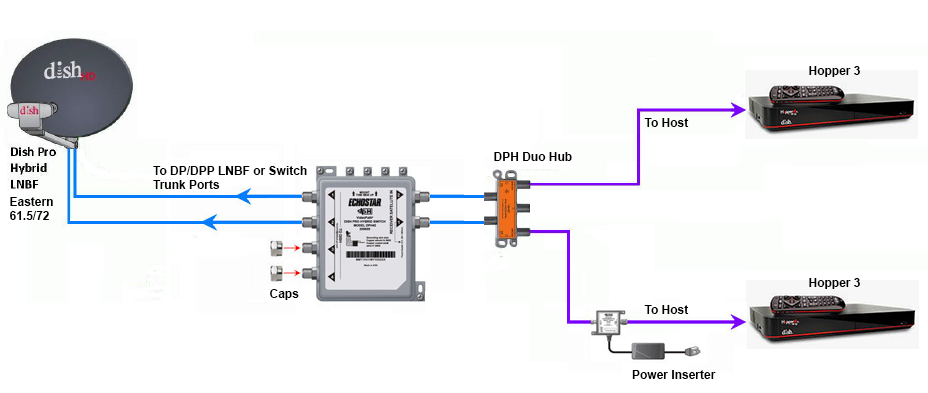
Does someone still have the diagram showing how to connect two Hopper 3s again?
I currently have one H3 and one 4K Joey, set up through a 1000.2 eastern arc hybrid lnb and solo hub.
The plan is to replace the Joey with the second H3. Already purchased a duo hub and I have three coax cables coming in from outside, from back when I used to have the older 1000.4 dish and the hopper 2. I don't fully remember, but I think the other two coax cables are just tied up next to the dish outside; will have to check again.
I currently have one H3 and one 4K Joey, set up through a 1000.2 eastern arc hybrid lnb and solo hub.
The plan is to replace the Joey with the second H3. Already purchased a duo hub and I have three coax cables coming in from outside, from back when I used to have the older 1000.4 dish and the hopper 2. I don't fully remember, but I think the other two coax cables are just tied up next to the dish outside; will have to check again.
26 Replies
·
5704 views



Pub Member / Supporter
Lifetime Supporter
While always entertaining....I hope you guys recognize that the child molesters they arrested in this video were STRICTLY due to tips from the National Center for Missing and Exploited Children. I strongly suggest that you go to their website and support them. They are the ONLY entity that is trying to curb all the perverts out there. And yes...if you want to have sex or see someone have sex with a minor you ARE a pervert.
View: https://www.youtube.com/watch?v=swYXp9x5bag&t=911s
View: https://www.youtube.com/watch?v=swYXp9x5bag&t=911s
0 Replies
·
16 views