

Social Feed
Moderator Note: Copied thread to the Colorado Voomers thread.
Folks -
Well, after waiting weeks after my installation to get my OTA setup fixed, VOOM/Installs Inc. setup a service call for today (June 30).
The issues to be addressed were:
1) Horrible OTA reception (virtually none) - I would occasionally get channels 2, sometimes 4 and 9, and 31. Channels 6, 7, 12, and 20 were completely out.
According to my OTA channel map, I should be getting:
2-1, 2-2, 3-1, 4-1, 5-1, 6-1, 7-1, 8-15 (VOOM), 9-1, 10-1, 12-1, 12-2, 12-3, 22-1, 24-1, 31-1, and 53-1.
Checking the VOOM status pages :
Off-Air Signal Quality: ranges from 14-20
Off-Air Signal Power/ SNR: 0/0.00 (always)
*** Action plan: Install a new 8-bay antenna
2) They had left a large loop of cable dangling from my roof because their ladder was too short to get them high enough to tie it down. (this is a homeowners association issue, as well as a bad practice).
*** Action plan: return with a ladder to tie the cable down
3) I have been having dropouts on just the DVI interface on one of my STB's. Could be a cable or the box itself - all other outputs work fine.
*** Action plan: return with a replacement STB and DVI cable.
4) I am also getting the 'stuck white pixels' that others have been seeing. I understand that this may be a software problem.
*** Action plan: wait for software upgrade
5) I seem to be having erratic OTA channel maps - they can differ from STB to STB (I have 4 boxes).
*** Action plan: wait for VOOM to get their OTA mapping act together.
Well - the guy showed up. He was a subcontracter working for 'Point 2 Point' communications. Immediate problems:
a) No long ladder - he hadn't gotten the word (even though I KNOW it was written into the original trouble ticket - I quizzed the CSR)
b) No replacement VOOM STB or DVI cable. Again - he hadn't gotten the word.
After he assembled the 8-bay antenna and took it on the roof, we still didn't have any improvement in signal:
Off-Air Signal Quality: ranges from 14-20
Off-Air Signal Power/ SNR: 0/0.00 (always)
My antenna had been setup as follows:
Antenna -> Amplifier -> DC power injector for AMP -> 1x4 splitter box
After found that the new antenna had no better response, I asked the tech to check the power to the inline amp (he didn't know it had one). He didn't have a meter - I had to loan him mine. It appears that the wall-wart/inline power supply was cooked. The original installer either used a bad one, or shorted the center conductor to the casing at the RF connector (there was visible charring). I also pulled the power supply out and checked it myself: supposed to be 18vdc/70ma, but it wasn't putting anything out. Of course the guy didn't have another power adapter on the truck - asked if I might be able to find one at Radio Shack (I couldn't - BTW).
Another guy came out to help the first guy. He told the first guy that the 8-bay didn't need an inline amp, as it was so powerful already. Hmmm. If that's the case, why am I getting the OTA signal strength readings I'm getting?
One got up on the roof while the other stood in from of my TV, and they chatted by cell phone while trying to position the antenna. They told me they could get 2, 4 and 31 or 9 and 31, but I couldn't have both (what about 7?). I verified on antennaweb.org that these stations were all within a couple of degrees of each other, and presented this - the antenna cannot be THAT directional. The most likely cause is that we're getting nearly no OTA signal into the system, and a slight nudge could lose whatever fraction of a signal they might have (probably could hang a piece of RG-6 out the window and get a similar/better signal).
The service call got halted because we had a brief thunderstorm. They promised to return tomorrow, but based on my experiences today I don't have a lot of confidence that they will resolve the problems.
Does anybody have any helpful suggestions?
Oh - I also have issues with rain fade, but I hear that others are having a heck of a time getting acknowldgement that this is a problem, and are having difficulties getting the larger dish.
I have a call into DishConnect right now (holding - as is the norm), and plan to escalate this to VOOM as well.
Such a potentially wonderful service (VOOM) being ruined by shoddy support. I'm not sure I'm prepared to remain in the early-adopter pool. If they can't get these issues worked out shortly, I may need to have them yank all four boxes.
While I'm griping, I might as well add these:
1) The relative lack of content/amount of repetitiveness of programming is enough to make you question the value of VOOM as a whole. Without the VaVaVOOM add-on that incorporates some of the premium movie stations in HD (even though they don't always broadcast 16x9 HD content), I would probably not subscribe. You see the same stuff over and over.
2) The program guide needs some serious human-engineering rework. I'm not saying that DirtecTV or Dish have it nailed, but they're much closer:
a) Returning to the top menu everytime you hit the VOOM button? Why not into the program guide you were in last at the channel you were viewing?
b) The program planner is impossibly basic - what about scheduling multiple iterations of a show? New programs only?
c) The program description in the guide is usually truncated to something unusually small. Many times the RAVE concert info doesn't even tell you who the performer is. (Note: the VOOM guide data available via Zap2it have MUCH more detail).
d) Like other DBS services, there should be an option to get a full screen of guide data rather than waste half of the screen with a preview and a LOGO.
3) Yes - I know a PVR is in the works, but life is very difficult for those of us that have become accustomed to time-shifting/commercial skipping. I frequently work until 8 or 9 at night, and when I sit down to watch TV, I hate having to be slaved to just what's on now. I think the proper approach would to have gotten a fundamental PVR into the market first, and produce the whiz-bang network capable unit at a later time.
4) The service issues and chain of problem ownership issues have to be addressed - this is how good products fail. I know - I'm in the tech business myself.
Pete Lyall
Folks -
Well, after waiting weeks after my installation to get my OTA setup fixed, VOOM/Installs Inc. setup a service call for today (June 30).
The issues to be addressed were:
1) Horrible OTA reception (virtually none) - I would occasionally get channels 2, sometimes 4 and 9, and 31. Channels 6, 7, 12, and 20 were completely out.
According to my OTA channel map, I should be getting:
2-1, 2-2, 3-1, 4-1, 5-1, 6-1, 7-1, 8-15 (VOOM), 9-1, 10-1, 12-1, 12-2, 12-3, 22-1, 24-1, 31-1, and 53-1.
Checking the VOOM status pages :
Off-Air Signal Quality: ranges from 14-20
Off-Air Signal Power/ SNR: 0/0.00 (always)
*** Action plan: Install a new 8-bay antenna
2) They had left a large loop of cable dangling from my roof because their ladder was too short to get them high enough to tie it down. (this is a homeowners association issue, as well as a bad practice).
*** Action plan: return with a ladder to tie the cable down
3) I have been having dropouts on just the DVI interface on one of my STB's. Could be a cable or the box itself - all other outputs work fine.
*** Action plan: return with a replacement STB and DVI cable.
4) I am also getting the 'stuck white pixels' that others have been seeing. I understand that this may be a software problem.
*** Action plan: wait for software upgrade
5) I seem to be having erratic OTA channel maps - they can differ from STB to STB (I have 4 boxes).
*** Action plan: wait for VOOM to get their OTA mapping act together.
Well - the guy showed up. He was a subcontracter working for 'Point 2 Point' communications. Immediate problems:
a) No long ladder - he hadn't gotten the word (even though I KNOW it was written into the original trouble ticket - I quizzed the CSR)
b) No replacement VOOM STB or DVI cable. Again - he hadn't gotten the word.
After he assembled the 8-bay antenna and took it on the roof, we still didn't have any improvement in signal:
Off-Air Signal Quality: ranges from 14-20
Off-Air Signal Power/ SNR: 0/0.00 (always)
My antenna had been setup as follows:
Antenna -> Amplifier -> DC power injector for AMP -> 1x4 splitter box
After found that the new antenna had no better response, I asked the tech to check the power to the inline amp (he didn't know it had one). He didn't have a meter - I had to loan him mine. It appears that the wall-wart/inline power supply was cooked. The original installer either used a bad one, or shorted the center conductor to the casing at the RF connector (there was visible charring). I also pulled the power supply out and checked it myself: supposed to be 18vdc/70ma, but it wasn't putting anything out. Of course the guy didn't have another power adapter on the truck - asked if I might be able to find one at Radio Shack (I couldn't - BTW).
Another guy came out to help the first guy. He told the first guy that the 8-bay didn't need an inline amp, as it was so powerful already. Hmmm. If that's the case, why am I getting the OTA signal strength readings I'm getting?
One got up on the roof while the other stood in from of my TV, and they chatted by cell phone while trying to position the antenna. They told me they could get 2, 4 and 31 or 9 and 31, but I couldn't have both (what about 7?). I verified on antennaweb.org that these stations were all within a couple of degrees of each other, and presented this - the antenna cannot be THAT directional. The most likely cause is that we're getting nearly no OTA signal into the system, and a slight nudge could lose whatever fraction of a signal they might have (probably could hang a piece of RG-6 out the window and get a similar/better signal).
The service call got halted because we had a brief thunderstorm. They promised to return tomorrow, but based on my experiences today I don't have a lot of confidence that they will resolve the problems.
Does anybody have any helpful suggestions?
Oh - I also have issues with rain fade, but I hear that others are having a heck of a time getting acknowldgement that this is a problem, and are having difficulties getting the larger dish.
I have a call into DishConnect right now (holding - as is the norm), and plan to escalate this to VOOM as well.
Such a potentially wonderful service (VOOM) being ruined by shoddy support. I'm not sure I'm prepared to remain in the early-adopter pool. If they can't get these issues worked out shortly, I may need to have them yank all four boxes.
While I'm griping, I might as well add these:
1) The relative lack of content/amount of repetitiveness of programming is enough to make you question the value of VOOM as a whole. Without the VaVaVOOM add-on that incorporates some of the premium movie stations in HD (even though they don't always broadcast 16x9 HD content), I would probably not subscribe. You see the same stuff over and over.
2) The program guide needs some serious human-engineering rework. I'm not saying that DirtecTV or Dish have it nailed, but they're much closer:
a) Returning to the top menu everytime you hit the VOOM button? Why not into the program guide you were in last at the channel you were viewing?
b) The program planner is impossibly basic - what about scheduling multiple iterations of a show? New programs only?
c) The program description in the guide is usually truncated to something unusually small. Many times the RAVE concert info doesn't even tell you who the performer is. (Note: the VOOM guide data available via Zap2it have MUCH more detail).
d) Like other DBS services, there should be an option to get a full screen of guide data rather than waste half of the screen with a preview and a LOGO.
3) Yes - I know a PVR is in the works, but life is very difficult for those of us that have become accustomed to time-shifting/commercial skipping. I frequently work until 8 or 9 at night, and when I sit down to watch TV, I hate having to be slaved to just what's on now. I think the proper approach would to have gotten a fundamental PVR into the market first, and produce the whiz-bang network capable unit at a later time.
4) The service issues and chain of problem ownership issues have to be addressed - this is how good products fail. I know - I'm in the tech business myself.
Pete Lyall
3 Replies
·
2004 views


This started a couple months ago. I have 2 H3s on one network, both with 2 EHD identical 3 TB seperately powered so all recordings are accessible by all 4k & J4s (8 of them).
On one H3 (not the main one that controls the MOCA network), after it reboots, it doesn't recognize it has two EHDs plugged into it. Rebooting the EHD by their power source doesn't fix it. Resetting the network doesn't. Software h3 reset doesn't fix it. Rebooting MOCA h3 doesn't fix it but so far, after 3+ cold boots (unplug pwr to H3 with unrecognized EHDs), it finally it figures out they are plugged into it. BUT.... Then when you open a program it only partially shows series and episodes, but instead of showing recordings, it only shows upcoming airings. HELP!!!!
On one H3 (not the main one that controls the MOCA network), after it reboots, it doesn't recognize it has two EHDs plugged into it. Rebooting the EHD by their power source doesn't fix it. Resetting the network doesn't. Software h3 reset doesn't fix it. Rebooting MOCA h3 doesn't fix it but so far, after 3+ cold boots (unplug pwr to H3 with unrecognized EHDs), it finally it figures out they are plugged into it. BUT.... Then when you open a program it only partially shows series and episodes, but instead of showing recordings, it only shows upcoming airings. HELP!!!!
13 Replies
·
216 views


TWiT Tech Podcast Network
Time for another AWESOME video from the TWIT Network!
View: https://www.youtube.com/shorts/E-QczD5oEh4
Direct YouTube Link - AI vs. Coders & Mathematicians: The Great Disruption #shorts
TWIT's Website
TWIT Live Feed
View: https://www.youtube.com/shorts/E-QczD5oEh4
Direct YouTube Link - AI vs. Coders & Mathematicians: The Great Disruption #shorts
TWIT's Website
TWIT Live Feed
0 Replies
·
2 views


Staff member
HERE TO HELP YOU!
Cutting Edge
Sometimes a thread gets so many posts in it that is can cause issues for the server so that why today we introduce The Song Name Game Part 3!
So let the game continue!
The last song was added by Bobby who posted...
One Meat Ball - Andrews Sisters
CONTINUE ON AND HAVE FUN! WELCOME HOME TO SATELLITEGUYS.US!
Here are the original rules for the game as posted by WebbyDude back in 2006. http://www.satelliteguys.us/threads/68645-Song-Name-Game
Just name a song title and the band who performed it. The next person does the same thing, but needs to list a song title or band name which includes a word from the previous entry. Pick songs from any genre.
Example:
Long Live Rock and Roll -- Rainbow
Rainbow in the Dark -- Dio
Another example:
Ride the Lightning -- Metallica
Lightning Strikes -- Ozzy Osbourne
Get it?
An additional note: we all know that song titles, sometimes, use profane words. Because this is a family friendly website it is advised that you clean up that title up a bit. This is accomplished by using something like sh!t instead of the real word. Thanks....
So let the game continue!
The last song was added by Bobby who posted...
One Meat Ball - Andrews Sisters
CONTINUE ON AND HAVE FUN! WELCOME HOME TO SATELLITEGUYS.US!
Here are the original rules for the game as posted by WebbyDude back in 2006. http://www.satelliteguys.us/threads/68645-Song-Name-Game
Just name a song title and the band who performed it. The next person does the same thing, but needs to list a song title or band name which includes a word from the previous entry. Pick songs from any genre.
Example:
Long Live Rock and Roll -- Rainbow
Rainbow in the Dark -- Dio
Another example:
Ride the Lightning -- Metallica
Lightning Strikes -- Ozzy Osbourne
Get it?
An additional note: we all know that song titles, sometimes, use profane words. Because this is a family friendly website it is advised that you clean up that title up a bit. This is accomplished by using something like sh!t instead of the real word. Thanks....
68512 Replies
·
2671677 views


For some reason, the satelliteguys.us site is loading a lot slower than usual on both Chrome on my Asus laptop and Safari on my iPhone.
I'm also seeing longer appearances of the blue bar at the top and the "3 blue bars" loading symbol.
Is anyone else also having the same problem? Thanks in advance.
I'm also seeing longer appearances of the blue bar at the top and the "3 blue bars" loading symbol.
Is anyone else also having the same problem? Thanks in advance.
540 Replies
·
18263 views


Supporting Founder
Lifetime Supporter
No idea what improvements might be involved.
11 Replies
·
547 views


Staff member
Pub Member / Supporter
Please post your remote make/model here and any details of your issue. We are looking to collect as many examples as possible. I may reach out to you for your receiver number, but please do not post it here.
If you've already reported this to me, please repost it here so I can track all instances in one thread.
Thanks!
Brittany
If you've already reported this to me, please repost it here so I can track all instances in one thread.
Thanks!
Brittany
22 Replies
·
685 views


Lifetime Supporter
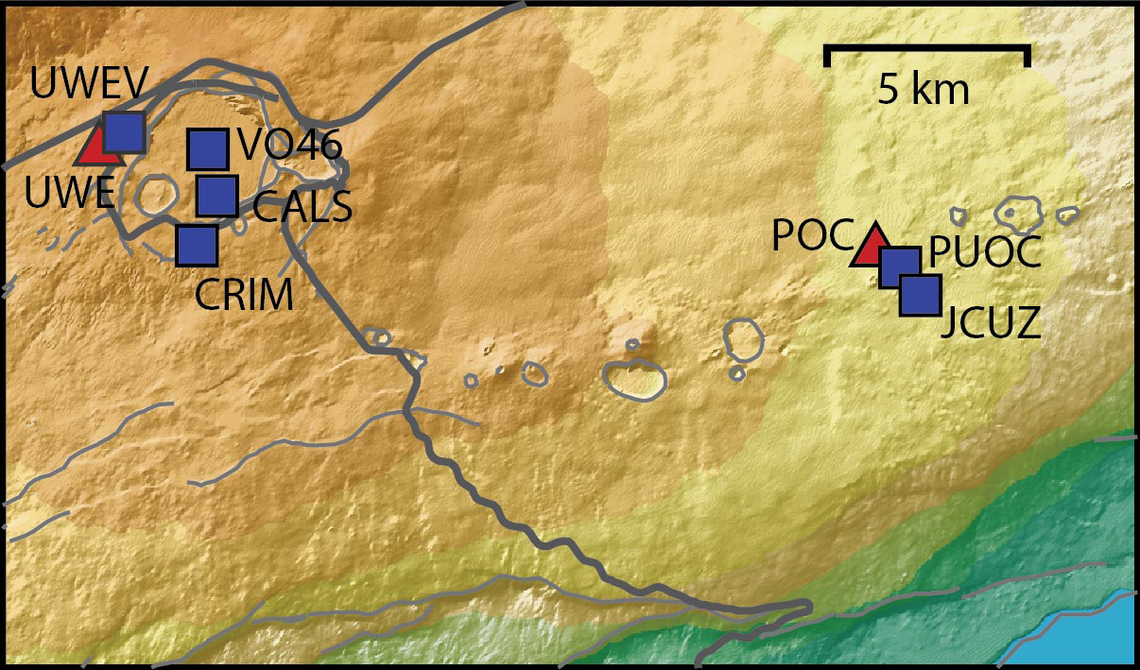
Continuing the Kilauea thread in the Pub here. Perhaps the Iceland one too next time there's remarkable activity.
Currently there is precursory lava flowing into the crater, leading to the next episode that'll probably start within the next day.
You can see the pace of inflation / deflation here. It serves as the primary predictor for when the expect the eruptions, which coincide w/ inflation turning into significant deflation and last for several hours on average with significant fountaining.
 www.usgs.gov
View: https://youtu.be/Uecu2seh4b4
Wife and I like the AfarTV feeds, for the discussion along w/ them, though they're otherwise just mirrors of the official USGS feeds.
View: https://youtu.be/iws3rh5vLAQ
Currently there is precursory lava flowing into the crater, leading to the next episode that'll probably start within the next day.
You can see the pace of inflation / deflation here. It serves as the primary predictor for when the expect the eruptions, which coincide w/ inflation turning into significant deflation and last for several hours on average with significant fountaining.
Monitoring Data for Kīlauea
For more information on how electronic tiltmeters and GPS receivers help monitor the deformation of Kīlauea volcano, see the HVO Deformation page.
View: https://youtu.be/Uecu2seh4b4
Wife and I like the AfarTV feeds, for the discussion along w/ them, though they're otherwise just mirrors of the official USGS feeds.
View: https://youtu.be/iws3rh5vLAQ
120 Replies
·
3259 views
TWiT Tech Podcast Network
Time for another AWESOME video from the TWIT Network!
View: https://www.youtube.com/shorts/AGvjJoT67F0
Direct YouTube Link - The Multi-User Functionality of the Apple HomeView
TWIT's Website
TWIT Live Feed
View: https://www.youtube.com/shorts/AGvjJoT67F0
Direct YouTube Link - The Multi-User Functionality of the Apple HomeView
TWIT's Website
TWIT Live Feed
0 Replies
·
9 views
TWiT Tech Podcast Network
Time for another AWESOME video from the TWIT Network!
View: https://www.youtube.com/shorts/mhc5dZ09m3U
Direct YouTube Link - Perseverance Mars Rover Sets New Interplanetary Driving Record
TWIT's Website
TWIT Live Feed
View: https://www.youtube.com/shorts/mhc5dZ09m3U
Direct YouTube Link - Perseverance Mars Rover Sets New Interplanetary Driving Record
TWIT's Website
TWIT Live Feed
0 Replies
·
13 views