Missing Channel Names

Advertisements

WickedStepMom

SatelliteGuys Family
Original poster
Feb 24, 2019
116
111
Missouri
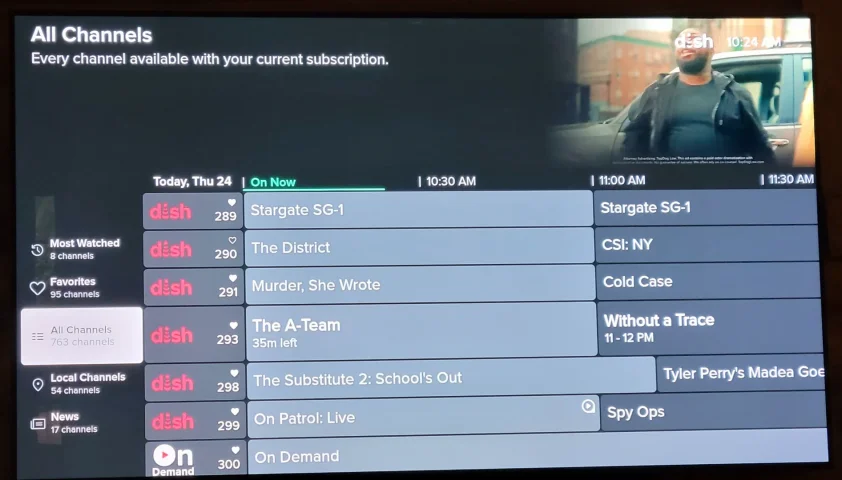
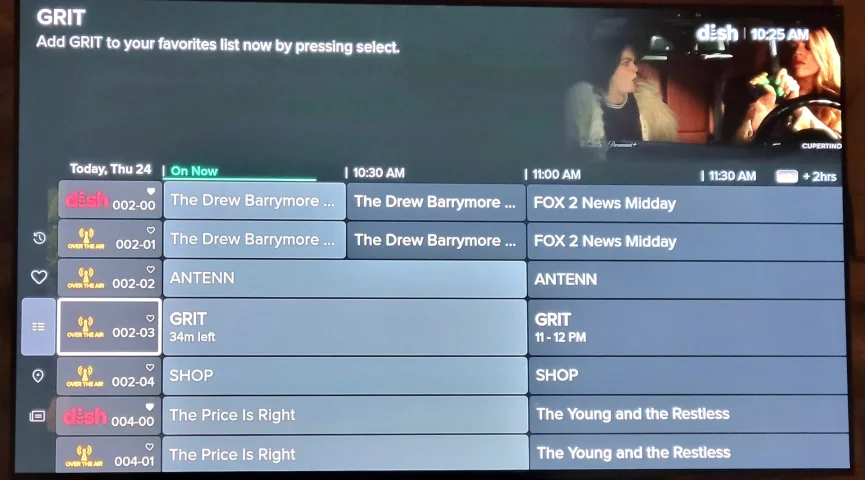
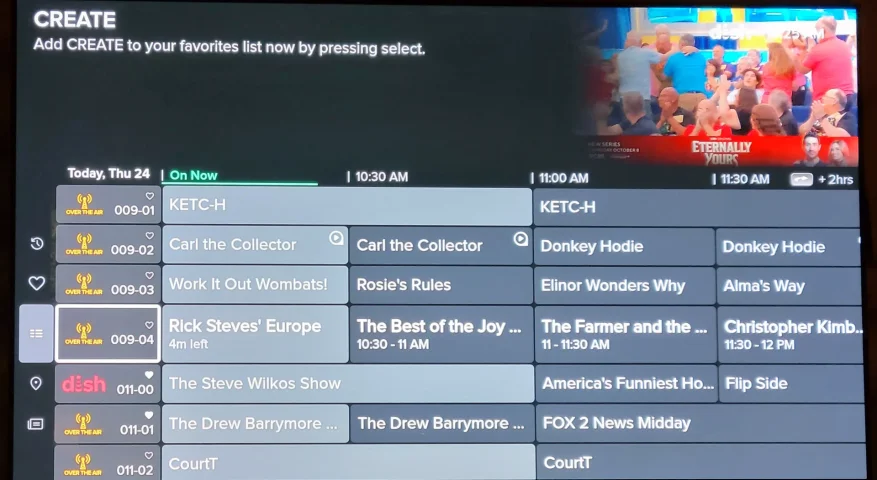
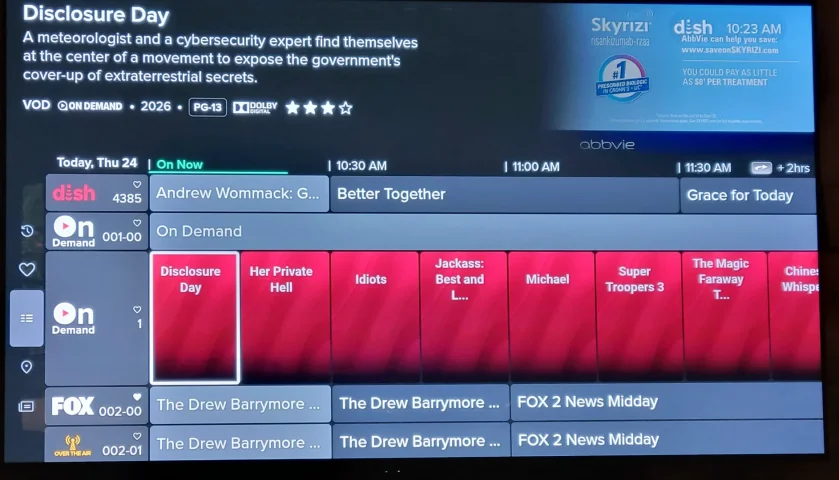
Has anyone experienced a change on the Hopper3's guide? Last week most of the names of the channels have vanished and been replaced with DISH. Attached are screenshots of what I'm seeing. Also, when I stop at the On Demand channel no pictures are showing. I've updated both the Hopper3 and the Hopper Plus.
 

Attachments

  • 20260924_102456.webp
    20260924_102456.webp
    116.1 KB · Views: 42
  • 20260924_102531.webp
    20260924_102531.webp
    137.6 KB · Views: 40
  • 20260924_102559.webp
    20260924_102559.webp
    146.4 KB · Views: 32
  • 20260924_102357.webp
    20260924_102357.webp
    154 KB · Views: 39
Has anyone experienced a change on the Hopper3's guide? Last week most of the names of the channels have vanished and been replaced with DISH. Attached are screenshots of what I'm seeing. Also, when I stop at the On Demand channel no pictures are showing. I've updated both the Hopper3 and the Hopper Plus.
Try pulling the power cord for a few seconds on the H3. My channels are labeled.
 
When I first went back to DISH about six months ago there were no channel logos for about the first day. I knew they would come in as soon as the DVR did a full guide update. If pulling the plug did not help, try going into the menu and forcing a guide update.
 
WickedStepMom - If I am correct, you also posted on reddit. Anyways, Hopper 3 (software H712) with Hopper Plus (software P15317) which would use the new guide only available on the Hopper 3 with Hopper Plus, Joey 4, Wireless Joey 4 which are all Android TV and not the Hopper 3 only.
My logos for the channels are all okay. Did you try forcing a Guide Update to see if it makes a difference?
 
When I first went back to DISH about six months ago there were no channel logos for about the first day. I knew they would come in as soon as the DVR did a full guide update. If pulling the plug did not help, try going into the menu and forcing a guide update.
interesting it took my hopper 2 hours to download everything and i had the channels just not some of the programs names.
 
I thank everyone for suggestions. I have restored the channel names on my Hopper3/Hopper Plus by doing the following:

>Turned off the power to both for a minute or so and then back on.

>While it was booting back up, unplugged the ethernet cable.

>All the channels had returned but since the ethernet cable was still disconnected, the channels on 90, 91, 92, and 93 channels said there was no Internet as well as when I tried accessing Paramount Plus through the apps via the Hopper Plus.

>Reconnected the ethernet cable and eventually all the channels dependent on the Internet were available.

>I did not do the suggestion of run a guide update and reset the receiver or rebooting my WIFI router/gateway since all was now working.

Thank you again for all the suggestions. Now if someone can get my other guide problem resolved that I've had since 07/06/26: When I scroll through the Hopper guide and stop at a show or movie and select the INFO button, regardless if I hit the BACK button or the INFO button to go back to the guide, it no longer takes me back to the area where that particular movie or show I was checking on for information. Instead, it takes me back to the guide area for whatever is currently playing. But this is only for all the channels I've listed as FAVORITES to keep me from having to scroll through ALL CHANNELS or news, movies, locals, kids, tv shows, music, etc. If I go to ALL CHANNELS for example, I have no problem. I have deleted everything in my FAVORITES and have recreated a new favorite list and the issue remains. Still, none of the other filter views have that issue. Have done both reset and restart and that doesn't change anything. The issue also exists on the Joey4.

 
I thank everyone for suggestions. I have restored the channel names on my Hopper3/Hopper Plus by doing the following:

>Turned off the power to both for a minute or so and then back on.

>While it was booting back up, unplugged the ethernet cable.

>All the channels had returned but since the ethernet cable was still disconnected, the channels on 90, 91, 92, and 93 channels said there was no Internet as well as when I tried accessing Paramount Plus through the apps via the Hopper Plus.

>Reconnected the ethernet cable and eventually all the channels dependent on the Internet were available.

>I did not do the suggestion of run a guide update and reset the receiver or rebooting my WIFI router/gateway since all was now working.

Thank you again for all the suggestions. Now if someone can get my other guide problem resolved that I've had since 07/06/26: When I scroll through the Hopper guide and stop at a show or movie and select the INFO button, regardless if I hit the BACK button or the INFO button to go back to the guide, it no longer takes me back to the area where that particular movie or show I was checking on for information. Instead, it takes me back to the guide area for whatever is currently playing. But this is only for all the channels I've listed as FAVORITES to keep me from having to scroll through ALL CHANNELS or news, movies, locals, kids, tv shows, music, etc. If I go to ALL CHANNELS for example, I have no problem. I have deleted everything in my FAVORITES and have recreated a new favorite list and the issue remains. Still, none of the other filter views have that issue. Have done both reset and restart and that doesn't change anything. The issue also exists on the Joey4.

For the other guide problem mentioned above, as there is a difference between people who have a Hopper 3 vs Hopper 3 with Hopper Plus. I am in the later camp with Hopper 3 (software H712) with Hopper Plus (software P15317) so it is 100% identical to yours and I have exactly the same results as you so the current channel is basically Favorite #5 and when I do INFO in the guide for any of the Favorites #1-#4 and then either INFO or BACK, it always back to Favorite #5. This is a newly created Favorites list since I don't use Favorites normally so maybe this is something for Rick Durham and brittanygarden to look at. Someone else with a Hopper 3 only without the Hopper Plus can probably chime in with their results.
 

H3 Audio Dropouts?

SD Channel Improvement?