OTA no working after Update

Advertisements
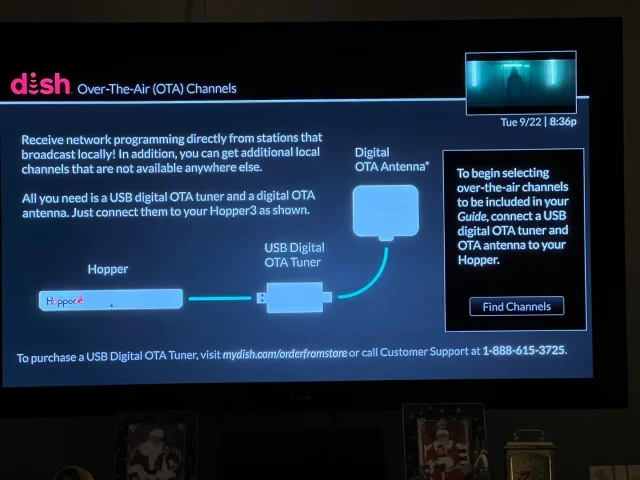
Also having the issue where my OTA adapter (guessing single tuner) is no longer detected/working with my Hopper3. Tried unplugging ota adapter, unplugging hopper from power, waiting 1 minute and plugging back in, waiting until booted up and plugged adapter back in, still nothing. Tried differnet usb cable and still not working.

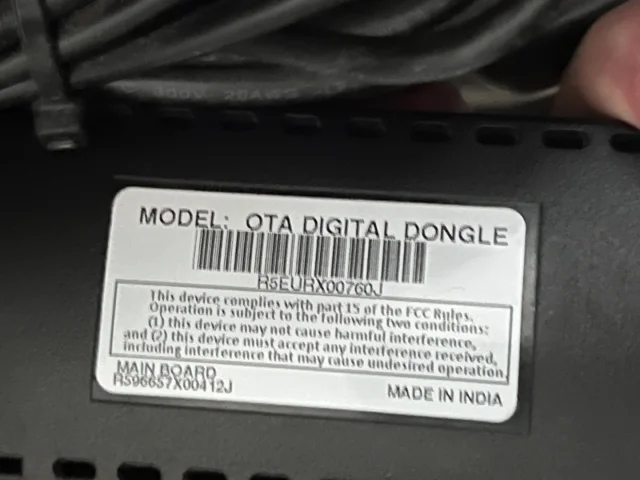
I did check that the usb port on my Hopper3 still works with an ext hard drive, it was detected shortly after plugging into same port. Dongle says "ota digital dongle" on the back for model.
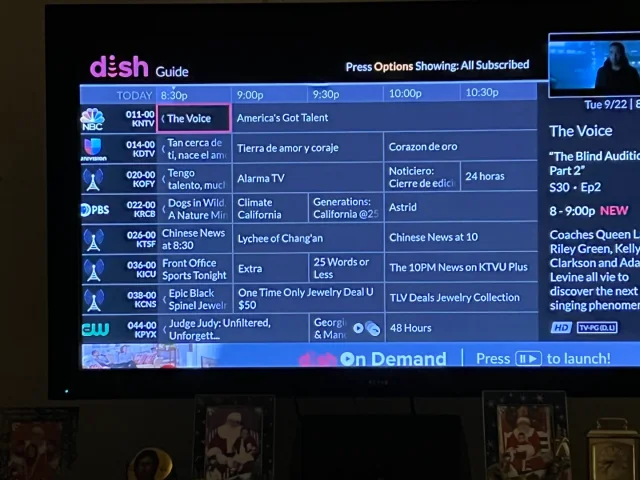
I have a similar problem in that my H3 doesn't think there is an OTA adapter connected, but I can still watch OTA channels, I just can't rescan. I have had this dual OTA adapter for several years and don't really rescan very often as long as I see the channels in the guide. I have unplugged the adapter for a few minutes before plugging back in but did not reboot the Hopper while unplugged. I guess I will try that next. All this talk about OTA issues is what made me check on mine.
 

Attachments

  • 2026-09-22 20.36.53.webp
    2026-09-22 20.36.53.webp
    111.1 KB · Views: 17
  • 2026-09-22 20.37.22.webp
    2026-09-22 20.37.22.webp
    147.8 KB · Views: 17
  • Like
Reactions: charlesrshell
Just tried, unplugging the OTA adapter, unplugging the H3, wait until it reboots and plugging it back in, but no joy. It seems Dish engineers have once again screwed up the software. I have been an embedded software developer/manager/director for over 40 years and clearly, Dish has a non-existent or poor software QA process. Considering the others who all of the sudden have OTA issues, I seriously doubt all of our adapters are failing at the same time. Mine is obviously working since I can still watch OTA channels; I just can't scan for any changes because the Hopper doesn't think it's present.
 
Just curious and for another reference point, did a rescan and 38 channels found in San Francisco, California USA. Within 1 minute after the scan, it did the program guide and DVR update which took about 10 minutes.

Hopper H3 with H712 software and the Hopper Plus with P15317 software. My specific model from the label:
Model: Dual OTA Adapter P/N 213293
 
Curious which adapter could be having issues
My dual (air/// , not wanting to climb behind my equipment right now, works perfectly and has been. I can rescan and pick up new channels as well.

Maybe someone other than me without old-guy-syndrome ;) may be able to give the correct manufacturer
 
Did you people having this issue contact Brittany yet? Shes trying to keep track of things and it would be good for you to contact her as maybe she can get this somewhere and get fixed.

Now while unofficial, I am hearing this issue wasn't caused by DISH's software team, but was caused by a chipset driver update that seemes to have hosed some older USB devices. If this is indeed the case I can see why DISH didn't know and why they are slow in fixing it as they need the chipset company to fix its drivers and release them to DISH so they can be pushed out to all.

DISH does not hate you guys nor do they want you to buy new USB dongles. I am rather sure they didn't even know this was an issue until they saw it posted.

Again contact Brittany if you are having this issue, so she has your info and hopefully she can do something for you to keep you happy. :)
 
Did you people having this issue contact Brittany yet? Shes trying to keep track of things and it would be good for you to contact her as maybe she can get this somewhere and get fixed.

Now while unofficial, I am hearing this issue wasn't caused by DISH's software team, but was caused by a chipset driver update that seemes to have hosed some older USB devices. If this is indeed the case I can see why DISH didn't know and why they are slow in fixing it as they need the chipset company to fix its drivers and release them to DISH so they can be pushed out to all.

DISH does not hate you guys nor do they want you to buy new USB dongles. I am rather sure they didn't even know this was an issue until they saw it posted.

Again contact Brittany if you are having this issue, so she has your info and hopefully she can do something for you to keep you happy. :)

Yes, I messaged her yesterday. I will also send her the details of my dongle. However, as a former engineering director at an enterprise NAS company, we had to incorporate other vendors drivers into our software. But it was up to us to thoroughly test it before releasing to our customers. So, this is still on Dish. A quick fix would be to revert the driver to the previous version that worked until they can get an update from the vendor.
 
Last edited:
Curious which adapter could be having issues
My dual (air/// , not wanting to climb behind my equipment right now, works perfectly and has been. I can rescan and pick up new channels as well.

Maybe someone other than me without old-guy-syndrome ;) may be able to give the correct manufacturer

I can still watch OTA channels, but cannot scan because my Hopper 3 doesn't think there is and adapter attached.
 

Attachments

  • 2026-09-24 15.36.44.webp
    2026-09-24 15.36.44.webp
    100.6 KB · Views: 10
I can still watch OTA channels, but cannot scan because my Hopper 3 doesn't think there is and adapter attached.
from the picture, Model: OTA Digital Dongle is the single tuner OTA adapter which is the same one people are having problems with as I just checked what my single OTA adapter says which is left unplugged next to the Dual tuner OTA adapter which says "Model: Dual OTA Adapter" or specifically "Model: Dual OTA Adapter P/N 213293"
 
from the picture, Model: OTA Digital Dongle is the single tuner OTA adapter which is the same one people are having problems with as I just checked what my single OTA adapter says which is left unplugged next to the Dual tuner OTA adapter which says "Model: Dual OTA Adapter" or specifically "Model: Dual OTA Adapter P/N 213293"
Thanks, not sure why I thought I had the dual tuner version. I guess I should look for that one.
 
New dual from Amazon installed and working on Hopper3. Guide automatically updated several minutes after scanning.

I thought I found a workaround for the "Timer Creation Failed" issue when trying to record a current live show for an OTA station that does not have any Guide info;
I moved the start time a minute or two ahead from the current then clicked "Create" and it "appeared to start recording, but then I could not find it showing as recording when I hit DVR. And now when I try to view an OTA channel, it shows both OTA tuners recording and I cannot select them nor can I join them and free up a tuner! Even though I believe one should be done recording.
I need to wait an hour now for the second timer to end recording and see if things work again.
Recording OTA is definitely sketchy!

Question: If they fix the old single OTA dongle issue, can I add it to the system for a 3rd OTA tuner? (on a Joey or the Hopper3?).
Your trick worked for me. While watching an OTA program and wanting to record it, I must advance the start time by one or two minutes and then hit create. Then it records. Thanks for the tip. Now that I have the new dual channel dongle that I bought from Amazon, everything works A-OK.
 
Did you people having this issue contact Brittany yet? Shes trying to keep track of things and it would be good for you to contact her as maybe she can get this somewhere and get fixed.

Now while unofficial, I am hearing this issue wasn't caused by DISH's software team, but was caused by a chipset driver update that seemes to have hosed some older USB devices. If this is indeed the case I can see why DISH didn't know and why they are slow in fixing it as they need the chipset company to fix its drivers and release them to DISH so they can be pushed out to all.

DISH does not hate you guys nor do they want you to buy new USB dongles. I am rather sure they didn't even know this was an issue until they saw it posted.

Again contact Brittany if you are having this issue, so she has your info and hopefully she can do something for you to keep you happy. :)

Thanks, but until they do, can't Dish just revert to the old driver that worked? Then test the new driver when delivered,d before pushing it again.

But then what does an old CIO know! I've only reamed quite a few buttholes from my people that didn't do that! ;)
 
A lot of drivers are signed by certificates that have expiration dates. Going back to a previous version isn't an option if the vendor signed the driver and the certificate has since expired. Depending on the certificate, it may have had a two year time span, renewed on an annual basis so the expiration of one overlapped with the new one so the driver code would still be valid.

An older version may have passed into the realm of no longer being supported, or the original vendor isn't around anymore. Buying the current dual-tuner replacement may be the only viable solution, plus gives you the ability to record one OTA source while watching another.
 
Thanks, but until they do, can't Dish just revert to the old driver that worked? Then test the new driver when delivered,d before pushing it again.

But then what does an old CIO know! I've only reamed quite a few buttholes from my people that didn't do that! ;)
dish can't revert back to older drivers or updates. although just one reason not to buy the ota dongle!!!
 
  • Like
Reactions: charlesrshell
dish can't revert back to older drivers or updates. although just one reason not to buy the ota dongle!!!
There are basically two types of DISH OTA dongles, a single tuner and a dual tuner dongle. The single tuner model is approximately 4 3/8 inches long with cooling vents all over the upper surface and a row of cooling vents near both edges of the bottom surface where a sticker says "MODEL: OTA Digital Dongle". I have two of these sweeties that are now not even usable as door stops. Both also say made in India.

The dual tuner model is 3 3/8 inches long either white (AirTV version) or black (Dish Network version). It has a built in usb cable about a foot long. Mine is the AirTV version and there are NO vents on the unit anywhere. This dual tuner unit still works fine except for being a bit weak in it's reception prowess.This unit says made in China.

Buying one of the two dual tuner versions (black/white) should restore your OTA channels.

I have seen NO reports of the dual OTA dongle not working at least on stronger OTA signals.
 
dish can't revert back to older drivers or updates. although just one reason not to buy the ota dongle!!!
They can absolutely put the old driver back if they wanted. This is an embedded software environment in which they have total control. All they have to do if build a new version of firmware with the old OTA driver and test it of course. They just don't want to spend the resources doing so. If they are not going to continue supporting the single tuner adapter, then they have to say so.
 
They can absolutely put the old driver back if they wanted. This is an embedded software environment in which they have total control. All they have to do if build a new version of firmware with the old OTA driver and test it of course. They just don't want to spend the resources doing so. If they are not going to continue supporting the single tuner adapter, then they have to say so.
they would rather screw the customer and pass the cost onto them!!!
 
They can absolutely put the old driver back if they wanted. This is an embedded software environment in which they have total control. All they have to do if build a new version of firmware with the old OTA driver and test it of course. They just don't want to spend the resources doing so. If they are not going to continue supporting the single tuner adapter, then they have to say so.
Unless of course they didn't keep a copy of the old drivers and can no longer get it. Then there is always the their support for the product is EOL after a x amount of time so it will make the consumer have to buy the current product offering.
 
Anyone heard any updates on this, I'm still having the issue so thought I'd check in.
No updates but if you can get DISH Technical Operations to roll you back to H710 or earlier even though H708 would be best because it also eliminates another problem like in this comment, you will also no longer have the problem as long as you don't update manually or forced to any new version until the problem is fixed as the problem started in H711 and still exist in H712 and H713.
 
Last edited:
  • Like
Reactions: charlesrshell

"Bonus View" Channel List

Dish vs Streaming Apps?