

iPhone Charging
- Thread starter telstar_1
- Start date
- Latest activity Latest activity:
- Replies 19
- Views 281
You are using an out of date browser. It may not display this or other websites correctly.
You should upgrade or use an alternative browser.
You should upgrade or use an alternative browser.

Can I do that with my phone?
Many newer phones do it automatically, like my Pixel 9 Fold.

I suppose it depends on the vehicle. I know you can with Gm and Tesla and Ford with their apps.Can I do that with my phone?
I assume, being in the section we are in, he is talking about setting the charging limit of the vehicle with his phone.Many newer phones do it automatically, like my Pixel 9 Fold.
Not setting the limit of the phone charge itself.
Last edited:


You know what happens when you assume!I assume, being in the section we are in, he is talking about setting the charging limit of the vehicle with his phone.
Not setting the limit of the charge itself.

PLEASE LOG IN TO GET RID OF THESE ADS!


Depends on your vehicle but I believe most vehicle apps have an option to set the charge limit. If not in the app your vehicle should have a setting on the screen. Our Blazer I can set either on the center screen or the phone app. Once it hits the limit you set it will stop charging.You can just leave it plugged in and it will stop at 80%?
No, I meant on my iPhone itself. They always say not to go to 100% all the time, for presumably same reasons as on a car. I suppose a low-tech timer might work to some extent. Or do the phones build in a buffer and never "really" go to a completely max charge?

No, I meant on my iPhone itself. They always say not to go to 100% all the time, for presumably same reasons as on a car. I suppose a low-tech timer might work to some extent. Or do the phones build in a buffer and never "really" go to a completely max charge?
About Charge Limit and Optimized Battery Charging on iPhone - Apple Support
To improve the lifespan of your battery, your iPhone learns from your daily charging habits.

Depending on your iPhone, you can set a maximum limit, or if you set it to 100%, you can opt to wait until your day starts before the charge goes from 80% to 100%. I've had times in the past where I woke up early and my phone was holding at 80%.

If it's that important, you can always choose to lower the maximum charge amount to 80% if that's what you want. My iPhone 13 was set to 100% and I had it for over four years, the battery life was still over 85% when I traded it in on my new 17.
PLEASE LOG IN TO GET RID OF THESE ADS!
College kids...
Can't find that setting. Have 26.3.1. It does state that my battery capacity has dropped to 76% and considers this to be "severe degradation".If it's that important, you can always choose to lower the maximum charge amount to 80% if that's what you want. My iPhone 13 was set to 100% and I had it for over four years, the battery life was still over 85% when I traded it in on my new 17.
Which iPhone do you have? It looks different on the older (14 and earlier) phones. If you scroll down on the Settings :: Battery screen, you should see Charging and Power Mode at the bottom, after the App and System Activity section:Can't find that setting. Have 26.3.1. It does state that my battery capacity has dropped to 76% and considers this to be "severe degradation".
Selecting "Battery" yields that screen, but below 'Apps & System Activity' appears 'Battery Health & Charging" (instead of 'Battery Health,' then 'Charging,' then 'Power Mode'). Below BH&C appears 'Battery Percentage,' which puts the %# next to the battery icon at top right and is toggled 'on', and lastly 'Low Power Mode' and its toggle. Selecting 'BH&C' goes to screen first stating 'Important Battery Message' saying its "health" is "significantly degraded". Then 'Minimum Capacity' at 76%. Then 'Peak Performance Capacity' with message that "dynamic systems will help counter performance impacts that may be noticed as your battery ages," which may relate to that kerfuffle that erupted a few years ago about them slowing things down to stretch battery life. Then 'Optimized Battery Charging' that "learns your daily routine to wait to finish charging past 80%," which I have toggled 'off'. Then 'Clean Energy Charging,' under which "iPhone will try to reduce your carbon footprint by selectively charging when lower carbon power is available." How it would know I have no clue, but that is toggled 'off' as well. Nothing further. It can apparently tell when my power provider is emitting less carbon, but not at what state of charge I would like it to stop charging.
Maybe iPhone battery charging discussion belongs in a different thread that isn't titled EV Charging Recommendations…
Maybe a Mod will take pity on us and relocate these posts over to the iPhone forum?Maybe iPhone battery charging discussion belongs in a different thread that isn't titled EV Charging Recommendations…

PLEASE LOG IN TO GET RID OF THESE ADS!

Maybe this will help others. Since I use an iPhone 17, that's what I'll concentrate on. Apple changed the Battery options on the iPhone 15 and later iPhones, so if you have an earlier iPhone, someone will need to provide their own experience and tips.
If you go into Settings and select Battery, you should be presented with a screen showing your current State of Charge and Daily Usage, along with your Top Apps and System activity:

Scrolling down, you should see different options under the Battery Health settings:

If you go into Settings and select Battery, you should be presented with a screen showing your current State of Charge and Daily Usage, along with your Top Apps and System activity:
Scrolling down, you should see different options under the Battery Health settings:
(again, this is on an iPhone 17, so yours may look different if it's an older iPhone)
If you look at the Battery State of Charge graph, you will see a circled "i" for "information" which will bring up the following:
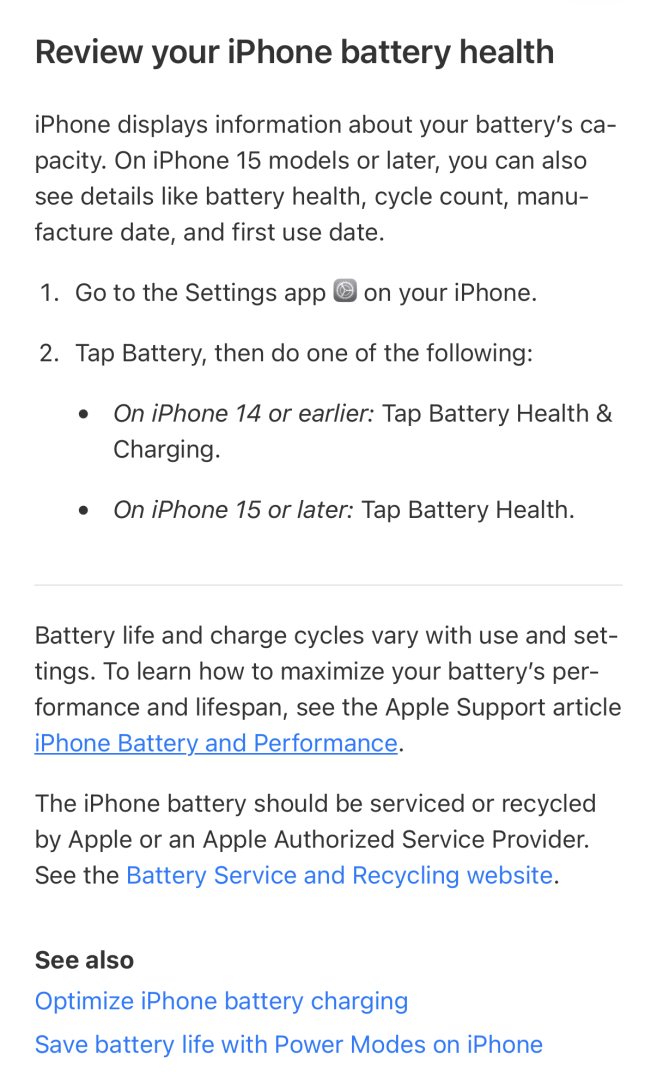 Clicking on the "iPhone Battery and Performance" link brings up the Apple Support App (if you have it loaded (you should)) which shows the following Tome of Battery Health Information:
----------
Your iPhone is designed to be simple and easy to use. This is only possible through a combination of advanced technologies and sophisticated engineering. One important technology area is battery and performance. Batteries are a complex technology, and a number of variables contribute to battery performance and related iPhone performance. All rechargeable batteries are consumables and have a limited lifespan—eventually their capacity and performance decline such that they need to be replaced. Learn more about iPhone batteries and how battery aging can affect iPhone performance.
Learn how to maximize battery performance and help extend battery lifespan. For example:
As lithium-ion batteries chemically age, the amount of charge they can hold diminishes, resulting in shorter amounts of time before a device needs to be recharged. This can be referred to as the battery's maximum capacity—the measure of battery capacity relative to when it was new. In addition, a battery's ability to deliver maximum instantaneous performance, or "peak power," might decrease. For a phone to function properly, the electronics must be able to draw upon instantaneous power from the battery. One attribute that affects this instantaneous power delivery is the battery's impedance. A battery with a high impedance might not be able to provide sufficient power to the system that needs it. A battery's impedance can increase if a battery has a higher chemical age. A battery's impedance will temporarily increase at a low state of charge and in a cold temperature environment. When coupled with a higher chemical age, the impedance increase will be more significant. These are characteristics of battery chemistry that are common to all lithium-ion batteries in the industry.
When a device pulls power from a battery with a higher level of impedance, the battery's voltage will drop to a greater degree. Electronic components require a minimum voltage to properly operate. This includes the device's internal storage, power circuits, and the battery itself. The power management system determines the capability of the battery to supply this power and manages the loads to maintain operations. When the operations can no longer be supported with the full capabilities of the power management system, the system will perform a shutdown to preserve these electronic components. While this shutdown is intentional from the device perspective, it might be unexpected by the user.
iPhone performance management works by looking at a combination of the device temperature, battery state of charge, and battery impedance. Only if these variables require it to prevent unexpected shutdowns, iOS will dynamically manage the maximum performance of some system components, such as the CPU and GPU. As a result, the device workloads will self-balance, allowing a smoother distribution of system tasks, rather than larger, quick spikes of performance all at once. In some cases, you might not notice any differences in device performance. The level of perceived change depends on how much performance management is required for your device.
In cases that require more extreme performance management, you might notice effects such as:
To maximize overall system performance, iPhone 8 and later use an advanced hardware and software design that provides a more accurate estimation of both power needs and the battery's power capability. This allows iOS to anticipate and avoid an unexpected shutdown more precisely. As a result, the effects of performance management might be less noticeable on iPhone 8 and later. Over time, the rechargeable batteries in all iPhone models will diminish in their capacity and peak performance and will eventually need to be replaced.

Devices updating from iOS 11.2.6 or earlier will initially have performance management disabled; it will be reenabled if the device subsequently experiences an unexpected shutdown.
To ensure that the battery and the overall system operates as designed and internal components are protected, all iPhone models include fundamental performance management. This includes behavior in hot or cold temperatures, as well as internal voltage management. This type of performance management is required for safety and expected function, and cannot be turned off.

Maximum battery capacity measures the device battery capacity relative to when it was new. A battery will have lower capacity as the battery chemically ages, which might result in fewer hours of usage between charges. Depending upon the length of time between when the iPhone was made and when it's activated, your battery capacity might show as slightly less than 100 percent.
Batteries of iPhone 14 models and earlier are designed to retain 80 percent of their original capacity at 500 complete charge cycles under ideal conditions.1 Batteries of iPhone 15 models are designed to retain 80 percent of their original capacity at 1000 complete charge cycles under ideal conditions.1 With all models, the exact capacity percentage depends on how the devices are regularly used and charged. The one-year warranty (two-year warranty in Türkiye) includes service coverage for a defective battery in addition to rights provided under local consumer laws. If it is out of warranty, Apple offers battery service for a charge. Learn more about charge cycles.
As your battery health degrades, so can its ability to deliver peak performance. The Battery Health screen includes a section for Peak Performance Capability where the following messages might appear.
Your battery is currently supporting normal peak performance.

This iPhone has experienced an unexpected shutdown because the battery was unable to deliver the necessary peak power. Performance management has been applied to help prevent this from happening again. Disable…
Note that if you disable performance management, you can't turn it back on. It will be turned on again automatically if an unexpected shutdown occurs. The option to disable will also be available.

This iPhone has experienced an unexpected shutdown because the battery was unable to deliver the necessary peak power. You have manually disabled performance management protections.
If the device experiences another unexpected shutdown, the performance-management features will be reapplied. The option to disable will also be available.

Your battery's health is significantly degraded. An Apple Authorized Service Provider can replace the battery to restore full performance and capacity. More about service options…
This message doesn't indicate a safety issue. You can still use your battery. However, you might experience more noticeable battery and performance issues. To improve your experience with a new replacement battery, get service.

Unable to verify this iPhone has a genuine Apple battery. Details from this battery may not be accurate. Learn more...
The battery health information on this screen might not be accurate. To have your battery checked, get service.

Learn more about genuine iPhone batteries
Learn more about recalibration of battery health reporting in iOS 14.5
Learn about battery service and recycling
----------
iPhone battery and performance
Understand iPhone performance and its relation to your battery.Your iPhone is designed to be simple and easy to use. This is only possible through a combination of advanced technologies and sophisticated engineering. One important technology area is battery and performance. Batteries are a complex technology, and a number of variables contribute to battery performance and related iPhone performance. All rechargeable batteries are consumables and have a limited lifespan—eventually their capacity and performance decline such that they need to be replaced. Learn more about iPhone batteries and how battery aging can affect iPhone performance.
About lithium-ion batteries
iPhone batteries use lithium-ion technology. Compared with older generations of battery technology, lithium-ion batteries charge faster, last longer, and have a higher power density for more battery life in a lighter package. Rechargeable lithium-ion technology currently provides the best technology for your device. Learn more about lithium-ion batteries.How to maximize battery performance
"Battery life" is the amount of time a device runs before it needs to be recharged. "Battery lifespan" is the amount of time a battery lasts until it needs to be replaced. The way that you use your device affects battery life and lifespan, but no matter how you use your device, there are ways to help. A battery's lifespan is related to its "chemical age," which is more than just the passage of time. It includes different factors, such as the number of charge cycles and how it was cared for.Learn how to maximize battery performance and help extend battery lifespan. For example:
- Keep your iPhone half charged when it's stored for the long term.
- Avoid charging or leaving your iPhone in hot environments, including direct sun exposure, for extended periods of time.
When batteries chemically age
All rechargeable batteries are consumable components that become less effective as they chemically age.As lithium-ion batteries chemically age, the amount of charge they can hold diminishes, resulting in shorter amounts of time before a device needs to be recharged. This can be referred to as the battery's maximum capacity—the measure of battery capacity relative to when it was new. In addition, a battery's ability to deliver maximum instantaneous performance, or "peak power," might decrease. For a phone to function properly, the electronics must be able to draw upon instantaneous power from the battery. One attribute that affects this instantaneous power delivery is the battery's impedance. A battery with a high impedance might not be able to provide sufficient power to the system that needs it. A battery's impedance can increase if a battery has a higher chemical age. A battery's impedance will temporarily increase at a low state of charge and in a cold temperature environment. When coupled with a higher chemical age, the impedance increase will be more significant. These are characteristics of battery chemistry that are common to all lithium-ion batteries in the industry.
When a device pulls power from a battery with a higher level of impedance, the battery's voltage will drop to a greater degree. Electronic components require a minimum voltage to properly operate. This includes the device's internal storage, power circuits, and the battery itself. The power management system determines the capability of the battery to supply this power and manages the loads to maintain operations. When the operations can no longer be supported with the full capabilities of the power management system, the system will perform a shutdown to preserve these electronic components. While this shutdown is intentional from the device perspective, it might be unexpected by the user.
Preventing unexpected shutdowns
You're more likely to experience unexpected shutdowns when your battery has a low state of charge, a higher chemical age, or when you're in colder temperatures. In extreme cases, shutdowns can occur more frequently, making the device unreliable or unusable. For iPhone 6, iPhone 6 Plus, iPhone 6s, iPhone 6s Plus, iPhone SE (1st generation), iPhone 7, and iPhone 7 Plus, iOS dynamically manages performance peaks to prevent the device from unexpectedly shutting down, so you can still use your iPhone. This performance management feature is specific to iPhone and doesn't apply to any other Apple products. Starting with iOS 12.1, iPhone 8, iPhone 8 Plus, and iPhone X include this feature; iPhone XS, iPhone XS Max, and iPhone XR include this feature starting with iOS 13.1. Learn about performance management on iPhone 11 and later.iPhone performance management works by looking at a combination of the device temperature, battery state of charge, and battery impedance. Only if these variables require it to prevent unexpected shutdowns, iOS will dynamically manage the maximum performance of some system components, such as the CPU and GPU. As a result, the device workloads will self-balance, allowing a smoother distribution of system tasks, rather than larger, quick spikes of performance all at once. In some cases, you might not notice any differences in device performance. The level of perceived change depends on how much performance management is required for your device.
In cases that require more extreme performance management, you might notice effects such as:
- Longer app launch times
- Lower frame rates while scrolling
- Backlight dimming (which can be overridden in Control Center)
- Lower speaker volume by up to -3dB
- Gradual frame-rate reductions in some apps
- During the most extreme cases, the camera flash will be disabled as visible in the camera UI
- Apps refreshing in background might require reloading upon launch
- Cellular call quality and networking throughput performance
- Captured photo and video quality
- GPS performance
- Location accuracy
- Sensors like gyroscope, accelerometer, barometer
- Apple Pay
For iOS 11.3 and later
iOS 11.3 and later improve performance management by periodically assessing the level of performance management necessary to avoid unexpected shutdowns. If the battery health is able to support the observed peak power requirements, the amount of performance management will be lowered. If an unexpected shutdown occurs again, performance management will increase. This assessment is ongoing, allowing more adaptive performance management.To maximize overall system performance, iPhone 8 and later use an advanced hardware and software design that provides a more accurate estimation of both power needs and the battery's power capability. This allows iOS to anticipate and avoid an unexpected shutdown more precisely. As a result, the effects of performance management might be less noticeable on iPhone 8 and later. Over time, the rechargeable batteries in all iPhone models will diminish in their capacity and peak performance and will eventually need to be replaced.
Battery Health
With iPhone 6 and later, iOS adds new features to show battery health and recommends if you need to replace the battery. To see Battery Health:- Open the Settings app, then tap Battery.
- Tap Battery Health.
Devices updating from iOS 11.2.6 or earlier will initially have performance management disabled; it will be reenabled if the device subsequently experiences an unexpected shutdown.
To ensure that the battery and the overall system operates as designed and internal components are protected, all iPhone models include fundamental performance management. This includes behavior in hot or cold temperatures, as well as internal voltage management. This type of performance management is required for safety and expected function, and cannot be turned off.
Your battery's maximum capacity
The Battery Health screen includes information on maximum battery capacity and peak performance capability.Maximum battery capacity measures the device battery capacity relative to when it was new. A battery will have lower capacity as the battery chemically ages, which might result in fewer hours of usage between charges. Depending upon the length of time between when the iPhone was made and when it's activated, your battery capacity might show as slightly less than 100 percent.
Batteries of iPhone 14 models and earlier are designed to retain 80 percent of their original capacity at 500 complete charge cycles under ideal conditions.1 Batteries of iPhone 15 models are designed to retain 80 percent of their original capacity at 1000 complete charge cycles under ideal conditions.1 With all models, the exact capacity percentage depends on how the devices are regularly used and charged. The one-year warranty (two-year warranty in Türkiye) includes service coverage for a defective battery in addition to rights provided under local consumer laws. If it is out of warranty, Apple offers battery service for a charge. Learn more about charge cycles.
As your battery health degrades, so can its ability to deliver peak performance. The Battery Health screen includes a section for Peak Performance Capability where the following messages might appear.
Performance is normal
When the battery condition can support normal peak performance and doesn't have the performance management features applied, you'll see this message:Your battery is currently supporting normal peak performance.
Performance management applied
When the performance management features have been applied, you'll see this message:This iPhone has experienced an unexpected shutdown because the battery was unable to deliver the necessary peak power. Performance management has been applied to help prevent this from happening again. Disable…
Note that if you disable performance management, you can't turn it back on. It will be turned on again automatically if an unexpected shutdown occurs. The option to disable will also be available.
Performance management turned off
If you disable the applied performance-management feature, you'll see this message:This iPhone has experienced an unexpected shutdown because the battery was unable to deliver the necessary peak power. You have manually disabled performance management protections.
If the device experiences another unexpected shutdown, the performance-management features will be reapplied. The option to disable will also be available.
Battery health degraded
If battery health has degraded significantly, the below message will also appear:Your battery's health is significantly degraded. An Apple Authorized Service Provider can replace the battery to restore full performance and capacity. More about service options…
This message doesn't indicate a safety issue. You can still use your battery. However, you might experience more noticeable battery and performance issues. To improve your experience with a new replacement battery, get service.
Unable to verify
If you see the message below, it means that the battery in your iPhone is unable to be verified. This message applies to iPhone XS, iPhone XS Max, iPhone XR, and later.2Unable to verify this iPhone has a genuine Apple battery. Details from this battery may not be accurate. Learn more...
The battery health information on this screen might not be accurate. To have your battery checked, get service.
Learn more about genuine iPhone batteries
Recalibration of battery health reporting on iPhone 11, iPhone 11 Pro, and iPhone 11 Pro Max
iOS 14.5 and later include an update to address inaccurate estimates of battery health reporting for some users. The battery health reporting system will recalibrate maximum battery capacity and peak performance capability on iPhone 11, iPhone 11 Pro, and iPhone 11 Pro Max.Learn more about recalibration of battery health reporting in iOS 14.5
Learn about battery service and recycling
- When you use your iPhone, its battery goes through charge cycles. You complete one charge cycle when you've used an amount that represents 100 percent of your battery's capacity. A complete charge cycle is normalized between 80 percent and 100 percent of original capacity to account for expected diminishing battery capacity over time.
- With iPhone X and earlier, instead of Unverified, you might see "Important Battery Message. This iPhone is unable to determine battery health."

I cannot set this on my iPhone 14, but it is there in my wife's 15. I plan to upgrade to the 18 when it comes out this fall (probably). Otherwise, I will need to get a new battery. FWIW: My wife charges hers to 100% every night, and her battery health is still 96%, so I don't know how much it really matters on a phone.
I do the same every night. My battery always seems fine.I cannot set this on my iPhone 14, but it is there in my wife's 15. I plan to upgrade to the 18 when it comes out this fall (probably). Otherwise, I will need to get a new battery. FWIW: My wife charges hers to 100% every night, and her battery health is still 96%, so I don't know how much it really matters on a phone.
PLEASE LOG IN TO GET RID OF THESE ADS!

Similar threads

- Replies
- 210
- Views
- 15K

- Replies
- 1
- Views
- 153

- Replies
- 111
- Views
- 10K

- Replies
- 460
- Views
- 37K
- Replies
- 5
- Views
- 1K


