

Social Feed

Staff member
HERE TO HELP YOU!
Lifetime Supporter
TOSHIBA DELIVERS ITS THIRD GENERATION HD DVD PLAYERS TAKING THE HIGH DEF MOVIE EXPERIENCE TO A BROADER CONSUMER BASE
Unrivaled Features, Affordable Prices, and Exciting New Promotions Add Up to Unprecedented Benefits For HDTV Consumers This Fall
CEDIA, DENVER, CO – SEPTEMBER 5, 2007 – Toshiba America Consumer Products, L.L.C. ("Toshiba") revealed its third generation HD DVD players at the CEDIA show today rolling out its most advanced, affordable line of HD DVD players with outstanding functionalities and Web-enabled network capabilities of the HD DVD format. Gearing up for the new line to hit shelves this fall, Toshiba also announced new HD DVD marketing initiatives and consumer promotions, including a season-long promotional campaign with NBC Television Station Group for Sunday Night Football broadcasts, a free two movie bundle with third generation players and a new five free HD DVD movie promotion.
"We have raised the bar yet again with the unmatched interactive capabilities and state-of-the art video and audio performance of our third generation players," said Jodi Sally, Vice President of Marketing, Toshiba's Digital A/V Group. "Web-enabled network capabilities, available on HD DVD, illustrate how Toshiba is delivering on its commitment to provide consumers with the ultimate home entertainment experience in high definition. With this new line, a growing base of HDTV consumers can now look forward to an unrivaled home theater experience this fall."
Toshiba Third Generation HD DVD Players
Toshiba's third generation family starts with the entry level HD-A3 player featuring 1080i output capability. The other two new models, Toshiba's HD-A30 and HD-A35, will output 1080p resolution (1920 x 1080p), the highest HD signal currently available. Both models are capable of outputting signals at 1080p/24 frames per second so consumers can enjoy movies in their native frame rate. The HD-A30 and HD-A35 models also feature "CE-Link" (HDMI™-CEC), allowing two-way control between the HD DVD player and a TV through an HDMI connection.
With a new slim design, Toshiba's third generation players have a cabinet that is approximately ¼-inch slimmer than second generation models. All of Toshiba's HD DVD models are backward compatible allowing users to enjoy their libraries of current DVDs and CDs while improving the picture quality of regular DVDs by upconverting them through an HDMI connection to near high definition quality.
New HD DVD Promotions
To further drive HD DVD sales this fall, Toshiba also announced today a number of exciting new marketing initiatives and promotions. To communicate the benefits of HD DVD to millions of HDTV owners, Toshiba announced a season-long promotional campaign with the NBC Television Station Group and its broadcasts of Sunday Night Football with Bob Costas and Tiki Barber. This includes 30 second HD DVD ads, web sponsorships promoting the format, as well as special on-air vignettes that will build awareness and educate consumers about HD DVD throughout the holidays and into 2008.
In addition, in order to allow consumers to enjoy the HD DVD experience right out of the box, Toshiba is offering consumers free movies with the purchase of their third generation players. With Toshiba's new bundle promotion, consumers will take home the highly acclaimed HD DVDs "300" from Warner Home Video and "The Bourne Identity" from Universal Studios Home Entertainment.
"Warner is excited to offer consumers who purchase the new Toshiba HD DVD players the opportunity to own `300'," said Dorinda Marticorena, SVP Worldwide High Definition Media., Warner Home Video. "Not only is it the best selling HD DVD title to date, but it is also one of the most advanced titles with regard to new and innovative Hi Def features, both on the disc itself and through web connectivity. We believe that with the initial sales of "300", and this
promotion, more than a half million consumers will own "300" on HD DVD by the end of this year."
"Now is an exciting time to buy an HD DVD player, with a blockbuster title like `The Bourne Identity' in the box at retail," said Craig Kornblau, President, Universal Studios Home Entertainment. "Toshiba is leading the way in bringing high definition home, and at prices that will fit in any home theater. By offering The Bourne Identity, in addition to Toshiba's 'Five Free' offer, we're giving consumers an amazing deal."
In addition to its bundle promotion, Toshiba announced "The Perfect HD Offer," which will begin on October 1st 2007 and continue until February 28th 2008. As a result, with the purchase of any Toshiba HD DVD player, consumers will be able to select five HD DVD titles for free, from a selection of 15, via a mail-in offer. Full offer details will be available at TOSHIBAHDDVD.COM.
Beyond the Hi Def Movie Experience
Beyond the high def picture and advanced audio, HD DVD delivers an immersive home theater experience with features such as picture-in-picture video and audio commentary. And now users can take their experience to a new level with value added web-enabled network capability. Thanks to the Ethernet port and persistent storage built into every Toshiba HD DVD player from the first generation models, studios have the ability to take movies to a higher level by allowing users to connect directly to their server and access bonus features as available. Examples of this value-added access can include movie trailers for new releases or the ability to share favorite scenes with other HD DVD player owners. Consumers may also purchase movie-related merchandise, ringtones and more without having to turn on their computers. Web-enabled network capability is now opening the door to a new entertainment experience beyond hi def video and audio.
Firmware Updates Keep HD DVD Consumers Current
With the Ethernet port available on every player, consumers are assured that their Toshiba HD DVD player is built for the future. With available firmware updates, Toshiba is able to keep a consumer's HD DVD player current by providing improved performance, new features and other capabilities to make the HD DVD experience consistent with what the studios have to offer. Today Toshiba is also announcing that in mid-September, a firmware update will be available for its second generation players. The update will bring 1080p/24 frames per second capability to its HD-XA2 and HD-A20 models.
Third Gen Goes Green
Toshiba is committed to not only making its products consumer friendly, but friendly to the environment as well. Its products, including the third generation HD DVD players, meet Toshiba's ongoing efforts to bring eco-conscious products to market and comply with the company's strict environmental policies. Environmental management is promoted both from the standpoint of improving products themselves and renewing manufacturing processes, which not only calls for the elimination of the use of hazardous substances in products, but also to avoid using such substances in any manufacturing process.
For example, Toshiba HD DVD players are compliant with the EU RoHS Directive, a European Union environmental directive that prohibits or restricts the use of six hazardous substances, including lead, mercury and cadmium. Also, for energy conservation, all third generation players meet the Energy Star standard. Toshiba will place the Toshiba Group Earth Protection mark on its third generation players, packaging and promotional materials. The Toshiba Environmental Standard for granting the Toshiba Group Earth Protection mark will soon be available on Toshiba America Consumer Products, L.L.C.'s official website.
Momentum For HD DVD Continues to Grow
This fall, with the availability of Toshiba's third generation players, and a significant increase in the rollout of HD DVD movie titles – expected to increase from 300 to 1,000 titles by the end of the year – momentum for HD DVD is undeniable. "With the recent announcement by Paramount and DreamWorks Animation SKG to exclusively support HD DVD, in addition to studio support from Universal and Warner, New Line Cinema and HBO, consumers now have even greater reason to supplement their HDTV purchase with a high def HD DVD movie experience," said Yoshi Uchiyama, Group Vice President, Toshiba America Digital A/V Group. "New players, new promotions, new movie titles and new studio partners are all evidence that HD DVD is delivering the ultimate high definition experience to the broader consumer market."
For more information on HD DVD, please visit TOSHIBAHDDVD.COM.
Expected Pricing and Expected Availability:
HD-A3 ($299.99, October 2007)
HD-A30 ($399.99, September 2007)
HD-A35 ($499.99, October 2007)
About Toshiba America Consumer Products, L.L.C.
Toshiba America Consumer Products, L.L.C. is owned by Toshiba America, Inc., a subsidiary of Toshiba Corporation, a world leader in high technology products with subsidiaries worldwide. Toshiba is a pioneer in HD DVD, DVD and DVD Recorder technology and a leading manufacturer of a full line of home entertainment products, including flat panel TV, combination products and portable devices. Toshiba America Consumer Products, L.L.C. is headquartered in Wayne, New Jersey. For additional information, please visit http://www.tacp.toshiba.com.
Important Notes:
HD DVD with high-definition content required for HD viewing. Up-conversion of DVD content will result in near HD picture quality. Viewing high-definition content and up-converting DVD content may require an HDCP capable DVI or HDMI input on your display device. 1080p capable display required for viewing content in 1080p. Firmware update may be required for some interactive features depending on content, which may also require an always-on broadband internet connection. Some features may require additional bandwidth. To take advantage of web-enabled network content, downloading and installing the latest firmware (ver.2.3 for HD DVD player models HD-XA1, HD-A1, and HD-D1; ver.2.0 for HD DVD player models HD-XA2, HD-A2, HD-A2W, HD-D2, HD-A2C, and HD-A20; and ver.1.0 for HD-A35, HD-A30, and HD-A3) is required. Web-enabled features require an always on broadband connection along with specific movie titles that include this form of content. MP3/WMA audio files not supported. For 24p output, content that was created in 1080p/24 frames/sec is required. Viewing 24p output requires an HD display capable of accepting a 1080p/24Hz signal. Use of CE-Link, which is a feature based on HDMI-CEC, requires an HDMI-CEC compatible display device. Depending on the specifications of your TV, some or all CE-Link functions may not work even if your TV is HDMI-CEC compatible. Use of High Bit Rate Audio requires High Bit Rate Audio compatible AV receiver. Deep Color feature as specified in HDMI 1.3a requires compatible Deep Color capable HD display and/or device. Because HD DVD is a new format that makes use of new technologies, certain disc, digital connection and other compatibility and/or performance issues are possible. This may, in rare cases, include disc freezing while accessing certain disc features or functions, or certain parts of
the disc not playing back or operating as fully intended. If you experience such issues, please refer to the FAQ sections of TOSHIBAHDDVD.COM or http://www.tacp.toshiba.com for information on possible work-around solutions or the availability of firmware updates that may resolve your problem, or contact Toshiba Customer Solutions. Some features subject to delayed availability. While Toshiba has made every effort at the time of publication to ensure the accuracy of the information provided herein, product specifications, configurations, system/component/options availability are all subject to change without notice. For additional information on Toshiba HD DVD players, please visit http://www.tacp.toshiba.com/hddvd/
HDMI, the HDMI logo, and High-Definition Multimedia Interface are trademarks or registered trademarks of HDMI Licensing, LLC.
HD DVD and DVD are trademarks of DVD Format/Logo Licensing Corporation.
Unrivaled Features, Affordable Prices, and Exciting New Promotions Add Up to Unprecedented Benefits For HDTV Consumers This Fall
CEDIA, DENVER, CO – SEPTEMBER 5, 2007 – Toshiba America Consumer Products, L.L.C. ("Toshiba") revealed its third generation HD DVD players at the CEDIA show today rolling out its most advanced, affordable line of HD DVD players with outstanding functionalities and Web-enabled network capabilities of the HD DVD format. Gearing up for the new line to hit shelves this fall, Toshiba also announced new HD DVD marketing initiatives and consumer promotions, including a season-long promotional campaign with NBC Television Station Group for Sunday Night Football broadcasts, a free two movie bundle with third generation players and a new five free HD DVD movie promotion.
"We have raised the bar yet again with the unmatched interactive capabilities and state-of-the art video and audio performance of our third generation players," said Jodi Sally, Vice President of Marketing, Toshiba's Digital A/V Group. "Web-enabled network capabilities, available on HD DVD, illustrate how Toshiba is delivering on its commitment to provide consumers with the ultimate home entertainment experience in high definition. With this new line, a growing base of HDTV consumers can now look forward to an unrivaled home theater experience this fall."
Toshiba Third Generation HD DVD Players
Toshiba's third generation family starts with the entry level HD-A3 player featuring 1080i output capability. The other two new models, Toshiba's HD-A30 and HD-A35, will output 1080p resolution (1920 x 1080p), the highest HD signal currently available. Both models are capable of outputting signals at 1080p/24 frames per second so consumers can enjoy movies in their native frame rate. The HD-A30 and HD-A35 models also feature "CE-Link" (HDMI™-CEC), allowing two-way control between the HD DVD player and a TV through an HDMI connection.
With a new slim design, Toshiba's third generation players have a cabinet that is approximately ¼-inch slimmer than second generation models. All of Toshiba's HD DVD models are backward compatible allowing users to enjoy their libraries of current DVDs and CDs while improving the picture quality of regular DVDs by upconverting them through an HDMI connection to near high definition quality.
New HD DVD Promotions
To further drive HD DVD sales this fall, Toshiba also announced today a number of exciting new marketing initiatives and promotions. To communicate the benefits of HD DVD to millions of HDTV owners, Toshiba announced a season-long promotional campaign with the NBC Television Station Group and its broadcasts of Sunday Night Football with Bob Costas and Tiki Barber. This includes 30 second HD DVD ads, web sponsorships promoting the format, as well as special on-air vignettes that will build awareness and educate consumers about HD DVD throughout the holidays and into 2008.
In addition, in order to allow consumers to enjoy the HD DVD experience right out of the box, Toshiba is offering consumers free movies with the purchase of their third generation players. With Toshiba's new bundle promotion, consumers will take home the highly acclaimed HD DVDs "300" from Warner Home Video and "The Bourne Identity" from Universal Studios Home Entertainment.
"Warner is excited to offer consumers who purchase the new Toshiba HD DVD players the opportunity to own `300'," said Dorinda Marticorena, SVP Worldwide High Definition Media., Warner Home Video. "Not only is it the best selling HD DVD title to date, but it is also one of the most advanced titles with regard to new and innovative Hi Def features, both on the disc itself and through web connectivity. We believe that with the initial sales of "300", and this
promotion, more than a half million consumers will own "300" on HD DVD by the end of this year."
"Now is an exciting time to buy an HD DVD player, with a blockbuster title like `The Bourne Identity' in the box at retail," said Craig Kornblau, President, Universal Studios Home Entertainment. "Toshiba is leading the way in bringing high definition home, and at prices that will fit in any home theater. By offering The Bourne Identity, in addition to Toshiba's 'Five Free' offer, we're giving consumers an amazing deal."
In addition to its bundle promotion, Toshiba announced "The Perfect HD Offer," which will begin on October 1st 2007 and continue until February 28th 2008. As a result, with the purchase of any Toshiba HD DVD player, consumers will be able to select five HD DVD titles for free, from a selection of 15, via a mail-in offer. Full offer details will be available at TOSHIBAHDDVD.COM.
Beyond the Hi Def Movie Experience
Beyond the high def picture and advanced audio, HD DVD delivers an immersive home theater experience with features such as picture-in-picture video and audio commentary. And now users can take their experience to a new level with value added web-enabled network capability. Thanks to the Ethernet port and persistent storage built into every Toshiba HD DVD player from the first generation models, studios have the ability to take movies to a higher level by allowing users to connect directly to their server and access bonus features as available. Examples of this value-added access can include movie trailers for new releases or the ability to share favorite scenes with other HD DVD player owners. Consumers may also purchase movie-related merchandise, ringtones and more without having to turn on their computers. Web-enabled network capability is now opening the door to a new entertainment experience beyond hi def video and audio.
Firmware Updates Keep HD DVD Consumers Current
With the Ethernet port available on every player, consumers are assured that their Toshiba HD DVD player is built for the future. With available firmware updates, Toshiba is able to keep a consumer's HD DVD player current by providing improved performance, new features and other capabilities to make the HD DVD experience consistent with what the studios have to offer. Today Toshiba is also announcing that in mid-September, a firmware update will be available for its second generation players. The update will bring 1080p/24 frames per second capability to its HD-XA2 and HD-A20 models.
Third Gen Goes Green
Toshiba is committed to not only making its products consumer friendly, but friendly to the environment as well. Its products, including the third generation HD DVD players, meet Toshiba's ongoing efforts to bring eco-conscious products to market and comply with the company's strict environmental policies. Environmental management is promoted both from the standpoint of improving products themselves and renewing manufacturing processes, which not only calls for the elimination of the use of hazardous substances in products, but also to avoid using such substances in any manufacturing process.
For example, Toshiba HD DVD players are compliant with the EU RoHS Directive, a European Union environmental directive that prohibits or restricts the use of six hazardous substances, including lead, mercury and cadmium. Also, for energy conservation, all third generation players meet the Energy Star standard. Toshiba will place the Toshiba Group Earth Protection mark on its third generation players, packaging and promotional materials. The Toshiba Environmental Standard for granting the Toshiba Group Earth Protection mark will soon be available on Toshiba America Consumer Products, L.L.C.'s official website.
Momentum For HD DVD Continues to Grow
This fall, with the availability of Toshiba's third generation players, and a significant increase in the rollout of HD DVD movie titles – expected to increase from 300 to 1,000 titles by the end of the year – momentum for HD DVD is undeniable. "With the recent announcement by Paramount and DreamWorks Animation SKG to exclusively support HD DVD, in addition to studio support from Universal and Warner, New Line Cinema and HBO, consumers now have even greater reason to supplement their HDTV purchase with a high def HD DVD movie experience," said Yoshi Uchiyama, Group Vice President, Toshiba America Digital A/V Group. "New players, new promotions, new movie titles and new studio partners are all evidence that HD DVD is delivering the ultimate high definition experience to the broader consumer market."
For more information on HD DVD, please visit TOSHIBAHDDVD.COM.
Expected Pricing and Expected Availability:
HD-A3 ($299.99, October 2007)
HD-A30 ($399.99, September 2007)
HD-A35 ($499.99, October 2007)
About Toshiba America Consumer Products, L.L.C.
Toshiba America Consumer Products, L.L.C. is owned by Toshiba America, Inc., a subsidiary of Toshiba Corporation, a world leader in high technology products with subsidiaries worldwide. Toshiba is a pioneer in HD DVD, DVD and DVD Recorder technology and a leading manufacturer of a full line of home entertainment products, including flat panel TV, combination products and portable devices. Toshiba America Consumer Products, L.L.C. is headquartered in Wayne, New Jersey. For additional information, please visit http://www.tacp.toshiba.com.
Important Notes:
HD DVD with high-definition content required for HD viewing. Up-conversion of DVD content will result in near HD picture quality. Viewing high-definition content and up-converting DVD content may require an HDCP capable DVI or HDMI input on your display device. 1080p capable display required for viewing content in 1080p. Firmware update may be required for some interactive features depending on content, which may also require an always-on broadband internet connection. Some features may require additional bandwidth. To take advantage of web-enabled network content, downloading and installing the latest firmware (ver.2.3 for HD DVD player models HD-XA1, HD-A1, and HD-D1; ver.2.0 for HD DVD player models HD-XA2, HD-A2, HD-A2W, HD-D2, HD-A2C, and HD-A20; and ver.1.0 for HD-A35, HD-A30, and HD-A3) is required. Web-enabled features require an always on broadband connection along with specific movie titles that include this form of content. MP3/WMA audio files not supported. For 24p output, content that was created in 1080p/24 frames/sec is required. Viewing 24p output requires an HD display capable of accepting a 1080p/24Hz signal. Use of CE-Link, which is a feature based on HDMI-CEC, requires an HDMI-CEC compatible display device. Depending on the specifications of your TV, some or all CE-Link functions may not work even if your TV is HDMI-CEC compatible. Use of High Bit Rate Audio requires High Bit Rate Audio compatible AV receiver. Deep Color feature as specified in HDMI 1.3a requires compatible Deep Color capable HD display and/or device. Because HD DVD is a new format that makes use of new technologies, certain disc, digital connection and other compatibility and/or performance issues are possible. This may, in rare cases, include disc freezing while accessing certain disc features or functions, or certain parts of
the disc not playing back or operating as fully intended. If you experience such issues, please refer to the FAQ sections of TOSHIBAHDDVD.COM or http://www.tacp.toshiba.com for information on possible work-around solutions or the availability of firmware updates that may resolve your problem, or contact Toshiba Customer Solutions. Some features subject to delayed availability. While Toshiba has made every effort at the time of publication to ensure the accuracy of the information provided herein, product specifications, configurations, system/component/options availability are all subject to change without notice. For additional information on Toshiba HD DVD players, please visit http://www.tacp.toshiba.com/hddvd/
HDMI, the HDMI logo, and High-Definition Multimedia Interface are trademarks or registered trademarks of HDMI Licensing, LLC.
HD DVD and DVD are trademarks of DVD Format/Logo Licensing Corporation.
0 Replies
·
1322 views


Staff member
HERE TO HELP YOU!
Cutting Edge
Sometimes a thread gets so many posts in it that is can cause issues for the server so that why today we introduce The Song Name Game Part 3!
So let the game continue!
The last song was added by Bobby who posted...
One Meat Ball - Andrews Sisters
CONTINUE ON AND HAVE FUN! WELCOME HOME TO SATELLITEGUYS.US!
Here are the original rules for the game as posted by WebbyDude back in 2006. http://www.satelliteguys.us/threads/68645-Song-Name-Game
Just name a song title and the band who performed it. The next person does the same thing, but needs to list a song title or band name which includes a word from the previous entry. Pick songs from any genre.
Example:
Long Live Rock and Roll -- Rainbow
Rainbow in the Dark -- Dio
Another example:
Ride the Lightning -- Metallica
Lightning Strikes -- Ozzy Osbourne
Get it?
An additional note: we all know that song titles, sometimes, use profane words. Because this is a family friendly website it is advised that you clean up that title up a bit. This is accomplished by using something like sh!t instead of the real word. Thanks....
So let the game continue!
The last song was added by Bobby who posted...
One Meat Ball - Andrews Sisters
CONTINUE ON AND HAVE FUN! WELCOME HOME TO SATELLITEGUYS.US!
Here are the original rules for the game as posted by WebbyDude back in 2006. http://www.satelliteguys.us/threads/68645-Song-Name-Game
Just name a song title and the band who performed it. The next person does the same thing, but needs to list a song title or band name which includes a word from the previous entry. Pick songs from any genre.
Example:
Long Live Rock and Roll -- Rainbow
Rainbow in the Dark -- Dio
Another example:
Ride the Lightning -- Metallica
Lightning Strikes -- Ozzy Osbourne
Get it?
An additional note: we all know that song titles, sometimes, use profane words. Because this is a family friendly website it is advised that you clean up that title up a bit. This is accomplished by using something like sh!t instead of the real word. Thanks....
68512 Replies
·
2671660 views


For some reason, the satelliteguys.us site is loading a lot slower than usual on both Chrome on my Asus laptop and Safari on my iPhone.
I'm also seeing longer appearances of the blue bar at the top and the "3 blue bars" loading symbol.
Is anyone else also having the same problem? Thanks in advance.
I'm also seeing longer appearances of the blue bar at the top and the "3 blue bars" loading symbol.
Is anyone else also having the same problem? Thanks in advance.
540 Replies
·
18244 views


This started a couple months ago. I have 2 H3s on one network, both with 2 EHD identical 3 TB seperately powered so all recordings are accessible by all 4k & J4s (8 of them).
On one H3 (not the main one that controls the MOCA network), after it reboots, it doesn't recognize it has two EHDs plugged into it. Rebooting the EHD by their power source doesn't fix it. Resetting the network doesn't. Software h3 reset doesn't fix it. Rebooting MOCA h3 doesn't fix it but so far, after 3+ cold boots (unplug pwr to H3 with unrecognized EHDs), it finally it figures out they are plugged into it. BUT.... Then when you open a program it only partially shows series and episodes, but instead of showing recordings, it only shows upcoming airings. HELP!!!!
On one H3 (not the main one that controls the MOCA network), after it reboots, it doesn't recognize it has two EHDs plugged into it. Rebooting the EHD by their power source doesn't fix it. Resetting the network doesn't. Software h3 reset doesn't fix it. Rebooting MOCA h3 doesn't fix it but so far, after 3+ cold boots (unplug pwr to H3 with unrecognized EHDs), it finally it figures out they are plugged into it. BUT.... Then when you open a program it only partially shows series and episodes, but instead of showing recordings, it only shows upcoming airings. HELP!!!!
11 Replies
·
207 views

Supporting Founder
Lifetime Supporter
No idea what improvements might be involved.
11 Replies
·
544 views


Staff member
Pub Member / Supporter
Please post your remote make/model here and any details of your issue. We are looking to collect as many examples as possible. I may reach out to you for your receiver number, but please do not post it here.
If you've already reported this to me, please repost it here so I can track all instances in one thread.
Thanks!
Brittany
If you've already reported this to me, please repost it here so I can track all instances in one thread.
Thanks!
Brittany
22 Replies
·
678 views


Lifetime Supporter
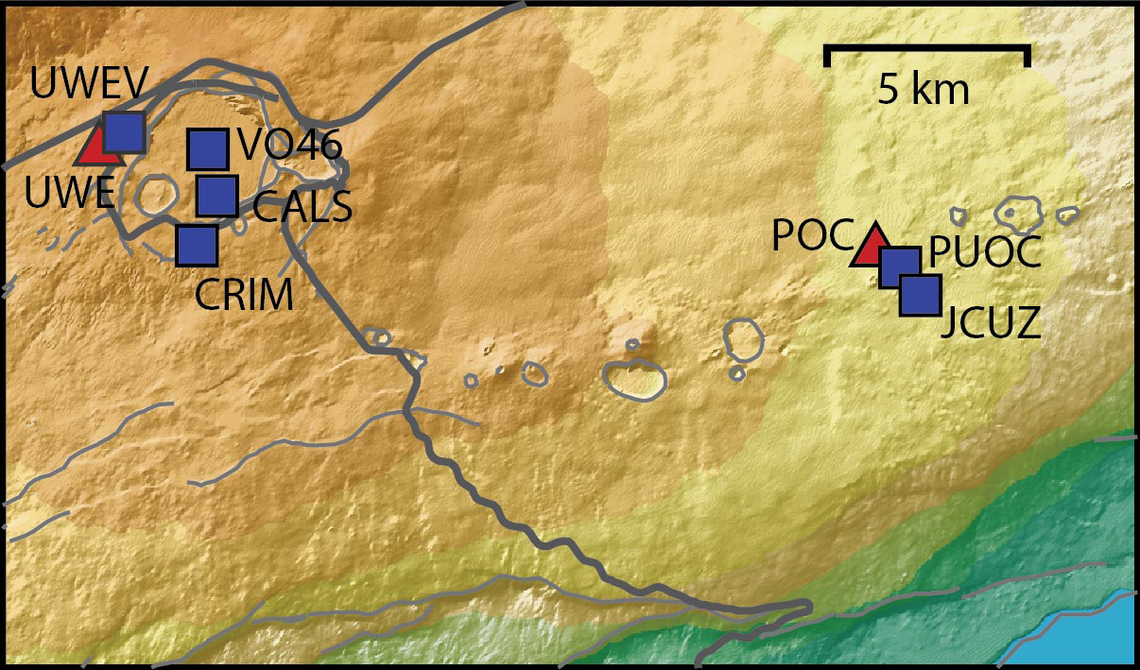
Continuing the Kilauea thread in the Pub here. Perhaps the Iceland one too next time there's remarkable activity.
Currently there is precursory lava flowing into the crater, leading to the next episode that'll probably start within the next day.
You can see the pace of inflation / deflation here. It serves as the primary predictor for when the expect the eruptions, which coincide w/ inflation turning into significant deflation and last for several hours on average with significant fountaining.
 www.usgs.gov
View: https://youtu.be/Uecu2seh4b4
Wife and I like the AfarTV feeds, for the discussion along w/ them, though they're otherwise just mirrors of the official USGS feeds.
View: https://youtu.be/iws3rh5vLAQ
Currently there is precursory lava flowing into the crater, leading to the next episode that'll probably start within the next day.
You can see the pace of inflation / deflation here. It serves as the primary predictor for when the expect the eruptions, which coincide w/ inflation turning into significant deflation and last for several hours on average with significant fountaining.
Monitoring Data for Kīlauea
For more information on how electronic tiltmeters and GPS receivers help monitor the deformation of Kīlauea volcano, see the HVO Deformation page.
View: https://youtu.be/Uecu2seh4b4
Wife and I like the AfarTV feeds, for the discussion along w/ them, though they're otherwise just mirrors of the official USGS feeds.
View: https://youtu.be/iws3rh5vLAQ
120 Replies
·
3257 views
TWiT Tech Podcast Network
Time for another AWESOME video from the TWIT Network!
View: https://www.youtube.com/shorts/AGvjJoT67F0
Direct YouTube Link - The Multi-User Functionality of the Apple HomeView
TWIT's Website
TWIT Live Feed
View: https://www.youtube.com/shorts/AGvjJoT67F0
Direct YouTube Link - The Multi-User Functionality of the Apple HomeView
TWIT's Website
TWIT Live Feed
0 Replies
·
8 views
TWiT Tech Podcast Network
Time for another AWESOME video from the TWIT Network!
View: https://www.youtube.com/shorts/mhc5dZ09m3U
Direct YouTube Link - Perseverance Mars Rover Sets New Interplanetary Driving Record
TWIT's Website
TWIT Live Feed
View: https://www.youtube.com/shorts/mhc5dZ09m3U
Direct YouTube Link - Perseverance Mars Rover Sets New Interplanetary Driving Record
TWIT's Website
TWIT Live Feed
0 Replies
·
13 views

Who says dinner or lunch has to be the only good meals of the day?
Honey butter grits with scrambled eggs and grilled boneless pork ribs on flakey biscuits washed down with cranberry juice.
Honey butter grits with scrambled eggs and grilled boneless pork ribs on flakey biscuits washed down with cranberry juice.
6630 Replies
·
379384 views

