

Social Feed

Supporting Founder
CONSUMER ELECTRONICS DAILY
August 27, 2004, Friday
1080p DTVs Seen 'Proliferating' Soon, HDTV Forum is Told
LOS ANGELES -- Picture quality matters as much to a consumer as form factor in a DTV set purchase, speaker after speaker emphasized here at this week's HDTV Forum. Set-maker executives said CE will respond next year with a "proliferation" of DTV products capable of 1080p resolution, putting the onus on broadcasters and the content industry to respond with 1080p HDTV programming.
Their embracing of 1080p as the ultimate DTV step-up feature seemed a form of backlash at statements earlier in the conference by ABC and ESPN executives that 720p was just fine for live football telecasts in HDTV. Overall, "there's an unmistakable trend" toward larger screen sizes in all DTV technologies, "and this trend will accelerate," Jonas Tanenbaum, Samsung senior mktg. mgr. for visual display products, told the Forum Wed. His other prediction was that microdisplay- based rear-projection will make a very aggressive attempt to "imitate" the form factor of flat- panel plasma and LCD. In turn, he said, 30%-thinner CRT- based rear-projection will seek to emulate microdisplay- based rear-projection DTV. It's expected that sets capable of 1920x1080p reproduction -- the "holy grail" of HDTV -- soon will "proliferate" as more programming becomes available and there's more exposure to consumers of the benefits of 1080p, Tanenbaum said.
Tanenbaum said it's projected there will be an eightfold increase in shipments of flat-panel DTVs through 2007. Form factor and picture quality are driving the success of flat panel, and the consumer is somewhat indifferent about which technology is used in the set, Tanenbaum said. Until now, the flat-panel DTV "landscape has been segmented" by screen sizes, he said. In LCD TV, 80% of the units sold at present are in screen sizes of 20W or less, he said. Plasma has been concentrated in the 32W-42W segment, while microdisplay- based rear-projection DTVs have dominated the 50W and larger "space," he said. In the near future, there will emerge "battleground" screen sizes among the 3 technologies, he said; LCD TVs will get larger, plasma will grow more focused on its core 40W and 42W base, and microdisplay will need to continue to increase in size to keep pace to maintain its forte as delivering big picture and high performance in a small cabinet.
Scott Ramirez, vp-mktg., at Toshiba America Consumer Products, agreed with Tanenbaum that while 720p will become "the standard" in fixed-pixel plasma displays, 1080p will be the norm in "top end" product such as microdisplay-based projection TVs, step up LCD TVs, and a new realm of flat-panel technology to be introduced in the next few months by Toshiba and others. He estimated over 25% of microdisplay-based projection TV could be 1080p next year and that proportion will grow quickly from there. Although 1080p will be found in flat-panel TVs 37W and larger, it will become a more important feature in screen sizes over 40W, Ramirez said.
As for new product developments from Toshiba, Ramirez hinted the company would introduce them soon. "SED" products -- resulting from joint development work between Toshiba and Canon -- will be billed as "the ultimate" large-screen flat-panel technology, he said. "OEL" -- the result of joint development with Matsushita -- will be given the same description in small screen flat panel, he said. Among its many frills, SED will be self- illuminating for low power consumption with no backlight or fan needed, Ramirez said. OEL's attributes will include the thinnest form factor and widest viewing angles possible when compared with other small-screen flat-panel technologies, he said.
Flat-panel TV growth will continue to double this year, with LCD dominating the market in screen sizes 40W and less, plasma 40W and above, Ramirez said. Moreover, flat-panel will continue to co-exist with microdisplay- based rear-projection, he said. As flat-panel TV grows increasingly "price-sensitive" this holiday selling season and beyond -- particularly in 13W-42W screen sizes -- microdisplays at 45W-73W will "continue to show value," Ramirez said. He agreed with Tanenbaum that microdisplays would grow thinner "and more flat panel- like" to try and emulate the successful form factor of plasma and LCD.
The big constraint of microdisplays has been their short supply -- a subject repeatedly emphasized by speakers at the Forum. Lamp and screen suppliers built their factory capacities to conform to analysts' projections that the industry would sell only 840,000 microdisplay-based rear-projection DTVs this year, said Vincent Sollitto, CEO at LCoS developer Brillian Corp. But the analysts were wrong, "and now we're in a situation where we can't get as many of the parts we want," although the shortage is expected to abate later this year and early next, Sollitto said.
All the major microdisplay technologies "have a place in this incredible $20 billion market," Sollitto said. LCoS has been "much-maligned" over the years, beginning with the unsuccessful attempt by Thomson and Three-Five Systems to build an RCA-branded LCoS rear- projection TV in 2002, he said. The effort failed because "there wasn't any infrastructure in place at that time," he said. "We haven't had a lot of good history in the past" for LCoS, Sollitto said, adding: "This year has been a little different -- we've had some good news and some disappointing news." Introductions of 720p products from Brillian, JVC and Sanyo and Sony's Qualia- branded 1080p front projector (which Sony calls "SXRD") lent much-needed credibility to the LCoS sector, he said. When Intel announced at the last CES it was going to enter the LCoS market, "we all cheered because we would have a big brother to fight the evil demons in Texas," Sollitto said jokingly in reference to the LCoS-rival Texas Instruments DLP camp. "But the guys at Intel discover it was a little more difficult that just putting silicon on top of silicon," he said. But he predicted "they're going to come back next year and help us fight the good fight" against DLP. -- Paul Gluckman
August 27, 2004, Friday
1080p DTVs Seen 'Proliferating' Soon, HDTV Forum is Told
LOS ANGELES -- Picture quality matters as much to a consumer as form factor in a DTV set purchase, speaker after speaker emphasized here at this week's HDTV Forum. Set-maker executives said CE will respond next year with a "proliferation" of DTV products capable of 1080p resolution, putting the onus on broadcasters and the content industry to respond with 1080p HDTV programming.
Their embracing of 1080p as the ultimate DTV step-up feature seemed a form of backlash at statements earlier in the conference by ABC and ESPN executives that 720p was just fine for live football telecasts in HDTV. Overall, "there's an unmistakable trend" toward larger screen sizes in all DTV technologies, "and this trend will accelerate," Jonas Tanenbaum, Samsung senior mktg. mgr. for visual display products, told the Forum Wed. His other prediction was that microdisplay- based rear-projection will make a very aggressive attempt to "imitate" the form factor of flat- panel plasma and LCD. In turn, he said, 30%-thinner CRT- based rear-projection will seek to emulate microdisplay- based rear-projection DTV. It's expected that sets capable of 1920x1080p reproduction -- the "holy grail" of HDTV -- soon will "proliferate" as more programming becomes available and there's more exposure to consumers of the benefits of 1080p, Tanenbaum said.
Tanenbaum said it's projected there will be an eightfold increase in shipments of flat-panel DTVs through 2007. Form factor and picture quality are driving the success of flat panel, and the consumer is somewhat indifferent about which technology is used in the set, Tanenbaum said. Until now, the flat-panel DTV "landscape has been segmented" by screen sizes, he said. In LCD TV, 80% of the units sold at present are in screen sizes of 20W or less, he said. Plasma has been concentrated in the 32W-42W segment, while microdisplay- based rear-projection DTVs have dominated the 50W and larger "space," he said. In the near future, there will emerge "battleground" screen sizes among the 3 technologies, he said; LCD TVs will get larger, plasma will grow more focused on its core 40W and 42W base, and microdisplay will need to continue to increase in size to keep pace to maintain its forte as delivering big picture and high performance in a small cabinet.
Scott Ramirez, vp-mktg., at Toshiba America Consumer Products, agreed with Tanenbaum that while 720p will become "the standard" in fixed-pixel plasma displays, 1080p will be the norm in "top end" product such as microdisplay-based projection TVs, step up LCD TVs, and a new realm of flat-panel technology to be introduced in the next few months by Toshiba and others. He estimated over 25% of microdisplay-based projection TV could be 1080p next year and that proportion will grow quickly from there. Although 1080p will be found in flat-panel TVs 37W and larger, it will become a more important feature in screen sizes over 40W, Ramirez said.
As for new product developments from Toshiba, Ramirez hinted the company would introduce them soon. "SED" products -- resulting from joint development work between Toshiba and Canon -- will be billed as "the ultimate" large-screen flat-panel technology, he said. "OEL" -- the result of joint development with Matsushita -- will be given the same description in small screen flat panel, he said. Among its many frills, SED will be self- illuminating for low power consumption with no backlight or fan needed, Ramirez said. OEL's attributes will include the thinnest form factor and widest viewing angles possible when compared with other small-screen flat-panel technologies, he said.
Flat-panel TV growth will continue to double this year, with LCD dominating the market in screen sizes 40W and less, plasma 40W and above, Ramirez said. Moreover, flat-panel will continue to co-exist with microdisplay- based rear-projection, he said. As flat-panel TV grows increasingly "price-sensitive" this holiday selling season and beyond -- particularly in 13W-42W screen sizes -- microdisplays at 45W-73W will "continue to show value," Ramirez said. He agreed with Tanenbaum that microdisplays would grow thinner "and more flat panel- like" to try and emulate the successful form factor of plasma and LCD.
The big constraint of microdisplays has been their short supply -- a subject repeatedly emphasized by speakers at the Forum. Lamp and screen suppliers built their factory capacities to conform to analysts' projections that the industry would sell only 840,000 microdisplay-based rear-projection DTVs this year, said Vincent Sollitto, CEO at LCoS developer Brillian Corp. But the analysts were wrong, "and now we're in a situation where we can't get as many of the parts we want," although the shortage is expected to abate later this year and early next, Sollitto said.
All the major microdisplay technologies "have a place in this incredible $20 billion market," Sollitto said. LCoS has been "much-maligned" over the years, beginning with the unsuccessful attempt by Thomson and Three-Five Systems to build an RCA-branded LCoS rear- projection TV in 2002, he said. The effort failed because "there wasn't any infrastructure in place at that time," he said. "We haven't had a lot of good history in the past" for LCoS, Sollitto said, adding: "This year has been a little different -- we've had some good news and some disappointing news." Introductions of 720p products from Brillian, JVC and Sanyo and Sony's Qualia- branded 1080p front projector (which Sony calls "SXRD") lent much-needed credibility to the LCoS sector, he said. When Intel announced at the last CES it was going to enter the LCoS market, "we all cheered because we would have a big brother to fight the evil demons in Texas," Sollitto said jokingly in reference to the LCoS-rival Texas Instruments DLP camp. "But the guys at Intel discover it was a little more difficult that just putting silicon on top of silicon," he said. But he predicted "they're going to come back next year and help us fight the good fight" against DLP. -- Paul Gluckman
8 Replies
·
3272 views


Staff member
HERE TO HELP YOU!
Anyone making their own breakfast sausage? I've recently been trying different recipes, found some I like, some I've modified...
42 Replies
·
3599 views

This started a couple months ago. I have 2 H3s on one network, both with 2 EHD identical 3 TB seperately powered so all recordings are accessible by all 4k & J4s (8 of them).
On one H3 (not the main one that controls the MOCA network), after it reboots, it doesn't recognize it has two EHDs plugged into it. Rebooting the EHD by their power source doesn't fix it. Resetting the network doesn't. Software h3 reset doesn't fix it. Rebooting MOCA h3 doesn't fix it but so far, after 3+ cold boots (unplug pwr to H3 with unrecognized EHDs), it finally it figures out they are plugged into it. BUT.... Then when you open a program it only partially shows series and episodes, but instead of showing recordings, it only shows upcoming airings. HELP!!!!
On one H3 (not the main one that controls the MOCA network), after it reboots, it doesn't recognize it has two EHDs plugged into it. Rebooting the EHD by their power source doesn't fix it. Resetting the network doesn't. Software h3 reset doesn't fix it. Rebooting MOCA h3 doesn't fix it but so far, after 3+ cold boots (unplug pwr to H3 with unrecognized EHDs), it finally it figures out they are plugged into it. BUT.... Then when you open a program it only partially shows series and episodes, but instead of showing recordings, it only shows upcoming airings. HELP!!!!
20 Replies
·
250 views

TWiT Tech Podcast Network
Time for another AWESOME video from the TWIT Network!
View: https://www.youtube.com/watch?v=ewCzxcofBUw
Direct YouTube Link - Untitled Linux Show 275
TWIT's Website
TWIT Live Feed
View: https://www.youtube.com/watch?v=ewCzxcofBUw
Direct YouTube Link - Untitled Linux Show 275
TWIT's Website
TWIT Live Feed
0 Replies
·
6 views

Supporting Founder
Lifetime Supporter
No idea what improvements might be involved.
12 Replies
·
566 views


TWiT Tech Podcast Network
Time for another AWESOME video from the TWIT Network!
View: https://www.youtube.com/shorts/E-QczD5oEh4
Direct YouTube Link - AI vs. Coders & Mathematicians: The Great Disruption #shorts
TWIT's Website
TWIT Live Feed
View: https://www.youtube.com/shorts/E-QczD5oEh4
Direct YouTube Link - AI vs. Coders & Mathematicians: The Great Disruption #shorts
TWIT's Website
TWIT Live Feed
0 Replies
·
9 views


Staff member
HERE TO HELP YOU!
Cutting Edge
Sometimes a thread gets so many posts in it that is can cause issues for the server so that why today we introduce The Song Name Game Part 3!
So let the game continue!
The last song was added by Bobby who posted...
One Meat Ball - Andrews Sisters
CONTINUE ON AND HAVE FUN! WELCOME HOME TO SATELLITEGUYS.US!
Here are the original rules for the game as posted by WebbyDude back in 2006. http://www.satelliteguys.us/threads/68645-Song-Name-Game
Just name a song title and the band who performed it. The next person does the same thing, but needs to list a song title or band name which includes a word from the previous entry. Pick songs from any genre.
Example:
Long Live Rock and Roll -- Rainbow
Rainbow in the Dark -- Dio
Another example:
Ride the Lightning -- Metallica
Lightning Strikes -- Ozzy Osbourne
Get it?
An additional note: we all know that song titles, sometimes, use profane words. Because this is a family friendly website it is advised that you clean up that title up a bit. This is accomplished by using something like sh!t instead of the real word. Thanks....
So let the game continue!
The last song was added by Bobby who posted...
One Meat Ball - Andrews Sisters
CONTINUE ON AND HAVE FUN! WELCOME HOME TO SATELLITEGUYS.US!
Here are the original rules for the game as posted by WebbyDude back in 2006. http://www.satelliteguys.us/threads/68645-Song-Name-Game
Just name a song title and the band who performed it. The next person does the same thing, but needs to list a song title or band name which includes a word from the previous entry. Pick songs from any genre.
Example:
Long Live Rock and Roll -- Rainbow
Rainbow in the Dark -- Dio
Another example:
Ride the Lightning -- Metallica
Lightning Strikes -- Ozzy Osbourne
Get it?
An additional note: we all know that song titles, sometimes, use profane words. Because this is a family friendly website it is advised that you clean up that title up a bit. This is accomplished by using something like sh!t instead of the real word. Thanks....
68512 Replies
·
2671719 views


For some reason, the satelliteguys.us site is loading a lot slower than usual on both Chrome on my Asus laptop and Safari on my iPhone.
I'm also seeing longer appearances of the blue bar at the top and the "3 blue bars" loading symbol.
Is anyone else also having the same problem? Thanks in advance.
I'm also seeing longer appearances of the blue bar at the top and the "3 blue bars" loading symbol.
Is anyone else also having the same problem? Thanks in advance.
540 Replies
·
18284 views


Staff member
Pub Member / Supporter
Please post your remote make/model here and any details of your issue. We are looking to collect as many examples as possible. I may reach out to you for your receiver number, but please do not post it here.
If you've already reported this to me, please repost it here so I can track all instances in one thread.
Thanks!
Brittany
If you've already reported this to me, please repost it here so I can track all instances in one thread.
Thanks!
Brittany
22 Replies
·
691 views


Lifetime Supporter
Continuing the Kilauea thread in the Pub here. Perhaps the Iceland one too next time there's remarkable activity.
Currently there is precursory lava flowing into the crater, leading to the next episode that'll probably start within the next day.
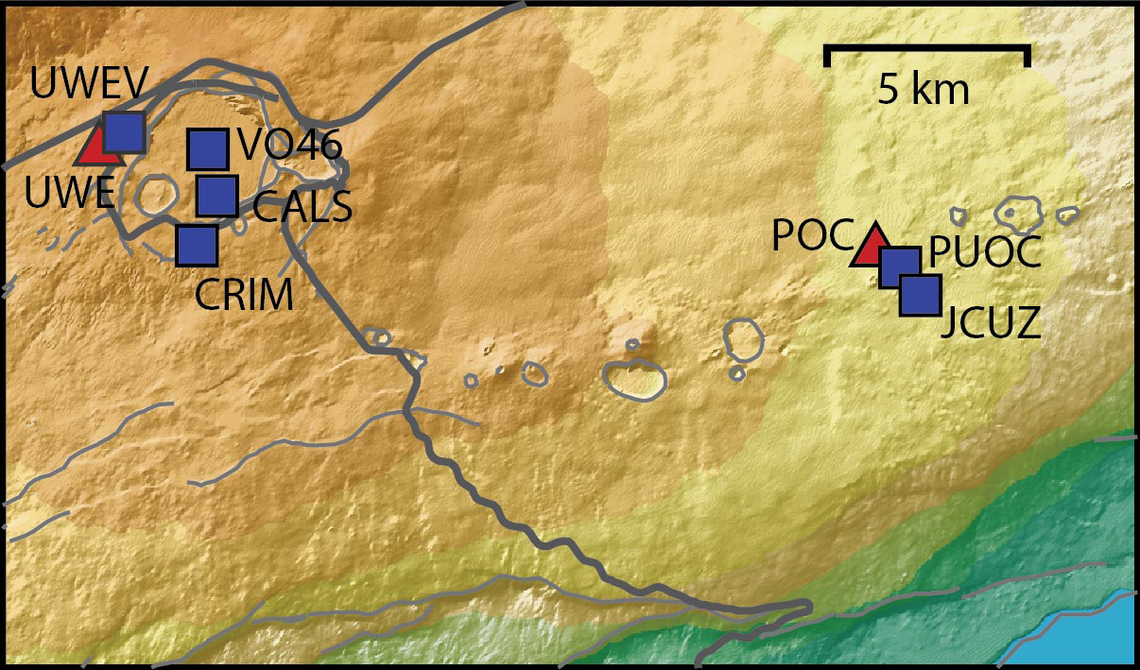
You can see the pace of inflation / deflation here. It serves as the primary predictor for when the expect the eruptions, which coincide w/ inflation turning into significant deflation and last for several hours on average with significant fountaining.
 www.usgs.gov
View: https://youtu.be/Uecu2seh4b4
Wife and I like the AfarTV feeds, for the discussion along w/ them, though they're otherwise just mirrors of the official USGS feeds.
View: https://youtu.be/iws3rh5vLAQ
Currently there is precursory lava flowing into the crater, leading to the next episode that'll probably start within the next day.
You can see the pace of inflation / deflation here. It serves as the primary predictor for when the expect the eruptions, which coincide w/ inflation turning into significant deflation and last for several hours on average with significant fountaining.
Monitoring Data for Kīlauea
For more information on how electronic tiltmeters and GPS receivers help monitor the deformation of Kīlauea volcano, see the HVO Deformation page.
View: https://youtu.be/Uecu2seh4b4
Wife and I like the AfarTV feeds, for the discussion along w/ them, though they're otherwise just mirrors of the official USGS feeds.
View: https://youtu.be/iws3rh5vLAQ
120 Replies
·
3267 views