

Social Feed

A couple of years ago I was at a crossroads in the quest for what to do about High Definition and 4:2:2 satellite content. At the time we in North America seemed stuck on using DVB-S as the modulation of choice, while DVB-S2 was being used in Europe for most all of their HD content. Several years before I had been testing software for a company that wanted to produce a workable PCI card solution for HD and SD in both 4:2:0 and 4:2:2 colorspace. The company decided to leave the satellite scene so I started playing with MyTheatre as well as Rod Hewitt's TSReader program. In the summer of 2006 I decided that I needed something permanent in the HD and 4:2:2 departments. I was torn between getting a QualiTV receiver, which at that time would work on SD and HD in both colorspace modes, or building a Home Theater PC. I wasn't really interested in any of the just released Korean HD receivers hitting the market because they were stuck in doing 4:2:0 only. The Quali was a proven performer although it had several caveats that needed to be dealt with, and of course computer PCI cards have their very own set of learning curve difficulties. It was the sheer versatility that prompted me to build a new Home Theater PC with its sole purpose being a satellite receiver. It was constructed specifically with good horsepower for HD and 4:2:2 content, and my old but trusted BEC DST-1000 PCI card was relegated to standby use and a new Twinhan 102G was installed. Its performance was outstanding. I added some newer codecs such as BitControl and Dscaler which are great 4:2:2 performers, as well as the more common ones like Elecard, Sonic Cinemaster, FFDShow, CyberLink, InterVideo, and a few others. When dealing with a PCI card, getting the codecs working properly and adjusted for correct deinterlacing is the maker or breaker of the whole system…it is the single most important aspect of a successful HTPC.
Over the next year or so the system was upgraded once with some more horsepower…not that it needed it but the opportunity arose, and it's better to have too much power than not enough. During mid to late 2007 there seemed to be a distinct move by some programmers to deploy the DVB-S2 modulation scheme in order to cram more bits in less space. So it became time to put some thought into an S2 solution, and I was right back at square one so to speak. Some of the newer STB's were working with S2 with good results, even with h.264 compression. There were a couple of PCI cards that were coming to the forefront…the TechnoTrend S2-3200 and one from DVBWorld. The USB adapters from both of these companies were getting some reviews, but there was a bandwidth limitation problem with the TechnoTrend USB model that I thought could possibly be a hinderance for any USB model, so I wanted to stay clear of the dongles. Some reports were about the TT S2-3200 being a bit deaf, which did concern me as I am a bit undersized on C band. And since I used Rod Hewitt's TSReader program a lot I knew there was no support for the cheaper DVBWorld card. In early March of 2008 I went ahead and pre-purchased an S2-3200 from CyberEstore…the only supplier of the S2-3200 in North America…and they were out of stock. They were running a pre-order special, and it was cheaper than ordering from DVBShop in Germany. CyberEstore posted regular status updates on their website, and I received the card in about 4 weeks.
Installation was bland and uneventful, as I did my homework beforehand. I knew I would have to use the ancient WDM data driver for use with TSReader, and the computer was already set up with my arsenal of codecs, so it just picked up right where it left off from my trusty Twinhan 102G. I found several of the reported S2 signals, but there were also 3 in particular on Galaxy 14 that I could not lock. I attributed this to my lacking of dish size…but I'll say more about that later. When racing season began there were some S2 feeds being reported, so of course I had to check those out. Although I could lock about 80% of the found feeds with my 8 footer, I found there were several that I could lock that other people with 10 footers were having trouble with, and there were a few that were marginal with me that others could lock fine. These were S2-8psk so it stands to reason you need as big a dish as is practical for your location, and it needs to be well tuned. My dish is an 8 foot Channel Master fiberglass using a Chaparral Bullseye II feed. The LNB's are a pair of California Amplifier Extended Professional II's 30 degree with 500 khz stability for C band, and a pair of Japan Radio NJR2535S PLL's rated at a .7db noise figure with 25 khz stability for KU band. Four separate RG11 coaxes come 270 feet down the hill to a 4x4 DTV multiswitch and power inserters for the vertical LNB's to insure full operating power.
Over this summer I have been very satisfied with the performance of the S2-3200 primarily using the TSReader/VLC combo. I'm not much of a baseball fan so the summer months is the time of least use of the HTPC…my heavy use time is during the fall/winter/spring college sports season. I do enjoy racing so it does see "some" summertime use. The reports started coming in about a particular network transitioning to DVB-S2. I was set to go for that modulation change but the biggest challenge was they were also going to use h.264 compression. I had messed around with the Tennis Channel HD feed that was in h.264 and I had found that the current release of VLC wouldn't work with h.264 at all…it just crashed. Since VLC is open source there are many people working on the program at once, and their work can be found in the "VLC Nightly Builds" section of their website. I had been checking a few of these later versions and while they did show improvement it was obvious they were still not ready for prime time. I had been using MyTheatre mainly for recording purposes, but it sees the S2-3200 as a WinTV Nova card so no go for S2 signals. Saar had been promising S2 and h.264 compatibility for a long time, but progress was slow. Using VLC didn't allow the choice of DirectShow codecs as MyTheatre does, so you're stuck with whatever codec is built in the program. There were some software versions being reported as working very well with S2-h.264 feeds, but the problem there was they only worked with the newer BDA drivers. I was at a crossroads yet again…do I continue to hang on to TSReader and use the WDM drivers, forsaking any h.264, or do I install the BDA drivers and move on to greener pastures with different software? I knew I would miss TSReaders ability to look at the tables and garner PID info, but I made the decision to move on and try some new things. I installed the newest BDA drivers for the S2-3200 from TechnoTrends site and had a look at DVBDream. I managed to get it working…sort of. It had a tough time locking S2 signals and didn't seem to have any provision to directly tell the software that the signal being tuned was S2. It was a hit or miss situation, similar to my investigation of the new version 4 beta of MyTheatre. I remember playing with the trial version of the Transedit program associated with DVBViewer, and still had it installed in the computer. Serious playing with this program unearthed absolute support for DVB-S2, and after doing a scan on an S2-h.264 MUX I set the codecs to their proper settings and was blessed with a glorious preview of an S2 h.264 HD picture. I was viewing the output on an LG 42" 1080p LCD and the compression artifacts were extremely minimal. After looking at the price of the DVBViewer Pro version I felt it was well worth the 19 bux if it produced the results I had seen with the transponder editor. I ponied up the cash and within an hour I had a serial number.
The Transedit program works in conjunction with the main program, and I was ecstatic to find out that it has an analyzer program built in. It looks like I'm not going to miss TSReader as much as I thought, and although TSR has other features that the Transedit program doesn't have, I probably won't use them. The DVBViewer program has some minimal quirks, but so does every other program I have tried. The software works very well with the S2-3200 and tunes/scans signals extremely quick. With TSReader I would wait sometimes up to a minute for it to get back to a useable state if the tuner was unable to lock an S2 signal. With the Transedit program you will know if you get a lock in just a few seconds.
I don't want to get into a review of DVBViewer, but I think it's important that one sees what to expect and what can be accomplished using this software with the TT S2-3200, so I will conclude with this. Since DVBViewer uses the BDA drivers I thought I would go back and take a look at those S2 signals that I couldn't lock using TSReader with WDM drivers. I revisited the 3 MUXES on Galaxy 14 that wouldn't lock at all, and using BDA drivers with DVBViewers Transedit program I locked 2 of those 3 signals, and they showed no errors.
The bottom line….
How well your DVB card works is dependent on how well you computer is set up with the proper codecs and how much horsepower you have under the hood. A PCI card (or USB dongle) is just a tuner…no more, no less. Its job is to lock the desired signal and pass the transport stream to the computer, and the computer's job is to deal with whatever signal it's given.
The Technotrend S2-3200 in my opinion works as well as anything out there when using the BDA drivers. After using both sets of drivers I can see a marked difference in tuner sensitivity.
It's better to have a well tuned system when dealing with S2 signals no matter what receiver you use.
There will always be something better on the horizon when dealing with consumer electronics, and this will probably never change. I've played the waiting game before, and it never really pays off. The TechnoTrend S2-3200 is a good performer, and if the computer and dish system is set up to be ready for DVB-S2 signals, it won't disappoint.
Over the next year or so the system was upgraded once with some more horsepower…not that it needed it but the opportunity arose, and it's better to have too much power than not enough. During mid to late 2007 there seemed to be a distinct move by some programmers to deploy the DVB-S2 modulation scheme in order to cram more bits in less space. So it became time to put some thought into an S2 solution, and I was right back at square one so to speak. Some of the newer STB's were working with S2 with good results, even with h.264 compression. There were a couple of PCI cards that were coming to the forefront…the TechnoTrend S2-3200 and one from DVBWorld. The USB adapters from both of these companies were getting some reviews, but there was a bandwidth limitation problem with the TechnoTrend USB model that I thought could possibly be a hinderance for any USB model, so I wanted to stay clear of the dongles. Some reports were about the TT S2-3200 being a bit deaf, which did concern me as I am a bit undersized on C band. And since I used Rod Hewitt's TSReader program a lot I knew there was no support for the cheaper DVBWorld card. In early March of 2008 I went ahead and pre-purchased an S2-3200 from CyberEstore…the only supplier of the S2-3200 in North America…and they were out of stock. They were running a pre-order special, and it was cheaper than ordering from DVBShop in Germany. CyberEstore posted regular status updates on their website, and I received the card in about 4 weeks.
Installation was bland and uneventful, as I did my homework beforehand. I knew I would have to use the ancient WDM data driver for use with TSReader, and the computer was already set up with my arsenal of codecs, so it just picked up right where it left off from my trusty Twinhan 102G. I found several of the reported S2 signals, but there were also 3 in particular on Galaxy 14 that I could not lock. I attributed this to my lacking of dish size…but I'll say more about that later. When racing season began there were some S2 feeds being reported, so of course I had to check those out. Although I could lock about 80% of the found feeds with my 8 footer, I found there were several that I could lock that other people with 10 footers were having trouble with, and there were a few that were marginal with me that others could lock fine. These were S2-8psk so it stands to reason you need as big a dish as is practical for your location, and it needs to be well tuned. My dish is an 8 foot Channel Master fiberglass using a Chaparral Bullseye II feed. The LNB's are a pair of California Amplifier Extended Professional II's 30 degree with 500 khz stability for C band, and a pair of Japan Radio NJR2535S PLL's rated at a .7db noise figure with 25 khz stability for KU band. Four separate RG11 coaxes come 270 feet down the hill to a 4x4 DTV multiswitch and power inserters for the vertical LNB's to insure full operating power.
Over this summer I have been very satisfied with the performance of the S2-3200 primarily using the TSReader/VLC combo. I'm not much of a baseball fan so the summer months is the time of least use of the HTPC…my heavy use time is during the fall/winter/spring college sports season. I do enjoy racing so it does see "some" summertime use. The reports started coming in about a particular network transitioning to DVB-S2. I was set to go for that modulation change but the biggest challenge was they were also going to use h.264 compression. I had messed around with the Tennis Channel HD feed that was in h.264 and I had found that the current release of VLC wouldn't work with h.264 at all…it just crashed. Since VLC is open source there are many people working on the program at once, and their work can be found in the "VLC Nightly Builds" section of their website. I had been checking a few of these later versions and while they did show improvement it was obvious they were still not ready for prime time. I had been using MyTheatre mainly for recording purposes, but it sees the S2-3200 as a WinTV Nova card so no go for S2 signals. Saar had been promising S2 and h.264 compatibility for a long time, but progress was slow. Using VLC didn't allow the choice of DirectShow codecs as MyTheatre does, so you're stuck with whatever codec is built in the program. There were some software versions being reported as working very well with S2-h.264 feeds, but the problem there was they only worked with the newer BDA drivers. I was at a crossroads yet again…do I continue to hang on to TSReader and use the WDM drivers, forsaking any h.264, or do I install the BDA drivers and move on to greener pastures with different software? I knew I would miss TSReaders ability to look at the tables and garner PID info, but I made the decision to move on and try some new things. I installed the newest BDA drivers for the S2-3200 from TechnoTrends site and had a look at DVBDream. I managed to get it working…sort of. It had a tough time locking S2 signals and didn't seem to have any provision to directly tell the software that the signal being tuned was S2. It was a hit or miss situation, similar to my investigation of the new version 4 beta of MyTheatre. I remember playing with the trial version of the Transedit program associated with DVBViewer, and still had it installed in the computer. Serious playing with this program unearthed absolute support for DVB-S2, and after doing a scan on an S2-h.264 MUX I set the codecs to their proper settings and was blessed with a glorious preview of an S2 h.264 HD picture. I was viewing the output on an LG 42" 1080p LCD and the compression artifacts were extremely minimal. After looking at the price of the DVBViewer Pro version I felt it was well worth the 19 bux if it produced the results I had seen with the transponder editor. I ponied up the cash and within an hour I had a serial number.
The Transedit program works in conjunction with the main program, and I was ecstatic to find out that it has an analyzer program built in. It looks like I'm not going to miss TSReader as much as I thought, and although TSR has other features that the Transedit program doesn't have, I probably won't use them. The DVBViewer program has some minimal quirks, but so does every other program I have tried. The software works very well with the S2-3200 and tunes/scans signals extremely quick. With TSReader I would wait sometimes up to a minute for it to get back to a useable state if the tuner was unable to lock an S2 signal. With the Transedit program you will know if you get a lock in just a few seconds.
I don't want to get into a review of DVBViewer, but I think it's important that one sees what to expect and what can be accomplished using this software with the TT S2-3200, so I will conclude with this. Since DVBViewer uses the BDA drivers I thought I would go back and take a look at those S2 signals that I couldn't lock using TSReader with WDM drivers. I revisited the 3 MUXES on Galaxy 14 that wouldn't lock at all, and using BDA drivers with DVBViewers Transedit program I locked 2 of those 3 signals, and they showed no errors.
The bottom line….
How well your DVB card works is dependent on how well you computer is set up with the proper codecs and how much horsepower you have under the hood. A PCI card (or USB dongle) is just a tuner…no more, no less. Its job is to lock the desired signal and pass the transport stream to the computer, and the computer's job is to deal with whatever signal it's given.
The Technotrend S2-3200 in my opinion works as well as anything out there when using the BDA drivers. After using both sets of drivers I can see a marked difference in tuner sensitivity.
It's better to have a well tuned system when dealing with S2 signals no matter what receiver you use.
There will always be something better on the horizon when dealing with consumer electronics, and this will probably never change. I've played the waiting game before, and it never really pays off. The TechnoTrend S2-3200 is a good performer, and if the computer and dish system is set up to be ready for DVB-S2 signals, it won't disappoint.
9 Replies
·
8625 views
This started a couple months ago. I have 2 H3s on one network, both with 2 EHD identical 3 TB seperately powered so all recordings are accessible by all 4k & J4s (8 of them).
On one H3 (not the main one that controls the MOCA network), after it reboots, it doesn't recognize it has two EHDs plugged into it. Rebooting the EHD by their power source doesn't fix it. Resetting the network doesn't. Software h3 reset doesn't fix it. Rebooting MOCA h3 doesn't fix it but so far, after 3+ cold boots (unplug pwr to H3 with unrecognized EHDs), it finally it figures out they are plugged into it. BUT.... Then when you open a program it only partially shows series and episodes, but instead of showing recordings, it only shows upcoming airings. HELP!!!!
On one H3 (not the main one that controls the MOCA network), after it reboots, it doesn't recognize it has two EHDs plugged into it. Rebooting the EHD by their power source doesn't fix it. Resetting the network doesn't. Software h3 reset doesn't fix it. Rebooting MOCA h3 doesn't fix it but so far, after 3+ cold boots (unplug pwr to H3 with unrecognized EHDs), it finally it figures out they are plugged into it. BUT.... Then when you open a program it only partially shows series and episodes, but instead of showing recordings, it only shows upcoming airings. HELP!!!!
11 Replies
·
199 views


For some reason, the satelliteguys.us site is loading a lot slower than usual on both Chrome on my Asus laptop and Safari on my iPhone.
I'm also seeing longer appearances of the blue bar at the top and the "3 blue bars" loading symbol.
Is anyone else also having the same problem? Thanks in advance.
I'm also seeing longer appearances of the blue bar at the top and the "3 blue bars" loading symbol.
Is anyone else also having the same problem? Thanks in advance.
539 Replies
·
18224 views


Supporting Founder
Lifetime Supporter
No idea what improvements might be involved.
11 Replies
·
535 views


Staff member
Pub Member / Supporter
Please post your remote make/model here and any details of your issue. We are looking to collect as many examples as possible. I may reach out to you for your receiver number, but please do not post it here.
If you've already reported this to me, please repost it here so I can track all instances in one thread.
Thanks!
Brittany
If you've already reported this to me, please repost it here so I can track all instances in one thread.
Thanks!
Brittany
22 Replies
·
669 views


Lifetime Supporter
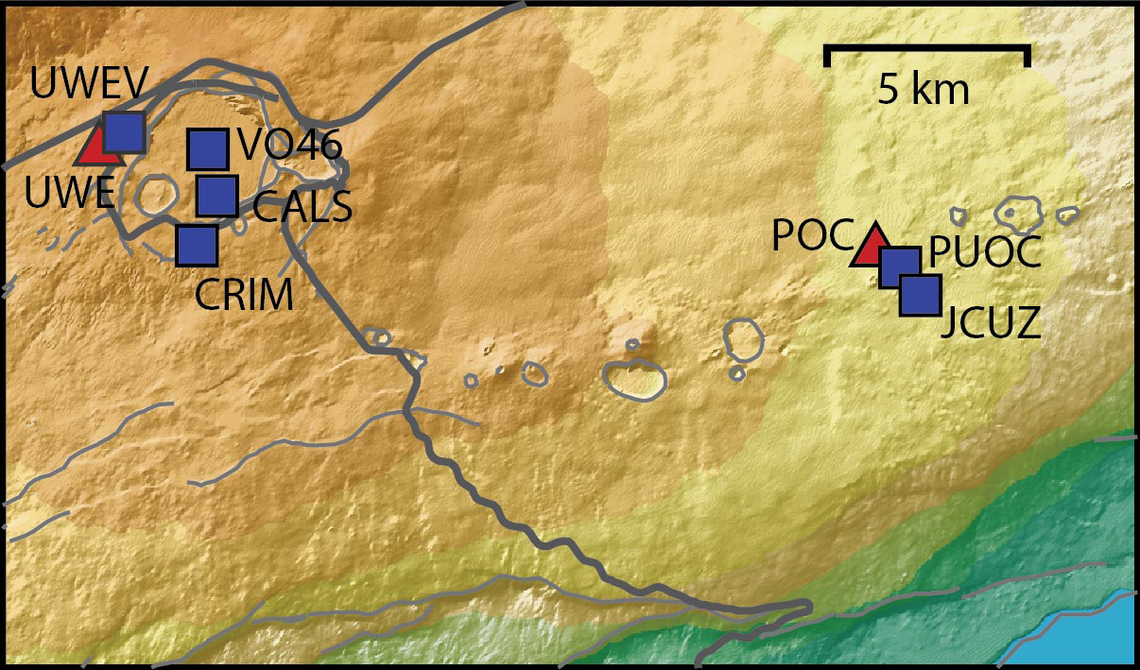
Continuing the Kilauea thread in the Pub here. Perhaps the Iceland one too next time there's remarkable activity.
Currently there is precursory lava flowing into the crater, leading to the next episode that'll probably start within the next day.
You can see the pace of inflation / deflation here. It serves as the primary predictor for when the expect the eruptions, which coincide w/ inflation turning into significant deflation and last for several hours on average with significant fountaining.
 www.usgs.gov
View: https://youtu.be/Uecu2seh4b4
Wife and I like the AfarTV feeds, for the discussion along w/ them, though they're otherwise just mirrors of the official USGS feeds.
View: https://youtu.be/iws3rh5vLAQ
Currently there is precursory lava flowing into the crater, leading to the next episode that'll probably start within the next day.
You can see the pace of inflation / deflation here. It serves as the primary predictor for when the expect the eruptions, which coincide w/ inflation turning into significant deflation and last for several hours on average with significant fountaining.
Monitoring Data for Kīlauea
For more information on how electronic tiltmeters and GPS receivers help monitor the deformation of Kīlauea volcano, see the HVO Deformation page.
View: https://youtu.be/Uecu2seh4b4
Wife and I like the AfarTV feeds, for the discussion along w/ them, though they're otherwise just mirrors of the official USGS feeds.
View: https://youtu.be/iws3rh5vLAQ
120 Replies
·
3249 views
TWiT Tech Podcast Network
Time for another AWESOME video from the TWIT Network!
View: https://www.youtube.com/shorts/AGvjJoT67F0
Direct YouTube Link - The Multi-User Functionality of the Apple HomeView
TWIT's Website
TWIT Live Feed
View: https://www.youtube.com/shorts/AGvjJoT67F0
Direct YouTube Link - The Multi-User Functionality of the Apple HomeView
TWIT's Website
TWIT Live Feed
0 Replies
·
6 views
TWiT Tech Podcast Network
Time for another AWESOME video from the TWIT Network!
View: https://www.youtube.com/shorts/mhc5dZ09m3U
Direct YouTube Link - Perseverance Mars Rover Sets New Interplanetary Driving Record
TWIT's Website
TWIT Live Feed
View: https://www.youtube.com/shorts/mhc5dZ09m3U
Direct YouTube Link - Perseverance Mars Rover Sets New Interplanetary Driving Record
TWIT's Website
TWIT Live Feed
0 Replies
·
12 views

Who says dinner or lunch has to be the only good meals of the day?
Honey butter grits with scrambled eggs and grilled boneless pork ribs on flakey biscuits washed down with cranberry juice.
Honey butter grits with scrambled eggs and grilled boneless pork ribs on flakey biscuits washed down with cranberry juice.
6630 Replies
·
379378 views


Staff member
HERE TO HELP YOU!
Cutting Edge
Sometimes a thread gets so many posts in it that is can cause issues for the server so that why today we introduce The Song Name Game Part 3!
So let the game continue!
The last song was added by Bobby who posted...
One Meat Ball - Andrews Sisters
CONTINUE ON AND HAVE FUN! WELCOME HOME TO SATELLITEGUYS.US!
Here are the original rules for the game as posted by WebbyDude back in 2006. http://www.satelliteguys.us/threads/68645-Song-Name-Game
Just name a song title and the band who performed it. The next person does the same thing, but needs to list a song title or band name which includes a word from the previous entry. Pick songs from any genre.
Example:
Long Live Rock and Roll -- Rainbow
Rainbow in the Dark -- Dio
Another example:
Ride the Lightning -- Metallica
Lightning Strikes -- Ozzy Osbourne
Get it?
An additional note: we all know that song titles, sometimes, use profane words. Because this is a family friendly website it is advised that you clean up that title up a bit. This is accomplished by using something like sh!t instead of the real word. Thanks....
So let the game continue!
The last song was added by Bobby who posted...
One Meat Ball - Andrews Sisters
CONTINUE ON AND HAVE FUN! WELCOME HOME TO SATELLITEGUYS.US!
Here are the original rules for the game as posted by WebbyDude back in 2006. http://www.satelliteguys.us/threads/68645-Song-Name-Game
Just name a song title and the band who performed it. The next person does the same thing, but needs to list a song title or band name which includes a word from the previous entry. Pick songs from any genre.
Example:
Long Live Rock and Roll -- Rainbow
Rainbow in the Dark -- Dio
Another example:
Ride the Lightning -- Metallica
Lightning Strikes -- Ozzy Osbourne
Get it?
An additional note: we all know that song titles, sometimes, use profane words. Because this is a family friendly website it is advised that you clean up that title up a bit. This is accomplished by using something like sh!t instead of the real word. Thanks....
68511 Replies
·
2671631 views


