Social Feed

A
Last reply · posted in Free To Air (FTA) Discussion
In my attempt to get a new Azbox Premium Plus to load up (The blind scan will not work and is not working for anyone, so don't buy one of these if you are buying it for blindscan options) I went to The List and downloaded some TP info..I input it in my AZbox and no go
so, when I was setting up my new dish, I used an old Sonicview 4000 to just locate the sats, it's easy to use and scans quickly..I noted a few TP data on each sat, and was looking at my list and find that they are not the same as the ones on the List.. So I checked the TP info on a Pansat 9200HD and see they are again different... i.e. :
Pansat 9200--- Freq 4101 H/ 26398 SR
PVR 800HD--- Freq 4100 H/ 29998 SR
On most of the TP's I have a difference of 1 Mhz and SR changing all over the place, but I am receiving the same channels..
So, when I go to input into the AZBOX, it is not hitting on either of them...I guess I need to check and in put all PID and VID now.....
Any suggestions???
Which info posted is correct..? I see differences (but not much) in what The List has and what I am receiving.
All of this to try and get an expensive AZBOX to do what it was advertised to do, and it will not... but that's another thread over at AZBOX subforum.
Does the SR # need to be exact??? Will 30000 work for 29998?? Or are they actually 30000 but my receiver is reading different???
I see Ice and those guys keep The List updated right all the time, and I am not sure which way to turn here.. Perhaps the AZ is not working at all.. However I am receiving channels that are not even listed on Lyngsat any other lists but that show CBand Freq's and look to me to be KU freqs and channels, but listed as CBand on that receiver... Sheeeeeeit !!!
Thanks, HB
14 Replies · 2375 views
guapoharry
...
so, when I was setting up my new dish, I used an old Sonicview 4000 to just locate the sats, it's easy to use and scans quickly..I noted a few TP data on each sat, and was looking at my list and find that they are not the same as the ones on the List.. So I checked the TP info on a Pansat 9200HD and see they are again different...
On most of the TP's I have a difference of 1 Mhz and SR changing all over the place, but I am receiving the same channels..
Why don't you list some better examples?
...So, when I go to input into the AZBOX, it is not hitting on either of them...I guess I need to check and in put all PID and VID now.....
Any suggestions???
Which info posted is correct..? I see differences (but not much) in what The List has and what I am receiving.
...
Again, list some examples.
All of this to try and get an expensive AZBOX to do what it was advertised to do, and it will not... but that's another thread over at AZBOX subforum.
...
An expensive Azbox? Try buying an equivalent Dreambox...
Does the SR # need to be exact??? Will 30000 work for 29998?? Or are they actually 30000 but my receiver is reading different???
...
The Freq and SR need to exact enough to get the channel to come in...
I see Ice and those guys keep The List updated right all the time, and I am not sure which way to turn here.. Perhaps the AZ is not working at all.. However I am receiving channels that are not even listed on Lyngsat any other lists but that show CBand Freq's and look to me to be KU freqs and channels, but listed as CBand on that receiver... Sheeeeeeit !!!
Thanks, HB
Again, list some examples so we can evaluate the issue....

If you get a known good blindscan box like a Coolsat 5000 and still have the problems, that would be surprising to me...
A
If you get a known good blindscan box like a Coolsat 5000 and still have the problems, that would be surprising to me...

Thanks for your input. I have been hearing from others across the board that they find different receivers are logging different info, so I guess it's not a big deal, and that most likey if one wants to input info directly it would be good to have a sat list from another who is using the same box...that's my conclusion
I have a Coolsat 6000, but haven't had it out for awhile...I just use the old sonicview 4000, as they have always been so simple to use and roll right through and am only using it to aim at the sats outside in the 100 degree heat and 100% humidity I am dealing with here in the jungle.. and then coming inside and trying to get things sorted out as far a full scans go
I am seeing that the Freq's and sr's are all different.. For instance yesterday I was deleting all TP's that were on the 9200 per TP and rescanning and here is an example,
I have Lyngsat and The List latest updates at hand as an example here is what i got yesterday. The 91w sat on C
Lynsat and the list on H tp's are all logging as V on the 9200
Where the lists have 3720Mhx H @ 26700 sr I am logging on the 9200HD 3721 V @ 26998 sr The old Sonicview 3719H @ 26700
The lists: 3860 v @30000 I am logging 3862 H @ 30000

So that is what I see happening..I am trying to do a comparison on 3 receivers at this point, the 9200HD, the SatHpvr800 and the Az P+, and it seems that guys across the pond are getting their AzP+'s up and scanning now using new firmware.. I haven't looked yet, as I am just doing the 9200 this week and next week I'll get after the Pvr800 and hope to find new AZ s/w soon and then try it again
Messing with this, I was looking at Lists, and wondering "which list do I use to manually input?" that's when I noticed this problem.

I thought I had a switching problem with my setup, but it appears not.I was asking switching questions over in CBand discussion, and I think I have it right, however i may need to spend more time with the setup of TP's on the AZBOX i.e on the 9200 I setup for KU using single 10600 22khz OFF and they log...On the AZ not at all, and someone suggesting trying 22khz on but i am looking for s/w first, then go in and try all this, as I may just have a s/w problem

Bottom line, I am hoping Stogie send me the sat list he has for his AZB, which he will when he finds time, and I can manually input and see what's up here.
On all these receivers I am deleting any existing TP info completely, and letting them scan new across the board.
It appears that all receivers are logging differently, why, I don't know..but it makes it a lot of work and time consuming to hit it correctly when setting up a new receiver...
thanks again for your input..HB
M
Mods for your Pansat 9200HD

There are mods that you can easily do to your Pansat 9200HD that work very well and have greatly reduced the glitches. I still have a glitch once in a great while but that's very seldom. Take a look at these mods, they should work out your problems and make the Panny a desirable receiver.

http://www.satelliteguys.us/free-air-fta-discussion/207171-heatsink-modification.html

http://www.satelliteguys.us/free-air-fta-discussion/207330-cooling-fan-modification.html

Also keep in mind that not all receivers handle switches the same way, the 9200HD does very well as it does 1.0 / 1.1 / 1.2 & USALS. I believe this increases it's ability and yet your other receivers may not have the same characteristics. I own many different recievers and still favor the Pansat for many reasons and especially now that I've modified it.

I also had issues with my Viewsat 9000HD and blind scan, for some reason it would scan in all of the C-band freq's in the 6000 range and yet the channels worked. I can only guess that the software is flakey and mistakenly assigns the freq's with a first digit of 6 instead of a 3 or 4.

Your varying freq issue may be a combination of many things concerning the hardware and how each receiver interprets them, in other words it may be a compatibility issue with switches, lnb's and receivers. This hobby seems to be getting more complicated all the time. :eek:
stogie5150
I setup for KU using single 10600 22khz OFF and they log.

If you are using that setting on a regular LNB that why you having problems. It should be 10750 unless the LNB's are universal LNB's. And if you have universal LNB's on your quad ortho it will NEVER work correctly because the LNB requires 22k to switch from LO to HIGH, and at the SAME time you are sending 22k from the azbox to select the KU LNB's. So all it will ever scan is the HIGH side of your universal LNB because the azbox is sending 22k ALL the time.

Now, if you have regular 11.7/12.2 gHz standard KU LNB's on that quad, your settings should be LO 10750, 22k ON.

My sat list ain't gonna do a damn thing for you, I don't think,because I don't do mine that way, I have a multiswitch for each dish. I don't use 22k for EXACTLY the reason you are experiencing. Yeah, it adds equipment, but makes troubleshooting a LOT easier. In your case that'd be a multiswitch for each band coming off that quad ortho.

If you still want the list I'll send it, but you might be putting more complexity into an already cocked up situation. :cool:
A
Thanks McGuyver for those links, and I agree Stogie, forget the list.
I have found that I am switching my setup correctly, however their may be switch compatibility issues as per McGuyver's post above..I ask for advice over at C_Band concerning the switching...And it seems I am switching my stuff correctly (hardware, that is) but I am having problems in the actual setup in the box...
Concerning the AZbox in the AZbox Forum here, a fellow posted a good thread yesterday on Blinscanning using Premium+ and Ultra..if you see that, he is using 10600...Imhaven't gotten to it yet...
I have finished working out most of the glitches on the Pansat... have all my setup information running smoothly there, so I will go this week or early next into the AZobx and try and get it rolling..there is new software for the AZBOX that smooths out the scanning process, so i was told at another forum...
I'm getting it...my idea here is to compare the 3 receivers I have here and post a topic with my results, to help others who come along... I l;ike the Sathawk 800 as well, if it weren't for the funcky blaster it comes with, it would be musch easier to setup, but that is a great receiver over-all...as is the Panny actually when one finishes straightening it out..None of them perfect.
Someone here mentioned that a group shopuld get together and design the ultimate receiver that addresses all issues and start making it...I see a fellow here modding a receiver to do just that...
My bottom line here at this post, is that it is difficult for one to come along and manually input sat data from the Lists here or Lynsat's or others, as the receivers are logging differently... the listed info gets you very very close, but not right on, so one ends up inputting 3 or 4 times or a minimum twice, trying to get a TP to shake awake and start logging....
Perhaps if the folks inputting into "lists" would state which receiver the info is logged from, that may help
Anyhow Stogie, and all, thanks for the input...I have learned a lot this past week with this here, just trying to hit it all on the nail, and that is what keeps it interesting..HB
Scott Greczkowski
Staff member HERE TO HELP YOU! Cutting Edge
Last reply · posted in The Chit Chat Club
Sometimes a thread gets so many posts in it that is can cause issues for the server so that why today we introduce The Song Name Game Part 3!

So let the game continue!

The last song was added by Bobby who posted...

One Meat Ball - Andrews Sisters

CONTINUE ON AND HAVE FUN! WELCOME HOME TO SATELLITEGUYS.US!

Here are the original rules for the game as posted by WebbyDude back in 2006. http://www.satelliteguys.us/threads/68645-Song-Name-Game

Just name a song title and the band who performed it. The next person does the same thing, but needs to list a song title or band name which includes a word from the previous entry. Pick songs from any genre.

Example:

Long Live Rock and Roll -- Rainbow

Rainbow in the Dark -- Dio

Another example:

Ride the Lightning -- Metallica

Lightning Strikes -- Ozzy Osbourne


Get it?


An additional note: we all know that song titles, sometimes, use profane words. Because this is a family friendly website it is advised that you clean up that title up a bit. This is accomplished by using something like sh!t instead of the real word. Thanks....
68650 Replies · 2680034 views
  • Like
Reactions: c-spand
long_time_Dish
Throwing It All Away - Genesis
dishstaller
All I Need is a Miracle - Mike + The Mechanics
gms49ers
Sweet Miracle - Rush
long_time_Dish
Sweet Baby James - James Taylor
  • Like
Reactions: dishstaller
ClarkGable
Sweet City Woman - The Stampeders
dishstaller
Pub Member / Supporter Lifetime Supporter
Last reply · posted in The Chit Chat Club
1 Replies · 31 views
Bruce
Supporting Founder Lifetime Supporter
Last reply · posted in Internet Television (IPTV) Discussion Forum
I was reading this article


That said this-
Last summer, for the first time, streaming services like Netflix and Amazon Prime claimed the largest share of the television viewing audience, surpassing both cable and broadcast TV. Streaming captured 34.8 percent of July viewers, according to Nielsen data, compared to 34.4 percent for cable and 21.6 percent for broadcast.

And then, sometime in the second half of 2022, cord-cutters became the majority. The share of cable and satellite television subscribers dipped to 48 percent, according to a report from Samba TV, a television technology company.


Now I do not consider those with YTTV and the likes, Cord Cutters, but they still do not have Traditional Cable/Satellite delivered Live TV, so I decided to do the math.

There are, now, 129 Million Households in the United States.

In 2015, there were 100 Million Cable/Sat Subscribers , no streaming Live TV Service.

Today, there are 66 Million Live TV subscribers, including Cable, Satellite and Streaming.

Roughly, Streaming Live TV has 14 Million subs including all of them.

So that means, Cable/Satellite now has, roughly, 51 Million Households

So in just 8 years, lost 49% of their subscribers and by the end of this year, expected sub count to be, roughly, 45 million households.

That means a total loss of 55% since 2015 at the end of 2023.

But out of 129 Million households, 45 million will mean only 35% will get Cable/Satellite Delivered Live TV by the end of 2023.

Imagine what 2024 will be like.
897 Replies · 72084 views
  • Wow
Reactions: MikeD-C05
Bruce
And again, 15 months in a row, streaming wins-

Cable and Broadcast added together-36.4%

Streaming with a massive 49.6%, 13.2% higher than Broadcast/Streaming.

IMG_2172.webp
Jimbo
And again, 15 months in a row, streaming wins-

Cable and Broadcast added together-36.4%

Streaming with a massive 49.6%, 13.2% higher than Broadcast/Streaming.

View attachment 194983
Your Still Thrilled about all this ?

These numbers will Never be accurate as many people use Both still ...

You have services like Hulu Live and You Tube TV that do, what you call Cable, but they ARE Streaming, so Which is is ?

Does it get counted 2x as both Streaming and Cable ?
  • Like
Reactions: MikeD-C05
Jimbo
But they ARE Streaming as well, so they Should be counted as both, which would make the Streaming numbers even More prominate.

Q.
Who does the Counting for Streaming ?

Neilson does the Broadcast/Cable ...
Bruce
But they ARE Streaming as well, so they Should be counted as both, which would make the Streaming numbers even More prominate.

Q.
Who does the Counting for Streaming ?

Neilson does the Broadcast/Cable ...
Same.

Ratings for streaming content is extremely accurate, since the service knows who is watching what and when, when we hit ok on our remotes.

Ratings for Broadcast/Cable shows has always been a estimate.
Jimbo
Same.

Ratings for streaming content is extremely accurate, since the service knows who is watching what and when, when we hit ok on our remotes.

Ratings for Broadcast/Cable shows has always been a estimate.
If I flip thru shows on an app, 3-4 in a few minutes, does that still show that I watched the whole episode ?


If I watch the Super Bowl for 5 minutes, does that count as watching the Super Bowl ?
Is it the same if I just watched the Commercials.
Bruce
If I flip thru shows on an app, 3-4 in a few minutes, does that still show that I watched the whole episode ?


If I watch the Super Bowl for 5 minutes, does that count as watching the Super Bowl ?
Is it the same if I just watched the Commercials.
Nielsen Streaming Ratings: Third-party measurement firm Nielsen tracks U.S. streaming viewership, releasing weekly reports that measure total minutes viewed across major television sets, broken down by program (such as original, acquired, and movie content) rather than minute-by-minute audience retention curves.
  • Like
Reactions: llokey and Jimbo
S
Your Still Thrilled about all this ?

These numbers will Never be accurate as many people use Both still ...
Nobody is "happy" or "sad" about this. Simply posting data in an non-editorialized way has nothing to do with anyone's feelings.

The data on the streaming side is immensely accurate, I'm guessing to the millisecond. Plus most people likely have not turned off data sharing and thus they are grabbing a huge swath of data. Much more accurate than cable which relies on a smaller sample size and probably not to the second.

In either case, nobody is getting "double counted" because it's usage based. If I watch 100 minutes of content and 30 minutes is on Youtube and 20 minutes on Disney and 50 minutes on YTTV, it's going to show up as 30%, 20%, 50% slices of my personal pie respectively.
Q.
Who does the Counting for Streaming ?

Neilson does the Broadcast/Cable ...
Nielsen does. If you go into the settings of any of your streaming accounts, you can turn off the option to share to usage data with their third party measuring service - Nielsen.
Jimbo
Nobody is "happy" or "sad" about this. Simply posting data in an non-editorialized way has nothing to do with anyone's feelings.

The data on the streaming side is immensely accurate, I'm guessing to the millisecond. Plus most people likely have not turned off data sharing and thus they are grabbing a huge swath of data. Much more accurate than cable which relies on a smaller sample size and probably not to the second.

In either case, nobody is getting "double counted" because it's usage based. If I watch 100 minutes of content and 30 minutes is on Youtube and 20 minutes on Disney and 50 minutes on YTTV, it's going to show up as 30%, 20%, 50% slices of my personal pie respectively.

Nielsen does. If you go into the settings of any of your streaming accounts, you can turn off the option to share to usage data with their third party measuring service - Nielsen.
I have turned some off, not others ...
dishstaller

Funny thing is that as the screen size and pic quality increase, the quality of the programming has DEcreased.
  • Sad
Reactions: Jimbo
Ramy
Supporting Founder
Last reply · posted in The Sports Section
Really excited for this season with Kentucky having a new coach and some really exciting recruits. Probably won't last long, but here's hoping this season is great.
174 Replies · 2668 views
  • Haha
Reactions: Mike0616
Y
You mean other than Miami being in the final last year... and Indiana being the only bye team to win a game?
Jimbo
You mean other than Miami being in the final last year... and Indiana being the only bye team to win a game?
No, I was actually referring to outside of the Top 8, but should have been Top 12 ...

I guess I should have looked at the bracket from last year first ...

I'm more thinking about them trying to expect a 15 to beat a 5 seed or there abouts .
Ronnie-
I'm more thinking about them trying to expect a 15 to beat a 5 seed or there abouts .
I mean you get upsets all the time.

Just a couple of weeks ago. Unranked Florida knocked off number 7 texas. Unranked Auburn beat number 1 Georgia.

This week unranked Cincinnati beat number 8 texas Tech. Unranked UCF beat number 2 BYU.

No reason to think similar upsets wont happen in the playoffs where a low seed can upset a higher one.
AZ.
AZ.
I mean you get upsets all the time.

Just a couple of weeks ago. Unranked Florida knocked off number 7 texas. Unranked Auburn beat number 1 Georgia.

This week unranked Cincinnati beat number 8 texas Tech. Unranked UCF beat number 2 BYU.

No reason to think similar upsets wont happen in the playoffs where a low seed can upset a higher one.
Yep, wonder why we rank the top 25 in 2 poles still? Do the ranking change much if they are unranked or have many loses? They sure do, any given day never take your opponent as a cake walk.....
Jimbo
I mean you get upsets all the time.

Just a couple of weeks ago. Unranked Florida knocked off number 7 texas. Unranked Auburn beat number 1 Georgia.

This week unranked Cincinnati beat number 8 texas Tech. Unranked UCF beat number 2 BYU.

No reason to think similar upsets wont happen in the playoffs where a low seed can upset a higher one.
Correct, you Do get upsets from time to time ....however .
You Don't get teams UPSETTING teams for 5 weeks in a row.

They are trying to make this Basketball and its a far cry from the way that is played.

How long till they go to 32 teams ? Then they will say, well, the NFL is 32 teams, we can make more money that way .... except the NFL is 32 teams, that are a set number of teams and divisions, you don't have that in College ... oh but they will try.

They would have to choose what teams they would want in and thats it.
Hopefully that NEVER happens.

I can see the NCAA going away and the CFP taking that portion over and a Collective Bargaining agreement coming in the not to distant future.
  • Haha
Reactions: meStevo
rvvaquero
The problem with rankings and playoffs is that they are designed to hype the game and make money. Period.

The only reason that BYU and Texas Tech were upsets is that they were hyped up in the standings in the first place. I love watching BYU and Bear Bachmeier. They are a fun and talented team, but not nearly so strong, fast, big, and skilled as a true top ten team. Does anyone truly believe they could compete with the likes of Georgia, Ohio State, Indiana, Alabama, etc.? Yet, they were ranked above those teams.

Each year, there are 10 to 12 teams who truly could compete for the championship if it depended on winning more than one game in a playoff. Including teams like James Madison, Tulane, BYU, etc. in a playoff has nothing to do with determining a national champion. It's just about money.
  • Like
Reactions: Yespage and AZ.
Ronnie-
Correct, you Do get upsets from time to time
Yes. As shown in a few posts now.


You Don't get teams UPSETTING teams for 5 weeks in a row.

.
But that wasn't what your stated argument was though.


I mean if you drag it out, no team even a favorite is gonna win every game 20 weeks in a row.


With the parity in college football now, who knows who can beat anyone at any given time?

This season and last have shown it might not be the ones we think that might win it all that will win it all.
  • Like
Reactions: osu1991
Jimbo
Yes. As shown in a few posts now.


But that wasn't what your stated argument was though.


I mean if you drag it out, no team even a favorite is gonna win every game 20 weeks in a row.


With the parity in college football now, who knows who can beat anyone at any given time?

This season and last have shown it might not be the ones we think that might win it all that will win it all.
No, no ... if you want to make the playoffs, you want to Win it ... If you want to Win it, you need to Win 4-5 games in a row against Top 10 teams for the most part, theres a Possibility you'd play someone out side of the Top 10, but not much.

The Playoffs is a 4-5 game Win or Go Home.
DialgaChampion
Last reply · posted in DISH Network Support Forum
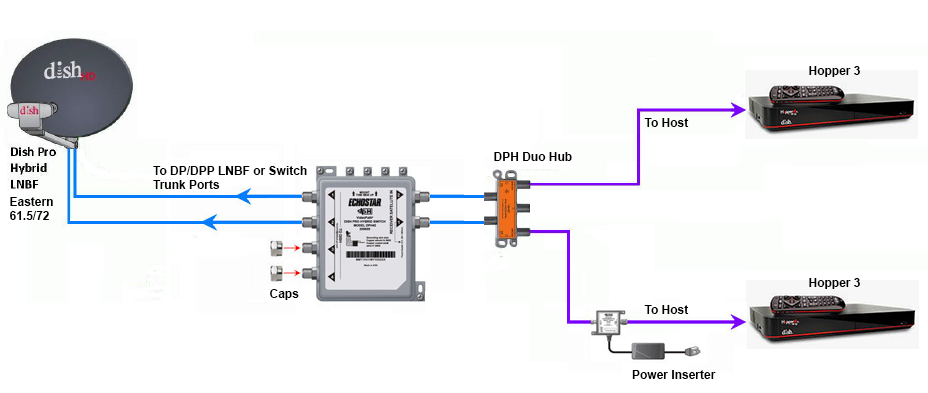
Does someone still have the diagram showing how to connect two Hopper 3s again?

I currently have one H3 and one 4K Joey, set up through a 1000.2 eastern arc hybrid lnb and solo hub.

The plan is to replace the Joey with the second H3. Already purchased a duo hub and I have three coax cables coming in from outside, from back when I used to have the older 1000.4 dish and the hopper 2. I don't fully remember, but I think the other two coax cables are just tied up next to the dish outside; will have to check again.
26 Replies · 5724 views
HipKat
dp6.png

You need a 42 switch.
Run the outputs to the inputs on the Duo Hub
DialgaChampion
You need a 42 switch.
Run the outputs to the inputs on the Duo Hub

Okay, so I made an updated diagram just to make sure I understand this right...

- 2 Coax connected from outside Dish LNB into 42 switch.
- 2 Coax from 42 switch into Duo Hub.
- 1 Coax from Duo Hub into 1st Hopper 3.
- 1 Coax from Duo Hub into Power Inserter.
- 1 Coax from Power Inserter into 2nd Hopper 3.
- Power Inserter plugged into wall electrical outlet.

Did I get that right? And also, I assume the power inserter is required?
HipKat
Okay, so I made an updated diagram just to make sure I understand this right...

- 2 Coax connected from outside Dish LNB into 42 switch.
- 2 Coax from 42 switch into Duo Hub.
- 1 Coax from Duo Hub into 1st Hopper 3.
- 1 Coax from Duo Hub into Power Inserter.
- 1 Coax from Power Inserter into 2nd Hopper 3.
- Power Inserter plugged into wall electrical outlet.

Did I get that right? And also, I assume the power inserter is required?
Twa Coaxes from the LNB if it's Eastern Arc (2 "Eyes") and three if it's Western Arc and yes, the power inserter, it's required
LQQK
Does someone still have the diagram showing how to connect two Hopper 3s again?

I currently have one H3 and one 4K Joey, set up through a 1000.2 eastern arc hybrid lnb and solo hub.

The plan is to replace the Joey with the second H3. Already purchased a duo hub and I have three coax cables coming in from outside, from back when I used to have the older 1000.4 dish and the hopper 2. I don't fully remember, but I think the other two coax cables are just tied up next to the dish outside; will have to check again.
Are you going with 2 H3s for the PIP/Multi-View features or something else?
  • Like
Reactions: charlesrshell
DialgaChampion
Are you going with 2 H3s for the PIP/Multi-View features or something else?

No, it's specifically to fix the problem with the 4K Joey's live feed intermittently freezing. I'll be watching a live program and then randomly out of nowhere, the picture and sound will just pixelate/freeze for 5-10 seconds, then go back to normal. Doesn't matter which channel it's on either. It's like what happens when the signal cuts out during heavy rain or a thunderstorm, but this will happen even on a perfectly clear day/night.

It doesn't happen with my H3 though, only with the Joey. I've replaced the solo hub and I've also replaced the Joey itself with another brand new 4K Joey, but it's still the same problem. And I know it's not the coax going from the hub into the Joey because I previously had another receiver connected in the same room before changing to the whole home dvr setup and that receiver worked fine.

So I'm basing this off process of elimination, which seems to indicate a problem with the 4K Joey device itself. Only thing I haven't tried is maybe getting a regular Joey 3, if that's still the latest model of Joey currently available, but otherwise the only other solution is getting a second Hopper 3. It'd be nice if the 42 and the Power Inserter weren't necessary and I could just use the Duo Hub though.
SandFarmer
Now that my Owned H3 fried itself. What gear can I remove for just one H3? Already took down the 129 Wing Dish.
  • Like
Reactions: charlesrshell
Bobby
Now that my Owned H3 fried itself. What gear can I remove for just one H3? Already took down the 129 Wing Dish.
You do know that DISH will replace your owned, fried, Hopper don't you. It's free....
SandFarmer
You do know that DISH will replace your owned, fried, Hopper don't you. It's free....
Yup. Been there done that many times over the past 29 years. Since not having it, I have found better and cheaper ways to get what little programming in need from it.

Just wondering how far down I can strip down all the gear on my chimney.

The 129 J-Arm grew an Outdoor Long Range AP. I already have several unused RJ lines that are going to be IPoE from the rack. Just wondering how much gear I'm going to be able to put up there.

Sent from my S61Pro using Tapatalk
  • Like
Reactions: charlesrshell
DialgaChampion
Twa Coaxes from the LNB if it's Eastern Arc (2 "Eyes") and three if it's Western Arc and yes, the power inserter, it's required
Yep just swap the lnb with a dpp lnb and connect the 42 switch.

Finally got around to trying to set everything up. Need some help because I've got an issue.

1st Hopper 3 works fine.

2nd Hopper 3 doesn't show any channels in my Top 200 package in the guide, even though it's set to All Subscribed. But it does see the 1st Hopper 3 and can access the recordings on it.

Here's my setup:
  • DPP EA 61.5/72 LNB on the dish. 2 Coaxes going from LNB into the DPH42 switch.
  • DPH42 "Receiver 1" port > Power Inserter "To Switch" port..... Power Inserter "To Receiver" port > Duo Hub "ODU 1" port.
  • DPH42 "Receiver 2" port > Duo Hub "ODU 2" port.
  • 2 Coaxes from both Host ports on the Duo Hub into both Hopper 3s.
I've spent the last few hours troubleshooting, no success. I did the Test Installation on the Diagnostics screen. Red button. Held Power Button for 15 seconds.

Also tried several different configurations with the coax cables according to Google's AI suggestions. Tried connecting both a Solo Hub and a Duo Hub (I don't have 2 solo hubs at the moment), having each Hopper connected to each hub independently. Tried connecting Receiver 2 from the DPH42 directly into the 2nd Hopper 3. Tried having the Power Inserter connected both before and after the hub.

I even checked my account online. Both Hopper 3s are authorized and "Powered" on the account. Even tried "Wake Up Receivers". That second H3 still won't show my channels in the guide at all.

According to Google's AI, it thinks this is the problem:
  • - When you plug two Hopper 3 units into a single Duo Hub, the hub cannot allocate the correct satellite transponder frequencies to both boxes simultaneously.
  • - As a result, the first Hopper 3 hogs the satellite line, while the second Hopper 3 gets locked out of the satellite signal entirely—causing an empty guide and blocking live TV. The unlinked status on the whole-home screen occurs because the software recognizes the conflict and stops integration.
But none of its solutions have worked. Any ideas?
  • Like
Reactions: charlesrshell
N
Googles AI is wrong as according to what you wrote you have two completely separate satellite line from the switch

My be a dumb question but did you run the check switch option on th 2nd H3

Did you try swapping the H3 to see if the problem switches between the two

That's all I can think of at the moment
  • Like
Reactions: charlesrshell
DialgaChampion
Googles AI is wrong as according to what you wrote you have two completely separate satellite line from the switch

My be a dumb question but did you run the check switch option on th 2nd H3

Did you try swapping the H3 to see if the problem switches between the two

That's all I can think of at the moment

Check Status complete. No issues found.
Test Installation screen shows green checks for 61.5 and 72, all 16 tuners.
Options > TV Activity shows 1 of 16 tuners in use.

When I bring up the program guide, the dish scapes channel appears and displays fine. The guide also shows the bonusview channels, and the stream and ppv channels.

I tried swapping the 2nd H3's cables with the 1st H3 and having it as the only H3 connected. It still has the same issue, so it seems isolated to the second Hopper 3 itself.

There was another suggestion from Google, not sure if it applies:

If the TV Activity Screen shows that your tuners are "Available" and "1 of 16 in use," your satellite signal path is 100% active and perfectly working. Your hardware wiring bypass has officially succeeded—the second Hopper 3 is successfully talking to the DPH42 switch, receiving high-frequency satellite data, and its internal processors are healthy. Because the hardware is fully operational, the fact that your screen is still black and the guide is missing means your receiver is stuck in Account Quarantine (Authorization Hold). Because a dual Hopper 3 system requires a non-standard account setup (32 tuners instead of the typical 16-tuner cap), standard "Wake Up" hits sent from the customer app or website are getting rejected by the system. The box can look at the data stream (which is why tuners show as available), but it is legally blocked by the internal software from decoding the live video feeds. To flip the switch and activate the live video feed, a DISH billing agent must manually push a tier-3 service re-hit through their legacy terminal.​

Any thoughts?
  • Like
Reactions: charlesrshell
S
No, it's specifically to fix the problem with the 4K Joey's live feed intermittently freezing. I'll be watching a live program and then randomly out of nowhere, the picture and sound will just pixelate/freeze for 5-10 seconds, then go back to normal. Doesn't matter which channel it's on either. It's like what happens when the signal cuts out during heavy rain or a thunderstorm, but this will happen even on a perfectly clear day/night.

It doesn't happen with my H3 though, only with the Joey. I've replaced the solo hub and I've also replaced the Joey itself with another brand new 4K Joey, but it's still the same problem. And I know it's not the coax going from the hub into the Joey because I previously had another receiver connected in the same room before changing to the whole home dvr setup and that receiver worked fine.

So I'm basing this off process of elimination, which seems to indicate a problem with the 4K Joey device itself. Only thing I haven't tried is maybe getting a regular Joey 3, if that's still the latest model of Joey currently available, but otherwise the only other solution is getting a second Hopper 3. It'd be nice if the 42 and the Power Inserter weren't necessary and I could just use the Duo Hub though.
Why not upgrade to the joey 4 with is an android box and dump the 4k joey
  • Like
Reactions: charlesrshell