

Social Feed

Staff member
HERE TO HELP YOU!
Cutting Edge
If you haven't noticed, watching video from the internet on your TV is a big tech thing this year. We have seen new innovations from devices like GoogleTV, Roku and VUDU. Each device does something great but yet can't do other functions which another box can do.
A Roku will give you the best Netflix experience but it can't play multimedia files on your network via DLNA.
A Vudu Box will let you watch amazing high quality movies, but it won't let you listen to live radio streams.
A GoogleTV box will let you interface your satellite or cable provider with the internet, but you can't watch online video from ABC. NBC, FOX or CBS.
A WDTV Live box will let me watch my media files including full 1080p HD Bluray rips in ISO format, but it won't let me watch Techzilla or Twit.TV from the internet.
On my desk at home in my bedroom there is a stack of boxes, all of them that do something great, but all of them suck at doing other things.
Up there currently I have a Sony 3D Bluray Player, a WDTV Live Plus box, a VUDU Box, a Logitech Revue GoogleTV box and a Roku.
Now what if you had a box that could do everything all those boxes can do, but in one box? That is the promise of the D-Link Boxee Box. I have wanted one of these boxes since seeing it at CES. And now I have one in my hands.
The Boxee Box is a strange little box that is oddly shaped. Its design prevents you from putting anything on top of it so its going to be on the top of your AV stack no matter what. The Boxee Box comes well packaged in a nice looking box. It was so well packaged it took me a few minutes to figure out how to unpack it.
Inside the Boxee Box …. box is the Boxee Box itself, a external power supply, a HDMI cable, a unique two sided remote and manuals. The Boxee Box requires that your HDTV have a HDMI post. There are no component outputs on the box for older HD sets.
Setup was simple, I plugged in the HDMI to my TV, an Ethernet cable for the internet and I also plugged in an external hard drive loaded with movies I have ripped from my DVD and Bluray collection. Once I powers the box on I was greeted by a bunch of animated boxes. Without even touching anything I got a note that there was a newer version of the Boxee Box software available for my box and it then started downloading it. Next step was to set the Boxee Box to the correct aspect ratio for my TV. Once I was done I was at the main menu.
The first thing I wanted to try was to see if the Boxee Box could play back my ripped DVD's and Blurays. It took me awhile to figure out how to do this because Boxee changed their interface from the Boxee software which is available for the Mac and the PC. I got to be honest I do not like the new interface, however with that said if your new to Boxee you will probably like it since you didn't know how it was setup before. After I figured out how to add my media I needed to wait for the box to scan it all in. While it was scanning I went in and checked the applications.
Many of the Boxee Box applications are good, but not all of them. And not all applications announced are available yet. Missing from the box were HULU PLUS, Netflix and VUDU. (Vudu is there but if you click on it you get a message that it's coming soon.
The apps I didn't like include the Radiotime App which interface seems out of date (when compared to the Radiotime app on GoogleTV. I couldn't figure out how to select radio stations from outside my area. If I wanted to listen to radio stations in my area I would just (gasp) turn on a radio! Another app is called Youtube Leanback, which lets you view videos from Youtube. The problem here is that it plays back Youtube videos full screen and the videos look terrible including the ones that are supposed to be HD. I am guessing that the program is watching the videos in SD but I see no way to force HD videos from Youtube to play in HD by default. Both of these things the Google TV does much better than the Boxee Box.
Another app that had me disappointed was the Twit.TV app, which lets you watch shows from Leo Laporte's Twit Network. While the app is nice it was missing one of the things I wanted most in this app and that is live video streaming from the Twit network.
Other apps ran great and I was impressed with them including the Revision3 app, the Pandora App and the Weather App.
After I went through all the apps my media from my USB drive and my NAS were all scanned in. So I went in to check them out. I was surprised that the Boxee actually figured out what some of my movies were and displayed them with the movie cover art and description. The Boxee Box was able to play every video I threw at it including the Bluray ISO files but the Bluray ISO playback was not perfect and the unit was often rebuffering which made watching them annoying. The WDTV Live Plus has no issue playing these files. I also tried some MKV, AVI and DIVX files and all played fine. What I did find strange though is that on the regular DVD ISO's some would display the DVD menus, while others would not. I don't understand why this is as my WDTV Live Plus unit shows the menus on all the DVD's. Just like the WDTV Live Plus the Boxee Box will not play the menus from Bluray ISO's.
One thing that annoyed me about local video media playback on the Boxee Box was that for every movie I watched subtitles were on by default. While you can go turn off the subtitles in each movie these settings are not saved, so next time you watch the movie you need to go in and turn them off again. Another thing is if you stop a movie from playing and exit from that movie you will lose the place you were in that movie. So when you go back in later you will need to fast forward to the part you left off at.
I should note that the volume level on the movies was VERY low on a lot of the movies through my TV, I found myself cranking the TV almost all the way up to hear them. My only audio in my bedroom is through the TV and in this case the audio is fed to the TV by the HDMI cable. The Boxee Box is sending everything to my TV in Dolby Digital… I hope in the future they build in a function so that the box downconverts the audio into a 2 speaker format. If they did this I believe it would correct the volume issue.
The Boxee Box Main Menu lists TV Show and Moves that are available on the Internet, you can click on a show like Star Trek and be taken to the website to watch Star Trek Shows. The Boxee Box has a built in web browser but I got to be honest I haven't figured out how to use it yet. I can use the D pad on the remote to move the cursor around on the screen, but have not found a way to click on my selection. I have tried the select button in the middle of the D pad and also the enter key on the keyboard to no avail. Watching TV this way stinks as you're watching the show on a tiny box in the middle of the screen. All the sites offer a full screen option to watch their videos and shows but without a way to click on them it's hard. I was so frustrated by this that I posted at the official Boxee forum, where I was told to hook up a USB mouse to the Boxee and then I can click full screen. This can hopefully be fixed with a software upgrade.
The movie selection was mostly public domain movies, I was not impressed at all with the Boxee movie selection
The remote that comes with the Boxee Box is both cool and a pain at the same time. Using the remote is very easy, on the remote side there is only 3 buttons and the D pad. One button is play and pause, on is to go back one step and the final button is in the center of the D pad which is the select button.
The back of the remote is a keyboard which comes in handy at times for things like searching for videos on Youtube.
The remote is not without its flaws though, first of all the keyboard tiny chicklet keys are not backlit, making it impossible to use in a darkened room. And even in a room full of light I had a hard time seeing the writing on the keys. The other flaw is the keys on the front of the remote including the D Pad make a loud clicking noise when you press them. This clicking noise actually got me smacked by my wife who was trying to sleep as I was continuing my evaluation of the Boxee Box.
As I was getting ready to wrap up my testing I figured out where the settings were and found the one setting that may drive many people to get a Boxee Box, and that is the setting for Adult items. By turning this on you have access to a number of adult items including a number of adult applications which were not displayed before. By allowing the adult content to be shown your Boxee then gains apps such as Youporn, Bang Bros and Reality Kings. While the Youporn app worked all the videos except for one would not play. If you turn the adult features on you can password protect them to keep your kids out of them, although I would rather a key combination to hide and unhide the adult content at will, it is a pain to hide them as you need to go into the settings menu each time.
There was only one application I found on the Boxee Box which let you watch live video streaming and this app let you watch live news channels from around the globe. I was hoping for more live streaming, such as Twit.TV, Justin.TV and USTREAM. I would also love to see the Boxee Box be able to handle a webcam for live streaming such as Skype video calls. The Boxee Box is after all a computer so it should be able to handle it.
One thing I have found that the Boxee cannot do is DLNA streaming. But honestly if the box does everything it should do then it really does not need it. The Boxee was able to find all the media on all my networked PC's in my house and my nas.
Overall thoughts.
I was disappointed with the Logitech Revue with GoogleTV when I reviewed it because I felt it was rushed to market just so they could get the product out in time for the holidays. I feel that same about the Boxee Box.
Like the GoogleTV the Boxee Box shipped as an unfinished, unpolished box
While most of it works it is still missing a lot, nowhere in the box is VUDU, HULU Plus or Netflix. Thos features should be available by the end of the year. When that happens I will be able to remove 2 boxes from my stack and because the software is upgradable I hope they can fix the buffering issue for the Bluray ISO's. Once they fix the issues with the box the Boxee Box may indeed be the dream box.
At the moment the Boxee Box is usable but not stable, in my first night of using it the box froze up solid 3 times requiring a reboot.
If I had to pick a box to purchase this holiday season and had to pick between a GoogleTV and a Boxee Box I would go with the Boxee Box. However with that said I think with some TLC and some nice software updates it might be hard to decided which one is best this time next year. As I said before I feel both have been rushed to the market and I feel that on both boxes we are only seeing a shell of what they can really do.
While my dream of having everything is one box is still just a dream the Boxee Box is really close to making that dream come true!
I give the D-Link Boxee Box 2.5 Stars out of 4.
A Roku will give you the best Netflix experience but it can't play multimedia files on your network via DLNA.
A Vudu Box will let you watch amazing high quality movies, but it won't let you listen to live radio streams.
A GoogleTV box will let you interface your satellite or cable provider with the internet, but you can't watch online video from ABC. NBC, FOX or CBS.
A WDTV Live box will let me watch my media files including full 1080p HD Bluray rips in ISO format, but it won't let me watch Techzilla or Twit.TV from the internet.
On my desk at home in my bedroom there is a stack of boxes, all of them that do something great, but all of them suck at doing other things.
Up there currently I have a Sony 3D Bluray Player, a WDTV Live Plus box, a VUDU Box, a Logitech Revue GoogleTV box and a Roku.
Now what if you had a box that could do everything all those boxes can do, but in one box? That is the promise of the D-Link Boxee Box. I have wanted one of these boxes since seeing it at CES. And now I have one in my hands.
The Boxee Box is a strange little box that is oddly shaped. Its design prevents you from putting anything on top of it so its going to be on the top of your AV stack no matter what. The Boxee Box comes well packaged in a nice looking box. It was so well packaged it took me a few minutes to figure out how to unpack it.
Inside the Boxee Box …. box is the Boxee Box itself, a external power supply, a HDMI cable, a unique two sided remote and manuals. The Boxee Box requires that your HDTV have a HDMI post. There are no component outputs on the box for older HD sets.
Setup was simple, I plugged in the HDMI to my TV, an Ethernet cable for the internet and I also plugged in an external hard drive loaded with movies I have ripped from my DVD and Bluray collection. Once I powers the box on I was greeted by a bunch of animated boxes. Without even touching anything I got a note that there was a newer version of the Boxee Box software available for my box and it then started downloading it. Next step was to set the Boxee Box to the correct aspect ratio for my TV. Once I was done I was at the main menu.
The first thing I wanted to try was to see if the Boxee Box could play back my ripped DVD's and Blurays. It took me awhile to figure out how to do this because Boxee changed their interface from the Boxee software which is available for the Mac and the PC. I got to be honest I do not like the new interface, however with that said if your new to Boxee you will probably like it since you didn't know how it was setup before. After I figured out how to add my media I needed to wait for the box to scan it all in. While it was scanning I went in and checked the applications.
Many of the Boxee Box applications are good, but not all of them. And not all applications announced are available yet. Missing from the box were HULU PLUS, Netflix and VUDU. (Vudu is there but if you click on it you get a message that it's coming soon.
The apps I didn't like include the Radiotime App which interface seems out of date (when compared to the Radiotime app on GoogleTV. I couldn't figure out how to select radio stations from outside my area. If I wanted to listen to radio stations in my area I would just (gasp) turn on a radio! Another app is called Youtube Leanback, which lets you view videos from Youtube. The problem here is that it plays back Youtube videos full screen and the videos look terrible including the ones that are supposed to be HD. I am guessing that the program is watching the videos in SD but I see no way to force HD videos from Youtube to play in HD by default. Both of these things the Google TV does much better than the Boxee Box.
Another app that had me disappointed was the Twit.TV app, which lets you watch shows from Leo Laporte's Twit Network. While the app is nice it was missing one of the things I wanted most in this app and that is live video streaming from the Twit network.
Other apps ran great and I was impressed with them including the Revision3 app, the Pandora App and the Weather App.
After I went through all the apps my media from my USB drive and my NAS were all scanned in. So I went in to check them out. I was surprised that the Boxee actually figured out what some of my movies were and displayed them with the movie cover art and description. The Boxee Box was able to play every video I threw at it including the Bluray ISO files but the Bluray ISO playback was not perfect and the unit was often rebuffering which made watching them annoying. The WDTV Live Plus has no issue playing these files. I also tried some MKV, AVI and DIVX files and all played fine. What I did find strange though is that on the regular DVD ISO's some would display the DVD menus, while others would not. I don't understand why this is as my WDTV Live Plus unit shows the menus on all the DVD's. Just like the WDTV Live Plus the Boxee Box will not play the menus from Bluray ISO's.
One thing that annoyed me about local video media playback on the Boxee Box was that for every movie I watched subtitles were on by default. While you can go turn off the subtitles in each movie these settings are not saved, so next time you watch the movie you need to go in and turn them off again. Another thing is if you stop a movie from playing and exit from that movie you will lose the place you were in that movie. So when you go back in later you will need to fast forward to the part you left off at.
I should note that the volume level on the movies was VERY low on a lot of the movies through my TV, I found myself cranking the TV almost all the way up to hear them. My only audio in my bedroom is through the TV and in this case the audio is fed to the TV by the HDMI cable. The Boxee Box is sending everything to my TV in Dolby Digital… I hope in the future they build in a function so that the box downconverts the audio into a 2 speaker format. If they did this I believe it would correct the volume issue.
The Boxee Box Main Menu lists TV Show and Moves that are available on the Internet, you can click on a show like Star Trek and be taken to the website to watch Star Trek Shows. The Boxee Box has a built in web browser but I got to be honest I haven't figured out how to use it yet. I can use the D pad on the remote to move the cursor around on the screen, but have not found a way to click on my selection. I have tried the select button in the middle of the D pad and also the enter key on the keyboard to no avail. Watching TV this way stinks as you're watching the show on a tiny box in the middle of the screen. All the sites offer a full screen option to watch their videos and shows but without a way to click on them it's hard. I was so frustrated by this that I posted at the official Boxee forum, where I was told to hook up a USB mouse to the Boxee and then I can click full screen. This can hopefully be fixed with a software upgrade.
The movie selection was mostly public domain movies, I was not impressed at all with the Boxee movie selection
The remote that comes with the Boxee Box is both cool and a pain at the same time. Using the remote is very easy, on the remote side there is only 3 buttons and the D pad. One button is play and pause, on is to go back one step and the final button is in the center of the D pad which is the select button.
The back of the remote is a keyboard which comes in handy at times for things like searching for videos on Youtube.
The remote is not without its flaws though, first of all the keyboard tiny chicklet keys are not backlit, making it impossible to use in a darkened room. And even in a room full of light I had a hard time seeing the writing on the keys. The other flaw is the keys on the front of the remote including the D Pad make a loud clicking noise when you press them. This clicking noise actually got me smacked by my wife who was trying to sleep as I was continuing my evaluation of the Boxee Box.
As I was getting ready to wrap up my testing I figured out where the settings were and found the one setting that may drive many people to get a Boxee Box, and that is the setting for Adult items. By turning this on you have access to a number of adult items including a number of adult applications which were not displayed before. By allowing the adult content to be shown your Boxee then gains apps such as Youporn, Bang Bros and Reality Kings. While the Youporn app worked all the videos except for one would not play. If you turn the adult features on you can password protect them to keep your kids out of them, although I would rather a key combination to hide and unhide the adult content at will, it is a pain to hide them as you need to go into the settings menu each time.
There was only one application I found on the Boxee Box which let you watch live video streaming and this app let you watch live news channels from around the globe. I was hoping for more live streaming, such as Twit.TV, Justin.TV and USTREAM. I would also love to see the Boxee Box be able to handle a webcam for live streaming such as Skype video calls. The Boxee Box is after all a computer so it should be able to handle it.
One thing I have found that the Boxee cannot do is DLNA streaming. But honestly if the box does everything it should do then it really does not need it. The Boxee was able to find all the media on all my networked PC's in my house and my nas.
Overall thoughts.
I was disappointed with the Logitech Revue with GoogleTV when I reviewed it because I felt it was rushed to market just so they could get the product out in time for the holidays. I feel that same about the Boxee Box.
Like the GoogleTV the Boxee Box shipped as an unfinished, unpolished box
While most of it works it is still missing a lot, nowhere in the box is VUDU, HULU Plus or Netflix. Thos features should be available by the end of the year. When that happens I will be able to remove 2 boxes from my stack and because the software is upgradable I hope they can fix the buffering issue for the Bluray ISO's. Once they fix the issues with the box the Boxee Box may indeed be the dream box.
At the moment the Boxee Box is usable but not stable, in my first night of using it the box froze up solid 3 times requiring a reboot.
If I had to pick a box to purchase this holiday season and had to pick between a GoogleTV and a Boxee Box I would go with the Boxee Box. However with that said I think with some TLC and some nice software updates it might be hard to decided which one is best this time next year. As I said before I feel both have been rushed to the market and I feel that on both boxes we are only seeing a shell of what they can really do.
While my dream of having everything is one box is still just a dream the Boxee Box is really close to making that dream come true!
I give the D-Link Boxee Box 2.5 Stars out of 4.
51 Replies
·
13507 views


Staff member
HERE TO HELP YOU!
Cutting Edge
Sometimes a thread gets so many posts in it that is can cause issues for the server so that why today we introduce The Song Name Game Part 3!
So let the game continue!
The last song was added by Bobby who posted...
One Meat Ball - Andrews Sisters
CONTINUE ON AND HAVE FUN! WELCOME HOME TO SATELLITEGUYS.US!
Here are the original rules for the game as posted by WebbyDude back in 2006. http://www.satelliteguys.us/threads/68645-Song-Name-Game
Just name a song title and the band who performed it. The next person does the same thing, but needs to list a song title or band name which includes a word from the previous entry. Pick songs from any genre.
Example:
Long Live Rock and Roll -- Rainbow
Rainbow in the Dark -- Dio
Another example:
Ride the Lightning -- Metallica
Lightning Strikes -- Ozzy Osbourne
Get it?
An additional note: we all know that song titles, sometimes, use profane words. Because this is a family friendly website it is advised that you clean up that title up a bit. This is accomplished by using something like sh!t instead of the real word. Thanks....
So let the game continue!
The last song was added by Bobby who posted...
One Meat Ball - Andrews Sisters
CONTINUE ON AND HAVE FUN! WELCOME HOME TO SATELLITEGUYS.US!
Here are the original rules for the game as posted by WebbyDude back in 2006. http://www.satelliteguys.us/threads/68645-Song-Name-Game
Just name a song title and the band who performed it. The next person does the same thing, but needs to list a song title or band name which includes a word from the previous entry. Pick songs from any genre.
Example:
Long Live Rock and Roll -- Rainbow
Rainbow in the Dark -- Dio
Another example:
Ride the Lightning -- Metallica
Lightning Strikes -- Ozzy Osbourne
Get it?
An additional note: we all know that song titles, sometimes, use profane words. Because this is a family friendly website it is advised that you clean up that title up a bit. This is accomplished by using something like sh!t instead of the real word. Thanks....
68504 Replies
·
2671160 views


Marques Brownlee
Time for another AWESOME video from Marques Brownlee!
View: https://www.youtube.com/watch?v=scwlR0QHGOk
Direct YouTube Link - The NEW Tesla Roadster: My Honest Reaction
The official MKBHD Website!
The MKBHD Store
View: https://www.youtube.com/watch?v=scwlR0QHGOk
Direct YouTube Link - The NEW Tesla Roadster: My Honest Reaction
The official MKBHD Website!
The MKBHD Store
0 Replies
·
3 views
iJustine
Time for another AWESOME video from iJustine!
View: https://www.youtube.com/shorts/m44iKsdN1-Q
Direct YouTube Link - NVIDIA RTX Spark launch party!!!
The official iJustine Website's Website
Buy her book!
View: https://www.youtube.com/shorts/m44iKsdN1-Q
Direct YouTube Link - NVIDIA RTX Spark launch party!!!
The official iJustine Website's Website
Buy her book!
0 Replies
·
3 views

For quite a while now, people with a VIP211k have been losing their recordings on their activated external HDDs... even when there's nothing physically wrong with HDD. I believe this is an intentional and underhanded tactic that Dish is pulling in an attempt to force users away from the VIP211k.
They are obviously regretting that they ever let users have a "non-dvr" dvr in the first place. You would think they would be happy charging you a $40 one time fee... and then be happy letting the customer be the one responsible for HDD failures.
Dish clearly hates the 211k bitter-clingers. This recording deletion problem is intentional (IMO), and I think it is just one more tool that they are using. Hopper and a 2-year agreement... that's what they want you to have. Think about that... a 2-year agreement... with a company $30 Billion in debt (that's with a B). What happens when all that debt causes them to drop the channel that may have been your whole reason for having Dish in the first place? Guess who's stuck with a service that no longer suits their needs... for the remainder of the 2-year agreement.
On top of that, they don't want you to install it yourself. I purchased and installed all my equipment myself. That used to be common. Now, they lie to me and tell me that my dish must be updated to use a Hopper. Funny thing is... they don't even know what dish I have because they didn't install it, and I didn't tell them. If you ask what type of dish/LNBs the hopper needs... good luck getting an answer. All they know is that whatever you have needs to be upgraded by an installer.
It is quite apparent to me that they care much more about staying in their box, than they do working with the customer. That's too bad, because it hasn't always been that way. It's like they are totally unaware of the current business environment that they are trying to compete in.
I have been a customer since 2010. I will be cancelling my service before the next period. Yeah, I know, my $1,200 a year won't make a difference to them. It just seems like they have forgotten who needs who, especially when you consider the competition in today's streaming world. But hey, they will have succeed in forcing me off the 211k.
They are obviously regretting that they ever let users have a "non-dvr" dvr in the first place. You would think they would be happy charging you a $40 one time fee... and then be happy letting the customer be the one responsible for HDD failures.
Dish clearly hates the 211k bitter-clingers. This recording deletion problem is intentional (IMO), and I think it is just one more tool that they are using. Hopper and a 2-year agreement... that's what they want you to have. Think about that... a 2-year agreement... with a company $30 Billion in debt (that's with a B). What happens when all that debt causes them to drop the channel that may have been your whole reason for having Dish in the first place? Guess who's stuck with a service that no longer suits their needs... for the remainder of the 2-year agreement.
On top of that, they don't want you to install it yourself. I purchased and installed all my equipment myself. That used to be common. Now, they lie to me and tell me that my dish must be updated to use a Hopper. Funny thing is... they don't even know what dish I have because they didn't install it, and I didn't tell them. If you ask what type of dish/LNBs the hopper needs... good luck getting an answer. All they know is that whatever you have needs to be upgraded by an installer.
It is quite apparent to me that they care much more about staying in their box, than they do working with the customer. That's too bad, because it hasn't always been that way. It's like they are totally unaware of the current business environment that they are trying to compete in.
I have been a customer since 2010. I will be cancelling my service before the next period. Yeah, I know, my $1,200 a year won't make a difference to them. It just seems like they have forgotten who needs who, especially when you consider the competition in today's streaming world. But hey, they will have succeed in forcing me off the 211k.
168 Replies
·
7470 views


Pub Member / Supporter
Lifetime Supporter
Has anyone subscribed to NBA League Pass for 2026-27 and try to link their account to NBA.com to stream League Pass? I purchased it for 2026-27, and when I linked, I got a message saying success, but then I receive an error that my linked subscription does not include the preseason games for NBA League Pass. Is that how it has always been? I know satellite doesn't have the preseason games on the NBA League Pass channels, but I thought that I was able to stream the preseason once I linked my account on NBA.com?
2 Replies
·
76 views


Supporting Founder
Really excited for this season with Kentucky having a new coach and some really exciting recruits. Probably won't last long, but here's hoping this season is great.
143 Replies
·
1450 views


For some reason, the satelliteguys.us site is loading a lot slower than usual on both Chrome on my Asus laptop and Safari on my iPhone.
I'm also seeing longer appearances of the blue bar at the top and the "3 blue bars" loading symbol.
Is anyone else also having the same problem? Thanks in advance.
I'm also seeing longer appearances of the blue bar at the top and the "3 blue bars" loading symbol.
Is anyone else also having the same problem? Thanks in advance.
530 Replies
·
18097 views


I thought I would come here and find lots of complaints about the update to the dish anywhere mobile app, but am not seeing any. It used to look just like the desktop webpage. Now you can no longer filter by sports channels or movie channels. Plus that they made it look like a big button telephone and you see fewer channels in the screen which requires more scrolling. Yes I realize you can look at sports then select which sport you want to look at, I just liked being able to see all sporting events in the guide with all other channels being filtered out. Am I alone in the wilderness on this?
7 Replies
·
143 views


Supporting Founder
Pub Member / Supporter
Lifetime Supporter
Apple has finally released their Apple TV 4K with built-in Siri and a microphone so it can respond to your queries even if you don't have the remote. It also increases in price, to $299. I had been planning on updating my current Apple TV 4K streamers, but that's $600 for the two of them, and that's a pass at this point.
At $299, it had better come with 256 GB of Storage, Gigabit (or better) Ethernet, the latest HDMI tech and standards, and one year of free Apple One. But it probably won't…
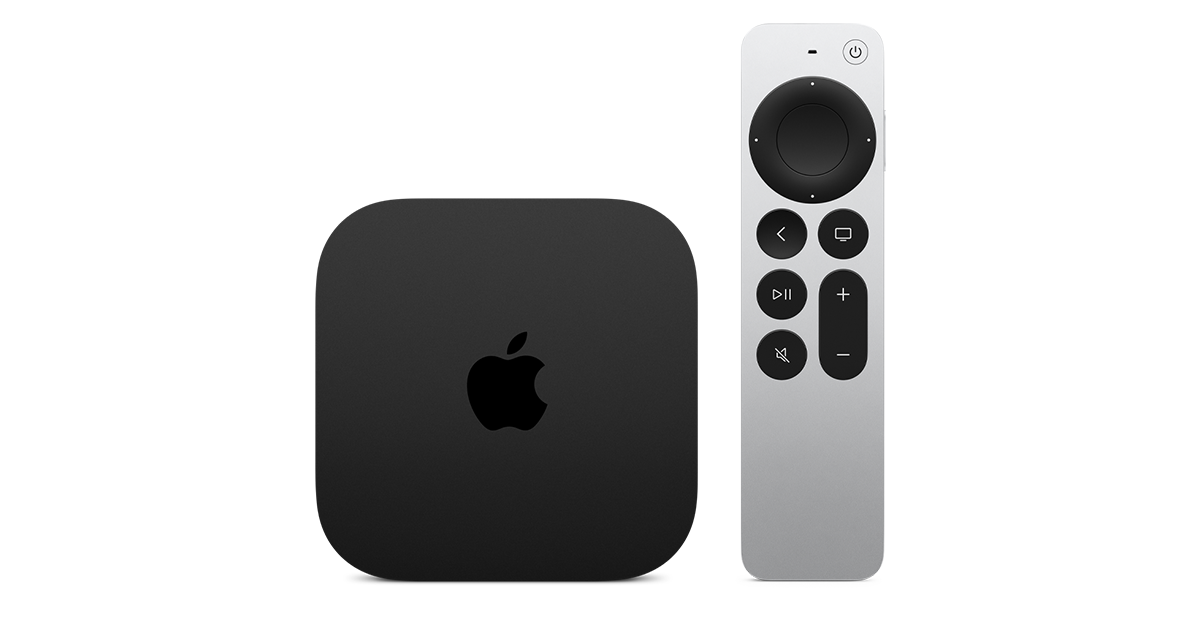
At $299, it had better come with 256 GB of Storage, Gigabit (or better) Ethernet, the latest HDMI tech and standards, and one year of free Apple One. But it probably won't…
Apple TV 4K
Apple TV 4K. New Siri AI and hands-free control. Stunning picture and immersive HomePod surround sound. Works with your Apple and smart home devices.
www.apple.com
20 Replies
·
311 views


 . apple's been making money off of software and not hardware for a while


