

Social Feed

Since I have moved, I have not had a satellite dish to play with, so I turned my hobbies to SW and getting what TV I can get "free" of course. 
I put up my new postage stamp size OTA antenna
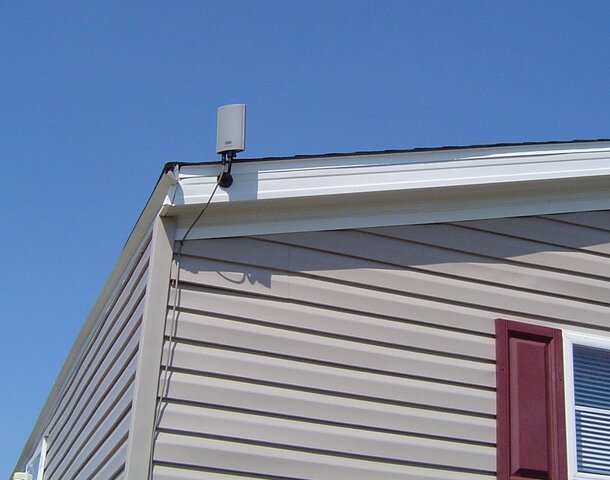
for receiving all the local channels in HD. It's not very big, and I am 25 -30 miles away from the towers, but it has a built in amplifier, and does an outstanding job for me.
I hooked that up the next morning after I moved in, and got my TVs all hooked up to it, and hooked up my computers and my original HDHomerun tuner for recording that I have always used.
Within a week I had cable internet installed, and being one of this "family" of like minded people, I just had to see what was available for free. Needless to say, it was worthwhile.
So I began thinking about a second HDHomerun just for recording "free" channels. I found one on Craig's list for $40.00, so I picked it up.
Got it hooked up to the HDHomerun, and then the fun started. There was very little help on the internet for getting clear QAM channels on the HDHR. I already know how to use DVBViewer on both satellite, and for OTA, and that is my program of choice for recording. So, I started experimenting.
I posted this at the DVBViewer forums, and on the Silicondust forums.
I'll copy from there, and then the tweaked improvements on the settings.
First post with some success:
Second Post with preliminary settings:
Final post with tweaked settings:
I had not changed my program from version 4.0 on my other computers simply because I had such a hard time making it work originally, and didn't want to fix something that wasn't broken.
The newer version of DVBViewer is very nice, and I have already switched one of the other computers over to the new version. I will follow up with the final computer today or tomorrow.
I just wanted to let you all know that I am still in the FTA hobby in one form or the other.
I put up my new postage stamp size OTA antenna
for receiving all the local channels in HD. It's not very big, and I am 25 -30 miles away from the towers, but it has a built in amplifier, and does an outstanding job for me.
I hooked that up the next morning after I moved in, and got my TVs all hooked up to it, and hooked up my computers and my original HDHomerun tuner for recording that I have always used.
Within a week I had cable internet installed, and being one of this "family" of like minded people, I just had to see what was available for free. Needless to say, it was worthwhile.
So I began thinking about a second HDHomerun just for recording "free" channels. I found one on Craig's list for $40.00, so I picked it up.
Got it hooked up to the HDHomerun, and then the fun started. There was very little help on the internet for getting clear QAM channels on the HDHR. I already know how to use DVBViewer on both satellite, and for OTA, and that is my program of choice for recording. So, I started experimenting.
I posted this at the DVBViewer forums, and on the Silicondust forums.
I'll copy from there, and then the tweaked improvements on the settings.
First post with some success:
Second Post with preliminary settings:
I got it to work finally.:
If anyone is interested, it is kind of a process to make it work. At least it was for me.
1. The setup in the HDHomerun. Part of that entails a registry setting.
2. Backup your registry, close all open programs, open regedit, navigate to:
HKEY_LOCAL_MACHINE\Software\Silicondust\HDHomeRun\Tuners\XXXXXXXX and set the BDAPIDFilter entry to "Enabled" (no quotes, case sensitive). Repeat for the -1 tuner. I got that off the silicon dust forums.
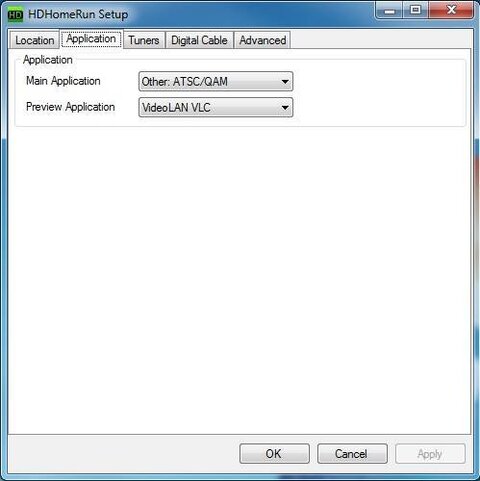
3. To get the normal ATSC OTA channels to come in, you need to set the main application in the HDHomerun setup to ATSC Remap and scan in you channels there.
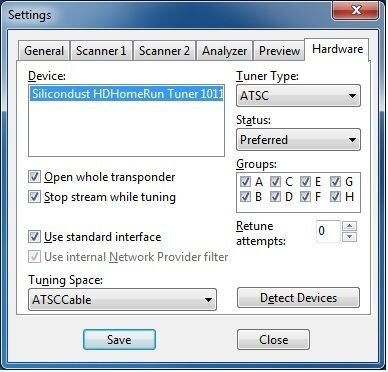
4. Set the tuner in DVBViewer options/hardware to only have two boxes ticked, and they are the has CI module, and open whole transponder.
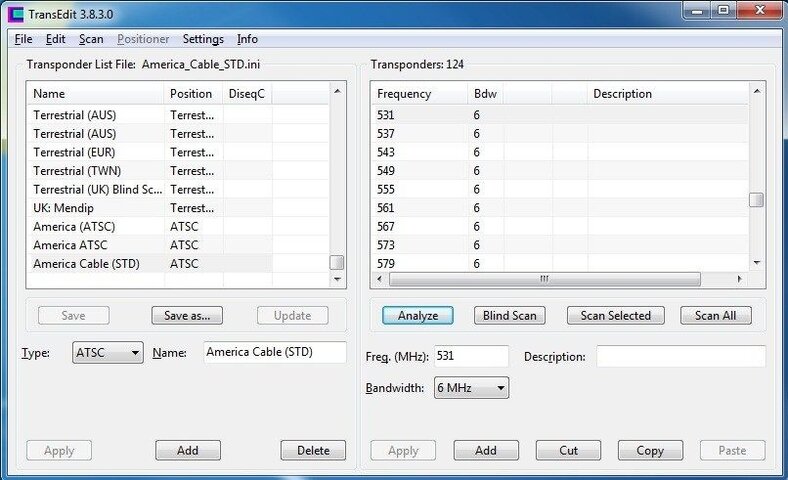
5. Scan in your OTA channels inside of DVBViewer using ATSC and the ATSC transponder list.
6. Go back into the HDHomerun setup, and change the main application to ATSC QAM remap.
7. Go into DVBViewer, and set the tuner assigned to your QAM HDHR tuner as preferred, and tick the two boxes as above.
8. Scan in the channels within DVBViewer using ATSC as the source, and using the ATSC Cable Std.
At that point, everything should work.
I tried having both tuners set to normal, and it would switch back and forth, but the switch was slow, and sometimes the video wouldn't come in.
So what I am doing for now, is if I want to watch OTA, I go into the options/hardware settings, and set that tuner as preferred, and the others to "Do Not Use".
If I want to watch cable, I go back into the options/hardware, and set that tuner as preferred.
Hope this helps someone else in the future.
It only took me since yesterday to figure it out.
Thanks to those who responded here.
Final post with tweaked settings:
I followed Griga's direction above, and unticked the CI Module, and unticked the Open Whole Transponder box.
I did however tick the box by the Stop Stream While Tuning.
I did not change the registry setting that I had enabled in the previous post.
DVBViewer will not scan in channels with the tuner being used is set to normal. I had to set the other tuners to "Do Not Use" in order to get the channels to scan in, while setting the tuner being used to "Preferred".
DVBViewer will change back and forth between OTA and QAM with both tuners set to normal, but the channel switching is very slow, and sometimes only the audio comes in. I get much better performance with setting the tuner that I am using to Preferred, and setting the other tuners to "Do Not Use".
Part of that may be due to the speed of this computer. It is a P4 3.2Ghz with 2GB of RAM and SATA hard drives. It does have an Nvidia GeForce 6200 video card with 128Mb of video RAM running Windows XP SP4.
DVBViewer scanned in all the clear channels, but scanned in a few with audio only. I used the channel editor and set the Video PID to be the ame as the PCR PID, and the channels came in and displayed fine.
I am very pleased to have it working in DVBViewer.
I used the same Transponder list, and set the tuners the same way in Transedit with no results.
I had not changed my program from version 4.0 on my other computers simply because I had such a hard time making it work originally, and didn't want to fix something that wasn't broken.
The newer version of DVBViewer is very nice, and I have already switched one of the other computers over to the new version. I will follow up with the final computer today or tomorrow.
I just wanted to let you all know that I am still in the FTA hobby in one form or the other.
18 Replies
·
9281 views




Staff member
HERE TO HELP YOU!
Cutting Edge
Sometimes a thread gets so many posts in it that is can cause issues for the server so that why today we introduce The Song Name Game Part 3!
So let the game continue!
The last song was added by Bobby who posted...
One Meat Ball - Andrews Sisters
CONTINUE ON AND HAVE FUN! WELCOME HOME TO SATELLITEGUYS.US!
Here are the original rules for the game as posted by WebbyDude back in 2006. http://www.satelliteguys.us/threads/68645-Song-Name-Game
Just name a song title and the band who performed it. The next person does the same thing, but needs to list a song title or band name which includes a word from the previous entry. Pick songs from any genre.
Example:
Long Live Rock and Roll -- Rainbow
Rainbow in the Dark -- Dio
Another example:
Ride the Lightning -- Metallica
Lightning Strikes -- Ozzy Osbourne
Get it?
An additional note: we all know that song titles, sometimes, use profane words. Because this is a family friendly website it is advised that you clean up that title up a bit. This is accomplished by using something like sh!t instead of the real word. Thanks....
So let the game continue!
The last song was added by Bobby who posted...
One Meat Ball - Andrews Sisters
CONTINUE ON AND HAVE FUN! WELCOME HOME TO SATELLITEGUYS.US!
Here are the original rules for the game as posted by WebbyDude back in 2006. http://www.satelliteguys.us/threads/68645-Song-Name-Game
Just name a song title and the band who performed it. The next person does the same thing, but needs to list a song title or band name which includes a word from the previous entry. Pick songs from any genre.
Example:
Long Live Rock and Roll -- Rainbow
Rainbow in the Dark -- Dio
Another example:
Ride the Lightning -- Metallica
Lightning Strikes -- Ozzy Osbourne
Get it?
An additional note: we all know that song titles, sometimes, use profane words. Because this is a family friendly website it is advised that you clean up that title up a bit. This is accomplished by using something like sh!t instead of the real word. Thanks....
68532 Replies
·
2673012 views


Lifetime Supporter
Schedule drops tomorrow. Mandatory mini camps in June. Hall of Fame game August 6th.
112 Replies
·
1756 views




For some reason, the satelliteguys.us site is loading a lot slower than usual on both Chrome on my Asus laptop and Safari on my iPhone.
I'm also seeing longer appearances of the blue bar at the top and the "3 blue bars" loading symbol.
Is anyone else also having the same problem? Thanks in advance.
I'm also seeing longer appearances of the blue bar at the top and the "3 blue bars" loading symbol.
Is anyone else also having the same problem? Thanks in advance.
541 Replies
·
18545 views


 . Hated to see my dawgs go down but I still say being ranked #1 is a hex on you!


My year was almost up and we got the new bill for a year of service for $ 360.00 insane sat radio is becoming like cable!!! i logged into my acct and hopped onto chat and told the rep that i wanted to cancel. she understood my concern and went quiet for a few minutes. i figured that she was canceling my service. she comes back and said that she seen that i have been a sub since 07 and then offers me the same package for a year for 120.00 with taxes and fee's!!! i grabbed it. after almost having a stroke
239 Replies
·
11068 views


 .
.
Pub Member / Supporter

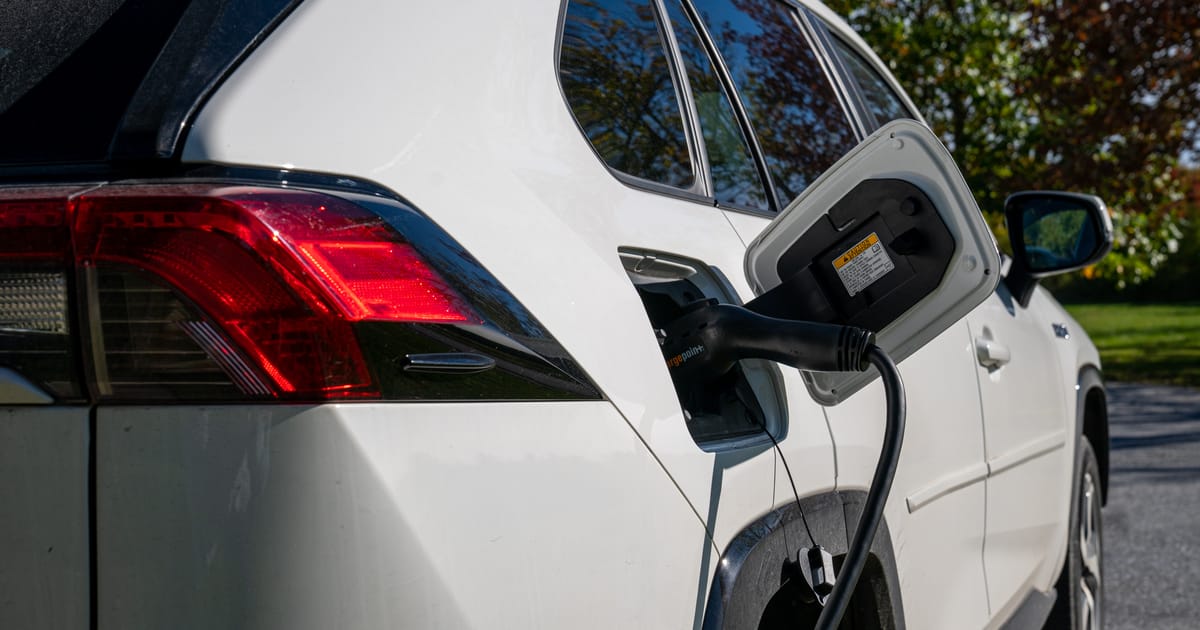
America’s Fastest-Growing EV State Isn’t California—Not by a Long Shot
New data shows electric vehicle adoption is increasingly driven by state policies, electricity prices and charging access—not federal incentives
 www.autoweek.com
The number-one US state for EV growth, according to the June 22 Yardi report?
Oklahoma.

It has no ZEV mandates and "minimal" incentives, Yardi says, but also has cheap electricity, high multi-car household rates (so, for example, a non-Lightning Ford F-150 pulls their trailers), and a consumer base willing to switch.
113 Replies
·
929 views




Staff member
HERE TO HELP YOU!
Stumbled across this ... http://www.gaspricewatch.com/USGas_ZipSearch.asp
I found no local prices, although it did show stations at my location...
Added these to this post...
USA National Gas Temperature Map
State By State Gasoline Taxes
Gas Buddy
Ethanol Free Stations
I found no local prices, although it did show stations at my location...
Added these to this post...
USA National Gas Temperature Map
State By State Gasoline Taxes
Gas Buddy
Ethanol Free Stations
5553 Replies
·
460691 views
TWiT Tech Podcast Network
Time for another AWESOME video from the TWIT Network!
View: https://www.youtube.com/watch?v=beTFfPz10OI
Direct YouTube Link - Club TWiT: Media Club #3 - Best of Adult Animation: Futurama, Rick and Morty, and Simpsons Classics
TWIT's Website
TWIT Live Feed
View: https://www.youtube.com/watch?v=beTFfPz10OI
Direct YouTube Link - Club TWiT: Media Club #3 - Best of Adult Animation: Futurama, Rick and Morty, and Simpsons Classics
TWIT's Website
TWIT Live Feed
0 Replies
·
12 views

Why are ViP922s So rare? like its crazy how ebay has none, i checked everywhere, also, i got a ViP222k now, which is actually activated!
4 Replies
·
111 views


