

Social Feed

Supporting Founder
Pub Member / Supporter
Background- Wife has an iphone5 16GB model. She had 1 GB of memory remaining so it was enough but was beginning to run sluggish for the past few months. Then this past week, she made the big mistake of letting our 6 yr old grandson "Play" with the phone. He figured out how to download games from the App store. Yes, she gave the kid our app store password. He downloaded 35 games! and the phone popped up the out of memory notice. Now she can't send text or even make phone calls.
So I try to free up memory but even eliminating all those games, the phone only freed up about 300Mb. Then I dumped all the photos and videos and managed to recover another GB. So what was taking up all my 16GB?
I connected her phone to our imac with itunes using the apple lightnig USB cable and saw it had 9GB of "Other" Went ahead and did a backup of the phone to our iMAC which didn't take too long but in the meantime I researched how to free up the memory and all the online suggestions were things I already tried.
So I figured that I have to try to start over like the phone just arrived new. I did a restore of my backup and it took about 3 hours but while this recovered my apps and photos and videos as well as some documents, email etc etc. I still had to initiate the phone's passwords and pair the BT with our peripherals like car connection and redo the Apple watch manually. The whole process took 5 hours! In the end, the "Other" was down to a very small amount and the total free memory was now 12.35GB and the phone was as fast as it was when brand new.
Is there an easier way to get rid of "Other" memory hogs on an iphone besides having to start all over? I did a little searching on this and the best I could determine was restore to factory new is the only way. The "Other" is a huge collection of trash files including old deleted images and videos that aren't really deleted from the iOS memory, just no longer visible. One Apple hater claimed this was a nefarious scheme by Apple to make customers by a fatter iphone when they upgrade so it will last longer and allow the Other to expand to 30-80 GB and higher before running out. What non- techie will spend 5 -6 hours restoring their phone? They will just think it's time to upgrade because the older one just runs slow.
OK, so now My wife's phone is like new, except for one more problem. How about all those games? After about an hour, I saw those games show up on her phone again. Sh!t! here we go again. I delete them all using two different methods and they still returned. I'm getting really pissed now. Can't find anything on line to help. It finally dawned on me that the iphone was downloading from the cloud, so I killed icloud access. Still they returned. Digging deep into system settings I see a place to deny access to auto download of apps music videos etc from the itunes store and app store. So I shut that off. Well, that killed the constant reappearance of those apps.
Is there anyway for me to turn back on the auto updates but prevent all those purchased apps games from downloading automatically? It seems they are doing that because they are now in my purchase history and no way to delete specific purchases from my history in the app store. A suggestion was to delete my itunes account and start a new one. Not going to do that.
Oh and FYI- with each reappearance of those games and me deleting them caused the "Other" to grow another couple hundred Mb in size. They weren't really deleted, just hidden from view.
So I try to free up memory but even eliminating all those games, the phone only freed up about 300Mb. Then I dumped all the photos and videos and managed to recover another GB. So what was taking up all my 16GB?
I connected her phone to our imac with itunes using the apple lightnig USB cable and saw it had 9GB of "Other" Went ahead and did a backup of the phone to our iMAC which didn't take too long but in the meantime I researched how to free up the memory and all the online suggestions were things I already tried.
So I figured that I have to try to start over like the phone just arrived new. I did a restore of my backup and it took about 3 hours but while this recovered my apps and photos and videos as well as some documents, email etc etc. I still had to initiate the phone's passwords and pair the BT with our peripherals like car connection and redo the Apple watch manually. The whole process took 5 hours! In the end, the "Other" was down to a very small amount and the total free memory was now 12.35GB and the phone was as fast as it was when brand new.
Is there an easier way to get rid of "Other" memory hogs on an iphone besides having to start all over? I did a little searching on this and the best I could determine was restore to factory new is the only way. The "Other" is a huge collection of trash files including old deleted images and videos that aren't really deleted from the iOS memory, just no longer visible. One Apple hater claimed this was a nefarious scheme by Apple to make customers by a fatter iphone when they upgrade so it will last longer and allow the Other to expand to 30-80 GB and higher before running out. What non- techie will spend 5 -6 hours restoring their phone? They will just think it's time to upgrade because the older one just runs slow.
OK, so now My wife's phone is like new, except for one more problem. How about all those games? After about an hour, I saw those games show up on her phone again. Sh!t! here we go again. I delete them all using two different methods and they still returned. I'm getting really pissed now. Can't find anything on line to help. It finally dawned on me that the iphone was downloading from the cloud, so I killed icloud access. Still they returned. Digging deep into system settings I see a place to deny access to auto download of apps music videos etc from the itunes store and app store. So I shut that off. Well, that killed the constant reappearance of those apps.
Is there anyway for me to turn back on the auto updates but prevent all those purchased apps games from downloading automatically? It seems they are doing that because they are now in my purchase history and no way to delete specific purchases from my history in the app store. A suggestion was to delete my itunes account and start a new one. Not going to do that.
Oh and FYI- with each reappearance of those games and me deleting them caused the "Other" to grow another couple hundred Mb in size. They weren't really deleted, just hidden from view.
11 Replies
·
2094 views


Supporting Founder
Several Dish offers showed up today in my account. Once you choose one the rest are removed. Offers were Showtime, Starz, AMC and others.
32 Replies
·
1543 views


Pub Member / Supporter
Cutting Edge
I created this thread on the original Edgecutter Cutting Edge Forums site. It's simply a place for those to review the latest software available for those using Windows 10 and Windows 11. To date it has received 112,559 views. I have been asked by staff to continue this thread here.
521 Replies
·
47186 views




For some reason, the satelliteguys.us site is loading a lot slower than usual on both Chrome on my Asus laptop and Safari on my iPhone.
I'm also seeing longer appearances of the blue bar at the top and the "3 blue bars" loading symbol.
Is anyone else also having the same problem? Thanks in advance.
I'm also seeing longer appearances of the blue bar at the top and the "3 blue bars" loading symbol.
Is anyone else also having the same problem? Thanks in advance.
527 Replies
·
17910 views


Help, I'm a little confjused on the activation process.
I purchased the Joey 4 from Solid Signal and shipping box has Call 866 726-4282 to Avtivate new Receiver. That number is Solid Signals number.
I googled and that search said call Dish to activate. I assume that is correct unless this requires a 2 step process.
Please let me know.
Thanks
I purchased the Joey 4 from Solid Signal and shipping box has Call 866 726-4282 to Avtivate new Receiver. That number is Solid Signals number.
I googled and that search said call Dish to activate. I assume that is correct unless this requires a 2 step process.
Please let me know.
Thanks
6 Replies
·
193 views


Supporting Founder
Pub Member / Supporter
Lifetime Supporter
Apple has finally released their Apple TV 4K with built-in Siri and a microphone so it can respond to your queries even if you don't have the remote. It also increases in price, to $299. I had been planning on updating my current Apple TV 4K streamers, but that's $600 for the two of them, and that's a pass at this point.
At $299, it had better come with 256 GB of Storage, Gigabit (or better) Ethernet, the latest HDMI tech and standards, and one year of free Apple One. But it probably won't…
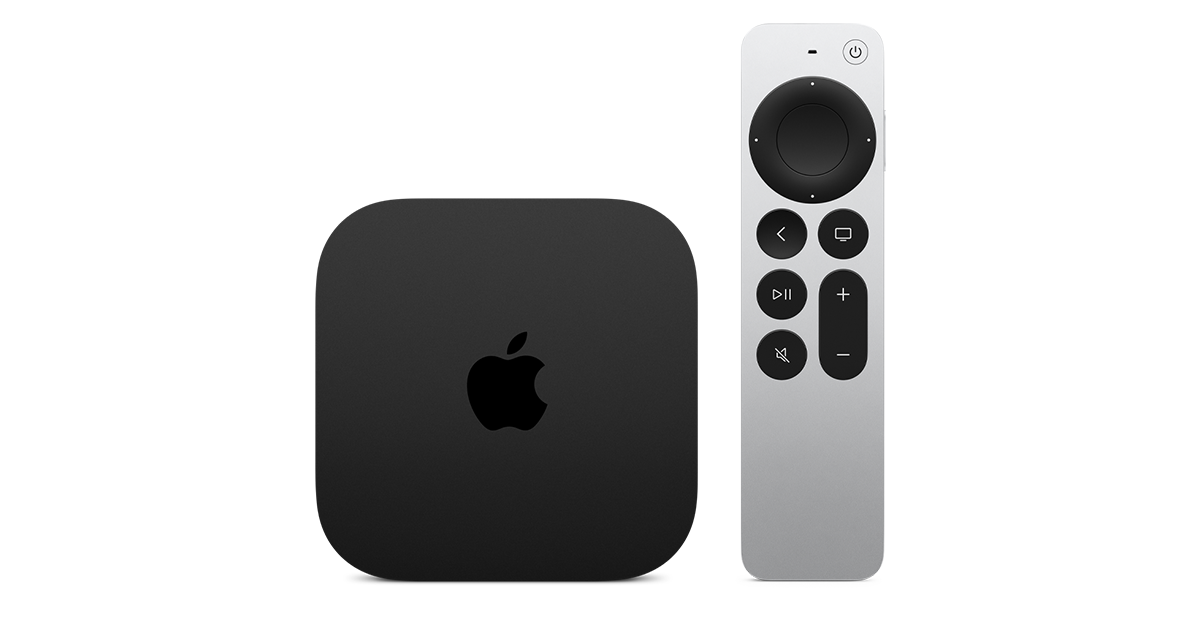
At $299, it had better come with 256 GB of Storage, Gigabit (or better) Ethernet, the latest HDMI tech and standards, and one year of free Apple One. But it probably won't…
Apple TV 4K
Apple TV 4K. New Siri AI and hands-free control. Stunning picture and immersive HomePod surround sound. Works with your Apple and smart home devices.
www.apple.com
14 Replies
·
174 views


 . apple's been making money off of software and not hardware for a while
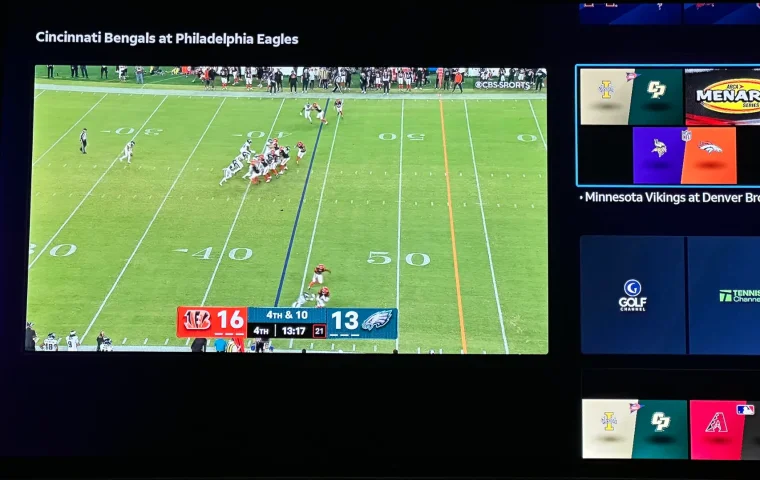
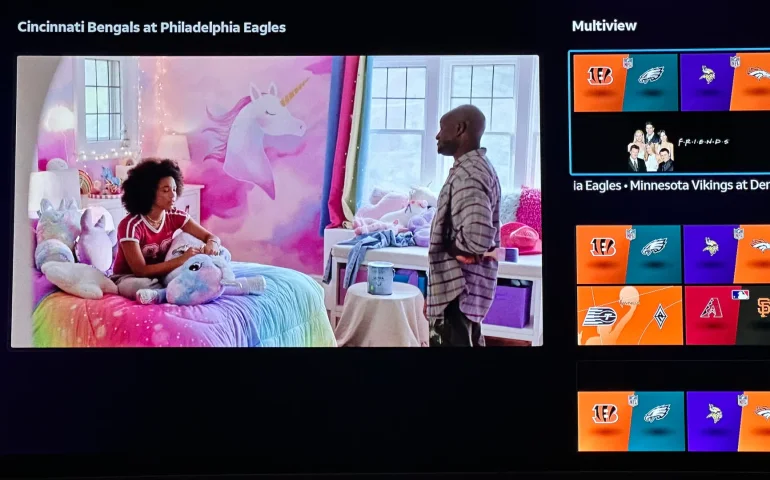
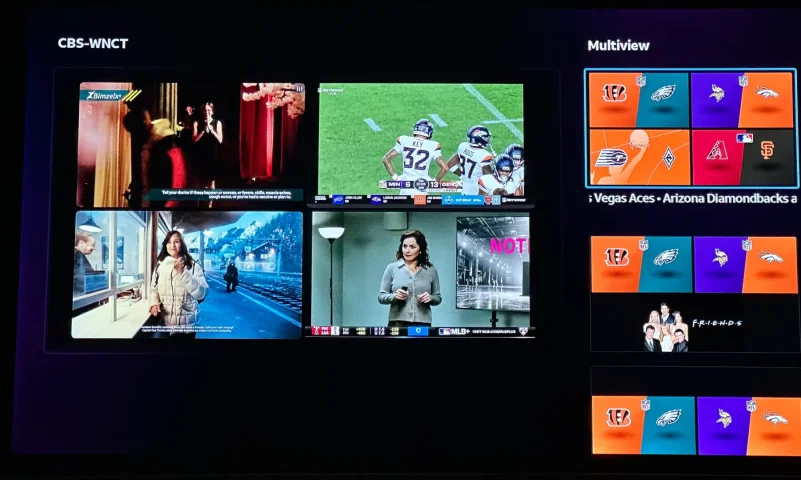
The new curated multiview is now live.
While on many of the sports channels and non sports channels there is a multi view option button. It will pull up a side bar with many different multi view options.
While on many of the sports channels and non sports channels there is a multi view option button. It will pull up a side bar with many different multi view options.
3 Replies
·
158 views


Supporting Founder
Really excited for this season with Kentucky having a new coach and some really exciting recruits. Probably won't last long, but here's hoping this season is great.
141 Replies
·
1348 views


Supporting Founder
Lifetime Supporter
This thread is a place to discuss the 4K events that appear on channel 540. We are getting, at this point, one college football game a week. Let's hope there is more coming.
1931 Replies
·
298854 views

TWiT Tech Podcast Network
Time for another AWESOME video from the TWIT Network!
View: https://www.youtube.com/watch?v=87N42NxLPC0
Direct YouTube Link - 8 U.S. States Sue OpenAI Over Safety Concerns With Younger Users
TWIT's Website
TWIT Live Feed
View: https://www.youtube.com/watch?v=87N42NxLPC0
Direct YouTube Link - 8 U.S. States Sue OpenAI Over Safety Concerns With Younger Users
TWIT's Website
TWIT Live Feed
0 Replies
·
12 views

Pub Member / Supporter
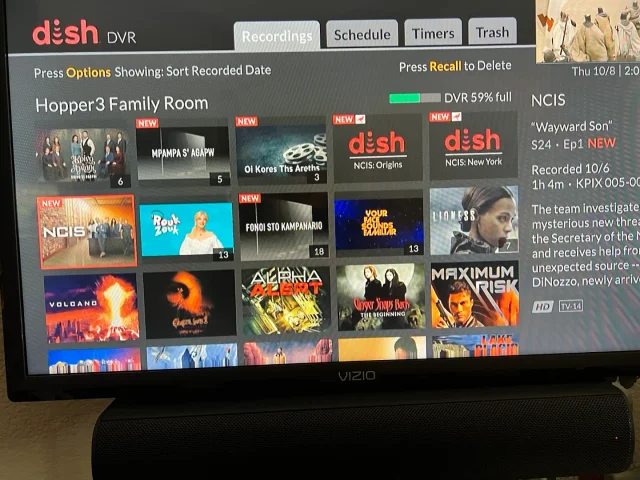
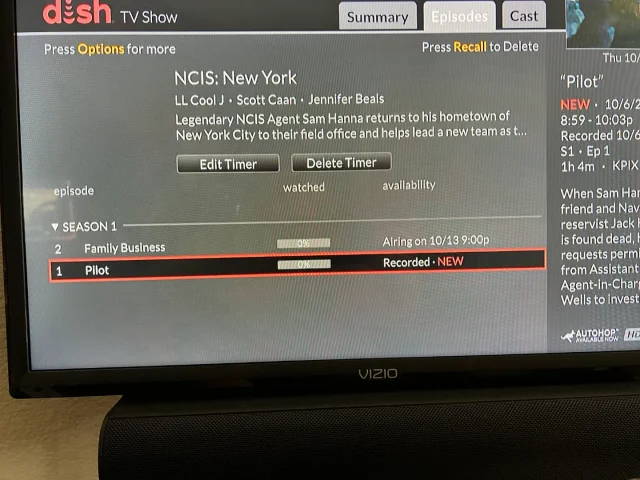
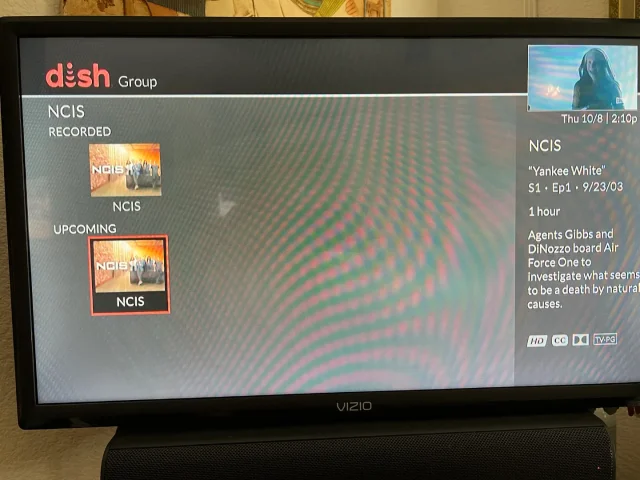
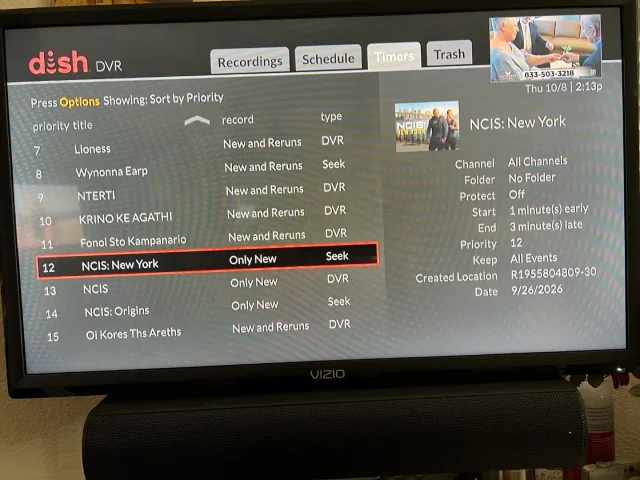
On Tuesday, I recorded the first episodes of the new season's NCIS shows on CBS (Dish provided, not OTA). The new New York series and Origins will both do Auto Skip, but the original, now season 24 does not. What's stranger, when I do a search for NCIS, Origins and New York show the current recording and the next episode it will record, but the original show only shows the current recording and some other channel showing the very first episode of season one. It makes no sense. When I set up the timers, I was able to use search for Origins and New York, but for the original, I had to scroll ahead in the guide until last Tuesday when the show was airing. Then set the timer from there. You can see its timer type is DVR where the other two are Seek. What am I missing?
Thanks!
Thanks!
20 Replies
·
392 views


