Social Feed

gpguitarman1
Last reply · posted in DISH Network Support Forum
Received 362 this morning. Still hoping the ff/rw is fixed. Also I still get stuck in a 60sec loop. When recording a show, start watching, pause, watch something else, go back to recording show,still in progress, and instead of resuming where I left off, it jumps to beginning and can't get past first minute of show. Says limit reached, when ff. End up going to guide, click show recording, then I can rewind to where I left off.

Sent from my SM-A326U using Tapatalk
69 Replies · 8595 views
  • Sad
Reactions: TheKrell
Almighty1
Thanks - I was able to duplicate it in our lab and we're opening it up as a new defect today. Appreciate your report!
Thanks for reporting it as well. One thing that is uncertain is I don't know if that issue existed before 358 or not but I'll stick to the not. There is another issue I have noticed with all software versions, basically the internal HDD of the Hopper 3 is
like 75% or 80% full as a reference point and I do have the Hopper nightly update time for 1:00AM PST but because I have timers, what happens is that if I don't restart sometime between 24 and 48 hours, the Hopper 3 recordings will stop because is complaining the HDD is full and deleting or moving recordings to the EHDD doesn't help. If I reboot the Hopper 3, then everything works fine with recordings and such and ofcourse the same problem happens 24 and 48 hours. So what I do now as a remedy is at 24 hours or the soonest that there is no timers at or a little bit after 24 hours, I just reboot it using the menu option and the problem doesn't show up. Not sure if that is even something that can be fixed. After rebooting, using the 75% or 80%, the HDD space used after a few minutes will actually go down and show like 70% instead of 75% and 75% instead of 80% for example.
  • Like
Reactions: charlesrshell
bookworm370
Thanks for reporting it as well. One thing that is uncertain is I don't know if that issue existed before 358 or not but I'll stick to the not. There is another issue I have noticed with all software versions, basically the internal HDD of the Hopper 3 is
like 75% or 80% full as a reference point and I do have the Hopper nightly update time for 1:00AM PST but because I have timers, what happens is that if I don't restart sometime between 24 and 48 hours, the Hopper 3 recordings will stop because is complaining the HDD is full and deleting or moving recordings to the EHDD doesn't help. If I reboot the Hopper 3, then everything works fine with recordings and such and ofcourse the same problem happens 24 and 48 hours. So what I do now as a remedy is at 24 hours or the soonest that there is no timers at or a little bit after 24 hours, I just reboot it using the menu option and the problem doesn't show up. Not sure if that is even something that can be fixed. After rebooting, using the 75% or 80%, the HDD space used after a few minutes will actually go down and show like 70% instead of 75% and 75% instead of 80% for example.
Ok,

I'll chime in again.

Another little-known factoid. The internal HDD will not decrement its usage by just deleting random recordings. The usage stats are based on several factors, with one big one being the age of the OLDEST recording on the internal drive.

Take a look at the date and look for the record(ings) that were recorded the longest ago. If you delete them, you will notice, as if by magic again, that the internal HD utilization number will drop almost instantly once you press delete.

It seems that someone was too conservative in calculating how much room would be left, and they included the total size of the recording and the Oldest to most current dates in the calculation. As for what reason, considering how the file system handles it, is anyone's guess.

My guess is the way that the Hopper handles On Demand from DVR events. They say that the internal HDD is partitioned into two 1TB partitions. My guess is that it is now, and it's a software partition scheme, as it would be a total waste of resources considering how much On Demand space is used versus DVR. However, some methods of calculating the size based on a virtual 1TB size needed to be invented. Poorly, IMHO, but that's how they do it.

But if you delete the oldest of a series or oldest (e.g., the oldest show of The Blacklist (if that's the oldest show on the internal drive), then the total space will drop by at least a week's worth of recording space.

Also, if you move those shows off to an EHD, the result is not instantaneous like deletion is, but a reboot will force the receiver to reindex the internal drive and give you another number.

So if it says 80% full, it's not. It's 80% as if it was recording your normal shows regularly, from the oldest to the most current.

I know that sounds like total mush and madness, and I agree, it is. But that is the way it works! My utilization is up right now because we have some of the NBC Chicago Med/PD/Fire shows from last season we haven't watched yet. When we start to watch them, and I start to delete them, you can bet the number will go down.

Yes, Another little factoid that no one seems to know about, even inside DISH support. But I found out after years of frustration and trial and error and just me being plain stubborn!

BW
  • Like
Reactions: charlesrshell
long_time_Dish
Ok,

I'll chime in again.

Another little-known factoid. The internal HDD will not decrement its usage by just deleting random recordings. The usage stats are based on several factors, with one big one being the age of the OLDEST recording on the internal drive.

Take a look at the date and look for the record(ings) that were recorded the longest ago. If you delete them, you will notice, as if by magic again, that the internal HD utilization number will drop almost instantly once you press delete.

It seems that someone was too conservative in calculating how much room would be left, and they included the total size of the recording and the Oldest to most current dates in the calculation. As for what reason, considering how the file system handles it, is anyone's guess.

My guess is the way that the Hopper handles On Demand from DVR events. They say that the internal HDD is partitioned into two 1TB partitions. My guess is that it is now, and it's a software partition scheme, as it would be a total waste of resources considering how much On Demand space is used versus DVR. However, some methods of calculating the size based on a virtual 1TB size needed to be invented. Poorly, IMHO, but that's how they do it.

But if you delete the oldest of a series or oldest (e.g., the oldest show of The Blacklist (if that's the oldest show on the internal drive), then the total space will drop by at least a week's worth of recording space.

Also, if you move those shows off to an EHD, the result is not instantaneous like deletion is, but a reboot will force the receiver to reindex the internal drive and give you another number.

So if it says 80% full, it's not. It's 80% as if it was recording your normal shows regularly, from the oldest to the most current.

I know that sounds like total mush and madness, and I agree, it is. But that is the way it works! My utilization is up right now because we have some of the NBC Chicago Med/PD/Fire shows from last season we haven't watched yet. When we start to watch them, and I start to delete them, you can bet the number will go down.

Yes, Another little factoid that no one seems to know about, even inside DISH support. But I found out after years of frustration and trial and error and just me being plain stubborn!

BW
Wow, that's an incredibly stupid way to manage the internal HDD diskspace percentage...
bookworm370
Wow, that's an incredibly stupid way to manage the internal HDD diskspace percentage...
Yup, but honestly, I've seen worse! Have you ever looked at the original DOS file system manager? Just a chain of linked lists. Break one of them, and it all crashed down. But all you lost was a great big giant floppy disk! LOL

But try it: pick an old recording, watch it, take a look at the percentage, and then use the recall/delete function to just press the button to delete it. You'll see the free disk space go up. Or the used space goes down depending on how you look at it.
  • Like
Reactions: charlesrshell
Almighty1
Yup, but honestly, I've seen worse! Have you ever looked at the original DOS file system manager? Just a chain of linked lists. Break one of them, and it all crashed down. But all you lost was a great big giant floppy disk! LOL

But try it: pick an old recording, watch it, take a look at the percentage, and then use the recall/delete function to just press the button to delete it. You'll see the free disk space go up. Or the used space goes down depending on how you look at it.
Never had that problem with DOS 2.11 and later as I ran a BBS since 1986 on FidoNet but ofcourse I later used a tool named List.com which had something called fv.com that was awesome while in DOS that I was using even with Windows XP I think up to 2009.

As for what you said, in my case, deleting whether I watch or not even new recordings or transferring to EHDD, the used space as in % goes down so if it was 80%, I will actually see it show 79%, 78%, 77%, 76% since everything I record in is SD version of the channel, it takes 2 or 3 recordings for it to go down 1% but eventually I get it down to 65%. So a lot has to do with the HDD is out of free space to record and the recording has been stopped message showing up. If I get the % down before it shows up, it will never show up. If I don't, then it will do that with the original timers it halted with a partial stopped recording as the timer would show stopped by user and then any timers following that will also show the message when that timer fires up with 0 minute recordings on the DVR. The message will show up and repeat within seconds until it feels like stopping or I get the % shown down to something like 63% for example which is why the transferring to EHDD method is faster as I wouldn't delete things that were recorded completely until after I finish watching it but in my case, the ones that I delete are the duplicates of each title that were repeats on that current day.

I'll have to try using recall/delete to delete as the way I usually do is hit select, then stop and then select delete or if it's without watching, just delete directly without watching.

So it seems the behavior on my Hopper 3 is that the utilization % will drop as long as things are deleted by 1% for every 2-3 1.5Hr SD recordings even current day ones and old ones whether it's deleted or transferred to a EHDD as the only different with the later is it's deleted from the internal HDD instead of the usual delete that goes to the trash first but ofcourse the same issue happens even if I emptied the trash. It happened more recently as this is not a new problem as before, my normal utilization is 50%-60% because I also do not have one title that has 3 x 1Hr recordings daily where 2 are reruns of the same episode so for each date, I watch the 4:00PM version and if there are problems, I may have to watch the 7:00AM or 9:00PM version for the rest but after watching, all 3 gets deleted and in this case, it has about 99 recordings which means there are 33 episodes I have to watch. It seems in older versions of software, I can delay the restarting forever meaning it can be weeks before it will reboot while the box is on but I am not there when it asks to reboot so it does it by default. So it's strange that for some, only deleting old recordings will make the % used go down while mines will go down as long as I delete and I know it works for new ones as I always delete the new ones daily and see it go down. So the bug here is once the message shows up that the HDD is out of space, it will do it without first checking if the current % going down which in my case has because it started at 80% but is doing it even at 65% but if I had things I could delete further and can get the % down further like 63% as I mentioned before, the issue is gone so the other problem is it could be there is a delay for the Hopper 3 which is 30 minutes to hours before it recognizes that the % used has actually gone down. Hard to tell as it's not like we had access to df and what the Hopper 3 thinks is available space at the same moment as a comparison.
  • Like
Reactions: charlesrshell
long_time_Dish
Never had that problem with DOS 2.11 and later as I ran a BBS since 1986 on FidoNet but ofcourse I later used a tool named List.com which had something called fv.com that was awesome while in DOS that I was using even with Windows XP I think up to 2009.
Loved List.com! That was one fantastic tool for it's time. The ability to view the contents of binary files and filter them was amazing for it's day, and yep, used it as well up through Windows XP...
Almighty1
One thing I noticed with H362 but not for certain if it happened with H358 is last night as I didn't pay close attention with H358 but when the Hopper 3 is rebooted either with the Red Button or using the menu, when it shows the acquiring signal
with the progress bar which may take up to 5 minutes that instead of the progress bar moving, within 2-3 seconds after that message is shown, that screen disappears and shows the Complete Signal Loss screen instead and eventually maybe 8-9 minutes later, the live video will work but before that, all the tuners will just show Acquiring Signal when I click on options.
bookworm370
Loved List.com! That was one fantastic tool for it's time. The ability to view the contents of binary files and filter them was amazing for it's day, and yep, used it as well up through Windows XP...
You know, I still have an ASUS Pentium Win/XP system running in my basement that runs my 1st generation home automation system. I reboot it maybe twice a year and just look at it to clear out log files, etc. I did upgrade it to SSD, so for a Pentium system, it's pretty snappy, only running one app. But as it's mission-critical, I did go out and acquire one of everything in the entire beast that might fail. I have extra exact SSDs, an extra motherboard, extra CPU, extra memory, LAN card, an extra old-style power supply, extra fans, etc. So, anything that might fry on it, I can just open it up and replace what has finally died. But I have quite a few fans keeping it as cool as possible.

Of the Windows 10, 11, and Ubuntu servers I have running, the XP box is the reliable pug and chug workhorse that it just makes it not worth my time to upgrade to the newest version of the software (which I also run as a supplement to the XP system as some technologies (Z-Wave, Zigbee, etc) just didn't exist back then so there was no support for those in the XP version of the HA system.
long_time_Dish
You know, I still have an ASUS Pentium Win/XP system running in my basement that runs my 1st generation home automation system. I reboot it maybe twice a year and just look at it to clear out log files, etc. I did upgrade it to SSD, so for a Pentium system, it's pretty snappy, only running one app. But as it's mission-critical, I did go out and acquire one of everything in the entire beast that might fail. I have extra exact SSDs, an extra motherboard, extra CPU, extra memory, LAN card, an extra old-style power supply, extra fans, etc. So, anything that might fry on it, I can just open it up and replace what has finally died. But I have quite a few fans keeping it as cool as possible.

Of the Windows 10, 11, and Ubuntu servers I have running, the XP box is the reliable pug and chug workhorse that it just makes it not worth my time to upgrade to the newest version of the software (which I also run as a supplement to the XP system as some technologies (Z-Wave, Zigbee, etc) just didn't exist back then so there was no support for those in the XP version of the HA system.
How'd you find duplicates of the motherboard, CPU, RAM, PSU, etc? Or did you buy them at the time you bought the box? It's nearly impossible to find gear that vintage nowadays...
  • Like
Reactions: charlesrshell
bookworm370
How'd you find duplicates of the motherboard, CPU, RAM, PSU, etc? Or did you buy them at the time you bought the box? It's nearly impossible to find gear that vintage nowadays...
I got a lot of them on eBay about 15 years ago. You could still find the Pentium CPUs, the ASUS motherboards and the DDR memory there. And they were pretty cheap. The hardest thing to find is the RocketPort 8 Channel Serial IO card. Back then, nothing was controlled via USB (USB what?) or network. So, everything connects via a serial port. I needed about six serial ports + 1. The plus one is that my COM2 on the motherboard gave up the ghost a few years back, and with only one UART gone and having extra cables/ports available, I just migrated the Ocelot over to one of the ports on the RocketPort.

I did find a 3rd party driver that patched XP to add the Trim command for the SSD when I got paranoid about my Raid 1 500G WD drives, so I replaced them with a Crucial SSD. That was like kicking in a turbo charger!

I know that with something that old and patched like it is, I'm not about to muck with it at all. I'll post a few pics of the 'data center' in my basement later. Most people will just say 'Holy sh*t'! and they would be right. Call me super geek!
long_time_Dish
I got a lot of them on eBay about 15 years ago. You could still find the Pentium CPUs, the ASUS motherboards and the DDR memory there. And they were pretty cheap. The hardest thing to find is the RocketPort 8 Channel Serial IO card. Back then, nothing was controlled via USB (USB what?) or network. So, everything connects via a serial port. I needed about six serial ports + 1. The plus one is that my COM2 on the motherboard gave up the ghost a few years back, and with only one UART gone and having extra cables/ports available, I just migrated the Ocelot over to one of the ports on the RocketPort.

I did find a 3rd party driver that patched XP to add the Trim command for the SSD when I got paranoid about my Raid 1 500G WD drives, so I replaced them with a Crucial SSD. That was like kicking in a turbo charger!

I know that with something that old and patched like it is, I'm not about to muck with it at all. I'll post a few pics of the 'data center' in my basement later. Most people will just say 'Holy sh*t'! and they would be right. Call me super geek!
Man, that's like being a computer archeologist! :D Yes, I have 2 XP boxes in the business because they can run some stuff that Microsoft has made obsolete or eliminated (unfortunately), but I am impressed that you were able to find all those parts. 15 years ago helps in the easter egg hunt though, that's for sure! I'd like to see a few pics of the 'data center'.
navychop
While we're playing, I have an old RCA COSMAC VIP computer with an 1802 CPU. And an old reverse Polish notation calculator using Nixie tubes.

Any other players?

;)
Almighty1
One thing I noticed with H362 but not for certain if it happened with H358 is last night as I didn't pay close attention with H358 but when the Hopper 3 is rebooted either with the Red Button or using the menu, when it shows the acquiring signal
with the progress bar which may take up to 5 minutes that instead of the progress bar moving, within 2-3 seconds after that message is shown, that screen disappears and shows the Complete Signal Loss screen instead and eventually maybe 8-9 minutes later, the live video will work but before that, all the tuners will just show Acquiring Signal when I click on options.
As I did a forced software update on H362 and still ended up with H362, I actually timed it this time around and this is what happens exactly:

1) It shows acquiring signal with he progress bar wich may take up to 5 minutes
2) Instead of the progress bar moving, within 2-3 seconds after that message is shown, that screen disappears
3) Complete Signal Loss 015A is shown for 4 minutes
4) Channel Signal Loss 004 is shown indefinitely as I had waited 30 minutes and it still did not show Live video and appears to be on the correct channel, I had to channel up and then channel down before it worked.
long_time_Dish
When 362 or 363 shows up on my receiver, that's when it shows up. My receiver is set to reboot at 4am everyday. I tried to force a reboot once and it didn't update, so I haven't tried it since. I'm still at 358 and it's working fine, so when it updates, it updates...
jamieh1
Last reply · posted in DIRECTV Programming Forum
Looks like DTV made a deal. I'm now getting it on ch 650. The tv promise slate is gone.
4 Replies · 58 views
M
A few teams got a deal. Was posted yesterday in the Directv update thread
K
https://www.prnewswire.com/news-rel...-louis-blues-regional-channels-302918682.html
DIRECTV today announced a new multi-year distribution agreement with the National Hockey League for Hurricanes Hockey Network, Blue Jackets Hockey Network, Wild+, and Blue Note+ pregame, postgame, and in-game live sports services.

Each of the four channels will be available to DIRECTV streaming and satellite customers who live in each team's NHL-designated home territory and subscribe to Choice and higher packages, and each U-verse customer in those same regions who subscribes to U200 and above.

This agreement also provides distribution rights to each NHL team to all of DIRECTV FOR BUSINESS's thousands of sports bars, restaurants, fitness clubs, and other commercial venues located within each team's respective region.

DIRECTV has recently obtained regional or local rights to provide 76 of the 81 U.S.-based NHL, NBA, or MLB franchises to their local fans, including multi-year agreements for 23 U.S.-based hockey teams.
  • Like
Reactions: Mr Tony
jamieh1
Now let's get the NBA game channels going.
K
I'm trying to figure out the math that got them to 76 of 81 US based teams:
DIRECTV has recently obtained regional or local rights to provide 76 of the 81 U.S.-based NHL, NBA, or MLB franchises to their local fans, including multi-year agreements for 23 U.S.-based hockey teams.
77 Phillies
78 76ers
79 Flyers (Next year will mark 30 years since DTV last had local Philly sports after the demise of SportsChannel Philly, at this point the lack of NBCS Philly is not a dealbreaker for most of their remaining PA, Southern NJ and Delaware customers)
80 Stars -- Not listed in the NHL release as KDFI/KDFW only has 17 simulcasts the rest are Prime only
The lack of Flyers and Stars would match the 23 of 25 US based NHL teams.

81 Ducks? -- KCOP is listed in the NHL release, but between them and KTTV only 65/77 games will be available, the other 12 will be Prime only, and there's no OTA option at all for viewers in the Santa Barbara or San Diego DMAs
Unlike the 4 NHL distributed teams (Blues, Blue Jackets, Hurricanes, Wild), the Stars and Ducks are available at no additional cost for Prime subscribers


In the NHL release they are counting the LIL coverage of OTA teams for "local rights", even if all of the outer markets aren't available (i.e. Golden Knights and Mammoth on The Spot Idaho subchannels, the Panthers on Laff Fort Myers and Ducks outside of the LA DMA), so at least for the home markets they have the following OTA NBA teams:
Heat - WPLG/10 Miami and WTCN-CD/43 West Palm Beach -- slate up on channel 654, but I doubt they are going to add a Heat feed just for Fort Myers unless the Heat make it available cheaply, they didn't even do it for the Panthers who won the Stanley Cup in 2024 and 2025
Hornets - WAXN/64 Charlotte, WMYV/48 Greensboro, WRDC/28 Raleigh and the satellite only WZBJ/24 Roanoke -- slate up on channel 648 for the rest of the Carolinas
Magic - WRDQ/27 Orlando and WMOR/32 Tampa -- slate up on channel 656 for the non-carried subchannel markets Jacksonville, Gainesville, Panama City and Tallahassee along with the Florida portions of the Mobile-Pensacola DMA who doesn't have any OTA carriage.
Hawks - WANF/46 Atlanta -- slate up on channel 646 for the rest of Georgia and Alabama
Bucks - WVTV-D2/24 Milwaukee and the satellite only WISC-D2/14 Madison -- slate up on channel 669 for the rest of Wisconsin
Suns - KAZF/32 Phoenix -- Nothing for Tucson, Yuma or New Mexico
Jazz - KJZZ/14 Salt Lake City -- Nothing for the areas of Eastern Washington, Eastern Oregon, Idaho and Montana that used to get it on an alternate feed of Root Northwest
dishstaller
Pub Member / Supporter Lifetime Supporter
Last reply · posted in The Chit Chat Club
I'm surprised Walmart hasn't banned this guy from all of their stores. He has been on their CASE the past few months.


View: https://www.youtube.com/shorts/f3zr37ekgKM?feature=share
60 Replies · 602 views
  • Wow
Reactions: NYDutch
TRG
TRG
I would think that the Vendor/Maker of the product would have a say in it, showing the Correct weight ...
You would think it would be in the contract.

I do look at the ounces of items, but unless its way off, I don't check the math, may have to start now.

Remember when you use to get a 13.5 oz bag of Chips .... Thats a PARTY Size now.
I remember when a pound of coffee was 16oz. Now its 12oz, they don't call it a pound anymore and its three times the cost of the 16oz pound.
Jimbo
I remember when a pound of coffee was 16oz. Now its 12oz, they don't call it a pound anymore and its three times the cost of the 16oz pound.
Well, they don't call it a pound anymore ....

Ice cream is that way too, use to be a half gallon, now its 1.5 quart or some say 48 oz
  • Sad
Reactions: Bobby
NYDutch
Well, they don't call it a pound anymore ....

Ice cream is that way too, use to be a half gallon, now its 1.5 quart or some say 48 oz
We have a regional ice cream company here that advertises that their ice cream containers are still a full half gallon.
Jimbo
We have a regional ice cream company here that advertises that their ice cream containers are still a full half gallon.
Now check and see if any of them (probably a few) are actual Ice Cream ...

Most Ice Creams are Not actual Ice Cream.
Bryers for example, call Most of thiers "Frozen Dairy Dessert"
TRG
TRG
Now check and see if any of them (probably a few) are actual Ice Cream ...

Most Ice Creams are Not actual Ice Cream.
Bryers for example, call Most of thiers "Frozen Dairy Dessert"
I only buy Tillamook and Alden's ice cream. The first ingredients are milk and cream.
  • Like
Reactions: Foxbat and Bobby
Jimbo
I only buy Tillamook and Alden's ice cream. The first ingredients are milk and cream.
1st Big Question is ... How Much Sugar is in it and Sodium and Carbs ...
I' m really not suppose to have Ice Cream, or at least Moderately ....
Depending on the amount of sugar and sodium (don't think theres sodium in it, but Carbs probably is.)
Bobby
$5.69 for the 48oz of Rocky Road at my Walmart.
  • Like
Reactions: Foxbat
Jimbo
$5.69 for the 48oz of Rocky Road at my Walmart.
Apparently my local Walmart doesn't carry that brand Tillamook ...
Kroger does .... Vanilla Bean $7.49 for 1.5 quart

Up here I have options of :
Vanilla Bean, French Vanilla, Cookies and Cream, Mud Slide and Strawberry

I will try the Strawberry and see what I think, IF the Sugar isn't any more than 22g ... it's Quite expensive.

Target does show it, cheaper, $5.99, however thier website says Not Sold in Store, closest store that carries it is 39 Miles away ....
I guess I better wait till WINTER to get it .. if it's that far away.

I'll have to check and see if Meijer has it ... YES they do ... $7.49 and a variety of Flavors
navychop
don't think theres sodium in it

According to "Miss A"" there is. Especially for higher end ones.
Jimbo
According to "Miss A"" there is. Especially for higher end ones.
I did look into that ... the ones I get have about 65mg, which is very little ... but then I wouldn't expect much to be in Ice Cream.
Carbs are more than I would have liked ...
Bobby
I did look into that ... the ones I get have about 65mg, which is very little ... but then I wouldn't expect much to be in Ice Cream.
Carbs are more than I would have liked ...
  • Like
Reactions: Foxbat and Jimbo
TRG
TRG
Apparently my local Walmart doesn't carry that brand Tillamook ...
Kroger does .... Vanilla Bean $7.49 for 1.5 quart

Up here I have options of :
Vanilla Bean, French Vanilla, Cookies and Cream, Mud Slide and Strawberry

I will try the Strawberry and see what I think, IF the Sugar isn't any more than 22g ... it's Quite expensive.

Target does show it, cheaper, $5.99, however thier website says Not Sold in Store, closest store that carries it is 39 Miles away ....
I guess I better wait till WINTER to get it .. if it's that far away.

I'll have to check and see if Meijer has it ... YES they do ... $7.49 and a variety of Flavors
It goes on sale all the time here. Like NOW! I'm gonna go stock up today. This is at Albertsons.
BTW I don't buy Ice cream for it's nutritional value. But I understand that some people need to keep an eye on that sort of thing for personal health reasons.

Screenshot from 2026-10-24 11-13-21.webp
  • Like
Reactions: Jimbo
cp2k
I've noticed some of this too, and a bigger trend I've noticed lately is that buying bigger quantities isn't always cheaper anymore. Take Pepsi for example. At several of our local stores it is cheaper per ounce to buy the 1.25l bottles (and buy more of them) than it is to buy the 2 liter bottles when you break it down to a per ounce price. Also, Food Lion is bad about jacking up prices before Buy one get one free sales. They'll have a BOGO offer where you get the second one free, but raise the price for one to nearly the same price or higher than it would be to just buy two of the item at another store outright.

Another big trap people fall for are Dollar General and Dollar Tree. Typically their quantities are smaller, and priced higher per ounce than what you would see at Wal-Mart for example. I saw someone in line the last time I was in Dollar Tree with 6 items at $1.50 each. Four of them could've been had for less than $1 at Wal-Mart. The crazier thing is the Dollar Tree is in a shopping strip mall located in the Wal-Mart parking lot.
Jimbo
It goes on sale all the time here. Like NOW! I'm gonna go stock up today. This is at Albertsons.
BTW I don't buy Ice cream for it's nutritional value. But I understand that some people need to keep an eye on that sort of thing for personal health reasons.

View attachment 195017
Up here, Breyers will go on sale for $3.99 or $4.99, it varies week to week.

I never use to worry about the Nutritional value either, but now I'm suppose to ... I really shouldn't have ANY, but if I have smaller quantities I'm ok ... trying to get the old A1C down, and still have somethings that I like.
Dr wants me on weeds apparently ... he hasn't offered weed yet !
Jimbo
I've noticed some of this too, and a bigger trend I've noticed lately is that buying bigger quantities isn't always cheaper anymore. Take Pepsi for example. At several of our local stores it is cheaper per ounce to buy the 1.25l bottles (and buy more of them) than it is to buy the 2 liter bottles when you break it down to a per ounce price. Also, Food Lion is bad about jacking up prices before Buy one get one free sales. They'll have a BOGO offer where you get the second one free, but raise the price for one to nearly the same price or higher than it would be to just buy two of the item at another store outright.

Another big trap people fall for are Dollar General and Dollar Tree. Typically their quantities are smaller, and priced higher per ounce than what you would see at Wal-Mart for example. I saw someone in line the last time I was in Dollar Tree with 6 items at $1.50 each. Four of them could've been had for less than $1 at Wal-Mart. The crazier thing is the Dollar Tree is in a shopping strip mall located in the Wal-Mart parking lot.
Convenience ... I guess.
Personally, I'm not bouncing around stores to save .50 cents
Bruce
Supporting Founder Lifetime Supporter
Last reply · posted in Internet Television (IPTV) Discussion Forum
I was reading this article


That said this-
Last summer, for the first time, streaming services like Netflix and Amazon Prime claimed the largest share of the television viewing audience, surpassing both cable and broadcast TV. Streaming captured 34.8 percent of July viewers, according to Nielsen data, compared to 34.4 percent for cable and 21.6 percent for broadcast.

And then, sometime in the second half of 2022, cord-cutters became the majority. The share of cable and satellite television subscribers dipped to 48 percent, according to a report from Samba TV, a television technology company.


Now I do not consider those with YTTV and the likes, Cord Cutters, but they still do not have Traditional Cable/Satellite delivered Live TV, so I decided to do the math.

There are, now, 129 Million Households in the United States.

In 2015, there were 100 Million Cable/Sat Subscribers , no streaming Live TV Service.

Today, there are 66 Million Live TV subscribers, including Cable, Satellite and Streaming.

Roughly, Streaming Live TV has 14 Million subs including all of them.

So that means, Cable/Satellite now has, roughly, 51 Million Households

So in just 8 years, lost 49% of their subscribers and by the end of this year, expected sub count to be, roughly, 45 million households.

That means a total loss of 55% since 2015 at the end of 2023.

But out of 129 Million households, 45 million will mean only 35% will get Cable/Satellite Delivered Live TV by the end of 2023.

Imagine what 2024 will be like.
895 Replies · 71741 views
  • Wow
Reactions: MikeD-C05
Bruce
And again, 15 months in a row, streaming wins-

Cable and Broadcast added together-36.4%

Streaming with a massive 49.6%, 13.2% higher than Broadcast/Streaming.

IMG_2172.webp
Jimbo
And again, 15 months in a row, streaming wins-

Cable and Broadcast added together-36.4%

Streaming with a massive 49.6%, 13.2% higher than Broadcast/Streaming.

View attachment 194983
Your Still Thrilled about all this ?

These numbers will Never be accurate as many people use Both still ...

You have services like Hulu Live and You Tube TV that do, what you call Cable, but they ARE Streaming, so Which is is ?

Does it get counted 2x as both Streaming and Cable ?
  • Like
Reactions: MikeD-C05
Jimbo
But they ARE Streaming as well, so they Should be counted as both, which would make the Streaming numbers even More prominate.

Q.
Who does the Counting for Streaming ?

Neilson does the Broadcast/Cable ...
Bruce
But they ARE Streaming as well, so they Should be counted as both, which would make the Streaming numbers even More prominate.

Q.
Who does the Counting for Streaming ?

Neilson does the Broadcast/Cable ...
Same.

Ratings for streaming content is extremely accurate, since the service knows who is watching what and when, when we hit ok on our remotes.

Ratings for Broadcast/Cable shows has always been a estimate.
Jimbo
Same.

Ratings for streaming content is extremely accurate, since the service knows who is watching what and when, when we hit ok on our remotes.

Ratings for Broadcast/Cable shows has always been a estimate.
If I flip thru shows on an app, 3-4 in a few minutes, does that still show that I watched the whole episode ?


If I watch the Super Bowl for 5 minutes, does that count as watching the Super Bowl ?
Is it the same if I just watched the Commercials.
Bruce
If I flip thru shows on an app, 3-4 in a few minutes, does that still show that I watched the whole episode ?


If I watch the Super Bowl for 5 minutes, does that count as watching the Super Bowl ?
Is it the same if I just watched the Commercials.
Nielsen Streaming Ratings: Third-party measurement firm Nielsen tracks U.S. streaming viewership, releasing weekly reports that measure total minutes viewed across major television sets, broken down by program (such as original, acquired, and movie content) rather than minute-by-minute audience retention curves.
  • Like
Reactions: llokey and Jimbo
S
Your Still Thrilled about all this ?

These numbers will Never be accurate as many people use Both still ...
Nobody is "happy" or "sad" about this. Simply posting data in an non-editorialized way has nothing to do with anyone's feelings.

The data on the streaming side is immensely accurate, I'm guessing to the millisecond. Plus most people likely have not turned off data sharing and thus they are grabbing a huge swath of data. Much more accurate than cable which relies on a smaller sample size and probably not to the second.

In either case, nobody is getting "double counted" because it's usage based. If I watch 100 minutes of content and 30 minutes is on Youtube and 20 minutes on Disney and 50 minutes on YTTV, it's going to show up as 30%, 20%, 50% slices of my personal pie respectively.
Q.
Who does the Counting for Streaming ?

Neilson does the Broadcast/Cable ...
Nielsen does. If you go into the settings of any of your streaming accounts, you can turn off the option to share to usage data with their third party measuring service - Nielsen.
Jimbo
Nobody is "happy" or "sad" about this. Simply posting data in an non-editorialized way has nothing to do with anyone's feelings.

The data on the streaming side is immensely accurate, I'm guessing to the millisecond. Plus most people likely have not turned off data sharing and thus they are grabbing a huge swath of data. Much more accurate than cable which relies on a smaller sample size and probably not to the second.

In either case, nobody is getting "double counted" because it's usage based. If I watch 100 minutes of content and 30 minutes is on Youtube and 20 minutes on Disney and 50 minutes on YTTV, it's going to show up as 30%, 20%, 50% slices of my personal pie respectively.

Nielsen does. If you go into the settings of any of your streaming accounts, you can turn off the option to share to usage data with their third party measuring service - Nielsen.
I have turned some off, not others ...
TWiT Tech Podcast Network
· posted in TWiT Tech Podcast Network
0 Replies · 4 views
TRG
TRG
Pub Member / Supporter
Last reply · posted in Computers and Gadgets
I set up a music server for my brother a few years ago. It's basically a small headless computer but it needs to have a DHCP IP address reserved for it in the router settings. This was easy to do in his DSL router. He's switching to Starlink now and I was wondering if these setting are easily accessible in the Starlink router. I'm pretty sure he will be getting the latest V5 router.
1 Replies · 13 views
b4pjoe
I set up a music server for my brother a few years ago. It's basically a small headless computer but it needs to have a DHCP IP address reserved for it in the router settings. This was easy to do in his DSL router. He's switching to Starlink now and I was wondering if these setting are easily accessible in the Starlink router. I'm pretty sure he will be getting the latest V5 router.
If you can't get into the router to reserve an IP address just don't use DHCP on the device that needs connected and assign it to a specific IP address in the network settings.
Scott Greczkowski
Staff member HERE TO HELP YOU! Cutting Edge
Last reply · posted in The Chit Chat Club
Sometimes a thread gets so many posts in it that is can cause issues for the server so that why today we introduce The Song Name Game Part 3!

So let the game continue!

The last song was added by Bobby who posted...

One Meat Ball - Andrews Sisters

CONTINUE ON AND HAVE FUN! WELCOME HOME TO SATELLITEGUYS.US!

Here are the original rules for the game as posted by WebbyDude back in 2006. http://www.satelliteguys.us/threads/68645-Song-Name-Game

Just name a song title and the band who performed it. The next person does the same thing, but needs to list a song title or band name which includes a word from the previous entry. Pick songs from any genre.

Example:

Long Live Rock and Roll -- Rainbow

Rainbow in the Dark -- Dio

Another example:

Ride the Lightning -- Metallica

Lightning Strikes -- Ozzy Osbourne


Get it?


An additional note: we all know that song titles, sometimes, use profane words. Because this is a family friendly website it is advised that you clean up that title up a bit. This is accomplished by using something like sh!t instead of the real word. Thanks....
68593 Replies · 2677117 views
  • Like
Reactions: c-spand
H
TAKE On ME-A-Ha
ClarkGable
On Broadway - George Benson
Bobby
Stay In Time - Off Broadway USA
harshness
Just In Time - Tony Bennett
gms49ers
Just Get Through This Night - Styx
T
Last reply · posted in Free To Air (FTA) Discussion
IS Amiko MIRA 3 any good ???
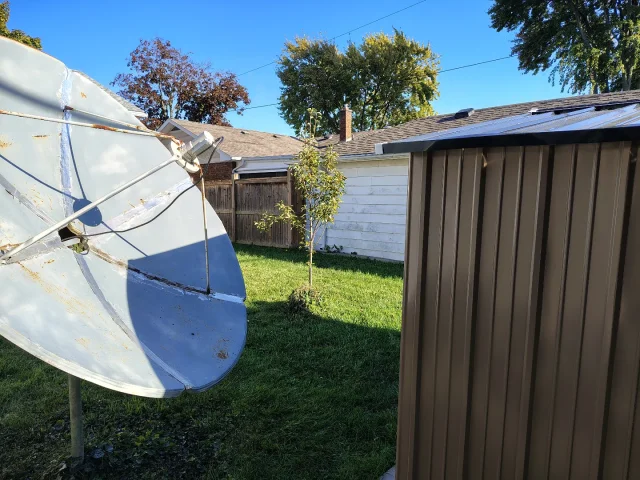
Can you recommend the best to cover all bases. NO BEEPS on certain channels 101w (NEWSMAX ,NEWS NATION), a clock that keeps working STEADY for timed recording ,solid unit with good lifespan. My Amiko died AND my Linkbox has NO Favorites Button and BEEPS on many channels. Picking up 105 west with a NEW SHED IN THE Way with 6 foot Cband ..95 percent quality ...unbelievable.
1 Replies · 34 views
primestar31
IS Amiko MIRA 3 any good ???
Can you recommend the best to cover all bases. NO BEEPS on certain channels 101w (NEWSMAX ,NEWS NATION), a clock that keeps working STEADY for timed recording ,solid unit with good lifespan. My Amiko died AND my Linkbox has NO Favorites Button and BEEPS on many channels. Picking up 105 west with a NEW SHED IN THE Way with 6 foot Cband ..95 percent quality ...unbelievable.
Have you tried a new power brick on your Amiko? It's slim pickings out there anymore. The FTA market in the US has pretty much been abandoned.

This would likely be your best bet, and Rick is a good seller. I've never had any issues with him:

  • Like
Reactions: FTA4PA
TWiT Tech Podcast Network
· posted in TWiT Tech Podcast Network
0 Replies · 6 views
K
Pub Member / Supporter Lifetime Supporter
Last reply · posted in TV Shows
Season 2 order already in hand:

'Star Trek: Starfleet Academy' Renewed for Season 2, Tatiana Maslany to Guest Star in Season 1

I've not been optimistic about this show based on what I've read so far. Seems to be aimed at a younger audience. Interesting though that Tatiana Maslany will have some sort of role.
85 Replies · 3531 views
K
I'm sure I will watch at least the first episode but I am not optimistic.
K
I'm sure I will watch at least the first episode but I am not optimistic.
Here i am over a year later and just finished season 1. Not great but not as bad as I was expecting. Did not care for the barefoot captain stuff but overall ok. Actually looking forward to see what they did for season 2.
  • Like
Reactions: MikeD-C05
MikeD-C05
Here i am over a year later and just finished season 1. Not great but not as bad as I was expecting. Did not care for the barefoot captain stuff but overall ok. Actually looking forward to see what they did for season 2.
Yeah, the foot stuff was just nasty. I kept thinking of how dirty her feet would get traipsing around shoe-less. Funny, I love being shoe less at home and never wear shoes indoors in my home for long, but seeing her laying on all her furniture with her bare feet hanging out just kind of grossed me out.
  • Like
Reactions: long_time_Dish
harshness
I kept thinking of how dirty her feet would get traipsing around shoe-less.
Where would this "dirt" come from? Dead skin and dandruff?
  • Like
Reactions: Jimbo
MikeD-C05
Where would this "dirt" come from? Dead skin and dandruff?
There would still be dirt ,dust in the future I am sure. So walking around the station like she did she would get stuff on her feet. I am sure the robot vacuum is still going to miss stuff, with all those different alien species running around there.
harshness
There would still be dirt ,dust in the future I am sure.
Where is it going to come from -- specifically?

Why do you think cleaning technology won't improve in the next few hundred years? HEPA filtration was invented as part of the Manhattan Project.
MikeD-C05
Where is it going to come from -- specifically?

Why do you think cleaning technology won't improve in the next few hundred years? HEPA filtration was invented as part of the Manhattan Project.
I don't know, but I still don't like her walking through the station or the academy with out her shoes. It looks unprofessional and very "hippy like" for someone of her status and I personally don't get off to feet, so there is that. ;)
  • Like
Reactions: long_time_Dish
osu1991
I don't know, but I still don't like her walking through the station or the academy with out her shoes. It looks unprofessional and very "hippy like" for someone of her status and I personally don't get off to feet, so there is that. ;)
Stay out of my office. I rarely have shoes or socks on in the office. My office and business is at home though :clapping
K
I just thought her behavior, including the bare feet thing, was disrespectful to her position.
harshness
I don't know, but I still don't like her walking through the station or the academy with out her shoes.
That is your right.

I couldn't buy hiding behind the dirty-feet argument.
  • Haha
Reactions: MikeD-C05
MikeD-C05
Stay out of my office. I rarely have shoes or socks on in the office. My office and business is at home though :clapping
Say, I don't wear socks or shoes in my house either. But for a captain in Star Fleet it looks bad to be walking around the academy with no shoes. Gives off 1960 Hippie vibes.