

Social Feed

http://electronics.howstuffworks.com/playstation-three.htm
The Sony PlayStation dynasty has ruled the console market since the introduction of the original PlayStation in 1994. There are 13,000 video game titles available worldwide for PlayStation products, and more are released monthly. Sony plans to continue its market dominance with the latest version of its successful console, the PlayStation 3.
[FONT=arial,helvetica]

[SIZE=-2]©2006 Sony Computer Entertainment Inc.[/SIZE]
[SIZE=-1]PlayStation 3[/SIZE][/FONT]
Officially unveiled at the 2005 E3 Expo in Los Angeles, CA, the PlayStation 3 is once again creating a lot of buzz at this year's Expo thanks to its revamped controller and news of the official launch dates and prices (read on for more information).
In this article, we'll take an in-depth look at the PlayStation 3. We'll learn about the ground-breaking new microprocessor at the heart of the PS3, the powerful graphics processor that supports hi-def graphics at unprecedented resolutions and the console's controller makeover, among other things.
[FONT=arial,helvetica] [SIZE=+1]Online Gaming: PC vs Console?[/SIZE]
[SIZE=-1]Will behemoths like Xbox 360, PS3 and Wii replace PCs as the network gamers' platform of choice?
Make your case here. [/SIZE][/FONT]
Sony designed the PlayStation 3 to be more than just a video game console. It supports all kinds of digital entertainment and is basically a home-entertainment computer. This computer sports a specially designed CPU called the Cell processor. Sony, Toshiba and IBM worked together to develop the Cell processor. It's their answer to the growing trend toward multi-core processing, in which manufacturers place as many processors as possible onto one chip. The Cell processor is scalable for different performance needs. The one used in the PlayStation 3 crams 234 million transistors onto a single die. For comparison, one of the most powerful desktop PC CPUs available in 2005, the $1,000, dual-core Pentium Processor Extreme Edition, just barely breaks the 200-million-transistor mark.
[FONT=arial,helvetica]

[SIZE=-2]Photo courtesy IBM[/SIZE]
[SIZE=-1]Big power, tiny package: There are 234 million transistors on this microprocessor. [/SIZE][/FONT]The setup of the Cell processor is like having a team of processors all working together on one chip to handle the large computational workload needed to run next-generation video games. In order to understand how the Cell processor works, it helps to look at each of the major parts that comprise this processor.
The "Processing Element" of the Cell is a 3.2-GHz PowerPC core equipped with 512 KB of L2 cache. The PowerPC core is a type of microprocessor similar to the one you would find running the Apple G5. It's a powerful processor on its own and could easily run a computer by itself; but in the Cell, the PowerPC core is not the sole processor. Instead, it's more of a "managing processor." It delegates processing to the eight other processors on the chip, the Synergistic Processing Elements.
The computational workload comes in through the PowerPC core. The core then assesses the work that needs to be done, looks at what the SPEs are currently processing and decides how to best dole out the workload to achieve maximum efficiency.
[FONT=arial,helvetica][SIZE=+1]Just the Facts, Ma'am[/SIZE][SIZE=-1]When? It's set to hit store shelves in the United States on November 17, 2006.
How much? The anticipated price of the 60GB configuration is $549 and expect the 20GB configuration to go for $499. [/SIZE][/FONT]The SPEs used in the Cell processor are each SIMD (Single Instruction, Multiple Data), 128-bit vector processors. Vector processors are designed to quickly process several pieces of data at once. They were commonly used in the 1980s in large, powerful, scientific supercomputers and were created as a faster alternative to the more common scalar processor. Scalar processors can only work one data element at a time. Despite this limitation, advances in scalar design and performance have made the use of vector processors very rare these days in most computers. However, because of the vector processor's ability to handle several data elements at once, IBM resurrected this design for the Cell. There are eight SPEs on the chip, but only seven of them handle processing. The eighth SPE is built in as redundancy in case one of the other seven fails.
The SPEs each come loaded with 256 KB SRAM. This high-speed memory helps each SPE crunch numbers quickly. The SPE memory is also visible to the main Processing Element. This allows the PowerPC Core to utilize the resources of each SPE in the most efficient way possible. All of this amounts to unprecedented power for a piece of consumer electronics.
Because graphics are so important to computers (and especially computers designed to play video games), there are microprocessors dedicated only to creating and displaying computer graphics. This processor is called the Graphic Processing Unit (GPU). One of the most anticipated aspects of the PlayStation 3 is the new GPU that was created for it -- the RSX "Reality Synthesizer."
[FONT=arial,helvetica]

[SIZE=-2]©2005 Sony Computer Entertainment Inc.[/SIZE]
[SIZE=-1]The Reality Synthesizer GPU has the power to create the realistic environments of the upcoming PS3 game "The Getaway 3."[/SIZE][/FONT]
Sony designed the RSX with graphics-card manufacturer Nvidia. The RSX is based on Nvidia's GeForce graphics technology. It's a 550-MHz, 300-million-transistor graphics chip. To put that in perspective, according to this Nvidia press release, the number of transistors on the RSX is "more than the total number of transistors in both the central processing units and the graphics processing units of the three leading current-generation systems, combined."
Unlike the GPU in the Xbox 360, the RSX is built on the traditional independent vertex/pixel shader architecture. Shaders are computer programs that determine the final look of what you see on the screen when you're looking at computer animation. To learn about shaders, see our answer to this question, "What are Gouraud shading and texture mapping in 3-D video games?"
[FONT=arial,helvetica]

[SIZE=-2]©2005 Sony Computer Entertainment Inc.[/SIZE]
[SIZE=-1]Real-time lighting, shadows and reflections add to the level of realism in games like "The Getaway 3."[/SIZE][/FONT]
All of this translated to a level of graphic detail never before seen on a video-game console. The 2005 demo model could output 1080p HD signals at a resolution of 1920x1080. It could also send HD signals via two separate HDMI outputs, allowing for dual-HDTV video-game displays. However, reportedly now that capability is gone. With only one HDMI output remaining on the current model, the 1080p HD signals boasted during last year's show are no longer "in the picture" so to speak. The PS3 should still support 480i, 480p and 720p.
$550 bucks for a machine that only goes up to 720p!!!!!!!!
Where do I get in line!!!!
The Sony PlayStation dynasty has ruled the console market since the introduction of the original PlayStation in 1994. There are 13,000 video game titles available worldwide for PlayStation products, and more are released monthly. Sony plans to continue its market dominance with the latest version of its successful console, the PlayStation 3.
[FONT=arial,helvetica]
[SIZE=-2]©2006 Sony Computer Entertainment Inc.[/SIZE]
[SIZE=-1]PlayStation 3[/SIZE][/FONT]
Officially unveiled at the 2005 E3 Expo in Los Angeles, CA, the PlayStation 3 is once again creating a lot of buzz at this year's Expo thanks to its revamped controller and news of the official launch dates and prices (read on for more information).
In this article, we'll take an in-depth look at the PlayStation 3. We'll learn about the ground-breaking new microprocessor at the heart of the PS3, the powerful graphics processor that supports hi-def graphics at unprecedented resolutions and the console's controller makeover, among other things.
[FONT=arial,helvetica]
[SIZE=+1]Online Gaming: PC vs Console?[/SIZE] [SIZE=-1]Will behemoths like Xbox 360, PS3 and Wii replace PCs as the network gamers' platform of choice?
Make your case here. [/SIZE][/FONT]
Sony designed the PlayStation 3 to be more than just a video game console. It supports all kinds of digital entertainment and is basically a home-entertainment computer. This computer sports a specially designed CPU called the Cell processor. Sony, Toshiba and IBM worked together to develop the Cell processor. It's their answer to the growing trend toward multi-core processing, in which manufacturers place as many processors as possible onto one chip. The Cell processor is scalable for different performance needs. The one used in the PlayStation 3 crams 234 million transistors onto a single die. For comparison, one of the most powerful desktop PC CPUs available in 2005, the $1,000, dual-core Pentium Processor Extreme Edition, just barely breaks the 200-million-transistor mark.
[FONT=arial,helvetica]
[SIZE=-2]Photo courtesy IBM[/SIZE]
[SIZE=-1]Big power, tiny package: There are 234 million transistors on this microprocessor. [/SIZE][/FONT]The setup of the Cell processor is like having a team of processors all working together on one chip to handle the large computational workload needed to run next-generation video games. In order to understand how the Cell processor works, it helps to look at each of the major parts that comprise this processor.
The "Processing Element" of the Cell is a 3.2-GHz PowerPC core equipped with 512 KB of L2 cache. The PowerPC core is a type of microprocessor similar to the one you would find running the Apple G5. It's a powerful processor on its own and could easily run a computer by itself; but in the Cell, the PowerPC core is not the sole processor. Instead, it's more of a "managing processor." It delegates processing to the eight other processors on the chip, the Synergistic Processing Elements.
The computational workload comes in through the PowerPC core. The core then assesses the work that needs to be done, looks at what the SPEs are currently processing and decides how to best dole out the workload to achieve maximum efficiency.
[FONT=arial,helvetica][SIZE=+1]Just the Facts, Ma'am[/SIZE][SIZE=-1]When? It's set to hit store shelves in the United States on November 17, 2006.
How much? The anticipated price of the 60GB configuration is $549 and expect the 20GB configuration to go for $499. [/SIZE][/FONT]The SPEs used in the Cell processor are each SIMD (Single Instruction, Multiple Data), 128-bit vector processors. Vector processors are designed to quickly process several pieces of data at once. They were commonly used in the 1980s in large, powerful, scientific supercomputers and were created as a faster alternative to the more common scalar processor. Scalar processors can only work one data element at a time. Despite this limitation, advances in scalar design and performance have made the use of vector processors very rare these days in most computers. However, because of the vector processor's ability to handle several data elements at once, IBM resurrected this design for the Cell. There are eight SPEs on the chip, but only seven of them handle processing. The eighth SPE is built in as redundancy in case one of the other seven fails.
The SPEs each come loaded with 256 KB SRAM. This high-speed memory helps each SPE crunch numbers quickly. The SPE memory is also visible to the main Processing Element. This allows the PowerPC Core to utilize the resources of each SPE in the most efficient way possible. All of this amounts to unprecedented power for a piece of consumer electronics.
Because graphics are so important to computers (and especially computers designed to play video games), there are microprocessors dedicated only to creating and displaying computer graphics. This processor is called the Graphic Processing Unit (GPU). One of the most anticipated aspects of the PlayStation 3 is the new GPU that was created for it -- the RSX "Reality Synthesizer."
[FONT=arial,helvetica]
[SIZE=-2]©2005 Sony Computer Entertainment Inc.[/SIZE]
[SIZE=-1]The Reality Synthesizer GPU has the power to create the realistic environments of the upcoming PS3 game "The Getaway 3."[/SIZE][/FONT]
Sony designed the RSX with graphics-card manufacturer Nvidia. The RSX is based on Nvidia's GeForce graphics technology. It's a 550-MHz, 300-million-transistor graphics chip. To put that in perspective, according to this Nvidia press release, the number of transistors on the RSX is "more than the total number of transistors in both the central processing units and the graphics processing units of the three leading current-generation systems, combined."
Unlike the GPU in the Xbox 360, the RSX is built on the traditional independent vertex/pixel shader architecture. Shaders are computer programs that determine the final look of what you see on the screen when you're looking at computer animation. To learn about shaders, see our answer to this question, "What are Gouraud shading and texture mapping in 3-D video games?"
[FONT=arial,helvetica]
[SIZE=-2]©2005 Sony Computer Entertainment Inc.[/SIZE]
[SIZE=-1]Real-time lighting, shadows and reflections add to the level of realism in games like "The Getaway 3."[/SIZE][/FONT]
All of this translated to a level of graphic detail never before seen on a video-game console. The 2005 demo model could output 1080p HD signals at a resolution of 1920x1080. It could also send HD signals via two separate HDMI outputs, allowing for dual-HDTV video-game displays. However, reportedly now that capability is gone. With only one HDMI output remaining on the current model, the 1080p HD signals boasted during last year's show are no longer "in the picture" so to speak. The PS3 should still support 480i, 480p and 720p.
$550 bucks for a machine that only goes up to 720p!!!!!!!!
Where do I get in line!!!!
5 Replies
·
1721 views


This started a couple months ago. I have 2 H3s on one network, both with 2 EHD identical 3 TB seperately powered so all recordings are accessible by all 4k & J4s (8 of them).
On one H3 (not the main one that controls the MOCA network), after it reboots, it doesn't recognize it has two EHDs plugged into it. Rebooting the EHD by their power source doesn't fix it. Resetting the network doesn't. Software h3 reset doesn't fix it. Rebooting MOCA h3 doesn't fix it but so far, after 3+ cold boots (unplug pwr to H3 with unrecognized EHDs), it finally it figures out they are plugged into it. BUT.... Then when you open a program it only partially shows series and episodes, but instead of showing recordings, it only shows upcoming airings. HELP!!!!
On one H3 (not the main one that controls the MOCA network), after it reboots, it doesn't recognize it has two EHDs plugged into it. Rebooting the EHD by their power source doesn't fix it. Resetting the network doesn't. Software h3 reset doesn't fix it. Rebooting MOCA h3 doesn't fix it but so far, after 3+ cold boots (unplug pwr to H3 with unrecognized EHDs), it finally it figures out they are plugged into it. BUT.... Then when you open a program it only partially shows series and episodes, but instead of showing recordings, it only shows upcoming airings. HELP!!!!
13 Replies
·
216 views


TWiT Tech Podcast Network
Time for another AWESOME video from the TWIT Network!
View: https://www.youtube.com/shorts/E-QczD5oEh4
Direct YouTube Link - AI vs. Coders & Mathematicians: The Great Disruption #shorts
TWIT's Website
TWIT Live Feed
View: https://www.youtube.com/shorts/E-QczD5oEh4
Direct YouTube Link - AI vs. Coders & Mathematicians: The Great Disruption #shorts
TWIT's Website
TWIT Live Feed
0 Replies
·
2 views


Staff member
HERE TO HELP YOU!
Cutting Edge
Sometimes a thread gets so many posts in it that is can cause issues for the server so that why today we introduce The Song Name Game Part 3!
So let the game continue!
The last song was added by Bobby who posted...
One Meat Ball - Andrews Sisters
CONTINUE ON AND HAVE FUN! WELCOME HOME TO SATELLITEGUYS.US!
Here are the original rules for the game as posted by WebbyDude back in 2006. http://www.satelliteguys.us/threads/68645-Song-Name-Game
Just name a song title and the band who performed it. The next person does the same thing, but needs to list a song title or band name which includes a word from the previous entry. Pick songs from any genre.
Example:
Long Live Rock and Roll -- Rainbow
Rainbow in the Dark -- Dio
Another example:
Ride the Lightning -- Metallica
Lightning Strikes -- Ozzy Osbourne
Get it?
An additional note: we all know that song titles, sometimes, use profane words. Because this is a family friendly website it is advised that you clean up that title up a bit. This is accomplished by using something like sh!t instead of the real word. Thanks....
So let the game continue!
The last song was added by Bobby who posted...
One Meat Ball - Andrews Sisters
CONTINUE ON AND HAVE FUN! WELCOME HOME TO SATELLITEGUYS.US!
Here are the original rules for the game as posted by WebbyDude back in 2006. http://www.satelliteguys.us/threads/68645-Song-Name-Game
Just name a song title and the band who performed it. The next person does the same thing, but needs to list a song title or band name which includes a word from the previous entry. Pick songs from any genre.
Example:
Long Live Rock and Roll -- Rainbow
Rainbow in the Dark -- Dio
Another example:
Ride the Lightning -- Metallica
Lightning Strikes -- Ozzy Osbourne
Get it?
An additional note: we all know that song titles, sometimes, use profane words. Because this is a family friendly website it is advised that you clean up that title up a bit. This is accomplished by using something like sh!t instead of the real word. Thanks....
68512 Replies
·
2671677 views


For some reason, the satelliteguys.us site is loading a lot slower than usual on both Chrome on my Asus laptop and Safari on my iPhone.
I'm also seeing longer appearances of the blue bar at the top and the "3 blue bars" loading symbol.
Is anyone else also having the same problem? Thanks in advance.
I'm also seeing longer appearances of the blue bar at the top and the "3 blue bars" loading symbol.
Is anyone else also having the same problem? Thanks in advance.
540 Replies
·
18263 views


Supporting Founder
Lifetime Supporter
No idea what improvements might be involved.
11 Replies
·
547 views


Staff member
Pub Member / Supporter
Please post your remote make/model here and any details of your issue. We are looking to collect as many examples as possible. I may reach out to you for your receiver number, but please do not post it here.
If you've already reported this to me, please repost it here so I can track all instances in one thread.
Thanks!
Brittany
If you've already reported this to me, please repost it here so I can track all instances in one thread.
Thanks!
Brittany
22 Replies
·
685 views


Lifetime Supporter
Continuing the Kilauea thread in the Pub here. Perhaps the Iceland one too next time there's remarkable activity.
Currently there is precursory lava flowing into the crater, leading to the next episode that'll probably start within the next day.
You can see the pace of inflation / deflation here. It serves as the primary predictor for when the expect the eruptions, which coincide w/ inflation turning into significant deflation and last for several hours on average with significant fountaining.
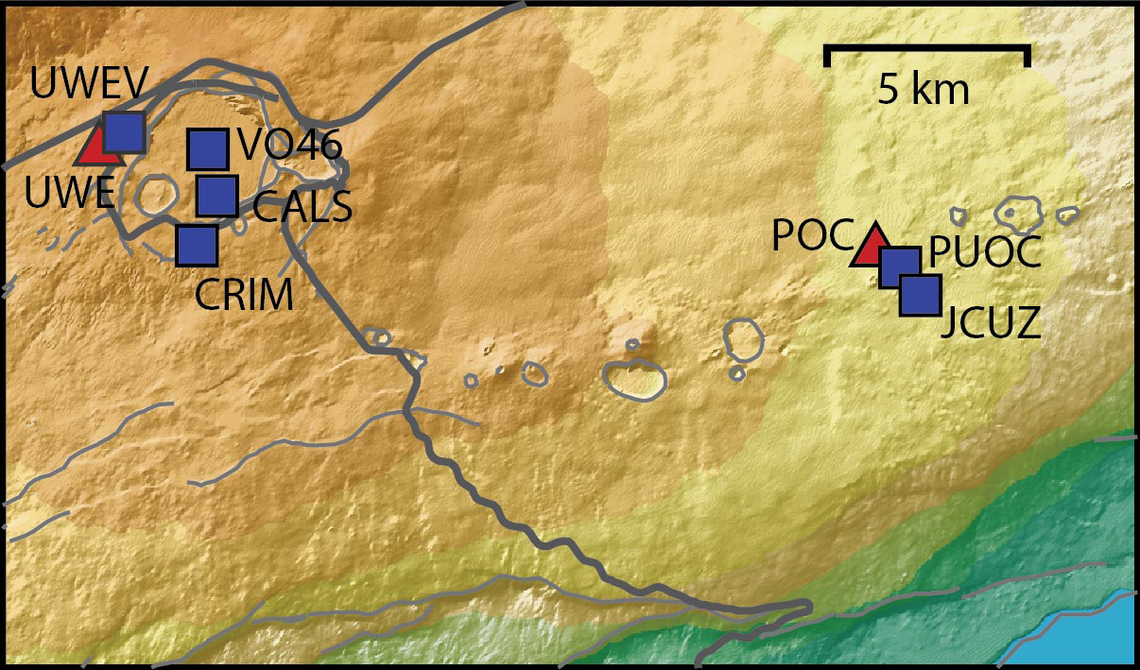
 www.usgs.gov
View: https://youtu.be/Uecu2seh4b4
Wife and I like the AfarTV feeds, for the discussion along w/ them, though they're otherwise just mirrors of the official USGS feeds.
View: https://youtu.be/iws3rh5vLAQ
Currently there is precursory lava flowing into the crater, leading to the next episode that'll probably start within the next day.
You can see the pace of inflation / deflation here. It serves as the primary predictor for when the expect the eruptions, which coincide w/ inflation turning into significant deflation and last for several hours on average with significant fountaining.
Monitoring Data for Kīlauea
For more information on how electronic tiltmeters and GPS receivers help monitor the deformation of Kīlauea volcano, see the HVO Deformation page.
View: https://youtu.be/Uecu2seh4b4
Wife and I like the AfarTV feeds, for the discussion along w/ them, though they're otherwise just mirrors of the official USGS feeds.
View: https://youtu.be/iws3rh5vLAQ
120 Replies
·
3259 views
TWiT Tech Podcast Network
Time for another AWESOME video from the TWIT Network!
View: https://www.youtube.com/shorts/AGvjJoT67F0
Direct YouTube Link - The Multi-User Functionality of the Apple HomeView
TWIT's Website
TWIT Live Feed
View: https://www.youtube.com/shorts/AGvjJoT67F0
Direct YouTube Link - The Multi-User Functionality of the Apple HomeView
TWIT's Website
TWIT Live Feed
0 Replies
·
9 views
TWiT Tech Podcast Network
Time for another AWESOME video from the TWIT Network!
View: https://www.youtube.com/shorts/mhc5dZ09m3U
Direct YouTube Link - Perseverance Mars Rover Sets New Interplanetary Driving Record
TWIT's Website
TWIT Live Feed
View: https://www.youtube.com/shorts/mhc5dZ09m3U
Direct YouTube Link - Perseverance Mars Rover Sets New Interplanetary Driving Record
TWIT's Website
TWIT Live Feed
0 Replies
·
13 views