DISH Hopper H 711 software version

Advertisements
Hopper3 software H711. Since this upgrade there is a bug in the Hopper's IR receiver. The issue is with the IR receiver going to sleep and being slow to wake up and start responding to IR signals. Problem happens with remotes from OFA and Logitech as well as the Dish 21.1.in IR mode. Is this still an open issue?
Called Dish support today. Half hour later I was told that IR is no longer supported. Tech refused to log a ticket to report this request. Even after showing him where the IR on/off setting is in settings/remote/advanced

Well, if it is true that the Dish Hopper 3 will no longer be supporting IR then I will find another TV programming provider.
 
Hopper3 software H711. Since this upgrade there is a bug in the Hopper's IR receiver. The issue is with the IR receiver going to sleep and being slow to wake up and start responding to IR signals. Problem happens with remotes from OFA and Logitech as well as the Dish 21.1.in IR mode. Is this still an open issue?
Called Dish support today. Half hour later I was told that IR is no longer supported. Tech refused to log a ticket to report this request. Even after showing him where the IR on/off setting is in settings/remote/advanced
Say what? IR is no longer supported? This is the first I've heard of this.
 
  • Like
Reactions: charlesrshell
See post(s) #30 and #31 in the following thread from Scott Greczkowski where his contacts at DISH says the IR should be working on the Hopper 3 and seems like the problems with IR are not even getting reported with H711 software on the Hopper 3 from what he was told. Of course, having a company admit a problem is hard.

 
  • Like
Reactions: charlesrshell
I just went into Menu > Diagnostics > Settings and paged down and it says Infrared Reception: On

So, while I have to do my trained monkey routine and tap the View button on my Pronto Pro a couple of times per hour (about every 15 minutes) to keep the IR side "awake", at least that does work...
 
  • Like
Reactions: charlesrshell
See post(s) #30 and #31 in the following thread from Scott Greczkowski where his contacts at DISH says the IR should be working on the Hopper 3 and seems like the problems with IR are not even getting reported with H711 software on the Hopper 3 from what he was told. Of course, having a company admit a problem is hard.

I've been PM'd by Brittany from Dish Tech support about the IR issue, so they are aware that there is an IR issue.
 

Sounds like what I've reported and have been experiencing since H711 arrived on 8/13/26. About an hour of idle time is enough to require anywhere from 5-16 button taps on my Pronto Pro to "awaken" the IR side of my Hopper 3. More idle time requires more button taps. The most, so far, has been 46. So, as I've said previously, I tap View about every 15 minutes to pop the banner to keep the IR side of my H3 "awake"...
 
Sounds like what I've reported and have been experiencing since H711 arrived on 8/13/26. About an hour of idle time is enough to require anywhere from 5-16 button taps on my Pronto Pro to "awaken" the IR side of my Hopper 3. More idle time requires more button taps. The most, so far, has been 46. So, as I've said previously, I tap View about every 15 minutes to pop the banner to keep the IR side of my H3 "awake"...
Posted that just to show there are lots of people with the problem. Hopefully it is fixed soon since it's either a new feature of H711 on getting finger excercise while watching tv or it is a good way to kill non-DISH Remotes fast.
 
How many think their Logitech finally died, as I did? May be a way to kill Dish.
Well, I use my Pronto Pro for my TV, soundbar, A/V system, lights and air cleaner as well and everything else was immediately responding, as usual. My Hopper 3 was the only unit that started being obstinate. So that led me to immediately suspect H711 was the culprit, as it was working just with fine up until 8/13/26...
 
  • Like
Reactions: charlesrshell
I'm no technician. Some of you tend to believe this is an IR issue. I'm having similar problems with my H3, and I'm using the DISH 54 remote. I thought the 54 was RF, not IR.
 
  • Like
Reactions: charlesrshell
The 54 remote can be set to IR. It is the bottom option in the remote menu. I would check that.
I understand that it has IR capability so that it can control other devices through IR (example: TV, AV, etc.). However, I thought that it controlled the Hopper through RF only.
 
  • Like
Reactions: charlesrshell
I understand that it has IR capability so that it can control other devices through IR (example: TV, AV, etc.). However, I thought that it controlled the Hopper through RF only.

I am under the impression that the IR setting under the 'Remote' option from 'Diagnostics' is to accommodate universal remote controls that use IR (Sofabaton X2, old Prontos, OFA and all others that use IR). The OEM Dish remote (in my case 54.1) still uses RF to control the Dish Hopper 3 is what I have read.

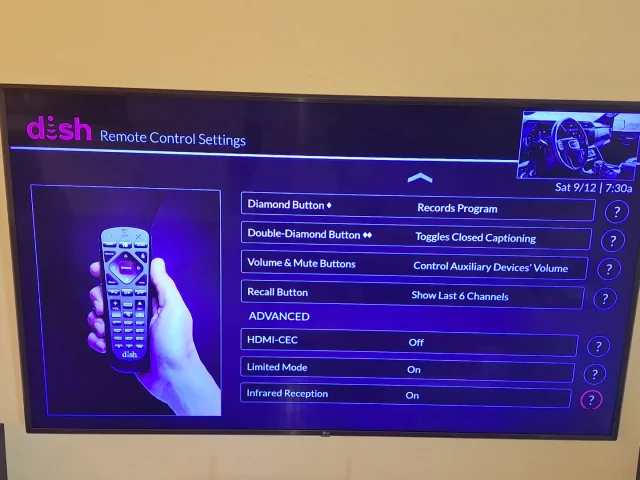
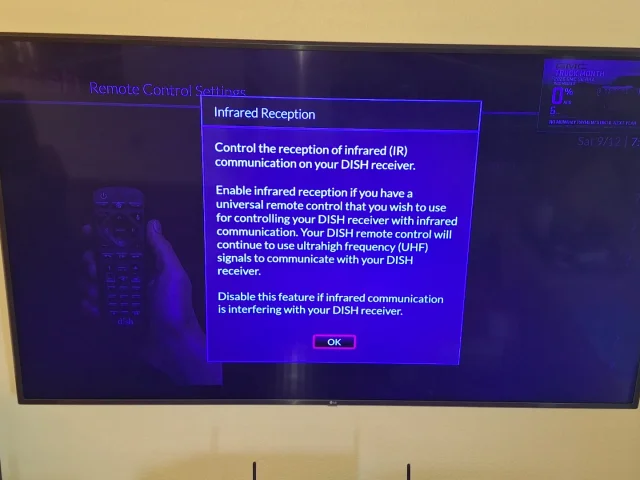
I have had the 'Remote' setting set to 'Infrared On' on for 8.5 years and my universal remotes (Harmony Ultimate One, Sofabaton X2) have always worked perfectly with the Hopper 3. I have included a couple of screen shots showing my settings for the 'Remote' on the Hopper 3. I primarily use my universal IR remotes to launch and shutdown Dish viewing activities and for streaming from my LG smart TV. For hardcore Dish viewing I always use the OEM Dish remote once everything has been turned on via the Sofabaton X2 universal remote.

The problem for me always occurs after powering up my Hopper 3, LG TV and Denon AVR via an 'Activity' sequence and using my Sofabaton X2 universal remote everything turns on as it should. Then after using the OEM Dish remote for a very short period of time (a handful of button presses) the Hopper 3 stops responding to commands from the Sofabaton X2 universal remote.

Then if I launch shutdown activity from the Sofabaton X2 universal remote everything shuts down except the Dish Hopper 3. If I go into 'Devices' on the Sofabaton X2 universal remote and manually press the 'Power Off' button from the display screen the Dish Hopper 3 doesn't respond. The odd thing is that if I manually press the 'Power' button on the front panel of the Dish Hopper 3 it will shut down. At this point the Sofabaton X2 universal remote is able to turn on the Dish Hopper 3, however after using the OEM Dish remote for a few minutes the cycle repeats and the Dish Hopper 3 ignores IR commands.

I have reported this to Dish technical support and brittanygarden, Dish Technical Support Manager, has been in contact with me via PM and she said that they are aware of the issue and looking into it. She is currently out of the office until Tuesday so I would expect to have an update sometime next week when she is back in the office.

These issues started to occur for me immediately after the firmware on my Dish Hopper 3 was 'upgraded' to version H711 which was sometime around Aug. 10.

20260912_073018.webp

20260912_073029.webp
 
I am under the impression that the IR setting under the 'Remote' option from 'Diagnostics' is to accommodate universal remote controls that use IR (Sofabaton X2, old Prontos, OFA and all others that use IR). The OEM Dish remote (in my case 54.1) still uses RF to control the Dish Hopper 3 is what I have read.

I have had the 'Remote' setting set to 'Infrared On' on for 8.5 years and my universal remotes (Harmony Ultimate One, Sofabaton X2) have always worked perfectly with the Hopper 3. I have included a couple of screen shots showing my settings for the 'Remote' on the Hopper 3. I primarily use my universal IR remotes to launch and shutdown Dish viewing activities and for streaming from my LG smart TV. For hardcore Dish viewing I always use the OEM Dish remote once everything has been turned on via the Sofabaton X2 universal remote.

The problem for me always occurs after powering up my Hopper 3, LG TV and Denon AVR via an 'Activity' sequence and using my Sofabaton X2 universal remote everything turns on as it should. Then after using the OEM Dish remote for a very short period of time (a handful of button presses) the Hopper 3 stops responding to commands from the Sofabaton X2 universal remote.

Then if I launch shutdown activity from the Sofabaton X2 universal remote everything shuts down except the Dish Hopper 3. If I go into 'Devices' on the Sofabaton X2 universal remote and manually press the 'Power Off' button from the display screen the Dish Hopper 3 doesn't respond. The odd thing is that if I manually press the 'Power' button on the front panel of the Dish Hopper 3 it will shut down. At this point the Sofabaton X2 universal remote is able to turn on the Dish Hopper 3, however after using the OEM Dish remote for a few minutes the cycle repeats and the Dish Hopper 3 ignores IR commands.

I have reported this to Dish technical support and brittanygarden, Dish Technical Support Manager, has been in contact with me via PM and she said that they are aware of the issue and looking into it. She is currently out of the office until Tuesday so I would expect to have an update sometime next week when she is back in the office.

These issues started to occur for me immediately after the firmware on my Dish Hopper 3 was 'upgraded' to version H711 which was sometime around Aug. 10.

View attachment 193982

View attachment 193983

Looking forward to what brittanygarden has to say. Hoping the tech I talked to was misinformed.
 
I'm no technician. Some of you tend to believe this is an IR issue. I'm having similar problems with my H3, and I'm using the DISH 54 remote. I thought the 54 was RF, not IR.
That's what I thought as well. One way to know for sure if the signal is IR or not is to block the IR on the remote like press the buttons underneath a blanket or something and if it works, it's RF and if it doesn't, it's IR. For me, I can walk to the bathroom which is on the other side of the living room wall and the remote still works so it's RF.
 

Hopper-to-Hopper Recordings Transfer Does Not Work

Joey 4?