Ignore the port 3 thing, it's a false positive. Can someone DM me their receiver number so I can have someone take a look?




Which model of the adapter? That's why I said earlier, whether one has it working or not to mention the specific model as the non-working can either be specific models of the adapter, this is assuming the OTA Adapter in question actually works or ofcourse the software update did something to the adapter if the adapter has firmware of any kind.Lark on the east with H711 and working.

For those who might not know, Rick Durham is a Dish employee and it is safe to DM your info to him. He gets the job done!Can anyone that is having an issue with the OTA adapter being detected DM me their Hopper receiver number? We got some info from navychops but would like another example.


That's enough....fix the issue or at least send existing customers a FREE fix rather than sending work orders to retailers like me, expecting ME to fix something you KNOW I can't fix.From everything I am seeing this issue is ONLY happening with the single tuner OTA adapter
I'm not judging you, and I definitely appreciate the knowledge you bring to the forum. However, Rick and Brittany have been very helpful over the years also. I don't think you should be calling them out publicly on the forum, especially for something they probably have very little control over. Get a private room for your family squabbles.That's enough....fix the issue or at least send existing customers a FREE fix rather than sending work orders to retailers like me, expecting ME to fix something you KNOW I can't fix.
Sorry for the rant but unless you lace MY shoes, don't judge.

That's the problem we retailers face on a near daily basis. I am constantly told that either I'm the only having a certain issue, when I've talked to multiple dealers facing the same thing. Or, I get no response.I don't think you should be calling them out publicly on the forum, especially for something they probably have very little control over

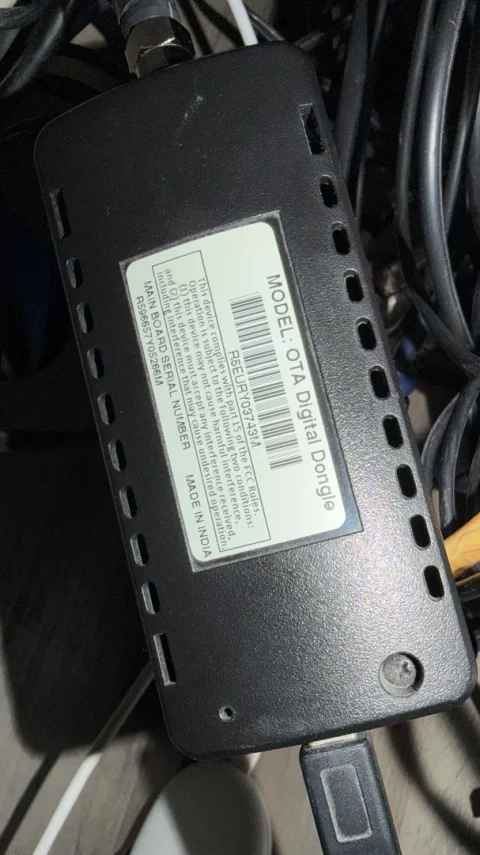
Yes, that is the single tuner OTA adapter. The dual tuner adapter has the usb cable built in.Can you tell me if this is the single tuner OTA adapter? It has a usb cable that can be removed.
That would be extremely helpful. Please keep us updated.Yes, that is the single tuner OTA adapter.
I have 2 plus the AirTv Dual tuner adapter.
I'll connect one of my single tuner OTA adapters to my Hopper 3 today and see if my OTA signals go away.
With one of my single tuner OTA adapters attached and without re-scanning, the channels are still in my guide but when I try yo tune one it says "the OTA signal has been lost for channel 013-01 KLBK-."That would be extremely helpful. Please keep us updated.
Hey, I get it. I've been reading posts from dealers on this site for years. I sympathize with your plight. It sounds like an issue to take up with DISH management or corporate. Do you really think that confronting a technician on this website and possibly discouraging him/them from participating in the future is really helping your cause?That's the problem we retailers face on a near daily basis. I am constantly told that either I'm the only having a certain issue, when I've talked to multiple dealers facing the same thing. Or, I get no response.
It is VERY frustrating to be bombarded with irate customers when I have actual work to do.
Is it possible that technical support didn't know anymore about this issue than you did? THIS forum is frequented by knowledgeable people who catch these kinds of faults. We are not typical DISH customers. What percentage of DISH customers even have an OTA adapter or know what one is?I have YET to get a single piece of communication explaining this issue or any type of fix or update. The ONLY way I knew that this was a problem was because of THIS forum
You can reach out to me directly with any issues you encounter, I work with Retailers on a regular basic, mainly ones who I met at Summit a couple years back.That's the problem we retailers face on a near daily basis. I am constantly told that either I'm the only having a certain issue, when I've talked to multiple dealers facing the same thing. Or, I get no response.
It is VERY frustrating to be bombarded with irate customers when I have actual work to do.
I have YET to get a single piece of communication explaining this issue or any type of fix or update. The ONLY way I knew that this was a problem was because of THIS forum....otherwise I would have gone out to the first customer's house with no clue as to what I was facing and probably would have wasted a lot of time, effort and money trying to solve a problem that is, as of now, unsolvable. I would have replaced the OTA adapter, which wouldn't solved the problem. I would have swapped the H3, which would not have solved the problem. Many hours of MY time would have been utterly wasted, whereas a simple heads up email would have cleared things up.
The "that's not my dept" line is not well received these days by those of us in the trenches.