

Social Feed

F
Last reply · posted in C-BAND Satellite Discussion
Please help! What is the best L.O. Stability, i.e, the Norsat uses the second number in the series to identify, i.e., 8115, 1 being plus or minus 100kHz. Is the higher number better or the lower?
11 Replies · 1825 views
M
agreed. Im always amazed how a LNB that is rated at 35K seems to be more stable than a LNBF rated at 17K or even 13K

Here in Minnesota where it can get COLD is when the stability really shows
T
agreed. Im always amazed how a LNB that is rated at 35K seems to be more stable than a LNBF rated at 17K or even 13K

Here in Minnesota where it can get COLD is when the stability really shows

From what I know the colder it is outside the better the LNB likes it. There was an old guy Doug Dennert on the SkyStore back in the late 80's and early 90's. His sat business was out of Minnesota. He used to say that LNB's loved 20 below zero outside and performed great at the cold temps. I have seen back in analog days when noise temps were higher this really held true.
WhiteBeard
From what I know the colder it is outside the better the LNB likes it. There was an old guy Doug Dennert on the SkyStore back in the late 80's and early 90's. His sat business was out of Minnesota. He used to say that LNB's loved 20 below zero outside and performed great at the cold temps. I have seen back in analog days when noise temps were higher this really held true.

I've noticed that when it gets very cold that NETV on DCII comes in solidly.
B.J.
agreed. Im always amazed how a LNB that is rated at 35K seems to be more stable than a LNBF rated at 17K or even 13K

Here in Minnesota where it can get COLD is when the stability really shows

From what I know the colder it is outside the better the LNB likes it. There was an old guy Doug Dennert on the SkyStore back in the late 80's and early 90's. His sat business was out of Minnesota. He used to say that LNB's loved 20 below zero outside and performed great at the cold temps. I have seen back in analog days when noise temps were higher this really held true.

While some specs of LNBs might get better at low temperatures, I'm sure that other parameters will get significantly worse. And the LO freq stability is certainly one parameter that will suffer.

I used to test some military electronics at low (and high) temperature, and the mil spec (I think the one we used was something like 810e if I remember right) was very hard to meet. Something is always going to go wrong when you get down to -40.

LNBs might have less noise at low temp, but I've never seen an LNB that didn't drift significantly at even moderately low temperatures. If you look up the LO stability specs for LNBs, they usually quote them at only a relatively narrow temperature range. I have a Sadoun KUL1 that would drift 5 MHz when the temperature got down close to zero F, and that isn't really very cold. I've observed moderate quality LNBs rated in the .75 to 1.0 MHz range, and they would drift up above +/- 2MHz when it got cold, and an LNB rated down around 0.1 MHz drifts up close to a MHz when cold.

Back in the analog days, drift of these magnitudes wasn't important, and for high SR digital signals, it probably isn't important for many receivers, particularly for receivers with somewhat loose tuning. But for narrow, low SR signals with receivers with tight tuning, this much drift will mean that you can't lock the transponders unless you change the frequency, or it can mean that you lock the wrong signal. I've seen many times, when trying to lock either 3978 SR newsfeeds or those 4444 SR PBS SCPC transponders, that when the temperature gets cold, I'll either lock on the wrong signal or not be able to get to some of the signals at all.

So anyway, some aspects of LNBs might get better at low temperature, but the performance WILL get worse in some respects.
ikki
Time to build a cystal oven and hard lock the temp.
P
You get what you pay for. A PLL LNB will normally be much more stable than a DRO, at quite a cost penalty. If you want your PLL to lock to an external reference, you can get down to fractions of a Hz. But it costs even more than a plain PLL. The point for the latter would be combining multiple apertures for higher CNR or interference mitigation. If we were dropping $500 apiece on LNBs, this hobby would look a little different.
emuman100
Actually, I know last year when it got gold in the winter here in Northeast Pennsylvania, I'd get excellent eb/no readings with the Weather Channel digital multiplex. Since the elevation of AMC 10 is so low up here, 14 degrees, I had a hard time getting a good signal trying to avoid the trees. But, the colder it got, the better performance I had.

Now, since I have the dish on a platform, I get the Weather Channel multiplex nice and strong, 6.8dB eb/no right now. 4 is the bare minimum to produce a stable picture, and most of last year I was a little over 4, kind of close to 5. The height that the platform adds really makes the difference. I use a Norsat 8115 and I love it.
Peter Parker
Supporting Founder Lifetime Supporter
Last reply · posted in DISH Network Support Forum
No idea what improvements might be involved.
11 Replies · 527 views
  • Like
Reactions: LQQK and reubenray
cpdretired
Two bugs out and three new bugs in.🐞
Almighty1
Updated to H713 on a Hopper 3 from H712 with Hopper Plus a few hours earlier.

It brought a old problem back:

One of the problems I am seeing is that the Available Joey Software section no longer is showing the Android TV versions even after a manual software reset twice and the nightly reboot. Until it does, nether Technician Android TV download and Hopper Plus is able to check, download and update the Android TV software.

This was a major problem with H703.

H710 removed that dependency but it's broken again.

Rick Durham and brittanygarden
  • Like
Reactions: charlesrshell
dishstaller
Two bugs out and three new bugs in.🐞
Yep. Just got a call from a customer who said her DVR buttons stopped working. Told her about the new software and had her reboot her H3, problem solved.
  • Like
Reactions: charlesrshell
S
Updated to H713 on a Hopper 3 from H712 with Hopper Plus a few hours earlier.

It brought a old problem back:

One of the problems I am seeing is that the Available Joey Software section no longer is showing the Android TV versions even after a manual software reset twice and the nightly reboot. Until it does, nether Technician Android TV download and Hopper Plus is able to check, download and update the Android TV software.

This was a major problem with H703.

H710 removed that dependency but it's broken again.

Rick Durham and brittanygarden
i can still see my joey software version with H713.. i am starting to think it's time to get rid of the hopper plus. i just have 2 joey 4's and the hopper 3 with no issues. it seem like the people that have the hopper plus have issues!!!
  • Like
Reactions: charlesrshell
Almighty1
i can still see my joey software version with H713.. i am starting to think it's time to get rid of the hopper plus. i just have 2 joey 4's and the hopper 3 with no issues. it seem like the people that have the hopper plus have issues!!!
Are you talking about the Available Joey Software section which goes something like this:
Available Joey W153 W209 J613 J713 J813 K113 J913
Software
in H713 in diagnostics which is directly below the "Switch" section which is what I am referring to that should have a number starting with P which is needed for the
Hopper Plus, Joey 4 and Wireless Joey 4
or the top area where it shows what the current version of the software is for the Hopper 3?

Seeing what your Joey 4/Wireless Joey 4 software version just tells you what is the current software version already installed, until the P version(s) shows up in "Available Joey Software" section which is different for the Hopper Plus, Joey 4, Wireless Joey 4 and it will only list one for the device(s) that exist in one's own configuration which lists what's the latest available, those devices will not be able to check or update their software as it will say "Failed: No Tgt" while "Download ATV Files" in TECHNICIAN SETTINGS under tools will respond with:
"Download ATV Files 3000
This device is not currently targeted for
Android software"
as both are dependent on the P version being listed in the "Available Joey Software" section. It usually takes a few minutes before it shows up. I know with H710-H712, it was not shown and the Download ATV Files worked except since H710, even if you selected everything shown which for me would be the Hopper Plus, Joey 4 and Wireless Joey 4 versions, the first download will as a end result only download the Hopper Plus's versions even though it shows all three as downloaded based on what Available Joey Software shows which is always two P numbers P153 and P15317. After the first successful download, the next download will actually download all three and Available Joey Software will reflect that. In H708 (H709 was skipped as no one mentioned it on the forums) and earlier, it always downloaded everything selected and would show 6 P versions in the Available Joey Software area. The Available Joey Software section is how I tell if there is a newer software available for the Hopper Plus and when I see that, I do the Download ATV files first which is where I get my information to post in my other thread, "Latest available software version for Android TV devices - Hopper Plus, Joey 4, Wireless Joey 4". The Download ATV files does not do any install or update the Hopper Plus as I still need to manually hit Menu, Settings, Device Preferences, About, Software Update to update the software.

So with any new Hopper 3 software update, the first things I will check is the Notifications in Settings to see if any of the settings were reset. For the "Remote Control Mode Reminder" setting, I would try it with off, exit notifications then hit TV on the side of the remote to make sure it does not show the reminder before going to notifications andputting it back to on, exit to see if it works correctly before going back to notifications for the other settings. Then I would look at Available Joey Software and regardless if the 2 P versions, one appears to be the 3 digit major version number and the other is the full 5 digit number which is the 3 digit major version number with 2 more digits, exists or not. Attempt to do the Download ATV Software for all 3 Android TV devices Hopper Plus, Joey 4 and Wireless Joey 4 until all of them is downloaded and shown in Available Joey Software which should be a total of 6 things added. If Download ATV Software has the no target like since H713, I will wait until I see a P version before I do it.

For reference, it's in the following threads:
  • Like
Reactions: charlesrshell
bookworm370
Yep. Just got a call from a customer who said her DVR buttons stopped working. Told her about the new software and had her reboot her H3, problem solved.
Reboot just fixes it for a short time and then it's back to messed up

Try going exclusively to an IR remote and you will see the pain
Almighty1
Updated to H713 on a Hopper 3 from H712 with Hopper Plus a few hours earlier.

It brought a old problem back:

One of the problems I am seeing is that the Available Joey Software section no longer is showing the Android TV versions even after a manual software reset twice and the nightly reboot. Until it does, nether Technician Android TV download and Hopper Plus is able to check, download and update the Android TV software.

This was a major problem with H703.

H710 removed that dependency but it's broken again.

Rick Durham and brittanygarden

Within the last few hours as I did check earlier today when it was still missing, the Available Joey Software line now has added "P154 P15403" which is for the Hopper Plus that I have but my Hopper Plus software is still on P15317, I will do a Download Android TV (ATV) Software for the Hopper Plus, Joey 4 and Wireless Joey which are all Android TV devices and then manually do a check update on the Hopper Plus to update the software shortly.
  • Like
Reactions: charlesrshell
BatStang2000
This happened to me. I was outside mowing and my wife came out and said that our nieces and nephews were going to be on the Noon News. She had it on in the bedroom on our Joey3. Since they weren't on yet, I decided to turn it on in the Living Room on our Hopper3. When I selected the channel (through Dish, not OTA) the Joey3 turned itself off. When I went back to the bedroom to turn it back on, the Hopper3 did a reboot. Luckily it all finished before their story came on, but I just found it strange.
  • Like
Reactions: charlesrshell
bookworm370
Has anyone noticed an FF stutter with 713? I used to be able to hit FF a few times and skip smoothly. After 713 (maybe 712), when I skip forward, there is a definite stutter for as many times as I have pressed FF.

Can anyone check on this and report back? Recorded programs and then press skip forward a few times to see if it's smooth? Normally, it just jumps to the right place after the skips.
brittanygarden
Staff member Pub Member / Supporter
Last reply · posted in DISH Network Support Forum
Please post your remote make/model here and any details of your issue. We are looking to collect as many examples as possible. I may reach out to you for your receiver number, but please do not post it here.

If you've already reported this to me, please repost it here so I can track all instances in one thread.

Thanks!
Brittany
22 Replies · 661 views
david_jr
I lost IR control of my H3 after the H398 update in September of 25. We were using the Harmony Hub remote system from Logitech. We have been using the H3 OEM remote to turn the receiver on and off ever since then.

H398 Software Version
bookworm370
I have a solution that is guaranteed to work.
All Hopper developers are required to turn in their RF Hopper remotes and use only IR remotes.

I guarantee you that the bug will be fixed in two days!
Try it; it will work! They will work 24 hours a day to fix it when the WAF goes into the toilet!
GRB1959
I have a solution that is guaranteed to work.
All Hopper developers are required to turn in their RF Hopper remotes and use only IR remotes.

I guarantee you that the bug will be fixed in two days!
Try it; it will work! They will work 24 hours a day to fix it when the WAF goes into the toilet!
Excellent suggestion.
Foxbat
As I was testing 4K on my Hopper 3 running H713 10/7/2026 by watching the NLCS Game 2 on Channel 148-01, I had been using my Dish 52.0 remote to navigate. I grabbed my Harmony One and pressed "Info". This caused the Hopper 3 to crash and restart.

After it restarted, the game finished so I pressed "Options" on the 52.0 remote to access the TV Activity screen. I pressed Select on the tuner with the NLCS game active and arrowed-down to select "Stop Recording". Again, the Hopper 3 crashed and restarted.

After it came back up, I used Recall to return to "Maine Cabin Masters" and when I tried the Options button again, I saw that the NLCS Game was still being recorded. I selected the game, arrowed-down to Stop recording, and this time it stopped recording and didn't crash.

Since I was watching an HD program instead of 4K, I tried the "Info" button and nothing happened. The Harmony One has an IR active indicator when it's transmitting so I know I pressed the button.

It looks like the 2nd or 3rd time I sent "Info" from the Harmony One, the Hopper 3 started to respond again. If I used the Dish 52.0 remote, the Hopper 3 stopped listening to the Harmony One IR commands. It looks like "Info" needs to be pressed twice and that seems to reactivate the IR recognition on the Hopper 3. It seems to stay active, but I didn't try leaving the Hopper 3 alone for an hour or more.
Bobby
As I was testing 4K on my Hopper 3 running H713 10/7/2026 by watching the NLCS Game 2 on Channel 148-01, I had been using my Dish 52.0 remote to navigate. I grabbed my Harmony One and pressed "Info". This caused the Hopper 3 to crash and restart.

After it restarted, the game finished so I pressed "Options" on the 52.0 remote to access the TV Activity screen. I pressed Select on the tuner with the NLCS game active and arrowed-down to select "Stop Recording". Again, the Hopper 3 crashed and restarted.

After it came back up, I used Recall to return to "Maine Cabin Masters" and when I tried the Options button again, I saw that the NLCS Game was still being recorded. I selected the game, arrowed-down to Stop recording, and this time it stopped recording and didn't crash.

Since I was watching an HD program instead of 4K, I tried the "Info" button and nothing happened. The Harmony One has an IR active indicator when it's transmitting so I know I pressed the button.

It looks like the 2nd or 3rd time I sent "Info" from the Harmony One, the Hopper 3 started to respond again. If I used the Dish 52.0 remote, the Hopper 3 stopped listening to the Harmony One IR commands. It looks like "Info" needs to be pressed twice and that seems to reactivate the IR recognition on the Hopper 3. It seems to stay active, but I didn't try leaving the Hopper 3 alone for an hour or more.
I think you have it. If you start up with the Harmony and then use the 54 remote it confuses the Hopper because you went from IR to RF. It seems to get cranky when you want to go back to the Harmony.
R
I think you have it. If you start up with the Harmony and then use the 54 remote it confuses the Hopper because you went from IR to RF. It seems to get cranky when you want to go back to the Harmony.
I checked this and you are correct. My Harmony 665 remote worked fine until my wife used the Dish remote. After the Dish remote is used I have to push or hold a button down until the 665 starts working again.
david_jr
I lost IR control of my H3 after the H398 update in September of 25. We were using the Harmony Hub remote system from Logitech. We have been using the H3 OEM remote to turn the receiver on and off ever since then.

H398 Software Version
BTW my bedroom H3 does not have this problem where I am using a Harmony 650. Also has there been any more feedback? Are they still working on this or what?
Foxbat
I think I have a separate issue with our Hopper 3 when watching/recording a 4K event. I have had many instances of it spontaneously restarting when I "disturbed" it during a 4K event. I learned to not touch the remote after a given point.

But it might be the IR code subroutine and 4K that make it touchy. I'll try it Wednesday night during the NLCS Game 3.
  • Like
Reactions: charlesrshell
JeffN9
I think I have a separate issue with our Hopper 3 when watching/recording a 4K event. I have had many instances of it spontaneously restarting when I "disturbed" it during a 4K event. I learned to not touch the remote after a given point.

But it might be the IR code subroutine and 4K that make it touchy. I'll try it Wednesday night during the NLCS Game 3.
I was having similar issues last night while watching and recording the NLCS game on 148. When I tried resuming the game at one point the screen went blank and I couldn't get my H3 to respond to any remote commands. Eventually the Hopper went to a HD channel but still no remote response. After a while the Hopper went into a re-boot cycle. This happened at least 3 times. I was using an IR universal remote only.

A little frustrating to have the game broken up like that but at least the Brewers won:)
bookworm370
Excellent suggestion.
Yea, I've only been a CIO for the last 30 years! :)
Trust me, when something important breaks, they get to own it!
meStevo
Lifetime Supporter
Last reply · posted in The Chit Chat Club
Continuing the Kilauea thread in the Pub here. Perhaps the Iceland one too next time there's remarkable activity.

Currently there is precursory lava flowing into the crater, leading to the next episode that'll probably start within the next day.

You can see the pace of inflation / deflation here. It serves as the primary predictor for when the expect the eruptions, which coincide w/ inflation turning into significant deflation and last for several hours on average with significant fountaining.
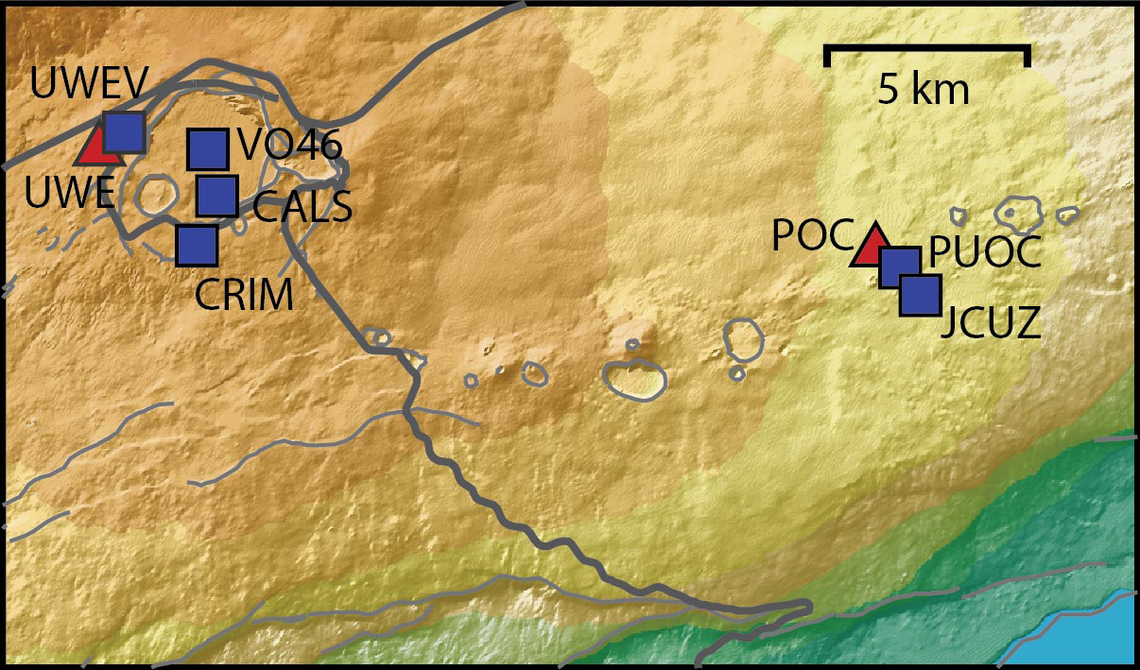


View: https://youtu.be/Uecu2seh4b4


Wife and I like the AfarTV feeds, for the discussion along w/ them, though they're otherwise just mirrors of the official USGS feeds.


View: https://youtu.be/iws3rh5vLAQ
120 Replies · 3243 views
  • Like
Reactions: osu1991
Foxbat
​
Foxbat
Oooo, quite the show now. All three vents have doming and overflows. The cone that built up around the North vent lost its upper quarter at 02:50 Oct 17 and is now spewing lava at a healthy rate. Don't know if I would say it's a fountain, but it's close.


IMG_1534.webp

edit: The USGS has called the official start of Episode 55 as starting at 03:19 HST Oct 17, 2026:

Alert Level: WATCH, Color Code: ORANGE 2026-10-17 13:43:56 UTC
HVO/USGS Volcanic Activity Notice

Volcano: Kilauea (VNUM #332010)

Current Volcano Alert Level: WATCH
Current Aviation Color Code: ORANGE

Issued: Saturday, October 17, 2026, 3:43 AM HST
Source: Hawaiian Volcano Observatory
Notice Number: 2026/H488
Location: N 19 deg 25 min W 155 deg 17 min
Elevation: 4091 ft (1247 m)
Area: Hawaii

Summary: Episode 55 of the ongoing Halemaʻumaʻu eruption began at 3:19 AM HST on October 17, 2026.

Volcanic Activity:
Episode 55 of lava fountaining in Halemaʻumaʻu began at the summit of Kīlauea began at 3:19 AM HST on October 17, 2026.

Fountain heights are relatively low at about 100-150 feet (30-45 m), and it is not clear whether this episode will evolve to the same heights as previous episodes. Continuous overflows from the vents began yesterday, October 16, just before 6 a.m. HST and transitioned into episode 55 fountains at 3:19 a.m. HST this morning. The current forecast is for winds are blowing from the north-northeast direction, which suggests that volcanic gas emissions and volcanic material may be distributed to the south-southwest direction from Halemaʻumaʻu.
  • All eruptive vents and lava flows are confined to Halemaʻumaʻu crater within Hawaiʻi Volcanoes National Park. Tephra fall from volcanic ash clouds is greatest within 3 miles (5 km) of the vents, lighter ash and Pele's Hair may stay suspended for large distances from the vents.
Foxbat
Kīlauea seems to be returning to the "normal" eruption script, impressive fountaining from the North Vent. For once, the V2 Cam has the best overall shot:
IMG_1535.webp
The lava flows have covered a good portion of the Halemaʻumaʻu crater floor.
Foxbat
Looks like the Episode 55 is over at 09:00 HST, just under six hours. The USGS said the fountains reached 720' or 220 meters.
​
Former member 209992
Last reply · posted in SatelliteGuys Support Center
For some reason, the satelliteguys.us site is loading a lot slower than usual on both Chrome on my Asus laptop and Safari on my iPhone.
I'm also seeing longer appearances of the blue bar at the top and the "3 blue bars" loading symbol.
Is anyone else also having the same problem? Thanks in advance.
537 Replies · 18205 views
  • Like
Reactions: charlesrshell
comfortably_numb
Site was down for a good 20+ minutes just now.
T
Was down for me also
  • Like
Reactions: charlesrshell
TRG
TRG
Site was down for a good 20+ minutes just now.
Ditto
  • Like
Reactions: charlesrshell
Foxbat
I was going to say I was also impacted, but after all the times it was me, I figured "here we go again" and tried to use a different device. It was also impacted, so it wasn't just me.
  • Like
Reactions: charlesrshell
Scott Greczkowski
Was down due to an emergency update at the ISP. They did email me seconds before they took it down and apologized for the short notice.

However once the server was back online NGINX failed to start.

I was at the grocery store and just rebooted the entire server and everything came back up again.

Just got home from the grocery store I will bring in the groceries and then take a look at what NGINX failed the first time.
comfortably_numb
Was down due to an emergency update at the ISP. They did email me seconds before they took it down and apologized for the short notice.

However once the server was back online NGINX failed to start.

I was at the grocery store and just rebooted the entire server and everything came back up again.

Just got home from the grocery store I will bring in the groceries and then take a look at what NGINX failed the first time.

NGINX
The site uses Nugenix?!


View: https://youtu.be/_DhEEo5S9fg
Van
Van
Last reply · posted in What's Cooking?
Who says dinner or lunch has to be the only good meals of the day?

Honey butter grits with scrambled eggs and grilled boneless pork ribs on flakey biscuits washed down with cranberry juice.
6630 Replies · 379375 views
TRG
TRG
Bacon, eggs, hash browns and toast. Coffee.
  • Like
Reactions: Mr Tony and dfergie
TRG
TRG
Wound up at the Waffle House this morning. Got the two egg breakfast with coffee.

1622.webp
  • Like
Reactions: dfergie and Mr Tony
dfergie
Speaking of waffles, I'm going to put my mini waffle iron on stove so I'll remember to make waffles in the morning... Had some last week, been awhile.
dfergie
Dos cackleberrys over easy on top of 2 corned beef hash patties fried in skillet... Chocolate milk.
  • Like
  • Love
Reactions: TRG and Bobby
TRG
TRG
Cold morning today, only 32 degrees. Fired up the oven and made cinnamon rolls (from a tube) and a pot of coffee.
Scott Greczkowski
Staff member HERE TO HELP YOU! Cutting Edge
Last reply · posted in The Chit Chat Club
Sometimes a thread gets so many posts in it that is can cause issues for the server so that why today we introduce The Song Name Game Part 3!

So let the game continue!

The last song was added by Bobby who posted...

One Meat Ball - Andrews Sisters

CONTINUE ON AND HAVE FUN! WELCOME HOME TO SATELLITEGUYS.US!

Here are the original rules for the game as posted by WebbyDude back in 2006. http://www.satelliteguys.us/threads/68645-Song-Name-Game

Just name a song title and the band who performed it. The next person does the same thing, but needs to list a song title or band name which includes a word from the previous entry. Pick songs from any genre.

Example:

Long Live Rock and Roll -- Rainbow

Rainbow in the Dark -- Dio

Another example:

Ride the Lightning -- Metallica

Lightning Strikes -- Ozzy Osbourne


Get it?


An additional note: we all know that song titles, sometimes, use profane words. Because this is a family friendly website it is advised that you clean up that title up a bit. This is accomplished by using something like sh!t instead of the real word. Thanks....
68511 Replies · 2671621 views
  • Like
Reactions: c-spand
ClarkGable
Five O'Clock World - The Vogues
  • Like
Reactions: FTA4PA and sdfntx
FTA4PA
Six O'Clock News - John Prine
  • Like
Reactions: sdfntx
Bobby
It's Five O'Clock Somewhere - Alan Jackson
harshness
Somewhere - Barbra Streisand
sdfntx
Somewhere in Time - John Barry
  • Like
Reactions: FTA4PA
BlackHitachi
Supporting Founder
Last reply · posted in Movie Talk
Since the Reds have there thread we should too!

Last watched Nine inch Nails
Next 3:10 to Yuma
5390 Replies · 510359 views
osu1991

View: https://youtu.be/9j3vxhzM8MY?is=Rs1cY1FQAiRWi87i


Come September (1961)
Rock Hudson and Gina Lollobrigida with Sandra Dee and Bobby Darin
  • Like
Reactions: dfergie
Y
1791758462355.webp


Simple, charming. Entire premise is quite silly but Cary Grant carries it across the line in good fashion.
T
Last: The Social Reckoning. Spoiler alert, they make Zuck look like a...
Foxbat
Since it was already "paid" for, I spent the two hours of my time watching the John Cena action movie on Apple TV, "Matchbox The Movie" even though the reviews were brutal. It was better than I expected, so I didn't feel like I had wasted an afternoon watching it. But it felt like another "Reacher"/"Neghley"/"Mission: Impossible"/"Fast & Furious" crash and blow stuff up with lots of automatic gunfire mixed in movie featuring covert CIA operatives.

I don't think we'll get a follow-up movie from this. I expect Mattel will have other toy lines to exploit.
  • Like
Reactions: osu1991