

Social Feed
I am a DirectTV newbie with no chance of ever getting cable at this new address. My experience so far with Directtv has been less than desirable and I am so fed up. I have had 2 different technicians come out to set up a DVR with whole home (or whatever it is called) and still have NO DVR!!
This home had Directtv service previously........the house was vacant when we purchased it so I do not know how things were set up but this is what I have been told. There are 4 lines coming out of the dish in the attic and 5 working outlets. The living room has two coaxial lines but one is not active. I cannot have a DVR because it takes 2 lines and we currently only have 1 working line for each tv. The 1st tech was for the initial install and said he could not find where the lines went once they reached a certain point and did not know if there was a switch(?) so he could not do anything. I insisted that he at least get the tv's working and he reluctantly did that for us. The 2nd guy that came out here was determined that he would help us get a DVR but in the end he left without being able to do it..... This time he and my husband pulled all the flooring up in the attic trying to locate this switch. Apparently there is no switch. He determined that there must not be a switch and that since there are 4 lines coming in and 5 receiver connections there must be a splitter somewhere. He said that is there was a splitter then we would not be able to cut the lines to add the switch because then we risk messing up what we have.... such as only getting even or odd channels on the tvs that must be split.
I went out and bought a Tivo thinking I would solve my own problem but it was not compatible with satellite.
I am now contemplating having an electrician come out and totally rewire this house with coaxials so that we can get the damn switch that we have to have but that will be very expensive. And then I still have to deal with Directtv to get it all connected.....
I would like to know IF I can connect an HD receiver with no DVR to the internet? Most of the tv connections in the house have a phone line right next to it. I thought I could move the modem and router to my bedroom and connect the receiver directly to the router with an ethernet cable. I could at least get Netflix or something like it to watch back episodes of things I have missed on tv but it still doesn't solve the DVR dilemma.
Any help, suggestions, and/or advice would be appreciated.
This home had Directtv service previously........the house was vacant when we purchased it so I do not know how things were set up but this is what I have been told. There are 4 lines coming out of the dish in the attic and 5 working outlets. The living room has two coaxial lines but one is not active. I cannot have a DVR because it takes 2 lines and we currently only have 1 working line for each tv. The 1st tech was for the initial install and said he could not find where the lines went once they reached a certain point and did not know if there was a switch(?) so he could not do anything. I insisted that he at least get the tv's working and he reluctantly did that for us. The 2nd guy that came out here was determined that he would help us get a DVR but in the end he left without being able to do it..... This time he and my husband pulled all the flooring up in the attic trying to locate this switch. Apparently there is no switch. He determined that there must not be a switch and that since there are 4 lines coming in and 5 receiver connections there must be a splitter somewhere. He said that is there was a splitter then we would not be able to cut the lines to add the switch because then we risk messing up what we have.... such as only getting even or odd channels on the tvs that must be split.
I went out and bought a Tivo thinking I would solve my own problem but it was not compatible with satellite.
I am now contemplating having an electrician come out and totally rewire this house with coaxials so that we can get the damn switch that we have to have but that will be very expensive. And then I still have to deal with Directtv to get it all connected.....
I would like to know IF I can connect an HD receiver with no DVR to the internet? Most of the tv connections in the house have a phone line right next to it. I thought I could move the modem and router to my bedroom and connect the receiver directly to the router with an ethernet cable. I could at least get Netflix or something like it to watch back episodes of things I have missed on tv but it still doesn't solve the DVR dilemma.
Any help, suggestions, and/or advice would be appreciated.
15 Replies
·
4167 views

This started a couple months ago. I have 2 H3s on one network, both with 2 EHD identical 3 TB seperately powered so all recordings are accessible by all 4k & J4s (8 of them).
On one H3 (not the main one that controls the MOCA network), after it reboots, it doesn't recognize it has two EHDs plugged into it. Rebooting the EHD by their power source doesn't fix it. Resetting the network doesn't. Software h3 reset doesn't fix it. Rebooting MOCA h3 doesn't fix it but so far, after 3+ cold boots (unplug pwr to H3 with unrecognized EHDs), it finally it figures out they are plugged into it. BUT.... Then when you open a program it only partially shows series and episodes, but instead of showing recordings, it only shows upcoming airings. HELP!!!!
On one H3 (not the main one that controls the MOCA network), after it reboots, it doesn't recognize it has two EHDs plugged into it. Rebooting the EHD by their power source doesn't fix it. Resetting the network doesn't. Software h3 reset doesn't fix it. Rebooting MOCA h3 doesn't fix it but so far, after 3+ cold boots (unplug pwr to H3 with unrecognized EHDs), it finally it figures out they are plugged into it. BUT.... Then when you open a program it only partially shows series and episodes, but instead of showing recordings, it only shows upcoming airings. HELP!!!!
19 Replies
·
233 views

TWiT Tech Podcast Network
Time for another AWESOME video from the TWIT Network!
View: https://www.youtube.com/watch?v=ewCzxcofBUw
Direct YouTube Link - Untitled Linux Show 275
TWIT's Website
TWIT Live Feed
View: https://www.youtube.com/watch?v=ewCzxcofBUw
Direct YouTube Link - Untitled Linux Show 275
TWIT's Website
TWIT Live Feed
0 Replies
·
2 views

Staff member
HERE TO HELP YOU!
Anyone making their own breakfast sausage? I've recently been trying different recipes, found some I like, some I've modified...
41 Replies
·
3591 views

Supporting Founder
Lifetime Supporter
No idea what improvements might be involved.
12 Replies
·
557 views


TWiT Tech Podcast Network
Time for another AWESOME video from the TWIT Network!
View: https://www.youtube.com/shorts/E-QczD5oEh4
Direct YouTube Link - AI vs. Coders & Mathematicians: The Great Disruption #shorts
TWIT's Website
TWIT Live Feed
View: https://www.youtube.com/shorts/E-QczD5oEh4
Direct YouTube Link - AI vs. Coders & Mathematicians: The Great Disruption #shorts
TWIT's Website
TWIT Live Feed
0 Replies
·
7 views


Staff member
HERE TO HELP YOU!
Cutting Edge
Sometimes a thread gets so many posts in it that is can cause issues for the server so that why today we introduce The Song Name Game Part 3!
So let the game continue!
The last song was added by Bobby who posted...
One Meat Ball - Andrews Sisters
CONTINUE ON AND HAVE FUN! WELCOME HOME TO SATELLITEGUYS.US!
Here are the original rules for the game as posted by WebbyDude back in 2006. http://www.satelliteguys.us/threads/68645-Song-Name-Game
Just name a song title and the band who performed it. The next person does the same thing, but needs to list a song title or band name which includes a word from the previous entry. Pick songs from any genre.
Example:
Long Live Rock and Roll -- Rainbow
Rainbow in the Dark -- Dio
Another example:
Ride the Lightning -- Metallica
Lightning Strikes -- Ozzy Osbourne
Get it?
An additional note: we all know that song titles, sometimes, use profane words. Because this is a family friendly website it is advised that you clean up that title up a bit. This is accomplished by using something like sh!t instead of the real word. Thanks....
So let the game continue!
The last song was added by Bobby who posted...
One Meat Ball - Andrews Sisters
CONTINUE ON AND HAVE FUN! WELCOME HOME TO SATELLITEGUYS.US!
Here are the original rules for the game as posted by WebbyDude back in 2006. http://www.satelliteguys.us/threads/68645-Song-Name-Game
Just name a song title and the band who performed it. The next person does the same thing, but needs to list a song title or band name which includes a word from the previous entry. Pick songs from any genre.
Example:
Long Live Rock and Roll -- Rainbow
Rainbow in the Dark -- Dio
Another example:
Ride the Lightning -- Metallica
Lightning Strikes -- Ozzy Osbourne
Get it?
An additional note: we all know that song titles, sometimes, use profane words. Because this is a family friendly website it is advised that you clean up that title up a bit. This is accomplished by using something like sh!t instead of the real word. Thanks....
68512 Replies
·
2671709 views


For some reason, the satelliteguys.us site is loading a lot slower than usual on both Chrome on my Asus laptop and Safari on my iPhone.
I'm also seeing longer appearances of the blue bar at the top and the "3 blue bars" loading symbol.
Is anyone else also having the same problem? Thanks in advance.
I'm also seeing longer appearances of the blue bar at the top and the "3 blue bars" loading symbol.
Is anyone else also having the same problem? Thanks in advance.
540 Replies
·
18276 views


Staff member
Pub Member / Supporter
Please post your remote make/model here and any details of your issue. We are looking to collect as many examples as possible. I may reach out to you for your receiver number, but please do not post it here.
If you've already reported this to me, please repost it here so I can track all instances in one thread.
Thanks!
Brittany
If you've already reported this to me, please repost it here so I can track all instances in one thread.
Thanks!
Brittany
22 Replies
·
689 views


Lifetime Supporter
Continuing the Kilauea thread in the Pub here. Perhaps the Iceland one too next time there's remarkable activity.
Currently there is precursory lava flowing into the crater, leading to the next episode that'll probably start within the next day.
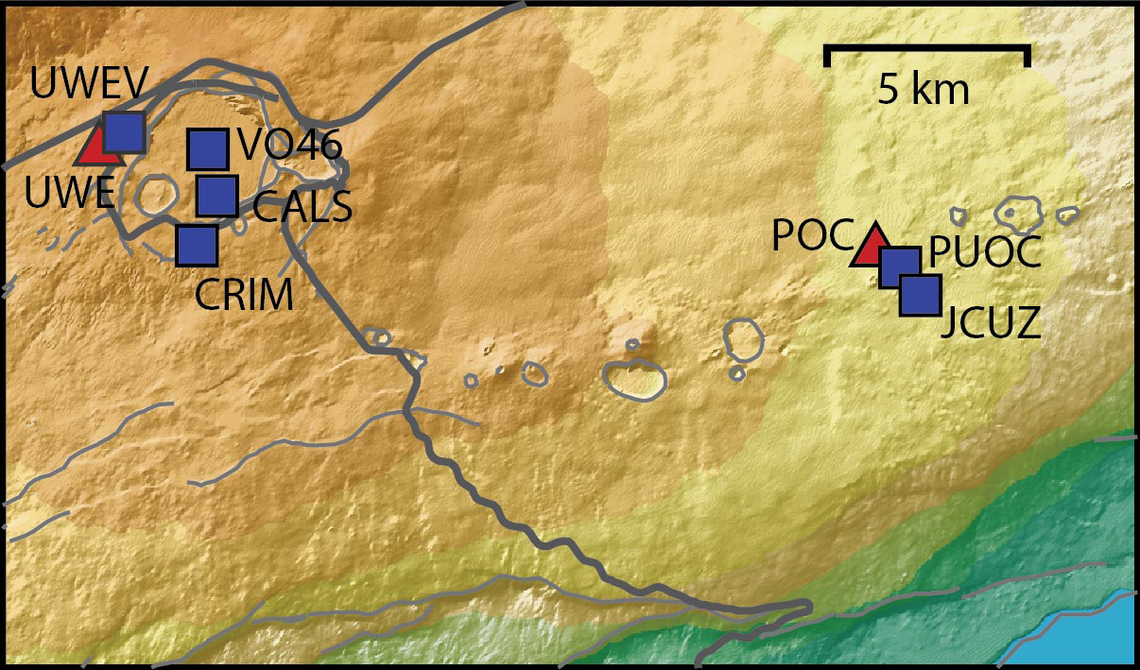
You can see the pace of inflation / deflation here. It serves as the primary predictor for when the expect the eruptions, which coincide w/ inflation turning into significant deflation and last for several hours on average with significant fountaining.
 www.usgs.gov
View: https://youtu.be/Uecu2seh4b4
Wife and I like the AfarTV feeds, for the discussion along w/ them, though they're otherwise just mirrors of the official USGS feeds.
View: https://youtu.be/iws3rh5vLAQ
Currently there is precursory lava flowing into the crater, leading to the next episode that'll probably start within the next day.
You can see the pace of inflation / deflation here. It serves as the primary predictor for when the expect the eruptions, which coincide w/ inflation turning into significant deflation and last for several hours on average with significant fountaining.
Monitoring Data for Kīlauea
For more information on how electronic tiltmeters and GPS receivers help monitor the deformation of Kīlauea volcano, see the HVO Deformation page.
View: https://youtu.be/Uecu2seh4b4
Wife and I like the AfarTV feeds, for the discussion along w/ them, though they're otherwise just mirrors of the official USGS feeds.
View: https://youtu.be/iws3rh5vLAQ
120 Replies
·
3264 views