Signal

  • HAPPY NEW YEAR! EXCITING CHANGES COMING IN 2026!
    Thank you for a great 2025 and we are so looking forward to 2026!
    PLEASE CLICK HERE to find out about some of our plans for 2026 including our BRAND NEW NAME we will be moving to in 2026! Exciting times are ahead!
    Happy New Year from your friends here at SatelliteGuys.US!

Dr Pepper

SatelliteGuys Family
Original poster
Mar 7, 2010
67
17
Bowling Green KY
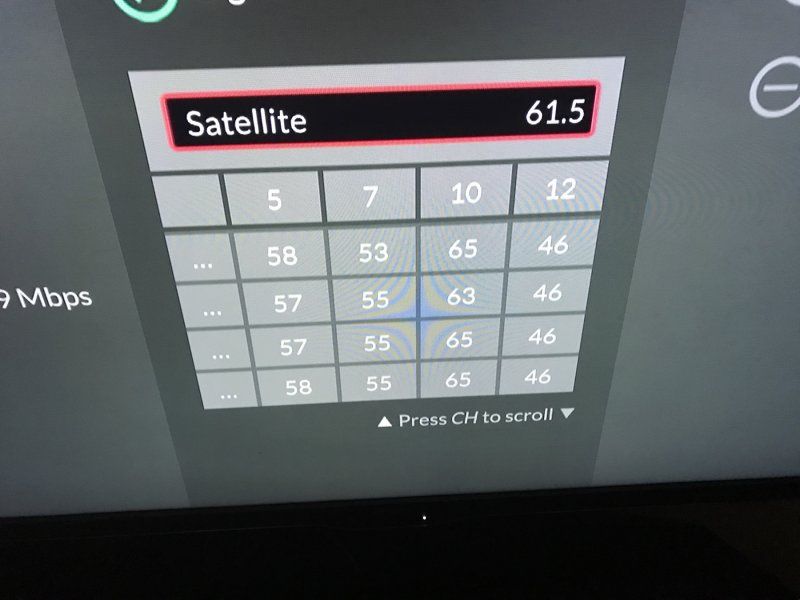
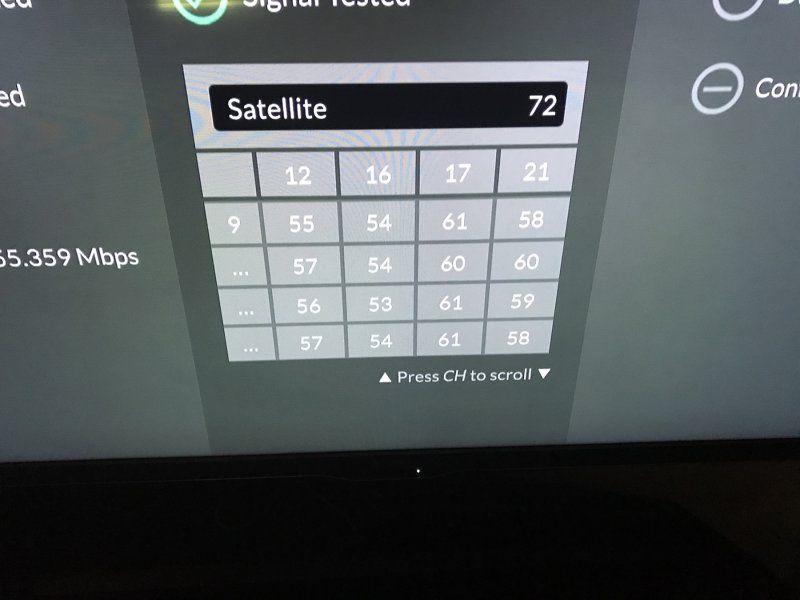
I upgraded to a hopper 3 setup looking at the eastern arc. I am in south central Kentucky. Do these signal levels look on par?

Thanks
IMG_0090.JPG
IMG_0091.JPG


Sent from my iPad using the SatelliteGuys app!
 
What I want to know is: how did you bring up that display? (I'm new to the CUI) Even my installer didn't check that display.
 
  • Like
Reactions: pattykay
Diagnostic screen (home button 3 times), #3 for dish, #5 for test installation - aka a check switch
I just tried that on my Hopper Duo, and that screen did not look like the pictures in the first post. I have never seen that display on a Wally, either. Is that just a Hopper 3 thing?
 
I just tried that on my Hopper Duo, and that screen did not look like the pictures in the first post. I have never seen that display on a Wally, either. Is that just a Hopper 3 thing?
My bad, that's the send status screen. If you hit 1 on the Diagnostic screen, then drop down 1 and hit 7 for Send Status. Step one checks connectivity, step 2 checks signal. I was wrong last night. Too much Bandanna BBQ and too many Corona's for dinner lol. (FWIW Step 3 sends that data to Dish)
 
My bad, that's the send status screen. If you hit 1 on the Diagnostic screen, then drop down 1 and hit 7 for Send Status. Step one checks connectivity, step 2 checks signal. I was wrong last night. Too much Bandanna BBQ and too many Corona's for dinner lol. (FWIW Step 3 sends that data to Dish)
Thanks. I just used that screen, and I found out that my internet connection is actually slightly faster than I thought it was. :)
 
I don't have a Hopper. Can someone explain how to read that screen? I assume the satellite it's looking at is the top of the screen. Then the chart I get stumped on. Transponder #'s in first row, then subsequent rows are levels (I guess at four different times)? Then what's the 9 in the first column, second row in the first picture?
 
I don't have a Hopper. Can someone explain how to read that screen? I assume the satellite it's looking at is the top of the screen. Then the chart I get stumped on. Transponder #'s in first row, then subsequent rows are levels (I guess at four different times)? Then what's the 9 in the first column, second row in the first picture?
That's the tuner number, I'm guessing. The chart is much simpler on a Hopper Duo or Wally, with only two rows of signal readings. (two tuners)
 
Doc, the thing that threw me the 1st time was the high bar/low reading at my dads several years ago. But it seems to just be a Dish thing.
 
I don't have a Hopper. Can someone explain how to read that screen? I assume the satellite it's looking at is the top of the screen. Then the chart I get stumped on. Transponder #'s in first row, then subsequent rows are levels (I guess at four different times)? Then what's the 9 in the first column, second row in the first picture?
The numbers on the left going down are tuners, the ones on top are transponders
 
  • Like
Reactions: charlesrshell

Need help with Dishnet NESN and MASN sport channels info

Staging for hurricane repairs

Users Who Are Viewing This Thread (Total: 0, Members: 0, Guests: 0)

Who Read This Thread (Total Members: 1)