Hopefully when Dish gets this fixed my Harmony 665 remote will work again without pushing buttons over and over again until it works.


DISH Hopper H 711 software version
- Thread starter Mister B
- Start date
- Latest activity Latest activity:
- Replies 151
- Views 4K
You are using an out of date browser. It may not display this or other websites correctly.
You should upgrade or use an alternative browser.
You should upgrade or use an alternative browser.
Advertisements


Seems like lots of people supposedly are having an issue with the External Hard Drive routine test nightly when their receivers (Hopper 3 I assume) reboot nightly instead of periodically which Dish has acknowledged. They seem to have misunderstood the fix which is the next update seems to mean the next night when it does the update check and not the next version after H711.
View: https://www.reddit.com/r/dishnetwork/comments/1w5lsoz/dish_wants_you_to_watch_less_tv/
View: https://www.reddit.com/r/dishnetwork/comments/1w5lsoz/dish_wants_you_to_watch_less_tv/


We are still having issues with the OEM Dish remote and the Dish Hopper 3 that has been occurring since my Dish Hopper 3 was updated to the H711 firmware. I let brittanygarden know the status from my end with the following information.
The problem with the Hopper 3 intermittently shutting down persists. Tonight I was watching a football game on ESPN and pressed the 'Guide' button and then pressed the 'Down Arrow' button several times to scroll down in the channel guide and when I pressed the 'Select' button in the center of the arrow keypad to change channels the Hopper 3 turned off. This happened to my wife today as well on 2 occasions.
I cannot say for certain, but it sure seems like the issue occurs while navigating in the channel guide and then pressing the 'Select' button to change channels and then the Dish Hopper 3 turns off. Note that all interactions with the Dish Hopper 3 when it shuts off have been performed using the OEM Dish remote.
Neither my wife or myself recall this ever occurring prior to the H711 Hopper 3 firmware update. We could likely isolate this relatively quickly if you could have my Hopper 3 set back to the prior version of firmware and then I will test it out over a couple of days. Since it occurs several times a day I think we could test the old firmware out in a day or so and know if the issue lies within the H711 version of the firmware.
The problem with the Hopper 3 intermittently shutting down persists. Tonight I was watching a football game on ESPN and pressed the 'Guide' button and then pressed the 'Down Arrow' button several times to scroll down in the channel guide and when I pressed the 'Select' button in the center of the arrow keypad to change channels the Hopper 3 turned off. This happened to my wife today as well on 2 occasions.
I cannot say for certain, but it sure seems like the issue occurs while navigating in the channel guide and then pressing the 'Select' button to change channels and then the Dish Hopper 3 turns off. Note that all interactions with the Dish Hopper 3 when it shuts off have been performed using the OEM Dish remote.
Neither my wife or myself recall this ever occurring prior to the H711 Hopper 3 firmware update. We could likely isolate this relatively quickly if you could have my Hopper 3 set back to the prior version of firmware and then I will test it out over a couple of days. Since it occurs several times a day I think we could test the old firmware out in a day or so and know if the issue lies within the H711 version of the firmware.

I'm going to guess that digital codes for the "select" and "on/off" buttons are very close; maybe only a single binary bit or two off. And some change in H771 to the H3's activity allows for an occasional corruption of the reception of the "select" code to be turned into an "on/off" code.We are still having issues with the OEM Dish remote and the Dish Hopper 3 that has been occurring since my Dish Hopper 3 was updated to the H711 firmware. I let brittanygarden know the status from my end with the following information.
The problem with the Hopper 3 intermittently shutting down persists. Tonight I was watching a football game on ESPN and pressed the 'Guide' button and then pressed the 'Down Arrow' button several times to scroll down in the channel guide and when I pressed the 'Select' button in the center of the arrow keypad to change channels the Hopper 3 turned off. This happened to my wife today as well on 2 occasions.
I cannot say for certain, but it sure seems like the issue occurs while navigating in the channel guide and then pressing the 'Select' button to change channels and then the Dish Hopper 3 turns off. Note that all interactions with the Dish Hopper 3 when it shuts off have been performed using the OEM Dish remote.
Neither my wife or myself recall this ever occurring prior to the H711 Hopper 3 firmware update. We could likely isolate this relatively quickly if you could have my Hopper 3 set back to the prior version of firmware and then I will test it out over a couple of days. Since it occurs several times a day I think we could test the old firmware out in a day or so and know if the issue lies within the H711 version of the firmware.
There are a couple of experiments you could try to see if this might be happening.
Try pressing the "down" button in the guide a couple of times then the "select" button as quickly as you can. Does that make it more likely for the problem to occur?
Try repeating the experiment above, but put a couple of a seconds delay between pressing the last "down" button and the "select" button. Does that change the behavior?
Also, try adding a couple of seconds delay between all of the "down" and "select" buttons presses.
Repeat the two experiments above, but before you bring up the Guide, pause the video (less simultaneous activity). Does that change the problem occurring?
In general, these experiments try to see if there some kind of pseudo-random timing issue that is corrupting button code reception.
Again, this is just a guess, but this is something I would try as part of my development testing on systems I work with (not Dish related).
I'm going to guess that digital codes for the "select" and "on/off" buttons are very close; maybe only a single binary bit or two off. And some change in H771 to the H3's activity allows for an occasional corruption of the reception of the "select" code to be turned into an "on/off" code.
There are a couple of experiments you could try to see if this might be happening.
Try pressing the "down" button in the guide a couple of times then the "select" button as quickly as you can. Does that make it more likely for the problem to occur?
Try repeating the experiment above, but put a couple of a seconds delay between pressing the last "down" button and the "select" button. Does that change the behavior?
Also, try adding a couple of seconds delay between all of the "down" and "select" buttons presses.
Repeat the two experiments above, but before you bring up the Guide, pause the video (less simultaneous activity). Does that change the problem occurring?
In general, these experiments try to see if there some kind of pseudo-random timing issue that is corrupting button code reception.
Again, this is just a guess, but this is something I would try as part of my development testing on systems I work with (not Dish related).
Thank you for the excellent suggestions. What you suggest makes sense. I have spent the past 3-4 weeks doing various tests and while the issue occurs every day and multiple times in a day I have not been able to duplicate the problem on demand.
I will try your suggestions and report back on this forum.
Thank you for the excellent suggestions. What you suggest makes sense. I have spent the past 3-4 weeks doing various tests and while the issue occurs every day and multiple times in a day I have not been able to duplicate the problem on demand.
I will try your suggestions and report back on this forum.
The issue happening at random would be harder to reproduce since I don't know if I have the issue or not and if this is a Hopper 3 only issue or a Hopper 3 with Hopper Plus issue or both. In my case, I have done the guide, down arrow once and then select which is once per day daily without issues with Hopper 3 (Software H711) with Hopper Plus (Software P15317) with the following remote(s) and remote firmware versions:
50.0 E008T504ES56
52.0 E009T504EM52
54.1 E011T504EW59
My issue which I thought was related to Hopper 3 software that worked fine before and then started a few years ago is that with the DISH Remotes 50.0/52.0/54.x is that the tv power button (50.0/52.0) or tv power function (54.x) would be sending the power toggle to both the tv and the Hopper 3 so it is sending the Hopper 3 to standby as mentioned earlier in the thread and the only way I found out it was the remote(s) was by changing the tv remote code to something else so the tv itself would ignore it (setting a Sony 810 on a LG TV) so it seems the issue with mines is the firmware aka software on the remotes that changed. Other people might not have the problem because they probably all practice the Hopper 3 going into standby when the tv is off while I keep my Hopper 3 on so that it will always be tuned and if I am not at the tv and then on the tv later, I can always view the live buffer for the past hour if there was something I missed or I want to see something within the hour after the tv is turned on. Your issue is clearly with the Hopper 3 software and not the remote. Can you share the following information as it might help to see if there are certain conditions that have to be met:
Are you on a Hopper 3 only or is this a Hopper Plus setup?
Can you share the remote model(s) and also the remote firmware/software version(s)?
Does the problem happen only with Satellite channels, Streaming channels or both?
I will try to do multiple down before doing select to see if it makes a difference.
The issue happening at random would be harder to reproduce since I don't know if I have the issue or not and if this is a Hopper 3 only issue or a Hopper 3 with Hopper Plus issue or both. In my case, I have done the guide, down arrow once and then select which is once per day daily without issues with Hopper 3 (Software H711) with Hopper Plus (Software P15317) with the following remote(s) and remote firmware versions:
50.0 E008T504ES56
52.0 E009T504EM52
54.1 E011T504EW59
My issue which I thought was related to Hopper 3 software that worked fine before and then started a few years ago is that with the DISH Remotes 50.0/52.0/54.x is that the tv power button (50.0/52.0) or tv power function (54.x) would be sending the power toggle to both the tv and the Hopper 3 so it is sending the Hopper 3 to standby as mentioned earlier in the thread and the only way I found out it was the remote(s) was by changing the tv remote code to something else so the tv itself would ignore it (setting a Sony 810 on a LG TV) so it seems the issue with mines is the firmware aka software on the remotes that changed. Other people might not have the problem because they probably all practice the Hopper 3 going into standby when the tv is off while I keep my Hopper 3 on so that it will always be tuned and if I am not at the tv and then on the tv later, I can always view the live buffer for the past hour if there was something I missed or I want to see something within the hour after the tv is turned on. Your issue is clearly with the Hopper 3 software and not the remote. Can you share the following information as it might help to see if there are certain conditions that have to be met:
Are you on a Hopper 3 only or is this a Hopper Plus setup?
Can you share the remote model(s) and also the remote firmware/software version(s)?
Does the problem happen only with Satellite channels, Streaming channels or both?
I will try to do multiple down before doing select to see if it makes a difference.
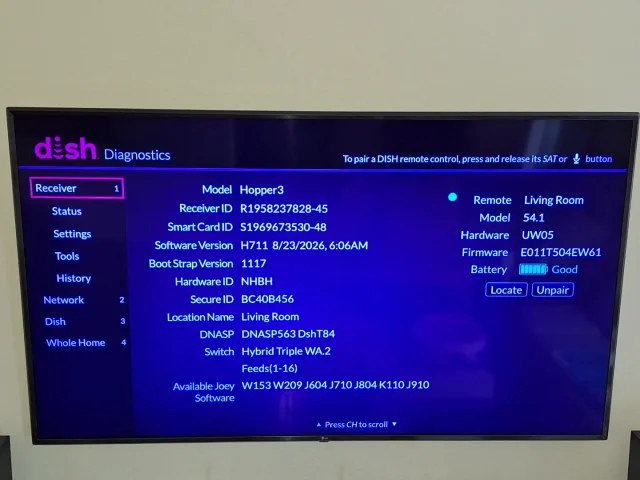
The image above shows my remote model, 54.1, and the current remote firmware. I am on a Hopper 3. I am not sure what you mean by a Hopper Plus setup.
When I personally experienced the issues it was when I was trying to watch Satellite channels and the same for my wife. I don't know which channels are Satellite channels vs. streaming channels. The only time that it uses the internet to stream is when the weather is poor and it switches to internet which I assume is then streaming.

My issue, with H711, still persists with my Pronto Pro remote. I have to "wake up" the IR side of my Hopper 3 if I haven't tapped any button on my Pronto Pro within an hour. If I haven't tapped a button in over an hour, then I have to tap View button multiple times. Typically anywhere from 5-25 times to get the banner to pop.
I'd love to go back to the firmware version prior to H711. This issue didn't exist.
I'd love to go back to the firmware version prior to H711. This issue didn't exist.
My issue, with H711, still persists with my Pronto Pro remote. I have to "wake up" the IR side of my Hopper 3 if I haven't tapped any button on my Pronto Pro within an hour. If I haven't tapped a button in over an hour, then I have to tap View button multiple times. Typically anywhere from 5-25 times to get the banner to pop.
I'd love to go back to the firmware version prior to H711. This issue didn't exist.
I agree 100 percent that going back to the firmware prior to H711 would be my desire as well. We are still having the same problem with the OEM Dish remote and the Dish Hopper 3. Just a few minutes ago I pressed the 'Guide' button on the OEM Dish remote and the Dish Hopper 3 shut off.
I pressed the 'Select' button in the center of the directional keypad and it came back on right away. This has been occurring several times a day since the 'upgrade' to firmware version H711 on the Dish Hopper 3.
The Dish Technical IT support team and their manager brittanygarden are aware of the problem and looking into it. I hope that they are able to fix this firmware bug soon.
I'm going to guess that digital codes for the "select" and "on/off" buttons are very close; maybe only a single binary bit or two off. And some change in H771 to the H3's activity allows for an occasional corruption of the reception of the "select" code to be turned into an "on/off" code.
There are a couple of experiments you could try to see if this might be happening.
Try pressing the "down" button in the guide a couple of times then the "select" button as quickly as you can. Does that make it more likely for the problem to occur?
Try repeating the experiment above, but put a couple of a seconds delay between pressing the last "down" button and the "select" button. Does that change the behavior?
Also, try adding a couple of seconds delay between all of the "down" and "select" buttons presses.
Repeat the two experiments above, but before you bring up the Guide, pause the video (less simultaneous activity). Does that change the problem occurring?
In general, these experiments try to see if there some kind of pseudo-random timing issue that is corrupting button code reception.
Again, this is just a guess, but this is something I would try as part of my development testing on systems I work with (not Dish related).
I tried your suggestions and could not get the Dish Hopper 3 to shut down using all of the scenarios that you listed. Then a few hours later I pressed the 'Guide' button on the Dish OEM remote and the Dish Hopper 3 shut down. I then pressed the 'Select' button on the directional keypad and the Dish Hopper 3 immediately turned back on.
I am stumped at this point and Dish Technical Support is aware of the issue. I don't know what else to do except explore alternative TV programming solutions when my contract with Dish Network expires in 4 months.
The Dish IT technical support manager brittanygarden has been responsive so I am willing to see if her team can get this fixed.
That would tend to suggest that a timing code corruption is NOT the problem. Rather, the H3 is simply confusing some button codes for others.I tried your suggestions and could not get the Dish Hopper 3 to shut down using all of the scenarios that you listed. Then a few hours later I pressed the 'Guide' button on the Dish OEM remote and the Dish Hopper 3 shut down. I then pressed the 'Select' button on the directional keypad and the Dish Hopper 3 immediately turned back on.
I am stumped at this point and Dish Technical Support is aware of the issue. I don't know what else to do except explore alternative TV programming solutions when my contract with Dish Network expires in 4 months.
The Dish IT technical support manager brittanygarden has been responsive so I am willing to see if her team can get this fixed.
The next time you get this problem, instead of re-pressing the "select" again to turn the H3 back on, try pressing the "on/off" button instead to turn the H3 on and then press the "select" button and see what happens.
That would tend to suggest that a timing code corruption is NOT the problem. Rather, the H3 is simply confusing some button codes for others.
The next time you get this problem, instead of re-pressing the "select" again to turn the H3 back on, try pressing the "on/off" button instead to turn the H3 on and then press the "select" button and see what happens.
Sure, the next time this happens I will press the 'on/off' button on the OEM Dish remote and then I will press the 'select' button. I will report back with the results.
Thanks.

Just a heads up she is out of the office until Next Tuesday. So if there is a delay in things it proves she actually has a life. LolThe Dish IT technical support manager brittanygarden has been responsive so I am willing to see if her team can get this fixed.


Just now my 54.2 remote with the Hopper 3 and TCL TV is acting odd. When I press the main power button which has always turned off both the TV and Hopper, now it brings up a screen from the TCL asking if I want to shut down or cancel. However, the DISH remote will not navigate to either choice and the Hopper does not turn off.
I just went to the Hopper's menu and changed the TV remote choice to Samsung (top of the list) and will just use the two seperate remotes. Sometimes I like to adjust the picture which of course requires using the TCL remote anyways.
I just went to the Hopper's menu and changed the TV remote choice to Samsung (top of the list) and will just use the two seperate remotes. Sometimes I like to adjust the picture which of course requires using the TCL remote anyways.

This can happen with Google TV platform.Just now my 54.2 remote with the Hopper 3 and TCL TV is acting odd. When I press the main power button which has always turned off both the TV and Hopper, now it brings up a screen from the TCL asking if I want to shut down or cancel. However, the DISH remote will not navigate to either choice and the Hopper does not turn off.
I just went to the Hopper's menu and changed the TV remote choice to Samsung (top of the list) and will just use the two seperate remotes. Sometimes I like to adjust the picture which of course requires using the TCL remote anyways.
I had this issue with my Hisense 75U7K.
To solve it, try the TCL code again, and only do a very short press on the dish remote power button when turning the TV off.
That should turn the TV off. A long press brings up that other menu.
Let us know if that works for you.
Interesting i got a popup today saying my hopper hasn't restarted in days and it may go crazy. i forced it to do a reboot now it's fine
Thank you. A short press seems to do the trick.This can happen with Google TV platform.
I had this issue with my Hisense 75U7K.
To solve it, try the TCL code again, and only do a very short press on the dish remote power button when turning the TV off.
That should turn the TV off. A long press brings up that other menu.
Let us know if that works for you.
Seems like your remote software for the 54.1 is newer than mines. As for Hopper Plus, you would know if you had one since it's basically a Android TV box from DISH that sits between the Hopper 3 and the TV and the HDMI would plug into the Hopper Plus instead of the Hopper 3 and then a USB cable connects the Hopper Plus to the Hopper 3.View attachment 193889
The image above shows my remote model, 54.1, and the current remote firmware. I am on a Hopper 3. I am not sure what you mean by a Hopper Plus setup.
When I personally experienced the issues it was when I was trying to watch Satellite channels and the same for my wife. I don't know which channels are Satellite channels vs. streaming channels. The only time that it uses the internet to stream is when the weather is poor and it switches to internet which I assume is then streaming.
As for the channels, maybe mention it by channel name and number? Does the problem happen if you hit up arrow or up arrow and down arrow before doing the down arrow 5 times?
I agree 100 percent that going back to the firmware prior to H711 would be my desire as well. We are still having the same problem with the OEM Dish remote and the Dish Hopper 3. Just a few minutes ago I pressed the 'Guide' button on the OEM Dish remote and the Dish Hopper 3 shut off.
I pressed the 'Select' button in the center of the directional keypad and it came back on right away. This has been occurring several times a day since the 'upgrade' to firmware version H711 on the Dish Hopper 3.
The Dish Technical IT support team and their manager brittanygarden are aware of the problem and looking into it. I hope that they are able to fix this firmware bug soon.
So the shutoff or the Hopper 3 going into standby happens when you press "Guide" without even doing the hitting the down button? When you say shut off, do you mean the screen that shows "Press SAT to watch TV" message showing on the tv? Forgot to ask but did you ever have H710 before H711 as H711 seemed to have came out a few days after H710 did.
So the shutoff or the Hopper 3 going into standby happens when you press "Guide" without even doing the hitting the down button? When you say shut off, do you mean the screen that shows "Press SAT to watch TV" message showing on the tv? Forgot to ask but did you ever have H710 before H711 as H711 seemed to have came out a few days after H710 did.
It varies, the last time it happened to me the Hopper 3 shut off (green LED no longer lit and the TV screen went dark) as soon as I pressed the 'Guide' button. When I say shut off the Hopper 3 the green power LED on the front panel is no longer lit and the TV screen is dark.
I am not sure if it displays a 'Press SAT to watch TV' message at that time. The next time it happens I will check. I have no idea what firmware version the Hopper 3 had immediately prior to H711.
Users Who Are Viewing This Thread (Total: 1, Members: 0, Guests: 1)
Who Read This Thread (Total Members: 132) Show all
- Mister B
- Almighty1
- Jim5506
- JeffN9
- jannah
- GRB1959
- Jrmorgan
- andaram
- Astroman3427
- gms49ers
- johnr475
- slow_poke_pete
- bwest602
- bookworm370
- Cold Irons
- llokey
- lonrhodes1
- deadfwd
- reubenray
- brice52
- rvvaquero
- TecNOfile
- worstman1
- dsimmon9
- Dell00iss
- JSheridan
- RTCDude
- dhunter113
- tallfence
- yelraek
- njack11
- gws
- Bobby
- garyreno
- Redneck_Randy
- oscar22
- jsmit86
- brittanygarden
- cpdretired
- Nebugeater
- mrbreeze640
- pamajestic
- ekilgus
- RobMeyer1
- JimC
- navychop
- Scott Greczkowski
- Foxbat
- ERSanders
- Willh699
- BatStang2000
- charlesrshell
- long_time_Dish
- bnewt
- hemicuda
- Russ8594
- Mr Tony
- harshness
- winter60
- uptownvideo
- niembre


