

Managing Favorites Lists

  • HAPPY NEW YEAR! EXCITING CHANGES COMING IN 2026!
    Thank you for a great 2025 and we are so looking forward to 2026!
    PLEASE CLICK HERE to find out about some of our plans for 2026 including our BRAND NEW NAME we will be moving to in 2026! Exciting times are ahead!
    Happy New Year from your friends here at SatelliteGuys.US!

toucan-man

SatelliteGuys Pro
Original poster
Jul 13, 2008
2,696
25
Wisconsin
So, is it possible to have a "keep favorites, delete all the rest" function? Am I the only one who would use it? I like to purge all the duplicate and useless channels that start to accumulate after doing a bunch of blind scans. Everything I want to save is always added as a favorite.

Have you anything different in the works that would make this "keep favorites" approach unnecessary?
 
Last edited by a moderator:
So, is it possible to have a "keep favorites, delete all the rest" function? Am I the only one who would use it? I like to purge all the duplicate and useless channels that start to accumulate after doing a bunch of blind scans. Everything I want to save is always added as a favorite.

Have you anything different in the works that would make this "keep favorites" approach unnecessary?

Had never considered a delete all except favorites. Could research, but your usage of the Favorites lists is very unique.

This is a perfect use for the PC editor. Sort the channel list by favorite, delete non-favorite channels and reload.
 
Now I'm curious, how do people typically use their favorites? I put all channels I intend to keep long term in the first Favorites list. The temporary feeds never go there.

I've never used an external editor, am really just a remote control jockey. I like removing the dead stuff and the repetitive stuff from past blind scans, I really don't need multiple instances of channels I'll never watch (or already have saved in my favorites.)
 
One trick I use that does nearly the same is to go thru the TP list and delete any that don't have signal lock. It kills all the one time channels simultaneously.


.
 
I want to kill off everything I don't want saved all an once. This includes the temporary stuff, as well as the duplicates.

What I asked for is apparently is not a much wanted feature :D. So could I maybe at least get a way to select all but my favorited channels in the channel manager? So I can end up with a screen like this:
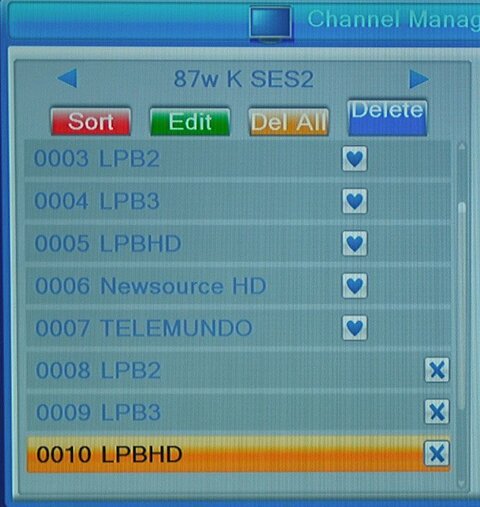
channel-manager.jpg

From there I can nuke 'em.

Notice how LPB channels repeat. I don't need multiple LPB or anything else that continually scans in.
 
You will not have duplicates if the TP list is correct. I suspect that there are two TPs scanned for any channel that duplicates during a scan. These TPs will be very close in the parameters. This could be happening if multiple Blind scans are performed on an LNBF with a drifting LO frequency.

Back to the original request....

To delete all but a few channels: Select "Delete All". Confirm the OK to Delete, but instead of exiting, select Delete and deselect the channels that you wish to save. Exit and save changes.
 
That's a vintage Primestar dish with the separate V and H connections. That dish will be retired shortly, and drift off to sleep.

Will try the transponder trick.

Danke.
 
You will not have duplicates if the TP list is correct. I suspect that there are two TPs scanned for any channel that duplicates during a scan. These TPs will be very close in the parameters. This could be happening if multiple Blind scans are performed on an LNBF with a drifting LO frequency.
Seems that if I "skip" these duplicates, the problem disappears. Now I always have a tidy small list of new stuff to look through after a multi-satellite blind scan.
 

Comparing signals on here for the microhd

Another re-booting issue

Users Who Are Viewing This Thread (Total: 0, Members: 0, Guests: 0)

Who Read This Thread (Total Members: 1)