Who to blame for missing Guide? the provider, Dish or this old geezer?

Advertisements
Hi;
I waited few days. Just checked the guide with my kitchen Joey. Disappointment!.

It is 8 am, June 8 Monday right now. the last listed program under guide is at 5 am, Wednesday.
So, the guide does not even provide 48 hour programming.
Are other people having the same problem?
Bobby, would you mind looking at yours?

I will wait til I hear from you guys before I make a call.

Grumpy geezer.
Angry Old Man GIF by STAGEWOLF.gif
 
Hi;
I waited few days. Just checked the guide with my kitchen Joey. Disappointment!.

It is 8 am, June 8 Monday right now. the last listed program under guide is at 5 am, Wednesday.
So, the guide does not even provide 48 hour programming.
Are other people having the same problem?
Bobby, would you mind looking at yours?

I will wait til I hear from you guys before I make a call.

Grumpy geezer.
View attachment 191635
My guide goes out the full schedule. I noted in one of your earlier posts that you unplugged the Hopper3 for 10 seconds. Try it again but leave it unplugged for 5 minutes and then plug it back in. After it reboots do not mess with anything just let it play the channel it is set to. Come back in one hour and then take a look at your guide. Did that fix it?
 
Followed Bobby's instructions. Unplugged the hopper, waited 10 minutes, turned tv on. No channel switches. Few hours later, the Guide still didn't cover the entire week. It shows for 48 hours. I tried to update the guide under 'tools'. It claimed it updated it. It didn't.
I am thinking calling the customer support.

800 333 3474
 
Followed Bobby's instructions. Unplugged the hopper, waited 10 minutes, turned tv on. No channel switches. Few hours later, the Guide still didn't cover the entire week. It shows for 48 hours. I tried to update the guide under 'tools'. It claimed it updated it. It didn't.
I am thinking calling the customer support.

800 333 3474
That is the thing to do at this time.
 
Talked to a rep. Jamaican accent?

He took over on his side. Checked stuff under 'Diagnostics'. I was watching all that. He wanted to make sure. Updated the software and guide. No luck. He took notes (he told me) of what he did and would give his troubleshooting to some technical investigative team. He said 'wait a day and check the guide again'.
I reminded him the guide was giving info for an entire week in the near past. I also mentioned a member at Forum (that's u Bobby:) ) said his guide was fine.

We will see what happens.
 
Hi y'all;
July 5th. No improvement on guide. 2 days. Of course, nobody from Dish called.
Maybe, my Hopper does not reboot every night tu update the guide.
How do I check that? Diagnostics under Settings?
 
  • Like
Reactions: charlesrshell
Your hopper should reboot nightly and update the guide. Look under your settings menu for POWER menu and you can set your receiver to reboot and update and at what time. I checked on my buddy's hopper yesterday because I remembered you could set it for a time you like.
 
  • Like
Reactions: charlesrshell
Mike;
I did what you suggested.
Inactivity timeout was OFF.
Daily reset time was 4 am.


Dish apparently does not recommend inactivity time being off. When I was looking into it, I changed that to 4 hrs (default).
( I remember getting tired of seeing Hopper was about to shut itself off after 4 hours unless I used the remote to cancel that. That's why I changed it to OFF in the past.)
My daily tv is connected to Joey2. I never use Hopper and a smaller LG TV connected to it. Long story for another day.

I am wondering whether guide updates messed up because inactivity timeout was off.

Bobby;
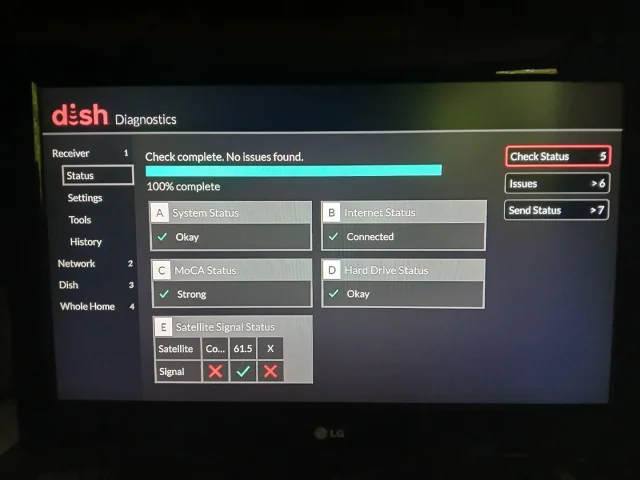
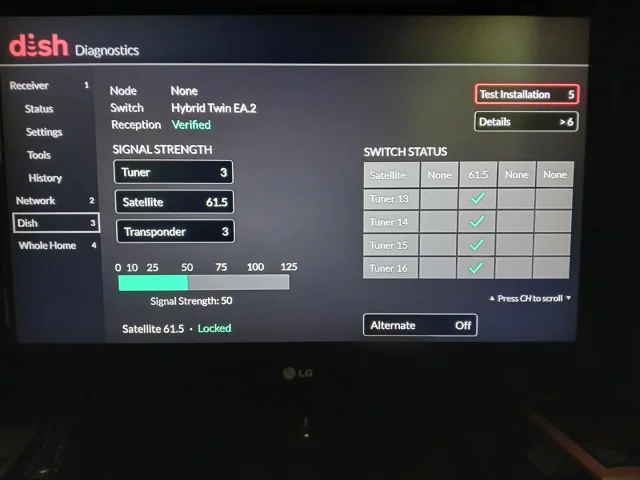
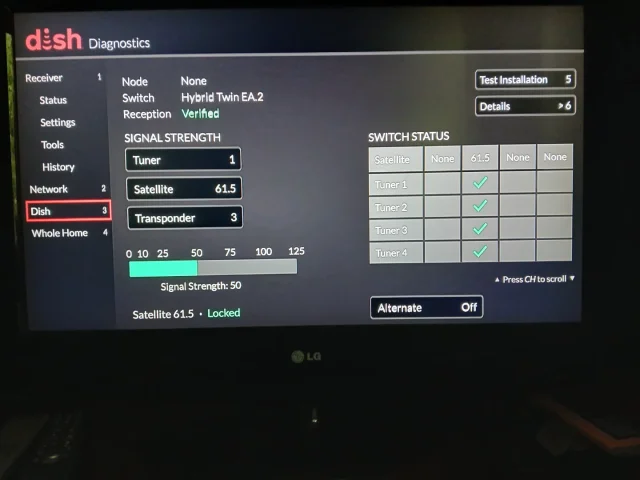
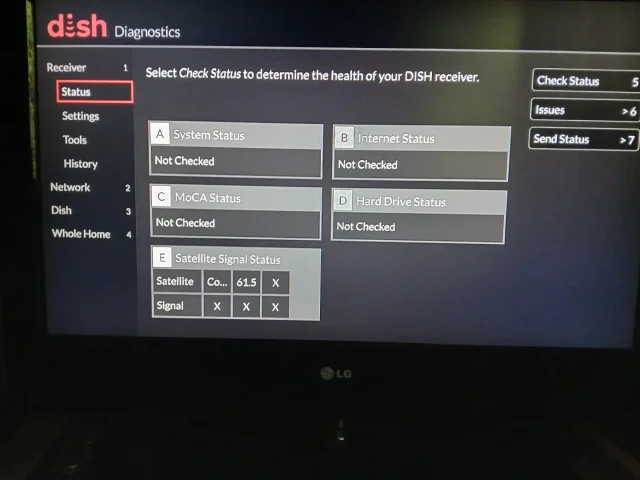
I did the check switch by selecting 'test installation'.
Under 'check switch status progress, a green bar on the screen. took the pictures.
I checked 'issues'. It showed none.

Hopefully, the pictures will be in order.

Thank you both.
 

Attachments

  • 1000098427.webp
    1000098427.webp
    77.5 KB · Views: 21
  • 1000098426.webp
    1000098426.webp
    73.8 KB · Views: 20
  • 1000098425.webp
    1000098425.webp
    77.7 KB · Views: 20
  • 1000098424.webp
    1000098424.webp
    79.1 KB · Views: 20
  • Like
Reactions: charlesrshell
Mike;
I did what you suggested.
Inactivity timeout was OFF.
Daily reset time was 4 am.


Dish apparently does not recommend inactivity time being off. When I was looking into it, I changed that to 4 hrs (default).
( I remember getting tired of seeing Hopper was about to shut itself off after 4 hours unless I used the remote to cancel that. That's why I changed it to OFF in the past.)
My daily tv is connected to Joey2. I never use Hopper and a smaller LG TV connected to it. Long story for another day.

I am wondering whether guide updates messed up because inactivity timeout was off.

Bobby;
I did the check switch by selecting 'test installation'.
Under 'check switch status progress, a green bar on the screen. took the pictures.
I checked 'issues'. It showed none.

Hopefully, the pictures will be in order.

Thank you both.
I see your issue. You are missing the 72.7 satellite. That is the satellite that sends the Dish guide. You are missing channels as well but you probably don't watch those channels. You need a truck roll to check your LNBs.
 
I see your issue. You are missing the 72.7 satellite. That is the satellite that sends the Dish guide. You are missing channels as well but you probably don't watch those channels. You need a truck roll to check your LNBs.
Agreed. But Hipkat has said that they are changing out installations for western arc now. They sound like DISH is moving back to just 110 and 119 satellites, since both are brand new satellites that will last till 2040.
 
  • Like
Reactions: charlesrshell
Agreed. But Hipkat has said that they are changing out installations for western arc now. They sound like DISH is moving back to just 110 and 119 satellites, since both are brand new satellites that will last till 2040.
That might be fine but if his locals are still on 61.5 only that doesn't help until Dish makes the move.
 
So, will rotating the dish solve the problem of not getting the two week (10 days?) guide?
I don't understand why the guide shows programming for 23 hours. I shouldn't get anything, right?

When the customer rep asked some questions first, then took over on his side to check diagnostics he never mentioned anything about missing satellite.
However, he appreciated our loyalty over 20 years and said we deserved some discount! The wifey got all excited. Nope. No lower monthly bill. A nice cell service!! we declined.
 
  • Like
Reactions: charlesrshell
So, will rotating the dish solve the problem of not getting the two week (10 days?) guide?
I don't understand why the guide shows programming for 23 hours. I shouldn't get anything, right?

When the customer rep asked some questions first, then took over on his side to check diagnostics he never mentioned anything about missing satellite.
However, he appreciated our loyalty over 20 years and said we deserved some discount! The wifey got all excited. Nope. No lower monthly bill. A nice cell service!! we declined.
I think you have an LNB go bad and need your twin LNBs replaced. Just call Dish and tell them that you are not seeing 72.7 and they will send a tech out to fix it. It could also be a cabling issue and the same needs to be done. Don't overthink it. The 23 hours is just how it works when you don't get guide updates.
 
  • Like
Reactions: charlesrshell
Hi y'all;
July 5th. No improvement on guide. 2 days. Of course, nobody from Dish called.
Maybe, my Hopper does not reboot every night tu update the guide.
How do I check that? Diagnostics under Settings?
your hopper and joey's should reboot every night. is that setting turned off 🤔🤔. the nightly reboots should have you pulling your hair out🤪🤣🤣😂😂
 
  • Like
Reactions: charlesrshell
I don't think Dish will send a technician to adjust the bird unless I am willing to pay some fee. Anybody knows what that might be? Routine visit. No complicated setup.

We have no problem getting a live signal, using dvr and mostly using Joey2s.
Hopper mostly collects dust in the homerun room (drywalled section with its own door under basement stairs). It is connected to a smaller tv which we no longer use. Back then, the biggest tv size was 40 inch. After getting a 75 inch TV about 15 years ago we decided to use a different wall with a Joey2. Moving Hopper to next to this new tv was not possible. The boss does not like to see any cable or box exposed. Joey 2 , HDMI and power cords, bluray player are located behind this wall where an exercise room is located.

Would it make sense to request a tech just to get a two week guide? I am struggling to decide what to do.
 
  • Like
Reactions: charlesrshell

Hopper is driving my parents nuts

External Hard Drive for DVR