Windows 10/11 Download

Apparently not in this case.
It isn't a Channels issue that causes this, it's lan networking issues, bad .m3u streaming, or in the case of a real tuner device (such as an HDHR), antenna signal loss. Channels will restart the stream as many times as is needed in those cases, until the time set for the recording is over. THAT'S what I meant by "robust"
 
It isn't a Channels issue that causes this, it's lan networking issues, bad .m3u streaming, or in the case of a real tuner device (such as an HDHR), antenna signal loss. Channels will restart the stream as many times as is needed in those cases, until the time set for the recording is over. THAT'S what I meant by "robust"
Yes in every case when the recording gets interrupted it then starts recording again. The shows I have watched that showed the recording interrupted must just be happening for seconds because I never notice anything missing when I watch it. Last night I shutdown Pluto for Channels and recorded 4 hours from the Discovery channel and there were no interruptions. Then after going back and looking at previous recordings it seems I only have recordings interrupted on my CBS local station on this DVR but not on the Channels DVR on my Synology NAS. So today I am going to try recording from that channel with Pluto for Channels off and see if I have any interruptions.
 
  • Like
Reactions: primestar31
Blaming issues on network faults is a relatively weak argument in this day and age.

Most self-respecting NAS devices are hardwired.
Sure Harsh, you know it all as usual. Do you even HAVE a Channels DVR server running?

I guarantee you that even slight network blips, congestion, bad ethernet cable, whatever can cause Channels to put up an "interrupted" message on a recording. It does not necessarily mean there will be a noticeable "blip" in the recording.

It's made that way to inform you.
 
Most self-respecting NAS devices are hardwired.
The issue I have had is not with my NAS which is actually hardwired with two 1gb ethernet connections. The issue I am having was on a Windows 11 PC that is also hardwired with Ethernet. That issue also occurred this morning when I recorded 3 shows from my local CBS so the issue is only happening via the CBS local. And this morning I had my Pluto TV software off so it isn't that software causing the issue.

PLEASE LOG IN TO GET RID OF THESE ADS!
 
  • Like
Reactions: primestar31
The issue I have had is not with my NAS which is actually hardwired with two 1gb ethernet connections. The issue I am having was on a Windows 11 PC that is also hardwired with Ethernet. That issue also occurred this morning when I recorded 3 shows from my local CBS so the issue is only happening via the CBS local. And this morning I had my Pluto TV software off so it isn't that software causing the issue.
Does any of this suggest to you that your hardware or network is necessarily at fault?

It all suggests to me that the fault lies with the Channels software, and it isn't as supremely robust as primestar31 suggests.
 
Do you even HAVE a Channels DVR server running?
I tried Channels a long time ago when it was more like TV Everywhere with DVR features, but it was officially threatening to become a cloud-based service rather than a local PVR setup. Much has changed since then, and apparently not all for the better.

I run Plex (with a $40 lifetime PlexPass subscription) on a Debian-based mid-tower server (my daily driver before I switched from Windows XP to Debian 9 on an even older machine). It has been 100% stable with my HDHomeRun tuner, and Plex device support is broad. Originally, I was running Ubuntu, but I'm feeling much better now with Debian 13.

If Channels is that fussy, I can't imagine using it, regardless of how hard it tries to cover its backside -- especially when used with an OTA tuner where there are no second chances.

 
  • Like
Reactions: Foxbat
Does any of this suggest to you that your hardware or network is necessarily at fault?

It all suggests to me that the fault lies with the Channels software, and it isn't as supremely robust as primestar31 suggests.
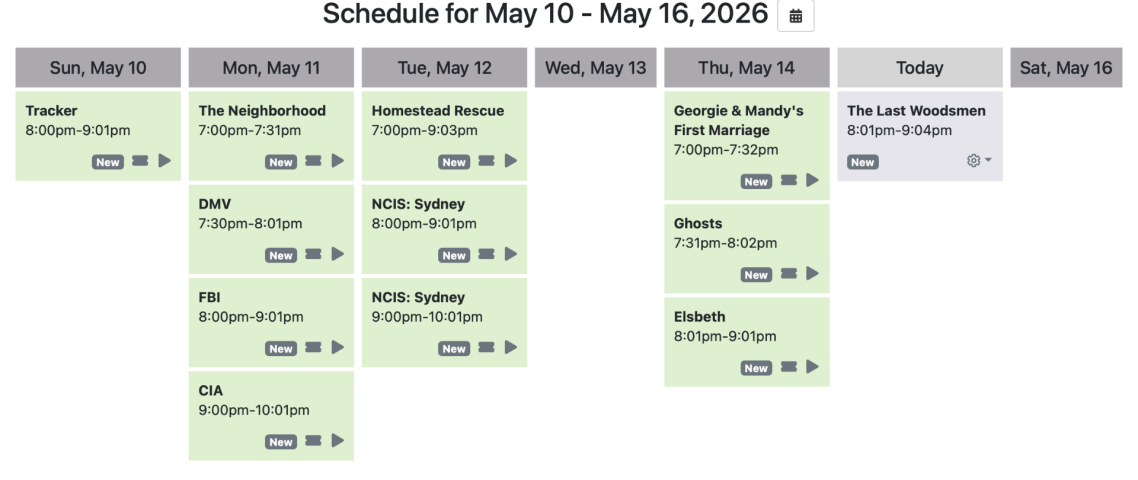
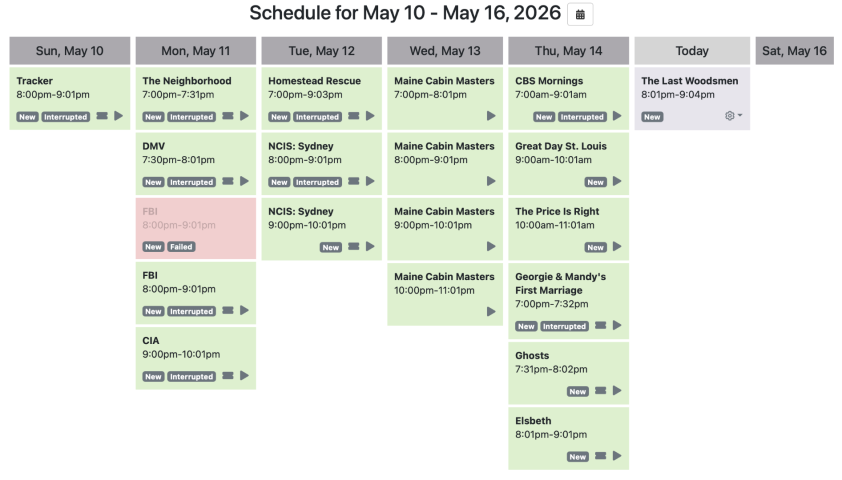
I'm pretty sure it lies in the Windows 11 PC somewhere or the network. There is one network switch that the WIN 11 PC goes through that the Synology NAS doesn't so I need to look into that too. Here are screenshots of my recordings from this week from the Synology NAS and the same recordings plus some extra stuff while testing from the WIN 11 pc. Today my next test will be to try a different Ethernet cable on the WIN 11 pc. I had thought it only happened from the CBS local but it happened on one show from Discovery also. Most of the stuff I record is from the CBS local and I hadn't noticed the interruption on Discovery. But on the Synology NAS...no interruptions at all. If it was the fault of the Channels DVR software it would be happening everywhere.
 

Attachments

  • Synology_NAS_Recordings.png
    Synology_NAS_Recordings.png
    251.6 KB · Views: 2
  • WIN11_PC_Recordings.png
    WIN11_PC_Recordings.png
    355.6 KB · Views: 4
  • Like
Reactions: primestar31
I tried Channels a long time ago when it was more like TV Everywhere with DVR features, but it was officially threatening to become a cloud-based service rather than a local PVR setup. Much has changed since then, and apparently not all for the better.

I run Plex (with a $40 lifetime PlexPass subscription) on a Debian-based mid-tower server (my daily driver before I switched from Windows XP to Debian 9 on an even older machine). It has been 100% stable with my HDHomeRun tuner, and Plex device support is broad. Originally, I was running Ubuntu, but I'm feeling much better now with Debian 13.

If Channels is that fussy, I can't imagine using it, regardless of how hard it tries to cover its backside -- especially when used with an OTA tuner where there are no second chances.

I assure you there are many people using Channels DVR successfully with an HD HomeRun via OTA which is not a possibility for me. If it were possible I would be doing it. I also have a lifetime PLEX subscription and very rarely use it for anything since OTA is not a possibility for me. The auto skip ads on the Channels DVR is worth the price of it. I also have my own video library going through Channels DVR instead of Plex because frankly Channels is far superior to Plex.
 
  • Like
Reactions: primestar31
Remember that Synology's DSM is a Linux distro. This is typically a huge advantage where networking is involved.
So my test of changing the Ethernet cable and bypassing the switch that the Synology NAS doesn't go through didn't help so I am still getting random interruptions on recordings using the Windows 11 pc. So right now it is either a hardware issue or a windows 11 issue. This same pc worked without these interruptions for about 2 years. The interruptions started within the last month or two and it isn't all recordings. I may try it on my Bazzite PC but it is recommended to install it via Docker on Linux pc's and I have never done that before so I will have to do some learning before I attempt it.
 
So my test of changing the Ethernet cable and bypassing the switch that the Synology NAS doesn't go through didn't help so I am still getting random interruptions on recordings using the Windows 11 pc. So right now it is either a hardware issue or a windows 11 issue. This same pc worked without these interruptions for about 2 years. The interruptions started within the last month or two and it isn't all recordings. I may try it on my Bazzite PC but it is recommended to install it via Docker on Linux pc's and I have never done that before so I will have to do some learning before I attempt it.
Post this on the Channels forum. Might get better answers. I'd suspect a Windows 11 update somehow is doing this, but who really knows.
 
  • Like
Reactions: b4pjoe
I may try it on my Bazzite PC but it is recommended to install it via Docker on Linux pc's and I have never done that before so I will have to do some learning before I attempt it.
Docker is easy (much more so than VMs), but it adds some overhead (especially if you're using hardware transcoding).

I'm betting that Windows 11 is the root of your evils.
 
Is this Channels DVR similar to something like Plex or Jellyfin?

PLEASE LOG IN TO GET RID OF THESE ADS!
 
Is this Channels DVR similar to something like Plex or Jellyfin?
Yes, but it requires a paid subscription, monthly or yearly. There's no lifetime option available. But it is constantly being actively updated, and worth the money IMO. It has a free 30 day test to see if you'd like it. It's very easy to install and run. Channels — Watch TV Your Way
 
Post this on the Channels forum. Might get better answers. I'd suspect a Windows 11 update somehow is doing this, but who really knows.
Well I think I got if fixed. That win11 pc is rarely powered off. The only reboots on it is after updates. Saturday morning I powered it off for a few minutes and then powered it back up. I have done about 30 recordings testing on it and since that time I have not had any recordings interrupted. So some Windows 11 Vodoo was cleared out by powering it off.
 
Well I think I got if fixed. That win11 pc is rarely powered off. The only reboots on it is after updates. Saturday morning I powered it off for a few minutes and then powered it back up. I have done about 30 recordings testing on it and since that time I have not had any recordings interrupted. So some Windows 11 Vodoo was cleared out by powering it off.
That's what happened to mine this past Tuesday update day. It rebooted maybe 6+ times with all the pushed updates. I couldn't connect to it remotely, and it reset it's network to Public. I couldn't change it, very frustrating. I then rebooted it one more time manually, and it fixed it! Go figure.

Stupid me, I even worked a backup helpdesk for the overnight shift for many years as part of my last 8 years in a NOC, and typically the first thing said was: "did you reboot?" I should have known better, oh well... lol
 
  • Like
Reactions: b4pjoe and Foxbat
Stupid me, I even worked a backup helpdesk for the overnight shift for many years as part of my last 8 years in a NOC, and typically the first thing said was: "did you reboot?" I should have known better, oh well... lol
It Crowd Maurice Moss GIF
 
If you're having problems, executing a restart is usually better than a shutdown. Shutting down doesn't purge cobwebs as well as restarting (it's often not much more useful than logging out and back in again). Shutting Windows down keeps some data around so it can boot faster (sometimes faster than hibernation).

In this day and age of computers never really powering off, it is perhaps bad form to refer to "power" unless a power chop has taken place. There's shutting down and waking up, and there's restarting. The whole time, there are things active in the computer.

Chopping power is perhaps more like a restart than a shutdown, as Windows recognizes that a proper shutdown wasn't executed, thus it shouldn't quickboot.

PLEASE LOG IN TO GET RID OF THESE ADS!
 

HELP