Edision OS mio 4k remote programming

SatelliteGuys Fund Raiser

Total amount
$735.00
Goal
$350.00
Donation ends:

Magic Static

SatelliteGuys Master
Original poster
Lifetime Supporter
Oct 12, 2010
7,498
4,853
Montana
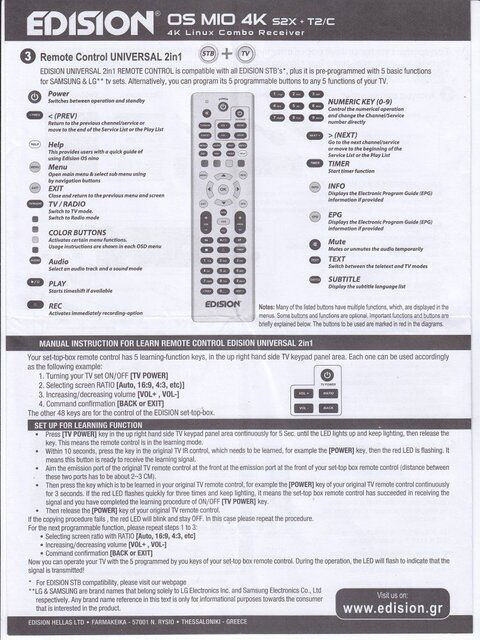
Info with the remote says compatible with Samsung and LG sets. You have 5 programmable keys marked Power, Vol+, Vol-, Ratio, and Back.
I have a Samsung. I programmed the first three keys as labeled. The Ratio was programmed as the Video Size key and the Back button I set for the Sound Mode. I was curious if anyone got a different brand to program and/or what you programmed your buttons for.
 
Mine work as-is labeled for my 2013 LG 3D 1080p tv set (42LA6200) , so I haven't felt the need to change them. My Tivo Peanut remote (with a full keyboard that slides out!, wish the MIO had that with adding an RF kbd) is already programmed to control the Tivo and my tv, so I use that for the functions I need.
 
Where do I find information on how to program these keys to control my TV?
Read this
IMG.jpg
 

Attachments

  • Like
Reactions: comfortably_numb
Thanks guys for the great info! My Visio's power on off worked out of the box. I now have a 2nd Mio and this got the Insignia's power button working. Also programed a button for input\source like Magic suggested. Also "enter" for another so I don't have to wait for the Insignia to switch sources
Thanks again
 
  • Like
Reactions: primestar31
Thought I would report back with an update. I run one of my Mio's audio through a Onkyo AV receiver. I was able to program the mio remote to control the volume up and down on the Onkyo. On my other Mio I run the audio through a Yamaha. Was also able to program the Mio remote for the Yamaha's volume. Sweet!
Power button still operates the tv. Ratio is now inputs on the tv.
 

Edision Mio+ with Netflix

Command-line blindscan using Edision Mio 4K+ and TNAP

Users Who Are Viewing This Thread (Total: 1, Members: 0, Guests: 1)

Who Read This Thread (Total Members: 3)