gateway timed out

  • ENJOY SATELLITEGUYS AD FREE THIS FEBRUARY!

    Thank you to the very generous support we got from our members in December we have decided to make the month of February AD FREE for everyone!

    We want to see the true speed of our site and enjoy SatelliteGuys the way it was meant to be enjoyed!

    If you would like to help us keep the lights on and keep enjoying the site AD FREE consider becoming a PUB MEMBER by CLICKING HERE.

    THANK YOU TO EVERYONE FOR YOUR SUPPORT!
Status
Not open for further replies.
Site is running rough this afternoon.Scott you working on it?
 
I just hope that I do not come to the site to find that it is down due to crashed disk array or something. Something appears to lock it up for a while, like it is recovering from an error.
 
If it was a disc issue it would be happening all the time.

It's something chewing on the database which is locking it up causing the error.

It always seems to happen when I am not In front of a computer when it happens, so I can never catch it to find out whats causing it. When the process is done the site returns to its normal speeds.

I wish I was better with MySQL so I could better track it down.


Posted Using The New SatelliteGuys App (Beta)
 
It is happening now...

And I am logged in and trying to figure out whats causing it. I am NOT going to stop it, so for a few minutes you may get a Gateway Timeout Error.
 
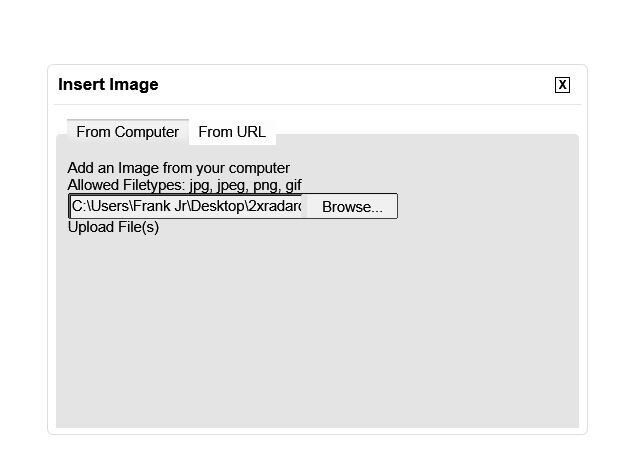
Don't know if this is related but the basic image uploader for PC does not work, the url option still works though. Images from a PC can be uploaded by using the attachment tab with the paper clip logo only.
 

Attachments

  • Capture.JPG
    Capture.JPG
    16.1 KB · Views: 148
I was having issues with this earlier also. Maybe Scott has fixed it now. At least I know it was not just me, or something I was doing wrong.
 
Not working for me. Just tried. I normally use the attachment uploader under the "Go Advanced" Tab, that works fine. May be something with IE 10 or Windows 7. I would try another browser on a different machine but I have to shut things down. Big storm about to hit here. Once it passes I will try.
 
Back up and running. Works fine on a Vista machine with Chrome. I didn't actually post the image, just went as far as the preview. Worked good. Must be something with IE 10 or Windows 7. I cleaned up all the files in the browser. Still doesn't work. Glad I can rule out a site issue. I will continue to use the advanced option. Sorry to bother you with this Scott. At least we now know. ;)

Thankfully the storm wasn't to bad for us.
 
I found the issue to be with the Standard Document Mode for IE 10. While still using IE 10 but using IE 9 Document Mode the basic uploader works fine. When I go back to the Standard Document Mode for IE 10 the basic loader does not respond. Capture.JPG Capture1.JPG
 
I hate to risk of it happening again because I am posting... I have not seen the gateway timeout in over a day now, was there something fixed?
 
Status
Not open for further replies.

Login Not Rememberd

Issues with New update for the iPhone & Android SatGuys App

Users Who Are Viewing This Thread (Total: 0, Members: 0, Guests: 0)

Who Read This Thread (Total Members: 1)

Latest posts