Latest osmio4k issues

WhiteBeard

Arrgh!
Pub Member / Supporter
Aug 2, 2009
18,735
14,555
USA
I got out my XR-3 and made these measurements on problem transponders on 101.0W:

3726V10000-5/8 DVB-S/QPSK C/N: 9.0
3734V2734-3/4 DVB-S/QPSK C/N: 10.0
3745V2734-3/4 DVB-S/QPSK C/N: 7.5
3749V2734-5/6 DVB-S/QPSK C/N: 7.3
3765V2734-5/6 DVB-S/QPSK C/N: 7.5

According to what I have read, these C/N measurements indicate that the transponders should always lock even though these aren't smoking hot signals. But, after adding the services on a MANUAL scan, I'll channel surf on that sat and when I get back to those manually scanned transponders they are gone. Zero signal. But, the services that scanned in on the blind scan persist. Anybody have an idea why? And why doesn't blind scan lock onto the ones that I had to manually scan? Sometimes moving to another sat or rebooting brings back the services that disappeared. For comparison, here is what the XR-3 gave me for a transponder that was blind scanned:

3716V4775-3/5 DVB-S2/8PSK C/N: 10.5
 
  • Like
Reactions: SDA_FL_USA

primestar31

SatelliteGuys Master
Pub Member / Supporter
Lifetime Supporter
Mar 15, 2005
15,346
18,990
Beta Omicron Delta III
primestar31 - Background scanning does not apply for johnnynobody's reported issue . Background scanning is for Service Updating behind the scenes and would not affect bouquets or satellite lists.

Edit:
Whoops, I just re-looked up the posts on legitfta. My bouquet channels didn't vanish with the Background Scanning turned on. They RENAMED themselves back to whatever name they originally blindscanned in as, if they were the kind that scanned in as transponder frequency style name.

Sorry, guess in all that's gone on, I confused this one.
 
Last edited:
  • Like
Reactions: Titanium

SDA_FL_USA

SatelliteGuys Pro
Jun 15, 2018
337
323
FL
I got out my XR-3 and made these measurements on problem transponders on 101.0W:

3726V10000-5/8 DVB-S/QPSK C/N: 9.0
3734V2734-3/4 DVB-S/QPSK C/N: 10.0
3745V2734-3/4 DVB-S/QPSK C/N: 7.5
3749V2734-5/6 DVB-S/QPSK C/N: 7.3
3765V2734-5/6 DVB-S/QPSK C/N: 7.5

According to what I have read, these C/N measurements indicate that the transponders should always lock even though these aren't smoking hot signals. But, after adding the services on a MANUAL scan, I'll channel surf on that sat and when I get back to those manually scanned transponders they are gone. Zero signal. But, the services that scanned in on the blind scan persist. Anybody have an idea why? And why doesn't blind scan lock onto the ones that I had to manually scan? Sometimes moving to another sat or rebooting brings back the services that disappeared. For comparison, here is what the XR-3 gave me for a transponder that was blind scanned:

3716V4775-3/5 DVB-S2/8PSK C/N: 10.5
Johnny use the frequencies that the mio4k finds with the blind scan and scan with signal finder if the blind scan service scan miss them. Some of these low power tranport streams are funny with the mio4k and slow to lock just have to sit on the channel until the signal pops in.
 
  • Like
Reactions: c-spand

WhiteBeard

Arrgh!
Pub Member / Supporter
Aug 2, 2009
18,735
14,555
USA
Johnny use the frequencies that the mio4k finds with the blind scan and scan with signal finder if the blind scan service scan miss them. Some of these low power tranport streams are funny with the mio4k and slow to lock just have to sit on the channel until the signal pops in.

That didn't help. When I get a chance I'll swap mios. This is a strange problem. I don't understand why some signals come and go while others are rock solid.

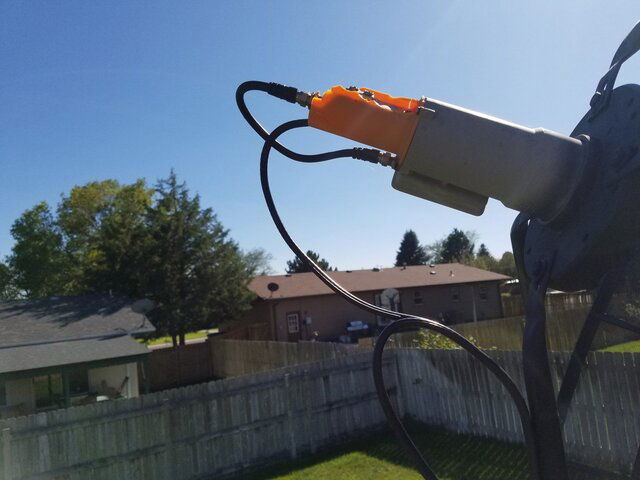
I'm beginning to think that the LNBF isn't consistently changing polarities. The polarity voltage is changing like it should. If the LNBF is the problem, it's intermittent. The LNBF may have been damaged by the hail storm after all. It doesn't look damaged but we did get some hail about the size of golf balls. I don't think I have a spare laying around and the dual-band LNBF on the other dish is definitely hail damaged. You should see my roof and gutters.
 

Attachments

  • 20190828_160111.jpg
    20190828_160111.jpg
    138.2 KB · Views: 217
Last edited:

SDA_FL_USA

SatelliteGuys Pro
Jun 15, 2018
337
323
FL
That didn't help. When I get a chance I'll swap mios. This is a strange problem. I don't understand why some signals come and go while others are rock solid.
So you are saying the signal never pops in after a few seconds of sitting on the problem channel? My few slow channels always pops in after a few seconds.I know what channels do it so I know just wait until the channel comes in.
 

WhiteBeard

Arrgh!
Pub Member / Supporter
Aug 2, 2009
18,735
14,555
USA
So you are saying the signal never pops in after a few seconds of sitting on the problem channel? My few slow channels always pops in after a few seconds.I know what channels do it so I know just wait until the channel comes in.

I think it's a bad LNBF - intermittent.
 

Titanium

AI6US
Lifetime Supporter
May 23, 2013
7,763
9,326
Meadow Vista, Northern California
I just saw that your LNBF is the C/KU combo. The C-band section of the CK1s is DRO and the KU section is PLL. The C-band LO frequency could be off or drifting in temperature extremes. The AI meters have a check function for LO frequency drift. You might try checking the C-band section LO frequency for drift between power-up and operational temperatures or cool mornings and afternoon heat.
 
  • Like
Reactions: c-spand

primestar31

SatelliteGuys Master
Pub Member / Supporter
Lifetime Supporter
Mar 15, 2005
15,346
18,990
Beta Omicron Delta III
I just saw that your LNBF is the C/KU combo. The C-band section of the CK1s is DRO and the KU section is PLL. The C-band LO frequency could be off or drifting in temperature extremes. The AI meters have a check function for LO frequency drift. You might try checking the C-band section LO frequency for drift between power-up and operational temperatures or cool mornings and afternoon heat.

+1

Likewise, check for wasps and the like that may have got inside, and built a nest or something.
 
  • Like
Reactions: Titanium

WhiteBeard

Arrgh!
Pub Member / Supporter
Aug 2, 2009
18,735
14,555
USA
I just saw that your LNBF is the C/KU combo. The C-band section of the CK1s is DRO and the KU section is PLL. The C-band LO frequency could be off or drifting in temperature extremes. The AI meters have a check function for LO frequency drift. You might try checking the C-band section LO frequency for drift between power-up and operational temperatures or cool mornings and afternoon heat.

It seems that I think differently from some of you guys. The image of the C/Ku LNBF is on a different antenna than the one I'm working on in this thread. The antenna that this thread is referencing has a Titanium C1W-PLL installed. I just uploaded the C/Ku LNBF image to show how damaging the hail storm was. I probably should've put the feed covers on both antennas. Anyway, I ordered a replacement Titanium C1W-PLL LNBF from Amazon. It should be here Monday.
 

c-spand

SatelliteGuys Pro
Feb 25, 2019
1,408
846
USA
Johnny use the frequencies that the mio4k finds with the blind scan and scan with signal finder if the blind scan service scan miss them. Some of these low power tranport streams are funny with the mio4k and slow to lock just have to sit on the channel until the signal pops in.
I have notice this too. It will scan so fast it will not lock. Could try transponder scan and then manual. Some channels need a moment to lock signal.
 

Brct203

SatelliteGuys Pro
Dec 24, 2016
1,574
1,726
Connecticut
I noticed that some signals take 10+ seconds to lock.
I have also noticed that the OSMIO4K occasionally misses some TPs. In my experience, a reboot usually fixes it though.
It is also sometimes a bit slow to lock on narrower transponders, but I think it's also like that on my Amiko. Maybe the slower bitrate means you just need more time to accumulate enough data for the receiver to figure out what to do with it?
 

WhiteBeard

Arrgh!
Pub Member / Supporter
Aug 2, 2009
18,735
14,555
USA
Turns out that my LNBF was bad. I put the new one in today and things look good. I removed OpenVIX because it couldn't keep correct time - it was jumping around by several hours. Installed OpenDroid in it's place and it is working better even though I had a tough time navigating the menu in Polish. I had to connect with webif since I couldn't get an image on the TV screen and change resolution and refresh frequency. I installed OpenATV in the remaining slot and i got it up and running after changing the language from German to English. I still have issues getting both H&I feeds on 101W.
 

Magic Static

SatelliteGuys Master
Lifetime Supporter
Oct 12, 2010
7,498
4,853
Montana
FWIW I use the TNAP that was pre-installed and have no issues with the Weigal channels. But I use an ortho feed with Norsat PLL LNBs on my 10' dish.
 

Magic Static

SatelliteGuys Master
Lifetime Supporter
Oct 12, 2010
7,498
4,853
Montana
But it doesn't matter what equipment you're using when the censors get done with this movie on MOVIES! I'm watching. It's like the audio cuts out every few seconds LOL You shouldn't run movies you have to butcher like that!.
 

Titanium

AI6US
Lifetime Supporter
May 23, 2013
7,763
9,326
Meadow Vista, Northern California
The TV resolution and/or refresh seems to be a reoccurring problem on your system. Glad you now can recognize this problem and manually change from the image default.

If you put your STB in standby or remove power, the time reference should be enabled for start-up. I don't believe that is the OpenVIX default.This setting will cause the time to jump.

FWIW I use the TNAP that was pre-installed and have no issues with the Weigal channels. But I use an ortho feed with Norsat PLL LNBs on my 10' dish.

Magic Static, I also use TNAP with a C2-PLL LNBF and have no problem with any of the Weigel SCPC services. To confirm the TP and service logging during a Blind Scan, do a transponder scan then manually select individual or all TPs and initiate the service logging. The TPs Blind Scan and are added to the transponder list then logged to the services list.
 
  • Like
Reactions: Magic Static

primestar31

SatelliteGuys Master
Pub Member / Supporter
Lifetime Supporter
Mar 15, 2005
15,346
18,990
Beta Omicron Delta III
If you put your STB in standby or remove power, the time reference should be enabled for start-up. I don't believe that is the OpenVIX default.This setting will cause the time to jump.

MIO_SystemTime_Settings_20190219172706.jpg

Set your Time settings like this. This screen is from NA SDGr, but it's similar in other images.

RTC time, and NTP Cold Start need to be turned ON.
 
  • Like
Reactions: Titanium

Edision OS Mio 4K TNAP Ver. 2

New Edision Mio+ Owner

Users Who Are Viewing This Thread (Total: 0, Members: 0, Guests: 0)

Who Read This Thread (Total Members: 4)